mirror SAAB 9-3 2003 User Guide
[x] Cancel search | Manufacturer: SAAB, Model Year: 2003, Model line: 9-3, Model: SAAB 9-3 2003Pages: 256, PDF Size: 21.66 MB
Page 100 of 256
100 Interior equipmentTo closeRaise the front edge of the button one step.
The window will stop when it is fully closed
or when the button is released.
Automatic closing (option): Raise the
button all the way and release it. If the
window does not close automatically, refer
to Calibration on page 101.
Comfort closing (option)Comfort closing is the remote closing of
open windows and the sunroof, and the
retracting of electrically retractable door
mirrors.
Press and hold the locking button on the
remote control until the windows are closed
and door mirrors retracted (takes roughly
2 s). The doors must be shut.
Confirmation that closing has finished is
provided by the direction indicators, which
flash once. No confirmation indicates that
closing was not possible. This may be due
to a door being open or a window requiring
calibration.
Pinch protectionOn certain model variants, the electric win-
dows are equipped with pinch protection.
This is activated if something gets trapped
between the window pane and door frame
when the window is closed. The window will
stop and lower slightly.
WARNING
Take care when closing a window to
ensure that no one gets caught.
WARNING
Make sure no one is so close to the car
that they can be injured if comfort closing
is activated.
ProCarManuals.com
Page 103 of 256
103 Interior equipment
To closeManually controlled closing
Slide the control forward to its first position.
The sunroof will halt when you release the
control.
Automatic closing
Slide the control forward to its second posi-
tion and release it. The sunroof will close
fully.
The sunroof pinch protection halts closing
and opens the sunroof slightly if something
obstructs closing.Ventilation position (rear edge of
sunroof open)
To open – press in the control.
To close – slide the control forward to the
second position.
It is also possible to select the ventilation
position when the sunroof is open by press-
ing in the control. The sunroof will then close
automatically. Press the control once
more to open the sunroof to its ventilation
position.
If you wish to open the sunroof fully from
the ventilation position, you must first close
it (slide the control forward). You can then
slide the control rearward to open the sun-
roof.
The sunroof incorporates an interior, man-
ual, sliding sun blind.
Comfort opening (option)Comfort opening is the remote opening of
windows and the sunroof.
Press and hold the unlocking button on the
remote control until the windows and sun-
roof start to open (approx. 2 s).
If the sunroof is in the ventilation position, it
will not open.
Comfort closing (option)Comfort closing is the remote closing of
open windows and the sunroof, and the
retracting of electrically retractable door
mirrors.
Press and hold the locking button on the
remote control until the windows are closed
and door mirrors retracted (takes roughly
2 s). The doors must be shut.
WARNING
Exercise great care when closing the
sunroof to ensure that nothing gets
trapped.
WARNING
Make sure no one is so close to the car
that they can be injured if comfort closing
is activated.
ProCarManuals.com
Page 105 of 256
105 Interior equipment
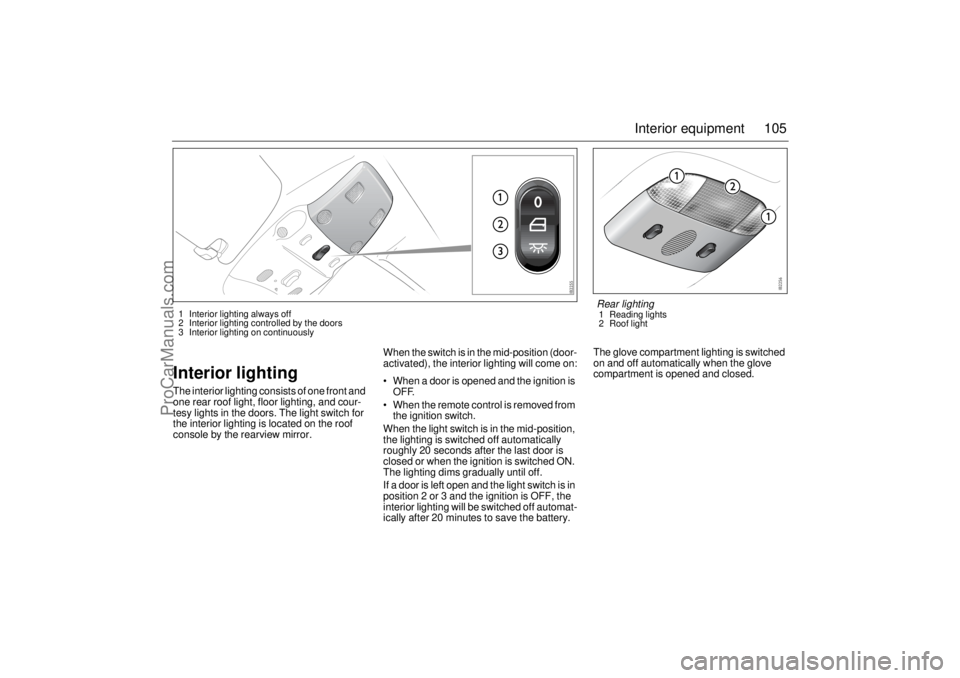
Interior lightingThe interior lighting consists of one front and
one rear roof light, floor lighting, and cour-
tesy lights in the doors. The light switch for
the interior lighting is located on the roof
console by the rearview mirror.When the switch is in the mid-position (door-
activated), the interior lighting will come on:
When a door is opened and the ignition is
OFF.
When the remote control is removed from
the ignition switch.
When the light switch is in the mid-position,
the lighting is switched off automatically
roughly 20 seconds after the last door is
closed or when the ignition is switched ON.
The lighting dims gradually until off.
If a door is left open and the light switch is in
position 2 or 3 and the ignition is OFF, the
interior lighting will be switched off automat-
ically after 20 minutes to save the battery.The glove compartment lighting is switched
on and off automatically when the glove
compartment is opened and closed.1 Interior lighting always off
2 Interior lighting controlled by the doors
3 Interior lighting on continuously
Rear lighting1 Reading lights
2 Roof light
ProCarManuals.com
Page 106 of 256
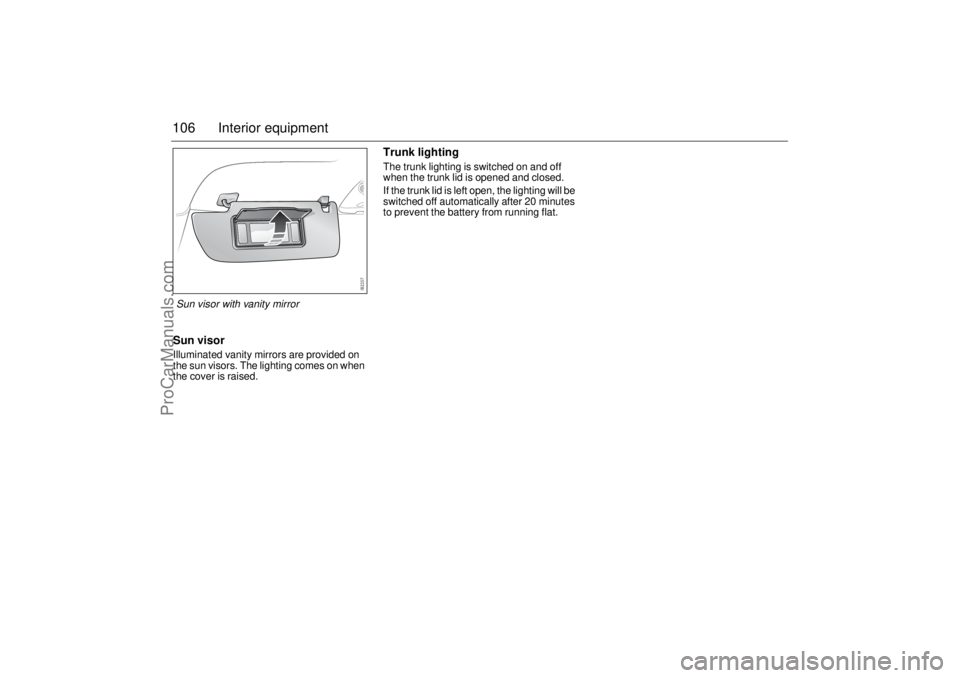
106 Interior equipmentSun visorIlluminated vanity mirrors are provided on
the sun visors. The lighting comes on when
the cover is raised.
Trunk lightingThe trunk lighting is switched on and off
when the trunk lid is opened and closed.
If the trunk lid is left open, the lighting will be
switched off automatically after 20 minutes
to prevent the battery from running flat.
Sun visor with vanity mirror
ProCarManuals.com
Page 110 of 256
110 Interior equipmentRearview mirrorsDoor mirrorsTo adjust
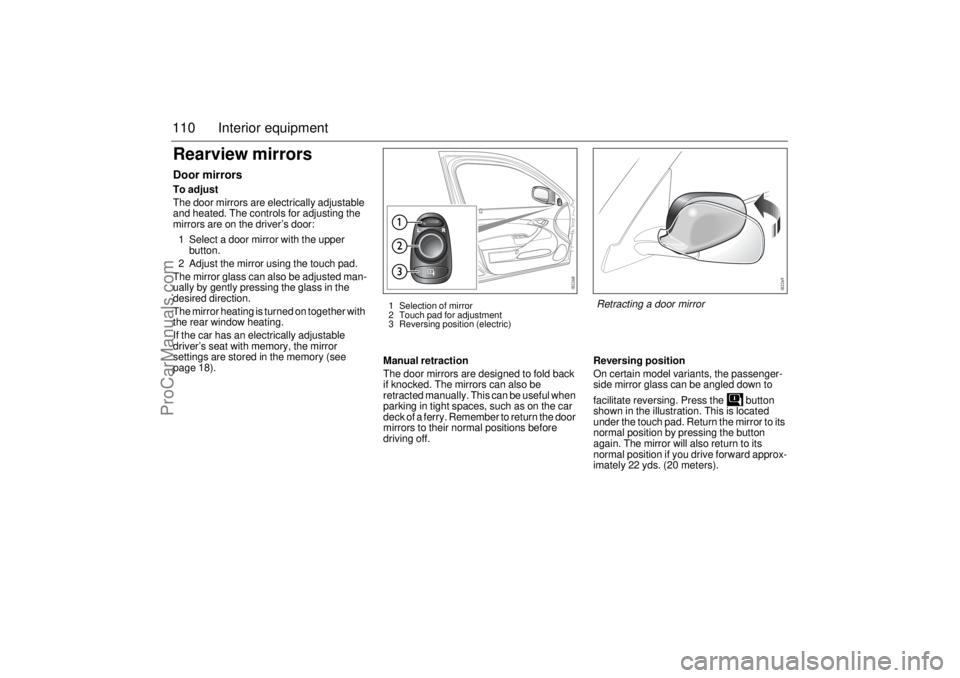
The door mirrors are electrically adjustable
and heated. The controls for adjusting the
mirrors are on the driver’s door:
1 Select a door mirror with the upper
button.
2 Adjust the mirror using the touch pad.
The mirror glass can also be adjusted man-
ually by gently pressing the glass in the
desired direction.
The mirror heating is turned on together with
the rear window heating.
If the car has an electrically adjustable
driver’s seat with memory, the mirror
settings are stored in the memory (see
page 18).Manual retraction
The door mirrors are designed to fold back
if knocked. The mirrors can also be
retracted manually. This can be useful when
parking in tight spaces, such as on the car
deck of a ferry. Remember to return the door
mirrors to their normal positions before
driving off.Reversing position
On certain model variants, the passenger-
side mirror glass can be angled down to
facilitate reversing. Press the button
shown in the illustration. This is located
under the touch pad. Return the mirror to its
normal position by pressing the button
again. The mirror will also return to its
normal position if you drive forward approx-
imately 22 yds. (20 meters).
1 Selection of mirror
2 Touch pad for adjustment
3 Reversing position (electric)
Retracting a door mirror
ProCarManuals.com
Page 111 of 256
111 Interior equipment
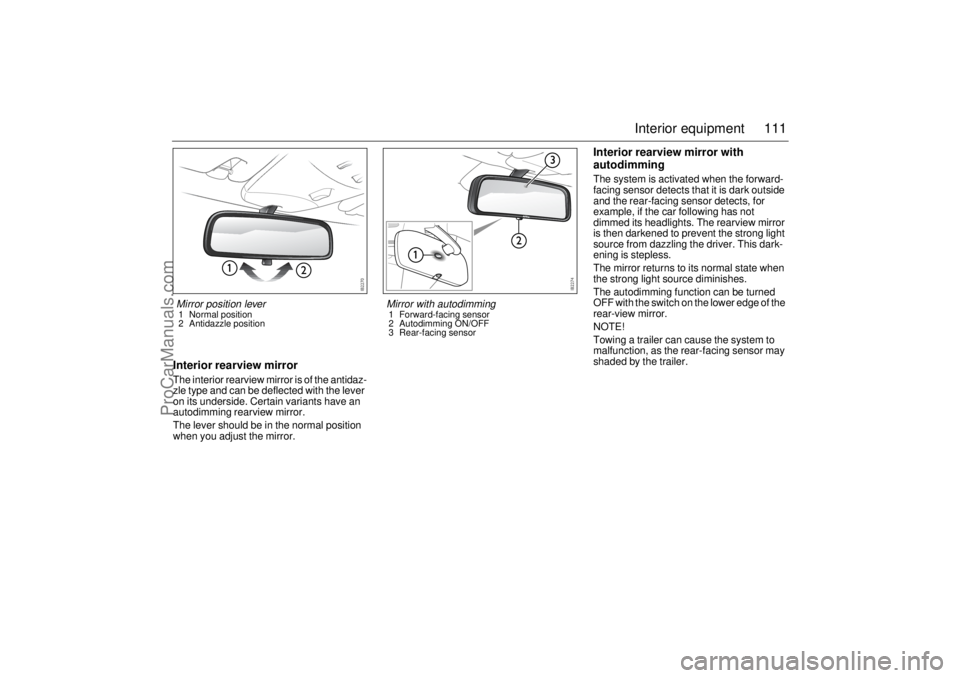
Interior rearview mirrorThe interior rearview mirror is of the antidaz-
zle type and can be deflected with the lever
on its underside. Certain variants have an
autodimming rearview mirror.
The lever should be in the normal position
when you adjust the mirror.
Interior rearview mirror with
autodimmingThe system is activated when the forward-
facing sensor detects that it is dark outside
and the rear-facing sensor detects, for
example, if the car following has not
dimmed its headlights. The rearview mirror
is then darkened to prevent the strong light
source from dazzling the driver. This dark-
ening is stepless.
The mirror returns to its normal state when
the strong light source diminishes.
The autodimming function can be turned
OFF with the switch on the lower edge of the
rear-view mirror.
NOTE!
Towing a trailer can cause the system to
malfunction, as the rear-facing sensor may
shaded by the trailer.
Mirror position lever1 Normal position
2 Antidazzle position
Mirror with autodimming1 Forward-facing sensor
2 Autodimming ON/OFF
3 Rear-facing sensor
ProCarManuals.com
Page 112 of 256
112 Interior equipmentInterior rearview mirror with garage
opener, autodimming function and
compass (certain variants only)
Retain your original garage door opener
(transmitter) for future programming proce-
dures (i.e., new vehicle purchase). It is also
suggested that upon the sale of the vehicle,
the programmed garage opener buttons be
erased for security purposes, see page 113.Preparations for first-time programming
Before programming the garage opener for
the first time, you must delete any factory
codes.
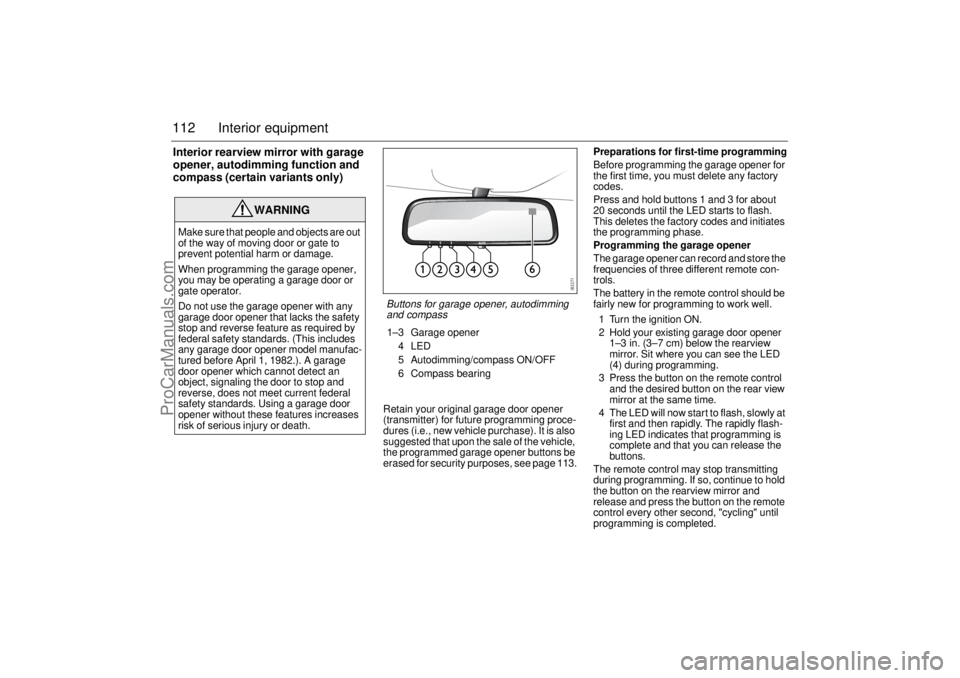
Press and hold buttons 1 and 3 for about
20 seconds until the LED starts to flash.
This deletes the factory codes and initiates
the programming phase.
Programming the garage opener
The garage opener can record and store the
frequencies of three different remote con-
trols.
The battery in the remote control should be
fairly new for programming to work well.
1 Turn the ignition ON.
2 Hold your existing garage door opener
1–3 in. (3–7 cm) below the rearview
mirror. Sit where you can see the LED
(4) during programming.
3 Press the button on the remote control
and the desired button on the rear view
mirror at the same time.
4 The LED will now start to flash, slowly at
first and then rapidly. The rapidly flash-
ing LED indicates that programming is
complete and that you can release the
buttons.
The remote control may stop transmitting
during programming. If so, continue to hold
the button on the rearview mirror and
release and press the button on the remote
control every other second, "cycling" until
programming is completed.
WARNING
Make sure that people and objects are out
of the way of moving door or gate to
prevent potential harm or damage.
When programming the garage opener,
you may be operating a garage door or
gate operator.
Do not use the garage opener with any
garage door opener that lacks the safety
stop and reverse feature as required by
federal safety standards. (This includes
any garage door opener model manufac-
tured before April 1, 1982.). A garage
door opener which cannot detect an
object, signaling the door to stop and
reverse, does not meet current federal
safety standards. Using a garage door
opener without these features increases
risk of serious injury or death.
Buttons for garage opener, autodimming
and compass1–3 Garage opener
4LED
5 Autodimming/compass ON/OFF
6 Compass bearing
ProCarManuals.com
Page 113 of 256

113 Interior equipment
The LED will flash slowly at first and then
rapidly. The rapidly flashing LED indicates
that programming is complete and that you
can release the buttons.
Reprogramming a button that has previ-
ously been programmed
1 Press and hold the desired button on the
rearview mirror for the entire program-
ming sequence.
2 The LED will start to flash slowly after
20 seconds.
3 Hold your existing garage door opener
1–3 in. (3–7 cm) from the rearview
mirror and press the button on the
remote control.
4 Reprogramming is complete when the
LED starts to flash rapidly.
The previous frequency is now erased and
replaced by the new one. Reprogramming
one button does not affect the other buttons.Complete erase
Completely erase the memory of the garage
opener by pressing and holding buttons
1 and 3 simultaneously for 20 seconds.
Confirmation is provided by the LED flash-
ing rapidly for 10 seconds.
A complete erase deletes the frequencies
from all three buttons. It is not possible to
erase the memory of a single button.
Opening a garage door
Press and hold the appropriate button until
the garage door starts to open.
You can of course still use your original
garage door opener even if you have pro-
grammed the garage opener in the rearview
mirror.Garage doors with rolling security codes
Garage doors with rolling security codes
manufactured after 1996 can be identified
as follows:
Read the instruction manual for the
garage door.
Programming the garage opener in the
rearview mirror seems to be successful
but the garage door does not open.
Press and hold the programmed button.
The garage door uses a rolling security
code if the LED flashes rapidly and after
2 seconds shines constantly.
If the garage door remote control uses roll-
ing security codes, proceed as follows
having programmed the garage opener:
1 Localise the button labelled "learn" or
"smart" on the motor unit of the garage
door. The location and color of this
button varies between makes.
2 Press and release the "learn" button on
the motor unit. Step 3 must be
performed within 30 seconds of Step 2.
3 Press the programmed button on the
rearview mirror twice (some garage
doors require the button to be pressed
three times; refer to the door’s instruc-
tion manual).NOTICESwitch off the power supply to the garage
door or gate (or park the car beyond the
range of the remote control) while
programming using the "cycling" method
to prevent damaging the electrical motor.
ProCarManuals.com
Page 115 of 256

115 Interior equipment
CompassThe compass is built into the rearview mir-
ror. The compass bearing is displayed in the
top right-hand corner of the mirror and is
updated every other second. The compass
displays the car’s direction of travel: N, NE,
E, etc.
Switch the compass display on and off by
pressing button 5 for 3 seconds, see illus-
tration on page 114.
Changing zones
The earth’s magnetic field varies depending
on one’s position on the globe. If you drive
your car from one magnetic zone to another
the compass setting will need to be changed
to ensure a correct bearing.
1 Study the illustrations to determine the
correct zone.
2 Press and hold button 5 until "ZONE" is
shown in the display on the mirror (6 s).
The zone number is now also shown.
3 Press button 5 repeatedly to change the
zone number. There are 15 zones from
which to choose. Once the correct zone
is selected, release the button and wait
4 seconds. The compass will now
display the bearing.Calibration
Calibration is performed automatically
during travel.
If, for any reason, a manual calibration is
needed perform as follows:
1 Press and hold button 5 until "CAL" and
the compass bearing are displayed
(approx. 9 s).
2 Drive in circles (max. 5 mph/8 km/h) or
drive as normal until "CAL" is no longer
displayed.
Compass zones in Canada
Compass zones in USA
ProCarManuals.com
Page 160 of 256

160 Starting and drivingChecks before drivingMake sure that the car and trailer are in
good working order. This is essential since
towing a trailer increases the strain on the
car.
Check and if necessary adjust the tire
pressure of the car and trailer.
Make sure all wheel bolts are properly
tightened.
Make sure that the equipment joining the
car and trailer is properly secured and
adjusted.
Make sure the trailer’s electrical cable is
properly connected and is not so long that
it drags along the ground. Also, make
sure the cable is not too short and risks
breaking when turning a corner.
Check all bulbs.
Check the car and trailer brakes.
Make sure that all items on or in the cara-
van or trailer are properly secured.
Make sure that the trailer’s jockey wheel
is raised and locked.
Check the distribution of the load so that
the car and trailer are well balanced.
Check that the rearview mirrors provide
the best possible rearward vision.
Make sure the trailer’s safety cable is
correctly attached.
Driving considerationsAlways take extra care when towing a
trailer, as the car’s handling will be different
and its braking performance reduced. The
trailer’s braking system and suspension
also have a considerable effect on these
characteristics. See also "Driving with a
load" on page 162.
Drive carefully:
descending hills
on uneven roads
over railway crossings
when meeting large vehicles
If the car has automatic transmission, select
gear M1 when ascending or descending
steep hills.ReversingGet someone to help you keep an eye out
behind the trailer as the door mirrors do not
always provide sufficient rearward vision
when reversing.
ProCarManuals.com