reset SAAB 9-3 2005 Owners Manual
[x] Cancel search | Manufacturer: SAAB, Model Year: 2005, Model line: 9-3, Model: SAAB 9-3 2005Pages: 292, PDF Size: 23 MB
Page 80 of 292
78 Instruments and controls
Warning and indicator
lightsThe following warning and indicator lights
are found on the main instrument panel.This warning light illuminates when a fault
arises in the antilock brake system.
The following message is shown on the
Saab Information Display (SID):
The brake system will continue to function
but without ABS modulation.
This light comes on when the battery is not
being charged by the alternator. If the light
comes on during driving, stop as soon as
possible and switch off the engine.
Check the drive belt, see page 210.
Antilock braking warningAntilock brake malfunction.
Contact Saab dealer.Charge warning light
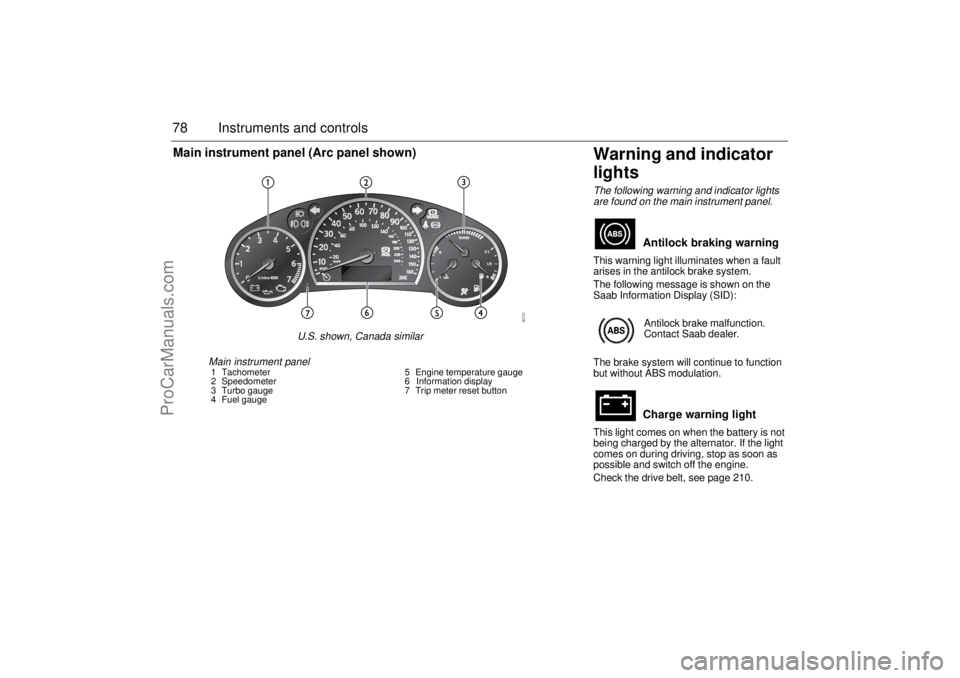
Main instrument panel1 Tachometer
2 Speedometer
3 Turbo gauge
4 Fuel gauge5 Engine temperature gauge
6 Information display
7 Trip meter reset button
Main instrument panel (Arc panel shown)
U.S. shown, Canada similar
ProCarManuals.com
Page 85 of 292
83 Instruments and controls
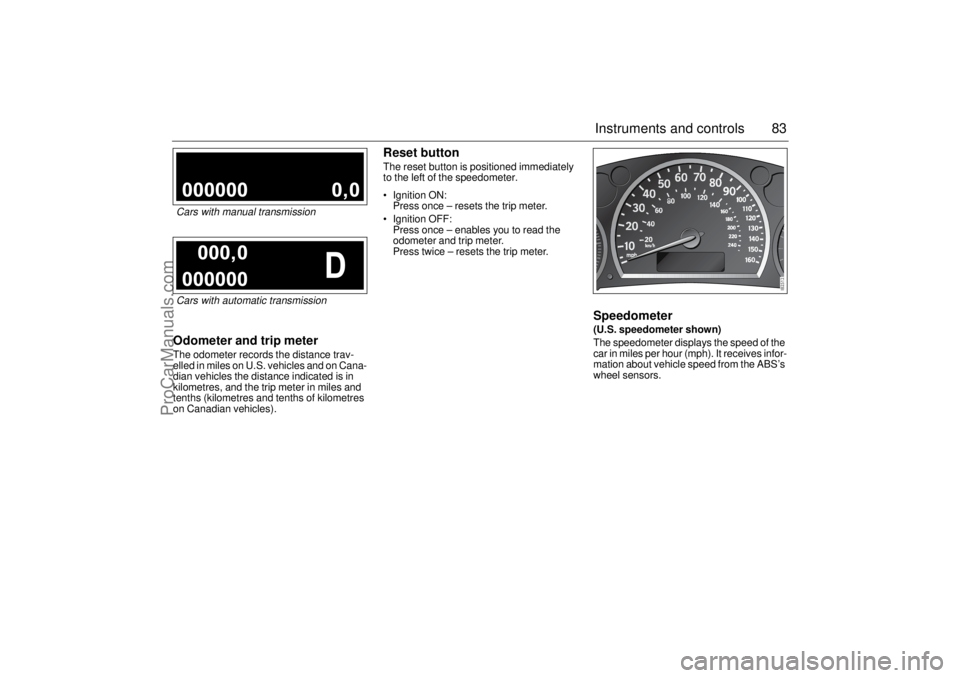
Odometer and trip meterThe odometer records the distance trav-
elled in miles on U.S. vehicles and on Cana-
dian vehicles the distance indicated is in
kilometres, and the trip meter in miles and
tenths (kilometres and tenths of kilometres
on Canadian vehicles).
Reset buttonThe reset button is positioned immediately
to the left of the speedometer.
Ignition ON:
Press once – resets the trip meter.
Ignition OFF:
Press once – enables you to read the
odometer and trip meter.
Press twice – resets the trip meter.
Speedometer (U.S. speedometer shown)
The speedometer displays the speed of the
car in miles per hour (mph). It receives infor-
mation about vehicle speed from the ABS’s
wheel sensors.
Cars with manual transmissionCars with automatic transmission
ProCarManuals.com
Page 90 of 292
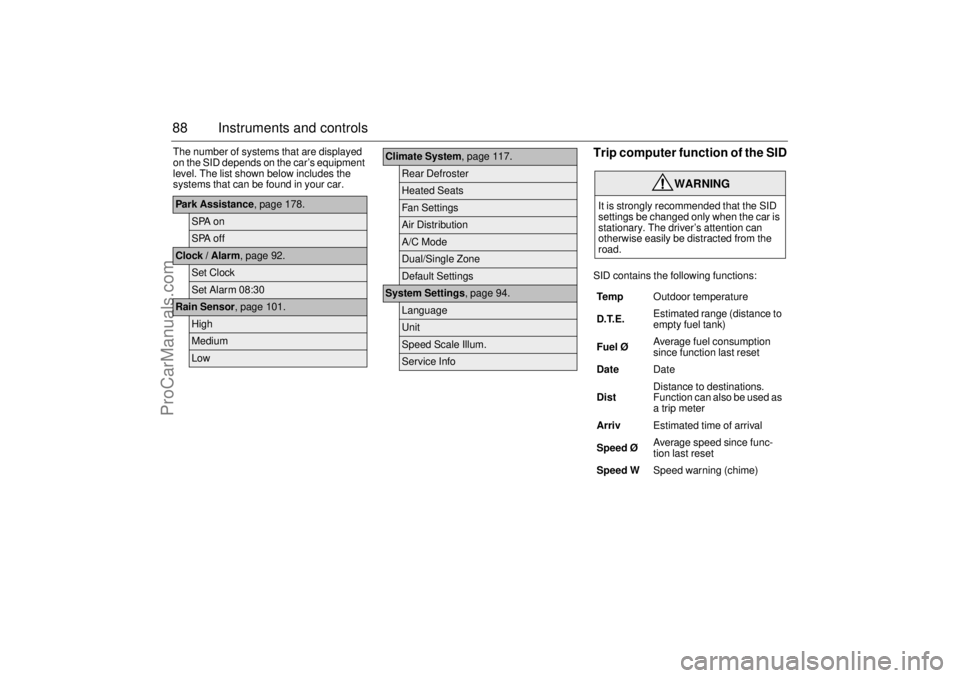
88 Instruments and controlsThe number of systems that are displayed
on the SID depends on the car’s equipment
level. The list shown below includes the
systems that can be found in your car.
Trip computer function of the SIDSID contains the following functions:
Park Assistance, page 178.
SPA onSPA off
Clock / Alarm, page 92.
Set ClockSet Alarm 08:30
Rain Sensor, page 101.
HighMediumLow
Climate System, page 117.
Rear DefrosterHeated SeatsFan SettingsAir DistributionA/C ModeDual/Single ZoneDefault Settings
System Settings, page 94.
LanguageUnitSpeed Scale Illum.Service Info
WARNING
It is strongly recommended that the SID
settings be changed only when the car is
stationary. The driver’s attention can
otherwise easily be distracted from the
road.
Te m pOutdoor temperature
D.T.E. Estimated range (distance to
empty fuel tank)
Fuel ØAverage fuel consumption
since function last reset
DateDate
DistDistance to destinations.
Function can also be used as
a trip meter
ArrivEstimated time of arrival
Speed Ø Average speed since func-
tion last reset
Speed WSpeed warning (chime)
ProCarManuals.com
Page 91 of 292
89 Instruments and controls
When the engine is started, the function that
was selected when the engine was
switched off is displayed, with the following
exceptions:
Te m p is displayed if the outside tempera-
ture is between 26 and 38°F (–3 and
+3°C).
D.T.E is displayed if less than or equal to
30 miles (50 km).
Outdoor temperature
The Temp function is always activated
(even in NIGHTPANEL mode) if the outdoor
temperature rises or falls to between 26 and
38°F (–3 and +3°C).
If the temperature sensor, located under the
front bumper, is covered by snow or ice,
temperature readings will be unreliable.
For how to set the year, month and day,
refer to Clock on page 92.Setting values
1 Select one of the functions using the
INFO dial.
Speed W (preset to 55 mph (90 km/h)
Dist (preset to 100 miles (100 km) if not
previously set)
Speed Ø
Arriv
2 Press and hold the INFO dial until given
audible confirmation.
3 Turn the INFO dial to change the value.
(Press CLEAR to reset the value.)
4 Press the INFO dial to finish setup.
Using DIST as a trip meter
1 Select Dist using the INFO dial.
2 Press and hold the CLEAR button for
approx. 1 second.
An arrow will now appear on the right-hand
side of the display, indicating that the trip
meter is running.Resetting a single function
1 Select the function you wish to reset with
the INFO dial.
Fuel Ø
Speed Ø
Tr i p (Dist used as trip meter)
2 Press and hold the CLEAR button for
approx. 1 second.
The selected function will now be reset.
Resetting the trip computer
1 Select one of the functions using the
INFO dial.
Fuel Ø
Speed Ø
D.T.E.
Arriv
Tr i p (Dist used as trip meter)
2 Press and hold the CLEAR button
(approx. 3 seconds) until audible confir-
mation is given.
WARNING
Remember that roads can be icy even at
temperatures of above 38°F (+3°C),
especially on bridges and stretches of
road that are sheltered from the sun.
ProCarManuals.com
Page 92 of 292

90 Instruments and controlsSpeed warning
This value is preset to 55 mph (90 km/h).
The value can be set to between 0 and
150 mph (0 and 250 km/h).
1 Select Speed W using the INFO dial.
2 Press and hold the INFO dial until given
audible confirmation.
3 Adjust the speed using the INFO dial.
4 Confirm the setting by pressing the
INFO dial.
A star on the right-hand side of the display
indicates when the speed warning function
is active.
An audible alarm will sound if the set speed
is exceeded.
Disengage the function with the CLEAR
button. Re-engage the function using
the INFO dial.Calculating the arrival time
(When will I arrive if I know how far I have to
drive?)
This function should be used before starting
out a journey.
To calculate the arrival time, the distance
must first be given.
1 Select the Dist function using the
INFO dial.
2 Press and hold the INFO dial until given
audible confirmation.
3 Set the distance to the destination using
the INFO dial.
4 Press the INFO dial to finish setup.
Select Arriv during the journey to display
the arrival time based on the average speed
since Dist was set. If you take a break, this
time will be added to the previously calcu-
lated arrival time.
Similarly, you can check the distance left by
selecting Dist.
After the distance to destination has
decreased to zero, Dist will function as a trip
meter (see Using DIST as a trip meter). The
starting value for the trip meter will be the
last distance set for the Dist function.
Example: The Dist function is set to
100 miles. After the count-down has
reached 0 miles, Dist will act as a trip meter
beginning at 100 miles.Calculating the arrival time if a specified
average speed is maintained
(When will I arrive if I know how far I have to
drive and know what my average speed will
be?)
This function should be used before starting
out a journey.
First, set the distance under Dist.
1 Then use the INFO dial to select the
Speed Ø function.
2 Press and hold the INFO dial until given
audible confirmation.
3 Turn the INFO dial to set the estimated
average speed.
4 Press the INFO dial to finish setup.
The time of arrival is updated during the
journey based on the average speed since
Dist was set. The speed of the car must
exceed 12 mph (20 km/h).
By selecting Dist during the journey, you
can see how much distance is left to travel.
When Dist reaches zero it acts as a trip
meter. The tip meter starts from the distance
that was set previously.
ProCarManuals.com
Page 95 of 292
93 Instruments and controls
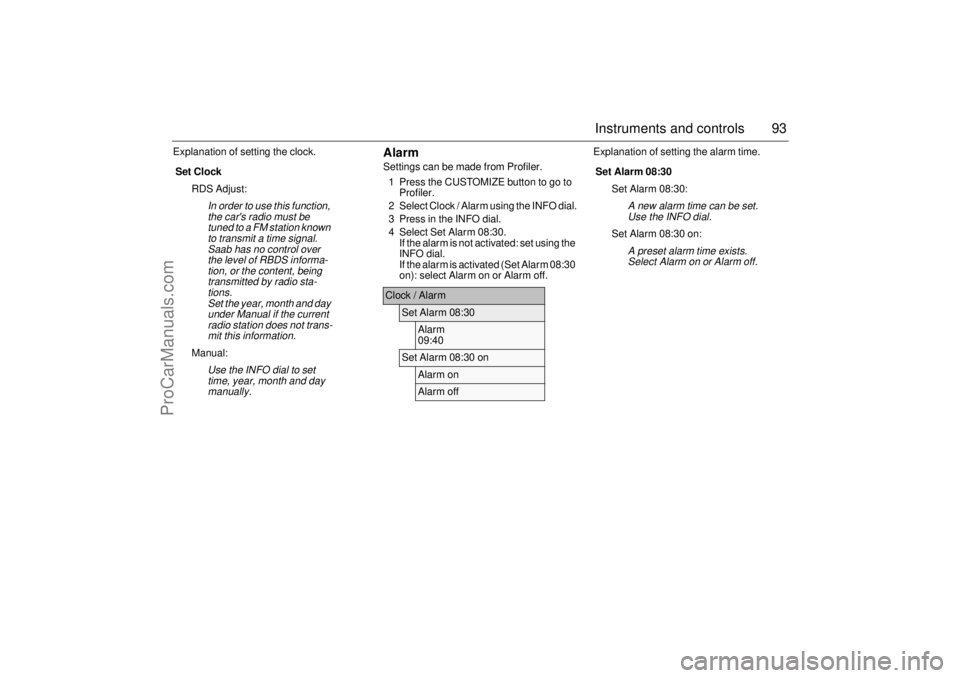
Explanation of setting the clock.
AlarmSettings can be made from Profiler.
1 Press the CUSTOMIZE button to go to
Profiler.
2 Select Clock / Alarm using the INFO dial.
3 Press in the INFO dial.
4 Select Set Alarm 08:30.
If the alarm is not activated: set using the
INFO dial.
If the alarm is activated (Set Alarm 08:30
on): select Alarm on or Alarm off.Explanation of setting the alarm time.
Set Clock
RDS Adjust:
In order to use this function,
the car's radio must be
tuned to a FM station known
to transmit a time signal.
Saab has no control over
the level of RBDS informa-
tion, or the content, being
transmitted by radio sta-
tions.
Set the year, month and day
under Manual if the current
radio station does not trans-
mit this information.
Manual:
Use the INFO dial to set
time, year, month and day
manually.
Clock / Alarm
Set Alarm 08:30
Alarm
09:40
Set Alarm 08:30 on
Alarm onAlarm off
Set Alarm 08:30
Set Alarm 08:30:
A new alarm time can be set.
Use the INFO dial.
Set Alarm 08:30 on:
A preset alarm time exists.
Select Alarm on or Alarm off.
ProCarManuals.com
Page 96 of 292
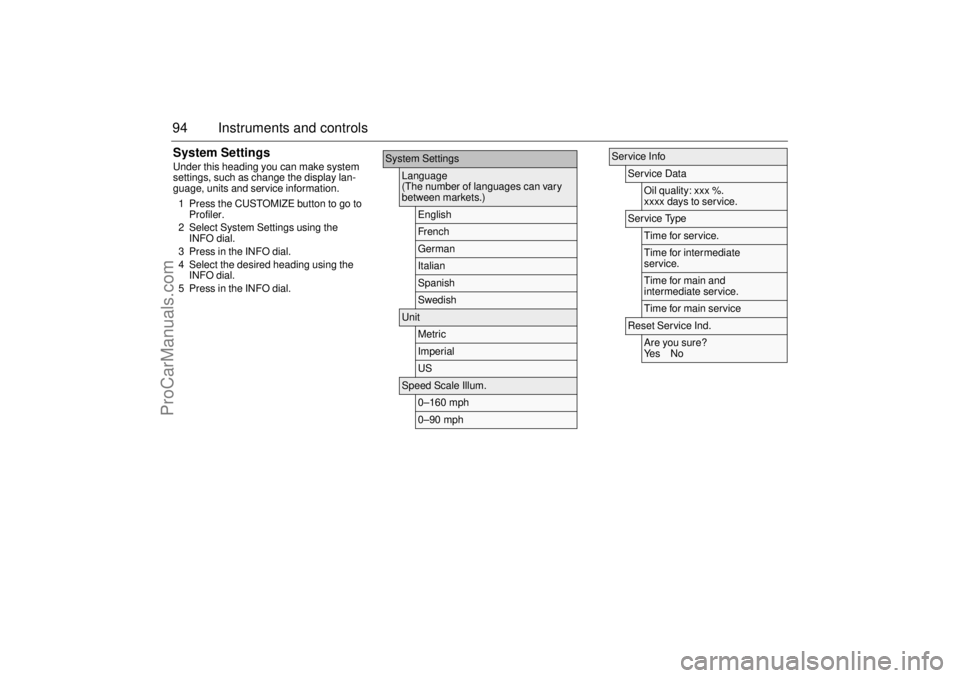
94 Instruments and controlsSystem SettingsUnder this heading you can make system
settings, such as change the display lan-
guage, units and service information.
1 Press the CUSTOMIZE button to go to
Profiler.
2 Select System Settings using the
INFO dial.
3 Press in the INFO dial.
4 Select the desired heading using the
INFO dial.
5 Press in the INFO dial.
System Settings
Language
(The number of languages can vary
between markets.)
EnglishFrenchGermanItalianSpanishSwedish
Unit
MetricImperialUS
Speed Scale Illum.
0–160 mph0–90 mph
Service Info
Service Data
Oil quality: xxx %.
xxxx days to service.
Service Type
Time for ser vice.Time for intermediate
service.Time for main and
intermediate service.Time for main ser vice
Reset Service Ind.
Are you sure?
Ye s N o
ProCarManuals.com
Page 97 of 292

95 Instruments and controls
Explanation of the various selections under
System Settings.
Language
Select the desired language. The num-
ber of languages can vary between
markets.
Unit
Select the desired group of units.
Speed Scale Illum.
Select the proportion of the speedo-
meter to be illuminated in NIGHT-
PANEL mode.
Service Info
Service Data:
The approximate condition of the oil
is shown here. 100% is equivalent
to new engine oil.
Service Type:
The type of service that is required
is shown here.
Reset Service Ind.:
The service indicator can be reset
here. This is normally done at the
dealer in connection with a service.
ProCarManuals.com
Page 167 of 292
165 Starting and driving
Cruise control(Cruise control system)
For safety reasons (brake system func-
tion), the brakes must be applied once
when the engine has started, before the
cruise control system can be activated.
The following message is shown on the SID:
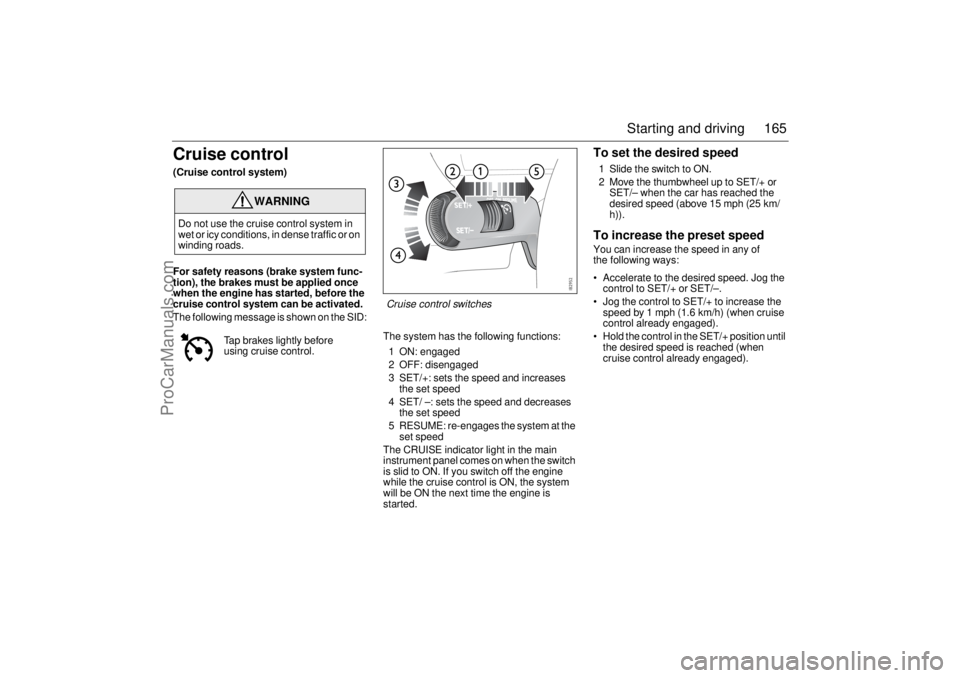
The system has the following functions:
1 ON: engaged
2 OFF: disengaged
3 SET/+: sets the speed and increases
the set speed
4 SET/ –: sets the speed and decreases
the set speed
5 RESUME: re-engages the system at the
set speed
The CRUISE indicator light in the main
instrument panel comes on when the switch
is slid to ON. If you switch off the engine
while the cruise control is ON, the system
will be ON the next time the engine is
started.
To set the desired speed1 Slide the switch to ON.
2 Move the thumbwheel up to SET/+ or
SET/– when the car has reached the
desired speed (above 15 mph (25 km/
h)).To increase the preset speedYou can increase the speed in any of
the following ways:
Accelerate to the desired speed. Jog the
control to SET/+ or SET/–.
Jog the control to SET/+ to increase the
speed by 1 mph (1.6 km/h) (when cruise
control already engaged).
Hold the control in the SET/+ position until
the desired speed is reached (when
cruise control already engaged).
WARNING
Do not use the cruise control system in
wet or icy conditions, in dense traffic or on
winding roads.
Tap brakes lightly before
using cruise control.
Cruise control switches
ProCarManuals.com
Page 168 of 292

166 Starting and drivingTo reduce the preset speedYou can reduce speed in any of the follow-
ing ways:
Brake to the desired speed. Jog the
control to SET/+ or SET/–.
Jog the control to SET/– to reduce the
speed by 1 mph (1.6 km/h).
Hold the control in the SET/– position until
the desired speed is reached.Temporary increase in speedAccelerate, without shifting down (manual
transmission), to exceed the set speed such
as for overtaking. When you release the
accelerator, the car will return to the set
speed.To disengage the system
temporarilySlide the switch to the left towards OFF, but
only as far as to disengage the cruise con-
trol. Allow the switch to spring back.
To re-engage the systemSlide the switch to RESUME. The car will
return to the previously set speed. Vehicle
speed must exceed 15 mph (25 km/h).To disengage the systemThe system will be disengaged:
As soon as the brake or clutch pedal is
depressed (cars with manual transmis-
sion).
When the switch is slid towards OFF. See
also heading "To disengage the system
temporarily".
When the switch is slid to OFF.
When the TCS/ESP system is operative.
When position N is selected (cars with
automatic transmission).
BrakingIt is good practice to try your brakes period-
ically while driving. This is particularly
important when driving in heavy rain, on
roads with a lot of surface water, in snow or
in salty slush. In such conditions a slight
delay in the braking effect may be noticed.
To minimize this delay, dry the brakes by
applying them lightly now and again. This
should also be done after the car has been
washed, and in extremely damp weather.
To avoid the brakes becoming overheated,
such as when negotiating long descents
with a drop of several hundred yards (hun-
dred metres), select a low gear to utilize the
braking effect of the engine. If the car has
automatic transmission, select 1st or 2nd
gear.
You can help to prolong the life of the brakes
by thinking ahead and braking harder over
short periods, rather than braking more
moderately over long stretches.
ProCarManuals.com