display SAAB 9-3 2007 Owner's Manual
[x] Cancel search | Manufacturer: SAAB, Model Year: 2007, Model line: 9-3, Model: SAAB 9-3 2007Pages: 304, PDF Size: 26.16 MB
Page 91 of 304
91 Instruments and controls
When the engine is started, the function that
was selected when the engine was
switched off is displayed, with the following
exceptions:
Temp is displayed if the outside tempera-
ture is between 26 and 38°F (–3 and
+3°C).
D.T.E. is displayed if less than or equal to
30 miles (50 km).Outdoor temperature
The Temp function is always activated
(even in NIGHTPANEL mode) if the outdoor
temperature rises or falls to between 26 and
38°F (–3 and +3°C).
If the temperature sensor, located under the
front bumper, is covered by snow or ice,
temperature readings will be unreliable.Setting values
1 Select one of the functions using the
steering wheel controls, or .
Dist (preset to 100 miles (100 km) if not
previously set)
Speed W (preset to 55 mph (90 km/h)
2 Press and hold the SET button until
given audible confirmation.
3 Use the steering wheel controls to select
the value. (Press CLR to reset the
value.)
4 Press the SET button to finish setup.
Using DIST as a trip meter
1 Select Dist using the steering wheel
controls, or .
2 Press and hold the CLR button for
approx. 1 second.
An arrow will now appear on the right-hand
side of the display, indicating that the trip
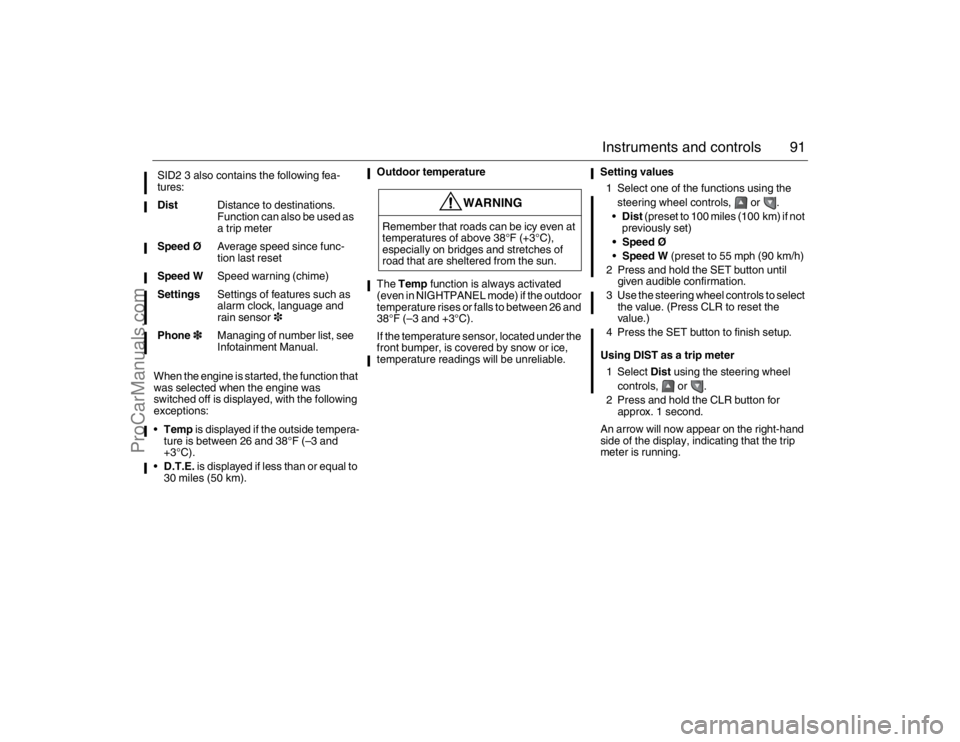
meter is running. SID2 3 also contains the following fea-
tures:
DistDistance to destinations.
Function can also be used as
a trip meter
Speed ØAverage speed since func-
tion last reset
Speed WSpeed warning (chime)
SettingsSettings of features such as
alarm clock, language and
rain sensor3
Phone3Managing of number list, see
Infotainment Manual.
WARNING
Remember that roads can be icy even at
temperatures of above 38°F (+3°C),
especially on bridges and stretches of
road that are sheltered from the sun.
93_U S _M 07.book Page 91 W ednesday, April 12, 2006 9:30 AM
ProCarManuals.com
Page 92 of 304

92 Instruments and controlsResetting a single function
1 Select the function you wish to reset
using the steering wheel controls, or
.
Fuel Ø (the value is rest to 10l/100 km)
Tr i p (Dist used as trip meter)
2 Press and hold the CLR button for
approx. 1 second.
The selected function will now be reset.
Resetting the trip computer
Press and hold the CLR button (approx.
3 seconds) until audible confirmation is
given.
The following functions will be rest:
Fuel Ø (the value is reset to 10l/
100 km)
D.T.E. (the value is reset to the
distance possible on the remaining fuel
if fuel consumption is 10l/100 km, lower
consumption means a longer possible
distance)
Tr i p (Dist used as trip meter)Speed warning
This value is preset to 55 mph (90 km/h).
The value can be set to between 0 and
150 mph (0 and 250 km/h).
1 Select Speed W using the steering
wheel controls, or .
2 Press and hold the SET button until
given audible confirmation.
3 Adjust the speed using the steering
wheel controls.
4 Confirm the setting by pressing the SET
button.
Go back/modify using the CLR-button.
The word ON on the right-hand side of the
display indicates when the speed warning
function is active.
An audible alarm will sound if the set speed
is exceeded.
Disengage the function with the CLR button.
Re-engage the function using the SET but-
ton.Calculating the arrival time
(When will I arrive if I know how far I have to
drive?)
This function should be used before starting
out a journey.
To calculate the arrival time, the distance
must first be given.
1 Select Dist using the steering wheel
controls, or .
2 Press and hold the SET button until
given audible confirmation.
3 Set the distance to the destination using
the steering wheel controls.
4 Confirm the setting by pressing the SET
button.
The calculated arrival time will now appear
on the right-hand side of the display.
If you take a break, this time will be added to
the previously calculated arrival time.93_U S _M 07.book Page 92 W ednesday, April 12, 2006 9:30 AM
ProCarManuals.com
Page 93 of 304

93 Instruments and controls
You can check the distance left by selecting
Dist. At the same time you can check the
calculated time of arrival.
After the distance to destination has
decreased to zero, Dist will function as a trip
meter (see Using DIST as a trip meter). The
starting value for the trip meter will be the
last distance set for the Dist function.
Example: The Dist function is set to
100 miles. After the count-down has
reached 0 miles, Dist will act as a trip meter
beginning at 100 miles.Calculating the arrival time if a specified
average speed is maintained
(When will I arrive if I know how far I have to
drive and know what my average speed will
be?)
This function should be used before starting
out a journey.
First, set the distance under Dist.
1 Then select Speed Ø function.
2 Press and hold the SET button until
given audible confirmation.
3 Set the estimated average speed using
the steering wheel controls.
4 Confirm the setting by pressing the SET
button.
The distance and the calculated time of
arrival is now displayed.
The time of arrival is updated during the
journey based on the average speed since
Dist was set. The speed of the car must
exceed 12 mph (20 km/h).
By selecting Dist during the journey, you
can see how much distance is left to travel.
When Dist reaches zero it acts as a trip
meter. The trip meter starts from the dis-
tance that was set previously.
NIGHTPANELTo improve night-driving conditions inside
the car, the Night Panel mode can be
selected. In this mode, the amount of infor-
mation displayed is reduced, and only the
most important instruments and displays
will be illuminated.
When the NIGHTPANEL button is pressed,
only the speedometer will be illuminated.
All other instrument lighting will be switched
off and the needles drop to zero.
Note: All indicator and warning lights and
messages will operate normally if required.
Temp (when the outside temperature falls
or rises to between 26 and 38°F (–3 and
+3°C)) and D.T.E. (when the remaining fuel
is only sufficient for approx. 80 miles
(50 km) of driving) are even shown in Night
Panel model.
93_U S _M 07.book Page 93 W ednesday, April 12, 2006 9:30 AM
ProCarManuals.com
Page 94 of 304
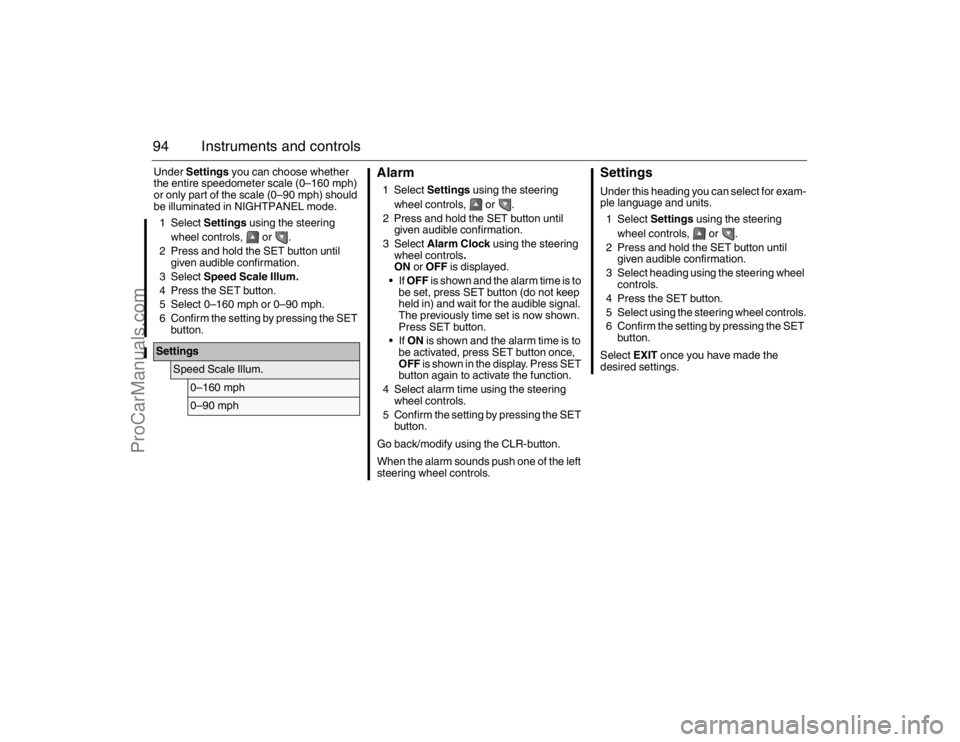
94 Instruments and controlsUnder Settings you can choose whether
the entire speedometer scale (0–160 mph)
or only part of the scale (0–90 mph) should
be illuminated in NIGHTPANEL mode.
1 Select Settings using the steering
wheel controls, or .
2 Press and hold the SET button until
given audible confirmation.
3 Select Speed Scale Illum.
4 Press the SET button.
5 Select 0–160 mph or 0–90 mph.
6 Confirm the setting by pressing the SET
button.
Alarm1 Select Settings using the steering
wheel controls, or .
2 Press and hold the SET button until
given audible confirmation.
3 Select Alarm Clock using the steering
wheel controls.
ON or OFF is displayed.
If OFF is shown and the alarm time is to
be set, press SET button (do not keep
held in) and wait for the audible signal.
The previously time set is now shown.
Press SET button.
If ON is shown and the alarm time is to
be activated, press SET button once,
OFF is shown in the display. Press SET
button again to activate the function.
4 Select alarm time using the steering
wheel controls.
5 Confirm the setting by pressing the SET
button.
Go back/modify using the CLR-button.
When the alarm sounds push one of the left
steering wheel controls.
SettingsUnder this heading you can select for exam-
ple language and units.
1 Select Settings using the steering
wheel controls, or .
2 Press and hold the SET button until
given audible confirmation.
3 Select heading using the steering wheel
controls.
4 Press the SET button.
5 Select using the steering wheel controls.
6 Confirm the setting by pressing the SET
button.
Select EXIT once you have made the
desired settings.
Settings
Speed Scale Illum.
0–160 mph0–90 mph
93_U S _M 07.book Page 94 W ednesday, April 12, 2006 9:30 AM
ProCarManuals.com
Page 95 of 304
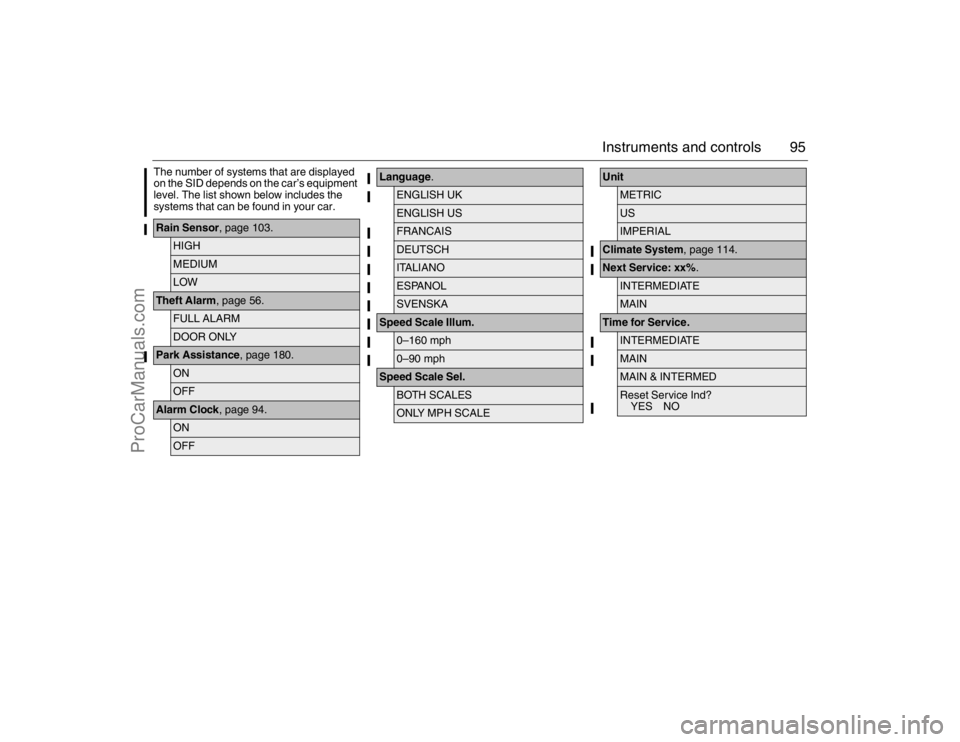
95 Instruments and controls
The number of systems that are displayed
on the SID depends on the car’s equipment
level. The list shown below includes the
systems that can be found in your car.Rain Sensor, page 103.
HIGHMEDIUMLOW
Theft Alarm, page 56.
FULL ALARMDOOR ONLY
Park Assistance, page 180.
ONOFF
Alarm Clock, page 94.
ONOFF
Language.
ENGLISH UKENGLISH USFRANCAISDEUTSCHITALIANOESPANOLSVENSKA
Speed Scale Illum.
0–160 mph0–90 mph
Speed Scale Sel.
BOTH SCALESONLY MPH SCALE
Unit
METRICUSIMPERIAL
Climate System, page 114.Next Service: xx%.
INTERMEDIATEMAIN
Time for Service.
INTERMEDIATEMAINMAIN & INTERMEDReset Service Ind?
YES NO
93_U S _M 07.book Page 95 W ednesday, April 12, 2006 9:30 AM
ProCarManuals.com
Page 96 of 304

96 Instruments and controlsExplanation of the various selections under
Settings.Resetting the service indication
Reset the service indication in accordance
with the following:
1 Turn the remote control to the ON posi-
tion, the engine must be switched off.
2 Select Settings using the steering
wheel controls, or .
3 Press and hold the SET button until
given audible confirmation.
4 Select Time for Service.
5 Press the SET button.
6 To the question Reset Service Ind?
select YES (Press CLR button to undo).
ClockAdjustments can be made in the Infotain-
ment system.
See separate Manual. Rain Sensor
The sensitivity has three levels.
Park Assistance
The Park Assistance can be shut off by
choosing OFF.
Alarm Clock
Setting of alarm clock is possible.
Language
Select the desired language. The
number of languages can vary
between markets.
Speed Scale Illum.
Select the proportion of the speedo-
meter to be illuminated in NIGHT-
PANEL mode.
Speed Scale Sel.
Select if both scales or just mph-scale
shall be illuminated in NIGHTPANEL
mode.
Unit
Select the desired group of units.
Next Service: xx%
Displayed percentage is approximately
equivalent to the condition of the
engine oil. 100% is equivalent to new
engine oil. The type of service that is
required is also shown here.
Time for Service.
:When it is time for service the required
service type is displayed.INTERMEDIATE
MAIN
MAIN & INTERMED
A service indication must only be
reset after the service has been
performed.
93_U S _M 07.book Page 96 W ednesday, April 12, 2006 9:30 AM
ProCarManuals.com
Page 102 of 304
102 Instruments and controls
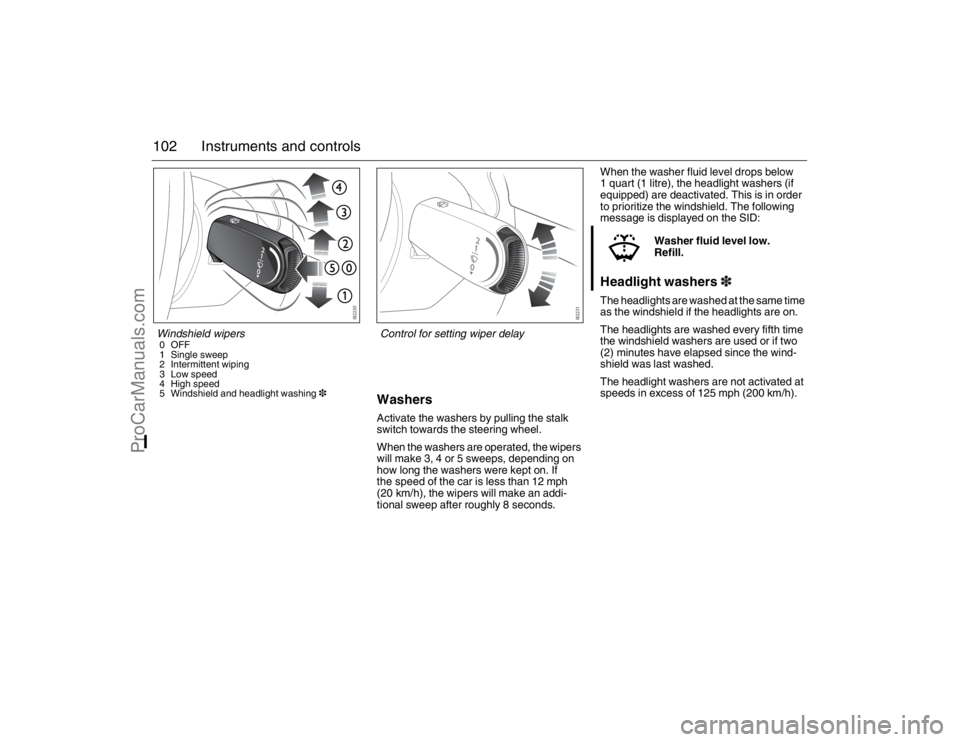
WashersActivate the washers by pulling the stalk
switch towards the steering wheel.
When the washers are operated, the wipers
will make 3, 4 or 5 sweeps, depending on
how long the washers were kept on. If
the speed of the car is less than 12 mph
(20 km/h), the wipers will make an addi-
tional sweep after roughly 8 seconds.When the washer fluid level drops below
1 quart (1 litre), the headlight washers (if
equipped) are deactivated. This is in order
to prioritize the windshield. The following
message is displayed on the SID:
Headlight washers3The headlights are washed at the same time
as the windshield if the headlights are on.
The headlights are washed every fifth time
the windshield washers are used or if two
(2) minutes have elapsed since the wind-
shield was last washed.
The headlight washers are not activated at
speeds in excess of 125 mph (200 km/h).Washer fluid level low.
Refill.
Windshield wipers0OFF
1 Single sweep
2 Intermittent wiping
3 Low speed
4 High speed
5 Windshield and headlight washing3
Control for setting wiper delay
93_U S _M 07.book Page 102 W ednesday, April 12, 2006 9:30 AM
ProCarManuals.com
Page 103 of 304
103 Instruments and controls
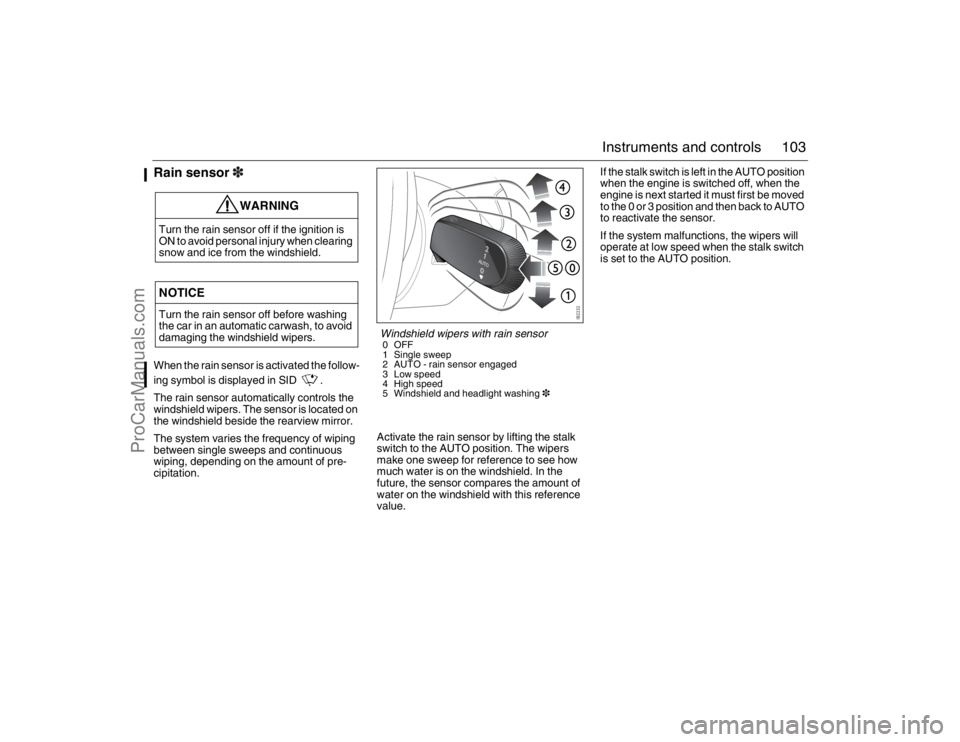
Rain sensor3When the rain sensor is activated the follow-
ing symbol is displayed in SID .
The rain sensor automatically controls the
windshield wipers. The sensor is located on
the windshield beside the rearview mirror.
The system varies the frequency of wiping
between single sweeps and continuous
wiping, depending on the amount of pre-
cipitation.Activate the rain sensor by lifting the stalk
switch to the AUTO position. The wipers
make one sweep for reference to see how
much water is on the windshield. In the
future, the sensor compares the amount of
water on the windshield with this reference
value.If the stalk switch is left in the AUTO position
when the engine is switched off, when the
engine is next started it must first be moved
to the 0 or 3 position and then back to AUTO
to reactivate the sensor.
If the system malfunctions, the wipers will
operate at low speed when the stalk switch
is set to the AUTO position.
WARNING
Turn the rain sensor off if the ignition is
ON to avoid personal injury when clearing
snow and ice from the windshield.NOTICETurn the rain sensor off before washing
the car in an automatic carwash, to avoid
damaging the windshield wipers.
Windshield wipers with rain sensor0OFF
1 Single sweep
2 AUTO - rain sensor engaged
3 Low speed
4 High speed
5 Windshield and headlight washing3
93_U S _M 07.book Page 103 W ednesday, April 12, 2006 9:30 AM
ProCarManuals.com
Page 105 of 304
105 Instruments and controls
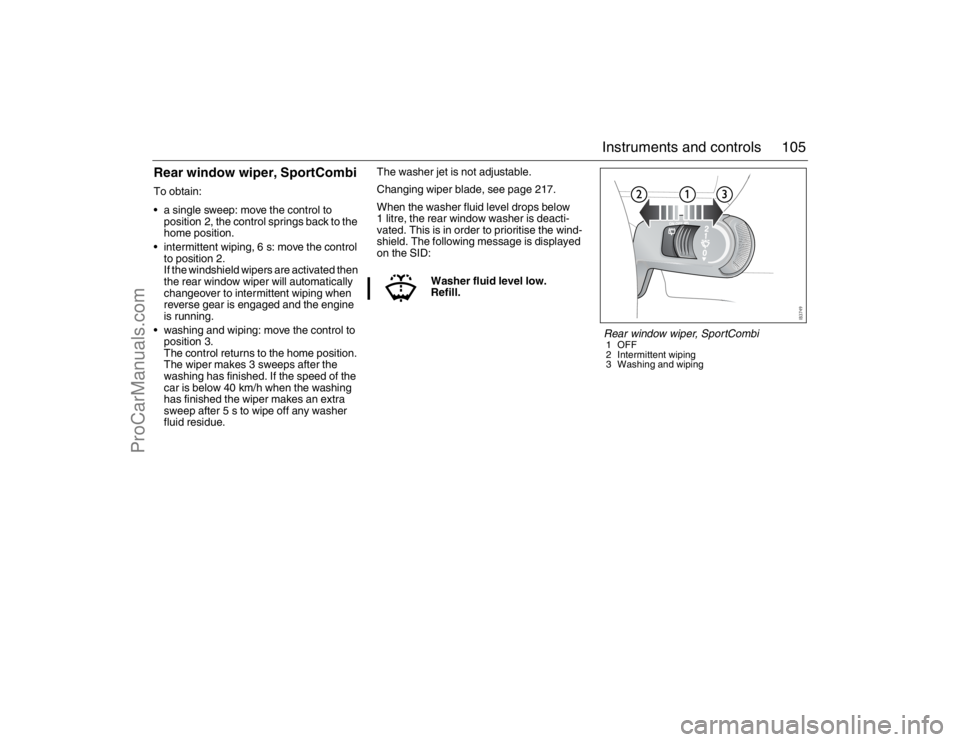
Rear window wiper, SportCombiTo obtain:
a single sweep: move the control to
position 2, the control springs back to the
home position.
intermittent wiping, 6 s: move the control
to position 2.
If the windshield wipers are activated then
the rear window wiper will automatically
changeover to intermittent wiping when
reverse gear is engaged and the engine
is running.
washing and wiping: move the control to
position 3.
The control returns to the home position.
The wiper makes 3 sweeps after the
washing has finished. If the speed of the
car is below 40 km/h when the washing
has finished the wiper makes an extra
sweep after 5 s to wipe off any washer
fluid residue.The washer jet is not adjustable.
Changing wiper blade, see page 217.
When the washer fluid level drops below
1 litre, the rear window washer is deacti-
vated. This is in order to prioritise the wind-
shield. The following message is displayed
on the SID:
Washer fluid level low.
Refill.
Rear window wiper, SportCombi1OFF
2 Intermittent wiping
3 Washing and wiping
93_U S _M 07.book Page 105 W ednesday, April 12, 2006 9:30 AM
ProCarManuals.com
Page 126 of 304
126 Interior equipmentReprogramming a single button
To program a device to the garage opener
using a button previously trained, follow
these steps:
1 Press and hold the desired button. DO
NOT release the button.
2 The indicator light will begin to flash after
20 seconds. Without releasing the
button, proceed with "Programming" -
step 3.
Erasing the three buttons
To erase programming from the three but-
tons (individual buttons cannot be erased
but can be "reprogrammed" as outlined
below), follow the step noted:
Press and hold the two outer buttons until
the indicator light begins to flash-after
20 seconds. Release both buttons. Do
not hold for longer that 30 seconds. The
garage opener is now in the train (or
learning) mode and can be programmed
at any time beginning with "Program-
ming" - step 3.Opening a garage door
To operate, simply press and release the
programmed button. Activation will now
occur for the trained device (i.e. garage door
opener, gate operator, security system,
entry door lock, home/office lighting, etc.).
For convenience, the hand-held transmitter
of the device may also be used at any time.
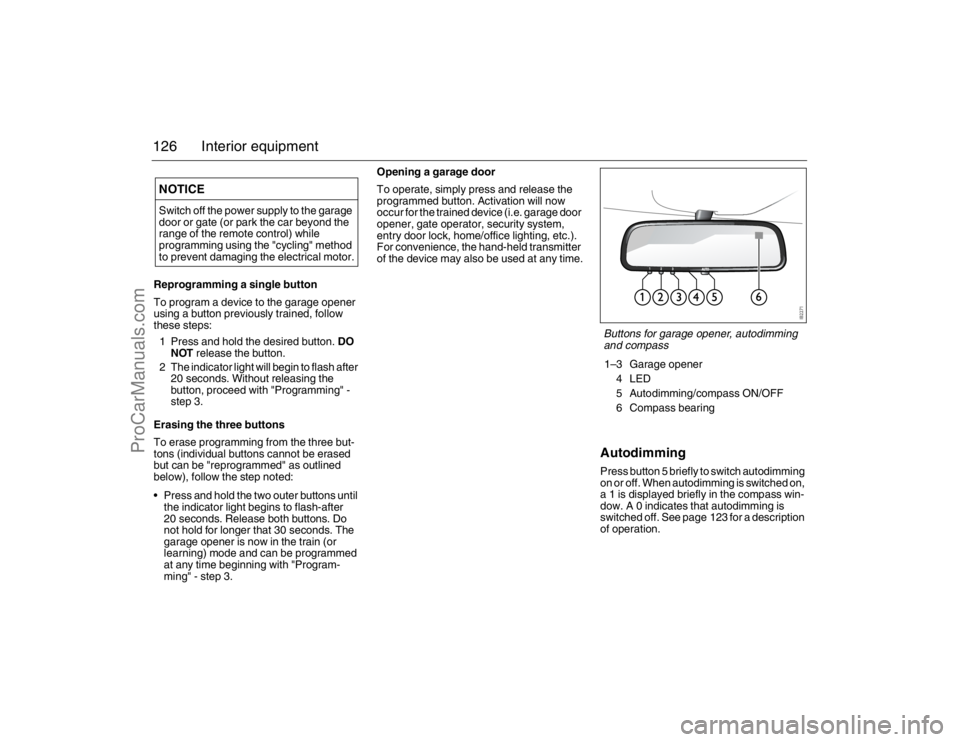
AutodimmingPress button 5 briefly to switch autodimming
on or off. When autodimming is switched on,
a 1 is displayed briefly in the compass win-
dow. A 0 indicates that autodimming is
switched off. See page 123 for a description
of operation.
NOTICESwitch off the power supply to the garage
door or gate (or park the car beyond the
range of the remote control) while
programming using the "cycling" method
to prevent damaging the electrical motor.
Buttons for garage opener, autodimming
and compass1–3 Garage opener
4LED
5 Autodimming/compass ON/OFF
6 Compass bearing
93_U S _M 07.book Page 126 W ednesday, April 12, 2006 9:30 AM
ProCarManuals.com