warning SAAB 9-3 2007 Repair Manual
[x] Cancel search | Manufacturer: SAAB, Model Year: 2007, Model line: 9-3, Model: SAAB 9-3 2007Pages: 304, PDF Size: 26.16 MB
Page 93 of 304

93 Instruments and controls
You can check the distance left by selecting
Dist. At the same time you can check the
calculated time of arrival.
After the distance to destination has
decreased to zero, Dist will function as a trip
meter (see Using DIST as a trip meter). The
starting value for the trip meter will be the
last distance set for the Dist function.
Example: The Dist function is set to
100 miles. After the count-down has
reached 0 miles, Dist will act as a trip meter
beginning at 100 miles.Calculating the arrival time if a specified
average speed is maintained
(When will I arrive if I know how far I have to
drive and know what my average speed will
be?)
This function should be used before starting
out a journey.
First, set the distance under Dist.
1 Then select Speed Ø function.
2 Press and hold the SET button until
given audible confirmation.
3 Set the estimated average speed using
the steering wheel controls.
4 Confirm the setting by pressing the SET
button.
The distance and the calculated time of
arrival is now displayed.
The time of arrival is updated during the
journey based on the average speed since
Dist was set. The speed of the car must
exceed 12 mph (20 km/h).
By selecting Dist during the journey, you
can see how much distance is left to travel.
When Dist reaches zero it acts as a trip
meter. The trip meter starts from the dis-
tance that was set previously.
NIGHTPANELTo improve night-driving conditions inside
the car, the Night Panel mode can be
selected. In this mode, the amount of infor-
mation displayed is reduced, and only the
most important instruments and displays
will be illuminated.
When the NIGHTPANEL button is pressed,
only the speedometer will be illuminated.
All other instrument lighting will be switched
off and the needles drop to zero.
Note: All indicator and warning lights and
messages will operate normally if required.
Temp (when the outside temperature falls
or rises to between 26 and 38°F (–3 and
+3°C)) and D.T.E. (when the remaining fuel
is only sufficient for approx. 80 miles
(50 km) of driving) are even shown in Night
Panel model.
93_U S _M 07.book Page 93 W ednesday, April 12, 2006 9:30 AM
ProCarManuals.com
Page 100 of 304
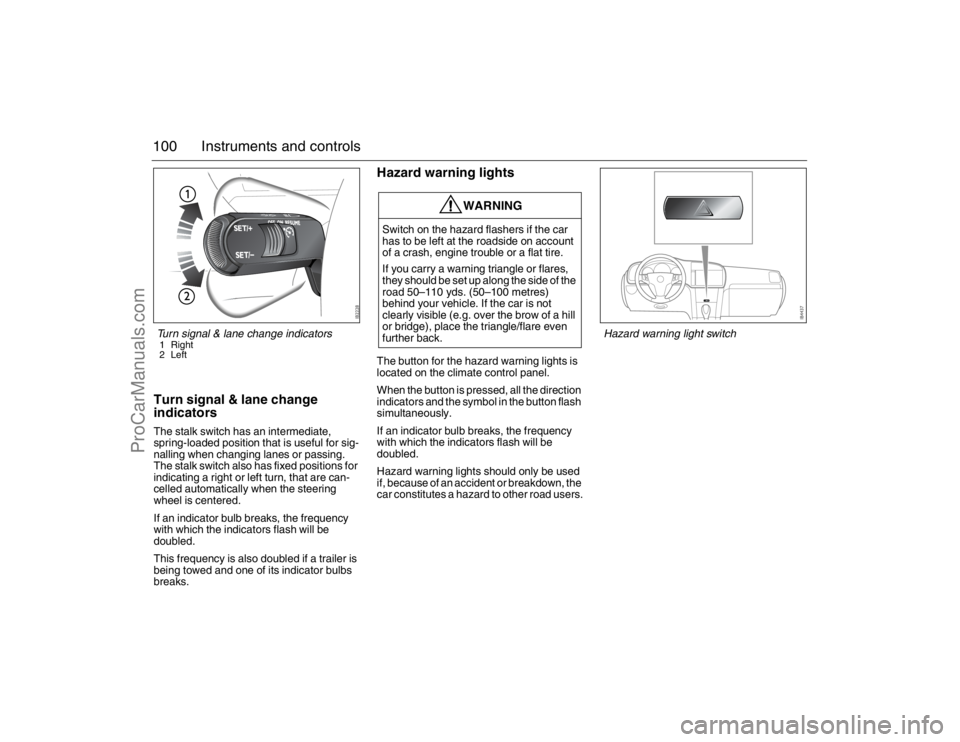
100 Instruments and controlsTurn signal & lane change
indicatorsThe stalk switch has an intermediate,
spring-loaded position that is useful for sig-
nalling when changing lanes or passing.
The stalk switch also has fixed positions for
indicating a right or left turn, that are can-
celled automatically when the steering
wheel is centered.
If an indicator bulb breaks, the frequency
with which the indicators flash will be
doubled.
This frequency is also doubled if a trailer is
being towed and one of its indicator bulbs
breaks.
Hazard warning lightsThe button for the hazard warning lights is
located on the climate control panel.
When the button is pressed, all the direction
indicators and the symbol in the button flash
simultaneously.
If an indicator bulb breaks, the frequency
with which the indicators flash will be
doubled.
Hazard warning lights should only be used
if, because of an accident or breakdown, the
car constitutes a hazard to other road users.
WARNING
Switch on the hazard flashers if the car
has to be left at the roadside on account
of a crash, engine trouble or a flat tire.
If you carry a warning triangle or flares,
they should be set up along the side of the
road 50–110 yds. (50–100 metres)
behind your vehicle. If the car is not
clearly visible (e.g. over the brow of a hill
or bridge), place the triangle/flare even
further back.
Turn signal & lane change indicators1 Right
2 Left
Hazard warning light switch
93_U S _M 07.book Page 100 W ednesday, April 12, 2006 9:30 AM
ProCarManuals.com
Page 103 of 304
103 Instruments and controls
Rain sensor3When the rain sensor is activated the follow-
ing symbol is displayed in SID .
The rain sensor automatically controls the
windshield wipers. The sensor is located on
the windshield beside the rearview mirror.
The system varies the frequency of wiping
between single sweeps and continuous
wiping, depending on the amount of pre-
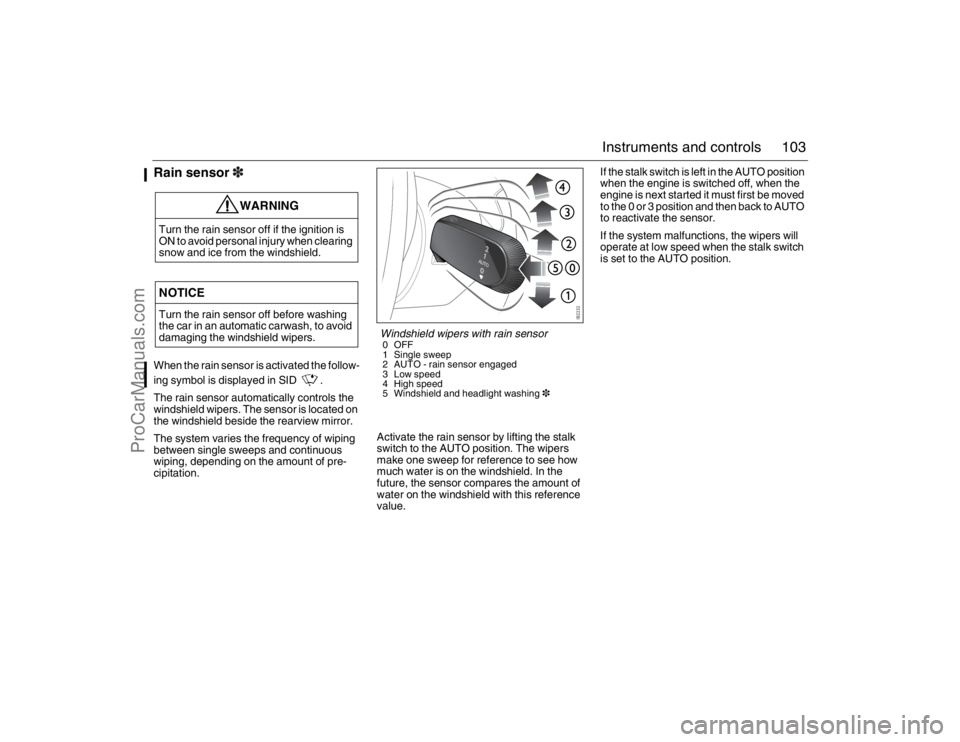
cipitation.Activate the rain sensor by lifting the stalk
switch to the AUTO position. The wipers
make one sweep for reference to see how
much water is on the windshield. In the
future, the sensor compares the amount of
water on the windshield with this reference
value.If the stalk switch is left in the AUTO position
when the engine is switched off, when the
engine is next started it must first be moved
to the 0 or 3 position and then back to AUTO
to reactivate the sensor.
If the system malfunctions, the wipers will
operate at low speed when the stalk switch
is set to the AUTO position.
WARNING
Turn the rain sensor off if the ignition is
ON to avoid personal injury when clearing
snow and ice from the windshield.NOTICETurn the rain sensor off before washing
the car in an automatic carwash, to avoid
damaging the windshield wipers.
Windshield wipers with rain sensor0OFF
1 Single sweep
2 AUTO - rain sensor engaged
3 Low speed
4 High speed
5 Windshield and headlight washing3
93_U S _M 07.book Page 103 W ednesday, April 12, 2006 9:30 AM
ProCarManuals.com
Page 106 of 304
106 Instruments and controlsAutomatic climate-
control system (ACC)Fresh air for the cabin is drawn in through an
inlet at the bottom edge of the windshield. It
passes through an effective filter before
reaching the climate control system and
delivery into the cabin. The air is evacuated
via openings in the parcel shelf. It is then led
through outlets on either side of the car
behind the rear bumper.
The Automatic Climate-Control system
(ACC) automatically maintains the desired
cabin temperature, regardless of the
weather outside.
The system will achieve the desired temper-
ature in the quickest possible way.
Note that heating or cooling is not
speeded up by setting the temperature
higher or lower than the final tempera-
ture you desire.
To optimize the performance of the air con-
ditioning system, all windows and the
moonroof3 should be shut. The air vents in
the fascia must be open.The incoming air is treated in three stages:
first it passes through a filter; it is then dehu-
midified and cooled; and finally, if required,
it is heated.
The filter is a combined particle and char-
coal filter. It is so efficient that levels of
noxious substances such as benzene and
toluene are also reduced.To reduce potential misting on the insides of
the windows, the glass should be cleaned
with a quality glass cleaner. How often this
will need to be done depends on how clean
the air is - if there are smokers in the car, the
windows will need to be cleaned more
frequently.
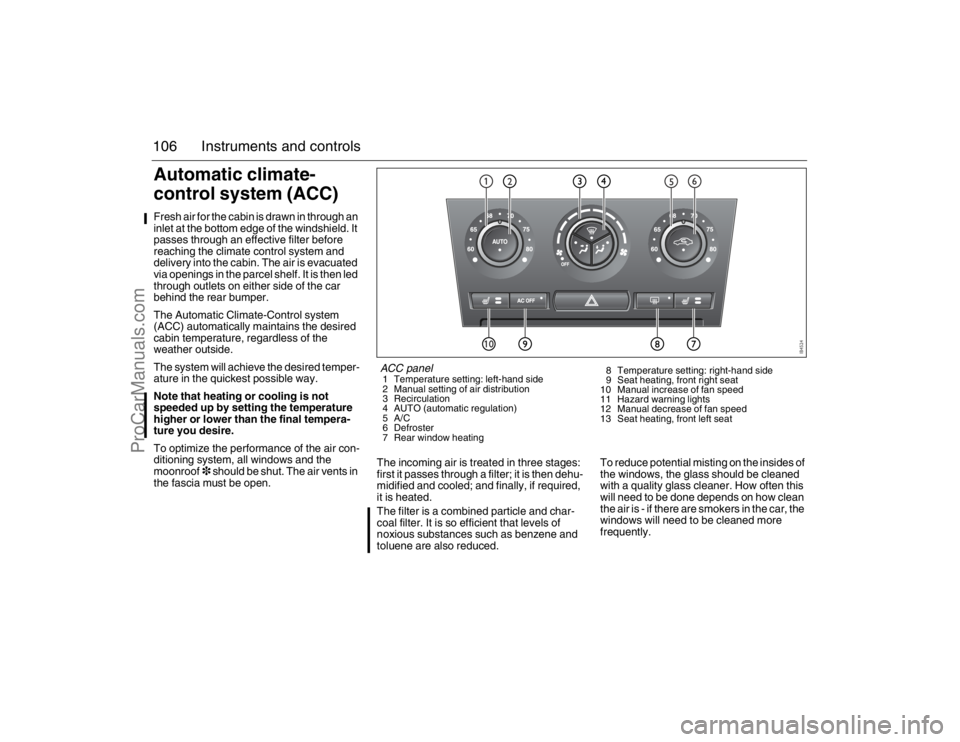
ACC panel1 Temperature setting: left-hand side
2 Manual setting of air distribution
3 Recirculation
4 AUTO (automatic regulation)
5A/C
6 Defroster
7 Rear window heating8 Temperature setting: right-hand side
9 Seat heating, front right seat
10 Manual increase of fan speed
11 Hazard warning lights
12 Manual decrease of fan speed
13 Seat heating, front left seat
93_U S _M 07.book Page 106 W ednesday, April 12, 2006 9:30 AM
ProCarManuals.com
Page 118 of 304
118 Interior equipmentSteering wheel
adjustmentThe height and reach of the steering wheel
can be adjusted.
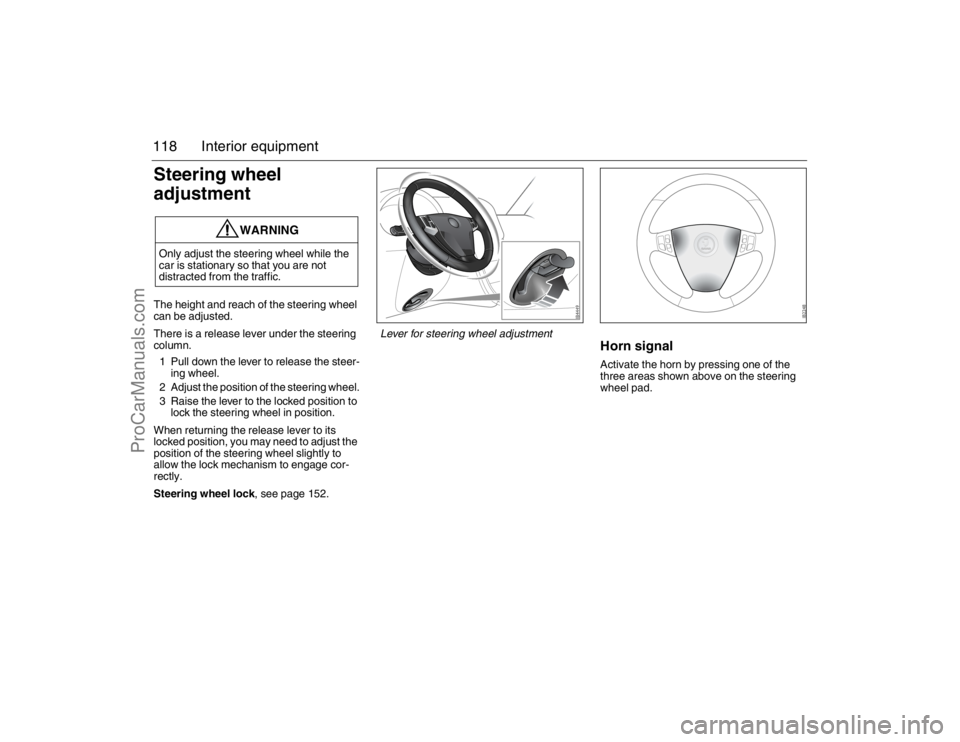
There is a release lever under the steering
column.
1 Pull down the lever to release the steer-
ing wheel.
2 Adjust the position of the steering wheel.
3 Raise the lever to the locked position to
lock the steering wheel in position.
When returning the release lever to its
locked position, you may need to adjust the
position of the steering wheel slightly to
allow the lock mechanism to engage cor-
rectly.
Steering wheel lock, see page 152.
Horn signalActivate the horn by pressing one of the
three areas shown above on the steering
wheel pad.
WARNING
Only adjust the steering wheel while the
car is stationary so that you are not
distracted from the traffic.
Lever for steering wheel adjustment
93_U S _M 07.book Page 118 W ednesday, April 12, 2006 9:30 AM
ProCarManuals.com
Page 119 of 304
119 Interior equipment
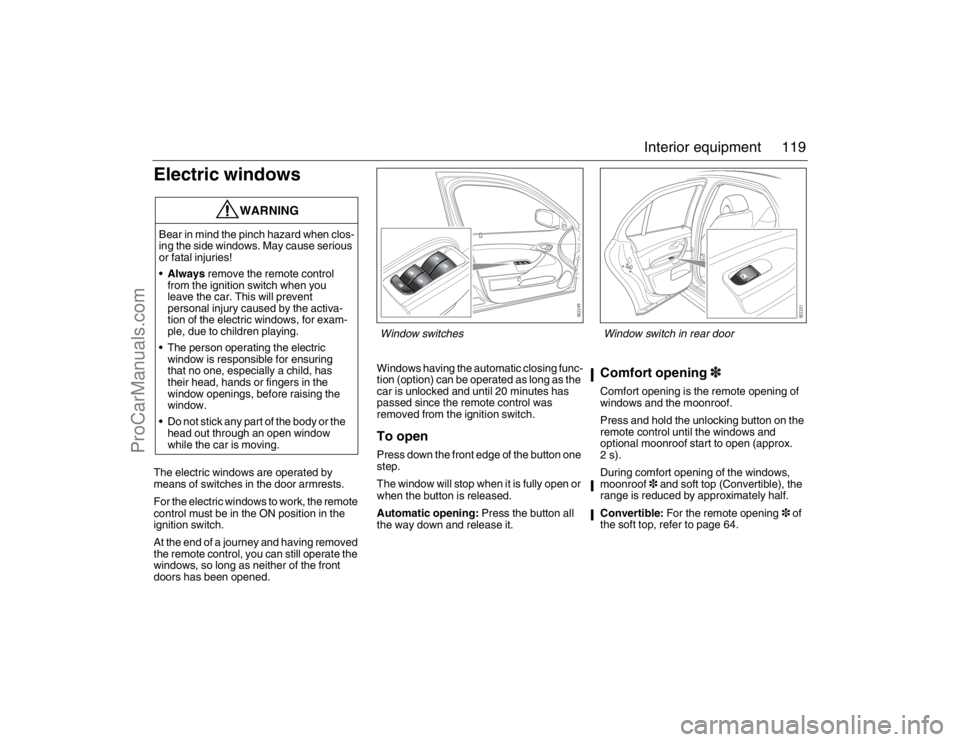
Electric windowsThe electric windows are operated by
means of switches in the door armrests.
For the electric windows to work, the remote
control must be in the ON position in the
ignition switch.
At the end of a journey and having removed
the remote control, you can still operate the
windows, so long as neither of the front
doors has been opened.Windows having the automatic closing func-
tion (option) can be operated as long as the
car is unlocked and until 20 minutes has
passed since the remote control was
removed from the ignition switch.
To openPress down the front edge of the button one
step.
The window will stop when it is fully open or
when the button is released.
Automatic opening: Press the button all
the way down and release it.
Comfort opening3Comfort opening is the remote opening of
windows and the moonroof.
Press and hold the unlocking button on the
remote control until the windows and
optional moonroof start to open (approx.
2s).
During comfort opening of the windows,
moonroof3 and soft top (Convertible), the
range is reduced by approximately half.
Convertible: For the remote opening3 of
the soft top, refer to page 64.
WARNING
Bear in mind the pinch hazard when clos-
ing the side windows. May cause serious
or fatal injuries!
Always remove the remote control
from the ignition switch when you
leave the car. This will prevent
personal injury caused by the activa-
tion of the electric windows, for exam-
ple, due to children playing.
The person operating the electric
window is responsible for ensuring
that no one, especially a child, has
their head, hands or fingers in the
window openings, before raising the
window.
Do not stick any part of the body or the
head out through an open window
while the car is moving.
Window switches
Window switch in rear door
93_U S _M 07.book Page 119 W ednesday, April 12, 2006 9:30 AM
ProCarManuals.com
Page 120 of 304
120 Interior equipmentTo closeRaise the front edge of the button one step.
The window will stop when it is fully closed
or when the button is released.
Automatic closing3: Raise the button all
the way and release it. If the window does
not close automatically, refer to Calibration
on page 121.
Pinch protection3On certain model variants, the front electric
windows are equipped with pinch protec-
tion. This is activated if something gets
trapped between the window pane and door
frame when the window is closed. The
window will stop and lower slightly.
Temporary overriding the pinch protec-
tion
If dirt, ice or similar create so much resis-
tance that the pinch protection cuts in (the
window cannot be closed), the pinch protec-
tion can be temporarily disengaged and the
window closed.
1 Make sure the ignition is ON.
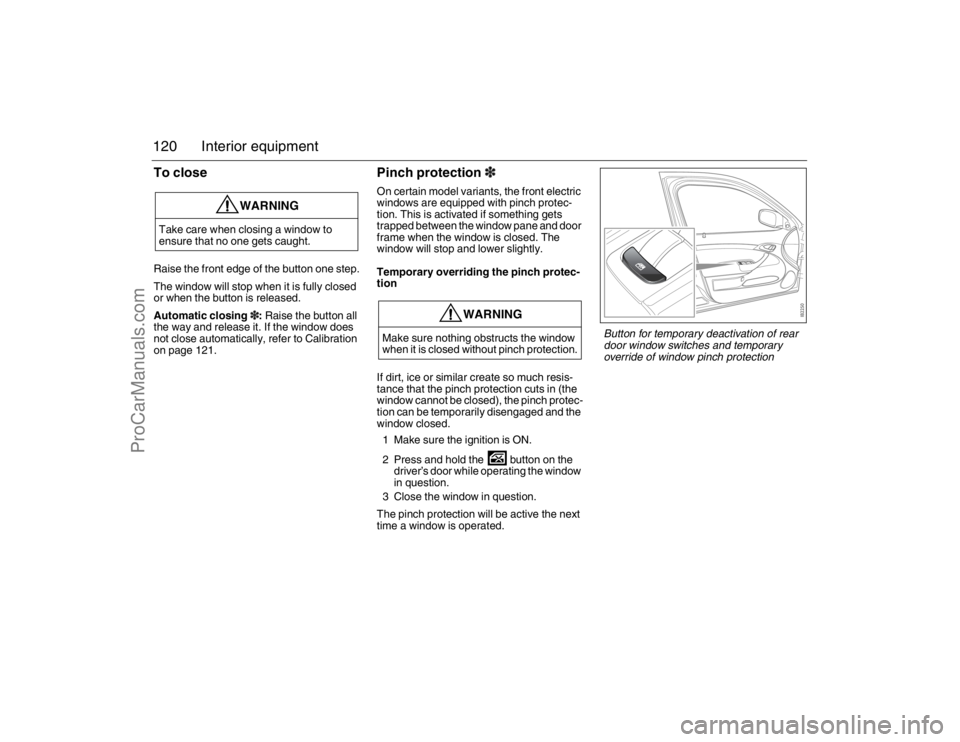
2 Press and hold the button on the
driver’s door while operating the window
in question.
3 Close the window in question.
The pinch protection will be active the next
time a window is operated.
WARNING
Take care when closing a window to
ensure that no one gets caught.
WARNING
Make sure nothing obstructs the window
when it is closed without pinch protection.
Button for temporary deactivation of rear
door window switches and temporary
override of window pinch protection
93_U S _M 07.book Page 120 W ednesday, April 12, 2006 9:30 AM
ProCarManuals.com
Page 121 of 304

121 Interior equipment
CalibrationThe front electric windows should be cali-
brated if automatic closing does not work or
if the battery has been disconnected. The
pinch protection3 will not work if the win-
dows are not calibrated.Calibration is performed as follows:
1 Close the doors.
2 The car must be running at idling speed.
The battery charger must not be
connected to the car’s battery during
calibration.
3 Open the window fully, the button must
be kept depressed the whole time.
4 Close the window fully, the button must
be kept raised the whole time and for
approx. 1 second after the window has
closed.
5 Open the window fully, the button must
be kept depressed the whole time and
for approx. 1 second after the window
has fully opened.
6 Close the window fully, and keep the
button raised until the calibration is
confirmed with a "chime".
Repeat steps 3-6 for the windows which
require calibration.
Deactivating the rear window
switchesThe in the driver’s door deactivates the
window switches in the rear doors.
The illuminated switch will change color
from green to orange (deactivated).
WARNING
The pinch protection will not be engaged
after a power break until the electric
windows have been calibrated.93_U S _M 07.book Page 121 W ednesday, April 12, 2006 9:30 AM
ProCarManuals.com
Page 124 of 304
124 Interior equipmentInterior rearview mirror with
garage opener, autodimming
function and compass3
Retain your original garage door opener
(transmitter) for future programming proce-
dures (i.e., new vehicle purchase). It is also
suggested that upon the sale of the vehicle,
the programmed garage opener buttons be
erased for security purposes, see
page 126.Preparations for first-time programming
Before programming the garage opener for
the first time, you must delete any factory
codes.
Press and hold the two outer buttons until
the indicator light begins to flash-after
20 seconds. Release both buttons. Do not
hold for longer that 30 seconds. The garage
opener is now in the train (or learning) mode
and can be programmed at any time begin-
ning with "Programming" - step 2.
Programming
The garage opener can record and store the
frequencies of three different remote con-
trols.
The battery in the remote control should be
fairly new for programming to work well.
Do not repeat "Programming" - step two
to train additional devices to a second or
third button. Begin with "Programming" -
step three.
1 Turn the ignition ON.
2 Press and hold the two outer buttons
(buttons one and three) - releasing only
when the indicator light begins to flash
(after 20 seconds). Do not hold the
buttons for longer than 30 seconds and
do not repeat step two to program a
second and/or third hand-held transmit-
ter to the remaining two buttons.
3 Position the end of your hand-held
transmitter 1-3 inches (5-14 cm) away
WARNING
Make sure that people and objects are out
of the way of moving door or gate to
prevent potential harm or damage.
When programming the garage opener,
you may be operating a garage door or
gate operator. Therefore it is advised to
park outside of the garage.
Do not use the garage opener with any
garage door opener that lacks the safety
stop and reverse feature as required by
federal safety standards. (This includes
any garage door opener model manufac-
tured before April 1, 1982.). A garage
door opener which cannot detect an
object, signaling the door to stop and
reverse, does not meet current federal
safety standards. Using a garage door
opener without these features increases
risk of serious injury or death.
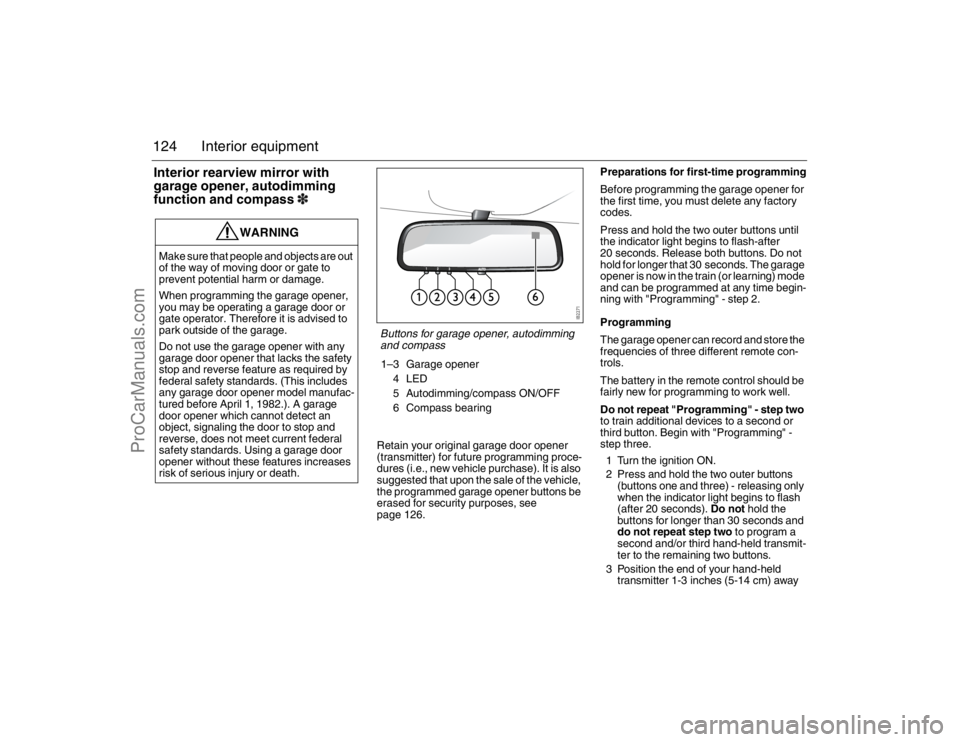
Buttons for garage opener, autodimming
and compass1–3 Garage opener
4LED
5 Autodimming/compass ON/OFF
6 Compass bearing
93_U S _M 07.book Page 124 W ednesday, April 12, 2006 9:30 AM
ProCarManuals.com
Page 128 of 304
128 Interior equipmentMoonroof3The moonroof is operated by the control in
the roof console. For the moonroof to work,
the remote control must be in the ON posi-
tion in the ignition switch.
If the car is equipped with windows having
the automatic closing function, the moon-
roof can be opened and closed so long as
the car is unlocked until 20 minutes has
passed since the remote control was
removed from the ignition switch.
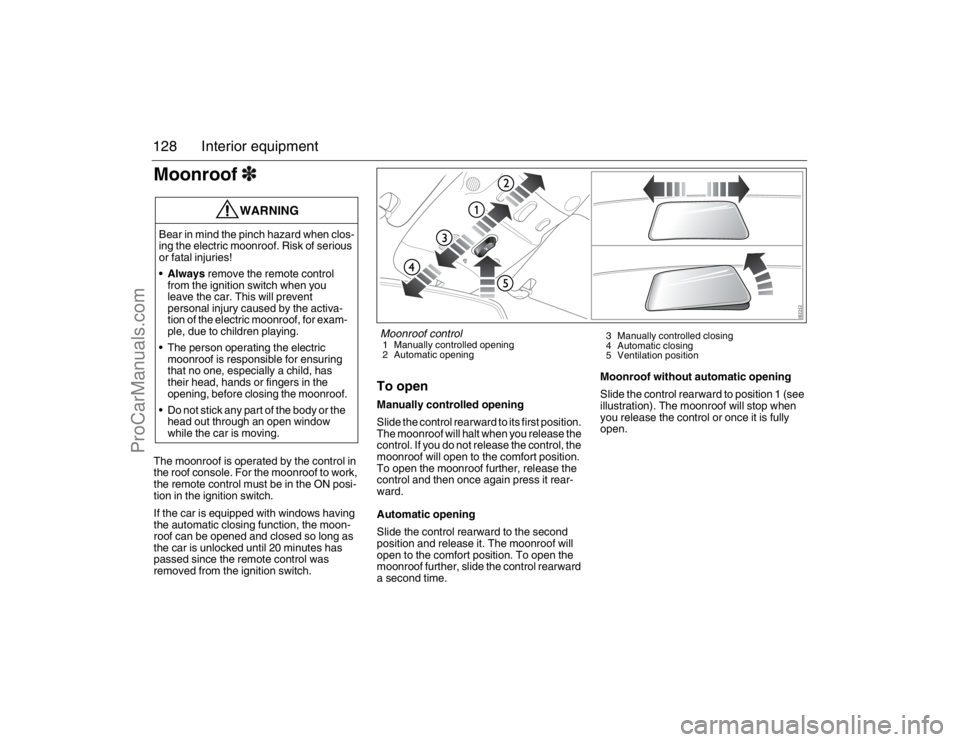
To openManually controlled opening
Slide the control rearward to its first position.
The moonroof will halt when you release the
control. If you do not release the control, the
moonroof will open to the comfort position.
To open the moonroof further, release the
control and then once again press it rear-
ward.
Automatic opening
Slide the control rearward to the second
position and release it. The moonroof will
open to the comfort position. To open the
moonroof further, slide the control rearward
a second time.Moonroof without automatic opening
Slide the control rearward to position 1 (see
illustration). The moonroof will stop when
you release the control or once it is fully
open.
WARNING
Bear in mind the pinch hazard when clos-
ing the electric moonroof. Risk of serious
or fatal injuries!
Always remove the remote control
from the ignition switch when you
leave the car. This will prevent
personal injury caused by the activa-
tion of the electric moonroof, for exam-
ple, due to children playing.
The person operating the electric
moonroof is responsible for ensuring
that no one, especially a child, has
their head, hands or fingers in the
opening, before closing the moonroof.
Do not stick any part of the body or the
head out through an open window
while the car is moving.
Moonroof control1 Manually controlled opening
2 Automatic opening3 Manually controlled closing
4 Automatic closing
5 Ventilation position
93_U S _M 07.book Page 128 W ednesday, April 12, 2006 9:30 AM
ProCarManuals.com