tow SAAB 9-3 2008 User Guide
[x] Cancel search | Manufacturer: SAAB, Model Year: 2008, Model line: 9-3, Model: SAAB 9-3 2008Pages: 320, PDF Size: 56.39 MB
Page 101 of 320
101 Instruments and controls
Rear fog lightTo turn on the rear fog light, press the rear
fog light button on the instrument panel. The
headlights or front fog lights must be on.
The rear fog light is automatically turned off
when the engine is switched off. When the
car is next started, the rear fog light will have
to be switched back on manually by press-
ing the rear fog light switch. If the engine is
restarted within 30 seconds, the rear fog
light will remain on but not if the light switch
is in position AUTO.
Rear fog light consists of one bulb.
Acquaint yourself with the legal provi-
sions governing the use of rear fog light.
Turn signal & lane change
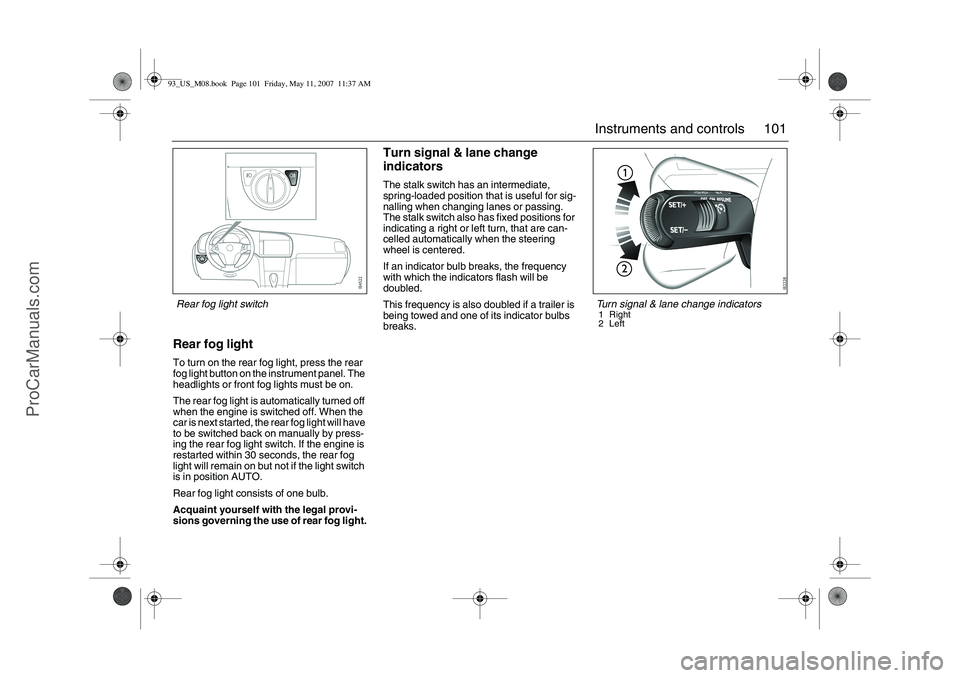
indicatorsThe stalk switch has an intermediate,
spring-loaded position that is useful for sig-
nalling when changing lanes or passing.
The stalk switch also has fixed positions for
indicating a right or left turn, that are can-
celled automatically when the steering
wheel is centered.
If an indicator bulb breaks, the frequency
with which the indicators flash will be
doubled.
This frequency is also doubled if a trailer is
being towed and one of its indicator bulbs
breaks.
Turn signal & lane change indicators1 Right
2Left
Rear fog light switch93_US_M08.book Page 101 Friday, May 11, 2007 11:37 AM
ProCarManuals.com
Page 104 of 320
104 Instruments and controls
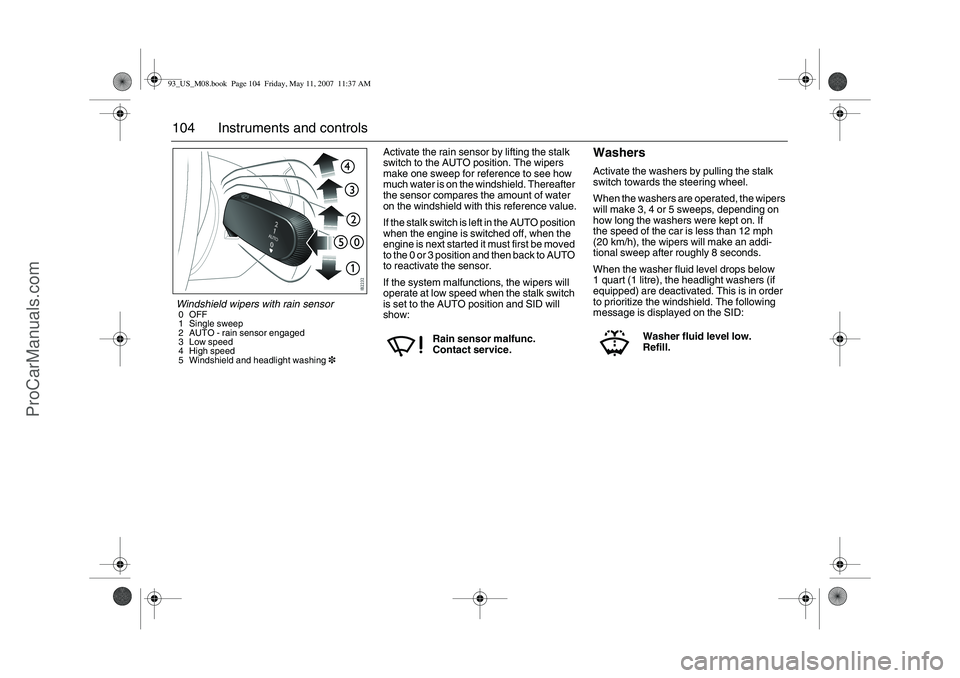
Activate the rain sensor by lifting the stalk
switch to the AUTO position. The wipers
make one sweep for reference to see how
much water is on the windshield. Thereafter
the sensor compares the amount of water
on the windshield with this reference value.
If the stalk switch is left in the AUTO position
when the engine is switched off, when the
engine is next started it must first be moved
to the 0 or 3 position and then back to AUTO
to reactivate the sensor.
If the system malfunctions, the wipers will
operate at low speed when the stalk switch
is set to the AUTO position and SID will
show:
WashersActivate the washers by pulling the stalk
switch towards the steering wheel.
When the washers are operated, the wipers
will make 3, 4 or 5 sweeps, depending on
how long the washers were kept on. If
the speed of the car is less than 12 mph
(20 km/h), the wipers will make an addi-
tional sweep after roughly 8 seconds.
When the washer fluid level drops below
1 quart (1 litre), the headlight washers (if
equipped) are deactivated. This is in order
to prioritize the windshield. The following
message is displayed on the SID:
Rain sensor malfunc.
Contact service.
Washer fluid level low.
Refill.
Windshield wipers with rain sensor0OFF
1 Single sweep
2 AUTO - rain sensor engaged
3 Low speed
4 High speed
5 Windshield and headlight washing393_US_M08.book Page 104 Friday, May 11, 2007 11:37 AM
ProCarManuals.com
Page 151 of 320

151 Starting and driving
Ignition switch ________ 152
Steering wheel lock ____ 154
Starting the engine ____ 154
Important considerations
for driving __________ 156
Refueling ____________ 159
Engine Break-in Period _ 163
Manual transmission___ 164
Automatic
transmission3
33 3______ 165
Cruise control ________ 171
Braking ______________ 172
Traction Control System
(TCS) ______________ 175
Electronic Stability
Program ESP
®
______ 177
Parking brake_________ 179
Parking ______________ 179
Saab Parking
Assistance3
33 3________ 182 Economical driving _____ 185
Driving in cold weather__ 187
Driving in hot climates __ 189
Towing a trailer3
33 3______ 190
Driving with a roof rack
load ________________ 194
Driving with a load _____ 196
Driving with the trunk lid
open________________ 196
Driving in deep water ___ 196
Driving at night ________ 197
Towing the car _________ 197
Jump starting _________ 200
For long trips __________ 202
Starting and driving
3Asterisk means: equipment not fitted in all cars
(can depend on model variant, engine variant,
market specification, options or accessories).93_US_M08.book Page 151 Friday, May 11, 2007 11:37 AM
ProCarManuals.com
Page 167 of 320
167 Starting and driving
Sport mode3
33 3
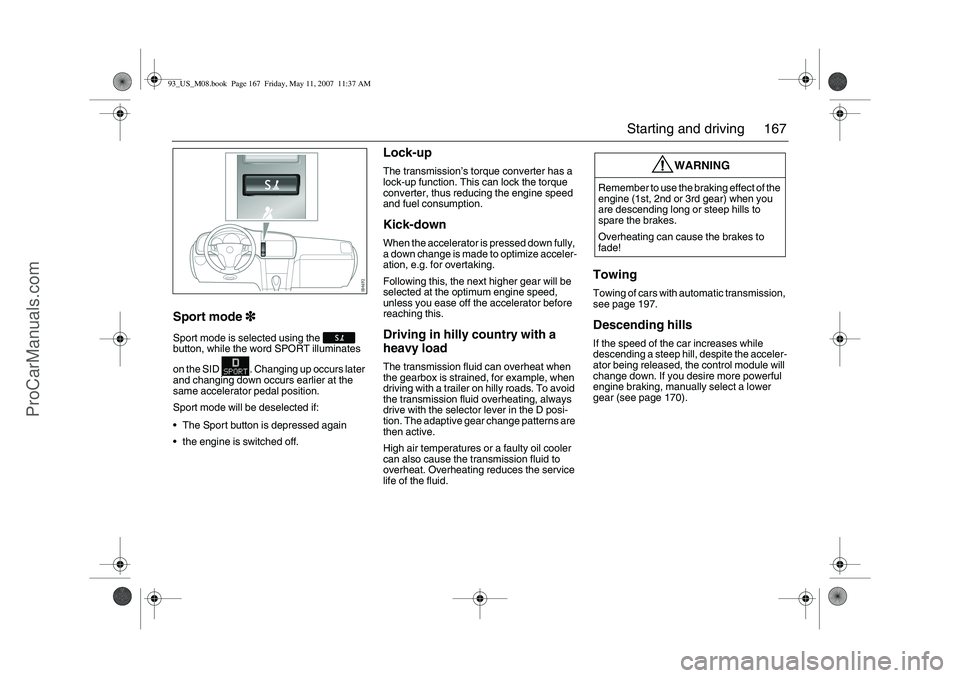
Sport mode is selected using the
button, while the word SPORT illuminates
on the SID . Changing up occurs later
and changing down occurs earlier at the
same accelerator pedal position.
Sport mode will be deselected if:
The Sport button is depressed again
the engine is switched off.
Lock-upThe transmission’s torque converter has a
lock-up function. This can lock the torque
converter, thus reducing the engine speed
and fuel consumption.Kick-downWhen the accelerator is pressed down fully,
a down change is made to optimize acceler-
ation, e.g. for overtaking.
Following this, the next higher gear will be
selected at the optimum engine speed,
unless you ease off the accelerator before
reaching this.Driving in hilly country with a
heavy loadThe transmission fluid can overheat when
the gearbox is strained, for example, when
driving with a trailer on hilly roads. To avoid
the transmission fluid overheating, always
drive with the selector lever in the D posi-
tion. The adaptive gear change patterns are
then active.
High air temperatures or a faulty oil cooler
can also cause the transmission fluid to
overheat. Overheating reduces the service
life of the fluid.
TowingTowing of cars with automatic transmission,
see page 197.Descending hillsIf the speed of the car increases while
descending a steep hill, despite the acceler-
ator being released, the control module will
change down. If you desire more powerful
engine braking, manually select a lower
gear (see page 170).
WARNING
Remember to use the braking effect of the
engine (1st, 2nd or 3rd gear) when you
are descending long or steep hills to
spare the brakes.
Overheating can cause the brakes to
fade!
93_US_M08.book Page 167 Friday, May 11, 2007 11:37 AM
ProCarManuals.com
Page 168 of 320
168 Starting and drivingLimp-homeIf the transmission malfunctions, the control
module will activate limp-home mode. Driv-
ability will be affected to varying degrees.
Cars with 5-speed transmission3
33 3
In this mode, only 2nd and 5th gears are
available. Select 2nd gear when driving at
low speeds and 5th gear at higher speeds.
2nd gear must be selected manually. Select
5th gear manually or move the selector
lever to D, see page 170.
Cars with 6-speed transmission3
33 3
The car may be totally powerless. If this is
case, have the car transported to a work-
shop to have the problem rectified.
The car may feel weak but can be driven
carefully to a workshop to have the prob-
lem rectified.
Drivability may barely be affected.
Irrespective of the drivability of the car, the
car must be taken to a workshop to have the
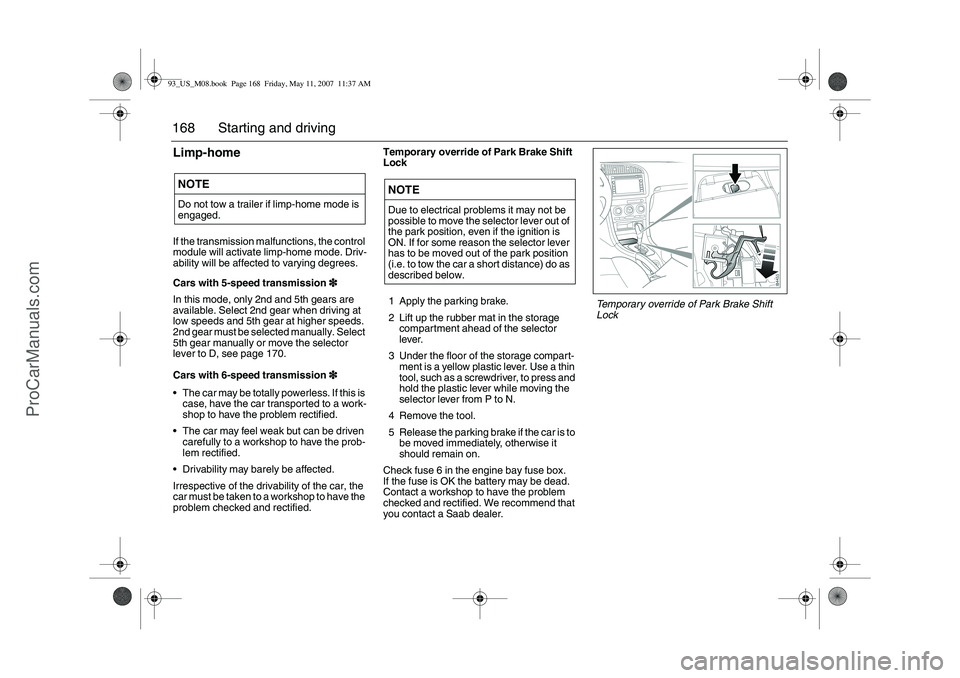
problem checked and rectified.Temporary override of Park Brake Shift
Lock
1 Apply the parking brake.
2 Lift up the rubber mat in the storage
compartment ahead of the selector
lever.
3 Under the floor of the storage compart-
ment is a yellow plastic lever. Use a thin
tool, such as a screwdriver, to press and
hold the plastic lever while moving the
selector lever from P to N.
4 Remove the tool.
5 Release the parking brake if the car is to
be moved immediately, otherwise it
should remain on.
Check fuse 6 in the engine bay fuse box.
If the fuse is OK the battery may be dead.
Contact a workshop to have the problem
checked and rectified. We recommend that
you contact a Saab dealer.NOTEDo not tow a trailer if limp-home mode is
engaged.
NOTEDue to electrical problems it may not be
possible to move the selector lever out of
the park position, even if the ignition is
ON. If for some reason the selector lever
has to be moved out of the park position
(i.e. to tow the car a short distance) do as
described below.
Temporary override of Park Brake Shift
Lock
93_US_M08.book Page 168 Friday, May 11, 2007 11:37 AM
ProCarManuals.com
Page 172 of 320
172 Starting and drivingTo reduce the preset speedYou can reduce speed in any of the follow-
ing ways:
Brake to the desired speed. Jog the
control to SET/+ or SET/–.
Jog the control to SET/– to reduce the
speed by 1 mph (1.6 km/h).
Hold the control in the SET/– position until
the desired speed is reached.Temporary increase in speedAccelerate, without shifting down (manual
transmission), to exceed the set speed such
as for overtaking. When you release the
accelerator, the car will return to the set
speed.To disengage the system
temporarilySlide the switch to the left towards OFF, but
only as far as to disengage the cruise con-
trol. Allow the switch to spring back.
To re-engage the systemSlide the switch to RESUME. The car will
return to the previously set speed. Vehicle
speed must exceed 15 mph (25 km/h).To disengage the systemThe system will be disengaged:
As soon as the brake or clutch pedal is
depressed (cars with manual transmis-
sion).
When the switch is slid towards OFF. See
also heading "To disengage the system
temporarily".
When the switch is slid to OFF.
When the TCS/ESP
® system is operative.
When position N is selected (cars with
automatic transmission).
BrakingIt is good practice to try your brakes period-
ically while driving. This is particularly
important when driving in heavy rain, on
roads with a lot of surface water, in snow or
in salty slush. In such conditions a slight
delay in the braking effect may be noticed.
To minimize this delay, dry the brakes by
applying them lightly now and again. This
should also be done after the car has been
washed, and in extremely damp weather.
To avoid the brakes becoming overheated,
such as when negotiating long descents
with a drop of several hundred yards (hun-
dred metres), select a low gear to utilize the
braking effect of the engine. If the car has
automatic transmission, select 1st or 2nd
gear.
You can help to prolong the life of the brakes
by thinking ahead and braking harder over
short periods, rather than braking more
moderately over long stretches.
93_US_M08.book Page 172 Friday, May 11, 2007 11:37 AM
ProCarManuals.com
Page 173 of 320
173 Starting and driving
ABS brakesThe Antilock Braking System (ABS) modu-
lates the brake pressure to each wheel. The
pressure is automatically reduced just
before the wheel locks up and then
increases again to the point at which the
wheel is just about to lock. The wheel sen-
sors send information to the brake system’s
electronic control module for every 4 or so
inches (decimetre) that the car rolls. This
information is processed continuously to
ensure that the adjustment of the brake
pressure will be as exact as possible.
Adjustment takes place up to 12 times per
second.The brake system provides Electronic
Brakeforce Distribution (EBD). This distri-
butes the brake pressure between the front
and rear wheels, in such a way as to achieve
optimum braking performance irrespective
of the car’s speed or load.
The ABS has a built-in diagnostics function
which will switch on the ABS warning light
if a fault is detected in the system (see
page 82).
The following message will appear on the
SID (and corresponding symbol on main
instrument unit) if a fault is detected:
WARNING
It is prudent to try your brakes from
time to time, especially when driving in
heavy rain, through water collected on
the road, in snow, on a wet road sur-
face or in salty slush. In such condi-
tions, the brakes may take longer than
normal to take effect. To rectify this,
touch the brake pedal periodically to
dry the brakes out.
The same applies after the car has
been washed or when the weather is
very humid.
Avoid parking the car with wet brakes.
Before parking, and if the traffic condi-
tions allow, brake quite heavily so that
the brake discs and pads warm up and
dry.
The brakes are power assisted and it
should be kept in mind that the servo
unit only provides the power assis-
tance when the engine is running.
The brake pressure required when the
engine is off, (e.g. when the car is
being towed) is roughly four times the
normal pedal force required. The
pedal also feels hard and unrespon-
sive.
Overheating can cause the brakes to
fade!
WARNING
The additional safety afforded by the
ABS system is not designed to allow
drivers to drive faster but to make
normal driving safer.
To stop as quickly as possible, without
loss of directional stability, whether
the road surface is dry, wet or slippery,
press the brake pedal down hard
without letting up (do not pump the
pedal), declutching simulta-
neously, and steer the car to safety.
Antilock brake malfunc.
Contact service.
93_US_M08.book Page 173 Friday, May 11, 2007 11:37 AM
ProCarManuals.com
Page 180 of 320
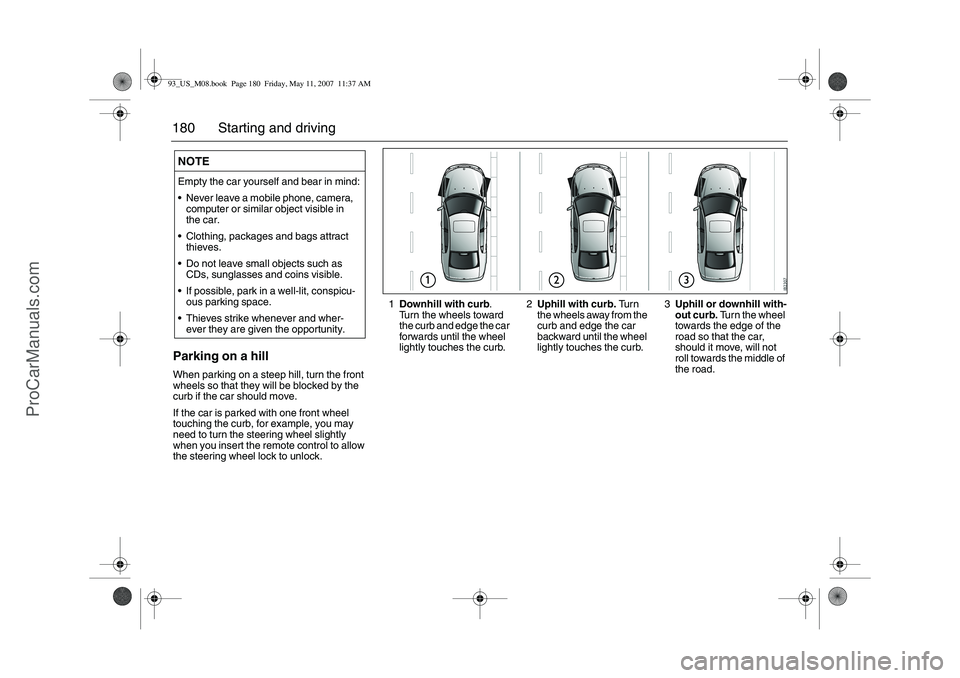
180 Starting and drivingParking on a hillWhen parking on a steep hill, turn the front
wheels so that they will be blocked by the
curb if the car should move.
If the car is parked with one front wheel
touching the curb, for example, you may
need to turn the steering wheel slightly
when you insert the remote control to allow
the steering wheel lock to unlock.NOTEEmpty the car yourself and bear in mind:
Never leave a mobile phone, camera,
computer or similar object visible in
the car.
Clothing, packages and bags attract
thieves.
Do not leave small objects such as
CDs, sunglasses and coins visible.
If possible, park in a well-lit, conspicu-
ous parking space.
Thieves strike whenever and wher-
ever they are given the opportunity.
1Downhill with curb
.
Turn the wheels toward
the curb and edge the car
forwards until the wheel
lightly touches the curb.2Uphill with curb. Tu r n
the wheels away from the
curb and edge the car
backward until the wheel
lightly touches the curb.3Uphill or downhill with-
out curb. Turn the wheel
towards the edge of the
road so that the car,
should it move, will not
roll towards the middle of
the road.
93_US_M08.book Page 180 Friday, May 11, 2007 11:37 AM
ProCarManuals.com
Page 182 of 320
182 Starting and drivingSaab Parking
Assistance3
33 3Saab Parking Assistance
Saab Parking Assistance facilitates parking
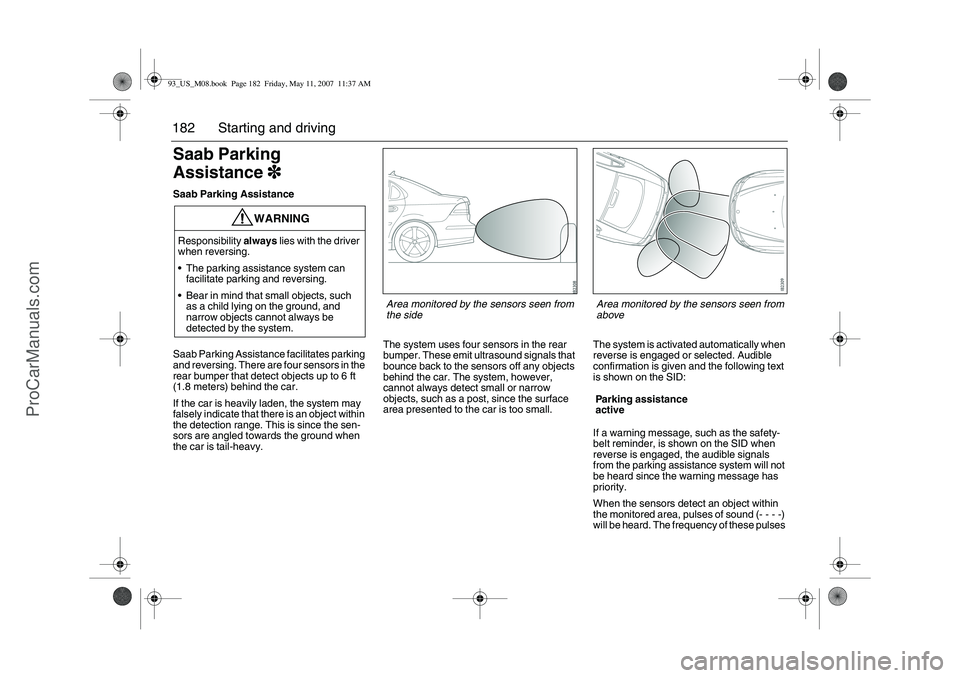
and reversing. There are four sensors in the
rear bumper that detect objects up to 6 ft
(1.8 meters) behind the car.
If the car is heavily laden, the system may
falsely indicate that there is an object within
the detection range. This is since the sen-
sors are angled towards the ground when
the car is tail-heavy.The system uses four sensors in the rear
bumper. These emit ultrasound signals that
bounce back to the sensors off any objects
behind the car. The system, however,
cannot always detect small or narrow
objects, such as a post, since the surface
area presented to the car is too small.The system is activated automatically when
reverse is engaged or selected. Audible
confirmation is given and the following text
is shown on the SID:
If a warning message, such as the safety-
belt reminder, is shown on the SID when
reverse is engaged, the audible signals
from the parking assistance system will not
be heard since the warning message has
priority.
When the sensors detect an object within
the monitored area, pulses of sound (- - - -)
will be heard. The frequency of these pulses
WARNING
Responsibility always lies with the driver
when reversing.
The parking assistance system can
facilitate parking and reversing.
Bear in mind that small objects, such
as a child lying on the ground, and
narrow objects cannot always be
detected by the system.
Parking assistance
active
Area monitored by the sensors seen from
the side
Area monitored by the sensors seen from
above
93_US_M08.book Page 182 Friday, May 11, 2007 11:37 AM
ProCarManuals.com
Page 183 of 320
183 Starting and driving
increases as the car comes closer to the
object.
If you stop the car with reverse gear
engaged, the sound pulse will stop after
2 seconds. The sound pulses will return if
you continue to reverse. If the car rolls for-
ward while reverse is engaged, the system
is silenced.
When the distance to the object is less
than 1 ft. (30 cm), a continuous tone will
be heard.
When an object is approximately 3 ft.
(90 cm) from the car, the sound pulses
change character markedly (frequency
increases). A distance of about 3 ft. (90 cm)
is suitable if you wish to load or unload the
trunk.
If the distance between an object and a
corner sensor does not change for
3 seconds, for example if you are reversing
alongside a wall, the system will switch to
monitoring straight back. The system indi-
cates if the distance to the wall decreases
again.
If a trailer is hitched up and correctly con-
nected to the trailer contact by the tow bar,
the system is automatically deactivated.Reversing alongside a wall
If the distance between an object and a
corner sensor does not change for
2 seconds, for example if you are reversing
alongside a wall, the system will switch to
monitoring straight back. The system indi-
cates if the distance to the wall decreases
again.Cars with trailer hitch
If the car has a trailer hitch and its wiring is
correctly connected to the car’s electrical
system, the Saab Parking Assistance auto-
matically compensates for the protrusion of
the tow bar.
If a camper or trailer is hitched up and the
trailer hitch wiring is correctly connected to
the car’s electrics, the system is automati-
cally deactivated.
You can temporarily deactivate the Saab
Parking Assistance as follows:
Engage reverse and press the CLR
button on the SID control panel.
The system will be reactivated the next time
you engage reverse.
NOTEThe sensors must be kept clean to func-
tion well. Ice, snow and dirt can affect
their sensitivity.
Large quantities of snow or dirt covering
the sensors can prevent the parking
assistance system from detecting any
objects.
Do not spray the sensors with a pressure
washer, as this can damage them.
93_US_M08.book Page 183 Friday, May 11, 2007 11:37 AM
ProCarManuals.com