remote control SAAB 9-3 2008 Owner's Manual
[x] Cancel search | Manufacturer: SAAB, Model Year: 2008, Model line: 9-3, Model: SAAB 9-3 2008Pages: 320, PDF Size: 56.39 MB
Page 103 of 320
103 Instruments and controls
Priority of audible informationIf two or more functions are active simulta-
neously, the most important function at that
time will be prioritized.
If, for example, the direction indicators are
active when you engage reverse, the park-
ing assistance (if fitted) will be heard instead
of the direction indicators. When reverse is
disengaged, the direction indicators will be
heard, if they are still active.
Wipers and washersWindshield wipersPosition 1 is a spring-loaded position that
will produce a single sweep of the wipers.
The wipers always return to their home posi-
tion when the ignition is turned off.
To leave the wipers positioned vertically on
the windshield, proceed as follows:
1 Switch off the engine and remove the
remote control.
2 Activate the wipers within the next
16 seconds by pressing the stalk switch
down.
When the ignition is next switched on the
wipers will return to their home position.
Changing wipers blades, see page 220.
Rain sensor3
33 3When the rain sensor is activated the follow-
ing symbol is displayed in SID .
The rain sensor automatically controls the
windshield wipers. The sensor is located on
the windshield beside the rearview mirror.
The system varies the frequency of wiping
between single sweeps and continuous
wiping, depending on the amount of pre-
cipitation.
WARNING
Turn the rain sensor off if the ignition is
ON to avoid personal injury when clearing
snow and ice from the windshield.NOTETurn the rain sensor off before washing
the car in an automatic carwash, to avoid
damaging the windshield wipers.
93_US_M08.book Page 103 Friday, May 11, 2007 11:37 AM
ProCarManuals.com
Page 121 of 320
121 Interior equipment
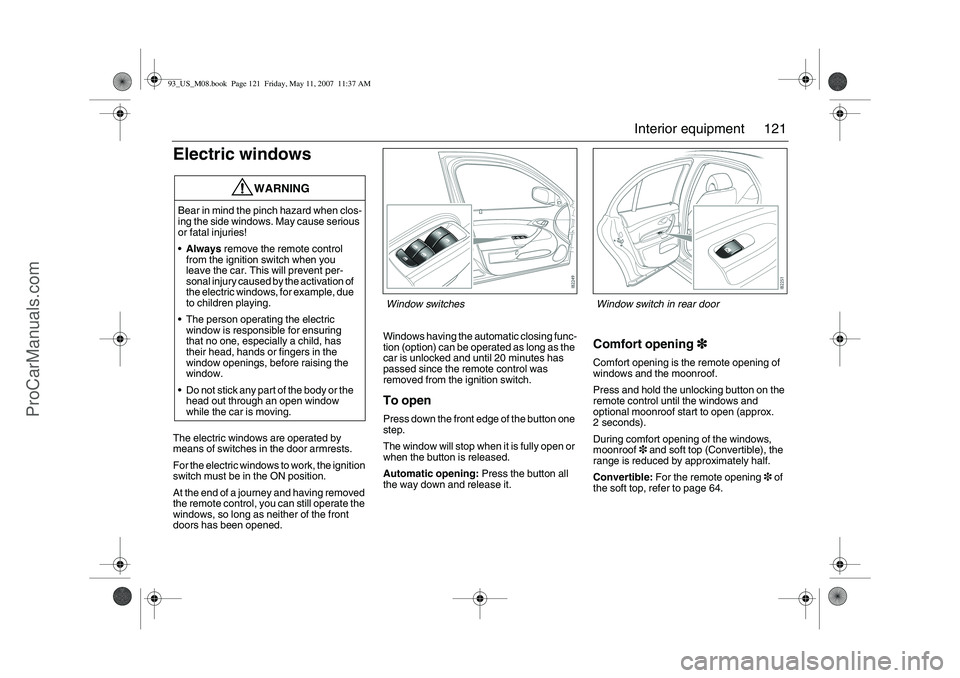
Electric windowsThe electric windows are operated by
means of switches in the door armrests.
For the electric windows to work, the ignition
switch must be in the ON position.
At the end of a journey and having removed
the remote control, you can still operate the
windows, so long as neither of the front
doors has been opened.Windows having the automatic closing func-
tion (option) can be operated as long as the
car is unlocked and until 20 minutes has
passed since the remote control was
removed from the ignition switch.
To openPress down the front edge of the button one
step.
The window will stop when it is fully open or
when the button is released.
Automatic opening: Press the button all
the way down and release it.
Comfort opening3
33 3Comfort opening is the remote opening of
windows and the moonroof.
Press and hold the unlocking button on the
remote control until the windows and
optional moonroof start to open (approx.
2 seconds).
During comfort opening of the windows,
moonroof3 and soft top (Convertible), the
range is reduced by approximately half.
Convertible: For the remote opening3 of
the soft top, refer to page 64.
WARNING
Bear in mind the pinch hazard when clos-
ing the side windows. May cause serious
or fatal injuries!
Always remove the remote control
from the ignition switch when you
leave the car. This will prevent per-
sonal injury caused by the activation of
the electric windows, for example, due
to children playing.
The person operating the electric
window is responsible for ensuring
that no one, especially a child, has
their head, hands or fingers in the
window openings, before raising the
window.
Do not stick any part of the body or the
head out through an open window
while the car is moving.
Window switches
Window switch in rear door
93_US_M08.book Page 121 Friday, May 11, 2007 11:37 AM
ProCarManuals.com
Page 126 of 320

126 Interior equipmentPreparations for first-time programming
Before programming the garage opener for
the first time, you must delete any factory
codes.
Press and hold the two outer buttons until
the indicator light begins to flash-after
20 seconds. Release both buttons. Do not
hold for longer that 30 seconds. The garage
opener is now in the train (or learning) mode
and can be programmed at any time begin-
ning with "Programming" - step 2.Programming
The garage opener can record and store the
frequencies of three different remote con-
trols.
The battery in the remote control should be
fairly new for programming to work well.
Do not repeat "Programming" - step two
to train additional devices to a second or
third button. Begin with "Programming" -
step three.
1 Turn the ignition ON.
2 Press and hold the two outer buttons
(buttons one and three) - releasing only
when the indicator light begins to flash
(after 20 seconds). Do not hold the
buttons for longer than 30 seconds and
do not repeat step two to program a
second and/or third hand-held transmit-
ter to the remaining two buttons.
3 Position the end of your hand-held trans-
mitter 1-3 inches (5-14 cm) away from
the button you wish to program while
keeping the indicator light in view. The
transmitter should face the mirror from
below or left side of the mirror.
4 Simultaneously press and hold both the
chosen and hand-held transmitter
buttons. Do not release the buttons
until step 5 has been completed.Note: Some gate operators and garage
door openers may require you to replace
this Programming Step 4 with procedures
noted in the "Gate Operator / Canadian
Programming" section.
5 After the indicator light changes from a
slow to a rapidly blinking light, release
both the mirror and hand-held transmit-
ter buttons.
6 Press and hold the just-trained button
and observe the indicator light.
If the indicator light stays on
constantly, programming is complete
and your device should activate when
the button is pressed and released.
Note: To program the remaining two but-
tons, begin with "Programming" - step
three. Do not repeat step two.93_US_M08.book Page 126 Friday, May 11, 2007 11:37 AM
ProCarManuals.com
Page 127 of 320
127 Interior equipment
If the indicator light blinks rapidly for two
seconds and then turns to a constant
light continue with "Programming"
steps 7-9 to complete the programming of
a rolling code equipped device (most
commonly a garage door opener).
7 At the garage door opener receiver
(motor-head unit) in the garage, locate
the "learn" or "smart" button. This can
usually be found where the hanging
antenna wire is attached to the
motor-head unit.
8 Firmly press and release the "learn" or
"smart" button. (The name and color of
the button may vary by manufacturer.)
Note: There are 30 seconds in which to ini-
tiate step nine.
9 Return to the vehicle and firmly press,
hold for two seconds and release the
programmed button. Repeat the
"press/hold/release" sequence a
second time, and, depending on the
brand of the garage door opener (or
other rolling code equipped device),
repeat this sequence a third time to
complete the programming process.
The garage opener should now activate
your rolling code equipped device.
Note: To program the remaining two but-
tons, begin with "Programming" - step
three. Do not repeat step two. Gate Operator / Canadian Programming
Canadian radio-frequency laws require
transmitter signals to "time-out" (or quit)
after several seconds of transmission -
which may not be long enough for the
garage opener to pick up the signal during
programming. Similar to this Canadian law,
some U.S. gate operators are designed to
"time-out" in the same manner.
If you live in Canada or you are having diffi-
culties programming a gate operator by
using the "Programming" procedures
(regardless of where you live), replace
"Programming " step 4 with the following:
Note: If programming a garage door opener
or gate operator, it is advised to unplug the
device during the "cycling" process to pre-
vent possible overheating.
Continue to press and hold the button while
you press and release - every two sec-
onds ("cycle") your hand-held transmitter
until the frequency signal has successfully
been accepted by the garage opener. (The
indicator light will flash slowly and then rap-
idly.)
Proceed with "Programming" step five to
complete.Reprogramming a single button
To program a device to the garage opener
using a button previously trained, follow
these steps:
1 Press and hold the desired button. DO
NOT release the button.
2 The indicator light will begin to flash after
20 seconds. Without releasing the
button, proceed with "Programming" -
step 3.
NOTESwitch off the power supply to the garage
door or gate (or park the car beyond the
range of the remote control) while pro-
gramming using the "cycling" method to
prevent damaging the electrical motor.
93_US_M08.book Page 127 Friday, May 11, 2007 11:37 AM
ProCarManuals.com
Page 130 of 320
130 Interior equipmentMoonroof3
33 3The moonroof is operated by the control in
the roof console. For the moonroof to work,
the ignition switch must be in the ON posi-
tion.
If the car is equipped with windows having
the automatic closing function, the moon-
roof can be opened and closed so long as
the car is unlocked until 20 minutes has
passed since the remote control was
removed from the ignition switch.
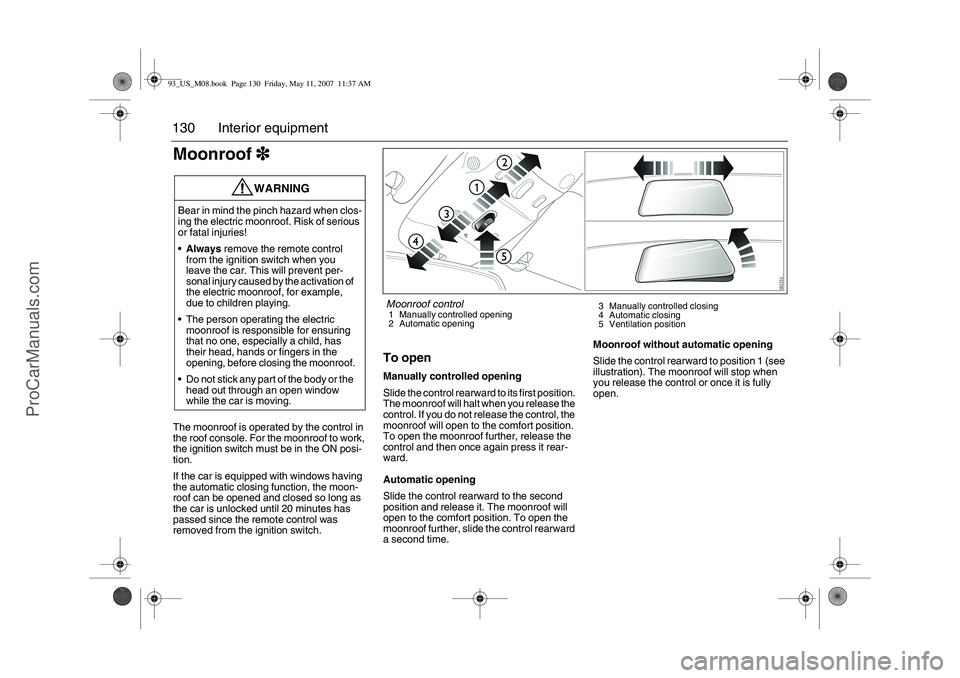
To openManually controlled opening
Slide the control rearward to its first position.
The moonroof will halt when you release the
control. If you do not release the control, the
moonroof will open to the comfort position.
To open the moonroof further, release the
control and then once again press it rear-
ward.
Automatic opening
Slide the control rearward to the second
position and release it. The moonroof will
open to the comfort position. To open the
moonroof further, slide the control rearward
a second time.Moonroof without automatic opening
Slide the control rearward to position 1 (see
illustration). The moonroof will stop when
you release the control or once it is fully
open.
WARNING
Bear in mind the pinch hazard when clos-
ing the electric moonroof. Risk of serious
or fatal injuries!
Always remove the remote control
from the ignition switch when you
leave the car. This will prevent per-
sonal injury caused by the activation of
the electric moonroof, for example,
due to children playing.
The person operating the electric
moonroof is responsible for ensuring
that no one, especially a child, has
their head, hands or fingers in the
opening, before closing the moonroof.
Do not stick any part of the body or the
head out through an open window
while the car is moving.
Moonroof control1 Manually controlled opening
2 Automatic opening3 Manually controlled closing
4 Automatic closing
5 Ventilation position
93_US_M08.book Page 130 Friday, May 11, 2007 11:37 AM
ProCarManuals.com
Page 131 of 320

131 Interior equipment
To closeManually controlled closing
Slide the control forward to its first position.
The moonroof will halt when you release the
control.
Automatic closing3
33 3
Slide the control forward to its second posi-
tion and release it. The moonroof will close
fully.
The moonroof pinch protection halts closing
and opens the moonroof slightly if some-
thing obstructs closing.
Moonroof without automatic closing3
33 3
Slide the control forward to position 3 (see
illustration). The moonroof will stop when
you release the control or once it is fully
closed.Ventilation position (rear edge of moon-
roof open)
To open – press in the control.
To close – slide the control forward to the
second position.
It is also possible to select the ventilation
position when the moonroof is open by
pressing in the control. The moonroof will
then close automatically. Press the control
once more to open the moonroof to its ven-
tilation position.
If you wish to open the moonroof fully from
the ventilation position, you must first close
it (slide the control forward). You can then
slide the control rearward to open the moon-
roof.
The moonroof incorporates an interior,
manual, sliding sun blind.
Moonroof without automatic closing3
33 3
To open – press the control up.
To c l o s e – slide the control forward to
position 3.
Comfort opening3
33 3Comfort opening is the remote opening of
windows and the moonroof.
Press and hold the unlocking button on the
remote control until the windows and
optional moonroof start to open (approx.
2 seconds).
During comfort opening of the windows,
moonroof (option) and soft top, the range is
reduced by approximately half.
If the moonroof is in the ventilation position,
it will not open.
Convertible: For the remote opening of the
soft top, refer to page 64.
WARNING
Exercise great care when closing the
moonroof to ensure that nothing gets
trapped.93_US_M08.book Page 131 Friday, May 11, 2007 11:37 AM
ProCarManuals.com
Page 133 of 320

133 Interior equipment
Interior lightingThe interior lighting consists of one front and
one rear roof light, floor lighting, and cour-
tesy lights in the doors (certain variants
only). The light switch for the interior lighting
is located on the roof console by the rear-
view mirror.When the switch is in the mid-position
(door-activated), the interior lighting will
come on:
When the car is unlocked.
When a door is opened and the ignition is
OFF.
When the remote control is removed from
the ignition switch.
The lighting goes out:
When the car is locked.
When the ignition is turned on.
Approx. 20 seconds after closing all
doors.
The lights are dimmed out gradually.If a door is left open and the light switch is in
position 2 or 3 and the ignition is OFF, the
interior lighting will be switched off automat-
ically after 20 minutes to save the battery.
The glove box lighting is switched on and off
automatically when the glove box is opened
and closed.1 Interior lighting always off
2 Interior lighting controlled by the doors
3 Interior lighting on continuously
Rear lighting1 Reading lights
2 Roof light
93_US_M08.book Page 133 Friday, May 11, 2007 11:37 AM
ProCarManuals.com
Page 152 of 320

152 Starting and drivingIgnition switchThe ignition switch is located on the center
console between the front seats. In cars
with automatic transmission, the remote
control can only be removed when the
selector lever is in position P.
To allow the various systems in the car time
to register that the remote control has been
inserted into the ignition switch, do not turn
the remote control for roughly half a second.
LOCK positionThe parking lights, hazard warning lights
and interior lighting can be turned on.
Cars with automatic transmission: Move
the gear lever to P.
The gear lever is locked in position. This is
the only position in which the remote control
can be removed.
Cars with manual transmission: The
remote control can be removed regardless
of the position of the gear lever.
NOTETake care not to spill drinks or to drop
crumbs over the ignition switch. If dirt or
liquid gets into it, the switch may not
operate properly.
If snow from clothing falls into the ignition
switch and melts, the ignition switch can
seize (freeze). Brush snow off clothing
before getting into the car.
WARNING
Always remove the remote control
before leaving children unattended in
the car.
Apply the parking brake before remov-
ing the remote control.
Never remove the remote control
while the car is moving. This will acti-
vate the steering wheel lock and make
it impossible to steer the car.
93_US_M08.book Page 152 Friday, May 11, 2007 11:37 AM
ProCarManuals.com
Page 153 of 320

153 Starting and driving
OFF positionParts of the electrical system are operative.
Do not leave the remote control in the
OFF position with the engine not running
as this could cause the battery to run flat
in a matter of hours.
Cars with automatic transmission: The
gear lever is not locked. See also page 166.
If the ignition switch is turned from ON to
OFF before the car is stationary then turning
to LOCK may not be possible. In which case
turn the ignition switch to the ON position
until the ABS lamp goes out,
approx. 2 seconds. Following which, turn it
back to OFF.
ON positionThe entire electrical system is operative.
Do not leave the remote control in the ON
position when the engine is not running.
Turn the ignition switch to the OFF position
to disconnect the electrical system.
When you turn the ignition switch to ON,
some indicator and warning lights will come
on in the main instrument panel. These
should go out after about 3 seconds.
ST - starter positionThe starter motor operates (automatic
transmission: selector lever must be in P or
N) when the ignition switch is turned to this
position. When released, the ignition switch
will spring back to the ON position.
The car has an electronic restart lock. If the
engine fails to start, the ignition switch must
first be turned back to a position between
OFF and LOCK before the starter motor can
be operated again.
93_US_M08.book Page 153 Friday, May 11, 2007 11:37 AM
ProCarManuals.com
Page 154 of 320

154 Starting and drivingSteering wheel lockThe steering wheel lock is electronic. The
lock engages when the remote control is
removed from the ignition and unlocks when
the remote control is inserted. A click can be
heard when the steering wheel lock locks
and unlocks.
If the car is parked with one front wheel
touching the curb, for example, you may
need to turn the steering wheel slightly
when you insert the remote control to allow
the steering wheel lock to unlock. If you do
not succeed on first attempt you must
remove the remote control before trying
again. Turn the steering wheel and insert
the remote control into the ignition switch.
If the steering wheel lock does not disen-
gage it will not be possible to turn the remote
control in the ignition switch.
The following message is shown on the SID:If a fault arises affecting the steering wheel
lock, the following message will be
displayed on the SID:
If the steering wheel lock malfunctions while
the remote control is in the ignition switch,
this may prevent the removal of the remote
control or prevent the car from being
restarted once the engine has been
switched off.
If you have to leave the car, lock the car by
pressing down the lock buttons on the
doors. Lock the front left door from outside
with the traditional key (see page 50). The
car is now locked but the alarm is inactive.
Starting the engine
Pull out key, turn
steering wheel. Restart.
Steering lock malfunc.
Make a safe stop.
WARNING
When starting the engine:
–Sit down in the driver’s seat.
–Depress the clutch pedal fully (M/T). If
the gear lever is not in the neutral posi-
tion, the clutch pedal must be fully
depressed or the car will jump for-
wards or backwards, which may
cause a crash.
–Never start the car from outside the
vehicle, e.g. through a window that is
down. This could lead to serious per-
sonal injury.
Cars with automatic transmission:
select position P to remove the ignition
key. The key can only be removed in
this gear position.
Carbon monoxide (CO) is a colorless,
odorless, poisonous gas. Be alert to
the danger of CO – always open the
garage doors before starting the
engine in the garage.
Do not rest or sleep in the car when
parked with the engine running. There
is a risk of depressing the accelerator
which could lead to engine damage.
There is also a danger of CO poison-
ing if the exhaust system is leaking.
93_US_M08.book Page 154 Friday, May 11, 2007 11:37 AM
ProCarManuals.com