key SAAB 9-5 2000 User Guide
[x] Cancel search | Manufacturer: SAAB, Model Year: 2000, Model line: 9-5, Model: SAAB 9-5 2000Pages: 256, PDF Size: 14.24 MB
Page 42 of 256

42 SecurityOverview of LED signals and SID messagesSome signals may differ between model variants for different
countries.Status LED signal
Activation (during 10-second delay). Comes on for 10 seconds.
Alarm activated (after delay). Flashes once every third
second.
Deactivation. Comes on for 2 seconds.
Alarm not activated. Off.
Door, trunk lid/tailgate or hood open
or opened during delay period.Flashes three times per sec-
ond for 10 seconds.
Unlocking the trunk lid/tailgate. Flashes three times per sec-
ond for 10 seconds.
Closing of door, trunk lid/tailgate or
hood after delay period.Comes on for 10 seconds.
Car immobilized but not locked.
Car alarm not activated.Flashes twice at three sec-
onds intervals.
SID message Reason/action
SERVICE THEFT ALARM Probably a fault in one of the sensors
or the alarm siren.
Have the car checked by an autho-
rized Saab dealer.
KEY NOT ACCEPTED Fault in key transmitter or in igni-
tion-switch receiver.
Turn ignition switch to ON and press
the unlock button on the remote con-
trol. Start the engine.
Have the car checked by an autho-
rized Saab dealer.
REPLACE KEY BATTERY Fit a new battery in the remote con-
trol, see page 35.
DOOR ALARM ONLY Window-glass sensor disabled.
FULL THEFT ALARM Window-glass sensor in circuit.
REMOTE KEY
TRANSPONDRTurn the ignition key to position ON
and then press the button for open-
ing the trunk lid. SID displays the
number of remote controls and
transmitters (transponders) coded to
the car.
ProCarManuals.com
Page 47 of 256
47 Instruments and controls
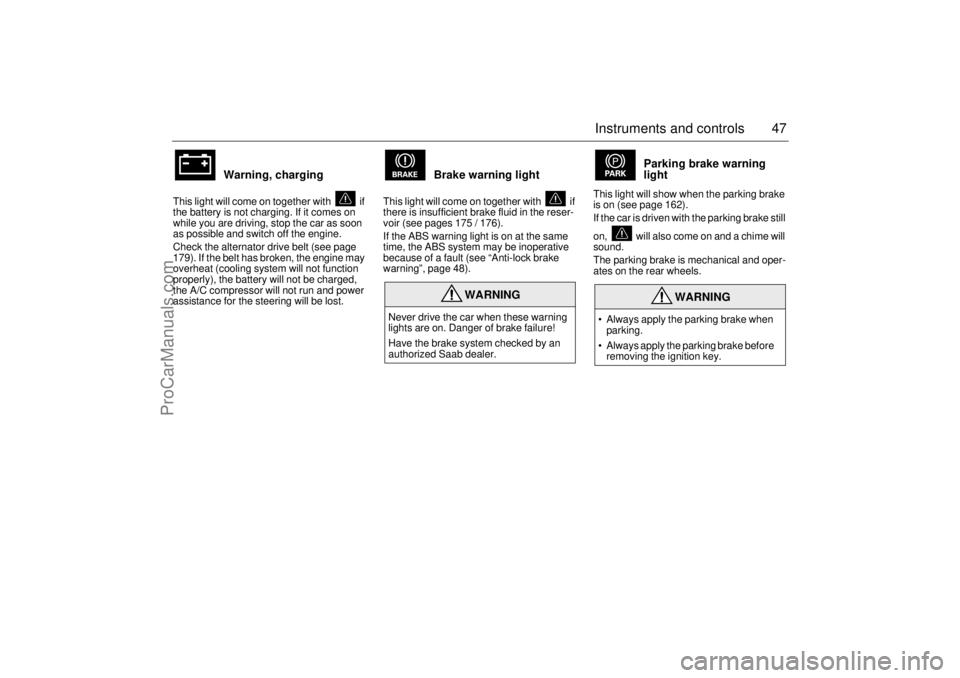
Warning, charging
This light will come on together with if
the battery is not charging. If it comes on
while you are driving, stop the car as soon
as possible and switch off the engine.
Check the alternator drive belt (see page
179). If the belt has broken, the engine may
overheat (cooling system will not function
properly), the battery will not be charged,
the A/C compressor will not run and power
assistance for the steering will be lost.
Brake warning light
This light will come on together with if
there is insufficient brake fluid in the reser-
voir (see pages 175 / 176).
If the ABS warning light is on at the same
time, the ABS system may be inoperative
because of a fault (see “Anti-lock brake
warning”, page 48).
Parking brake warning
light
This light will show when the parking brake
is on (see page 162).
If the car is driven with the parking brake still
on, will also come on and a chime will
sound.
The parking brake is mechanical and oper-
ates on the rear wheels.
WARNING
Never drive the car when these warning
lights are on. Danger of brake failure!
Have the brake system checked by an
authorized Saab dealer.
WARNING
Always apply the parking brake when
parking.
Always apply the parking brake before
removing the ignition key.
ProCarManuals.com
Page 48 of 256
48 Instruments and controls
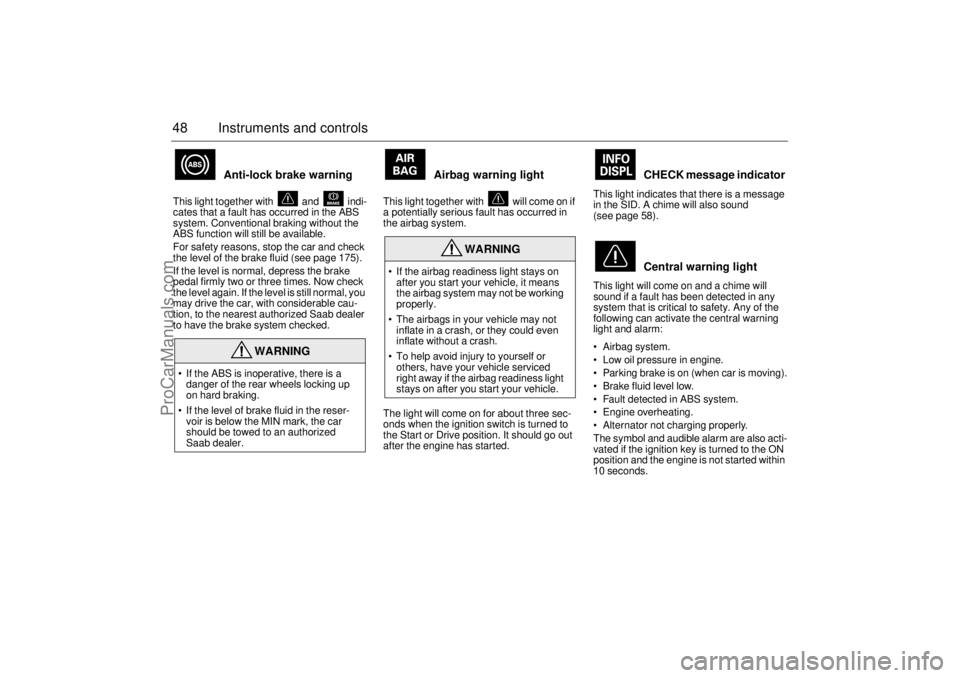
Anti-lock brake warning
This light together with and indi-
cates that a fault has occurred in the ABS
system. Conventional braking without the
ABS function will still be available.
For safety reasons, stop the car and check
the level of the brake fluid (see page 175).
If the level is normal, depress the brake
pedal firmly two or three times. Now check
the level again. If the level is still normal, you
may drive the car, with considerable cau-
tion, to the nearest authorized Saab dealer
to have the brake system checked.
Airbag warning light
This light together with will come on if
a potentially serious fault has occurred in
the airbag system.
The light will come on for about three sec-
onds when the ignition switch is turned to
the Start or Drive position. It should go out
after the engine has started.
CHECK message indicator
This light indicates that there is a message
in the SID. A chime will also sound
(see page 58).
Central warning light
This light will come on and a chime will
sound if a fault has been detected in any
system that is critical to safety. Any of the
following can activate the central warning
light and alarm:
Airbag system.
Low oil pressure in engine.
Parking brake is on (when car is moving).
Brake fluid level low.
Fault detected in ABS system.
Engine overheating.
Alternator not charging properly.
The symbol and audible alarm are also acti-
vated if the ignition key is turned to the ON
position and the engine is not started within
10 seconds.
WARNING
If the ABS is inoperative, there is a
danger of the rear wheels locking up
on hard braking.
If the level of brake fluid in the reser-
voir is below the MIN mark, the car
should be towed to an authorized
Saab dealer.
WARNING
If the airbag readiness light stays on
after you start your vehicle, it means
the airbag system may not be working
properly.
The airbags in your vehicle may not
inflate in a crash, or they could even
inflate without a crash.
To help avoid injury to yourself or
others, have your vehicle serviced
right away if the airbag readiness light
stays on after you start your vehicle.
ProCarManuals.com
Page 58 of 256

58 Instruments and controlsResetting values
To reset the values, press CLEAR for at
least four seconds.
The following functions will be reset
simultaneously:
Estimated range on remaining fuel
(function based on a fuel consumption of
28 mpg).
Average fuel consumption.
Average speed.
Arrival time (function based on current
speed).
Programmed values for DIST, ALARM and
SPD W will not be reset (see the respective
function).
CHECK messages When the engine is started, CHECKING will
appear on the display for about four sec-
onds, while the SID checks are being per-
formed.
When a CHECK message is generated
while the car is being driven, a chime will
sound, INFO DISPL will come on on the
main instrument panel, and the message
will appear on the SID. The number of mes-
sages that can be displayed by the SID
varies with the specification of the car.
If more than one CHECK message has
been generated, the
+ symbol will appear to
the left of the text on the display. The mes-
sages appear in order of priority.
If a new fault occurs while another message
is being displayed, the message relating to
the new one will appear for 10 seconds,
after which the display will return to the ear-
lier one.
Press CLEAR once to acknowledge a mes-
sage, whereupon it will be cleared from the
display. It will not be displayed again before
the ignition has been switched off and then
on again. The following messages may be displayed:
Message See
page
FRONT LIGHT FAILURE 182
REAR LIGHT FAILURE 185
FOG LIGHT FAILURE 186
BRAKE LIGHT FAILURE 185
TEST BRAKE LIGHTS
1)
185
WASHER FLUID LEVEL LOW 181
FILL COOLANT FLUID 174
REPLACE KEY BATTERY 35
KEY NOT ACCEPTED 42
SERVICE THEFT ALARM 42
TRANSMISSION OVERHEAT-
ING 141
TIGHTEN FUEL FILLER CAP 134
TIME FOR SERVICE
2)
218
ProCarManuals.com
Page 61 of 256
61 Instruments and controls
Switches
Daytime running lights
The parking lights and daytime running
lights come on automatically when the igni-
tion switch is ON.
Note to owners in the U.S.: If you do not
want Daytime Running Lights, this feature
can be disconnected: switch off the engine
and remove fuse No. 35 (see page 194).
Note to owners in Canada: Daytime Run-
ning Lights must not be disconnected as
they are a Canadian Federal legal require-
ment.
Parking lights
The parking lights can be switched on
regardless of the position of the ignition
switch.
Note:
The lighting switch must be in parking or
headlight position (low beam position only)
to operate the fog lights (see page 63).
Headlights
The headlights come on automatically when
the ignition is ON and go off when the igni-
tion switch is turned to the LOCK position.
The parking lights, however, can be on
when the ignition switch is in the LOCK posi-
tion.
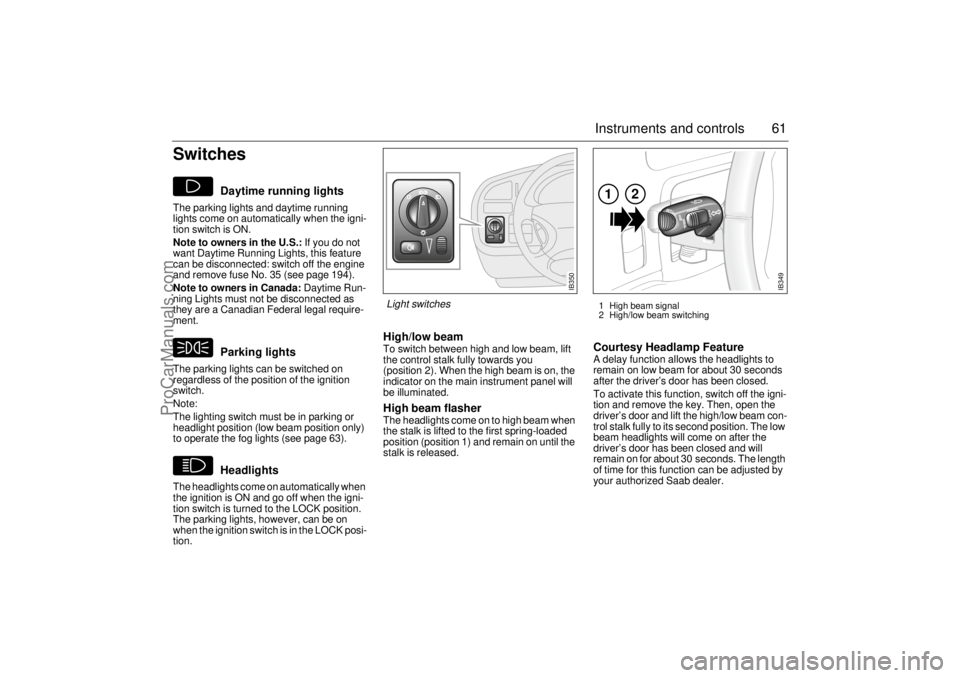
High/low beamTo switch between high and low beam, lift
the control stalk fully towards you
(position 2). When the high beam is on, the
indicator on the main instrument panel will
be illuminated.High beam flasher The headlights come on to high beam when
the stalk is lifted to the first spring-loaded
position (position 1) and remain on until the
stalk is released.
Courtesy Headlamp FeatureA delay function allows the headlights to
remain on low beam for about 30 seconds
after the driver’s door has been closed.
To activate this function, switch off the igni-
tion and remove the key. Then, open the
driver’s door and lift the high/low beam con-
trol stalk fully to its second position. The low
beam headlights will come on after the
driver’s door has been closed and will
remain on for about 30 seconds. The length
of time for this function can be adjusted by
your authorized Saab dealer.
IB349
1
2
1 High beam signal
2 High/low beam switching
IB350
Light switches
ProCarManuals.com
Page 64 of 256
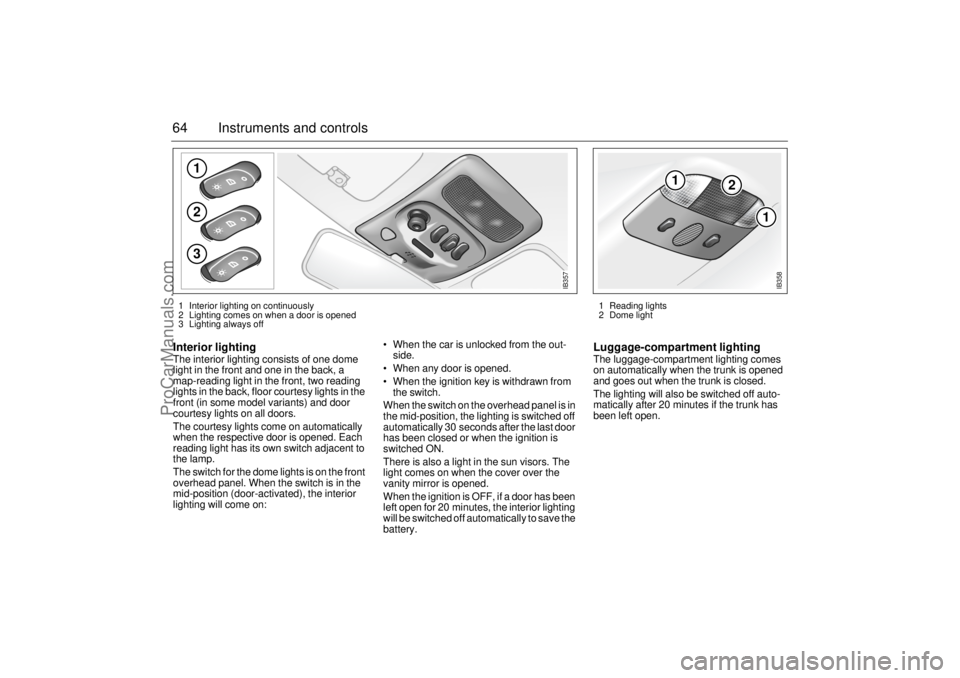
64 Instruments and controlsInterior lighting The interior lighting consists of one dome
light in the front and one in the back, a
map-reading light in the front, two reading
lights in the back, floor courtesy lights in the
front (in some model variants) and door
courtesy lights on all doors.
The courtesy lights come on automatically
when the respective door is opened. Each
reading light has its own switch adjacent to
the lamp.
The switch for the dome lights is on the front
overhead panel. When the switch is in the
mid-position (door-activated), the interior
lighting will come on: When the car is unlocked from the out-
side.
When any door is opened.
When the ignition key is withdrawn from
the switch.
When the switch on the overhead panel is in
the mid-position, the lighting is switched off
automatically 30 seconds after the last door
has been closed or when the ignition is
switched ON.
There is also a light in the sun visors. The
light comes on when the cover over the
vanity mirror is opened.
When the ignition is OFF, if a door has been
left open for 20 minutes, the interior lighting
will be switched off automatically to save the
battery.
Luggage-compartment lightingThe luggage-compartment lighting comes
on automatically when the trunk is opened
and goes out when the trunk is closed.
The lighting will also be switched off auto-
matically after 20 minutes if the trunk has
been left open.
123
IB357
1 Interior lighting on continuously
2 Lighting comes on when a door is opened
3 Lighting always off
1
2
1
IB358
1 Reading lights
2 Dome light
ProCarManuals.com
Page 79 of 256
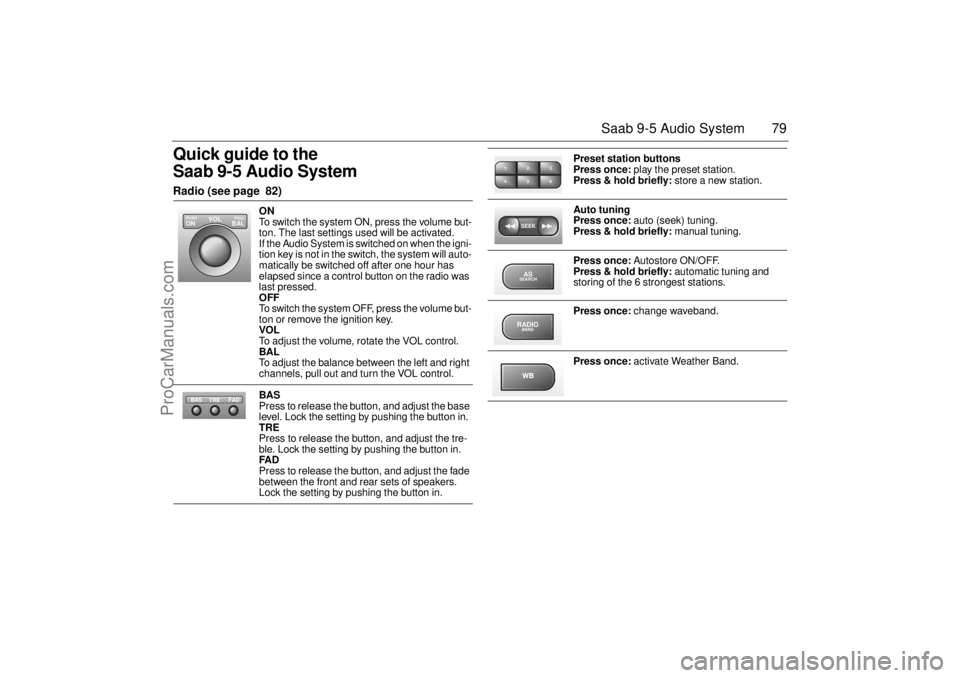
79 Saab 9-5 Audio System
Quick guide to the
Saab 9-5 Audio System Radio (see page 82)
ON
To switch the system ON, press the volume but-
ton. The last settings used will be activated.
If the Audio System is switched on when the igni-
tion key is not in the switch, the system will auto-
matically be switched off after one hour has
elapsed since a control button on the radio was
last pressed.
OFF
To switch the system OFF, press the volume but-
ton or remove the ignition key.
VOL
To adjust the volume, rotate the VOL control.
BAL
To adjust the balance between the left and right
channels, pull out and turn the VOL control.
BAS
Press to release the button, and adjust the base
level. Lock the setting by pushing the button in.
TRE
Press to release the button, and adjust the tre-
ble. Lock the setting by pushing the button in.
FAD
Press to release the button, and adjust the fade
between the front and rear sets of speakers.
Lock the setting by pushing the button in.
VOL
BAL ON
PULL PUSH
TREFAD BAS
Preset station buttons
Press once: play the preset station.
Press & hold briefly: store a new station.
Auto tuning
Press once: auto (seek) tuning.
Press & hold briefly: manual tuning.
Press once: Autostore ON/OFF.
Press & hold briefly: automatic tuning and
storing of the 6 strongest stations.
Press once: change waveband.
Press once: activate Weather Band.
2 13
5 46SEEKASSEARCHRADIOBAND
ProCarManuals.com
Page 81 of 256
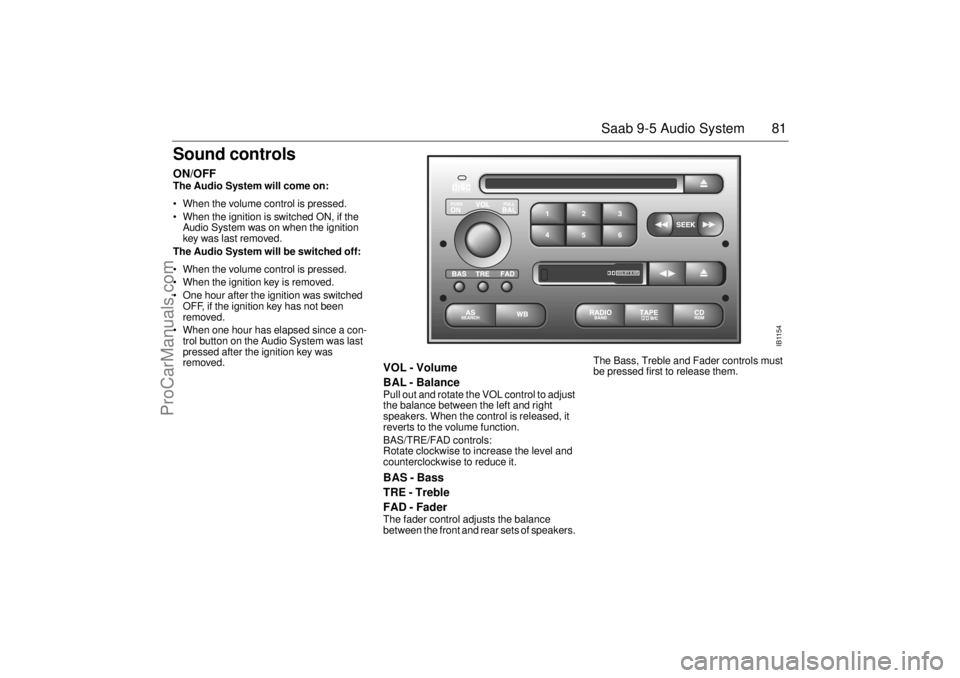
81 Saab 9-5 Audio System
Sound controlsON/OFF The Audio System will come on:
• When the volume control is pressed.
When the ignition is switched ON, if the
Audio System was on when the ignition
key was last removed.
The Audio System will be switched off:
When the volume control is pressed.
When the ignition key is removed.
One hour after the ignition was switched
OFF, if the ignition key has not been
removed.
When one hour has elapsed since a con-
trol button on the Audio System was last
pressed after the ignition key was
removed.
VOL - Volume
BAL - Balance Pull out and rotate the VOL control to adjust
the balance between the left and right
speakers. When the control is released, it
reverts to the volume function.
BAS/TRE/FAD controls:
Rotate clockwise to increase the level and
counterclockwise to reduce it. BAS - Bass
TRE - Treble
FAD - Fader The fader control adjusts the balance
between the front and rear sets of speakers. The Bass, Treble and Fader controls must
be pressed first to release them.
IB1154
DOLBY B NR
ProCarManuals.com
Page 110 of 256
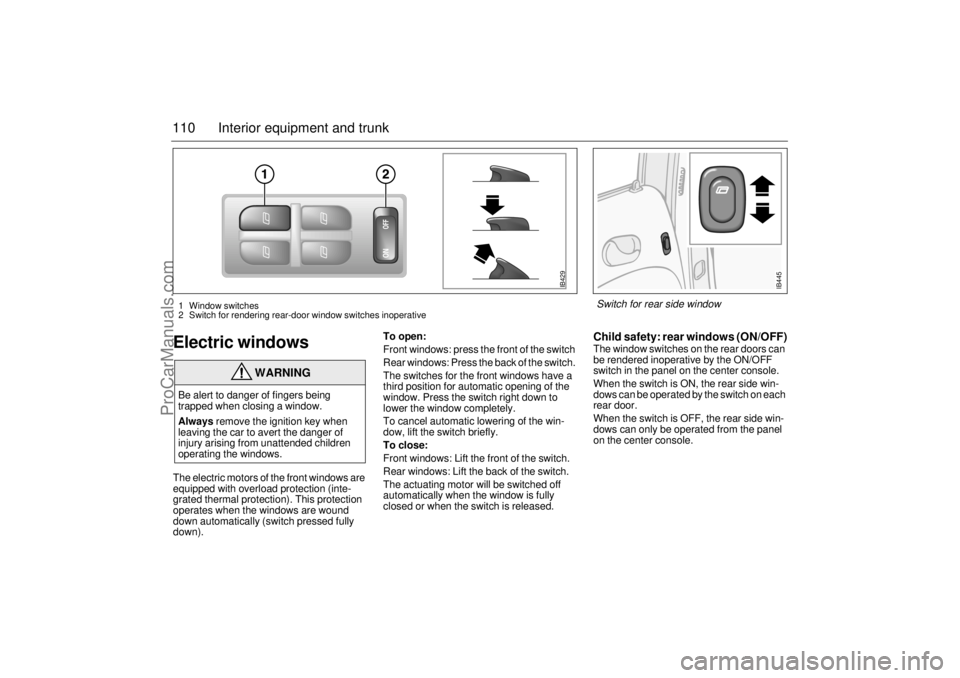
110 Interior equipment and trunkElectric windowsThe electric motors of the front windows are
equipped with overload protection (inte-
grated thermal protection). This protection
operates when the windows are wound
down automatically (switch pressed fully
down).To open:
Front windows: press the front of the switch
Rear windows: Press the back of the switch.
The switches for the front windows have a
third position for automatic opening of the
window. Press the switch right down to
lower the window completely.
To cancel automatic lowering of the win-
dow, lift the switch briefly.
To close:
Front windows: Lift the front of the switch.
Rear windows: Lift the back of the switch.
The actuating motor will be switched off
automatically when the window is fully
closed or when the switch is released.
Child safety: rear windows (ON/OFF)The window switches on the rear doors can
be rendered inoperative by the ON/OFF
switch in the panel on the center console.
When the switch is ON, the rear side win-
dows can be operated by the switch on each
rear door.
When the switch is OFF, the rear side win-
dows can only be operated from the panel
on the center console.
WARNING
Be alert to danger of fingers being
trapped when closing a window.
Always remove the ignition key when
leaving the car to avert the danger of
injury arising from unattended children
operating the windows.
IB429
1 Window switches
2 Switch for rendering rear-door window switches inoperative
IB445
Switch for rear side window
ProCarManuals.com
Page 111 of 256
111 Interior equipment and trunk
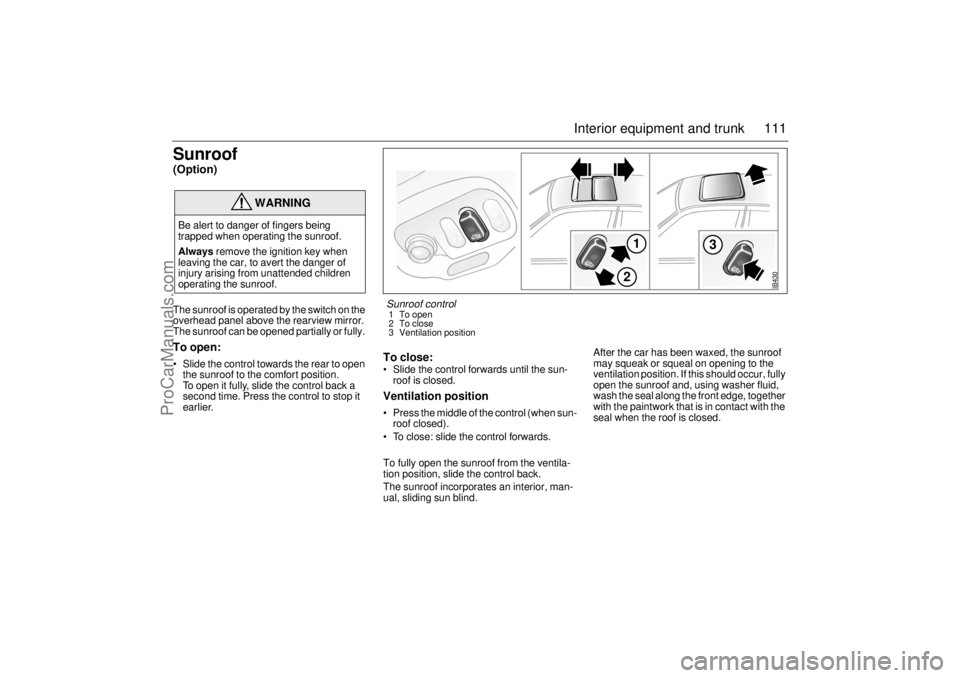
Sunroof (Option) The sunroof is operated by the switch on the
overhead panel above the rearview mirror.
The sunroof can be opened partially or fully. To open: Slide the control towards the rear to open
the sunroof to the comfort position.
To open it fully, slide the control back a
second time. Press the control to stop it
earlier.
To close: Slide the control forwards until the sun-
roof is closed. Ventilation position Press the middle of the control (when sun-
roof closed).
To close: slide the control forwards.
To fully open the sunroof from the ventila-
tion position, slide the control back.
The sunroof incorporates an interior, man-
ual, sliding sun blind. After the car has been waxed, the sunroof
may squeak or squeal on opening to the
ventilation position. If this should occur, fully
open the sunroof and, using washer fluid,
wash the seal along the front edge, together
with the paintwork that is in contact with the
seal when the roof is closed.
WARNING
Be alert to danger of fingers being
trapped when operating the sunroof.
Always remove the ignition key when
leaving the car, to avert the danger of
injury arising from unattended children
operating the sunroof.
IB430
1
3
2
Sunroof control 1 To open
2 To close
3 Ventilation position
ProCarManuals.com