automatic SAAB 9-5 2000 Owner's Manual
[x] Cancel search | Manufacturer: SAAB, Model Year: 2000, Model line: 9-5, Model: SAAB 9-5 2000Pages: 256, PDF Size: 14.24 MB
Page 67 of 256
67 Instruments and controls
Automatic climate
control (ACC) The ACC system automatically works to
maintain the desired temperature inside the
car.
The system will achieve the desired temper-
ature in the quickest possible way. Note that
selecting a higher or lower temperature than
that desired will not speed up the process.
For the ACC system to be most effective, all
windows (and sunroof, if fitted) should be
closed.
Fresh air for the cabin is drawn in through an
inlet grille adjacent to the bottom edge of the
windshield. The air flows through a filter
upstream of the ACC system before deliv-
ery to the cabin. Cabin air is evacuated via
openings in the rear parcel shelf and then
through outlets on either side of the car
behind the rear bumper.
The incoming air is treated in three stages:
first it passes through a filter; it is then dehu-
midified and cooled and, finally, if required,
heated.
The ACC system also includes a charcoal
filter which further improves the quality of
the cabin air. This filter is a special benefit to
allergy sufferers, as it reduces concentra-
tions of noxious substances, such as ben-
zene and toluene. To reduce the likelihood of misting on the
insides of the windows, the glass should be
cleaned with a quality window cleaner. How
often this will need to be done depends on
how clean the air is – if there are smokers in
the car, cleaning will need to be done more
frequently.
AUTO
ECON OFF
AUTO
ºF
ºC
ºF
ºC
ECON OFF
IB367
9
1
5
4
23
68
7
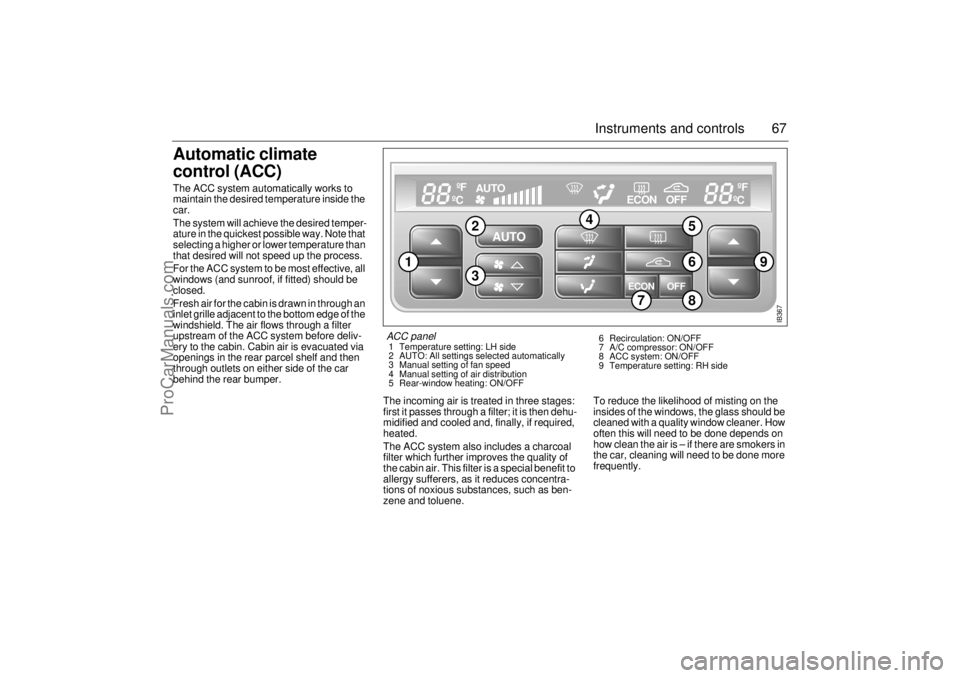
ACC panel 1 Temperature setting: LH side
2 AUTO: All settings selected automatically
3 Manual setting of fan speed
4 Manual setting of air distribution
5 Rear-window heating: ON/OFF 6 Recirculation: ON/OFF
7 A/C compressor: ON/OFF
8 ACC system: ON/OFF
9 Temperature setting: RH side
ProCarManuals.com
Page 70 of 256
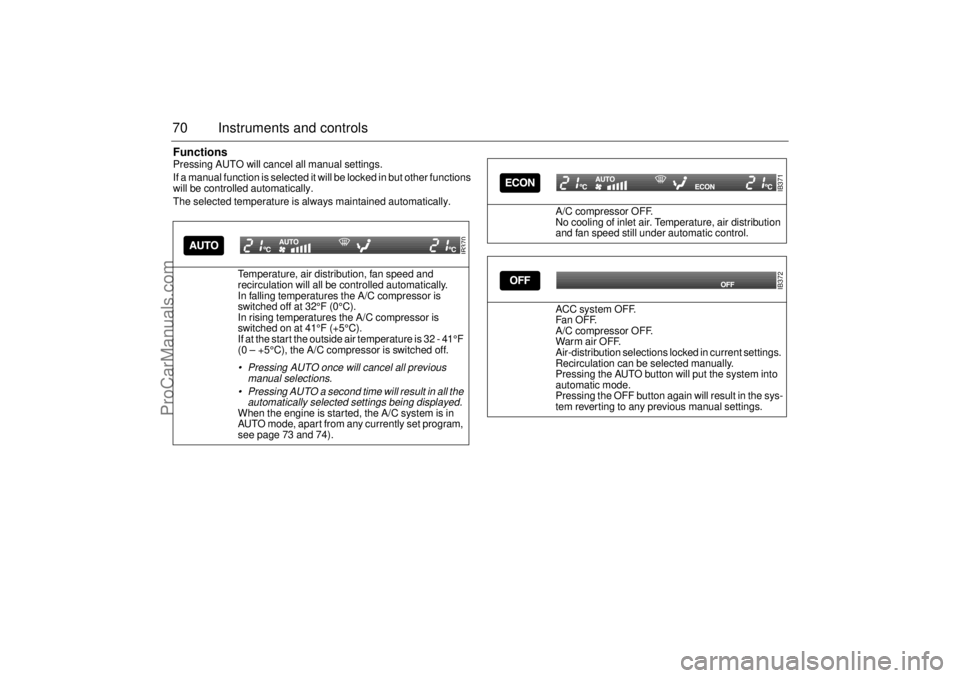
70 Instruments and controlsFunctionsPressing AUTO will cancel all manual settings.
If a manual function is selected it will be locked in but other functions
will be controlled automatically.
The selected temperature is always maintained automatically.
Temperature, air distribution, fan speed and
recirculation will all be controlled automatically.
In falling temperatures the A/C compressor is
switched off at 32°F (0°C).
In rising temperatures the A/C compressor is
switched on at 41°F (+5°C).
If at the start the outside air temperature is 32 - 41°F
(0 – +5°C), the A/C compressor is switched off.
Pressing AUTO once will cancel all previous
manual selections.
Pressing AUTO a second time will result in all the
automatically selected settings being displayed. When the engine is started, the A/C system is in
AUTO mode, apart from any currently set program,
see page 73 and 74).
IB370
A/C compressor OFF.
No cooling of inlet air. Temperature, air distribution
and fan speed still under automatic control.
ACC system OFF.
Fa n OF F.
A/C compressor OFF.
War m air OFF.
Air-distribution selections locked in current settings.
Recirculation can be selected manually.
Pressing the AUTO button will put the system into
automatic mode.
Pressing the OFF button again will result in the sys-
tem reverting to any previous manual settings.
IB371IB372
ProCarManuals.com
Page 71 of 256
71 Instruments and controls
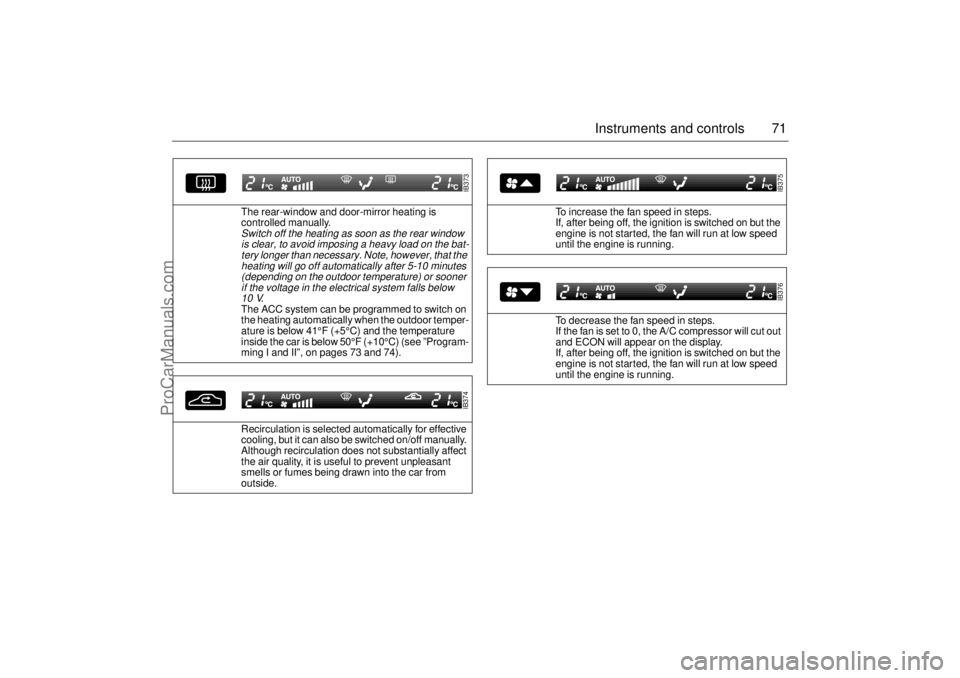
The rear-window and door-mirror heating is
controlled manually. Switch off the heating as soon as the rear window
is clear, to avoid imposing a heavy load on the bat-
tery longer than necessary. Note, however, that the
heating will go off automatically after 5-10 minutes
(depending on the outdoor temperature) or sooner
if the voltage in the electrical system falls below
10 V
.
The ACC system can be programmed to switch on
the heating automatically when the outdoor temper-
ature is below 41°F (+5°C) and the temperature
inside the car is below 50°F (+10°C) (see ”Program-
ming I and II”, on pages 73 and 74).
Recirculation is selected automatically for effective
cooling, but it can also be switched on/off manually.
Although recirculation does not substantially affect
the air quality, it is useful to prevent unpleasant
smells or fumes being drawn into the car from
outside.
IB373IB374
To increase the fan speed in steps.
If, after being off, the ignition is switched on but the
engine is not started, the fan will run at low speed
until the engine is running.
To decrease the fan speed in steps.
If the fan is set to 0, the A/C compressor will cut out
and ECON will appear on the display.
If, after being off, the ignition is switched on but the
engine is not started, the fan will run at low speed
until the engine is running.
IB375IB376
ProCarManuals.com
Page 72 of 256
72 Instruments and controlsAir distribution
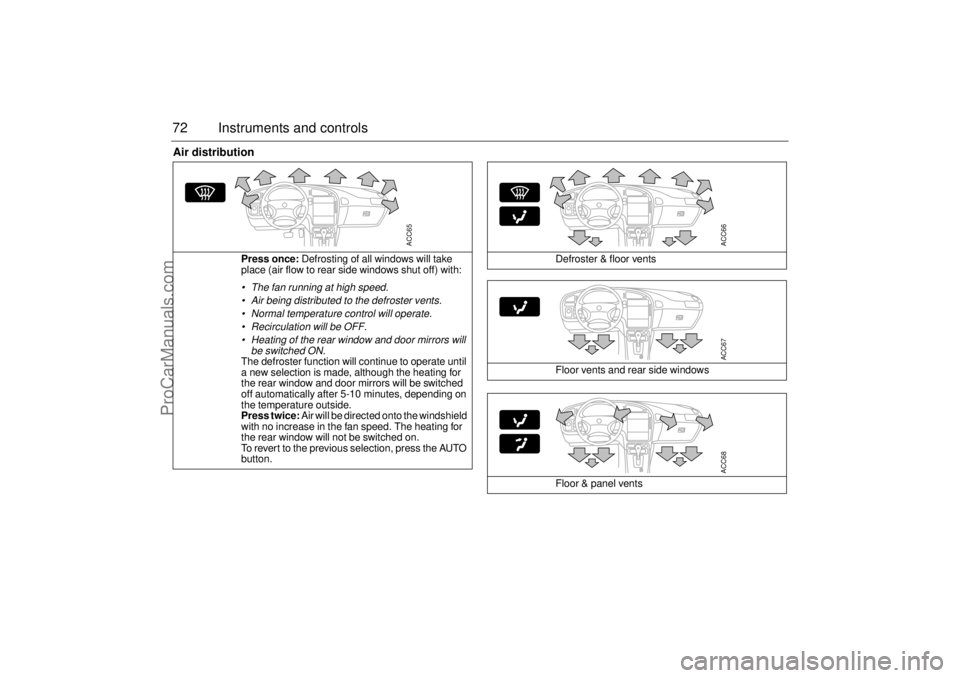
Press once: Defrosting of all windows will take
place (air flow to rear side windows shut off) with: The fan running at high speed.
Air being distributed to the defroster vents.
Normal temperature control will operate.
Recirculation will be OFF.
Heating of the rear window and door mirrors will
be switched ON.The defroster function will continue to operate until
a new selection is made, although the heating for
the rear window and door mirrors will be switched
off automatically after 5-10 minutes, depending on
the temperature outside.
Press twice: Air will be directed onto the windshield
with no increase in the fan speed. The heating for
the rear window will not be switched on.
To revert to the previous selection, press the AUTO
button.
ACC65
Defroster & floor vents
Floor vents and rear side windows
Floor & panel vents
ACC66ACC67ACC68
ProCarManuals.com
Page 73 of 256
73 Instruments and controls
Starting in cold weather
To start with, the system will automatically select the defroster set-
ting, maximum heat and low fan speed.
As the engine warms up, air will also be distributed through the floor
vents and the fan speed will be increased.
As the temperature inside the car nears the selected value, both the
fan speed and the heat will be decreased to a level determined by
the system.
Starting in hot weather
The system will automatically distribute air through the panel vents
at high fan speed and will switch on the A/C compressor (unless the
ECON switch has been pressed).
If the outdoor temperature is above 86
°F (30°C), the system might
select recirculation after approximately 45 seconds if this is required
in order to reach the desired temperature.
As the temperature inside the car nears the selected value, the fan
speed will be decreased to a value determined by the system.
Programming IManual selections can be programmed into the ACC system so that
these will take effect when the car is started. Note that the ignition
must be switched off for at least ten minutes after programming for
the selections to be saved in the system’s memory.
1 Make sure the ignition is ON.
2 Select the desired settings.
3 Press and , simultaneously
(the display will flash to confirm that the settings have been
recorded).
Example: If you want air distribution through the panel vents when
you start the car, press
and then save the setting by pressing
and .
Cancelling the programmed settings (I) To cancel the programmed settings, press and
simultaneously (the display will flash to confirm that the settings
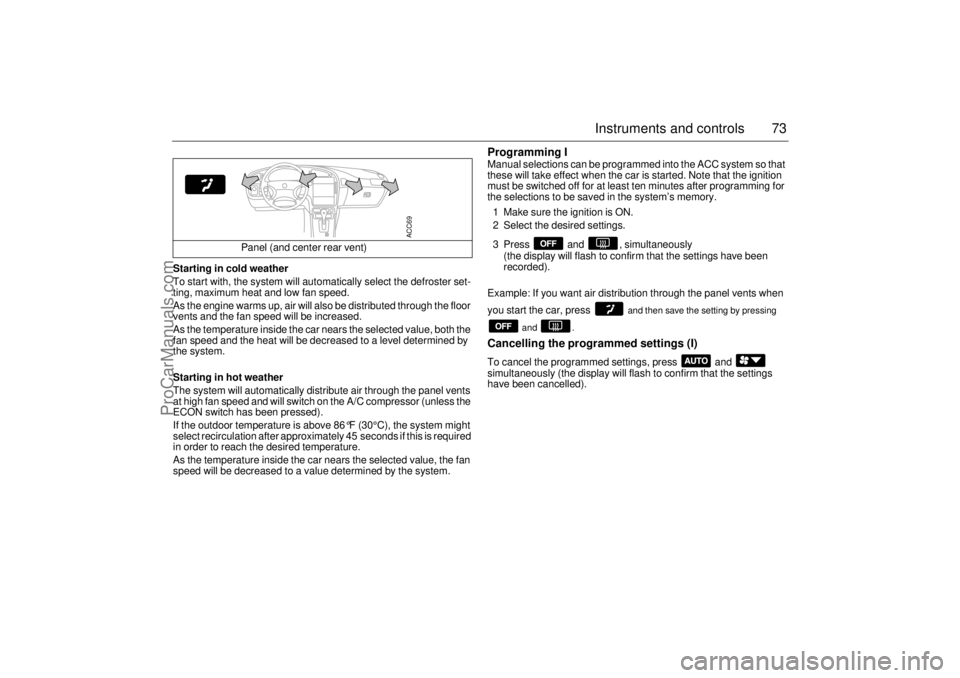
have been cancelled). Panel (and center rear vent)
ACC69
ProCarManuals.com
Page 74 of 256
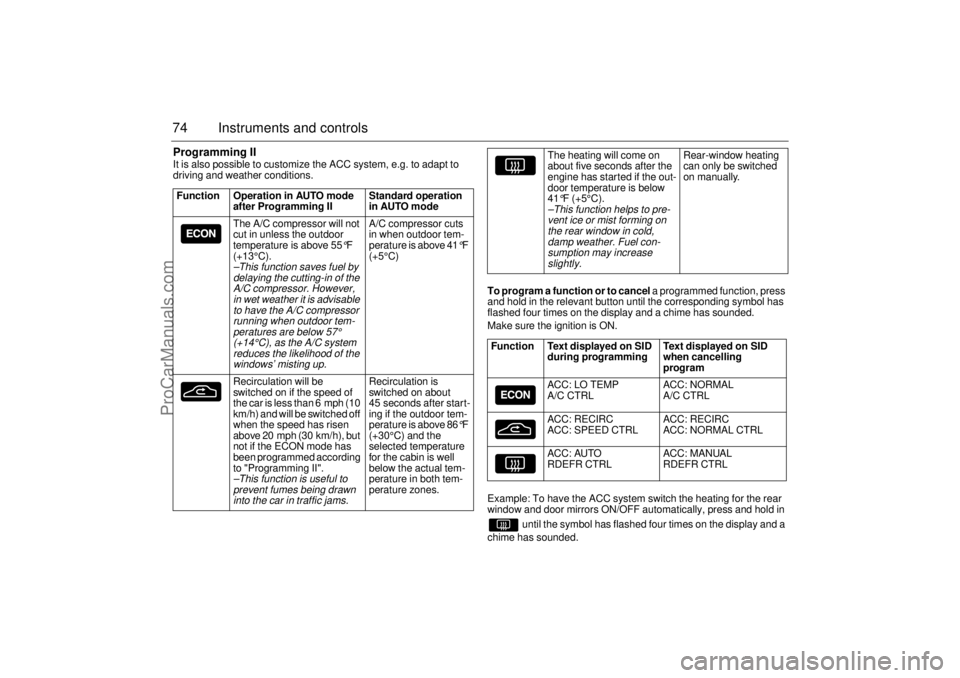
74 Instruments and controlsProgramming IIIt is also possible to customize the ACC system, e.g. to adapt to
driving and weather conditions.
To program a function or to cancel a programmed function, press
and hold in the relevant button until the corresponding symbol has
flashed four times on the display and a chime has sounded.
Make sure the ignition is ON.
Example: To have the ACC system switch the heating for the rear
window and door mirrors ON/OFF automatically, press and hold in
until the symbol has flashed four times on the display and a
chime has sounded. Function Operation in AUTO mode
after Programming II Standard operation
in AUTO mode
The A/C compressor will not
cut in unless the outdoor
temperature is above 55
°F
(+13°C).
–This function saves fuel by
delaying the cutting-in of the
A/C compressor. However,
in wet weather it is advisable
to have the A/C compressor
running when outdoor tem-
peratures are below
57°
(+14°C), as the A/C system
reduces the likelihood of the
windows’ misting up.
A/C compressor cuts
in when outdoor tem-
perature is above 41
°F
(+5°C)
Recirculation will be
switched on if the speed of
the car is less than 6 mph (10
km/h) and will be switched off
when the speed has risen
above 20 mph (30 km/h), but
not if the ECON mode has
been programmed according
to "Programming II".
–This function is useful to
prevent fumes being drawn
into the car in traffic jams.
Recirculation is
switched on about
45 seconds after start-
ing if the outdoor tem-
perature is above 86
°F
(+30°C) and the
selected temperature
for the cabin is well
below the actual tem-
perature in both tem-
perature zones.
The heating will come on
about five seconds after the
engine has started if the out-
door temperature is below
41°F (+5°C).
–This function helps to pre-
vent ice or mist forming on
the rear window in cold,
damp weather. Fuel con-
sumption may increase
slightly.
Rear-window heating
can only be switched
on manually.
Function Text displayed on SID
during programming Text displayed on SID
when cancelling
program
ACC: LO TEMP
A/C CTRL ACC: NORMAL
A/C CTRL
ACC: RECIRC
ACC: SPEED CTRL ACC: RECIRC
ACC: NORMAL CTRL
ACC: AUTO
RDEFR CTRL ACC: MANUAL
RDEFR CTRL
ProCarManuals.com
Page 79 of 256
79 Saab 9-5 Audio System
Quick guide to the
Saab 9-5 Audio System Radio (see page 82)
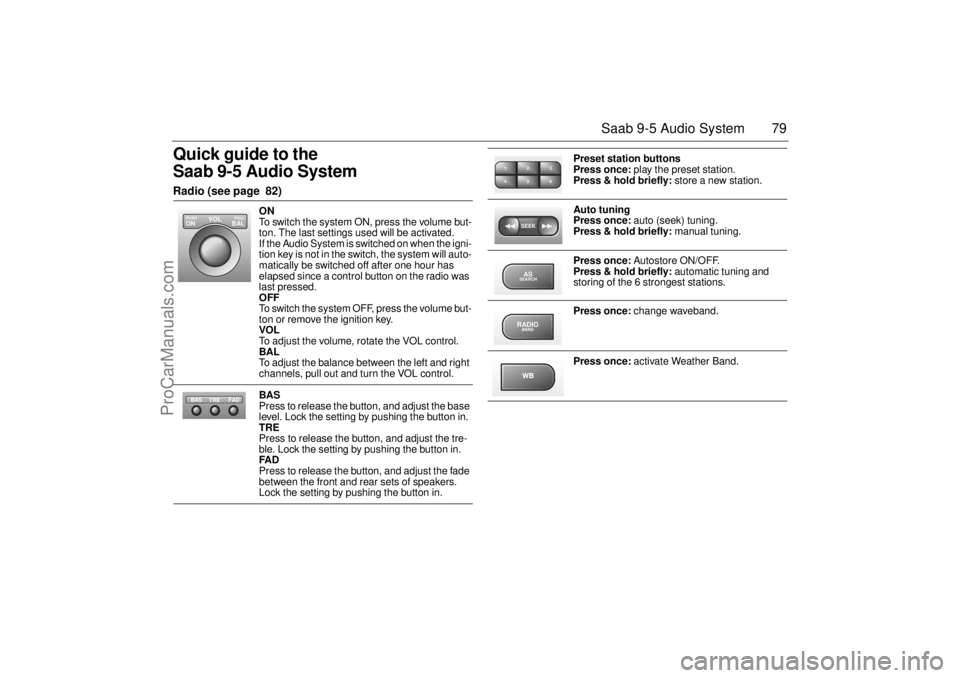
ON
To switch the system ON, press the volume but-
ton. The last settings used will be activated.
If the Audio System is switched on when the igni-
tion key is not in the switch, the system will auto-
matically be switched off after one hour has
elapsed since a control button on the radio was
last pressed.
OFF
To switch the system OFF, press the volume but-
ton or remove the ignition key.
VOL
To adjust the volume, rotate the VOL control.
BAL
To adjust the balance between the left and right
channels, pull out and turn the VOL control.
BAS
Press to release the button, and adjust the base
level. Lock the setting by pushing the button in.
TRE
Press to release the button, and adjust the tre-
ble. Lock the setting by pushing the button in.
FAD
Press to release the button, and adjust the fade
between the front and rear sets of speakers.
Lock the setting by pushing the button in.
VOL
BAL ON
PULL PUSH
TREFAD BAS
Preset station buttons
Press once: play the preset station.
Press & hold briefly: store a new station.
Auto tuning
Press once: auto (seek) tuning.
Press & hold briefly: manual tuning.
Press once: Autostore ON/OFF.
Press & hold briefly: automatic tuning and
storing of the 6 strongest stations.
Press once: change waveband.
Press once: activate Weather Band.
2 13
5 46SEEKASSEARCHRADIOBAND
ProCarManuals.com
Page 82 of 256
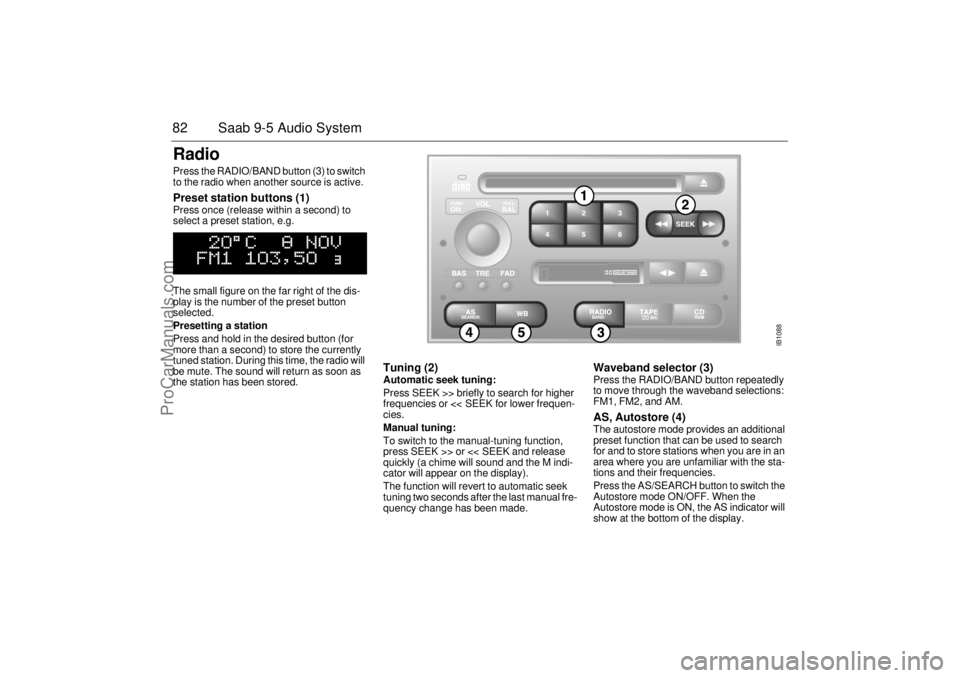
82 Saab 9-5 Audio SystemRadio Press the RADIO/BAND button (3) to switch
to the radio when another source is active. Preset station buttons (1) Press once (release within a second) to
select a preset station, e.g.
The small figure on the far right of the dis-
play is the number of the preset button
selected.
Presetting a station
Press and hold in the desired button (for
more than a second) to store the currently
tuned station. During this time, the radio will
be mute. The sound will return as soon as
the station has been stored.
Tuning (2) Automatic seek tuning:
Press SEEK >> briefly to search for higher
frequencies or << SEEK for lower frequen-
cies.
Manual tuning:
To switch to the manual-tuning function,
press SEEK >> or << SEEK and release
quickly (a chime will sound and the M indi-
cator will appear on the display).
The function will revert to automatic seek
tuning two seconds after the last manual fre-
quency change has been made.
Waveband selector (3) Press the RADIO/BAND button repeatedly
to move through the waveband selections:
FM1, FM2, and AM. AS, Autostore (4) The autostore mode provides an additional
preset function that can be used to search
for and to store stations when you are in an
area where you are unfamiliar with the sta-
tions and their frequencies.
Press the AS/SEARCH button to switch the
Autostore mode ON/OFF. When the
Autostore mode is ON, the AS indicator will
show at the bottom of the display.
IB1088
ProCarManuals.com
Page 83 of 256

83 Saab 9-5 Audio System
Press and hold in the AS/SEARCH button
for more than a second to initiate a search
for the six strongest stations.
Each time the system finds and stores a sta-
tion, the number on the far right of the dis-
play will change. If the system cannot find
six stations with good reception, the remain-
ing preset buttons will be empty. If one of
these empty buttons is pressed, U**** (FM)
or AM**** will appear on the display.
When the system leaves the AS mode, it
returns to the station that was selected
before the AS mode was activated.
The AS mode can also be used in the AM
band.
WB (Weather Band) (5)Press the WB button to select the Weather
Band mode. The radio will automatically
search for the strongest national weather
service station in the area. When a weather
band station is received, the display indi-
cates "WB". The strongest station generally
provides the most accurate information for
the area in which you are travelling.
To exit the Weather Band mode, depress
the WB button again. Weather Band recep-
tion is available in CD, TAPE and RADIO
mode. If the radio is unable to find a suffi-
ciently strong station to lock onto, the unit
will continue to search and the display will
indicate "NO WB".
ProCarManuals.com
Page 84 of 256

84 Saab 9-5 Audio SystemCassette player Before playing a tape, make sure that the
label is secure and that the cassette is not
warped, otherwise the cassette can
become jammed in the deck. The cassette
player senses automatically whether the
tape is normal or metal (Type I or Type II). TAPE (1) Turn on the cassette player by pressing
or by inserting a cassette in the
deck, with the exposed tape to the right.
Playback will start with the side that is facing
up (indicated by A on the display). The dis-
play will now be as follows: Playback direction (2) To play the other side of the tape,
press .
The deck will automatically change the play-
back direction when the end of the tape is
reached, be it during playback, fast
forward/rewind or music search.
Dolby
® noise reduction (3)
Press TAPE/DOLBY to switch on Dolby NR
B/C.
Dolby B/C should be on for playback of
tapes recorded with Dolby B/C, and off for
those recorded without Dolby B/C.
Eject button (4) To stop playback of a tape, press the eject
button or select another source.
If you select another source without press-
ing the eject button, the tape will remain in
the deck but the head and pinch rollers will
be clear of the tape. The same applies if the
Audio System is switched off while a tape is
being played. Tapes can still be ejected
when the system is turned off.
IB1090
VOL
TREBAL ON
FA D BAS
PULL PUSH
CDRDM
RADIO BAND
ASSEARCH
2 13
5 46
DOLBY B NR
SEEK
3
5
2
4
1
ProCarManuals.com