lights SAAB 9-5 2001 User Guide
[x] Cancel search | Manufacturer: SAAB, Model Year: 2001, Model line: 9-5, Model: SAAB 9-5 2001Pages: 272, PDF Size: 14.83 MB
Page 54 of 272
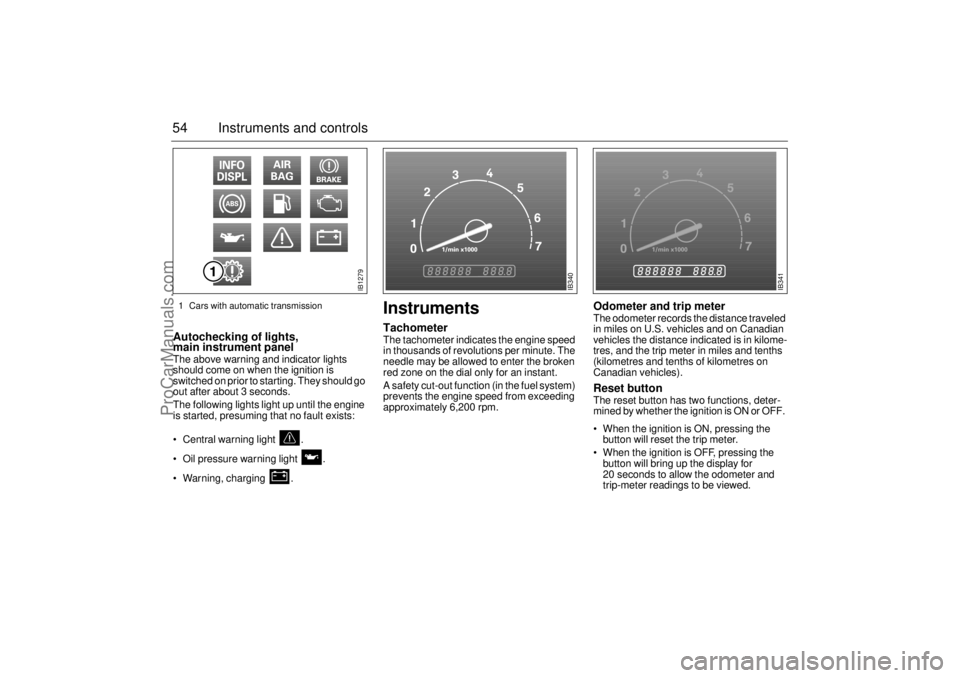
54 Instruments and controlsAutochecking of lights,
main instrument panel The above warning and indicator lights
should come on when the ignition is
switched on prior to starting. They should go
out after about 3 seconds.
The following lights light up until the engine
is started, presuming that no fault exists:
Central warning light .
Oil pressure warning light .
Warning, charging .
InstrumentsTachometerThe tachometer indicates the engine speed
in thousands of revolutions per minute. The
needle may be allowed to enter the broken
red zone on the dial only for an instant.
A safety cut-out function (in the fuel system)
prevents the engine speed from exceeding
approximately 6,200 rpm.
Odometer and trip meter The odometer records the distance traveled
in miles on U.S. vehicles and on Canadian
vehicles the distance indicated is in kilome-
tres, and the trip meter in miles and tenths
(kilometres and tenths of kilometres on
Canadian vehicles). Reset button The reset button has two functions, deter-
mined by whether the ignition is ON or OFF.
When the ignition is ON, pressing the
button will reset the trip meter.
When the ignition is OFF, pressing the
button will bring up the display for
20 seconds to allow the odometer and
trip-meter readings to be viewed.
IB1279
IB340
IB341
1 Cars with automatic transmission
ProCarManuals.com
Page 61 of 272

61 Instruments and controls
CHECK messages When the engine is started, CHECKING will
appear on the display for about four sec-
onds, while the SID checks are being per-
formed.
When a CHECK message is generated
while the car is being driven, a chime will
sound, INFO DISPL will illuminate on on the
main instrument panel, and the message
will appear on the SID. The number of mes-
sages that can be displayed by the SID
varies with the specification of the car.
If more than one CHECK message has
been generated, the
+ symbol will appear to
the left of the text on the display. The mes-
sages appear in order of priority.
If a new fault occurs while another message
is being displayed, the message relating to
the new one will appear for 10 seconds,
after which the display will return to the ear-
lier one.
Press CLEAR once to acknowledge a mes-
sage, whereupon it will be cleared from the
display. It will not be displayed again before
the ignition has been switched off and then
on again. The following messages may be displayed:
1 This message will be displayed approxi-
mately 600 miles (1,000 km) before the next
scheduled service is due, or when 365 days
have elapsed since the last service. The
message should be cleared at the time of that
service (see the Saab Warranties & Service
Record Booklet).
This message can also be deleted by first
briefly pressing the CLEAR button, then
depressing it a second time for at least eight
seconds until ”SERVICE” appears on the dis-
play and a chime sounds. The message can
only be deleted when it is shown on the SID.
Night panelTo improve night-driving conditions inside
the car, the Night Panel mode can be
selected. In this mode, the amount of infor-
mation displayed is reduced, and only the
most important instruments and displays
will be illuminated.
When the Night Panel button is pressed,
only the speedometer will be illuminated (up
to the 87-mph or 140-km/h graduation), all
the other instruments illumination being
extinguished and their needles moved to
zero. Both the SID and the ACC displays will
be extinguished and the backlighting for
switches and other controls will be dimmed.
Note: All indicator and warning lights,
together with the display of CHECK mes-
sages, will operate as normal, except ”Out-
door temperature (Frost warning)”, see
page 58. Message See
page
FRONT LIGHT FAILURE 205
REAR LIGHT FAILURE 208
FOG LIGHT FAILURE 209
BRAKE LIGHT FAILURE 208
WASHER FLUID LEVEL LOW 204
FILL COOLANT FLUID 196
REPLACE KEY BATTERY 37
KEY NOT ACCEPTED 45
SERVICE THEFT ALARM 45
TRANSMISSION OVERHEATING 162
TIGHTEN FUEL FILLER CAP 154
TIME FOR SERVICE
1)
242
ProCarManuals.com
Page 63 of 272
63 Instruments and controls
Switches
Daytime running lights
The parking lights and daytime running
lights come on automatically when the igni-
tion switch is ON.
Note to owners in the U.S.: If you do not
want Daytime Running Lights, this feature
can be disconnected: switch off the engine
and remove fuse No. 35 (see page 217).
Note to owners in Canada: Daytime Run-
ning Lights must not be disconnected as
they are a Canadian Federal legal require-
ment.
Parking lights
The parking lights can be switched on
regardless of the position of the ignition
switch. Do not use parking lights when driv-
ing.
Note: The lighting switch must be in parking
light or headlight position (low beam posi-
tion only) to operate the fog lights (see page
66).
Headlights
The headlights come on automatically when
the ignition is ON and go off when the igni-
tion switch is turned to the LOCK position.
The parking lights, however, can be on
when the ignition switch is in the LOCK posi-
tion.
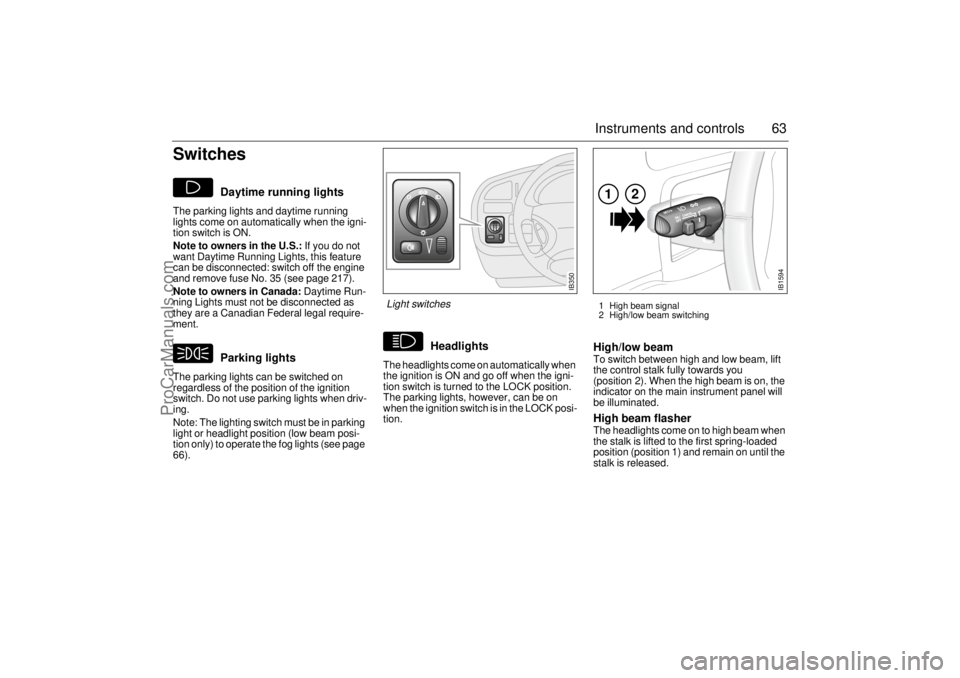
High/low beamTo switch between high and low beam, lift
the control stalk fully towards you
(position 2). When the high beam is on, the
indicator on the main instrument panel will
be illuminated.High beam flasher The headlights come on to high beam when
the stalk is lifted to the first spring-loaded
position (position 1) and remain on until the
stalk is released.
IB1594
121 High beam signal
2 High/low beam switching
IB350
Light switches
ProCarManuals.com
Page 64 of 272
64 Instruments and controlsCourtesy Headlight FeatureA delay function allows the headlights to
remain on low beam for about 30 seconds
after the driver’s door has been closed.
To activate this function,
Switch off the ignition and remove the key
Open the driver’s door
Pull the high/low beam control stalk
towards the steering wheel like you are
flashing the high beam, see page 63. The
low beam headlights will now come on
immediately after the driver’s door has
been closed (within 30 seconds) and will
remain on for about 30 seconds.
The length of time for this function can be
adjusted by your authorized Saab dealer.
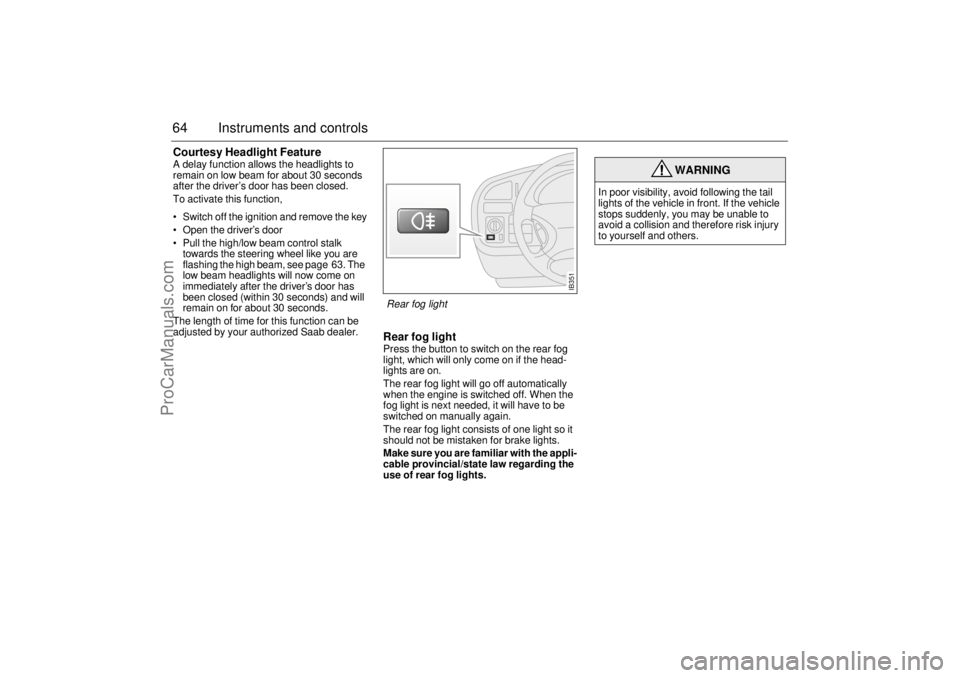
Rear fog lightPress the button to switch on the rear fog
light, which will only come on if the head-
lights are on.
The rear fog light will go off automatically
when the engine is switched off. When the
fog light is next needed, it will have to be
switched on manually again.
The rear fog light consists of one light so it
should not be mistaken for brake lights.
Make sure you are familiar with the appli-
cable provincial/state law regarding the
use of rear fog lights.
WARNING
In poor visibility, avoid following the tail
lights of the vehicle in front. If the vehicle
stops suddenly, you may be unable to
avoid a collision and therefore risk injury
to yourself and others.
IB351
Rear fog light
ProCarManuals.com
Page 65 of 272
65 Instruments and controls
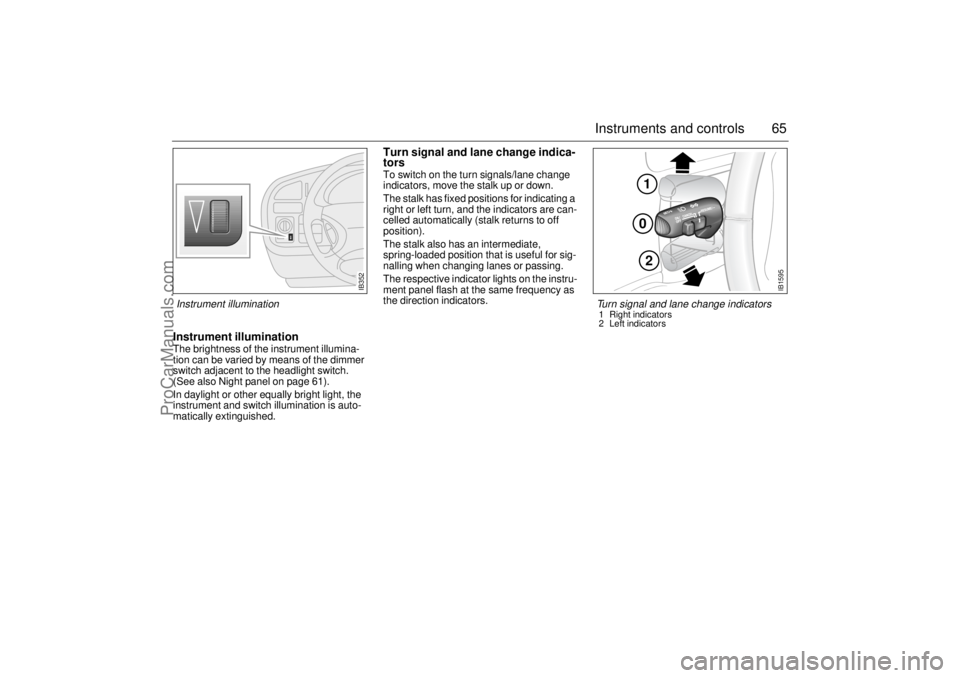
Instrument illuminationThe brightness of the instrument illumina-
tion can be varied by means of the dimmer
switch adjacent to the headlight switch.
(See also Night panel on page 61).
In daylight or other equally bright light, the
instrument and switch illumination is auto-
matically extinguished.
Turn signal and lane change indica-
torsTo switch on the turn signals/lane change
indicators, move the stalk up or down.
The stalk has fixed positions for indicating a
right or left turn, and the indicators are can-
celled automatically (stalk returns to off
position).
The stalk also has an intermediate,
spring-loaded position that is useful for sig-
nalling when changing lanes or passing.
The respective indicator lights on the instru-
ment panel flash at the same frequency as
the direction indicators.
IB352
102
IB1595
Turn signal and lane change indicators 1 Right indicators
2 Left indicators
Instrument illumination
ProCarManuals.com
Page 66 of 272
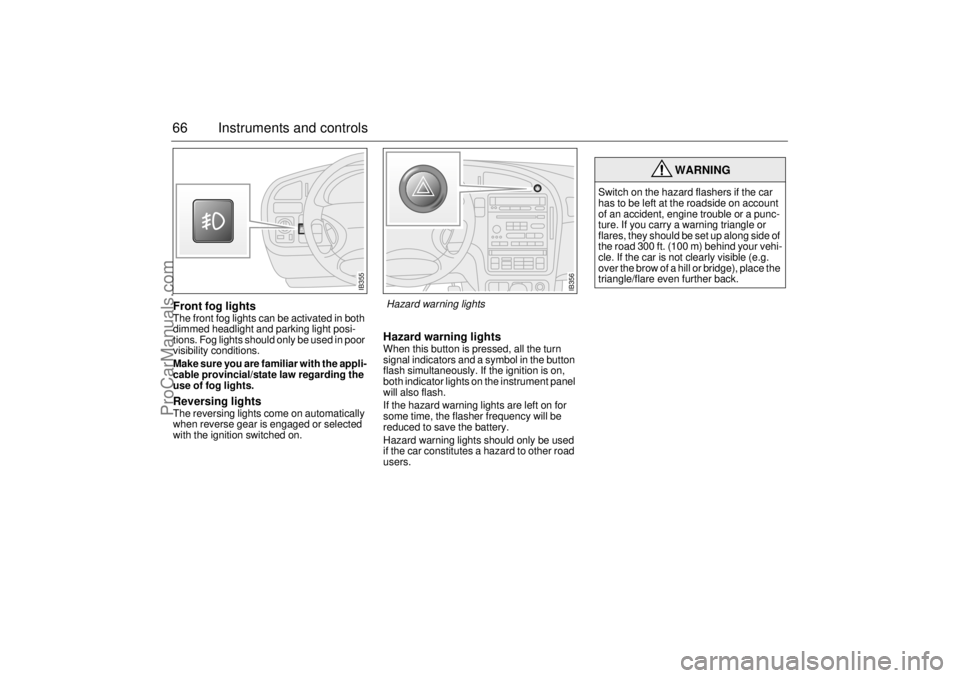
66 Instruments and controlsFront fog lightsThe front fog lights can be activated in both
dimmed headlight and parking light posi-
tions. Fog lights should only be used in poor
visibility conditions.
Make sure you are familiar with the appli-
cable provincial/state law regarding the
use of fog lights. Reversing lightsThe reversing lights come on automatically
when reverse gear is engaged or selected
with the ignition switched on.
Hazard warning lightsWhen this button is pressed, all the turn
signal indicators and a symbol in the button
flash simultaneously. If the ignition is on,
both indicator lights on the instrument panel
will also flash.
If the hazard warning lights are left on for
some time, the flasher frequency will be
reduced to save the battery.
Hazard warning lights should only be used
if the car constitutes a hazard to other road
users.
WARNING
Switch on the hazard flashers if the car
has to be left at the roadside on account
of an accident, engine trouble or a punc-
ture. If you carry a warning triangle or
flares, they should be set up along side of
the road 300 ft. (100 m) behind your vehi-
cle. If the car is not clearly visible (e.g.
over the brow of a hill or bridge), place the
triangle/flare even further back.
IB355
IB356
Hazard warning lights
ProCarManuals.com
Page 67 of 272
67 Instruments and controls
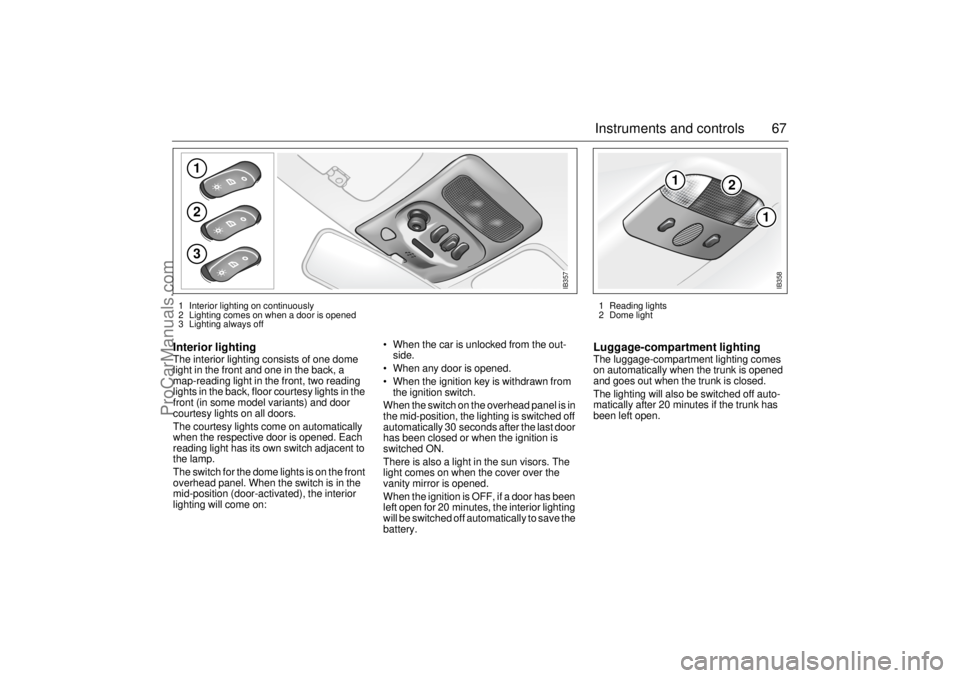
Interior lighting The interior lighting consists of one dome
light in the front and one in the back, a
map-reading light in the front, two reading
lights in the back, floor courtesy lights in the
front (in some model variants) and door
courtesy lights on all doors.
The courtesy lights come on automatically
when the respective door is opened. Each
reading light has its own switch adjacent to
the lamp.
The switch for the dome lights is on the front
overhead panel. When the switch is in the
mid-position (door-activated), the interior
lighting will come on: When the car is unlocked from the out-
side.
When any door is opened.
When the ignition key is withdrawn from
the ignition switch.
When the switch on the overhead panel is in
the mid-position, the lighting is switched off
automatically 30 seconds after the last door
has been closed or when the ignition is
switched ON.
There is also a light in the sun visors. The
light comes on when the cover over the
vanity mirror is opened.
When the ignition is OFF, if a door has been
left open for 20 minutes, the interior lighting
will be switched off automatically to save the
battery.
Luggage-compartment lightingThe luggage-compartment lighting comes
on automatically when the trunk is opened
and goes out when the trunk is closed.
The lighting will also be switched off auto-
matically after 20 minutes if the trunk has
been left open.
123
IB357
1 Interior lighting on continuously
2 Lighting comes on when a door is opened
3 Lighting always off
1
2
1
IB358
1 Reading lights
2 Dome light
ProCarManuals.com
Page 68 of 272
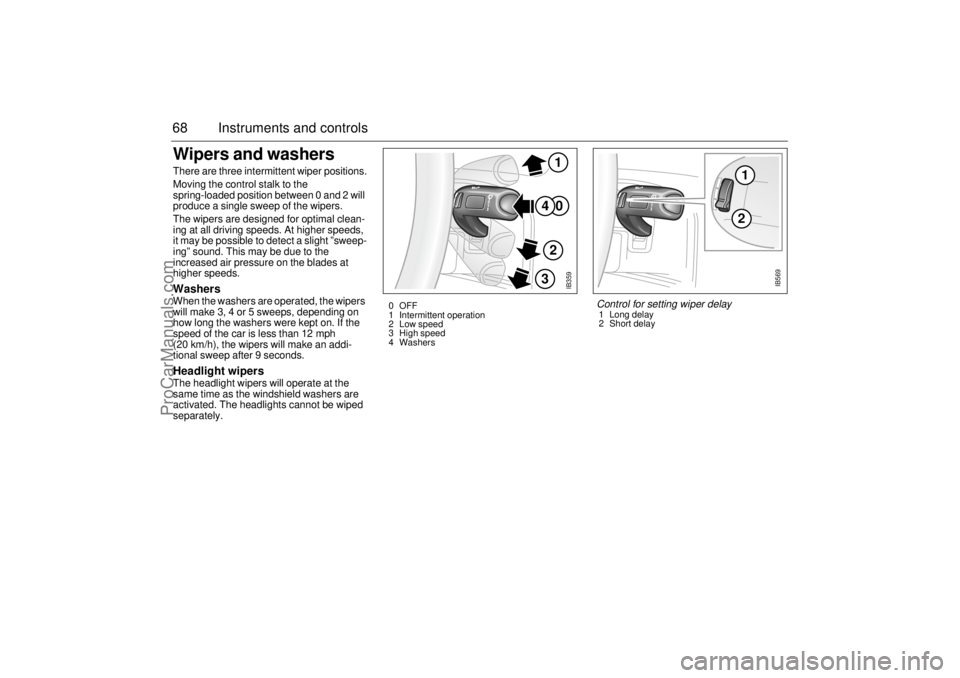
68 Instruments and controlsWipers and washers There are three intermittent wiper positions.
Moving the control stalk to the
spring-loaded position between 0 and 2 will
produce a single sweep of the wipers.
The wipers are designed for optimal clean-
ing at all driving speeds. At higher speeds,
it may be possible to detect a slight ”sweep-
ing” sound. This may be due to the
increased air pressure on the blades at
higher speeds.Washers When the washers are operated, the wipers
will make 3, 4 or 5 sweeps, depending on
how long the washers were kept on. If the
speed of the car is less than 12 mph
(20 km/h), the wipers will make an addi-
tional sweep after 9 seconds. Headlight wipersThe headlight wipers will operate at the
same time as the windshield washers are
activated. The headlights cannot be wiped
separately.
IB359
0
41
2
3
0 OFF
1 Intermittent operation
2 Low speed
3 High speed
4 Washers
12
IB569
Control for setting wiper delay1 Long delay
2 Short delay
ProCarManuals.com
Page 69 of 272
69 Instruments and controls
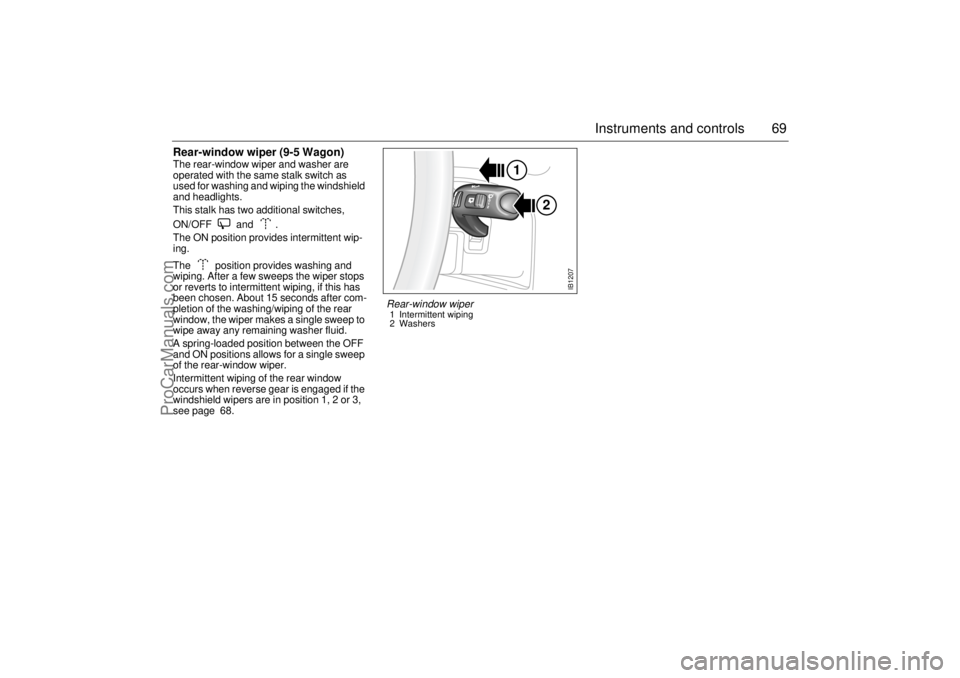
Rear-window wiper (9-5 Wagon)The rear-window wiper and washer are
operated with the same stalk switch as
used for washing and wiping the windshield
and headlights.
This stalk has two additional switches,
ON/OFF and .
The ON position provides intermittent wip-
ing.
The position provides washing and
wiping. After a few sweeps the wiper stops
or reverts to intermittent wiping, if this has
been chosen. About 15 seconds after com-
pletion of the washing/wiping of the rear
window, the wiper makes a single sweep to
wipe away any remaining washer fluid.
A spring-loaded position between the OFF
and ON positions allows for a single sweep
of the rear-window wiper.
Intermittent wiping of the rear window
occurs when reverse gear is engaged if the
windshield wipers are in position 1, 2 or 3,
see page 68.
2 1
IB1207
Rear-window wiper1 Intermittent wiping
2 Washers
ProCarManuals.com
Page 109 of 272

109 OnStar - Telematics
System status lightSolid Green — Indicates the OnStar
system in the vehicle is powered ON and
ready to make calls or receive calls from the
OnStar Center.
Blinking Green — The light blinks green to
indicate a call is being connected or in
progress. If you notice this light blinking
while you are not on a call, press the Call
Answer/End button.
Red — This signals that your OnStar
system may not be functioning properly.
Press the OnStar button to attempt to con-
tact an OnStar Advisor. If the connection is
made, the Advisor will assist you in making
sure your OnStar system is operating prop-
erly. If you cannot contact the OnStar Cen-
ter, please take your car to the nearest Saab
dealer for diagnosis and service.The OnStar Center is the heart of your ser-
vice — staffed 24 hours a day, 7 days a
week with knowledgeable OnStar Advisors.
Even on weekends and holidays, there is
always someone ready to help.
OnStar uses sophisticated Global Position-
ing System (GPS) satellites to locate your
Saab, and wireless technology to provide
the communications link and seamless inte-
gration into your Saab. This system allows
our OnStar Advisors to pinpoint your Saab´s
location precisely. This way, Advisors can
provide you with a range of helpful services
to protect you and your Saab. Plus, with our
Premium Plan* included for 12 months with
your Saab, Advisors can also access an
extensive database to assist you with direc-
tions, making reservations and other conve-
nience services.
*) New retail deliveries only.
Emergency button
In an emergency, press this
button to connect with an
OnStar Advisor. Your call will
be given the highest priority,
and you will hear a tone fol-
lowed by the words ”Connect-
ing to OnStar Emergency.” The
Advisor will locate your Saab,
find out what kind of assistance
you require, and contact the
nearest emergency services
provider who can dispatch
ambulance, fire, police or other
emergency services. Please
use this button only for true
emergencies.
Call answer/end button
Press this button at the end of a
call. You’ll hear the words
”OnStar Request Ended.” Also,
press this button to answer a
call from the OnStar Center, or
cancel a call if one of the other
buttons is accidentally
pressed. This button is also
used to access OnStar Per-
sonal Calling services which
are described on page 112.
ProCarManuals.com