lights SAAB 9-5 2002 Owner's Manual
[x] Cancel search | Manufacturer: SAAB, Model Year: 2002, Model line: 9-5, Model: SAAB 9-5 2002Pages: 272, PDF Size: 16.26 MB
Page 107 of 272

107 OnStar - Telematics
System status lightSolid Green — Indicates the OnStar
system in the vehicle is powered ON and
ready to make calls or receive calls from the
OnStar Center.
Blinking Green — The light blinks green to
indicate a call is being connected or in
progress. If you notice this light blinking
while you are not on a call, press the White
dot button.
Red — This signals that your OnStar
system may not be functioning properly.
Press the OnStar button to attempt to con-
tact an OnStar advisor. If the connection is
made, the advisor will assist you in making
sure your OnStar system is operating prop-
erly. If you cannot contact the OnStar Cen-
ter, please take your car to the nearest Saab
dealer for diagnosis and service.The OnStar Center is the heart of your ser-
vice — staffed 24 hours a day, 7 days a
week with knowledgeable OnStar advisors.
Even on weekends and holidays, there is
always someone ready to help.
OnStar uses sophisticated Global Position-
ing System (GPS) satellites to locate your
Saab, and wireless technology to provide
the communications link and seamless inte-
gration into your Saab. This system allows
the OnStar advisors to pinpoint your Saab´s
location precisely. This way, advisors can
provide you with a range of helpful services
to protect you and your Saab. Plus, with the
Premium Services Plan* included for 12
months with your Saab, advisors can also
access an extensive database to assist you
with directions, making reservations and
other convenience services.
*) New retail deliveries only.
Emergency button
In an emergency, press this
button to connect with an
OnStar advisor. Your call will
be given the highest priority,
and you will hear a tone fol-
lowed by the words ”Connect-
ing to OnStar Emergency.” An
advisor will locate your Saab,
find out what kind of assistance
you require, and contact the
nearest emergency services
provider who can dispatch
ambulance, fire, police or other
emergency services. Please
use this button only for true
emergencies.
White dot button
Press this button at the end of a
call. You’ll hear the words
”OnStar Request Ended.” Also,
press this button to answer a
call from the OnStar Center, or
cancel a call if one of the other
buttons is accidentally
pressed. This button is also
used to access OnStar Per-
sonal Calling services which
are described on page 110.
ProCarManuals.com
Page 114 of 272

114 OnStar - TelematicsVirtual AdvisorOnce you have activated Personal Calling,
you can enjoy your time in your Saab even
more with the OnStar Virtual Advisor. This
service allows you to listen to your favorite
news and information topics, such as
weather reports, stock quotes and sports
scores. You can even listen to your e-mail,
whenever you want, without ever taking
your eyes off the road. Using simple voice
commands, you can browse your personal
topics and skip or listen to those you
choose. You can also search for additional
information on special topics that interest
you.
To find out how to set up a customized pro-
file, visit the OnStar subscriber website at
www.onstar.com, or turn to the OnStar sub-
scriber website section on page 31 of this
guide. If you do not have Internet access,
you can still take advantage of the OnStar
Virtual Advisor services as a default profile
will be set up for you.
Calling the Virtual Advisor
Getting Information from the Virtual
AdvisorThe OnStar Virtual Advisor will prompt you
for information you desire. These offerings
will change to provide you with services and
information that you and other subscribers
want and need. The prompts are very clear
and easy to understand and use.Information AvailableOnStar will continue to add new features
and categories to the Virtual Advisor. The
following general categories will give you an
overview of the types of information avail-
able to you. For complete up-to-date cate-
gories, you can go to the Saab Cars USA,
Inc. website at www.saabusa.com or the
OnStar website at www.onstar.com, and
then click on the link to the subscriber web-
site.
WeatherThe OnStar Virtual advisor will deliver an
up-to-date weather forecast for the current
location of the vehicle. The forecast
includes current temperature, daily
high/low, tomorrow’s high/low, precipitation
forecast, and unusual conditions.Stock QuotesThe OnStar Virtual advisor can provide you
with current quotes for the stocks you have
specified in your customized profile as well
as other requested stocks. All market data
is delayed by twenty minutes. If you have
not set your profile, you can still access the
stock quote feature through your default
profile and then request the stock of your
choice.Sports ScoresThe OnStar Virtual advisor can provide you
with scores for your favorite college and pro-
fessional teams with up-to-the- minute high-
lights, even if they are being broadcast on a
local station. See the team selection option
in your Mobile Profiler section of the sub-
scriber section of OnStar.com.
If you have not set your profile or are still
using the default profile, you can access the
sports option of the Virtual advisor and ask
for an update on your favorite sport. You
always have access to the options in the Vir-
tual Advisor. 1 Press the
OnStar White
Dot buttonOnStar will respond
”Ready”
2Say ”Virtual
Advisor”You will be connected
to Virtual Advisor
ProCarManuals.com
Page 124 of 272

124 Interior equipment and trunkCars equipped with a programmable
driver’s seat also have the ability to angle
the passenger’s mirror down when revers-
ing, e.g. for a better view of the curb.
After selecting reverse, press the tiny button
adjacent to the doormirror switch to tilt the
mirror. The mirror will be reset automatically
when reverse gear is deselected.
Rearview mirror with auto dimming
functionThe interior rearview mirror has two sen-
sors, one forward-facing and one rear-fac-
ing.
The system is activated when the for-
ward-facing sensor detects that it is dark
outside and the rear-facing sensor detects,
for example, if the car following has not
dimmed its headlights. The rearview mirror
is then darkened to prevent the strong light
source from dazzling the driver. This dark-
ening is stepless.
The mirror returns to its normal state when
the strong light source diminishes.
The auto dimming function can be turned
OFF with the switch on the lower edge of the
rear-view mirror.
NOTE
Towing a trailer can cause the system to
malfunction, as the rear-facing sensor may
sense light from the trailer.
IB568
Button for angling passenger’s mirror
down on reversing
IB1284
1
23
1 Forward-facing sensor
2 ON/OFF switch, auto dimming function
3 Rear-facing sensor
ProCarManuals.com
Page 146 of 272

146 Starting and drivingIgnition switchThe combined ignition switch and
gear-lever lock is located in the center con-
sole between the front seats. The ignition
key can only be removed when reverse is
engaged (automatic transmission: selector
in ”P” position).
The key fits all the locks on the car. The key
number is specified on the small plastic
strap that comes with the keys when the car
is delivered. Keep a note of the key number
in a safe place, as you will need to quote it if
ordering a replacement key.
See also page 38.
LOCK position Engage reverse and turn the key to LOCK.
Automatic transmission: select ”P”.
The gear lever is locked. This is the only position in which the key can be
removed.
The parking lights, hazard warning lights and interior lighting all work. OFF position Gear lever no longer locked.
Certain electrical circuits operationalON position All electrical circuits working. Do not leave the key in the ON position
when the engine is not running. Turn the key to OFF to switch off the
electrical circuits. In the ON position certain warning and indicator lights
come on as a check, and they normally are extinguished after about
3 seconds.ST (starter) position The starter operates when the key is turned to this position. When
released, the key will spring back to the ON position. If the engine fails to
start, the key must first be turned back to the position between OFF and
LOCK before the starter can be operated again.
When the starter motor is running, several electrical circuits are
disconnected to facilitate starting.
LOCK
OFFONST
LOCK
OFFONST
LOCK
OFFONST
LOCK
OFFONST
IB1120
ProCarManuals.com
Page 161 of 272

161 Starting and driving
Selector positions
P
To shift out of the P position you must
depress the brake pedal and the ignition
must be ON.
The parking position (P) must only be selected
when the car is at a complete standstill. The
selector lever is locked and the transmission is
mechanically immobilized. Always apply the
parking brake after parking the car.
The engine can be started. The key can be
removed.
R
The reverse (R) position must only be selected
when the car is at a complete standstill. The
detent-release button must be pressed before
the selector lever can be moved to R. Wait until
reverse gear has engaged (car starts to creep)
before touching the accelerator.
N
In the Neutral position (N), the transmission is
disengaged from the engine. The engine can be
started, but first ensure that the parking brake is
on, to prevent the car from moving off unexpect-
edly.
To prevent the engine and transmission from
becoming hotter than necessary, select N for
stops other than brief ones, e.g. if stuck in a traf-
fic jam.
The normal drive position (D) is recommended
for waiting at traffic lights.
D
The Drive position (D) is the position for normal
motoring. Gear changes between 1st and 5th
will take place automatically, the timing of which
is determined by the throttle (accelerator) posi-
tion and the speed of the car.
After moving the selector lever to D, pause to
give the gear time to engage (car starts to pull).
4
In position 4, 5th gear is locked out. The car will
start in 1st gear and normal gear changing (up
and down) will take place automatically between
gears 1, 2, 3 and 4.
Moving the selector lever from D to 4 will effect
a change-down to 4th gear, which will give better
engine-braking.
Do not move the selector to position 4 at speeds
in excess of 90 mph (150 km/h).
3
Position 3 is recommended in hilly country as it
provides effective engine-braking. Normal gear
changing (up and down) between 1st and 3rd
gear will take place automatically. Fourth and
5th gears are locked out.
Do not move the selector to position 3 at speeds
in excess of 70 mph (110 km/h).
ProCarManuals.com
Page 181 of 272

181 Starting and driving
Rear towing eyeThe car has a permanently mounted towing
eye at the back. If the car is equipped with a
trailer hitch, this can be used instead of the
towing eye. Considerations when towing the car
with manual transmission Gear lever in neutral and parking lights on.
Drive carefully and do not exceed the
speed limit for vehicles being towed.
Always try to keep the towrope taut by
gently applying the brake, as necessary.
This will avoid the towrope being jerked
violently.
Considerations when towing the car
with automatic transmission Selector lever at N (neutral) and parking
lights on.
Drive carefully and do not exceed the
speed limit for vehicles being towed.
Always try to keep the towrope taut by
gently applying the brake, as necessary.
This will avoid the towrope being jerked
violently. 1 Selector lever in position N.
2 The local regulations on towing speeds
must be followed.
The highest permissible towing speed is
30 mph (50 km/h), unless the legal limit
is lower. The longest permissible towing
distance is 25-30 miles (40-50 km). If the
car has to be transported farther than
that, summon a tow truck. A flat bed tow
truck is the preferred method to tow.
Failure to follow these guidelines can result
in damage.
Cars with automatic transmission cannot be
bump started. In an emergency, it is possi-
ble to start the engine using jump leads (see
the section, ”Jump starting” on page 182). NOTE The car must be towed front first.
If the car is to be towed with the front
wheels off the ground, make sure the
parking brake is off, as this acts on the
rear wheels.
IB483
Rear towing eye
ProCarManuals.com
Page 182 of 272

182 Starting and drivingJump startingIf your battery has run down, you may want
to use another vehicle and some jumper
cables to start your Saab. Follow the steps
below to do it safely.
To jump start your vehicle:
1 Check the other vehicle. It must have a
12-volt battery with a negative ground
system.
2 Get the vehicles close enough so the
jumper cables can reach, but be sure the
vehicles are not touching each other. If
a poor connection on the negative
jumper cable should exist, it is possible
for damage to be caused to electrical
systems/components of either vehicle
should inadvertent contact be made.
You would not be able to start your car and bad grounding could damage elec-
trical systems.
3 Turn off the ignition on both vehicles.
Turn off all lights that are not needed,
and radios. This will avoid sparks and
help save both batteries and it could
save your radio.
4 Open the hood and locate the battery.
Find the positive (+) and negative (-) termi-
nals on the battery.
WARNING
Batteries can cause injury. They can be
dangerous because:
They contain acid that can burn you.
They contain gas that can explode or
ignite.
They contain enough electricity to
injure you.
If you do not follow these steps exactly,
some or all of these things can hurt you.NOTEIgnoring these steps could result in costly
damage to your vehicle that would not be
covered by your warranty.
Trying to start your car by pushing or pull-
ing it could damage your vehicle, even if
you have a manual transmission. If you
have an automatic transmission, your
vehicle cannot be started by pushing or
pulling it.
NOTEIf the other system is not a 12-volt system
with a negative ground, both vehicles can
be damaged.
WARNING
You could be injured if the vehicles roll.
Set the parking brake firmly on each vehi-
cle. Put an automatic transmission in P
(Park) or a manual transmission in Neu-
tral.NOTEIf you leave your radio on, it could be
badly damaged. The repairs would not be
covered by your warranty.
+
–
+
–
IB484
ProCarManuals.com
Page 203 of 272
203 Car care and technical information
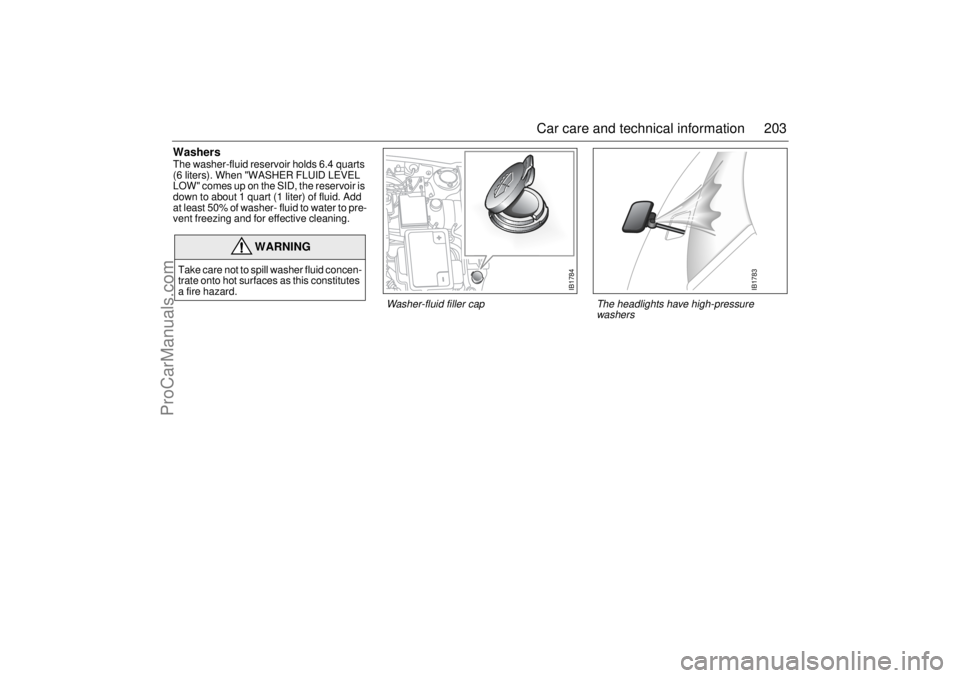
WashersThe washer-fluid reservoir holds 6.4 quarts
(6 liters). When "WASHER FLUID LEVEL
LOW" comes up on the SID, the reservoir is
down to about 1 quart (1 liter) of fluid. Add
at least 50% of washer- fluid to water to pre-
vent freezing and for effective cleaning.
WARNING
Take care not to spill washer fluid concen-
trate onto hot surfaces as this constitutes
a fire hazard.
IB1784
Washer-fluid filler cap
IB1783
The headlights have high-pressure
washers
ProCarManuals.com
Page 204 of 272

204 Car care and technical informationChanging bulbs Check that the new bulb is working when finished.
Some bulbs are of the ”Long-Life” type. Make sure the same type is
fitted when changing one of these.
Headlight aiming, see page 239.
Xenon headlight (certain models only)Xenon headlights produce roughly twice as much light as halogen
bulbs and have a significantly longer service life.
The lamp units consist of a gas discharge lamp containing xenon.
When the lights are switched on a very high voltage activates the
xenon gas. The lamps soon reach full intensity.
Cars with xenon headlights have automatic levelling. The levelling
system comprises two sensors on the front axle, one on the rear axle
and a control unit under the headlight housing. Headlight alignment
is regulated automatically to prevent dazzling oncoming traffic.
Alignment is also adjusted during braking.
WARNING
Before changing a bulb in the engine bay, switch off the engine to
avoid danger of fingers and hands being injured by moving parts.
The radiator fan can start up even when the engine is switched off.
Xenon headlights are high tension and must therefore be
changed at an authorized Saab workshop. Work involving
high-tension components is potentially lethal.NOTE Since the headlight lenses are made of plastic, rinse dried-on
dirt with water and allow it time to soften up before cleaning
the lenses. Avoid rubbing the lenses when dry and never use
solvents.
Use de-icer spray instead of scraping the ice off.
NOTE Do not fit bulbs with a higher rating than 55 W, since the head-
light reflector and the wiring of the car are not designed for a
higher wattage.
Switch off the ignition before changing a bulb, to avoid possi-
ble short-circuiting.
ProCarManuals.com
Page 207 of 272
207 Car care and technical information
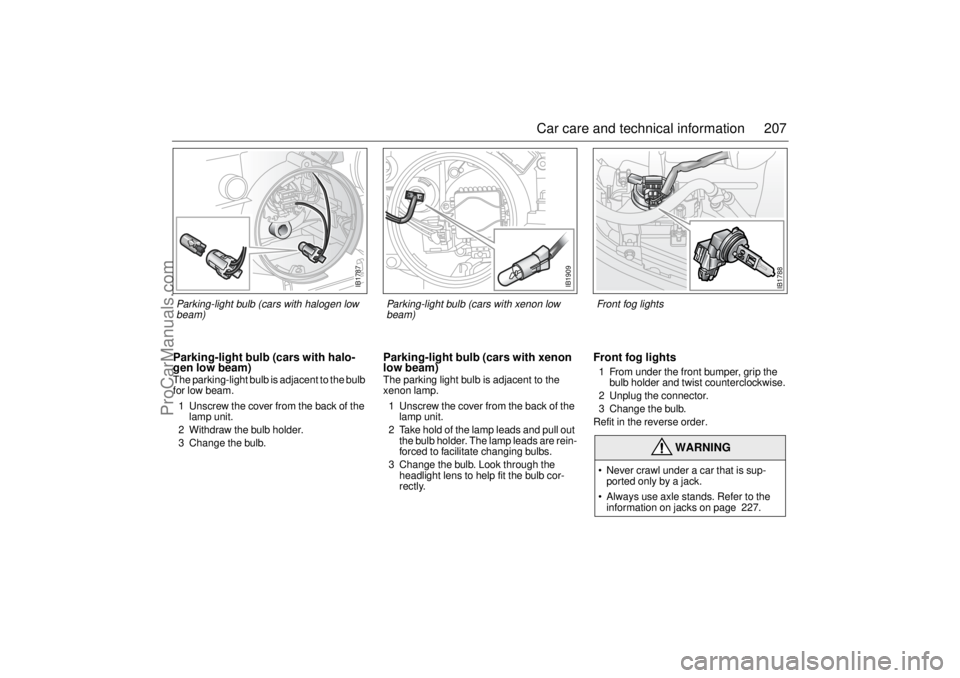
Parking-light bulb (cars with halo-
gen low beam)The parking-light bulb is adjacent to the bulb
for low beam.
1 Unscrew the cover from the back of the
lamp unit.
2 Withdraw the bulb holder.
3 Change the bulb.
Parking-light bulb (cars with xenon
low beam)The parking light bulb is adjacent to the
xenon lamp.
1 Unscrew the cover from the back of the
lamp unit.
2 Take hold of the lamp leads and pull out
the bulb holder. The lamp leads are rein-
forced to facilitate changing bulbs.
3 Change the bulb. Look through the
headlight lens to help fit the bulb cor-
rectly.
Front fog lights 1 From under the front bumper, grip the
bulb holder and twist counterclockwise.
2 Unplug the connector.
3 Change the bulb.
Refit in the reverse order.
WARNING
Never crawl under a car that is sup-
ported only by a jack.
Always use axle stands. Refer to the
information on jacks on page 227.
IB1787
Parking-light bulb (cars with halogen low
beam)
IB1788
Front fog lights
IB1909
Parking-light bulb (cars with xenon low
beam)
ProCarManuals.com