warning SAAB 9-5 2002 Service Manual
[x] Cancel search | Manufacturer: SAAB, Model Year: 2002, Model line: 9-5, Model: SAAB 9-5 2002Pages: 272, PDF Size: 16.26 MB
Page 59 of 272

59 Instruments and controls
Selector lever indication
(Automatic transmission) The position of the selector lever is indi-
cated on the main instrument panel.
Trip computer SID (Saab Information Display (SID) The SID displays CHECK messages and
has eight trip-computer functions (Saab Car
Computer, SCC)
The SID is also used by the Audio System.
SCCSelecting the function
Use the button to scroll through the
following functions:
Use the button to scroll through the
following functions:
WARNING
It is strongly recommended that the SID
settings be changed only when the car is
stationary. The driver’s attention can
otherwise easily be distracted from the
road.
DIST Distance to destination / Trip
meter.
ARRIV Estimated time of arrival.
ALARM Alarm function.
SPD W Speed warning (chime).
TEMP Outdoor temperature and Date.
D.T.E. Estimated range (distance to
empty fuel tank).
FUEL∅ Average fuel consumption
since function last reset.
SPD∅ Average speed since function
last reset.
NIGHT PANEL
CLEAR
SET
IB346
IB1750
ProCarManuals.com
Page 60 of 272

60 Instruments and controlsOutdoor temperature
(Frost warning)Regardless of which function has been
selected, except Night Panel Mode, SID will
automatically display the outdoor tempera-
ture when it is between 26° and 38°F (-3°
and +3°C). This also applies if the
temperature has moved outside the range
of 21° to 43°F (-6° to +6°C) but is again
between 26° and 38°F (-3° and +3°C).
Entering values for the functions Values can be entered for the following
functions: SPD∅, DIST, ARRIV, ALARM
and SPD W.
1 Select the desired function using or
.
2 Press the SET button for at least one
second (figures start to flash and a
chime sounds).
3 Use or to increase or decrease
the value (press CLEAR to reset).
4 Press SET to record the value.Average fuel consumptionThe average fuel consumption is calculated
using the values for fuel consumed and dis-
tance driven since last reset. This value is
stored in the car’s trip computer even when
the engine is switched off.
Select FUEL Ø with .
To reset the value, press the CLEAR button
for 4 seconds. A chime will be heard and
CLEARED will be displayed.
Setting the date1 Use to select TEMP.
2 Press the SET button for at least one
second (year starts to flash and a chime
sounds).
3 Set the year using or .
4 Touch SET.
5 Set the month in the same way.
6 Touch SET.
7 Set the day in the same way.
8 Press SET to save the date setting.
WARNING
Remember that roads can be icy even at
temperatures of above 38°F (+3°C),
especially on bridges and stretches of
road that are sheltered from the sun.
ProCarManuals.com
Page 61 of 272

61 Instruments and controls
Turning the Alarm and Speed
warning on or off 1 Select the Alarm or Speed-warning
function.
2 Press SET to turn on the function.
Press CLEAR to turn off the function.
When either function is on, ALARM/SPD W
respectively will be visible on the display. An
asterisk
* will be visible on the far right of the
display when either function is selected.
The Alarm and Speed-warning settings will
not be cancelled when the engine is
switched off.
When the Alarm has been set to come on at
a specified time, it will only be activated
once – it will not come on at the same time
every day. Press SET to turn it on again.
The Alarm will continue to beep for one
minute if not switched off.
Calculation of arrival time and
average speed The settings must be made before the jour-
ney is started.
Calculation of arrival time:
1 Select DIST using the button.
2 Set the destination distance.
3 Press SET.
When ARRIV is selected during the journey,
the arrival time based on the average speed
over the past 20 minutes will be displayed.
The trip computer will include any stops in
the calculation of the estimated time of
arrival.
Press DIST and the distance remaining to
the destination will be displayed in the same
way.
After the distance to destination has
decreased to zero, the DIST will function as
a trip meter (see ”Using DIST as a trip
meter”). The starting value for the trip meter
will be the last distance set in the DIST
function.
Example: The DIST setting was 100 miles.
Once 100 miles (160 km) has been cov-
ered, the DIST will start to function as a trip
meter, the initial reading of which will be
100 miles (160 km).
Using DIST as a trip meter If no value has been set for the DIST func-
tion, DIST will now function as a trip meter
(indicated by an arrow on the far right of the
display).
Press CLEAR to reset the trip meter.
Under 1000 miles the distance will be
shown in increments of 0.1 miles,
there-after, the reading will change in incre-
ments of 1.0 mile.
Metric units: for just under a kilometer, the
distance will be shown in increments of
10 meters, there-after, the reading will
change in increments of 100 meters.
When DIST is functioning as a trip meter,
the ARRIV function will display the current
time.
ProCarManuals.com
Page 63 of 272

63 Instruments and controls
CHECK messages When the engine is started, CHECKING will
appear on the display for about four sec-
onds, while the SID checks are being per-
formed.
When a CHECK message is generated
while the car is being driven, a chime will
sound, INFO DISPL will illuminate on the
main instrument panel, and the message
will appear on the SID. The number of mes-
sages that can be displayed by the SID
varies with the specification of the car.
If more than one CHECK message has
been generated, the
+ symbol will appear to
the left of the text on the display. The mes-
sages appear in order of priority.
If a new fault occurs while another message
is being displayed, the message relating to
the new one will appear for 10 seconds,
after which the display will return to the ear-
lier one.
Press CLEAR once to acknowledge a mes-
sage, whereupon it will be cleared from the
display. It will not be displayed again before
the ignition has been switched off and then
on again. The following messages may be displayed:
1 This message will be displayed approxi-
mately 600 miles (1,000 km) before the next
scheduled service is due, or when 365 days
have elapsed since the last service. The
message should be cleared at the time of that
service (see the Saab Warranties & Service
Record Booklet).
This message can also be deleted by first
briefly pressing the CLEAR button, then
depressing it a second time for at least eight
seconds until ”SERVICE” appears on the dis-
play and a chime sounds. The message can
only be deleted when it is shown on the SID.
Night panelTo improve night-driving conditions inside
the car, the Night Panel mode can be
selected. In this mode, the amount of infor-
mation displayed is reduced, and only the
most important instruments and displays
will be illuminated.
When the Night Panel button is pressed,
only the speedometer will be illuminated (up
to the 87-mph or 140-km/h graduation), all
the other instruments illumination being
extinguished and their needles moved to
zero. Both the SID and the ACC displays will
be extinguished and the backlighting for
switches and other controls will be dimmed.
Note: All indicator and warning lights,
together with the display of CHECK mes-
sages, will operate as normal, except ”Out-
door temperature (Frost warning)”, see
page 60. Message See
page
FRONT LIGHT FAILURE 205
REAR LIGHT FAILURE 209
FOG LIGHT FAILURE 209
BRAKE LIGHT FAILURE 209
WASHER FLUID LEVEL LOW 203
FILL COOLANT FLUID 196
REPLACE KEY BATTERY 40
KEY NOT ACCEPTED 47
SERVICE THEFT ALARM 47
TRANSMISSION OVERHEATING 160
TIGHTEN FUEL FILLER CAP 152
TIME FOR SERVICE
1)
244
ProCarManuals.com
Page 66 of 272

66 Instruments and controlsCourtesy Headlight FeatureA delay function allows the headlights to
remain on low beam for about 30 seconds
after the driver’s door has been closed.
To activate this function,
Switch off the ignition and remove the key
Open the driver’s door
Pull the high/low beam control stalk
towards the steering wheel like you are
flashing the high beam, see page 65. The
low beam headlights will now come on
immediately after the driver’s door has
been closed (within 30 seconds) and will
remain on for about 30 seconds.
The length of time for this function can be
adjusted by your authorized Saab dealer.
Rear fog lightPress the button to switch on the rear fog
light, which will only come on if the head-
lights are on.
The rear fog light will go off automatically
when the engine is switched off. When the
fog light is next needed, it will have to be
switched on manually again.
The rear fog light consists of one light so it
should not be mistaken for brake lights.
Make sure you are familiar with the appli-
cable provincial/state law regarding the
use of rear fog lights.
WARNING
In poor visibility, avoid following the tail
lights of the vehicle in front. If the vehicle
stops suddenly, you may be unable to
avoid a crash and therefore risk injury to
yourself and others.
IB351
Rear fog light
ProCarManuals.com
Page 68 of 272

68 Instruments and controlsFront fog lightsThe front fog lights can be activated in both
dimmed headlight and parking light posi-
tions. Fog lights should only be used in poor
visibility conditions.
Make sure you are familiar with the appli-
cable provincial/state law regarding the
use of fog lights. Reversing lightsThe reversing lights come on automatically
when reverse gear is engaged or selected
with the ignition switched on.
Hazard warning lightsWhen this button is pressed, all the turn
signal indicators and a symbol in the button
flash simultaneously. If the ignition is on,
both indicator lights on the instrument panel
will also flash.
If the hazard warning lights are left on for
some time, the flasher frequency will be
reduced to save the battery.
Hazard warning lights should only be used
if the car constitutes a hazard to other road
users.
WARNING
Switch on the hazard flashers if the car
has to be left at the roadside on account
of a crash, engine trouble or a puncture. If
you carry a warning triangle or flares, they
should be set up along side of the road
300 ft. (100 m) behind your vehicle. If the
car is not clearly visible (e.g. over the
brow of a hill or bridge), place the trian-
gle/flare even further back.
IB355
IB356
Hazard warning lights
ProCarManuals.com
Page 70 of 272

70 Instruments and controlsWipers and washers There are three intermittent wiper positions.
Moving the control stalk to the
spring-loaded position between 0 and 2 will
produce a single sweep of the wipers.
The wipers are designed for optimal clean-
ing at all driving speeds. At higher speeds,
it may be possible to detect a slight ”sweep-
ing” sound. This may be due to the
increased air pressure on the blades at
higher speeds.Headlight washersIf dim-dipped beam is on, the headlights are
washed every seventh time the windshield-
washers are used or if 2 minutes have
elapsed since the windshield was last
washed. If the headlights are not on they are
only washed the first time the windshield is
washed. The headlight washers cannot be
activated separately.
The headlight washers are of the high-pres-
sure type, which means that other parts of
the car may become wet if you activate the
washers while the car is stationary.Rain sensing wipers (option)
The rain sensor automatically controls the
windshield wipers. The sensor is located on
the windshield beside the rearview mirror.
The system varies between single sweeps
of the windshield and continuous wiping
depending on how much water or snow
there is on the windscreen.Activate the system by lifting the control
stalk to position 1. The wipers make one
sweep for reference to see how much water
and snow is on the windshield. In future, the
sensor compares the amount of water and
snow on the windshield with this reference
value. When the engine has been switched
off, the control stalk must be moved to posi-
tion 0 and back to position 1 to reactivate the
sensor.
Set the sensitivity using the control on the
wiper stalk (the same control as used for
wiper delay on cars not fitted with a rain sen-
sor). The sensor has three sensitivity set-
tings. It is most sensitive when in the upper-
most position (1). When a higher degree of
WARNING
To avoid personal injury, turn the rain
sensor off if the ignition is ON when clear-
ing snow and ice from the windscreen.
NOTETo avoid damaging the windshield
wipers, turn the rain sensor off before
washing the car in an automatic carwash.
IB359
0
41
2
3
0 OFF
1 Intermittent operation
2 Low speed
3 High speed
4 Washers
12
IB569
Control for setting wiper delay1 Long delay
2 Short delay
ProCarManuals.com
Page 99 of 272
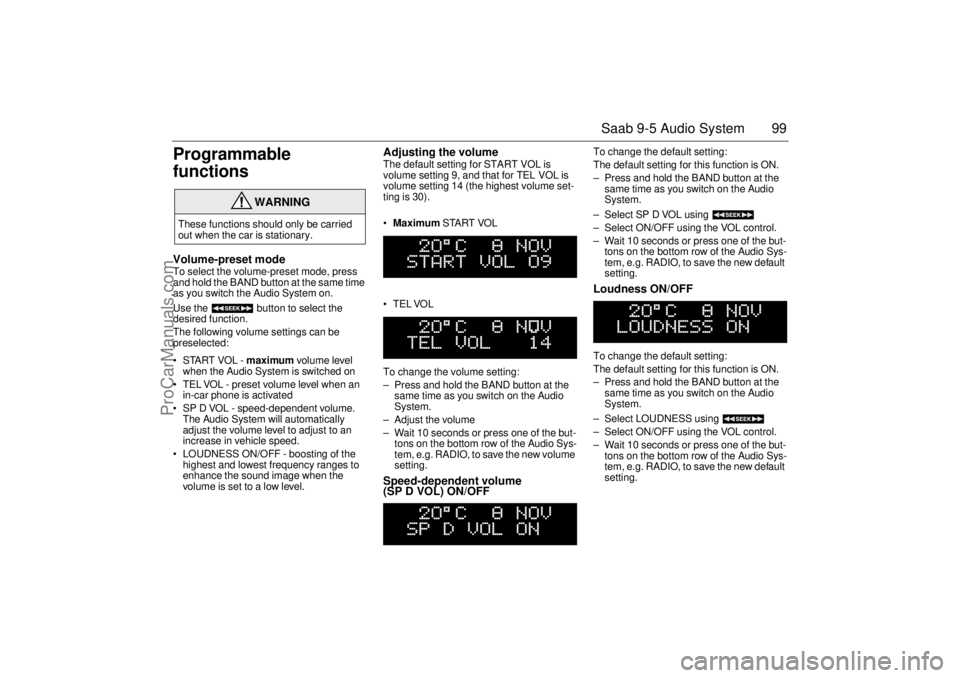
99 Saab 9-5 Audio System
Programmable
functionsVolume-preset modeTo select the volume-preset mode, press
and hold the BAND button at the same time
as you switch the Audio System on.
Use the button to select the
desired function.
The following volume settings can be
preselected:
STARTVOL - maximum volume level
when the Audio System is switched on
TEL VOL - preset volume level when an
in-car phone is activated
SP D VOL - speed-dependent volume.
The Audio System will automatically
adjust the volume level to adjust to an
increase in vehicle speed.
LOUDNESS ON/OFF - boosting of the
highest and lowest frequency ranges to
enhance the sound image when the
volume is set to a low level.
Adjusting the volume The default setting for START VOL is
volume setting 9, and that for TEL VOL is
volume setting 14 (the highest volume set-
ting is 30).
Maximum START VOL
TELVOL
To change the volume setting:
– Press and hold the BAND button at the
same time as you switch on the Audio
System.
– Adjust the volume
– Wait 10 seconds or press one of the but-
tons on the bottom row of the Audio Sys-
tem, e.g. RADIO, to save the new volume
setting.Speed-dependent volume
(SP D VOL) ON/OFF
To change the default setting:
The default setting for this function is ON.
– Press and hold the BAND button at the
same time as you switch on the Audio
System.
– Select SP D VOL using
– Select ON/OFF using the VOL control.
– Wait 10 seconds or press one of the but-
tons on the bottom row of the Audio Sys-
tem, e.g. RADIO, to save the new default
setting. Loudness ON/OFF To change the default setting:
The default setting for this function is ON.
– Press and hold the BAND button at the
same time as you switch on the Audio
System.
– Select LOUDNESS using
– Select ON/OFF using the VOL control.
– Wait 10 seconds or press one of the but-
tons on the bottom row of the Audio Sys-
tem, e.g. RADIO, to save the new default
setting.
WARNING
These functions should only be carried
out when the car is stationary.
ProCarManuals.com
Page 102 of 272

102 Saab 9-5 Audio SystemAntennas The Audio System has three antennas
incorporated in the rear window; two for FM
diversity and one for AM.
The car has a factory-fitted roof antenna for
a mobile phone/OnStar. Roof loads may
negatively affect telecommunication.
Multipath propagation Multipath propagation occurs when radio
waves from an FM transmitter are reflected
by, e.g. large buildings, causing them to
arrive slightly later than the direct waves.
This can create interference to radio recep-
tion. To avoid this problem as much as pos-
sible the system is equipped with two FM
antennas, so called FM diversity.
NOTERefrain from placing hard or sharp
objects on the rear parcel shelf, to avoid
damaging the antenna leads.
Do not use sun protective film which con-
tains metal particles on the rear window,
this can be the cause of radio interfer-
ence.
WARNING
To reduce the risk of head injuries in the
event of a crash, the headliner and pillar
trims incorporate energy absorbing mate-
rial. These areas must not be modified in
any way. Work on these areas must only
be carried out at an authorized Saab
dealer.
IB386
IB389
IB1743
Accessories and other equipment must
not be fitted to the surfaces marked as
these are where the airbags inflate in the
event of a crash
ProCarManuals.com
Page 103 of 272

103 Saab 9-5 Audio System
Adjusting the frequency steps North
America/Europe If the car is taken from North America to
Europe, the radio’s frequency steps can be
adjusted.
Press and hold (mid-segment)
and switch the radio on at the same time.
The preset stations will be cancelled and
replaced by default frequencies.
Fault codesThe Audio System has a built-in diagnostics
function. If a fault is detected, a fault code is
generated to help dealer technicians to
diagnose the fault. Below are the codes for
some faults that you might be able to rectify
yourself.
OnStar SystemYour vehicle may be equipped with OnStar,
a vehicle telematics communications and
navigation system. Please consult the sep-
arate chapter in this owner’s manual, page
105.
NOTEGreat care should be exercised in trying
to rectify a fault. If you are at all unsure,
contact an authorized Saab dealer.
Fault code Possible cause
CD/CDC
ERROR
12/17/19 CD is dirty, loaded
wrong side up or defec-
tive.
TAPE ERR 01 Tape broken or
mechanical fault in
deck.
TAPE ERR
02/03 Tape snarled up or
mechanical fault in
deck.
TAPE ERR 11 Cassette jammed: can-
not be loaded/ejected.
WARNING
The CD player/CD changer is classified
as Class 1 laser equipment
Service and repair work must only be
carried out by authorized technicians.
If the casing is damaged, hazardous
laser radiation can occur. NOTEAll work on the Audio System must be
carried out by an authorized Saab dealer.
ProCarManuals.com