buttons SAAB 9-5 2003 User Guide
[x] Cancel search | Manufacturer: SAAB, Model Year: 2003, Model line: 9-5, Model: SAAB 9-5 2003Pages: 288, PDF Size: 16.78 MB
Page 112 of 288
112 OnStar - TelematicsYour new vehicle comes equipped with
advanced telematics hardware and one full
year of Onstar Directions and Connections.
Saab telematics is a sophisticated in-vehi-
cle system allowing convergence of wire-
less communications, GPS (Global Posi-
tioning System) satellites and advanced
vehicle electronics.
You must activate immediately to ensure
you receive your full year of service, as your
prepaid subscription begins at the time of
delivery.
Here’s how to activate your OnStar ser-
vice:
1 Push the blue OnStar button located in
your Saab. After a prerecorded mes-
sage explaining the benefits of OnStar,
you will be greeted by a live OnStar advi-
sor. The advisor will activate your
OnStar service.
2 Provide the information requested by
the advisor to activate your account and
set up your personal profile. This will
take approximately 10–15 minutes.
Using OnStarWelcome to OnStar. This section gives you
all the information you need to get started
using OnStar, including descriptions of all
OnStar services. It also introduces the
added services of Personal Calling, Virtual
advisor, and the Onstar Subscriber website.
For a complete explanation of these addi-
tional services, please see pages 116, 120
and 121.
NOTE: In order for OnStar to operate, the
car audio system must be switched on.OnStar is EasyIt’s easy to start using your OnStar system.
In fact, pressing the OnStar button is usually
all you need to do. Once you are connected,
an OnStar advisor will help you with the ser-
vices in your plan.
Inoperative if battery is discharged or
disconnected.
OnStar is powered by your vehicle´s battery
and will not operate if the battery is dis-
charged or disconnected.
Potentially inoperative if vehicle is in a
crash
If your vehicle is in a crash, some compo-
nents could be damaged or disconnected,
potentially rendering OnStar inoperative.Your onboard OnStar System consists of
three buttons:
OnStar Services Button
Press this button, and you are
connected to an OnStar advi-
sor. You will hear a chime, fol-
lowed by the words
”Connecting to OnStar.” Allow
20–30 seconds for initial con-
nection to the OnStar Call Cen-
ter. An advisor will then help
you with any of the services
included in your OnStar plan.
If cellular service is unavail-
able, OnStar will generate a
fast busy tone. The OnStar sys-
tem will retry calls a number of
times before returning to the
ready mode. To cancel the
automatic dialing, press the
White dot button.
ProCarManuals.com
Page 113 of 288

113 OnStar - Telematics
System status lightSolid Green — Indicates the OnStar
system in the vehicle is powered ON and
ready to make calls or receive calls from the
OnStar Center.
Blinking Green — The light blinks green to
indicate a call is being connected or in
progress. If you notice this light blinking
while you are not on a call, press the White
dot button.
Red — This signals that your OnStar
system may not be functioning properly.
Press the OnStar button to attempt to con-
tact an OnStar advisor. If the connection is
made, the advisor will assist you in making
sure your OnStar system is operating prop-
erly. If you cannot contact the OnStar Cen-
ter, please take your car to the nearest Saab
dealer for diagnosis and service.The OnStar Center is the heart of your ser-
vice — staffed 24 hours a day, 7 days a
week with knowledgeable OnStar advisors.
Even on weekends and holidays, there is
always someone ready to help.
OnStar uses sophisticated Global Position-
ing System (GPS) satellites to locate your
Saab, and wireless technology to provide
the communications link and seamless inte-
gration into your Saab. This system allows
the OnStar advisors to pinpoint your Saab´s
location precisely. This way, advisors can
provide you with a range of helpful services
to protect you and your Saab. Plus, with the
Premium Services Plan* included for 12
months with your Saab, advisors can also
access an extensive database to assist you
with directions, making reservations and
other convenience services.
*) New retail deliveries only.
Emergency button
In an emergency, press this
button to connect with an
OnStar advisor. Your call will
be given the highest priority,
and you will hear a tone fol-
lowed by the words ”Connect-
ing to OnStar Emergency.” An
advisor will locate your Saab,
find out what kind of assistance
you require, and contact the
nearest emergency services
provider who can dispatch
ambulance, fire, police or other
emergency services. Please
use this button only for true
emergencies.
White dot button
Press this button at the end of a
call. You’ll hear the words
”OnStar Request Ended.” Also,
press this button to answer a
call from the OnStar Center, or
cancel a call if one of the other
buttons is accidentally
pressed. This button is also
used to access OnStar Per-
sonal Calling services which
are described on page 116.
ProCarManuals.com
Page 125 of 288
125 Interior equipment and trunk
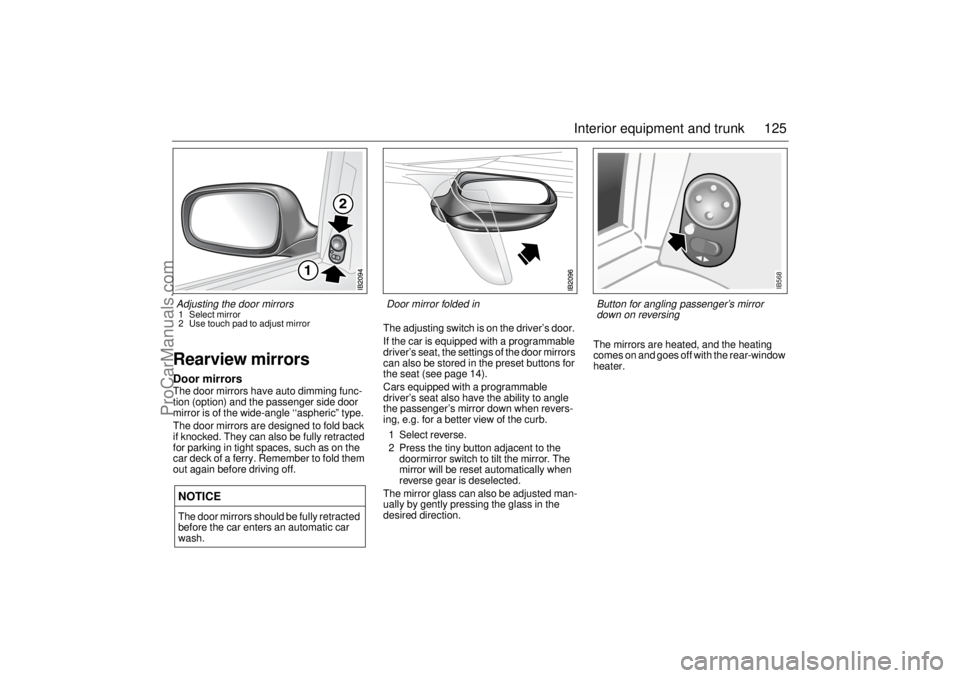
Rearview mirrorsDoor mirrorsThe door mirrors have auto dimming func-
tion (option) and the passenger side door
mirror is of the wide-angle ‘‘aspheric” type.
The door mirrors are designed to fold back
if knocked. They can also be fully retracted
for parking in tight spaces, such as on the
car deck of a ferry. Remember to fold them
out again before driving off.The adjusting switch is on the driver’s door.
If the car is equipped with a programmable
driver’s seat, the settings of the door mirrors
can also be stored in the preset buttons for
the seat (see page 14).
Cars equipped with a programmable
driver’s seat also have the ability to angle
the passenger’s mirror down when revers-
ing, e.g. for a better view of the curb.
1 Select reverse.
2 Press the tiny button adjacent to the
doormirror switch to tilt the mirror. The
mirror will be reset automatically when
reverse gear is deselected.
The mirror glass can also be adjusted man-
ually by gently pressing the glass in the
desired direction.The mirrors are heated, and the heating
comes on and goes off with the rear-window
heater.NOTICEThe door mirrors should be fully retracted
before the car enters an automatic car
wash.Adjusting the door mirrors 1 Select mirror
2 Use touch pad to adjust mirror
Door mirror folded in
IB568
Button for angling passenger’s mirror
down on reversing
ProCarManuals.com
Page 126 of 288
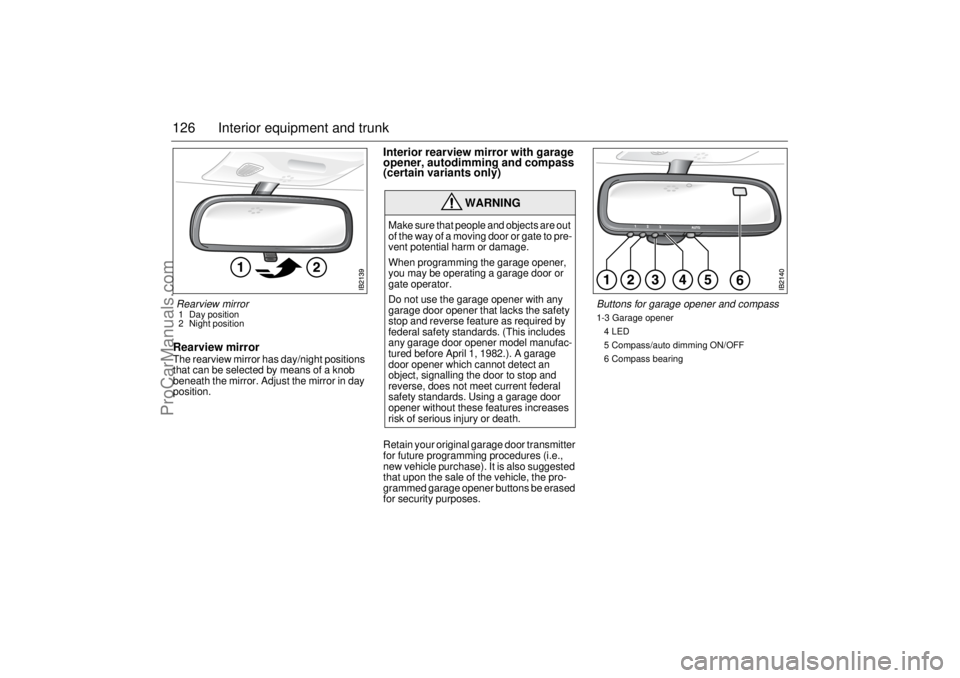
126 Interior equipment and trunkRearview mirrorThe rearview mirror has day/night positions
that can be selected by means of a knob
beneath the mirror. Adjust the mirror in day
position.
Interior rearview mirror with garage
opener, autodimming and compass
(certain variants only)Retain your original garage door transmitter
for future programming procedures (i.e.,
new vehicle purchase). It is also suggested
that upon the sale of the vehicle, the pro-
grammed garage opener buttons be erased
for security purposes.
WARNING
Make sure that people and objects are out
of the way of a moving door or gate to pre-
vent potential harm or damage.
When programming the garage opener,
you may be operating a garage door or
gate operator.
Do not use the garage opener with any
garage door opener that lacks the safety
stop and reverse feature as required by
federal safety standards. (This includes
any garage door opener model manufac-
tured before April 1, 1982.). A garage
door opener which cannot detect an
object, signalling the door to stop and
reverse, does not meet current federal
safety standards. Using a garage door
opener without these features increases
risk of serious injury or death.
Rearview mirror 1 Day position
2 Night position
Buttons for garage opener and compass1-3 Garage opener
4 LED
5 Compass/auto dimming ON/OFF
6 Compass bearing
ProCarManuals.com
Page 127 of 288

127 Interior equipment and trunk
Preparations for first-time programming
Before programming the garage opener for
the first time, you must delete any factory
codes.
Press and hold buttons 1 and 3 for about
20 seconds until the LED starts to flash.
This will delete the factory codes and initiate
the programming phase.
Programming the garage opener
The garage opener can record and store the
frequencies of three different remote con-
trols.
The battery in the remote control should be
fairly new for programming to work well.
1 Turn the ignition to ON.
2 Hold the garage door remote control
3–7 cm from the rearview mirror. Sit
where you can see the LED (4) during
programming.
3 Press the remote control button and the
desired button on the rear view mirror at
the same time.
4 The LED will now start to flash, slowly at
first and then rapidly. The rapidly flash-
ing LED indicates that programming is
complete and that you can release the
buttons.Reprogramming a button that has previ-
ously been programmed
1 Press and hold the desired button on the
rearview mirror for the entire program-
ming sequence.
2 The LED starts to flash slowly after
20 seconds.
3 Hold the garage door remote control
3 –7 cm from the rearview mirror and
press the button on the remote control.
4 Reprogramming is complete when the
LED starts to flash rapidly.
The previous frequency is now erased and
replaced by the new one. Reprogramming
one button does not affect the other buttons.
Complete erase
Completely erase the memory of the garage
opener by pressing and holding buttons 1
and 3 simultaneously for 20 seconds. Con-
firmation is provided by the LED flashing
rapidly for 10 seconds.
A complete erase deletes the frequencies
from all three buttons. It is not possible to
erase the memory of a single button.Opening a garage door
Press and hold the appropriate button until
the garage door starts to open.
You can of course still use the original
garage door remote control after you have
programmed the garage opener in the rear-
view mirror.
Garage doors with rolling security codes
Garage doors with rolling security codes
manufactured after 1996 can be identified
as follows:
Read the garage door’s instruction man-
ual.
Programming the garage opener in the
rearview mirror seems to be successful
but the garage door does not open.
Press and hold the programmed button.
The garage door uses a rolling security
code if the LED flashes rapidly and after
2 seconds shines constantly.
ProCarManuals.com
Page 128 of 288

128 Interior equipment and trunkIf the garage door remote control uses roll-
ing security codes, proceed as follows
having programmed the garage opener:
1 Localise the button labelled "learn" or
"smart" on the motor unit of the garage
door. The location and colour of this
button varies between makes.
2 Press and release the "learn" button on
the motor unit. Step 3 must be per-
formed within 30 seconds of Step 2.
3 Press the programmed button on the
rearview mirror twice (some garage
doors require the button to be pressed
three times; refer to the door’s instruc-
tion manual).Gate programming & Canada program-
ming
The remote control may stop transmitting
during programming. If so, continue to hold
the button on the rearview mirror and
release and press the button on the remote
control every other second, "cycling" until
programming is completed.
The LED will flash slowly at first and then
rapidly. The rapidly flashing LED indicates
that programming is complete and that you
can release the buttons.
NOTICESwitch off the power supply to the garage
door or gate (or park the car beyond the
range of the remote control) while pro-
gramming using the "cycling" method to
prevent damaging the electrical motor.
This device complies with Part 15 of the FCC Rules.
Operation is subject to the following two conditions: (1)
this device may not cause harmful interference, and (2)
must accept any interference received, including inter-
ference that may cause undesired operation.
Changes or modifications not expressly approved by the
manufacturer could void the user’s authority to operate
the equipment.
Canada only:
This device complies with RSS-210 of Industry Canada.
Operation is subject to the following two conditions: (1)
this device may not cause interference, and (2) this
device must accept any interference, including interfer-
ence that may cause undesired operation of this device.
ProCarManuals.com
Page 153 of 288
153 Starting and driving
If the car does not startIf the text ”KEY NOT ACCEPTED” is shown
on the SID, after a failed start attempt, the
cause could be a fault in the transmitter in
the key, or in the receiver in the ignition lock.
The following should be done:
Turn the key back to the LOCK position.
Turn the key to ON.
Press one of the buttons on the remote
control (the LED stops blinking).
Start the engine.
Try another key. If this works, then the fault
is in the first key.
Contact an authorized Saab dealer for
checking and rectification.
Note:
Certain electronic items, such as cellular
phones, may affect the starting produce-
dure. Be sure that all devices are clear of the
key/ignition switch area.
Starting the engine
NOTICETake care not to spill drinks or to drop
crumbs over the ignition switch. If dirt or
liquid gets into it, the switch may not
operate properly.
WARNING
Always remove the key before leaving
the car.
Always apply the parking brake before
removing the ignition key.
WARNING
When starting the engine:
- Sit down in the driver’s seat.
- Depress the clutch pedal fully. If the
gear lever is not in the neutral posi-
tion, the clutch pedal must be fully
depressed or the car will jump for-
wards or backwards, which may
cause a crash.
- Never start the car from outside the
vehicle, e.g. through a wound down
window. This could lead to serious
personal injury.
Engage reverse (R) (position P for
automatic transmission) to remove the
ignition key. The key can only be
removed in this gear position.
Carbon monoxide (CO) is a colorless,
odorless, poisonous gas. Be alert to
the danger of CO – always open the
garage doors before starting the
engine in the garage.
There is also a danger of CO poison-
ing if the exhaust system is leaking.
ProCarManuals.com
Page 220 of 288
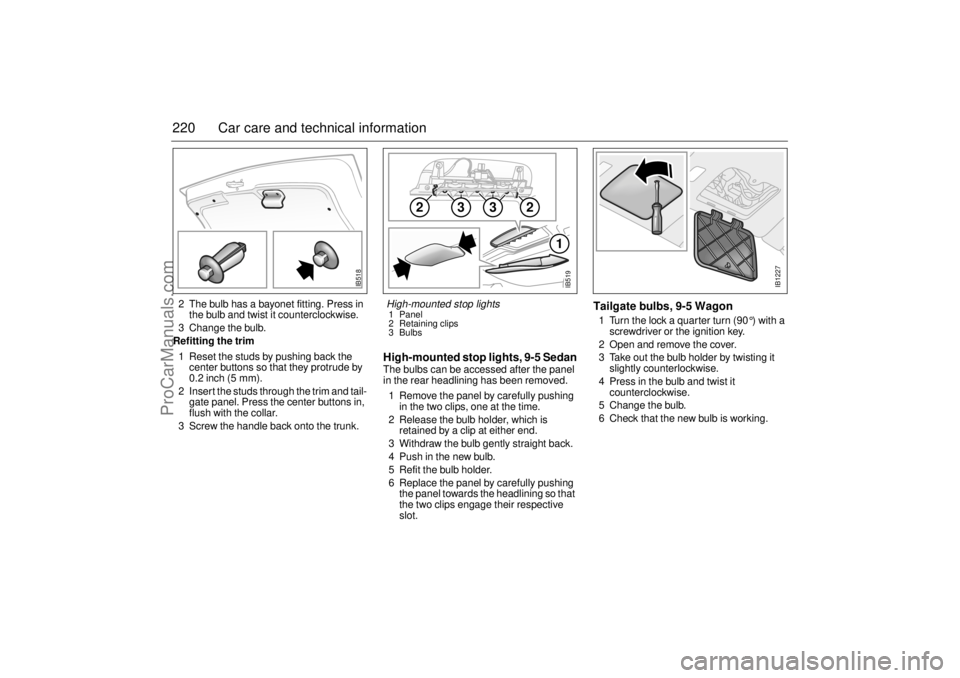
220 Car care and technical information2 The bulb has a bayonet fitting. Press in
the bulb and twist it counterclockwise.
3 Change the bulb.
Refitting the trim
1 Reset the studs by pushing back the
center buttons so that they protrude by
0.2 inch (5 mm).
2 Insert the studs through the trim and tail-
gate panel. Press the center buttons in,
flush with the collar.
3 Screw the handle back onto the trunk.
High-mounted stop lights, 9-5 SedanThe bulbs can be accessed after the panel
in the rear headlining has been removed.
1 Remove the panel by carefully pushing
in the two clips, one at the time.
2 Release the bulb holder, which is
retained by a clip at either end.
3 Withdraw the bulb gently straight back.
4 Push in the new bulb.
5 Refit the bulb holder.
6 Replace the panel by carefully pushing
the panel towards the headlining so that
the two clips engage their respective
slot.
Tailgate bulbs, 9-5 Wagon1 Turn the lock a quarter turn (90 °) with a
screwdriver or the ignition key.
2 Open and remove the cover.
3 Take out the bulb holder by twisting it
slightly counterlockwise.
4 Press in the bulb and twist it
counterclockwise.
5 Change the bulb.
6 Check that the new bulb is working.
IB518
3
2
2
3
1
IB519
High-mounted stop lights1 Panel
2 Retaining clips
3 Bulbs
IB1227
ProCarManuals.com