ECU SAAB 9-5 2003 Owner's Guide
[x] Cancel search | Manufacturer: SAAB, Model Year: 2003, Model line: 9-5, Model: SAAB 9-5 2003Pages: 288, PDF Size: 16.78 MB
Page 115 of 288

115 OnStar - Telematics
Roadside assistance**There’s nothing worse than being stranded
on the road with car trouble. No matter what
the problem is (flat tire, out of gas, or engine
trouble), just call OnStar. They will contact
the help you need to get you quickly back on
the road.Stolen vehicle trackingOnStar doesn’t just protect you, it protects
your Saab, too. If your vehicle is ever stolen,
just contact OnStar by calling
1-888-4-ONSTAR. They will put you in
touch with the authorities and aid them in
locating your Saab. Ask your insurance car-
rier about possible premium discounts.Accident Assist™Accident Assist™ provides step-by-step
guidance about what to do in case of a
crash. Working with leading insurance com-
panies OnStar has developed a ”best prac-
tices” list to assist you through most acci-
dent situations. OnStar Accident Assist™
can make the process of completing a
police report and/or insurance claim less
stressful.
OnStar Med-Net***OnStar MED-NET securely stores your per-
sonal medical information (e.g., physician’s
name, emergency contacts, medications,
chronic conditions) and, in an emergency,
can quickly send it to a medical facility. This
important information can help assist with
diagnosis and treatment. ******There will be no charge for Roadside Assistance as
long as your vehicle is under warranty.
***Requires activation and additional fee.
****Not available in Canada.Hands-free communicationTalking to an OnStar advisor is easy and
hands-free. Simply press the OnStar but-
ton, and a small microphone picks up your
voice while the OnStar advisor talks to you
through your stereo speakers. Note: Audio
system must be switched on. You can even
adjust the volume to your liking with the
steering wheel controls or the radio volume
knob. Your hands remain on the steering
wheel, while your eyes remain on the road.Being safe on the road is important, but
there’s more to life than security. There’s liv-
ing. That’s why we have created the OnStar
Directions and Connections Plan. It gives
you not only the important protections of the
Safe and Sound Plan, but also a whole
range of services which truly change driving
from a chore to a luxury. All new Saab
models come with one full year of the
OnStar Directions and Connections Plan.* * New retail deliveries only.
The OnStar Premium
Services Plan *Route supportWith OnStar Route Support, an advisor can
help you find your way, no matter how far off
course you are. You can get exact street
directions, or guidance to nearby gas sta-
tions, restaurants, hotels or ATMs.Ride AssistIf you need a lift, anytime of the day or night,
just call OnStar. They’ll contact transporta-
tion and send it right to you.Information and Convenience ser-
vicesOnStar advisors have access to over five
million service listings including hotels, res-
taurants, gas stations, dealerships, hospi-
tals, ATMs and airports — more than 250
service categories in all. OnStar advisors
can even assist you with hotel and restau-
rant reservations.*All Saab models come with a full year of Premium Ser-
vice. New retail deliveries only.
ProCarManuals.com
Page 116 of 288

116 OnStar - TelematicsOnline Concierge servicesFrom shopping to travel to entertainment
and more, OnStar’s online concierge can
help you make the most of your time. Login
to www.myonstar.com and simply select a
city, choose a category and ask away. Get
instant answers in a live online chat with an
OnStar Advisor or send an email if you pre-
fer. You can also view OnStar’s recommen-
dations for top picks in eight categories like
dining, travel and sports and recreation.
Additional ServicesPersonal CallingAs an OnStar Safe and Sound Plan or
Directions and Connections Plan sub-
scriber, you have access to OnStar Per-
sonal Calling. OnStar Personal Calling pro-
vides you with a nationwide wireless phone
service in your Saab that you can activate
simply by pressing a button and using your
voice. You can use Personal Calling in your
Saab to place or to receive calls. The
voice-activated system will dial the number.
Your party will answer through your stereo
speakers.
With OnStar Personal Calling, you can
enjoy the simplicity of a one-touch wireless
connection. Whether you are placing or
receiving a call, once you press the button,
you never have to take your hands off the
wheel or your eyes off the road. The ease of
the hands-free communication service
allows you to enjoy an even greater level of
safety, security and convenience while driv-
ing.
This new service is not yet available in all
areas. Complete availability in the U.S. is
anticipated in 2001*. For system limitations
and details, call OnStar at
1-800-ONSTAR-7.* Availability in Canada was undetermined at time of
publication. Please contact your local dealer in Canada.
Signing Up for Personal CallingAs an OnStar subscriber, the Personal Call-
ing capability is already built into your
Saab’s OnStar hardware. In order to use
this service, an OnStar advisor must set up
your cellular account. You must also pro-
vide a credit card in order to establish your
prepaid cellular account. Usage charges
will be deducted from this prepaid account
of ”units.” Units are easily replenished using
the credit card on file at OnStar. Once you
sign up for OnStar Personal Calling, you will
be given your own personal phone number
that others can use to call into your Saab. To sign up for Personal Calling,
simply Press the OnStar button in your Saab.
Inform the advisor that you would like to
sign up for Personal Calling.
The advisor will set up your account.
You will need to provide account and
credit card information.
ProCarManuals.com
Page 119 of 288

119 OnStar - Telematics
Contact OnStar
You will need your OnStar Personal Identi-
fication Number (PIN) to authorize the
charge to your credit card on file.
If you are not in your Saab, you may call an
OnStar Advisor at 1-888-4-ONSTAR
(1-888-466-7827) to request unit replenish-
ment.
Security/Locking your SystemYou can set up a four-digit Personal Secu-
rity Code to ensure that unauthorized
people do not use the calling capability of
your system. With security set to ON, the
system will not allow any personal calls. You
must turn security OFF before calls can be
made.
Volume ControlThe volume of the audio portion of Personal
Calling is controlled with your steering
wheel volume controls or with the radio
volume knob. 1Press the
OnStar
White Dot
buttonOnStar will respond
”Ready”
2 Say ”Units” OnStar will respond
”Verify or Add”
3 Say ”Add” You will be connected to
OnStar for replenish-
ment
1 Press the
OnStar White
Dot buttonOnStar will respond
”Ready”
2 Say ”Security” OnStar will respond
”Enter Four-Digit
Security Code”
3 Say the 1st Digit OnStar will repeat
the digit
4 Say the 2nd Digit OnStar will repeat
the digit
5 Say the 3rd Digit OnStar will repeat
the digit
6 Say the 4th Digit OnStar reply ”Secu-
rity (code # # # #) is
now ON/OFF”
ProCarManuals.com
Page 121 of 288

121 OnStar - Telematics
News HeadlinesThe OnStar Virtual Advisor will provide cur-
rent headlines for many different catego-
ries, including:
International News Headlines
National News Headlines
Technology Headlines
Business Headlines
Sports Headlines
Entertainment HeadlinesE-mail ReaderThe OnStar Virtual Advisor allows you to lis-
ten, and soon respond, to your e-mails any
time you want. E-mail availability is based
on the address(es) you provide to OnStar.
Every Virtual Advisor enrollee will receive
an E-mail account.
OnStar Subscriber
WebsiteAs an OnStar subscriber, you have access
to the OnStar subscriber website. The sub-
scriber website will provide you with impor-
tant facts about your OnStar subscription
and allow you to customize your Virtual
Advisor Mobile Profile. All this allows you to
access up-to-the-minute information that
can make your driving experience safer and
more enjoyable.
The subscriber website was designed to
provide you with easy access to personal-
ized information, learn more about OnStar,
update your account information, plan your
travel, receive weather information and
interact with OnStar.
You can also act like an OnStar advisor and
pinpoint your Saab. To access the sub-
scriber website, simply go to
www.onstar.com, and then click on the
OnStar subscriber link. The OnStar Sub-
scriber website is a secured site that is
password protected. You will be required to
provide your OnStar account number and
personal identification number (PIN). If you
do not know your account number or PIN,
contact OnStar at 1-888-4-ONSTAR. For
security reasons, your PIN will be mailed to
your address on record.
LimitationsNot withstanding anything contained
herein, OnStar's nonperformance hereun-
der shall be excused if caused by act or
omission of a cellular carrier or a third-party
service provider, equipment failure, acts of
God, strikes, equipment or facility shortage,
or other causes beyond OnStar’s reason-
able control. In addition, the liability of
OnStar, if any, for any mistake, omission,
interruption, delay, error, defect or other fail-
ure in the service furnished, or in the equip-
ment used in furnishing service, shall in no
event exceed the amount of OnStar’s
charges to subscriber for said service
during the period so affected, provided that
no liability shall result for outages of 24
hours or less.
This manual includes the latest information
at the time it was printed. We reserve the
right to make changes to the products and
services without prior notification.
In order to provide you with excellent ser-
vice, any call to the OnStar Center may be
monitored or recorded.
All features may not be available on all mod-
els. Please consult your dealer for details.
ProCarManuals.com
Page 126 of 288
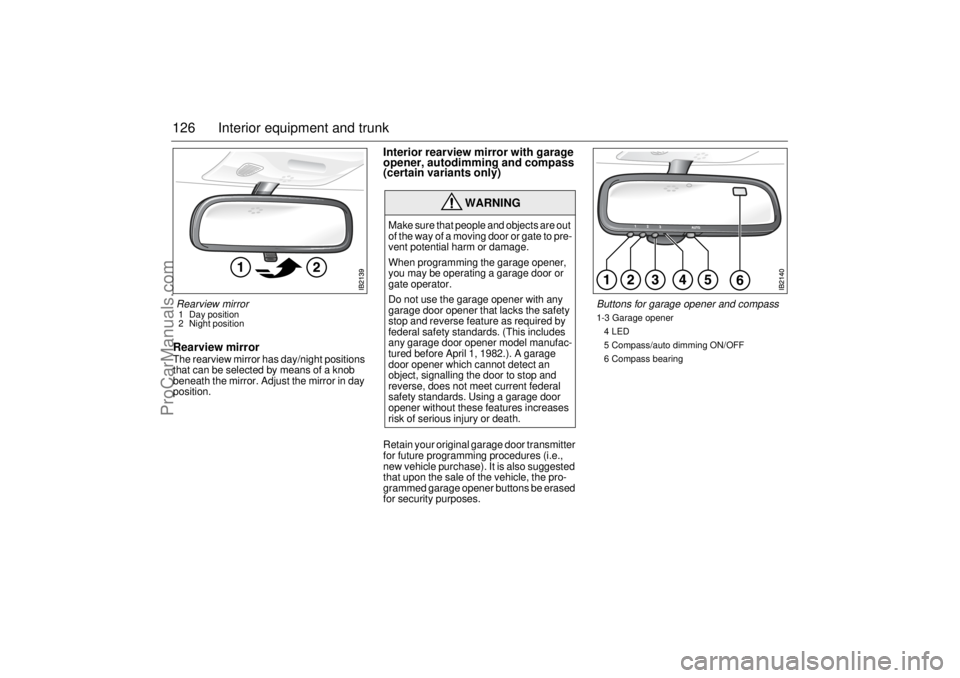
126 Interior equipment and trunkRearview mirrorThe rearview mirror has day/night positions
that can be selected by means of a knob
beneath the mirror. Adjust the mirror in day
position.
Interior rearview mirror with garage
opener, autodimming and compass
(certain variants only)Retain your original garage door transmitter
for future programming procedures (i.e.,
new vehicle purchase). It is also suggested
that upon the sale of the vehicle, the pro-
grammed garage opener buttons be erased
for security purposes.
WARNING
Make sure that people and objects are out
of the way of a moving door or gate to pre-
vent potential harm or damage.
When programming the garage opener,
you may be operating a garage door or
gate operator.
Do not use the garage opener with any
garage door opener that lacks the safety
stop and reverse feature as required by
federal safety standards. (This includes
any garage door opener model manufac-
tured before April 1, 1982.). A garage
door opener which cannot detect an
object, signalling the door to stop and
reverse, does not meet current federal
safety standards. Using a garage door
opener without these features increases
risk of serious injury or death.
Rearview mirror 1 Day position
2 Night position
Buttons for garage opener and compass1-3 Garage opener
4 LED
5 Compass/auto dimming ON/OFF
6 Compass bearing
ProCarManuals.com
Page 127 of 288

127 Interior equipment and trunk
Preparations for first-time programming
Before programming the garage opener for
the first time, you must delete any factory
codes.
Press and hold buttons 1 and 3 for about
20 seconds until the LED starts to flash.
This will delete the factory codes and initiate
the programming phase.
Programming the garage opener
The garage opener can record and store the
frequencies of three different remote con-
trols.
The battery in the remote control should be
fairly new for programming to work well.
1 Turn the ignition to ON.
2 Hold the garage door remote control
3–7 cm from the rearview mirror. Sit
where you can see the LED (4) during
programming.
3 Press the remote control button and the
desired button on the rear view mirror at
the same time.
4 The LED will now start to flash, slowly at
first and then rapidly. The rapidly flash-
ing LED indicates that programming is
complete and that you can release the
buttons.Reprogramming a button that has previ-
ously been programmed
1 Press and hold the desired button on the
rearview mirror for the entire program-
ming sequence.
2 The LED starts to flash slowly after
20 seconds.
3 Hold the garage door remote control
3 –7 cm from the rearview mirror and
press the button on the remote control.
4 Reprogramming is complete when the
LED starts to flash rapidly.
The previous frequency is now erased and
replaced by the new one. Reprogramming
one button does not affect the other buttons.
Complete erase
Completely erase the memory of the garage
opener by pressing and holding buttons 1
and 3 simultaneously for 20 seconds. Con-
firmation is provided by the LED flashing
rapidly for 10 seconds.
A complete erase deletes the frequencies
from all three buttons. It is not possible to
erase the memory of a single button.Opening a garage door
Press and hold the appropriate button until
the garage door starts to open.
You can of course still use the original
garage door remote control after you have
programmed the garage opener in the rear-
view mirror.
Garage doors with rolling security codes
Garage doors with rolling security codes
manufactured after 1996 can be identified
as follows:
Read the garage door’s instruction man-
ual.
Programming the garage opener in the
rearview mirror seems to be successful
but the garage door does not open.
Press and hold the programmed button.
The garage door uses a rolling security
code if the LED flashes rapidly and after
2 seconds shines constantly.
ProCarManuals.com
Page 128 of 288

128 Interior equipment and trunkIf the garage door remote control uses roll-
ing security codes, proceed as follows
having programmed the garage opener:
1 Localise the button labelled "learn" or
"smart" on the motor unit of the garage
door. The location and colour of this
button varies between makes.
2 Press and release the "learn" button on
the motor unit. Step 3 must be per-
formed within 30 seconds of Step 2.
3 Press the programmed button on the
rearview mirror twice (some garage
doors require the button to be pressed
three times; refer to the door’s instruc-
tion manual).Gate programming & Canada program-
ming
The remote control may stop transmitting
during programming. If so, continue to hold
the button on the rearview mirror and
release and press the button on the remote
control every other second, "cycling" until
programming is completed.
The LED will flash slowly at first and then
rapidly. The rapidly flashing LED indicates
that programming is complete and that you
can release the buttons.
NOTICESwitch off the power supply to the garage
door or gate (or park the car beyond the
range of the remote control) while pro-
gramming using the "cycling" method to
prevent damaging the electrical motor.
This device complies with Part 15 of the FCC Rules.
Operation is subject to the following two conditions: (1)
this device may not cause harmful interference, and (2)
must accept any interference received, including inter-
ference that may cause undesired operation.
Changes or modifications not expressly approved by the
manufacturer could void the user’s authority to operate
the equipment.
Canada only:
This device complies with RSS-210 of Industry Canada.
Operation is subject to the following two conditions: (1)
this device may not cause interference, and (2) this
device must accept any interference, including interfer-
ence that may cause undesired operation of this device.
ProCarManuals.com
Page 140 of 288
140 Interior equipment and trunk
WARNING
Place heavy items closest to the backrest and stow smaller
and lighter items on top.
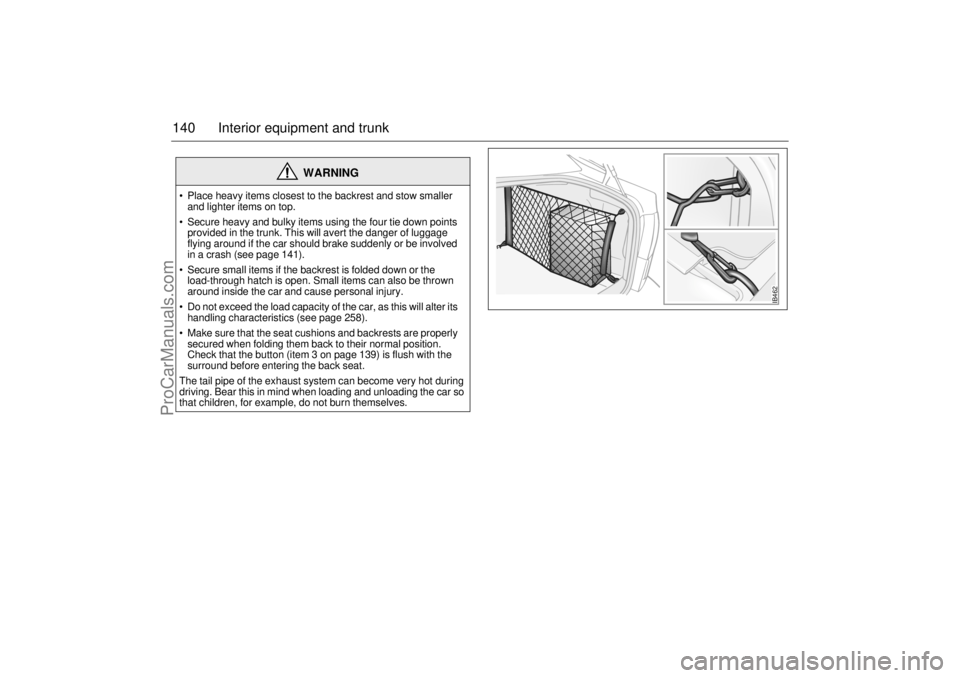
Secure heavy and bulky items using the four tie down points
provided in the trunk. This will avert the danger of luggage
flying around if the car should brake suddenly or be involved
in a crash (see page 141).
Secure small items if the backrest is folded down or the
load-through hatch is open. Small items can also be thrown
around inside the car and cause personal injury.
Do not exceed the load capacity of the car, as this will alter its
handling characteristics (see page 258).
Make sure that the seat cushions and backrests are properly
secured when folding them back to their normal position.
Check that the button (item 3 on page 139) is flush with the
surround before entering the back seat.
The tail pipe of the exhaust system can become very hot during
driving. Bear this in mind when loading and unloading the car so
that children, for example, do not burn themselves.
IB462
ProCarManuals.com
Page 141 of 288
141 Interior equipment and trunk
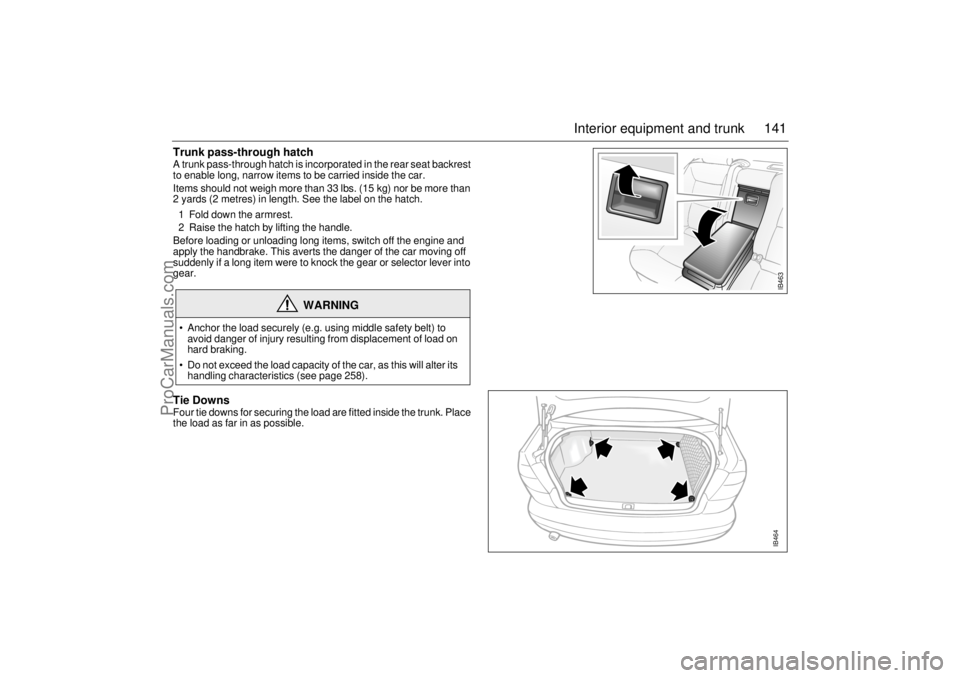
Trunk pass-through hatch A trunk pass-through hatch is incorporated in the rear seat backrest
to enable long, narrow items to be carried inside the car.
Items should not weigh more than 33 lbs. (15 kg) nor be more than
2 yards (2 metres) in length. See the label on the hatch.
1 Fold down the armrest.
2 Raise the hatch by lifting the handle.
Before loading or unloading long items, switch off the engine and
apply the handbrake. This averts the danger of the car moving off
suddenly if a long item were to knock the gear or selector lever into
gear. Tie DownsFour tie downs for securing the load are fitted inside the trunk. Place
the load as far in as possible.
WARNING
Anchor the load securely (e.g. using middle safety belt) to
avoid danger of injury resulting from displacement of load on
hard braking.
Do not exceed the load capacity of the car, as this will alter its
handling characteristics (see page 258).
IB463IB464
ProCarManuals.com
Page 144 of 288
144 Interior equipment and trunkLoad anchoring
Driving with the trunk lid/tailgate open, see
page 188.
WARNING
Put heavy loads as low down and as
far forward as possible in the luggage
compartment, i.e. against the back of
the rear seat.
Never stack cargo so high that any part
of the cargo lies above the edge of the
backrest, if a cargo guard (accessory)
is not being used.
Always tie down the cargo so that it
cannot be thrown forward during
heavy braking or in the event of a
crash.
Unsecured and heavy cargo can
increase the risk of injury during hard
braking, sudden avoidance maneu-
vers and in the event of a crash.
For the best load anchoring, use the
special cargo bolts and load straps
(accessory).
Load the cargo bolts evenly. Never
attach more than one strap to each tie
down eye.
Provide protection on sharp edges to
prevent damage to the load straps.
Never use the elastic floor net and
elastic side net when the rear seat is
folded down. These nets are only
intended to keep light objects tidy, not
for the anchoring of loads.
If possible, avoid having the rear seat
folded down when driving with a heavy
load because the anchoring possibili-
ties are restricted when the rear seat is
in this position. That the rear seat is
in the upright position is a basic
requirement for protection against
cargo displacement in the event of
a crash.
Cargo can intrude into the passenger
compartment during a sudden stop or
front crash if the outer safety belts are
not fastened. Check that the two red
warning-indication flags are fully
down. This shows that the backrests
are locked.
WARNING
Match the speed and driving style
according to how the car is loaded.
The driving characteristics of the car
can be affected because the center of
gravity is altered when there is a cargo
in the luggage compartment.
An object weighing 55 lbs. (25 kg) cor-
responds to a weight of 2200 lbs.
(1000 kg) in a head on crash at
32 mph (50 km/h).
Adjust the car’s load (passengers and
luggage) so that the gross vehicle
weight or the axle weight is not
exceeded, see page 258.
ProCarManuals.com