lock SAAB 9-5 2004 Service Manual
[x] Cancel search | Manufacturer: SAAB, Model Year: 2004, Model line: 9-5, Model: SAAB 9-5 2004Pages: 288, PDF Size: 16.91 MB
Page 140 of 288
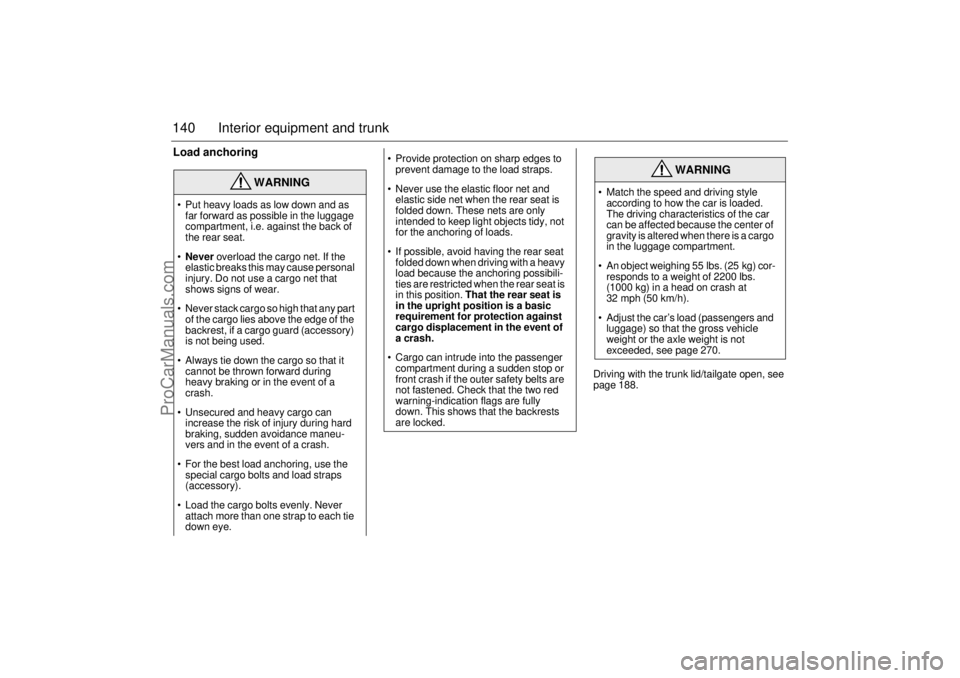
140 Interior equipment and trunkLoad anchoring
Driving with the trunk lid/tailgate open, see
page 188.
WARNING
Put heavy loads as low down and as
far forward as possible in the luggage
compartment, i.e. against the back of
the rear seat.
Never overload the cargo net. If the
elastic breaks this may cause personal
injury. Do not use a cargo net that
shows signs of wear.
Never stack cargo so high that any part
of the cargo lies above the edge of the
backrest, if a cargo guard (accessory)
is not being used.
Always tie down the cargo so that it
cannot be thrown forward during
heavy braking or in the event of a
crash.
Unsecured and heavy cargo can
increase the risk of injury during hard
braking, sudden avoidance maneu-
vers and in the event of a crash.
For the best load anchoring, use the
special cargo bolts and load straps
(accessory).
Load the cargo bolts evenly. Never
attach more than one strap to each tie
down eye.
Provide protection on sharp edges to
prevent damage to the load straps.
Never use the elastic floor net and
elastic side net when the rear seat is
folded down. These nets are only
intended to keep light objects tidy, not
for the anchoring of loads.
If possible, avoid having the rear seat
folded down when driving with a heavy
load because the anchoring possibili-
ties are restricted when the rear seat is
in this position. That the rear seat is
in the upright position is a basic
requirement for protection against
cargo displacement in the event of
a crash.
Cargo can intrude into the passenger
compartment during a sudden stop or
front crash if the outer safety belts are
not fastened. Check that the two red
warning-indication flags are fully
down. This shows that the backrests
are locked.
WARNING
Match the speed and driving style
according to how the car is loaded.
The driving characteristics of the car
can be affected because the center of
gravity is altered when there is a cargo
in the luggage compartment.
An object weighing 55 lbs. (25 kg) cor-
responds to a weight of 2200 lbs.
(1000 kg) in a head on crash at
32 mph (50 km/h).
Adjust the car’s load (passengers and
luggage) so that the gross vehicle
weight or the axle weight is not
exceeded, see page 270.
ProCarManuals.com
Page 141 of 288
141 Interior equipment and trunk
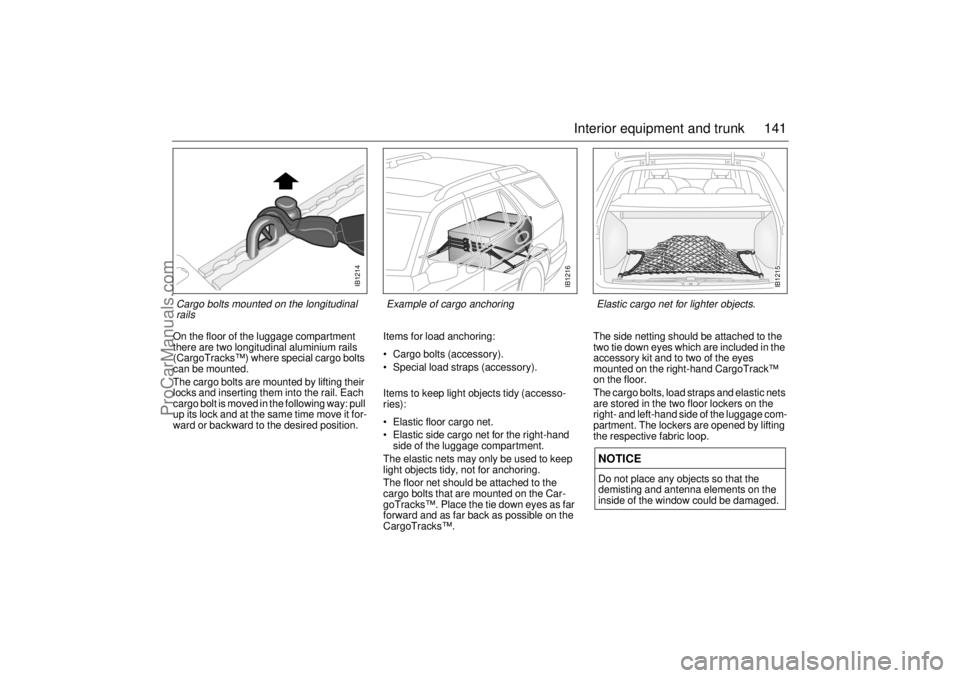
On the floor of the luggage compartment
there are two longitudinal aluminium rails
(CargoTracks™) where special cargo bolts
can be mounted.
The cargo bolts are mounted by lifting their
locks and inserting them into the rail. Each
cargo bolt is moved in the following way: pull
up its lock and at the same time move it for-
ward or backward to the desired position.Items for load anchoring:
Cargo bolts (accessory).
Special load straps (accessory).
Items to keep light objects tidy (accesso-
ries):
Elastic floor cargo net.
Elastic side cargo net for the right-hand
side of the luggage compartment.
The elastic nets may only be used to keep
light objects tidy, not for anchoring.
The floor net should be attached to the
cargo bolts that are mounted on the Car-
goTracks™. Place the tie down eyes as far
forward and as far back as possible on the
CargoTracks™.The side netting should be attached to the
two tie down eyes which are included in the
accessory kit and to two of the eyes
mounted on the right-hand CargoTrack™
on the floor.
The cargo bolts, load straps and elastic nets
are stored in the two floor lockers on the
right- and left-hand side of the luggage com-
partment. The lockers are opened by lifting
the respective fabric loop.
NOTICEDo not place any objects so that the
demisting and antenna elements on the
inside of the window could be damaged.
IB1214
Cargo bolts mounted on the longitudinal
rails
IB1216
Example of cargo anchoring
IB1215
Elastic cargo net for lighter objects.
ProCarManuals.com
Page 144 of 288
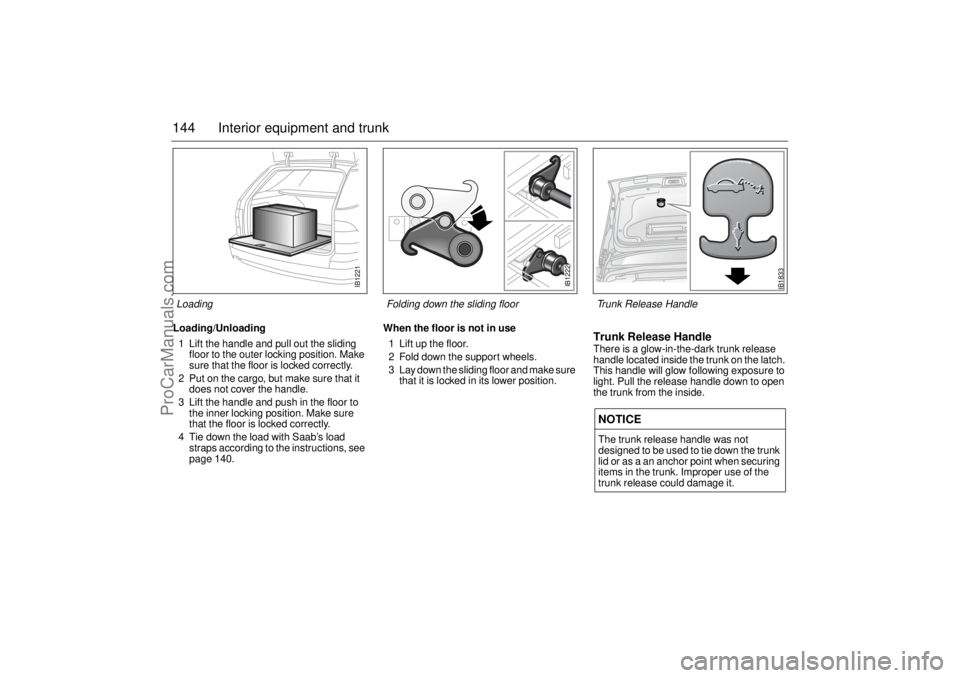
144 Interior equipment and trunkLoading/Unloading
1 Lift the handle and pull out the sliding
floor to the outer locking position. Make
sure that the floor is locked correctly.
2 Put on the cargo, but make sure that it
does not cover the handle.
3 Lift the handle and push in the floor to
the inner locking position. Make sure
that the floor is locked correctly.
4 Tie down the load with Saab’s load
straps according to the instructions, see
page 140.When the floor is not in use
1 Lift up the floor.
2 Fold down the support wheels.
3 Lay down the sliding floor and make sure
that it is locked in its lower position.
Trunk Release HandleThere is a glow-in-the-dark trunk release
handle located inside the trunk on the latch.
This handle will glow following exposure to
light. Pull the release handle down to open
the trunk from the inside.NOTICEThe trunk release handle was not
designed to be used to tie down the trunk
lid or as a an anchor point when securing
items in the trunk. Improper use of the
trunk release could damage it.
IB1221
Loading
IB1222
Folding down the sliding floor
IB1833
Trunk Release Handle
ProCarManuals.com
Page 146 of 288
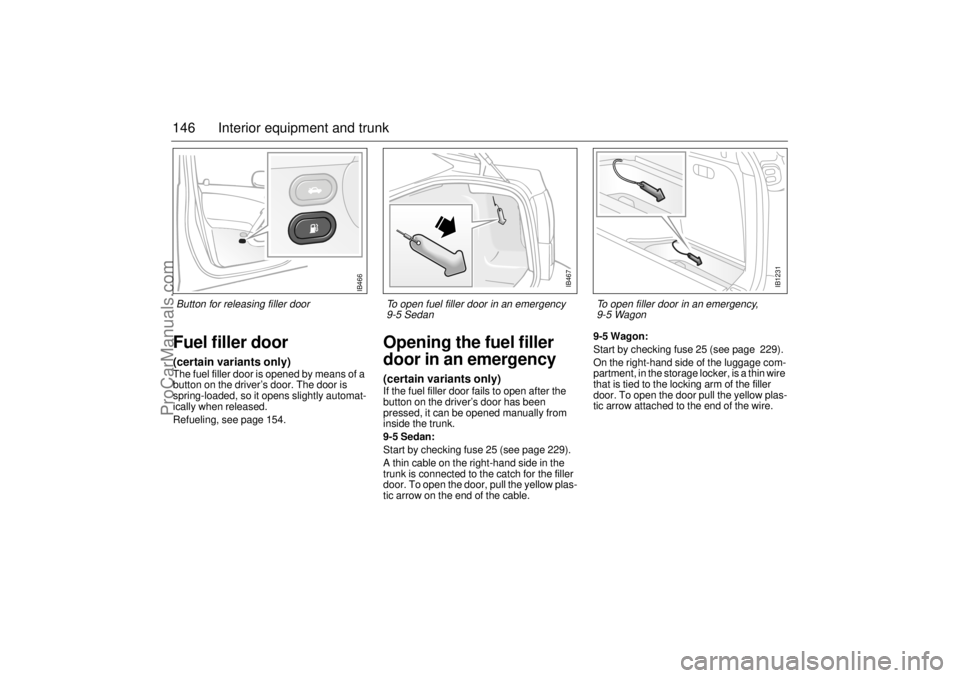
146 Interior equipment and trunkFuel filler door(certain variants only)The fuel filler door is opened by means of a
button on the driver’s door. The door is
spring-loaded, so it opens slightly automat-
ically when released.
Refueling, see page 154.
Opening the fuel filler
door in an emergency(certain variants only)If the fuel filler door fails to open after the
button on the driver’s door has been
pressed, it can be opened manually from
inside the trunk.
9-5 Sedan:
Start by checking fuse 25 (see page 229).
A thin cable on the right-hand side in the
trunk is connected to the catch for the filler
door. To open the door, pull the yellow plas-
tic arrow on the end of the cable. 9-5 Wagon:
Start by checking fuse 25 (see page 229).
On the right-hand side of the luggage com-
partment, in the storage locker, is a thin wire
that is tied to the locking arm of the filler
door. To open the door pull the yellow plas-
tic arrow attached to the end of the wire.
IB1231
To open filler door in an emergency,
9-5 Wagon
IB467
To open fuel filler door in an emergency
9-5 Sedan
IB466
Button for releasing filler door
ProCarManuals.com
Page 148 of 288
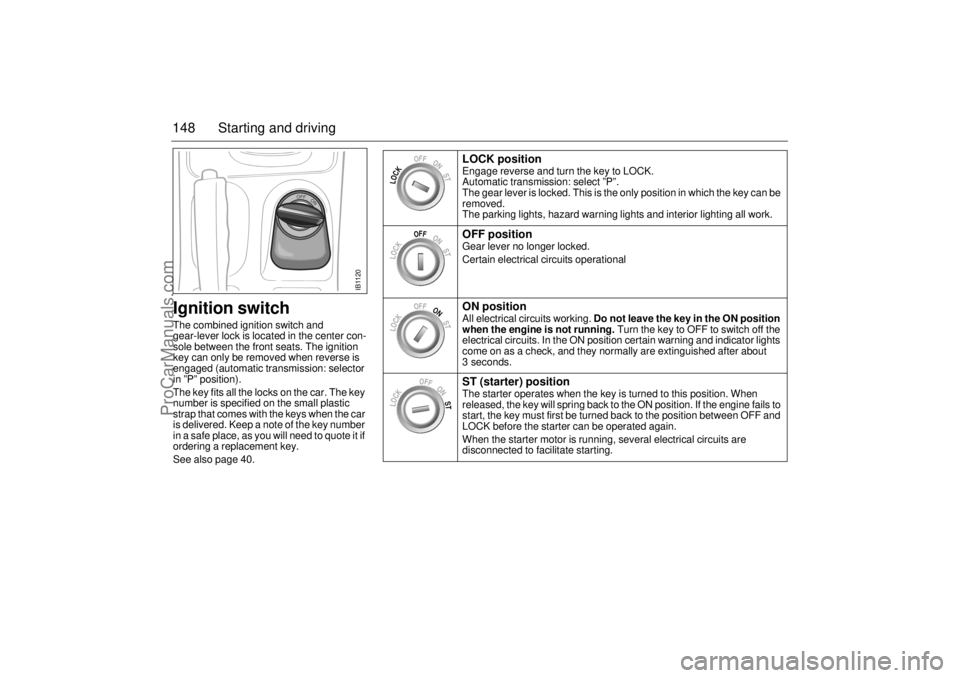
148 Starting and drivingIgnition switchThe combined ignition switch and
gear-lever lock is located in the center con-
sole between the front seats. The ignition
key can only be removed when reverse is
engaged (automatic transmission: selector
in ”P” position).
The key fits all the locks on the car. The key
number is specified on the small plastic
strap that comes with the keys when the car
is delivered. Keep a note of the key number
in a safe place, as you will need to quote it if
ordering a replacement key.
See also page 40.
LOCK position Engage reverse and turn the key to LOCK.
Automatic transmission: select ”P”.
The gear lever is locked. This is the only position in which the key can be
removed.
The parking lights, hazard warning lights and interior lighting all work. OFF position Gear lever no longer locked.
Certain electrical circuits operationalON position All electrical circuits working. Do not leave the key in the ON position
when the engine is not running. Turn the key to OFF to switch off the
electrical circuits. In the ON position certain warning and indicator lights
come on as a check, and they normally are extinguished after about
3 seconds.ST (starter) position The starter operates when the key is turned to this position. When
released, the key will spring back to the ON position. If the engine fails to
start, the key must first be turned back to the position between OFF and
LOCK before the starter can be operated again.
When the starter motor is running, several electrical circuits are
disconnected to facilitate starting.
LOCK
OFFONST
LOCK
OFFONST
LOCK
OFFONST
LOCK
OFFONST
IB1120
ProCarManuals.com
Page 149 of 288
149 Starting and driving
If the car does not startIf the text ”Key not accepted. Contact ser-
vice.” is shown on the SID, after a failed start
attempt, the cause could be a fault in the
transmitter in the key, or in the receiver in
the ignition lock. The following should be
done:
Turn the key back to the LOCK position.
Turn the key to ON.
Press one of the buttons on the remote
control (the LED stops blinking).
Start the engine.
Try another key. If this works, then the fault
is in the first key.
Contact an authorized Saab dealer for
checking and rectification.
Note:
Certain electronic items, such as cellular
phones, may affect the starting produce-
dure. Be sure that all devices are clear of the
key/ignition switch area.
Starting the engine
NOTICETake care not to spill drinks or to drop
crumbs over the ignition switch. If dirt or
liquid gets into it, the switch may not
operate properly.
WARNING
Always remove the key before leaving
the car.
Always apply the parking brake before
removing the ignition key.
WARNING
When starting the engine:
- Sit down in the driver’s seat.
- Depress the clutch pedal fully. If the
gear lever is not in the neutral posi-
tion, the clutch pedal must be fully
depressed or the car will jump for-
wards or backwards, which may
cause a crash.
- Never start the car from outside the
vehicle, e.g. through a wound down
window. This could lead to serious
personal injury.
Engage reverse (R) (position P for
automatic transmission) to remove the
ignition key. The key can only be
removed in this gear position.
Carbon monoxide (CO) is a colorless,
odorless, poisonous gas. Be alert to
the danger of CO – always open the
garage doors before starting the
engine in the garage.
There is also a danger of CO poison-
ing if the exhaust system is leaking.
ProCarManuals.com
Page 158 of 288
158 Starting and drivingGear changingManual transmissionTo start the engine the clutch pedal must
be fully depressed.
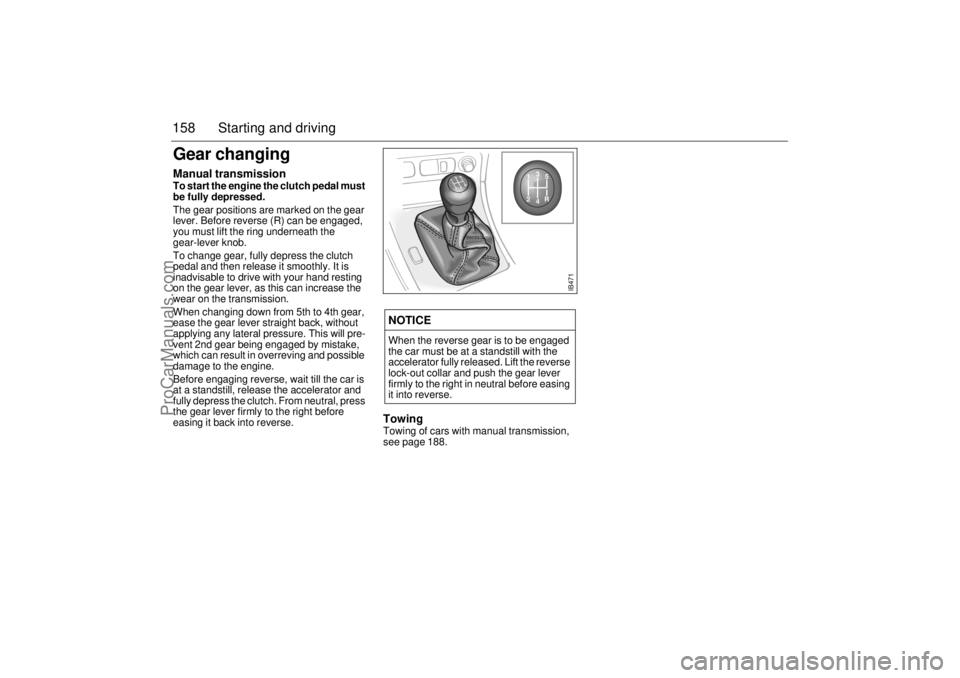
The gear positions are marked on the gear
lever. Before reverse (R) can be engaged,
you must lift the ring underneath the
gear-lever knob.
To change gear, fully depress the clutch
pedal and then release it smoothly. It is
inadvisable to drive with your hand resting
on the gear lever, as this can increase the
wear on the transmission.
When changing down from 5th to 4th gear,
ease the gear lever straight back, without
applying any lateral pressure. This will pre-
vent 2nd gear being engaged by mistake,
which can result in overreving and possible
damage to the engine.
Before engaging reverse, wait till the car is
at a standstill, release the accelerator and
fully depress the clutch. From neutral, press
the gear lever firmly to the right before
easing it back into reverse.
Towing Towing of cars with manual transmission,
see page 188. NOTICEWhen the reverse gear is to be engaged
the car must be at a standstill with the
accelerator fully released. Lift the reverse
lock-out collar and push the gear lever
firmly to the right in neutral before easing
it into reverse.
IB471
13
25
R
4
ProCarManuals.com
Page 160 of 288
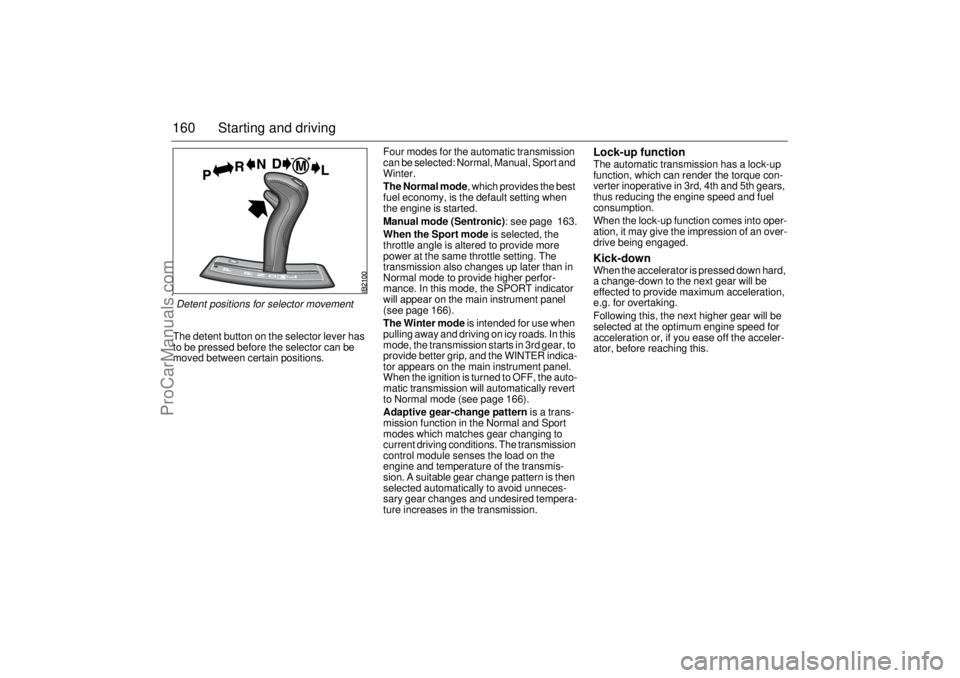
160 Starting and drivingThe detent button on the selector lever has
to be pressed before the selector can be
moved between certain positions. Four modes for the automatic transmission
can be selected: Normal, Manual, Sport and
Winter.
The Normal mode, which provides the best
fuel economy, is the default setting when
the engine is started.
Manual mode (Sentronic): see page 163.
When the Sport mode is selected, the
throttle angle is altered to provide more
power at the same throttle setting. The
transmission also changes up later than in
Normal mode to provide higher perfor-
mance. In this mode, the SPORT indicator
will appear on the main instrument panel
(see page 166).
The Winter mode is intended for use when
pulling away and driving on icy roads. In this
mode, the transmission starts in 3rd gear, to
provide better grip, and the WINTER indica-
tor appears on the main instrument panel.
When the ignition is turned to OFF, the auto-
matic transmission will automatically revert
to Normal mode (see page 166).
Adaptive gear-change pattern is a trans-
mission function in the Normal and Sport
modes which matches gear changing to
current driving conditions. The transmission
control module senses the load on the
engine and temperature of the transmis-
sion. A suitable gear change pattern is then
selected automatically to avoid unneces-
sary gear changes and undesired tempera-
ture increases in the transmission.
Lock-up function The automatic transmission has a lock-up
function, which can render the torque con-
verter inoperative in 3rd, 4th and 5th gears,
thus reducing the engine speed and fuel
consumption.
When the lock-up function comes into oper-
ation, it may give the impression of an over-
drive being engaged.Kick-downWhen the accelerator is pressed down hard,
a change-down to the next gear will be
effected to provide maximum acceleration,
e.g. for overtaking.
Following this, the next higher gear will be
selected at the optimum engine speed for
acceleration or, if you ease off the acceler-
ator, before reaching this.
Detent positions for selector movement
ProCarManuals.com
Page 161 of 288
161 Starting and driving
Park Brake Shift lockThe transmission has a security function
known as Park Brake Shift Lock. To move
the gear selector out of the P position, the
brake pedal must be depressed at the same
time as the gear selector catch (detente) is
pressed in.
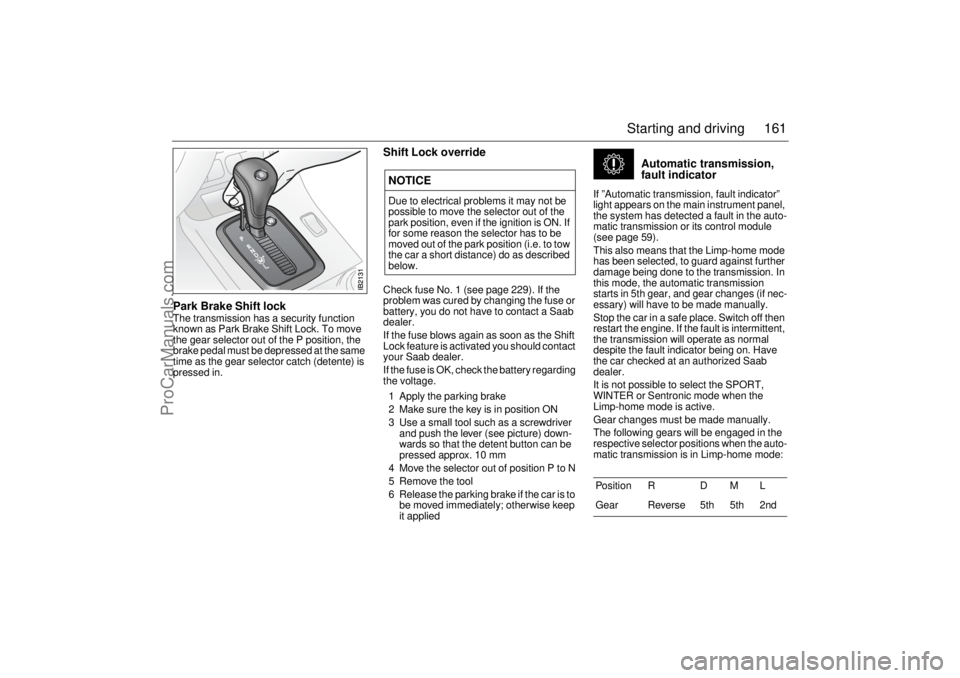
Shift Lock overrideCheck fuse No. 1 (see page 229). If the
problem was cured by changing the fuse or
battery, you do not have to contact a Saab
dealer.
If the fuse blows again as soon as the Shift
Lock feature is activated you should contact
your Saab dealer.
If the fuse is OK, check the battery regarding
the voltage.
1 Apply the parking brake
2 Make sure the key is in position ON
3 Use a small tool such as a screwdriver
and push the lever (see picture) down-
wards so that the detent button can be
pressed approx. 10 mm
4 Move the selector out of position P to N
5 Remove the tool
6 Release the parking brake if the car is to
be moved immediately; otherwise keep
it applied
Automatic transmission,
fault indicator
If ”Automatic transmission, fault indicator”
light appears on the main instrument panel,
the system has detected a fault in the auto-
matic transmission or its control module
(see page 59).
This also means that the Limp-home mode
has been selected, to guard against further
damage being done to the transmission. In
this mode, the automatic transmission
starts in 5th gear, and gear changes (if nec-
essary) will have to be made manually.
Stop the car in a safe place. Switch off then
restart the engine. If the fault is intermittent,
the transmission will operate as normal
despite the fault indicator being on. Have
the car checked at an authorized Saab
dealer.
It is not possible to select the SPORT,
WINTER or Sentronic mode when the
Limp-home mode is active.
Gear changes must be made manually.
The following gears will be engaged in the
respective selector positions when the auto-
matic transmission is in Limp-home mode:
NOTICEDue to electrical problems it may not be
possible to move the selector out of the
park position, even if the ignition is ON. If
for some reason the selector has to be
moved out of the park position (i.e. to tow
the car a short distance) do as described
below.
Position R D M L
Gear Reverse 5th 5th 2nd
ProCarManuals.com
Page 164 of 288
164 Starting and drivingSelector positions
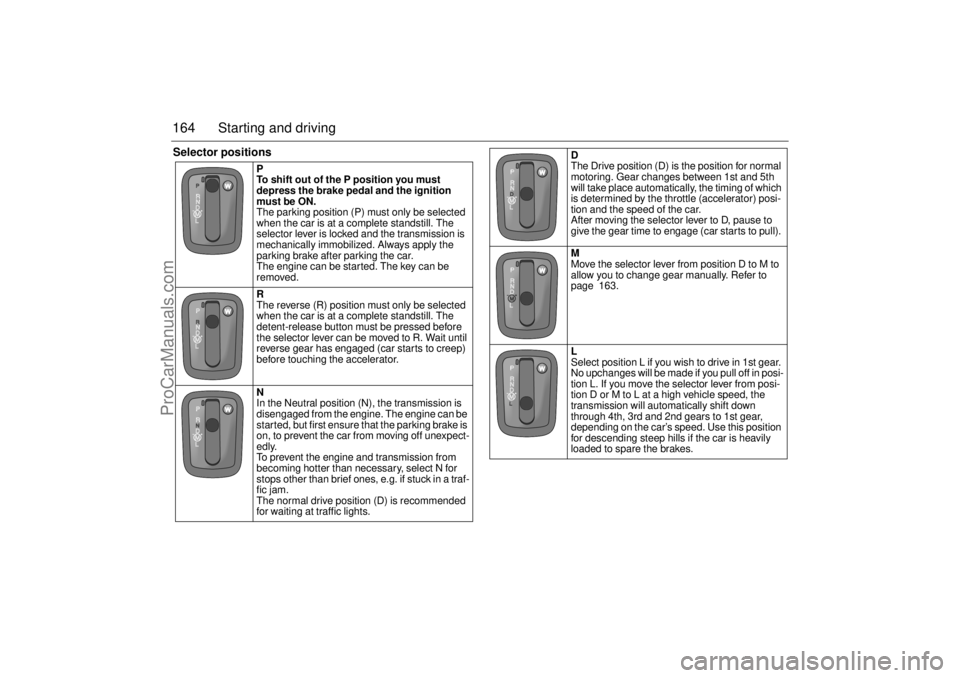
P
To shift out of the P position you must
depress the brake pedal and the ignition
must be ON.
The parking position (P) must only be selected
when the car is at a complete standstill. The
selector lever is locked and the transmission is
mechanically immobilized. Always apply the
parking brake after parking the car.
The engine can be started. The key can be
removed.
R
The reverse (R) position must only be selected
when the car is at a complete standstill. The
detent-release button must be pressed before
the selector lever can be moved to R. Wait until
reverse gear has engaged (car starts to creep)
before touching the accelerator.
N
In the Neutral position (N), the transmission is
disengaged from the engine. The engine can be
started, but first ensure that the parking brake is
on, to prevent the car from moving off unexpect-
edly.
To prevent the engine and transmission from
becoming hotter than necessary, select N for
stops other than brief ones, e.g. if stuck in a traf-
fic jam.
The normal drive position (D) is recommended
for waiting at traffic lights.
D
The Drive position (D) is the position for normal
motoring. Gear changes between 1st and 5th
will take place automatically, the timing of which
is determined by the throttle (accelerator) posi-
tion and the speed of the car.
After moving the selector lever to D, pause to
give the gear time to engage (car starts to pull).
M
Move the selector lever from position D to M to
allow you to change gear manually. Refer to
page 163.
L
Select position L if you wish to drive in 1st gear.
No upchanges will be made if you pull off in posi-
tion L. If you move the selector lever from posi-
tion D or M to L at a high vehicle speed, the
transmission will automatically shift down
through 4th, 3rd and 2nd gears to 1st gear,
depending on the car’s speed. Use this position
for descending steep hills if the car is heavily
loaded to spare the brakes.
ProCarManuals.com