battery SAAB 9-5 2005 User Guide
[x] Cancel search | Manufacturer: SAAB, Model Year: 2005, Model line: 9-5, Model: SAAB 9-5 2005Pages: 276, PDF Size: 16.72 MB
Page 55 of 276
53 Instruments and controls
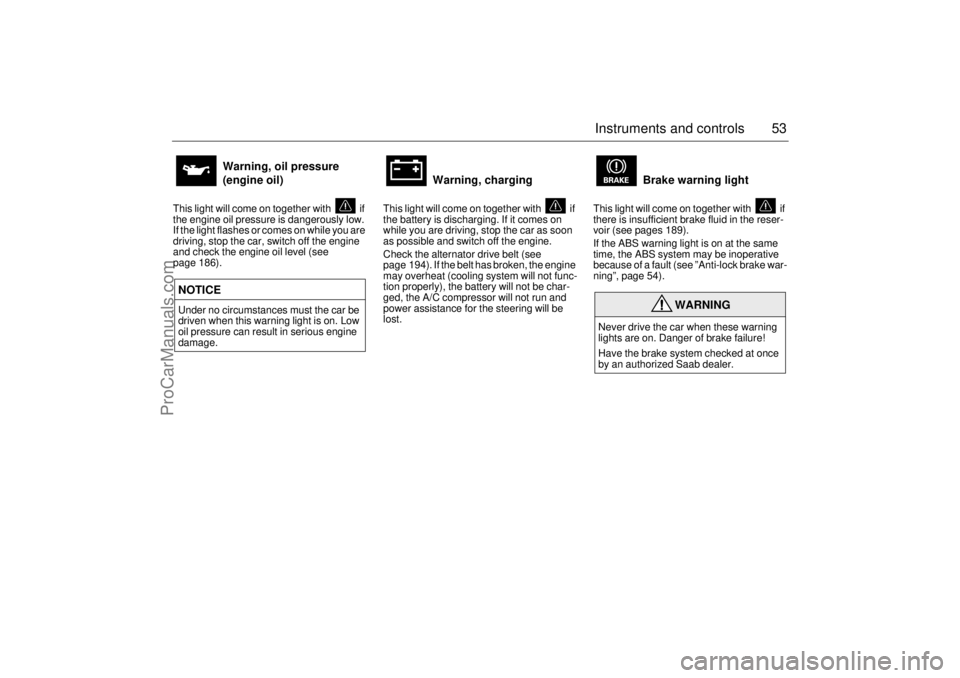
This light will come on together with if
the engine oil pressure is dangerously low.
If the light flashes or comes on while you are
driving, stop the car, switch off the engine
and check the engine oil level (see
page 186).
This light will come on together with if
the battery is discharging. If it comes on
while you are driving, stop the car as soon
as possible and switch off the engine.
Check the alternator drive belt (see
page 194). If the belt has broken, the engine
may overheat (cooling system will not func-
tion properly), the battery will not be char-
ged, the A/C compressor will not run and
power assistance for the steering will be
lost.This light will come on together with if
there is insufficient brake fluid in the reser-
voir (see pages 189).
If the ABS warning light is on at the same
time, the ABS system may be inoperative
because of a fault (see ”Anti-lock brake war-
ning”, page 54).
Warning, oil pressure
(engine oil)
NOTICE
Under no circumstances must the car be
driven when this warning light is on. Low
oil pressure can result in serious engine
damage.
Warning, charging
Brake warning light
WARNING
Never drive the car when these warning
lights are on. Danger of brake failure!
Have the brake system checked at once
by an authorized Saab dealer.
ProCarManuals.com
Page 67 of 276

65 Instruments and controls
The following messages may be displayed: 1) This message will be displayed approximately
600 miles (1,000 km) before the next scheduled
service is due, or when 365 days have elapsed
since the last service. The message should be
cleared at the time of that service (see the Saab
Warranties & Service Record Booklet).
This message can also be deleted by first briefly
pressing the CLEAR button, then depressing it a
second time for at least eight seconds until
”SERVICE” appears on the display and a chime
sounds. The message can only be deleted when
it is shown on the SID.
Night panelTo improve night-driving conditions inside
the car, the Night Panel mode can be selec-
ted. In this mode, the amount of information
displayed is reduced, and only the most
important instruments and displays will be
illuminated.
When the Night Panel button is pressed,
only the speedometer will be illuminated (up
to the 87-mph or 140-km/h graduation), all
the other instruments illumination being ext-
inguished and their needles moved to zero.
Both the SID and the ACC displays will be
extinguished and the backlighting for swit-
ches and other controls will be dimmed.
Note: All indicator and warning lights,
together with the display of CHECK messa-
ges, will operate as normal, except ”Out-
door temperature”, see page 62.The following conditions will wake up the
respective displays in the Night-Panel
mode:
Setting of the Audio system, SID or ACC
(display comes on for ten seconds).
CHECK message generated in the SID.
High engine revs cause the rev counter to
be illuminated until the engine speed has
fallen again.
If the quantity of fuel remaining falls below
4 gallons (15 liters), the fuel gauge will be
illuminated.
If the engine temperature rises above nor-
mal, the temperature gauge will be illumi-
nated.
If the speed of the car exceeds 84 mph
(135 km/h), the entire speedometer will
be illuminated.
In cars with automatic transmission, if the
selector lever is moved from D to position
M or L, the selector indication on the main
instrument panel will be illuminated.
To restore the displays and lighting to the
normal mode, press the Night-Panel button. Message See
page
Fog light failure. 198
Rear light failure. 203
Brake light failure. 203
Washer fluid level low.
Refill. 196
Coolant level low.
Refill. 188
Remote control battery
low. Replace battery. 41
Key not accepted.
Contact service. 48
Theft protection failure.
Contact service. 48
Gearbox too hot.
Make a safe stop. 146
Time for ser vice.
1)
246
ProCarManuals.com
Page 72 of 276
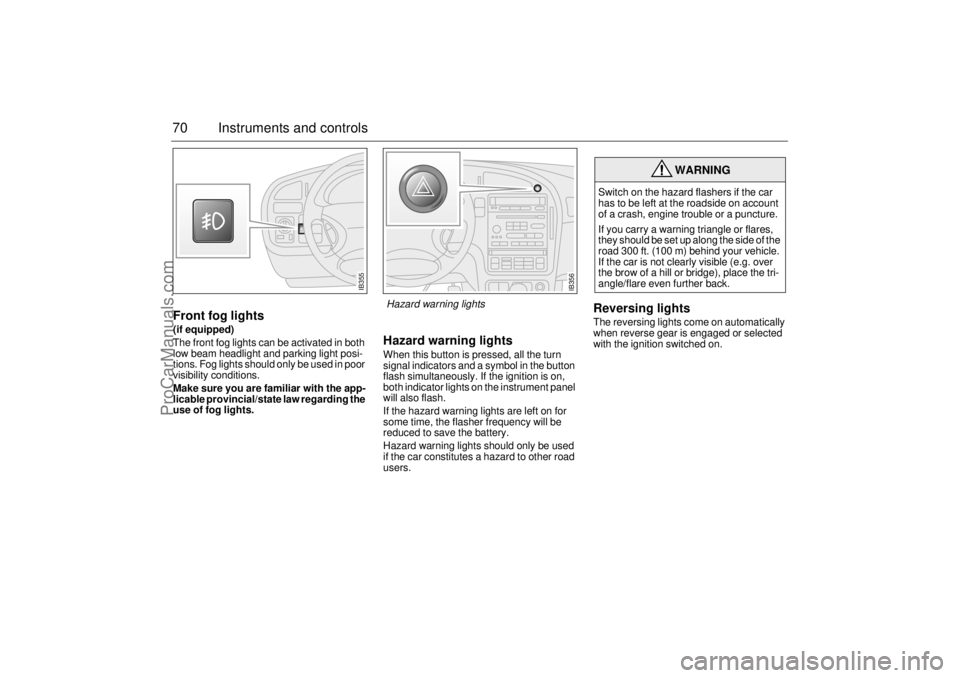
70 Instruments and controlsFront fog lights(if equipped)
The front fog lights can be activated in both
low beam headlight and parking light posi-
tions. Fog lights should only be used in poor
visibility conditions.
Make sure you are familiar with the app-
licable provincial/state law regarding the
use of fog lights.
Hazard warning lightsWhen this button is pressed, all the turn
signal indicators and a symbol in the button
flash simultaneously. If the ignition is on,
both indicator lights on the instrument panel
will also flash.
If the hazard warning lights are left on for
some time, the flasher frequency will be
reduced to save the battery.
Hazard warning lights should only be used
if the car constitutes a hazard to other road
users.
Reversing lightsThe reversing lights come on automatically
when reverse gear is engaged or selected
with the ignition switched on.
WARNING
Switch on the hazard flashers if the car
has to be left at the roadside on account
of a crash, engine trouble or a puncture.
If you carry a warning triangle or flares,
they should be set up along the side of the
road 300 ft. (100 m) behind your vehicle.
If the car is not clearly visible (e.g. over
the brow of a hill or bridge), place the tri-
angle/flare even further back.
IB355
IB356
Hazard warning lights
ProCarManuals.com
Page 83 of 276
81 Instruments and controls
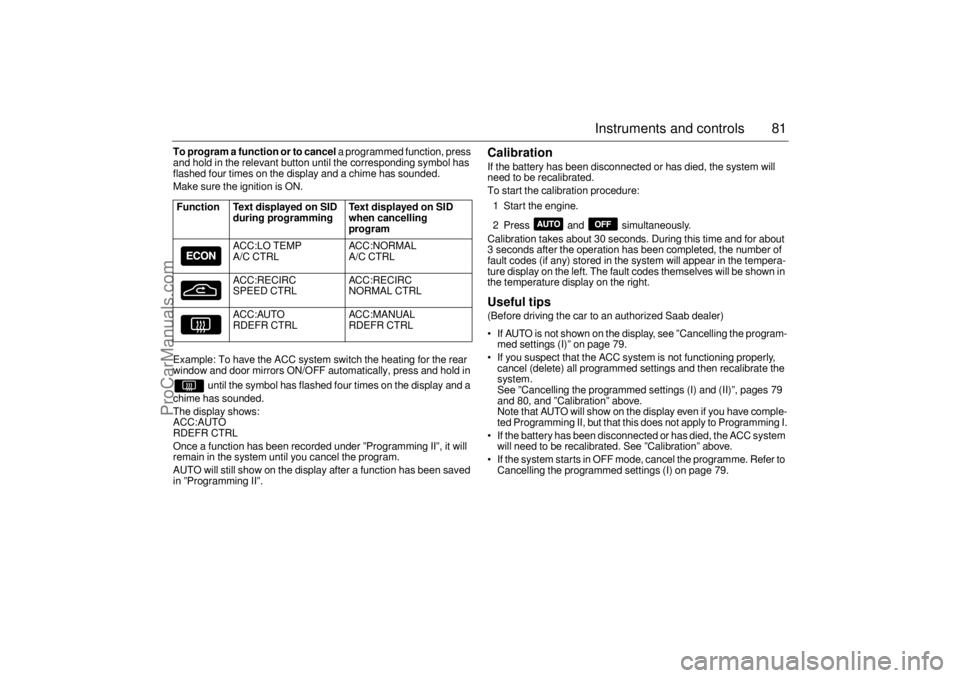
To program a function or to cancel
a programmed function, press
and hold in the relevant button until the corresponding symbol has
flashed four times on the display and a chime has sounded.
Make sure the ignition is ON.
Example: To have the ACC system switch the heating for the rear
window and door mirrors ON/OFF automatically, press and hold in
until the symbol has flashed four times on the display and a
chime has sounded.
The display shows:
ACC:AUTO
RDEFR CTRL
Once a function has been recorded under ”Programming II”, it will
remain in the system until you cancel the program.
AUTO will still show on the display after a function has been saved
in ”Programming II”.
Calibration If the battery has been disconnected or has died, the system will
need to be recalibrated.
To start the calibration procedure:
1 Start the engine.
2 Press and simultaneously.
Calibration takes about 30 seconds. During this time and for about
3 seconds after the operation has been completed, the number of
fault codes (if any) stored in the system will appear in the tempera-
ture display on the left. The fault codes themselves will be shown in
the temperature display on the right. Useful tips (Before driving the car to an authorized Saab dealer)
If AUTO is not shown on the display, see ”Cancelling the program-
med settings (I)” on page 79.
If you suspect that the ACC system is not functioning properly,
cancel (delete) all programmed settings and then recalibrate the
system.
See ”Cancelling the programmed settings (I) and (II)”, pages 79
and 80, and ”Calibration” above.
Note that AUTO will show on the display even if you have comple-
ted Programming II, but that this does not apply to Programming I.
If the battery has been disconnected or has died, the ACC system
will need to be recalibrated. See ”Calibration” above.
If the system starts in OFF mode, cancel the programme. Refer to
Cancelling the programmed settings (I) on page 79.
Function Text displayed on SID
during programming Text displayed on SID
when cancelling
program
ACC:LO TEMP
A/C CTRLACC:NORMAL
A/C CTRL
ACC:RECIRC
SPEED CTRLACC:RECIRC
NORMAL CTRL
ACC:AUTO
RDEFR CTRLACC :MANUAL
RDEFR CTRL
ProCarManuals.com
Page 111 of 276

109 Interior equipment and trunk
Preparations for first-time programmingBefore programming the garage opener for
the first time, you must delete any factory
codes.
Press and hold the two outer buttons until
the indicator light begins to flash-after
20 seconds. Release both buttons. Do not
hold for longer that 30 seconds. The garage
opener is now in the train (or learning) mode
and can be programmed at any time begin-
ning with "Programming" - step 2.ProgrammingThe garage opener can record and store the
frequencies of three different remote con-
trols.
The battery in the remote control should be
fairly new for programming to work well.Do not repeat "Programming" - step two
to train additional devices to a second or
third button. Begin with "Programming" -
step three.
1 Turn the ignition ON.
2 Press and hold the two outer buttons
(buttons one and three) - releasing only
when the indicator light begins to flash
(after 20 seconds).
Do not
hold the but-
tons for longer than 30 seconds and
do
not repeat step two
to program a
second and/or third hand-held transmit-
ter to the remaining two buttons.
3 Position the end of your hand-held trans-
mitter 1-3 inches (5-14 cm) away from
the button you wish to program while
keeping the indicator light in view. The transmitter should face the mirror from
below or left side of the mirror.
4 Simultaneously press and hold both the
chosen and hand-held transmitter but-
tons.
Do not release the buttons until
step 5 has been completed.
Note:
Some gate operators and garage
door openers may require you to replace
this Programming Step 4 with procedures
noted in the "Gate Operator / Canadian Pro-
gramming" section.
5 After the indicator light changes from a
slow to a rapidly blinking light, release
both the mirror and hand-held transmit-
ter buttons.
6 Press and hold the just-trained button
and observe the indicator light.
If the indicator light
stays on con-
stantly, programming is complete
and your device should activate when
the button is pressed and released.
Note:
To program the remaining two but-
tons, begin with "Programming" -
step
three. Do not repeat step two.
If the indicator light blinks
rapidly for two
seconds and then turns to a constant
light continue with "Programming"
steps 7-9
to complete the programming of
a rolling code equipped device (most com-
monly a garage door opener).
7 At the garage door opener receiver
(motor-head unit) in the garage, locate
the "learn" or "smart" button. This can
usually
be found where the hanging antenna wire is attached to the
motor-head unit.
8 Firmly press and release the "learn" or
"smart" button. (The name and color of
the button may vary by manufacturer.)
Note:
There are 30 seconds in which to ini-
tiate step nine.
9 Return to the vehicle and firmly
press,
hold for two seconds and release
the
programmed button. Repeat the
"press/hold/release"
sequence a
second time, and, depending on the
brand of the garage door opener (or
other rolling code equipped device),
repeat this sequence a third time to com-
plete the programming process.
The garage opener should now activate
your rolling code equipped device.
Note:
To program the remaining two but-
tons, begin with "Programming" -
step
three
. Do not repeat step two.
ProCarManuals.com
Page 118 of 276
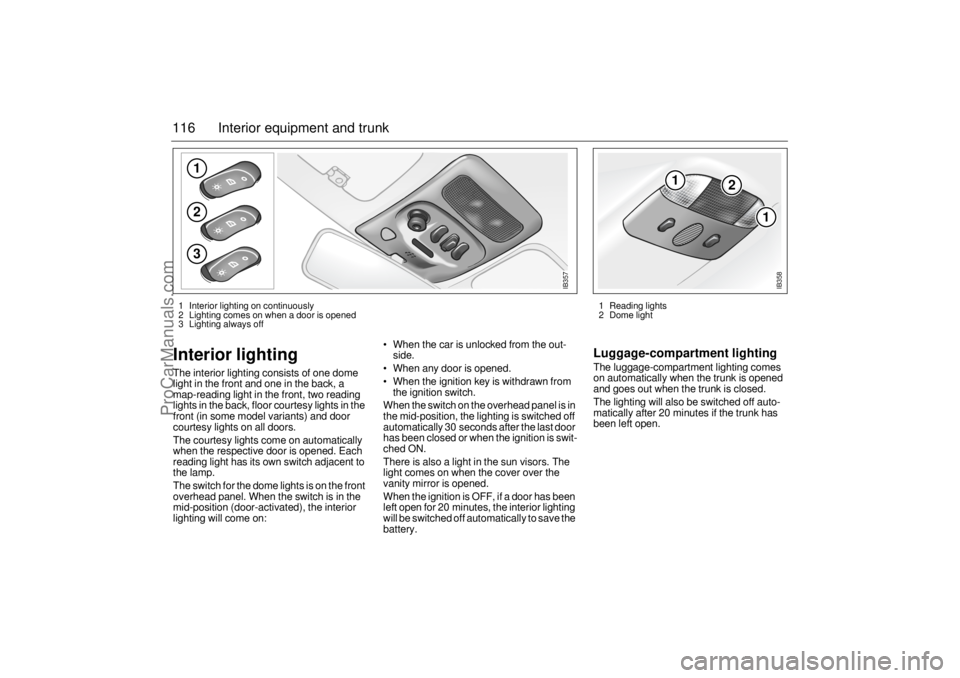
116 Interior equipment and trunkInterior lighting The interior lighting consists of one dome
light in the front and one in the back, a
map-reading light in the front, two reading
lights in the back, floor courtesy lights in the
front (in some model variants) and door
courtesy lights on all doors.
The courtesy lights come on automatically
when the respective door is opened. Each
reading light has its own switch adjacent to
the lamp.
The switch for the dome lights is on the front
overhead panel. When the switch is in the
mid-position (door-activated), the interior
lighting will come on: When the car is unlocked from the out-
side.
When any door is opened.
When the ignition key is withdrawn from
the ignition switch.
When the switch on the overhead panel is in
the mid-position, the lighting is switched off
automatically 30 seconds after the last door
has been closed or when the ignition is swit-
ched ON.
There is also a light in the sun visors. The
light comes on when the cover over the
vanity mirror is opened.
When the ignition is OFF, if a door has been
left open for 20 minutes, the interior lighting
will be switched off automatically to save the
battery.
Luggage-compartment lightingThe luggage-compartment lighting comes
on automatically when the trunk is opened
and goes out when the trunk is closed.
The lighting will also be switched off auto-
matically after 20 minutes if the trunk has
been left open.
123
IB357
1
2
1
IB358
1 Reading lights
2 Dome light 1 Interior lighting on continuously
2 Lighting comes on when a door is opened
3 Lighting always off
ProCarManuals.com
Page 136 of 276

134 Starting and drivingIt is possible for air to enter the lubricating
system in conjunction with an oil or oil-filter
change, or if the car has been stored for
some time. This air can cause the hydraulic
cam followers to emit a ticking noise, which
can persist for up to 15 minutes after start-
ing. Although this is quite normal and does
not indicate any malfunction, it is advisable
not to exceed 3,000 rpm before the noise
has disappeared.
The hydraulic cam lifters are completely
service free; the valve clearance is set up at
the factory and will not need any subse-
quent adjustment.
Starting the engineAvoid racing the engine or putting a heavy
load on it before it has warmed up. Drive
away as soon as the oil warning light has
been extinguished to enable the engine to
attain its normal temperature as quickly as
possible.
The engine has an automatic choke and
should be started as follows:Cars with manual transmission
To start the engine the clutch pedal must
be fully depressed.1 Depress the clutch pedal fully but do not
touch the accelerator.
2 Start the engine. Let the ignition key
spring back as soon as the engine has
started and is running smoothly – at very
low temperatures, you may need to run
the starter for up to 25 seconds. Wait
20–30 seconds before running the star-
ter again, to give the battery time to reco-
ver.
Note:
On cars with manual transmission, if the
starter fails to engage when the ignition key
is turned to the start position, make sure the
clutch pedal is full depressed. Misposi-
tioned floor mats or other obstructions
under the clutch pedal may affect starting.
Let the engine idle for about 10 seconds. Do
not open the throttle wide for at least 2–
3 minutes after starting.
Cars with automatic transmission 1 The selector lever must be in the P or N
position.
2 Keep your foot on the brake pedal.
3 Start the engine. Let the ignition key
spring back as soon as the engine has
started and is running smoothly – at very
low temperatures, you may need to run
the starter for up to 25 seconds. Wait
20–30 seconds before running the star-
ter again, to give the battery time to reco-
ver.
Let the engine idle for about 10 seconds. Do
not open the throttle wide for at least
2–3 minutes after starting. The tail pipe of the exhaust system
can become very hot during driving.
Bear this in mind when loading and
unloading the car.
Do not rest or sleep in the car when
parked with the engine running. There
is a risk of depressing the accelerator
which could lead to engine damage.
ProCarManuals.com
Page 139 of 276

137 Starting and driving
Important considerations with
catalytic convertersThe catalytic converter is an emission-con-
trol device incorporated in the car’s exhaust
system. It consists of a metal canister with a
honeycomb insert, the cells of which have
walls coated in a catalytic layer (mixture of
precious metals).
To ensure that the catalytic converter con-
tinues to function properly, and also to avoid
damage to the converter and its associated
components, the following points must be
observed:
Have the car serviced regularly in accor-
dance with the service program. The fuel
and ignition systems are particularly
important in this context.
Always be alert to any misfiring of the
engine (not running on all cylinders) and
any loss of power or performance. At the
first sign of a malfunction, reduce speed
and take the car to an authorized Saab
dealer as soon as possible.
If the engine fails to start (in very cold
weather or if the battery is flat), the car can
be push started (manual gearbox only) or
started using jumper cables to a donor battery. However, as soon as you have
started the engine, it is important that it
runs on all cylinders. If it is misfiring, allow
it to idle for up to five minutes to give it time
to settle and run smoothly. If, after this
time, the engine still fails to run properly,
turn off the engine and get in touch with
an authorized Saab dealer for advice.
Never park the car on dry grass or other
combustible material. The catalytic con-
verter gets very hot and could therefore
start a fire.
Never drive off if the engine is misfiring.
If you jump start the car when the engine
is already up to normal temperature, the engine must start to run on all cylinders.
Stop jump-starting if the engine fails to
start immediately.
Failure to follow these directions could
result in the catalytic converter and associ-
ated components being damaged, and
could represent a breach of the warranty
conditions.
NOTICEUse only unleaded gasoline. Leaded
gasoline is detrimental to the catalyst and
oxygen sensor and will seriously impair
the function of the catalytic converter.
NOTICEIf the car runs out of fuel, it is possible for
air to get into the fuel system. If this
happens, the catalytic converter may
overheat and be damaged.
IB1289
2
2
1
3
3
Oxygen-sensor-controlled
injection system1 Engine control module
2 Oxygen sensor (lambda probe)
3 Catalytic converters
ProCarManuals.com
Page 147 of 276
145 Starting and driving
Lock-up function The automatic transmission has a lock-up
function, which can render the torque con-
verter inoperative in 3rd, 4th and 5th gears,
thus reducing the engine speed and fuel
consumption.
When the lock-up function comes into oper-
ation, it may give the impression of an over-
drive being engaged.Kick-downWhen the accelerator is pressed down hard,
a change-down to the next gear will be
effected to provide maximum acceleration,
e.g. for overtaking.
Following this, the next higher gear will be
selected at the optimum engine speed for
acceleration or, if you ease off the acceler-
ator, before reaching this.
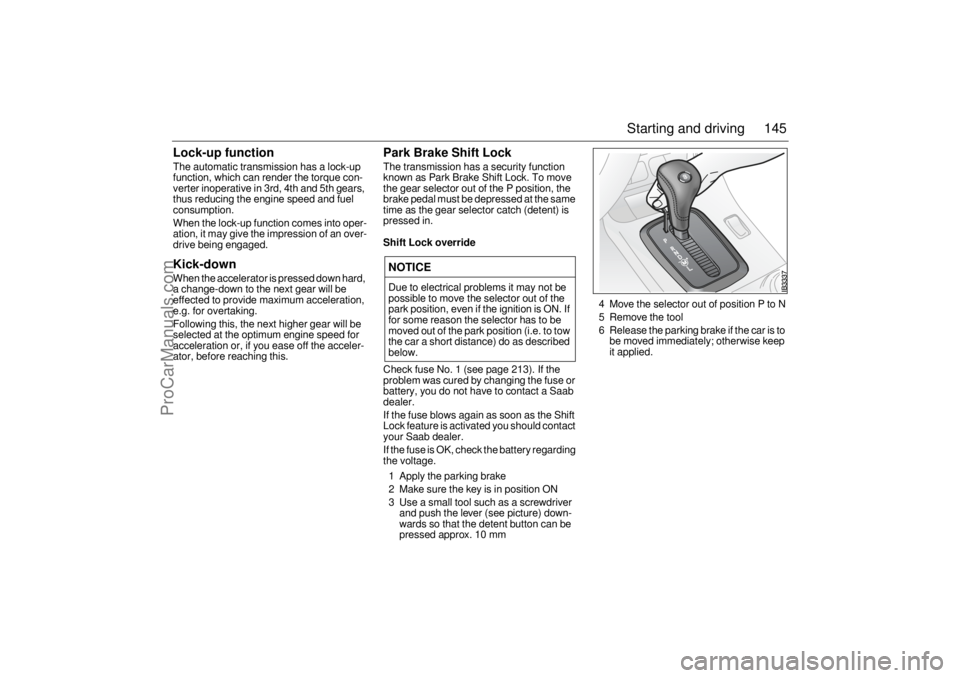
Park Brake Shift LockThe transmission has a security function
known as Park Brake Shift Lock. To move
the gear selector out of the P position, the
brake pedal must be depressed at the same
time as the gear selector catch (detent) is
pressed in.Shift Lock overrideCheck fuse No. 1 (see page 213). If the
problem was cured by changing the fuse or
battery, you do not have to contact a Saab
dealer.
If the fuse blows again as soon as the Shift
Lock feature is activated you should contact
your Saab dealer.
If the fuse is OK, check the battery regarding
the voltage.
1 Apply the parking brake
2 Make sure the key is in position ON
3 Use a small tool such as a screwdriver
and push the lever (see picture) down-
wards so that the detent button can be
pressed approx. 10 mm4 Move the selector out of position P to N
5 Remove the tool
6 Release the parking brake if the car is to
be moved immediately; otherwise keep
it applied.NOTICEDue to electrical problems it may not be
possible to move the selector out of the
park position, even if the ignition is ON. If
for some reason the selector has to be
moved out of the park position (i.e. to tow
the car a short distance) do as described
below.
ProCarManuals.com
Page 176 of 276
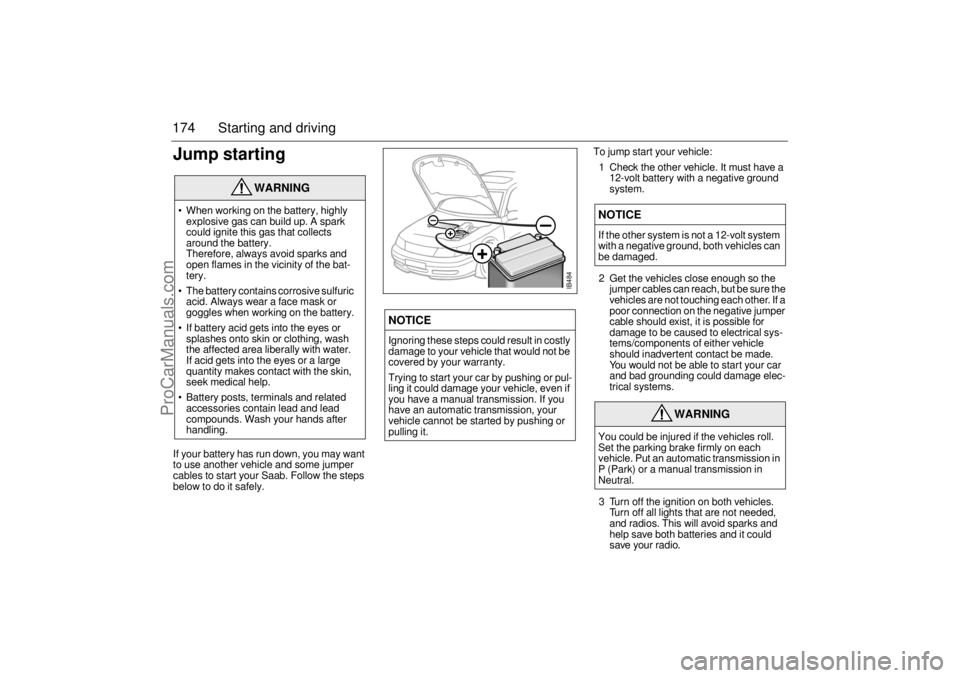
174 Starting and drivingJump startingIf your battery has run down, you may want
to use another vehicle and some jumper
cables to start your Saab. Follow the steps
below to do it safely.To jump start your vehicle:
1 Check the other vehicle. It must have a
12-volt battery with a negative ground
system.
2 Get the vehicles close enough so the
jumper cables can reach, but be sure the
vehicles are not touching each other. If a
poor connection on the negative jumper
cable should exist, it is possible for
damage to be caused to electrical sys-
tems/components of either vehicle
should inadvertent contact be made.
You would not be able to start your car
and bad grounding could damage elec-
trical systems.
3 Turn off the ignition on both vehicles.
Turn off all lights that are not needed,
and radios. This will avoid sparks and
help save both batteries and it could
save your radio.
WARNING
When working on the battery, highly
explosive gas can build up. A spark
could ignite this gas that collects
around the battery.
Therefore, always avoid sparks and
open flames in the vicinity of the bat-
tery.
The battery contains corrosive sulfuric
acid. Always wear a face mask or
goggles when working on the battery.
If battery acid gets into the eyes or
splashes onto skin or clothing, wash
the affected area liberally with water.
If acid gets into the eyes or a large
quantity makes contact with the skin,
seek medical help.
Battery posts, terminals and related
accessories contain lead and lead
compounds. Wash your hands after
handling.
NOTICEIgnoring these steps could result in costly
damage to your vehicle that would not be
covered by your warranty.
Trying to start your car by pushing or pul-
ling it could damage your vehicle, even if
you have a manual transmission. If you
have an automatic transmission, your
vehicle cannot be started by pushing or
pulling it.
NOTICEIf the other system is not a 12-volt system
with a negative ground, both vehicles can
be damaged.
WARNING
You could be injured if the vehicles roll.
Set the parking brake firmly on each
vehicle. Put an automatic transmission in
P (Park) or a manual transmission in
Neutral.
+
–
+
–
IB484
ProCarManuals.com