hood open SAAB 9-5 2005 User Guide
[x] Cancel search | Manufacturer: SAAB, Model Year: 2005, Model line: 9-5, Model: SAAB 9-5 2005Pages: 276, PDF Size: 16.72 MB
Page 163 of 276

161 Starting and driving
2 Wait until the needle has dropped back
to indicate normal temperature (roughly
midway, in the white zone) before stop-
ping the engine. If the coolant needs top-
ping up, unscrew the cap on expansion
tank
carefully
.
Top up, as necessary, ideally with a
50/50 mixture of Saab-approved coolant
and water. If only water is available, use
that, but remember to have the coolant
mixture checked as soon as possible.
3 As soon as possible, have the cooling
system checked by an authorized Saab
dealer.
Towing a trailer
Trailer hitch attachmentTrailer hitch attachments are available as
accessories. These are designed for a max-
imum trailer weight of 3500 lbs. (1588 kg),
see also page 253.
Use only the electrical trailer hitch socket
provided in the trailer hitch kit.
Saab recommends:
Use a Saab original hitch kit attachment
which is designed and tested by Saab.
Consult your Saab dealer regarding the
appropriate hitch kit for your car.
WARNING
Exercise care when opening the hood
if the engine is overheated. Never
remove the expansion tank cap com-
pletely when the engine is hot.
The cooling system is pressurized -
hot coolant and vapor can escape.
These can cause injury to your eyes
and burns. Open the cap slowly to
release the pressure before
removing it.
WARNING
When towing a trailer, do not attempt
to negotiate a hill having a gradient in
excess of 15 %. The weight distribu-
tion over the front wheels of the car will
be insufficient to prevent wheelspin,
making further progress impossible.
In addition, the parking brake may not
always be able to hold the car and trai-
ler securely, with the result that the
wheels can start to slide downhill.
Always apply the trailer’s handbrake
when unhitching it. There is otherwise
a risk of personal injury or damage to
the bumper should the trailer start to
roll.
NOTICEUse only a genuine Saab trailer hitch and
wiring, since other wiring methods can
cause expensive damage to the car’s
body and electrical system.
Consult an authorized Saab dealer for
guidance on how to connect the trailer
hitch electrical system.
ProCarManuals.com
Page 177 of 276

175 Starting and driving
4 Open the hood and locate the battery.
Find the positive (+) and negative (–) termi-
nals on the battery.5 Check that the jumper cables do not
have loose or missing insulation. If they
do, you could get a shock and also the
vehicles could be damaged.
Before you connect the cables, here are
some basic things you should know.
Positive (+) will go to positive (+) and
negative (–) will go to a major metal
engine part with a good ground. Do not
connect (+) to (–) or you will get a short
that could injure you or would damage
the battery and maybe other parts as
well.
6 Connect the red positive (+) cable to the
positive (+) terminal of the vehicle with
the discharged battery.
7 Do not let the other end touch metal.
Connect it to the positive (+) terminal of
the good battery. Use a remote positive
(+) terminal if the vehicle has one.
8 Now connect the black negative (–)
cable to the good battery’s negative
terminal.NOTICEIf you leave your radio on, it could be
badly damaged. The repairs would not be
covered by your warranty.
WARNING
An electric fan can start up even when the
engine is not running and can injure you.
Keep hands, clothing and tools away from
any underhood electric fan.
WARNING
Using a match or flame of any kind near a
battery can cause battery gas to explode.
You can suffer burns or be blinded. Use a
flashlight if you need more light.
Be sure the battery has enough water.
The battery installed in your new Saab
has filler caps. Be sure the right amount
of water is there. Add distilled or boiled
water if the level is too low. If you don’t,
explosive gas could be present.
Be sure the electrolyte in the battery is not
frozen. Discharged batteries will freeze.
When connecting jumper cables to a
frozen battery, gas from the chemical
reaction inside the battery can build up
under the ice and cause an explosion.
Battery fluid contains acid that can burn
you. Do not get it on you. If you acciden-
tally get it in your eyes or on your skin,
flush the area with water and get medical
help immediately.
ProCarManuals.com
Page 182 of 276
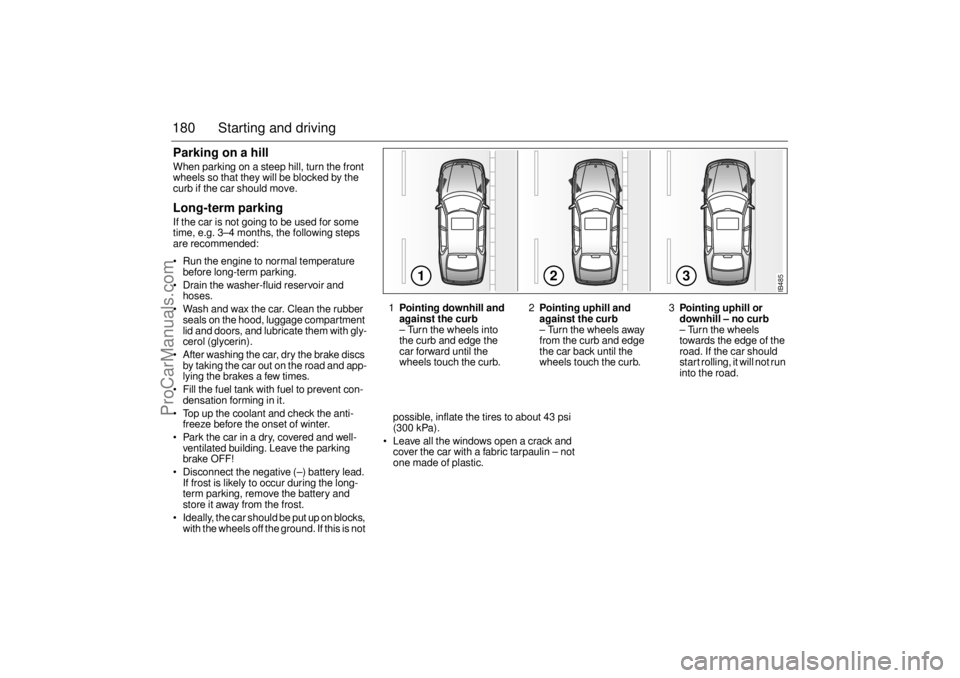
180 Starting and drivingParking on a hillWhen parking on a steep hill, turn the front
wheels so that they will be blocked by the
curb if the car should move. Long-term parkingIf the car is not going to be used for some
time, e.g. 3–4 months, the following steps
are recommended:
Run the engine to normal temperature
before long-term parking.
Drain the washer-fluid reservoir and
hoses.
Wash and wax the car. Clean the rubber
seals on the hood, luggage compartment
lid and doors, and lubricate them with gly-
cerol (glycerin).
After washing the car, dry the brake discs
by taking the car out on the road and app-
lying the brakes a few times.
Fill the fuel tank with fuel to prevent con-
densation forming in it.
Top up the coolant and check the anti-
freeze before the onset of winter.
Park the car in a dry, covered and well-
ventilated building. Leave the parking
brake OFF!
Disconnect the negative (–) battery lead.
If frost is likely to occur during the long-
term parking, remove the battery and
store it away from the frost.
Ideally, the car should be put up on blocks,
with the wheels off the ground. If this is not possible, inflate the tires to about 43 psi
(300 kPa).
Leave all the windows open a crack and
cover the car with a fabric tarpaulin – not
one made of plastic.
123
IB485
1Pointing downhill and
against the curb– Turn the wheels into
the curb and edge the
car forward until the
wheels touch the curb.2
Pointing uphill and
against the curb– Turn the wheels away
from the curb and edge
the car back until the
wheels touch the curb.3
Pointing uphill or
downhill – no curb– Turn the wheels
towards the edge of the
road. If the car should
start rolling, it will not run
into the road.
ProCarManuals.com
Page 184 of 276
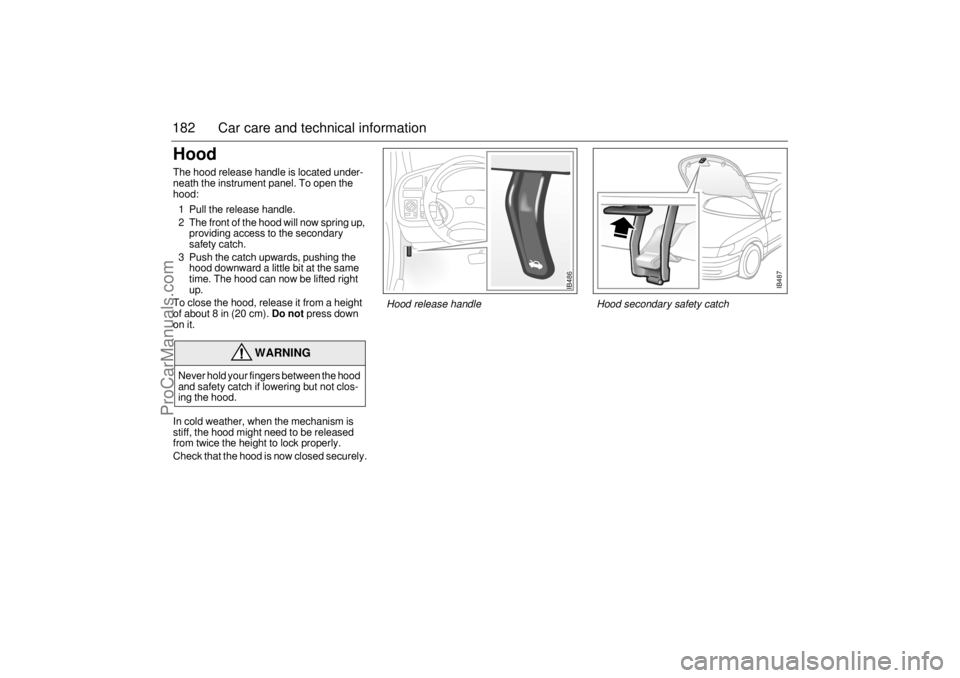
182 Car care and technical informationHood The hood release handle is located under-
neath the instrument panel. To open the
hood:
1 Pull the release handle.
2 The front of the hood will now spring up,
providing access to the secondary
safety catch.
3 Push the catch upwards, pushing the
hood downward a little bit at the same
time. The hood can now be lifted right
up.
To close the hood, release it from a height
of about 8 in (20 cm).
Do not
press down
on it.
In cold weather, when the mechanism is
stiff, the hood might need to be released
from twice the height to lock properly.
Check that the hood is now closed securely.
WARNING
Never hold your fingers between the hood
and safety catch if lowering but not clos-
ing the hood.
IB487
IB486
Hood release handle Hood secondary safety catch
ProCarManuals.com
Page 190 of 276

188 Car care and technical informationTransmission fluidManual transmission Check and top up the fluid in accordance
with the service program.Automatic transmissionCheck and top up the fluid in accordance
with the service program.
Coolant The expansion tank is transparent to facili-
tate checking of the coolant level.
When the engine is cold, the coolant must
not lie over the KALT/COLD mark on the
expansion tank.If the message
”Coolant level low.
Refill.”
is displayed on the SID, check the level of
fluid in the expansion tank.
Top up, as necessary, with equal parts of
clean water and Saab-approved coolant.
If the expansion tank is empty when coolant
is added, run the engine to normal tempera-
ture and top up again, as necessary.
WARNING
Proceed with caution if the radiator is
boiling when you open the hood.
Never remove the expansion-tank
filler cap when the radiator is boiling.
The cooling system is pressurized –
hot coolant and vapor can escape
when the filler cap is released. These
can cause injury to your eyes and
burns. Loosen the cap carefully, and
let the engine cool before removing
the cap.
Exercise care when adding coolant.
Coolant on hot surfaces constitutes a
fire risk.
IB1338
Coolant expansion tank
ProCarManuals.com
Page 245 of 276
243 Car care and technical information
The vehicle should be fully assembled
and all other work stopped while headlight
aiming is being done.
The vehicle should not have any snow, ice
or mud attached to it.
Tires should be inflated to the prescribed
pressure.
Close all doors.
Rock the vehicle to stabilize the suspen-
sion.
Headlight aiming is done with the vehicle
low beam lamps. The high beam lamps will
be correctly aimed if the low beam lamps
are aimed properly.
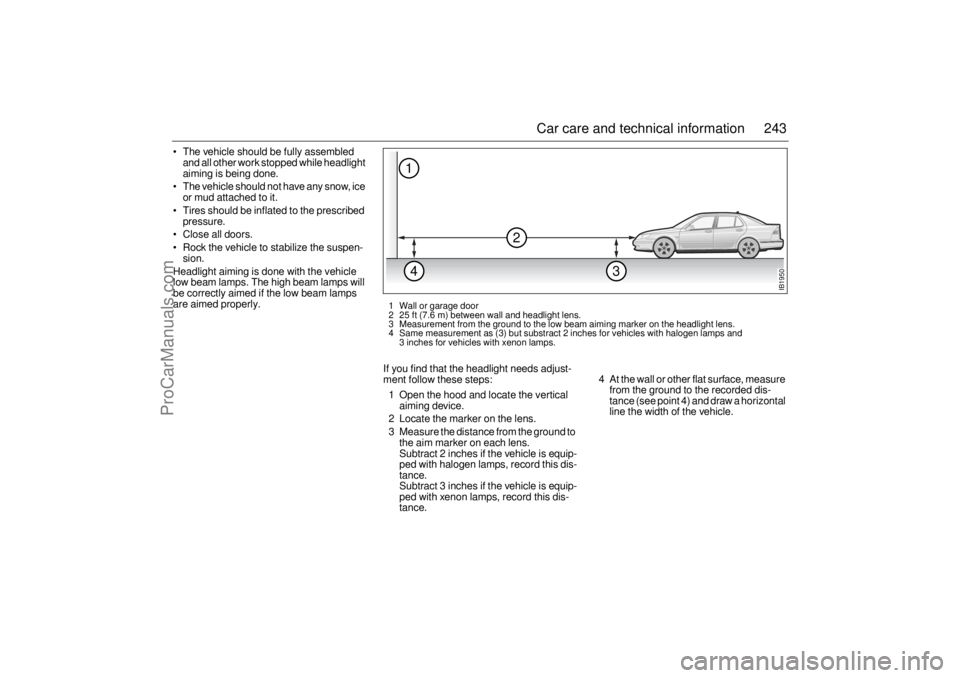
If you find that the headlight needs adjust-
ment follow these steps:
1 Open the hood and locate the vertical
aiming device.
2 Locate the marker on the lens.
3 Measure the distance from the ground to
the aim marker on each lens.
Subtract 2 inches if the vehicle is equip-
ped with halogen lamps, record this dis-
tance.
Subtract 3 inches if the vehicle is equip-
ped with xenon lamps, record this dis-
tance.4 At the wall or other flat surface, measure
from the ground to the recorded dis-
tance (see point 4) and draw a horizontal
line the width of the vehicle.
IB1950
2
14
3
1 Wall or garage door
2 25 ft (7.6 m) between wall and headlight lens.
3 Measurement from the ground to the low beam aiming marker on the headlight lens.
4 Same measurement as (3) but substract 2 inches for vehicles with halogen lamps and
3 inches for vehicles with xenon lamps.
ProCarManuals.com
Page 268 of 276

266 IndexCoolant
_______________________ 188
Courtesy Headlight Feature
________ 68
Crash memory, see EDR
_________ 249
Cruise control
__________________ 151
Cup holder
____________________ 120
DDICE/TWICE
___________________ 212
Dampers
______________________ 259
Date code, tires
_________________ 229
Definitions and terminology, tire
____ 226
Determining correct load, tires
_____ 228
Dim-dipped beam
________________ 67
Direction indicators _______________ 69
Door handles
___________________ 38
Door mirrors
___________________ 107
Doors, locks & luggage compartment
_37
Drive belt
______________________ 257
Drive belt, alternator
_____________ 194
Drive belts, length
_______________ 257
Driver’s seat, programmable
________ 14
Driving at night
_________________ 168
Driving in hot weather
____________ 160
Driving with a load
______________ 168
EEDR (Event Data Recorders)
______ 249
ESP
__________________________ 155
Electric heating seat
______________ 15
Electric heating, front seats
_________ 15
Electric windows
________________ 113
Electrical system, technical data
____ 257
Electronic Stability Program, ESP ___ 155
Electronic starting interlock
_________ 43
Emergency operation of sunroof
____ 115
Emission control systems
_________ 184
Engine bay
____________________ 183
Engine bay, cleaning
_____________ 238
Engine number
_________________ 262
Engine oil, grade ________________ 255
Engine, description ______________ 186
Engine, technical data ____________ 254
Engine, temperature gauge
________ 59
Engine-oil level, checking
_________ 186
Event Data Recorders (EDR) ______ 249
Expansion tank, coolant
__________ 188
FFault codes, Audio System
________ 104
Flat spots, tires
_________________ 218
Fluid level, automatic transmission
__ 188
Folding the rear seat, 9-5 Sedan
___ 121
Folding the rear seat,
9-5 SportWagon
_______________ 124Frequently asked questions on airbag
35
Front fog lights
___________________ 70
Frost warning ____________________ 62
Fuel
__________________________ 138
Fuel consumption
________________ 61
Fuel gauge
_____________________ 59
Fuel grade _____________________ 254
Fuse box under hood
____________ 215
Fuse panel
_____________________ 211
Fuses
_________________________ 211
GGarage door opener
_____________ 108
Gearbox number
________________ 262
Gearbox oil, checking
____________ 188
Gearbox, technical data, __________ 258
Glove compartment
______________ 118
HHandbrake
_____________________ 179
Hazard warning lights
_____________ 70
Head restraint
___________________ 15
Headlight flasher _________________ 67
Headlights
______________________ 67
Hood
_________________________ 182
Horn __________________________ 106
ProCarManuals.com
Page 271 of 276

269 Index
Towing, automatics
______________ 171
Trailer weights
_________________ 253
Treadwear indicators
____________ 219
Trionic
________________________ 184
Trip computer
___________________ 61
Trip meter
______________________ 58
Trunk
_________________________ 121
Trunk lid, opening
________________ 42
Turbo gauge
____________________ 60
Turbo, points to note
_____________ 136
UUnder the hood
_________________ 183
Uniform tire quality grading
________ 221
Upholstery and trim
______________ 236
Upholstery and trim, care of
_______ 236
Useful tips, ACC
_________________ 81
VVanity mirrors
__________________ 117
Vehicle Data Collection
___________ 249
Ventilated front seats
_____________ 14
Viscosity, engine oil
_____________ 254
WWarning labels
___________________ 7
Warning light, AIR BAG
___________ 33
Warning lights
___________________ 52
Washers
______________________ 195
Washers, windshield
_____________ 196
Washing the car
________________ 237
Waxing and polishing
____________ 238
Wear indicators, tires ____________ 219
What Will You See After an Airbag
Inflates?
______________________ 34
Wheel replacement
______________ 222
Wheel, change
_________________ 231
Wheels and tires ________________ 260
Wheels and tires, sizes
___________ 260
When it is time for new tires
_______ 219
Windshield washers
______________ 71
Windshield wipers
________________ 71
Winter tires
________________ 228
, 260
Wiper blades, replacing
__________ 195
Wipers and washers
__________ 71
, 195
XXenon headlight
________________ 197
ProCarManuals.com