ignition SAAB 9-5 2007 Owner's Manual
[x] Cancel search | Manufacturer: SAAB, Model Year: 2007, Model line: 9-5, Model: SAAB 9-5 2007Pages: 288, PDF Size: 18.14 MB
Page 76 of 288
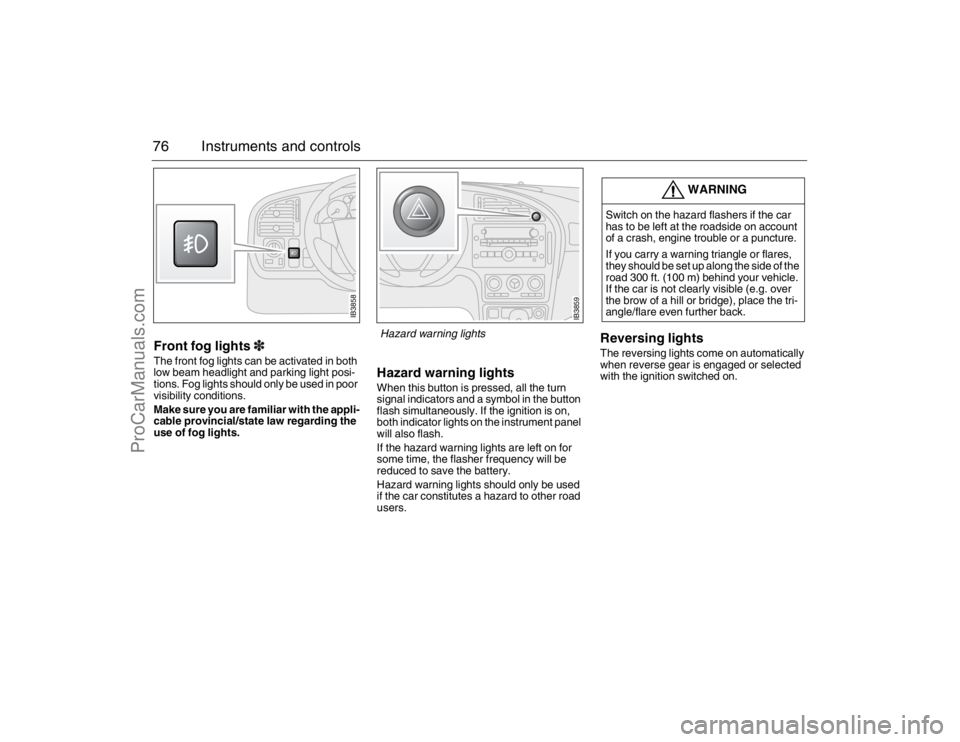
76 Instruments and controlsFront fog lights3The front fog lights can be activated in both
low beam headlight and parking light posi-
tions. Fog lights should only be used in poor
visibility conditions.
Make sure you are familiar with the appli-
cable provincial/state law regarding the
use of fog lights.
Hazard warning lightsWhen this button is pressed, all the turn
signal indicators and a symbol in the button
flash simultaneously. If the ignition is on,
both indicator lights on the instrument panel
will also flash.
If the hazard warning lights are left on for
some time, the flasher frequency will be
reduced to save the battery.
Hazard warning lights should only be used
if the car constitutes a hazard to other road
users.
Reversing lightsThe reversing lights come on automatically
when reverse gear is engaged or selected
with the ignition switched on.
WARNING
Switch on the hazard flashers if the car
has to be left at the roadside on account
of a crash, engine trouble or a puncture.
If you carry a warning triangle or flares,
they should be set up along the side of the
road 300 ft. (100 m) behind your vehicle.
If the car is not clearly visible (e.g. over
the brow of a hill or bridge), place the tri-
angle/flare even further back.
IB3858
IB3859
Hazard warning lights
95_U S _M 07.book Page 76 Friday, June 9, 2006 8:58 AM
ProCarManuals.com
Page 77 of 288
77 Instruments and controls
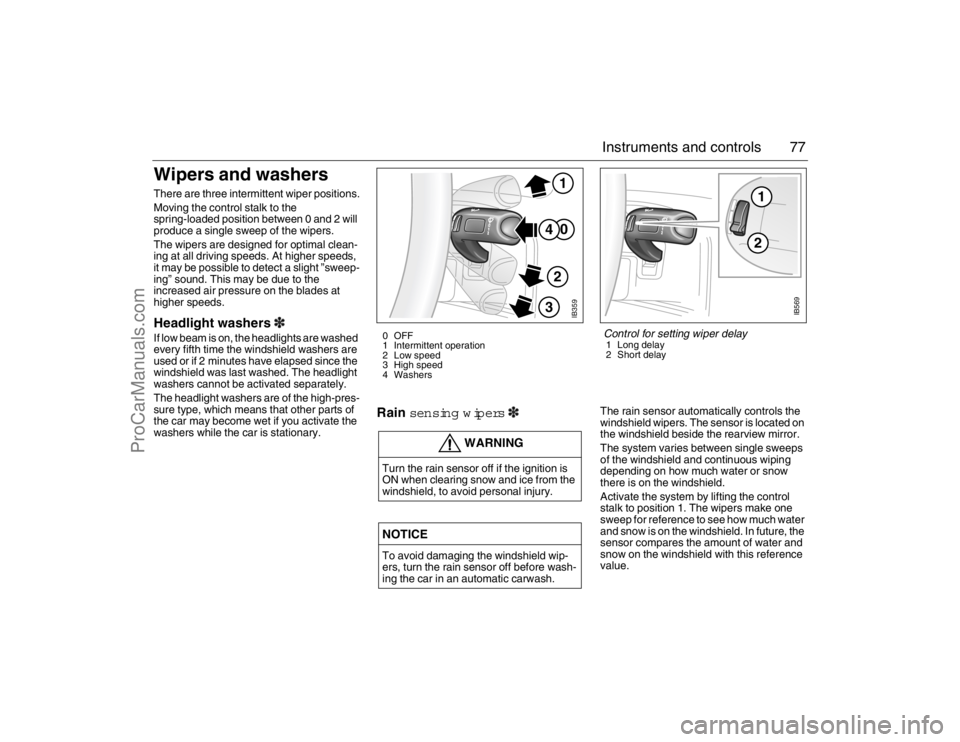
Wipers and washers There are three intermittent wiper positions.
Moving the control stalk to the
spring-loaded position between 0 and 2 will
produce a single sweep of the wipers.
The wipers are designed for optimal clean-
ing at all driving speeds. At higher speeds,
it may be possible to detect a slight ”sweep-
ing” sound. This may be due to the
increased air pressure on the blades at
higher speeds.Headlight washers3If low beam is on, the headlights are washed
every fifth time the windshield washers are
used or if 2 minutes have elapsed since the
windshield was last washed. The headlight
washers cannot be activated separately.
The headlight washers are of the high-pres-
sure type, which means that other parts of
the car may become wet if you activate the
washers while the car is stationary.
Rain sen sing wipers3
The rain sensor automatically controls the
windshield wipers. The sensor is located on
the windshield beside the rearview mirror.
The system varies between single sweeps
of the windshield and continuous wiping
depending on how much water or snow
there is on the windshield.
Activate the system by lifting the control
stalk to position 1. The wipers make one
sweep for reference to see how much water
and snow is on the windshield. In future, the
sensor compares the amount of water and
snow on the windshield with this reference
value.
WARNING
Turn the rain sensor off if the ignition is
ON when clearing snow and ice from the
windshield, to avoid personal injury.NOTICETo avoid damaging the windshield wip-
ers, turn the rain sensor off before wash-
ing the car in an automatic carwash.
IB359
0
41
2
3
0 OFF
1 Intermittent operation
2 Low speed
3 High speed
4 Washers
12
IB569
Control for setting wiper delay1 Long delay
2 Short delay
95_U S _M 07.book Page 77 Friday, June 9, 2006 8:58 AM
ProCarManuals.com
Page 81 of 288
81 Instruments and controls
Temperature control The cabin is divided into two temperature
zones:
The driver’s zone
The passenger zone (front and rear
seats)
The desired temperature can be set
between 60 and 80°F.
The displayed temperature is not the abso-
lute temperature but corresponds to the
comfort level normally experienced at that
temperature after allowance has been
made for the air flow, relative humidity, solar
radiation, etc., currently prevailing inside
the car.
The most usual temperature setting is
64–76°F, depending on personal prefer-
ence and what clothing is worn.
To allow the system time to adjust,
changes in the temperature setting shall
only be made in steps of 2°F.
Once the desired climate has been
achieved, the rear center vents can be
closed to prevent warm air being distributed
at face height.
When the ignition is switched off, only the
temperature control affects the system the
next time the engine is started. The system
will warm up/cool down to the temperature
to which the control is set.MAX heat, red indication
The MAX heat setting is obtained by turning
the temperature control to the first position
past 80 (to the red LED). The driver’s side
selection regulates air distribution and recir-
culation status. Temperature, however, can
be adjusted on the passenger side.
Settings when MAX heat is selected:
Maximum heat
Air distribution to windshield and floor
Recirculation OFF (even if manually
selected before)
Fan: high speed
MAX cooling, blue indicator
The MAX cooling setting is obtained by turn-
ing the temperature control to the first posi-
tion past 60 (to the blue LED). The driver’s
side selection regulates air distribution and
recirculation status. Temperature, however,
can be adjusted on the passenger side.
Settings when MAX cooling is selected:
Maximum cooling (A/C compressor will
run even if AC OFF manually selected
before)
Air distribution through panel vents
Fan: maximum speed
Recirculation ON
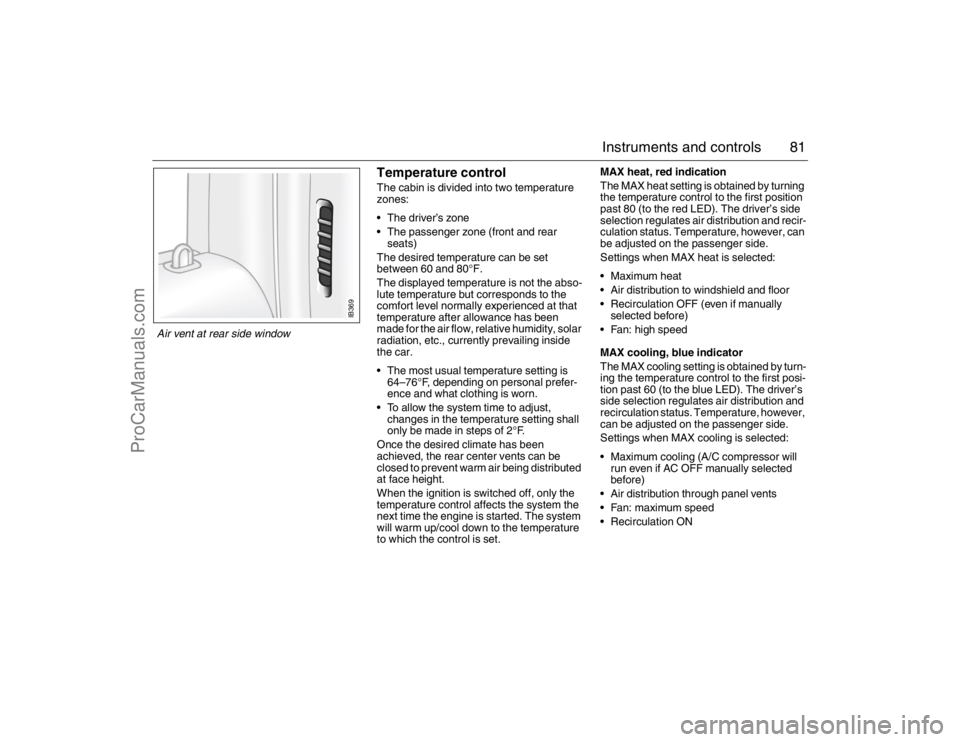
IB369
Air vent at rear side window 95_U S _M 07.book Page 81 Friday, June 9, 2006 8:58 AM
ProCarManuals.com
Page 85 of 288
85 Instruments and controls
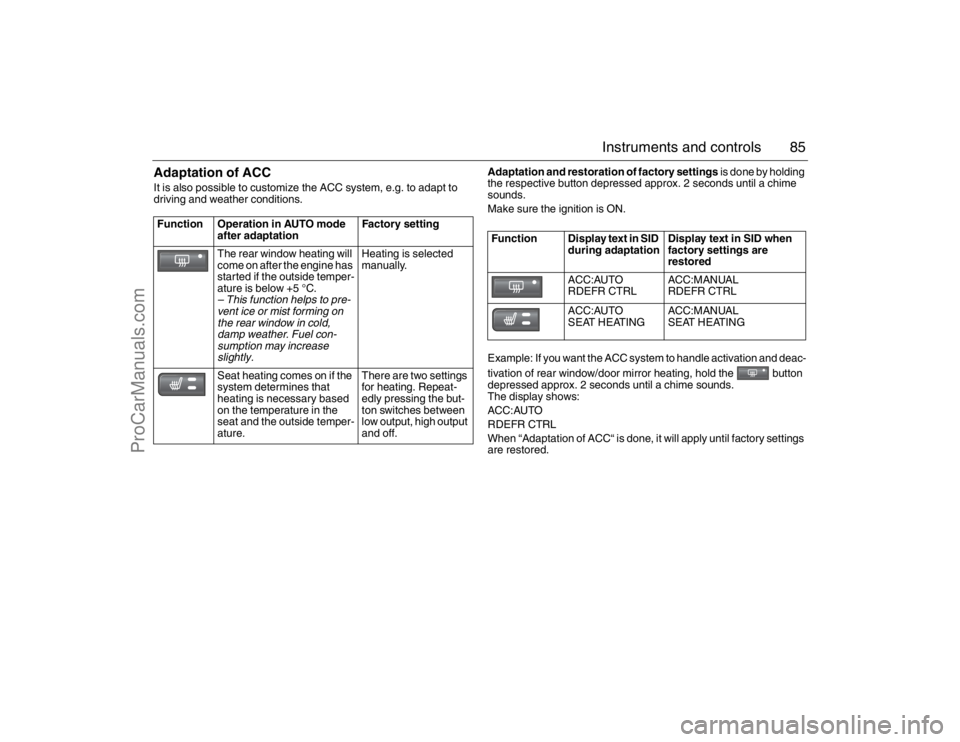
Adaptation of ACCIt is also possible to customize the ACC system, e.g. to adapt to
driving and weather conditions.
Adaptation and restoration of factory settings is done by holding
the respective button depressed approx. 2 seconds until a chime
sounds.
Make sure the ignition is ON.
Example: If you want the ACC system to handle activation and deac-
tivation of rear window/door mirror heating, hold the button
depressed approx. 2 seconds until a chime sounds.
The display shows:
ACC:AUTO
RDEFR CTRL
When “Adaptation of ACC“ is done, it will apply until factory settings
are restored. Function Operation in AUTO mode
after adaptationFactory setting
The rear window heating will
come on after the engine has
started if the outside temper-
ature is below +5 °C.
– This function helps to pre-
vent ice or mist forming on
the rear window in cold,
damp weather. Fuel con-
sumption may increase
slightly.
Heating is selected
manually.
Seat heating comes on if the
system determines that
heating is necessary based
on the temperature in the
seat and the outside temper-
ature
.
There are two settings
for heating. Repeat-
edly pressing the but-
ton switches between
low output, high output
and off.
Function Display text in SID
during adaptationDisplay text in SID when
factory settings are
restored
ACC:AUTO
RDEFR CTRLACC:MANUAL
RDEFR CTRL
ACC:AUTO
SEAT HEATINGACC:MANUAL
SEAT HEATING
95_U S _M 07.book Page 85 Friday, June 9, 2006 8:58 AM
ProCarManuals.com
Page 86 of 288
86 Instruments and controlsCalibrationCalibration is carried out automatically after
a certain number of starts if the ignition has
been switched off for more than 2 hours.
If the battery has been disconnected or has
run flat, the system will need to be recali-
brated.
Calibration is started manually as follows:
1 Start the engine.
2 Press and at the same
time.
When manual calibration starts,
” ACC:CALIBR.
STARTED”
appears in SID.
Calibration takes approx. 30 seconds.Useful tips(before taking the car to a workshop. We
recommend that you contact an authorized
Saab workshop.)
If the battery has been disconnected or
has run flat, the system will need to be
recalibrated. See "Calibration" above.
If front seat heating and/or rear window
heating do not function satisfactorily, see
"Adaptation of ACC" on page 85.
Condensation waterWhen the A/C system is running, the intake
air is dehumidified, and the resultant con-
densation is drained off through two outlets
underneath the floor of the car, in the vicinity
of the front doors.
It is therefore perfectly normal for water to
be seen dripping from these outlets when
the car is parked. The warmer the ambient
air and the higher the humidity, the more
condensation water will form.Formation of ice and mist in
extreme weather conditionsIt is only in the most extreme conditions that
icing and misting of window glass are likely
to be a problem, e.g. in torrential rain or
severe cold coupled with high relative
humidity, or when passengers are perspir-
ing heavily or wearing wet clothes.
The following measures are recommended
if such problems should occur:
1 Select AUTO and 21 °C for both temper-
ature zones.
2 Select Defroster.
If this is not enough...
3 Increase the fan speed.
If this is not enough...
4 Select a higher temperature.
The following measures are recommended
if the occupants feel that it is cold and
draughty in the car:1 Make sure that all the air vents are fully
open, including the center rear vent. If
this is not enough...
2 Direct the air flow away from the body. If
this is not enough...
3 Raise the temperature setting a degree
or two. If this is not enough...
4 Lower the fan speed.
Troubleshooting and care, see page 243.
95_U S _M 07.book Page 86 Friday, June 9, 2006 8:58 AM
ProCarManuals.com
Page 92 of 288

92 Saab 9-5 Audio SystemSwitching the audio
system On/OffThe audio system will come on: When the ignition is switched ON and/or
the ON/OFF control is pressed.ON/OFF controlThe audio system will be
switched off: When the ON/OFF control is pressed.
When the ignition key is removed.
One hour after the ignition was switched
OFF, if the ignition key has not been
removed.
1 hour after the audio system has been
switched on if the key is not in the ignition
switch.
Audio settingsVolume
Turn the ON/OFF control until the desired
volume is obtained.Tone controlsTone and speaker settingsManual tone and speaker settings
1 Press the tone control to open the menu
for tone and speaker settings.
2 Press the pushbutton under the desired
tone/speaker setting.
3 Adjust the selected setting by turning
the tone control. The selected settings
can also be adjusted by pressing the
SEEK, FWD or REV button.
Centering tone and speaker settings
Hold the tone control depressed until a
chime sounds to center all tone and speaker
settings.Automatic tone setting
You can choose to automatically adapt tone
setting,
Auto EQ
(Equalizer), to the tuned
station or disc being played.
1 Press the tone control to open the menu
for tone settings.
2 Press the pushbutton under the menu
option
Auto EQ
label.
3 Press the pushbutton under the desired
tone setting.
4 The tone settings menu automatically
returns to the previous menu within
5 seconds.
Auto EQ menu
95_U S _M 07.book Page 92 Friday, June 9, 2006 8:58 AM
ProCarManuals.com
Page 115 of 288

115 Interior equipment and trunk
Electric windowsThe electric motors of the front windows are
equipped with overload protection (inte-
grated thermal protection). This protection
operates when the windows are wound
down automatically (switch pressed fully
down).To open:
Front windows: press the front of the switch
Rear windows: Press the back of the switch.
The switches for the front windows have a
third position for automatic opening of the
window. Press the switch fully down to lower
the window completely.
To cancel automatic lowering of the win-
dow, lift the switch briefly.To close:
Front windows: Lift the front of the switch.
Rear windows: Lift the back of the switch.
The actuating motor will be switched off
automatically when the window is fully
closed or when the switch is released.
WARNING
Bear in mind the pinch hazard when the
side windows are being wound up.
Always remove the ignition key when
you leave the car. This prevents per-
sonal injury caused by the electric win-
dows, for example, due to children
playing.
The person operating the electric win-
dows is responsible for ensuring that
no one, especially children, has their
head, hands or fingers in the window
openings, before raising the windows.
Raising the windows could otherwise
cause serious or fatal injuries.
Do not extend your arm, head etc. out
of an open window while driving.
IB3231
1 Window switches
2 Switch for rendering rear door window switches inoperative
95_U S _M 07.book Page 115 Friday, June 9, 2006 8:58 AM
ProCarManuals.com
Page 119 of 288

119 Interior equipment and trunk
Preparations for first-time programming
Before programming the garage opener for
the first time, you must delete any factory
codes.
Press and hold the two outer buttons until
the indicator light begins to flash-after
20 seconds. Release both buttons. Do not
hold for longer that 30 seconds. The garage
opener is now in the train (or learning) mode
and can be programmed at any time begin-
ning with "Programming" - step 2.
Programming
The garage opener can record and store the
frequencies of three different remote con-
trols.
The battery in the remote control should be
fairly new for programming to work well.
Do not repeat "Programming" - step two
to train additional devices to a second or
third button. Begin with "Programming" -
step three.
1 Turn the ignition ON.
2 Press and hold the two outer buttons
(buttons one and three) - releasing only
when the indicator light begins to flash
(after 20 seconds). Do not hold the but-
tons for longer than 30 seconds and do
not repeat step two to program a
second and/or third hand-held transmit-
ter to the remaining two buttons.
3 Position the end of your hand-held trans-
mitter 1-3 inches (5-14 cm) away from
the button you wish to program while
keeping the indicator light in view. The transmitter should face the mirror from
below or left side of the mirror.
4 Simultaneously press and hold both the
chosen and hand-held transmitter but-
tons. Do not release the buttons until
step 5 has been completed.
Note: Some gate operators and garage
door openers may require you to replace
this Programming Step 4 with procedures
noted in the "Gate Operator / Canadian Pro-
gramming" section.
5 After the indicator light changes from a
slow to a rapidly blinking light, release
both the mirror and hand-held transmit-
ter buttons.
6 Press and hold the just-trained button
and observe the indicator light.
If the indicator light stays on con-
stantly, programming is complete
and your device should activate when
the button is pressed and released.
Note: To program the remaining two but-
tons, begin with "Programming" - step
three. Do not repeat step two.
If the indicator light blinks rapidly for two
seconds and then turns to a constant
light continue with "Programming"
steps 7-9 to complete the programming of
a rolling code equipped device (most com-
monly a garage door opener).
7 At the garage door opener receiver
(motor-head unit) in the garage, locate
the "learn" or "smart" button. This can
usually
be found where the hanging antenna wire is attached to the
motor-head unit.
8 Firmly press and release the "learn" or
"smart" button. (The name and color of
the button may vary by manufacturer.)
Note: There are 30 seconds in which to ini-
tiate step nine.
9 Return to the vehicle and firmly press,
hold for two seconds and release the
programmed button. Repeat the
"press/hold/release" sequence a
second time, and, depending on the
brand of the garage door opener (or
other rolling code equipped device),
repeat this sequence a third time to com-
plete the programming process.
The garage opener should now activate
your rolling code equipped device.
Note: To program the remaining two but-
tons, begin with "Programming" -
step
three
. Do not repeat step two.
95_U S _M 07.book Page 119 Friday, June 9, 2006 8:58 AM
ProCarManuals.com
Page 123 of 288

123 Interior equipment and trunk
Moonroof3 The moonroof is operated by the switch on
the overhead panel above the rearview mir-
ror. The moonroof can be opened partially
or fully.
To open:
Slide the control towards the rear to open
the moonroof to the comfort position.
To open it fully, slide the control back a
second time. Press the control to stop it
earlier. To close:
Slide the control forwards until the moon-
roof is closed.
Ventilation position
Press the middle of the control (when
moonroof closed).
To close: slide the control forwards.
To fully open the moonroof from the ventila-
tion position, slide the control back.
The moonroof incorporates an interior,
manual, sliding sun blind.
If the car is newly waxed, the moonroof may
creak when opened to the ventilation posi-
tion or when driving with the moonroof
closed. The sound comes from the area
where the front edge of the moonroof meets the metal roof. Open the moonroof fully and,
using washer fluid, clean the seal on the
leading edge of the moonroof and the
painted surface against which this seals
when the moonroof is closed.
WARNING
Bear in mind the pinch hazard when clos-
ing the moonroof.
Always remove the ignition key when
you leave the car. This prevents per-
sonal injury caused by the electric
moonroof, for example, due to chil-
dren playing.
The person operating the electric
moonroof is responsible for ensuring
that no one, especially children, has
their head, hands or fingers in the
opening, before closing the moonroof.
Operating the moonroof could other-
wise cause serious or fatal injuries.
Do not extend your arm, head etc. out
of an open moonroof while driving.
IB430
1
3
2
Moonroof control 1 To open
2 To close
3 Ventilation position
95_U S _M 07.book Page 123 Friday, June 9, 2006 8:58 AM
ProCarManuals.com
Page 124 of 288

124 Interior equipment and trunkEmergency operation of
moonroofIn an emergency (e.g. if there is an electrical
failure) the moonroof can be operated by a
screwdriver. Remove the cover at the front
of the moonroof opening, insert a screw-
driver in the groove, and rotate.
Rotate counterclockwise to close moonroof.
Interior lighting The interior lighting consists of one dome
light in the front and one in the back, a
map-reading light in the front, two reading
lights in the back, floor courtesy lights in the
front (in some model variants) and door
courtesy lights on all doors.
The courtesy lights come on automatically
when the respective door is opened. Each
reading light has its own switch adjacent to
the lamp.The switch for the dome lights is on the front
overhead panel. When the switch is in the
mid-position (door-activated), the interior
lighting will come on:
When the car is unlocked from the out-
side.
When any door is opened.
When the ignition key is withdrawn from
the ignition switch.
Lighting goes out 30 seconds after the
doors have been closed or:
when the ignition is switched ON, pro-
vided that the cabin lighting control is in
the center position
when the car is locked with the remote
control.
IB431
Manual operation of moonroof
123
IB357
1 Interior lighting on continuously
2 Lighting comes on when a door is opened
3 Lighting always off
95_U S _M 07.book Page 124 Friday, June 9, 2006 8:58 AM
ProCarManuals.com