change time SAAB 9-7X 2007 User Guide
[x] Cancel search | Manufacturer: SAAB, Model Year: 2007, Model line: 9-7X, Model: SAAB 9-7X 2007Pages: 498, PDF Size: 3.13 MB
Page 223 of 498
Playing the Radio
P
(Power):Press this knob to turn the system
on and off.
Turn this knob clockwise or counterclockwise to
increase or to decrease the volume.
DISP (Display):When the ignition is turned off,
press this knob to display the time.
For XM™ (if equipped), press the DISP knob while
in XM™ mode to retrieve four different categories of
information related to the current song or channel:
Artist, Song Title, Category or PTY (program type),
Channel Number/Channel Name.
To change the default on the display, press the
DISP knob until the desired option displays, then
hold this knob for two seconds. One beep sounds
and the selected display becomes the default.AUTO VOL (Automatic Volume):With automatic
volume, the audio system adjusts automatically
to make up for road and wind noise as you drive.
Set the volume at the desired level. Press this
button to select LOW, MEDIUM, or HIGH.
Each higher setting allows for more volume
compensation at faster vehicle speeds. Then as
you drive, automatic volume increases the volume,
as necessary, to overcome noise at any speed.
The volume level should always sound the same to
you as you drive. NONE displays if the radio
cannot determine the vehicle speed. To turn
automatic volume off, press this button until
AVOL OFF (automatic volume off) displays.
Finding a Station
BAND:Press this button to switch between FM1,
FM2, AM, or XM1 or XM2 (if equipped). The
selection displays.
e(Tune):Turn this knob to select radio stations.
223
ProCarManuals.com
Page 231 of 498
To scan all loaded CDs, press and hold either arrow
for more than four seconds until CD SCAN displays
and a beep sounds. Use this feature to listen to
10 seconds of the rst track of each loaded CD.
Press either arrow again, to stop scanning.
DISP (Display):Press this knob to see how long
the current track has been playing. The elapsed
time of the track displays. To change the
default on the display, track or elapsed time, press
this knob until the desired option displays, then
hold the knob for two seconds. One beep sounds
and the selected display becomes the default.
BAND:Press this button to listen to the
radio when a CD is playing. The inactive CD(s)
remains inside the radio for future listening.
B(CD):Press this button to play a CD when
listening to the radio. The CD symbol displays
when a CD is loaded.
AUTO EQ (Automatic Equalization):Press
AUTO EQ to select an equalization setting while
playing a CD. The equalization is set whenever a
CD is played. See “AUTO EQ” listed previously
for more information. If you select an EQ setting
for your CD, it is activated each time a CD plays.
Using Song List Mode
R
(Song List):The six-disc CD changer has a
feature called song list. This feature is capable
of saving 20 track selections.
To save tracks into the song list feature, perform
the following steps:
1. Turn the CD player on and load it with at least
one CD. See “LOAD CD” listed previously in
this section for more information.
2. Check to see that the CD changer is not in
song list mode. S-LIST should not display.
If S-LIST displays, press the song list button to
turn it off.
3. Select the desired CD by pressing the
numbered pushbutton and then use the SEEK
SCAN right arrow to locate the track to be
saved. the track begins to play.
4. Press and hold the song list button to save
the track into memory. When the song list
button is pressed, one beep sounds. After
two seconds of continuously pressing the song
list button, two beeps sound to conrm the
track has been saved.
5. Repeat Steps 3 and 4 for saving other
selections.
231
ProCarManuals.com
Page 238 of 498
DISP (Display):Press this knob to switch
between track mode, folder/playlist mode, and
time of day mode. The display shows only
eight characters, but there can be up to four pages
of text. If there are more than eight characters
in the song, folder, or playlist name, pressing this
knob within two seconds takes the CD to
the next page of text. If there are no other
pages to be shown, pressing this knob within
two seconds takes the CD to the next
display mode.
Track mode displays the current track number
and the ID3 tag song name.
Folder/playlist mode displays the current folder
or playlist number and the folder/playlist name.
Time of day mode displays the time of day and
the ID3 tag song name.
To change the default on the display, press the
DISP knob until the desired option displays,
then hold this knob for two seconds. One beep
sounds and the selected display becomes
the default.
4(Information):INFO displays whenever a
current track has ID3 tag information. Press this
button to display the artist name and album
contained in the tag. INFO disappears from the
display when the information in the ID3 tag
has nished.
BAND:Press this button to listen to the radio
when a CD is playing. The inactive CD remains
inside the radio for future listening.
B(CD):Press this button to play a CD when
listening to the radio. The CD symbol displays
when a CD is loaded.
AUTO EQ (Automatic Equalization):Press
AUTO EQ to select an equalization setting while
playing a CD. The equalization is set whenever a
CD is played. See “AUTO EQ” listed previously
for more information. If you select an EQ setting
for your CD, it is activated each time a CD plays.
Z(Eject):Press this button to eject a CD.
Eject may be activated with either the ignition or
radio off. CDs may be loaded with the ignition and
radio off if this button is pressed rst.
238
ProCarManuals.com
Page 244 of 498
Headphones
The RSE system includes two sets of wireless
headphones.
Each set of headphones has an ON/OFF control.
An indicator light will illuminate on the headphones
when they are on. If the light does not illuminate,
the batteries may need to be replaced. See “Battery
Replacement” following for more information.
Each set of headphones has a volume knob.
To adjust the volume, adjust this knob.
The transmitters are located below the video
display screen. The headphones will shut
off automatically if they lose the signal from the
system after about four minutes to save battery
power. The signal may be lost if the system
is turned off or if the headphones are out of
range of the transmitters.
When using the wired headphones, if the front
seat passengers play a CD in the Radio with
Six-Disc CD (if equipped) or use XM™ Satellite
Radio Service (if equipped), you will hear the audio
for these sources, instead of the DVD or CD
that is currently playing through the RSE.Notice:Do not store the headphones in heat
or direct sunlight. This could damage the
headphones and repairs will not be covered by
your warranty. Keep the headphones stored
in a cool, dry place.
Battery Replacement
To change the batteries, do the following:
1. Loosen the screw on the battery compartment
door located on the left side of the headphone
earpiece.
2. Replace the two AAA batteries in the
compartment. Make sure that they are
installed correctly, using the diagram on the
inside of the battery compartment.
3. Tighten the screw to close the
compartment door.
If the headphones are to be stored for a long
period of time, remove the batteries and keep them
in a cool, dry place.
244
ProCarManuals.com
Page 248 of 498
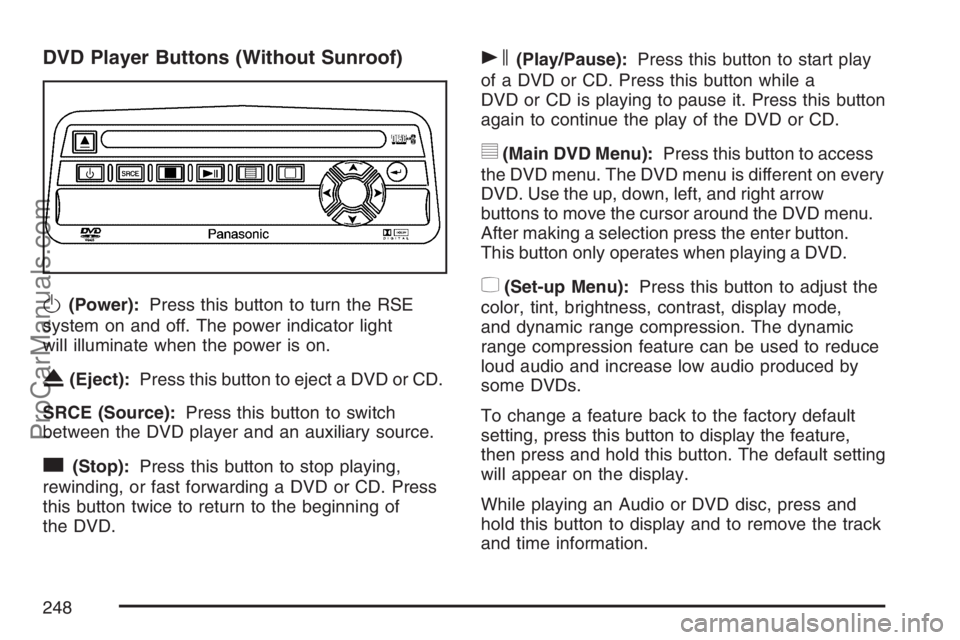
DVD Player Buttons (Without Sunroof)
O(Power):Press this button to turn the RSE
system on and off. The power indicator light
will illuminate when the power is on.
X(Eject):Press this button to eject a DVD or CD.
SRCE (Source):Press this button to switch
between the DVD player and an auxiliary source.
c(Stop):Press this button to stop playing,
rewinding, or fast forwarding a DVD or CD. Press
this button twice to return to the beginning of
the DVD.
s(Play/Pause):Press this button to start play
of a DVD or CD. Press this button while a
DVD or CD is playing to pause it. Press this button
again to continue the play of the DVD or CD.
y(Main DVD Menu):Press this button to access
the DVD menu. The DVD menu is different on every
DVD. Use the up, down, left, and right arrow
buttons to move the cursor around the DVD menu.
After making a selection press the enter button.
This button only operates when playing a DVD.
z(Set-up Menu):Press this button to adjust the
color, tint, brightness, contrast, display mode,
and dynamic range compression. The dynamic
range compression feature can be used to reduce
loud audio and increase low audio produced by
some DVDs.
To change a feature back to the factory default
setting, press this button to display the feature,
then press and hold this button. The default setting
will appear on the display.
While playing an Audio or DVD disc, press and
hold this button to display and to remove the track
and time information.
248
ProCarManuals.com
Page 252 of 498
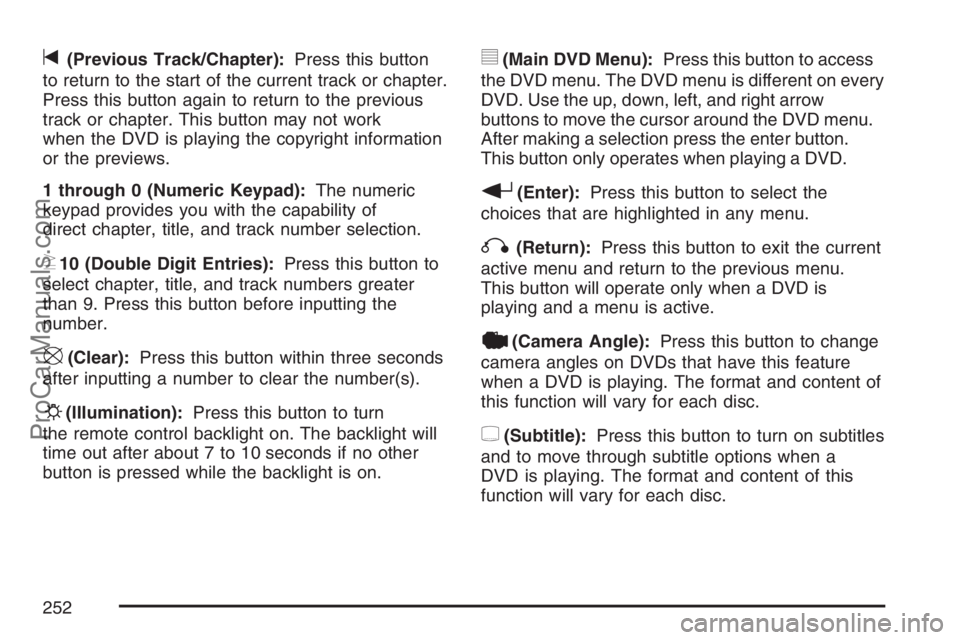
t(Previous Track/Chapter):Press this button
to return to the start of the current track or chapter.
Press this button again to return to the previous
track or chapter. This button may not work
when the DVD is playing the copyright information
or the previews.
1 through 0 (Numeric Keypad):The numeric
keypad provides you with the capability of
direct chapter, title, and track number selection.
}10 (Double Digit Entries):Press this button to
select chapter, title, and track numbers greater
than 9. Press this button before inputting the
number.
\(Clear):Press this button within three seconds
after inputting a number to clear the number(s).
P(Illumination):Press this button to turn
the remote control backlight on. The backlight will
time out after about 7 to 10 seconds if no other
button is pressed while the backlight is on.
y(Main DVD Menu):Press this button to access
the DVD menu. The DVD menu is different on every
DVD. Use the up, down, left, and right arrow
buttons to move the cursor around the DVD menu.
After making a selection press the enter button.
This button only operates when playing a DVD.
r(Enter):Press this button to select the
choices that are highlighted in any menu.
q(Return):Press this button to exit the current
active menu and return to the previous menu.
This button will operate only when a DVD is
playing and a menu is active.
|(Camera Angle):Press this button to change
camera angles on DVDs that have this feature
when a DVD is playing. The format and content of
this function will vary for each disc.
{(Subtitle):Press this button to turn on subtitles
and to move through subtitle options when a
DVD is playing. The format and content of this
function will vary for each disc.
252
ProCarManuals.com
Page 253 of 498
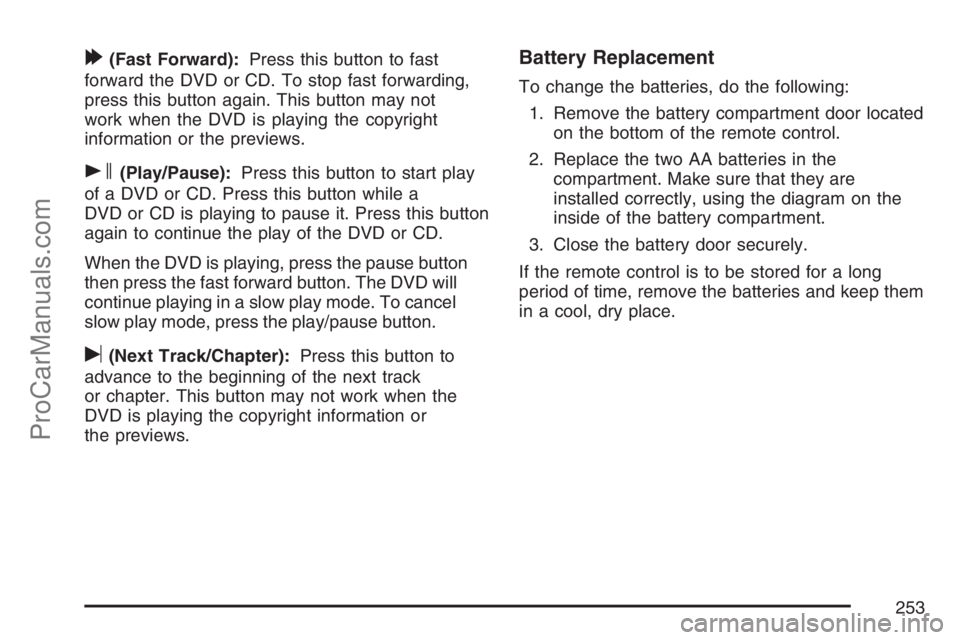
[(Fast Forward):Press this button to fast
forward the DVD or CD. To stop fast forwarding,
press this button again. This button may not
work when the DVD is playing the copyright
information or the previews.
s(Play/Pause):Press this button to start play
of a DVD or CD. Press this button while a
DVD or CD is playing to pause it. Press this button
again to continue the play of the DVD or CD.
When the DVD is playing, press the pause button
then press the fast forward button. The DVD will
continue playing in a slow play mode. To cancel
slow play mode, press the play/pause button.
u(Next Track/Chapter):Press this button to
advance to the beginning of the next track
or chapter. This button may not work when the
DVD is playing the copyright information or
the previews.
Battery Replacement
To change the batteries, do the following:
1. Remove the battery compartment door located
on the bottom of the remote control.
2. Replace the two AA batteries in the
compartment. Make sure that they are
installed correctly, using the diagram on the
inside of the battery compartment.
3. Close the battery door securely.
If the remote control is to be stored for a long
period of time, remove the batteries and keep them
in a cool, dry place.
253
ProCarManuals.com
Page 271 of 498
Remember: ABS does not change the time you
need to get your foot up to the brake pedal or
always decrease stopping distance. If you get too
close to the vehicle in front of you, you will not have
time to apply your brakes if that vehicle suddenly
slows or stops. Always leave enough room up
ahead to stop, even though you have ABS.
Using ABS
Do not pump the brakes. Just hold the brake pedal
down rmly and let anti-lock work for you. You may
feel the brakes vibrate, or you may notice some
noise, but this is normal.
Braking in Emergencies
With ABS, you can steer and brake at the same
time. In many emergencies, steering can help you
more than even the very best braking.
Limited-Slip Rear Axle
Your vehicle may have this feature. A limited-slip
rear axle can give you additional traction on
snow, mud, ice, sand or gravel. It works like a
standard axle most of the time, but when one of
the rear wheels has no traction and the other does,
this feature will allow the wheel with traction to
move the vehicle.
StabiliTrak®System
Your vehicle is equipped with StabiliTrak®,
Electronic Stability Control (ESC) which combines
antilock brake, traction and stability control
systems and helps the driver maintain directional
control of the vehicle in most driving conditions.
Traction control activates when the controller
senses wheel spin. StabiliTrak
®will selectively
apply the brakes and reduce engine torque to help
regain traction.
Stability control activates when the controller
senses a discrepancy between your intended
path and the direction the vehicle is travelling.
StabiliTrak
®selectively applies braking pressure at
any one of the vehicle’s brakes to help guide
the vehicle in the direction which you are steering.
271
ProCarManuals.com
Page 279 of 498
Watch for traffic signs, pavement markings, and
lines. If you can see a sign up ahead that might
indicate a turn or an intersection, delay your
pass. A broken center line usually indicates it is
all right to pass, providing the road ahead is
clear. Never cross a solid line on your side of
the lane or a double solid line, even if the road
seems empty of approaching traffic.
Do not get too close to the vehicle you want to
pass while you are awaiting an opportunity. For
one thing, following too closely reduces your
area of vision, especially if you are following a
larger vehicle. Also, you will not have adequate
space if the vehicle ahead suddenly slows or
stops. Keep back a reasonable distance.
When it looks like a chance to pass is coming
up, start to accelerate but stay in the right lane
and do not get too close. Time your move so
you will be increasing speed as the time comes
to move into the other lane. If the way is clear to
pass, you will have a running start that more
than makes up for the distance you would lose
by dropping back. And if something happens to
cause you to cancel your pass, you need only
slow down and drop back again and wait for
another opportunity.
If other vehicles are lined up to pass a slow
vehicle, wait your turn. But take care that
someone is not trying to pass you as you pull
out to pass the slow vehicle. Remember to
glance over your shoulder and check the
blind spot.
Check your vehicle’s mirrors, glance over your
shoulder, and start your left lane change signal
before moving out of the right lane to pass.
When you are far enough ahead of the passed
vehicle to see its front in your vehicle’s inside
mirror, activate the right lane change signal and
move back into the right lane. Remember that
your vehicle’s passenger side outside mirror is
convex. The vehicle you just passed may seem
to be farther away from you than it really is.
Try not to pass more than one vehicle at a time
on two-lane roads. Reconsider before passing
the next vehicle.
Do not overtake a slowly moving vehicle too
rapidly. Even though the brake lamps are not
ashing, it may be slowing down or starting
to turn.
If you are being passed, make it easy for the
following driver to get ahead of you. Perhaps
you can ease a little to the right.
279
ProCarManuals.com
Page 305 of 498
Towing a Trailer
{CAUTION:
If you do not use the correct equipment
and drive properly, you can lose control
when you pull a trailer. For example, if the
trailer is too heavy, the brakes may not
work well — or even at all. You and your
passengers could be seriously injured.
Pull a trailer only if you have followed all
the steps in this section. Ask your dealer
for advice and information about towing a
trailer with your vehicle.
Notice:Pulling a trailer improperly can
damage your vehicle and result in costly
repairs that would not be covered by your
warranty. Always follow the instructions in this
section and check with your dealer for more
information about towing a trailer with
your vehicle.To identify the trailering capacity of your vehicle,
you should read the information in “Weight of
the Trailer” that appears later in this section.
Trailering is different than just driving your vehicle
by itself. Trailering means changes in acceleration,
braking, handling, durability and fuel economy.
Successful, safe trailering takes correct equipment,
and it has to be used properly.
That’s the reason for this part. In it are many
time-tested, important trailering tips and safety
rules. Many of these are important for your safety
and that of your passengers. So please read
this section carefully before you pull a trailer.
305
ProCarManuals.com