reset SAAB 9-7X 2007 User Guide
[x] Cancel search | Manufacturer: SAAB, Model Year: 2007, Model line: 9-7X, Model: SAAB 9-7X 2007Pages: 498, PDF Size: 3.13 MB
Page 203 of 498
SERVICE AIR BAG
This message displays if there is a problem with
the airbag system. Have your dealer inspect
the system for problems. SeeAirbag Readiness
Light on page 178andAirbag System on page 64
for more information. Press any of the DIC
buttons, or the trip stem, to acknowledge this
message and clear it from the DIC display.
SERVICE BRAKE SYSTEM
This message displays if a problem occurs with
the brake system. If this message appears, stop as
soon as possible and turn off the vehicle. Restart
the vehicle and check for the message on the
DIC display. If the message is still displayed, or
appears again when you begin driving, the
brake system needs service. See your dealer.
SERVICE CHARGING SYS (System)
This message displays if there is a problem with the
battery charging system. Under certain conditions,
the charging system light may also turn on in the
instrument panel cluster. SeeCharging System
Light on page 182. The battery will not be charging
at an optimal rate and the vehicle will lose the ability
to enter the fuel economy mode. The vehicle is safe
to drive, however you should have the electrical
system checked by your dealer. Press any of the
DIC buttons, or the trip stem, to acknowledge this
message and clear it from the DIC display.
SERVICE STABILITRAK
If this message displays, it means there may be a
problem with the StabiliTrak®system. If this
message appears, try to reset the system by
performing the following: stop; turn off the engine;
then start the engine again. If this message still
comes on, it means there is a problem. You should
see your dealer for service. The vehicle is safe
to drive, however, you do not have the benet of
StabiliTrak
®, so reduce your speed and drive
accordingly. Press any of the DIC buttons, or the
trip stem, to acknowledge this message and
clear it from the DIC display.
203
ProCarManuals.com
Page 211 of 498
ALARM WARNING: OFF:There will be no alarm
warning on activation.
Choose one of the available options and press the
customization button while your choice is
displayed on the DIC to select it and move on to
the next feature. For more information on
alarm warning type, seeContent Theft-Deterrent
on page 102.
Language
Press the customization button until LANGUAGE:
ENGLISH appears in the display. To select
your preference for display language, press the
select button while LANGUAGE: ENGLISH
is displayed on the DIC. Pressing the select button
will scroll through the following languages:
ENGLISH (default)
FRANCAIS (French)
ESPANOL (Spanish)
Choose one of the available options and press the
customization button while it is displayed on the
DIC to select it and move on to the next feature.If you accidentally choose a language that you do
not want or understand, press and hold the
customization button and the trip information
button at the same time. The DIC will begin
scrolling through the languages in their particular
language. English will be in English, Francais
will be in French, and Espanol will be in Spanish.
When you see the language that you would
like, release both buttons. The DIC will then
display the information in the language you chose.
You can also scroll through the different
languages by pressing and holding the trip reset
stem for four seconds, as long as you are in
the odometer mode.
Units
Press the customization button until UNITS: U.S.
(ENGLISH) appears in the display. To select
English or metric, press the select button while
UNITS: U.S. (ENGLISH) is displayed on the DIC.
Pressing the select button will scroll through
the following choices:
UNITS: U.S. (ENGLISH) (default)
UNITS: METRIC (km/L)
UNITS: METRIC (L/100 km)
211
ProCarManuals.com
Page 212 of 498
If U.S. (ENGLISH) is chosen, all information will
be displayed in English units. For example,
distance will be displayed in miles (mi) and fuel
economy in miles per gallon (MPG). If METRIC
(km/L) is chosen, all information will be displayed
in metric units. For example, distance will be
displayed in kilometers (km) and fuel economy in
kilometers per liter (km/L). If METRIC (L/100 km)
is chosen, all information will be displayed in metric
units. For example, distance will be displayed in
kilometers (km) and fuel economy in liters per
100 kilometers (L/100 km).
Choose one of the available options and press the
customization button while it is displayed on the
DIC to select it and exit out of the customizable
options.
Audio System(s)
Determine which radio your vehicle has and then
read the pages following to familiarize yourself
with its features.
Driving without distraction is a necessity for a
safer driving experience. SeeDefensive Driving on
page 264. By taking a few moments to read this
manual and get familiar with your vehicle’saudio system, you can use it with less effort, as
well as take advantage of its features. While your
vehicle is parked, set up your audio system by
presetting your favorite radio stations, setting the
tone and adjusting the speakers. Then, when
driving conditions permit, you can tune to
your favorite stations using the presets and
steering wheel controls if the vehicle has them.
{CAUTION:
This system provides you with a far greater
access to audio stations and song listings.
Giving extended attention to entertainment
tasks while driving can cause a crash and
you or others can be injured or killed.
Always keep your eyes on the road and
your mind on the drive — avoid engaging
in extended searching while driving.
Keeping your mind on the drive is important for
safe driving. For more information, seeDefensive
Driving on page 264.
212
ProCarManuals.com
Page 213 of 498
Here are some ways in which you can help avoid
distraction while driving.
While your vehicle is parked:
Familiarize yourself with all of its controls.
Familiarize yourself with its operation.
Set up your audio system by presetting your
favorite radio stations, setting the tone, and
adjusting the speakers. Then, when driving
conditions permit, you can tune to your favorite
radio stations using the presets and steering
wheel controls if the vehicle has them.
Notice:Before adding any sound equipment to
your vehicle, such as an audio system, CD
player, CB radio, mobile telephone, or two-way
radio, make sure that it can be added by
checking with your dealer. Also, check federal
rules covering mobile radio and telephone
units. If sound equipment can be added, it is
very important to do it properly. Added sound
equipment may interfere with the operation of
your vehicle’s engine, radio, or other systems,
and even damage them. Your vehicle’s systems
may interfere with the operation of sound
equipment that has been added.Your vehicle has a feature called Retained
Accessory Power (RAP). With RAP, the audio
system can be played even after the ignition is
turned off. SeeRetained Accessory Power (RAP)
on page 108for more information.Setting the Time
Press and hold H until the correct hour appears on
the display. AM or PM will appear on the display
(Radio with CD (UpLevel, MP3, and Six-Disc CD)).
Press and hold M until the correct minute
appears on the display. The time can be set with
the ignition on or off.
213
ProCarManuals.com
Page 215 of 498
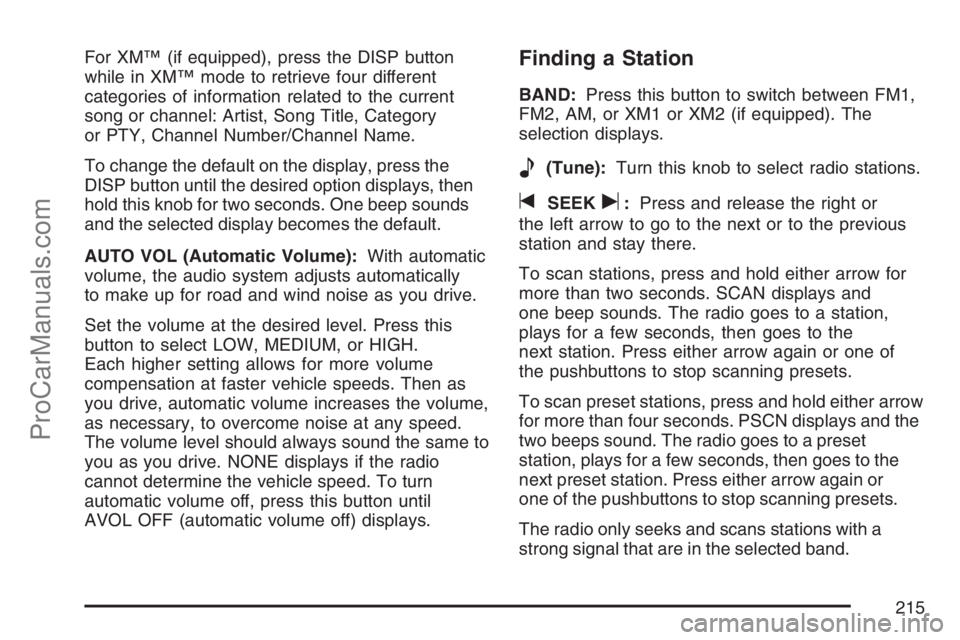
For XM™ (if equipped), press the DISP button
while in XM™ mode to retrieve four different
categories of information related to the current
song or channel: Artist, Song Title, Category
or PTY, Channel Number/Channel Name.
To change the default on the display, press the
DISP button until the desired option displays, then
hold this knob for two seconds. One beep sounds
and the selected display becomes the default.
AUTO VOL (Automatic Volume):With automatic
volume, the audio system adjusts automatically
to make up for road and wind noise as you drive.
Set the volume at the desired level. Press this
button to select LOW, MEDIUM, or HIGH.
Each higher setting allows for more volume
compensation at faster vehicle speeds. Then as
you drive, automatic volume increases the volume,
as necessary, to overcome noise at any speed.
The volume level should always sound the same to
you as you drive. NONE displays if the radio
cannot determine the vehicle speed. To turn
automatic volume off, press this button until
AVOL OFF (automatic volume off) displays.Finding a Station
BAND:Press this button to switch between FM1,
FM2, AM, or XM1 or XM2 (if equipped). The
selection displays.
e(Tune):Turn this knob to select radio stations.
tSEEKu:Press and release the right or
the left arrow to go to the next or to the previous
station and stay there.
To scan stations, press and hold either arrow for
more than two seconds. SCAN displays and
one beep sounds. The radio goes to a station,
plays for a few seconds, then goes to the
next station. Press either arrow again or one of
the pushbuttons to stop scanning presets.
To scan preset stations, press and hold either arrow
for more than four seconds. PSCN displays and the
two beeps sound. The radio goes to a preset
station, plays for a few seconds, then goes to the
next preset station. Press either arrow again or
one of the pushbuttons to stop scanning presets.
The radio only seeks and scans stations with a
strong signal that are in the selected band.
215
ProCarManuals.com
Page 216 of 498
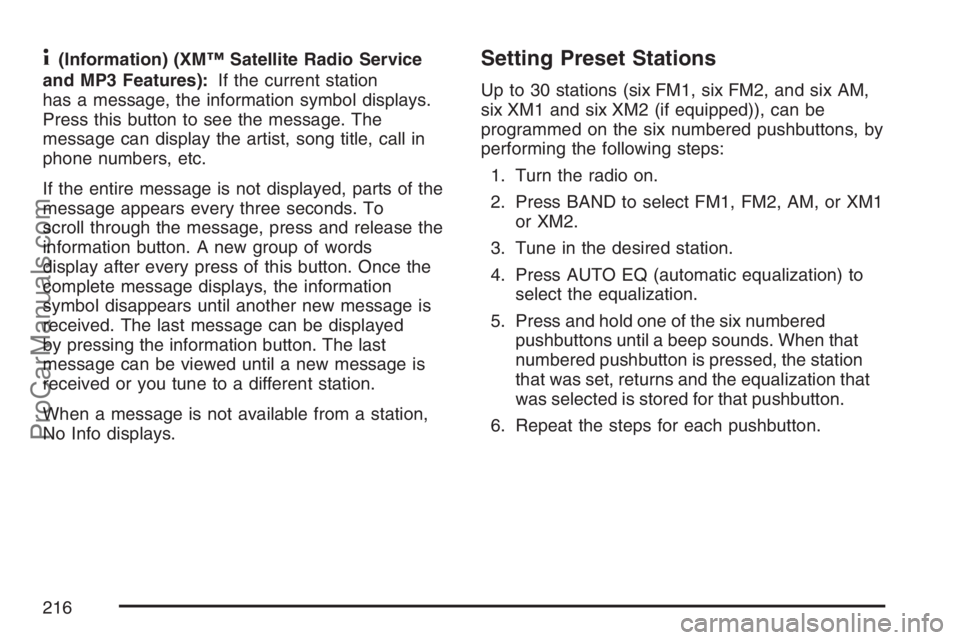
4(Information) (XM™ Satellite Radio Service
and MP3 Features):If the current station
has a message, the information symbol displays.
Press this button to see the message. The
message can display the artist, song title, call in
phone numbers, etc.
If the entire message is not displayed, parts of the
message appears every three seconds. To
scroll through the message, press and release the
information button. A new group of words
display after every press of this button. Once the
complete message displays, the information
symbol disappears until another new message is
received. The last message can be displayed
by pressing the information button. The last
message can be viewed until a new message is
received or you tune to a different station.
When a message is not available from a station,
No Info displays.Setting Preset Stations
Up to 30 stations (six FM1, six FM2, and six AM,
six XM1 and six XM2 (if equipped)), can be
programmed on the six numbered pushbuttons, by
performing the following steps:
1. Turn the radio on.
2. Press BAND to select FM1, FM2, AM, or XM1
or XM2.
3. Tune in the desired station.
4. Press AUTO EQ (automatic equalization) to
select the equalization.
5. Press and hold one of the six numbered
pushbuttons until a beep sounds. When that
numbered pushbutton is pressed, the station
that was set, returns and the equalization that
was selected is stored for that pushbutton.
6. Repeat the steps for each pushbutton.
216
ProCarManuals.com
Page 224 of 498
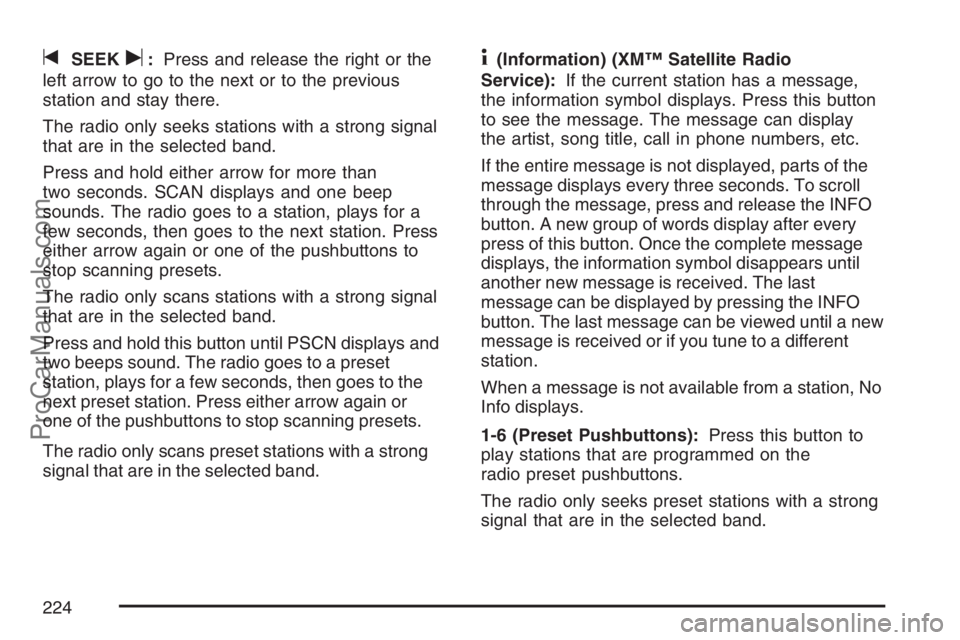
tSEEKu:Press and release the right or the
left arrow to go to the next or to the previous
station and stay there.
The radio only seeks stations with a strong signal
that are in the selected band.
Press and hold either arrow for more than
two seconds. SCAN displays and one beep
sounds. The radio goes to a station, plays for a
few seconds, then goes to the next station. Press
either arrow again or one of the pushbuttons to
stop scanning presets.
The radio only scans stations with a strong signal
that are in the selected band.
Press and hold this button until PSCN displays and
two beeps sound. The radio goes to a preset
station, plays for a few seconds, then goes to the
next preset station. Press either arrow again or
one of the pushbuttons to stop scanning presets.
The radio only scans preset stations with a strong
signal that are in the selected band.4(Information) (XM™ Satellite Radio
Service):If the current station has a message,
the information symbol displays. Press this button
to see the message. The message can display
the artist, song title, call in phone numbers, etc.
If the entire message is not displayed, parts of the
message displays every three seconds. To scroll
through the message, press and release the INFO
button. A new group of words display after every
press of this button. Once the complete message
displays, the information symbol disappears until
another new message is received. The last
message can be displayed by pressing the INFO
button. The last message can be viewed until a new
message is received or if you tune to a different
station.
When a message is not available from a station, No
Info displays.
1-6 (Preset Pushbuttons):Press this button to
play stations that are programmed on the
radio preset pushbuttons.
The radio only seeks preset stations with a strong
signal that are in the selected band.
224
ProCarManuals.com
Page 225 of 498
Setting Preset Stations
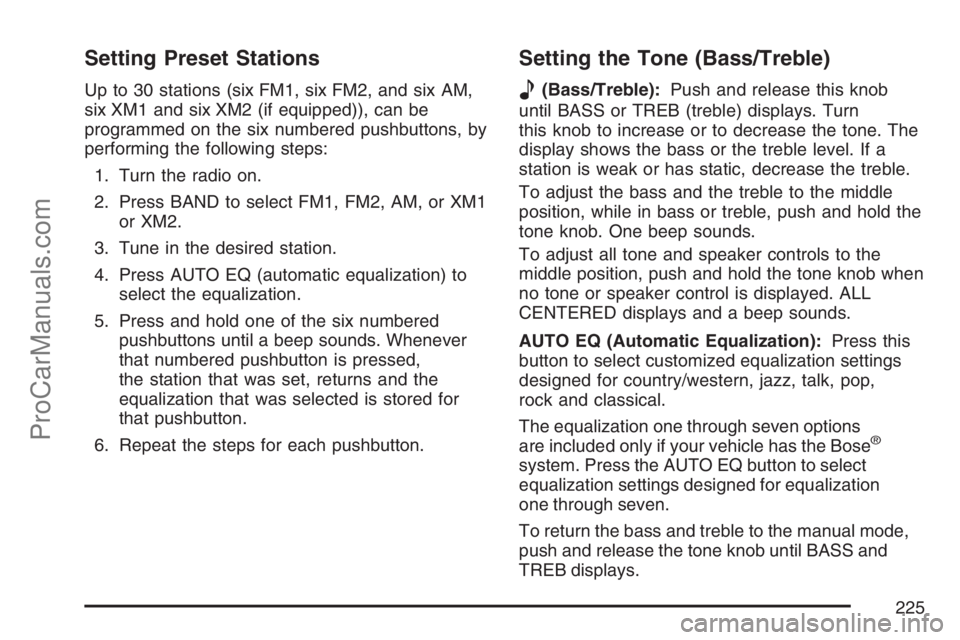
Up to 30 stations (six FM1, six FM2, and six AM,
six XM1 and six XM2 (if equipped)), can be
programmed on the six numbered pushbuttons, by
performing the following steps:
1. Turn the radio on.
2. Press BAND to select FM1, FM2, AM, or XM1
or XM2.
3. Tune in the desired station.
4. Press AUTO EQ (automatic equalization) to
select the equalization.
5. Press and hold one of the six numbered
pushbuttons until a beep sounds. Whenever
that numbered pushbutton is pressed,
the station that was set, returns and the
equalization that was selected is stored for
that pushbutton.
6. Repeat the steps for each pushbutton.
Setting the Tone (Bass/Treble)
e
(Bass/Treble):Push and release this knob
until BASS or TREB (treble) displays. Turn
this knob to increase or to decrease the tone. The
display shows the bass or the treble level. If a
station is weak or has static, decrease the treble.
To adjust the bass and the treble to the middle
position, while in bass or treble, push and hold the
tone knob. One beep sounds.
To adjust all tone and speaker controls to the
middle position, push and hold the tone knob when
no tone or speaker control is displayed. ALL
CENTERED displays and a beep sounds.
AUTO EQ (Automatic Equalization):Press this
button to select customized equalization settings
designed for country/western, jazz, talk, pop,
rock and classical.
The equalization one through seven options
are included only if your vehicle has the Bose
®
system. Press the AUTO EQ button to select
equalization settings designed for equalization
one through seven.
To return the bass and treble to the manual mode,
push and release the tone knob until BASS and
TREB displays.
225
ProCarManuals.com
Page 229 of 498
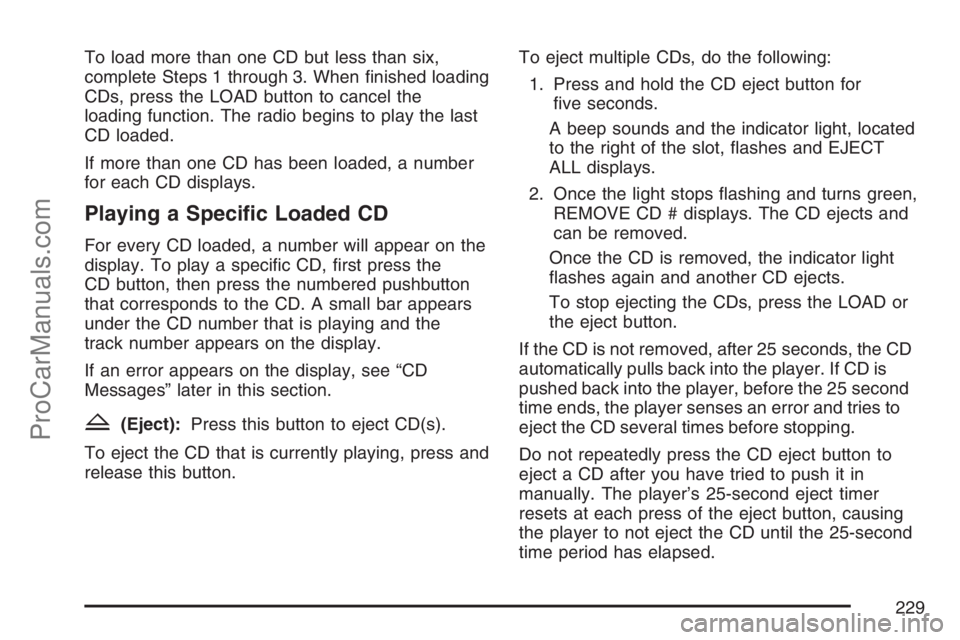
To load more than one CD but less than six,
complete Steps 1 through 3. When nished loading
CDs, press the LOAD button to cancel the
loading function. The radio begins to play the last
CD loaded.
If more than one CD has been loaded, a number
for each CD displays.
Playing a Specic Loaded CD
For every CD loaded, a number will appear on the
display. To play a specic CD, rst press the
CD button, then press the numbered pushbutton
that corresponds to the CD. A small bar appears
under the CD number that is playing and the
track number appears on the display.
If an error appears on the display, see “CD
Messages” later in this section.
Z(Eject):Press this button to eject CD(s).
To eject the CD that is currently playing, press and
release this button.To eject multiple CDs, do the following:
1. Press and hold the CD eject button for
ve seconds.
A beep sounds and the indicator light, located
to the right of the slot, ashes and EJECT
ALL displays.
2. Once the light stops ashing and turns green,
REMOVE CD # displays. The CD ejects and
can be removed.
Once the CD is removed, the indicator light
ashes again and another CD ejects.
To stop ejecting the CDs, press the LOAD or
the eject button.
If the CD is not removed, after 25 seconds, the CD
automatically pulls back into the player. If CD is
pushed back into the player, before the 25 second
time ends, the player senses an error and tries to
eject the CD several times before stopping.
Do not repeatedly press the CD eject button to
eject a CD after you have tried to push it in
manually. The player’s 25-second eject timer
resets at each press of the eject button, causing
the player to not eject the CD until the 25-second
time period has elapsed.
229
ProCarManuals.com
Page 239 of 498
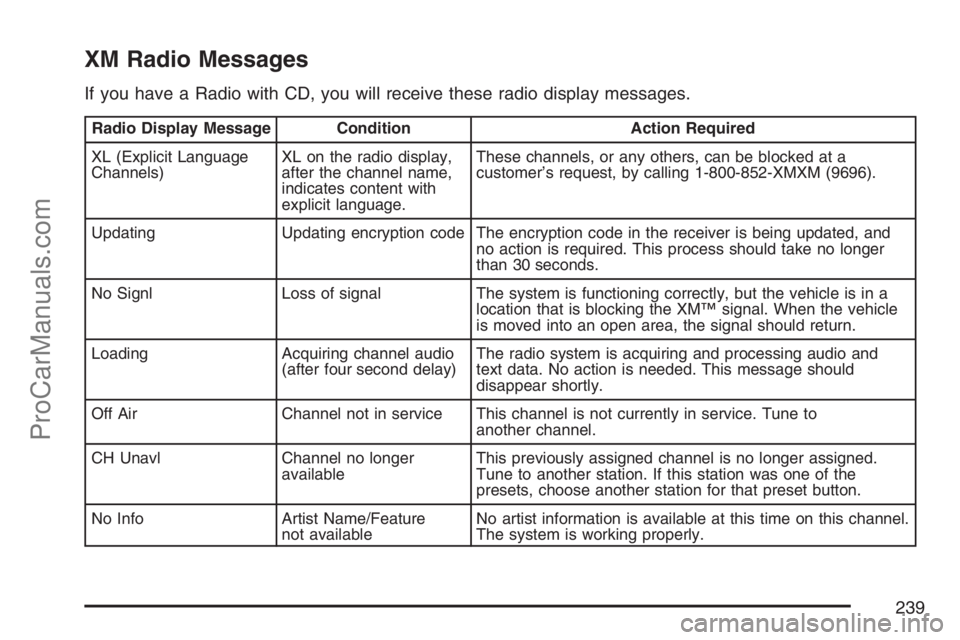
XM Radio Messages
If you have a Radio with CD, you will receive these radio display messages.
Radio Display Message Condition Action Required
XL (Explicit Language
Channels)XL on the radio display,
after the channel name,
indicates content with
explicit language.These channels, or any others, can be blocked at a
customer’s request, by calling 1-800-852-XMXM (9696).
Updating Updating encryption code The encryption code in the receiver is being updated, and
no action is required. This process should take no longer
than 30 seconds.
No Signl Loss of signal The system is functioning correctly, but the vehicle is in a
location that is blocking the XM™ signal. When the vehicle
is moved into an open area, the signal should return.
Loading Acquiring channel audio
(after four second delay)The radio system is acquiring and processing audio and
text data. No action is needed. This message should
disappear shortly.
Off Air Channel not in service This channel is not currently in service. Tune to
another channel.
CH Unavl Channel no longer
availableThis previously assigned channel is no longer assigned.
Tune to another station. If this station was one of the
presets, choose another station for that preset button.
No Info Artist Name/Feature
not availableNo artist information is available at this time on this channel.
The system is working properly.
239
ProCarManuals.com