radio SAAB 9-7X 2007 Owners Manual
[x] Cancel search | Manufacturer: SAAB, Model Year: 2007, Model line: 9-7X, Model: SAAB 9-7X 2007Pages: 498, PDF Size: 3.13 MB
Page 89 of 498
Remote Keyless Entry (RKE)
System
Your Remote Keyless Entry (RKE) system
operates on a radio frequency subject to Federal
Communications Commission (FCC) Rules
and with Industry Canada.
This device complies with Part 15 of the FCC
Rules. Operation is subject to the following
two conditions:
1. This device may not cause interference.
2. This device must accept any interference
received, including interference that may
cause undesired operation of the device.
This device complies with RSS-210 of Industry
Canada. Operation is subject to the following
two conditions:
1. This device may not cause interference.
2. This device must accept any interference
received, including interference that may
cause undesired operation of the device.
Changes or modications to this system by other
than an authorized service facility could void
authorization to use this equipment.At times you may notice a decrease in operating
range. This is normal for any RKE system.
If the transmitter does not work or if you have to
stand closer to your vehicle for the transmitter
to work, try this:
Check the distance. You may be too far from
your vehicle. You may need to stand closer
during rainy or snowy weather.
Check the location. Other vehicles or objects
may be blocking the signal. Take a few steps
to the left or right, hold the transmitter
higher, and try again.
Check to determine if battery replacement is
necessary. See “Battery Replacement”
underRemote Keyless Entry (RKE) System
Operation on page 90.
If you are still having trouble, see your dealer
or a qualied technician for service.
89
ProCarManuals.com
Page 103 of 498
Testing the Alarm
The alarm can be tested by following these steps:
1. From inside the vehicle, lower the driver’s
window and open the driver’s door.
2. Activate the system by locking the doors with
the power door lock switch while the door is
open, or with the remote keyless entry
transmitter.
3. Get out of the vehicle, close the door and wait
for the security light to go out.
4. Then reach in through the window, unlock the
door with the manual door lock and open the
door. This should set off the alarm.
When the alarm is set the power door unlock
switch is not operational.
If the alarm does not sound when it should but the
headlamps ash, check to see if the horn works.
The horn fuse may be blown. To replace the fuse,
seeFuses and Circuit Breakers on page 435.
If the alarm does not sound or the headlamps do
not ash, the vehicle should be serviced by
your dealer.
PASS-Key®III
Your PASS-Key®III system operates on a radio
frequency subject to Federal Communications
Commission (FCC) Rules and with Industry
Canada.
This device complies with Part 15 of the FCC
Rules. Operation is subject to the following
two conditions:
1. This device may not cause harmful
interference.
2. This device must accept any interference
received, including interference that may
cause undesired operation.
This device complies with RSS-210 of Industry
Canada. Operation is subject to the following
two conditions:
1. This device may not cause interference.
2. This device must accept any interference
received, including interference that may
cause undesired operation of the device.
Changes or modications to this system by other
than an authorized service facility could void
authorization to use this equipment.
PASS-Key
®III uses a radio frequency transponder
in the key that matches a decoder in your vehicle.
103
ProCarManuals.com
Page 107 of 498
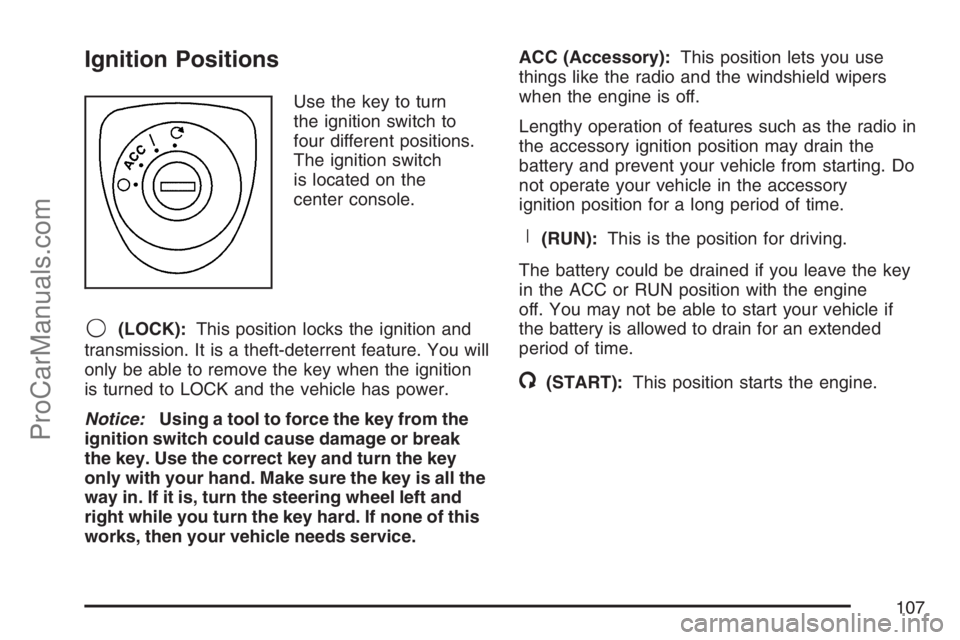
Ignition Positions
Use the key to turn
the ignition switch to
four different positions.
The ignition switch
is located on the
center console.
9(LOCK):This position locks the ignition and
transmission. It is a theft-deterrent feature. You will
only be able to remove the key when the ignition
is turned to LOCK and the vehicle has power.
Notice:Using a tool to force the key from the
ignition switch could cause damage or break
the key. Use the correct key and turn the key
only with your hand. Make sure the key is all the
way in. If it is, turn the steering wheel left and
right while you turn the key hard. If none of this
works, then your vehicle needs service.ACC (Accessory):This position lets you use
things like the radio and the windshield wipers
when the engine is off.
Lengthy operation of features such as the radio in
the accessory ignition position may drain the
battery and prevent your vehicle from starting. Do
not operate your vehicle in the accessory
ignition position for a long period of time.
R(RUN):This is the position for driving.
The battery could be drained if you leave the key
in the ACC or RUN position with the engine
off. You may not be able to start your vehicle if
the battery is allowed to drain for an extended
period of time.
/(START):This position starts the engine.
107
ProCarManuals.com
Page 108 of 498
Key In the Ignition
Never leave your vehicle with the keys inside, as it
is an easy target for joy riders or thieves. If you
leave the key in the ignition and park your vehicle,
a chime will sound, when you open the driver’s
door. Always remember to remove your key from
the ignition and take it with you. This will lock
your ignition and transaxle. Also, always remember
to lock the doors.
The battery could be drained if you leave the key
in the ignition while your vehicle is parked.
You may not be able to start your vehicle after it
has been parked for an extended period of time.
Retained Accessory Power (RAP)
Your vehicle is equipped with a Retained Accessory
Power (RAP) feature which will allow certain
features of your vehicle to continue to work up to
10 minutes after the ignition key is turned to LOCK.
Your radio, power windows, DVD player, sunroof
(option) and overhead console will work when
the ignition key is in RUN or ACC. Once the key is
turned from RUN to LOCK, these features will
continue to work for up to 10 minutes or until
a door is opened.
Starting the Engine
Place the transmission in the proper gear.
Move your shift lever to PARK (P) or
NEUTRAL (N). Your engine will not start in
any other position -- this is a safety feature.
To restart when you are already moving, use
NEUTRAL (N) only.
Notice:Do not try to shift to PARK (P) if your
vehicle is moving. If you do, you could
damage the transmission. Shift to PARK (P)
only when your vehicle is stopped.
Starting Procedure
1. With your foot off the accelerator pedal, turn
the ignition key to START. When the engine
starts, let go of the key. The idle speed will go
down as your engine gets warm. Do not
race the engine immediately after starting it.
Operate the engine and transmission gently to
allow the oil to warm up and lubricate all
moving parts.
108
ProCarManuals.com
Page 128 of 498
OnStar®service that involves location information
about your vehicle cannot work unless GPS
satellite signals are unobstructed and available in
that place as well.
Your vehicle must have a working electrical
system (including adequate battery power) for the
OnStar
®equipment to operate. There are other
problems OnStar®cannot control that may prevent
OnStar®from providing OnStar®service to you
at any particular time or place. Some examples are
damage to important parts of your vehicle in an
accident, hills, tall buildings, tunnels, weather
or wireless phone network congestion.
Your Responsibility
You may need to increase the volume of your
radio to hear the OnStar®advisor. If the light next
to the OnStar®buttons is red, this means that
your system is not functioning properly and should
be checked by a dealer. If the light appears
clear (no light is appearing), your OnStar
®
subscription has expired. You can always press
the blue OnStar®button to conrm that your
OnStar®equipment is active.
Universal Home Remote
System
Universal Home Remote System
(With Three Round LED)
The Universal Home Remote System provides a
way to replace up to three hand-held
Radio-Frequency (RF) transmitters used to
activate devices such as garage door openers,
security systems, and home lighting.
This device complies with Part 15 of the FCC
Rules. Operation is subject to the following
two conditions:
1. This device may not cause harmful
interference.
2. This device must accept any interference
received, including interference that may
cause undesired operation.
The FCC Grant of Equipment Authorization
Certicate number is KOBGTE05A.
128
ProCarManuals.com
Page 129 of 498
This device complies with RSS-210 of Industry
Canada. Operation is subject to the following
two conditions:
1. This device may not cause interference.
2. This device must accept any interference
received, including interference that may
cause undesired operation of the device.
The Canadian Registration ID number is
3521A-GTE05A.
Changes or modications to this system by other
than an authorized service facility could void
authorization to use this equipment.
Universal Home Remote System
(With One Triangular LED)
The Universal Home Remote System provides a
way to replace up to three hand-held
radio-frequency (RF) transmitters used to activate
devices such as garage door openers, security
systems, and home lighting.This device complies with Part 15 of the FCC
Rules. Operation is subject to the following
two conditions:
1. This device may not cause harmful
interference.
2. This device must accept any interference
received, including interference that may
cause undesired operation.
The FCC Grant of Equipment Authorization
Certicate number is CB2SAHL3.
This device complies with RSS-210 of Industry
Canada. Operation is subject to the following
two conditions:
1. This device may not cause interference.
2. This device must accept any interference
received, including interference that may
cause undesired operation of the device.
The Canadian Registration ID number is
2791021849A.
Changes or modications to this system by other
than an authorized service facility could void
authorization to use this equipment.
129
ProCarManuals.com
Page 136 of 498
Read the instructions completely before attempting
to program the Universal Home Remote.
Because of the steps involved, it may be helpful to
have another person available to assist you in
the programming steps.
Keep the original hand-held transmitter for use in
other vehicles as well as for future Universal
Home Remote programming. It is also
recommended that upon the sale of the vehicle,
the programmed Universal Home Remote buttons
should be erased for security purposes. See
“Erasing Universal Home Remote Buttons” later in
this section or, for assistance, seeCustomer
Assistance Offices on page 468.
Be sure that people and objects are clear of the
garage door or gate operator you are
programming. When programming a garage door,
it is advised to park outside of the garage.
It is recommended that a new battery be
installed in your hand-held transmitter for
quicker and more accurate transmission of the
radio-frequency signal.Programming Universal Home Remote
Follow these steps to program up to three channels:
1. Press and hold down the two outside
Universal Home Remote buttons, releasing
only when the Universal Home Remote
indicator light begins to ash, after
20 seconds. Do not hold down the buttons for
longer than 30 seconds and do not repeat
this step to program a second and/or
third hand-held transmitter to the remaining
two Universal Home Remote buttons.
2. Position the end of your hand-held transmitter
about 1 to 3 inches (3 to 8 cm) away from the
Universal Home Remote buttons while
keeping the indicator light in view.
3. Simultaneously press and hold both the
desired Universal Home Remote button
and the hand-held transmitter button. Do not
release the buttons until Step 4 has been
completed.
Some entry gates and garage door openers
may require you to substitute Step 3 with
the procedure noted in “Gate Operator and
Canadian Programming” later in this section.
136
ProCarManuals.com
Page 138 of 498
Gate Operator and Canadian
Programming
Canadian radio-frequency laws require transmitter
signals to time out or quit after several seconds
of transmission. This may not be long enough
for Universal Home Remote to pick up the signal
during programming. Similarly, some U.S. gate
operators are manufactured to time out in
the same manner.
If you live in Canada, or you are having difficulty
programming a gate operator or garage door
opener by using the “Programming Universal
Home Remote” procedures, regardless of where
you live, replace Step 3 under “Programming
Universal Home Remote” with the following:
Continue to press and hold the Universal Home
Remote button while you press and release every
two seconds (cycle) the hand-held transmitter
button until the frequency signal has been
successfully accepted by the Universal Home
Remote. The Universal Home Remote indicator
light will ash slowly at rst and then rapidly.
Proceed with Step 4 under “Programming
Universal Home Remote” to complete.
Using Universal Home Remote
Press and hold the appropriate Universal Home
Remote button for at least half of a second.
The indicator light will come on while the signal is
being transmitted.
Erasing Universal Home Remote
Buttons
To erase programming from the three Universal
Home Remote buttons do the following:
1. Press and hold down the two outside buttons
until the indicator light begins to ash, after
20 seconds. Do not hold the two outside
buttons for longer than 30 seconds.
2. Release both buttons.
The Universal Home Remote is now in the training
(learning) mode and can be programmed at any
time beginning with Step 2 under “Programming
Universal Home Remote” shown earlier in
this section.
Individual buttons cannot be erased, but they can
be reprogrammed. See “Reprogramming a
Single Universal Home Remote Button” following
this section.
138
ProCarManuals.com
Page 139 of 498
Reprogramming a Single Universal
Home Remote Button
To program a device to Universal Home Remote
using a Universal Home Remote button
previously trained, follow these steps:
1. Press and hold the desired Universal Home
Remote button. Do not release the button.
2. The indicator light will begin to ash after
20 seconds. While still holding the Universal
Home Remote button, proceed with Step
2 under “Programming Universal Home
Remote” shown earlier in this section.
For additional information on Universal Home
Remote, seeCustomer Assistance Offices
on page 468.
Storage Areas
Glove Box
Open the glove box by pulling the handle to the
left. Use the key to lock and unlock.
Cupholder(s)
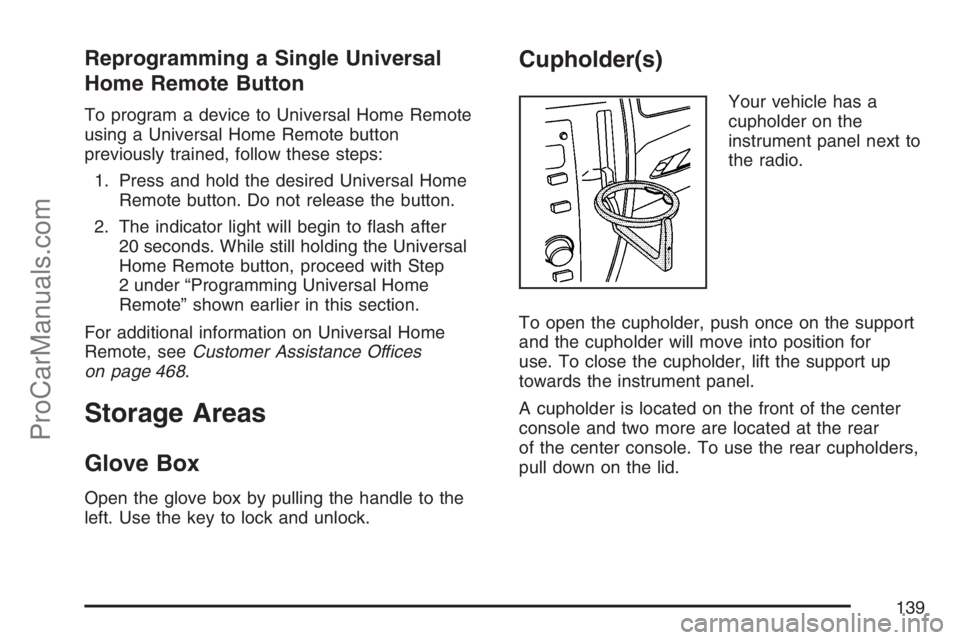
Your vehicle has a
cupholder on the
instrument panel next to
the radio.
To open the cupholder, push once on the support
and the cupholder will move into position for
use. To close the cupholder, lift the support up
towards the instrument panel.
A cupholder is located on the front of the center
console and two more are located at the rear
of the center console. To use the rear cupholders,
pull down on the lid.
139
ProCarManuals.com
Page 146 of 498
Tire Pressure Light.................................... 186
Malfunction Indicator Lamp........................ 187
Oil Pressure Gage..................................... 190
Security Light............................................ 191
Cruise Control Light.................................. 191
Reduced Engine Power Light.................... 191
Highbeam On Light................................... 192
Service All-Wheel Drive Light.................... 192
Check Gages Warning Light...................... 192
Gate Ajar Light.......................................... 193
Fuel Gage................................................. 193
Low Fuel Warning Light............................ 194
Check Gas Cap Light................................ 194
Driver Information Center (DIC).................. 194
DIC Operation and Displays...................... 195
DIC Warnings and Messages.................... 199
DIC Vehicle Customization........................ 205Audio System(s)......................................... 212
Setting the Time........................................ 213
Radio with CD........................................... 214
Radio with Six-Disc CD............................. 222
Using an MP3........................................... 233
XM Radio Messages................................. 239
Navigation/Radio System........................... 243
Rear Seat Entertainment System............... 243
Rear Seat Audio (RSA)............................. 257
Theft-Deterrent Feature............................. 258
Audio Steering Wheel Controls.................. 259
Radio Reception........................................ 260
Care of Your CDs and DVDs.................... 261
Care of the CD and DVD Player............... 261
Fixed Mast Antenna.................................. 261
XM™ Satellite Radio Antenna System....... 261
Section 3 Instrument Panel
146
ProCarManuals.com