buttons SAAB 9-7X 2008 User Guide
[x] Cancel search | Manufacturer: SAAB, Model Year: 2008, Model line: 9-7X, Model: SAAB 9-7X 2008Pages: 426, PDF Size: 2.77 MB
Page 127 of 426
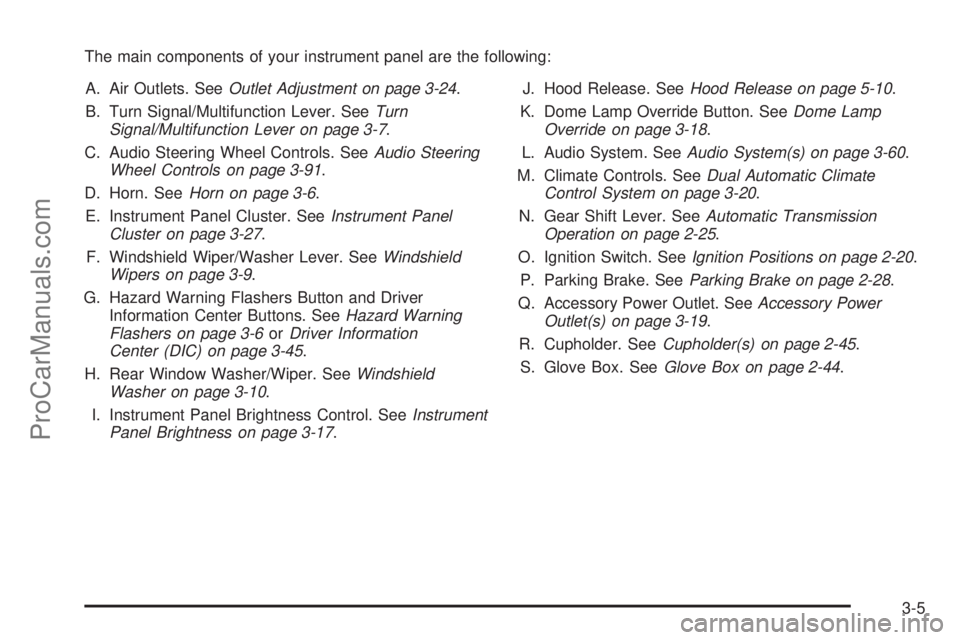
The main components of your instrument panel are the following:
A. Air Outlets. SeeOutlet Adjustment on page 3-24.
B. Turn Signal/Multifunction Lever. SeeTurn
Signal/Multifunction Lever on page 3-7.
C. Audio Steering Wheel Controls. SeeAudio Steering
Wheel Controls on page 3-91.
D. Horn. SeeHorn on page 3-6.
E. Instrument Panel Cluster. SeeInstrument Panel
Cluster on page 3-27.
F. Windshield Wiper/Washer Lever. SeeWindshield
Wipers on page 3-9.
G. Hazard Warning Flashers Button and Driver
Information Center Buttons. SeeHazard Warning
Flashers on page 3-6orDriver Information
Center (DIC) on page 3-45.
H. Rear Window Washer/Wiper. SeeWindshield
Washer on page 3-10.
I. Instrument Panel Brightness Control. SeeInstrument
Panel Brightness on page 3-17.J. Hood Release. SeeHood Release on page 5-10.
K. Dome Lamp Override Button. SeeDome Lamp
Override on page 3-18.
L. Audio System. SeeAudio System(s) on page 3-60.
M. Climate Controls. SeeDual Automatic Climate
Control System on page 3-20.
N. Gear Shift Lever. SeeAutomatic Transmission
Operation on page 2-25.
O. Ignition Switch. SeeIgnition Positions on page 2-20.
P. Parking Brake. SeeParking Brake on page 2-28.
Q. Accessory Power Outlet. SeeAccessory Power
Outlet(s) on page 3-19.
R. Cupholder. SeeCupholder(s) on page 2-45.
S. Glove Box. SeeGlove Box on page 2-44.
3-5
ProCarManuals.com
Page 146 of 426
Rear Window Defogger
The rear window defogger uses a warming grid to
remove fog from the rear window.
<(Rear):Press this button to turn the rear window
defogger on or off.
An indicator light in the button will come on to let you
know that the rear window defogger is activated.
The rear window defogger will turn off approximately
10 minutes after the button is pressed. If you need
additional warming time, press the button again.
The heated mirrors will also come on when you press
this button. SeeOutside Heated Mirrors on page 2-36.
Notice:Do not use a razor blade or sharp object
to clear the inside rear window. Do not adhere
anything to the defogger grid lines in the rear glass.
These actions may damage the rear defogger.
Repairs would not be covered by your warranty.
Outlet Adjustment
Use the air outlets located in the center and on the
sides of your instrument panel to direct the airow.
Operation Tips
Keep the hood and front air inlets free of ice, snow,
or any other obstruction, such as leaves. The
heater and defroster will work far better, reducing
the chance of fogging the inside of your windows.
When you enter a vehicle in cold weather, select
maximum blower speed for a few moments
before driving. This helps clear the intake ducts
of snow and moisture, and reduces the chance of
fogging the inside of your window.
Keep the air path under the front seats clear of
objects. This helps air to circulate throughout
your vehicle.
Adding outside equipment to the front of your
vehicle, such as hood-air deectors, may affect the
performance of the heating and air conditioning
system. Check with your dealer before adding
equipment to the outside of your vehicle.
Rear Climate Control System
The lower buttons on the rear seat audio are used to
adjust the rear seat climate controls. The temperature
of the air coming through the rear outlets is determined
by the front passenger’s temperature setting.
3-24
ProCarManuals.com
Page 147 of 426
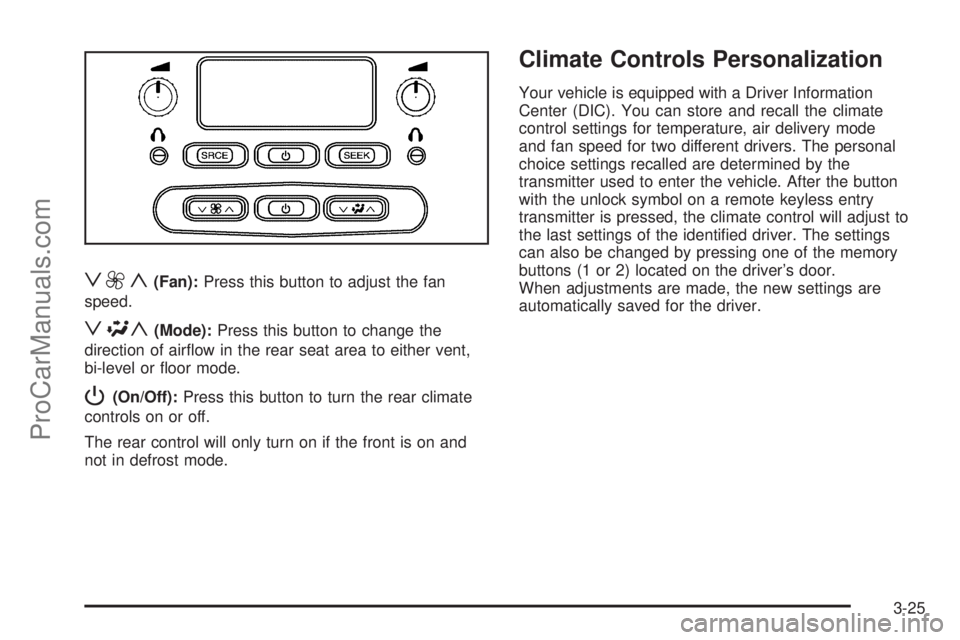
z9y(Fan):Press this button to adjust the fan
speed.
z\y(Mode):Press this button to change the
direction of airow in the rear seat area to either vent,
bi-level or oor mode.
P(On/Off):Press this button to turn the rear climate
controls on or off.
The rear control will only turn on if the front is on and
not in defrost mode.
Climate Controls Personalization
Your vehicle is equipped with a Driver Information
Center (DIC). You can store and recall the climate
control settings for temperature, air delivery mode
and fan speed for two different drivers. The personal
choice settings recalled are determined by the
transmitter used to enter the vehicle. After the button
with the unlock symbol on a remote keyless entry
transmitter is pressed, the climate control will adjust to
the last settings of the identied driver. The settings
can also be changed by pressing one of the memory
buttons (1 or 2) located on the driver’s door.
When adjustments are made, the new settings are
automatically saved for the driver.
3-25
ProCarManuals.com
Page 167 of 426
Driver Information Center (DIC)
The Driver Information Center (DIC) display is located
on the instrument panel cluster, below the speedometer.
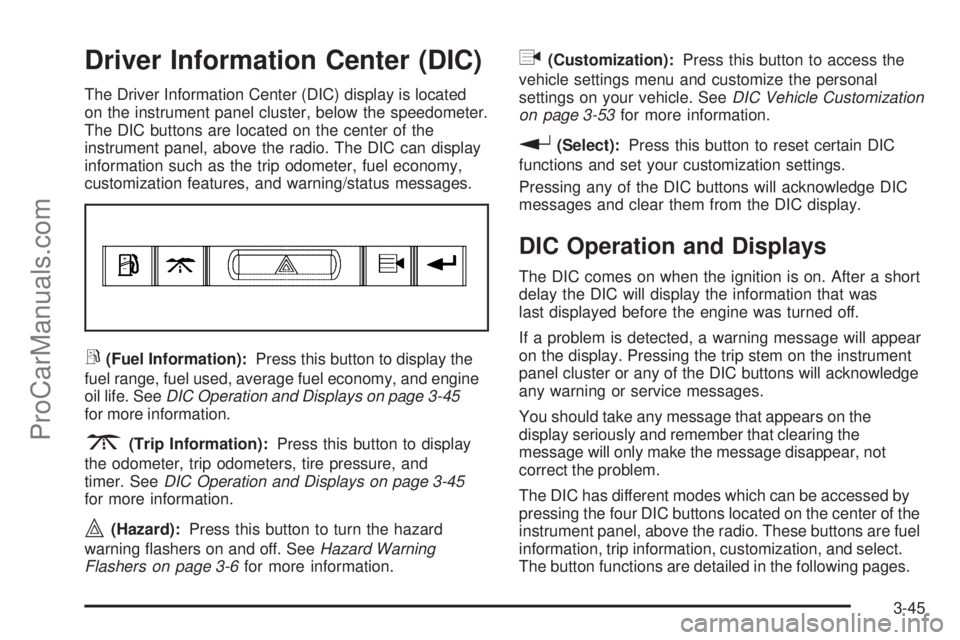
The DIC buttons are located on the center of the
instrument panel, above the radio. The DIC can display
information such as the trip odometer, fuel economy,
customization features, and warning/status messages.
r(Fuel Information):Press this button to display the
fuel range, fuel used, average fuel economy, and engine
oil life. SeeDIC Operation and Displays on page 3-45
for more information.
3(Trip Information):Press this button to display
the odometer, trip odometers, tire pressure, and
timer. SeeDIC Operation and Displays on page 3-45
for more information.
|(Hazard):Press this button to turn the hazard
warning ashers on and off. SeeHazard Warning
Flashers on page 3-6for more information.
q(Customization):Press this button to access the
vehicle settings menu and customize the personal
settings on your vehicle. SeeDIC Vehicle Customization
on page 3-53for more information.
r(Select):Press this button to reset certain DIC
functions and set your customization settings.
Pressing any of the DIC buttons will acknowledge DIC
messages and clear them from the DIC display.
DIC Operation and Displays
The DIC comes on when the ignition is on. After a short
delay the DIC will display the information that was
last displayed before the engine was turned off.
If a problem is detected, a warning message will appear
on the display. Pressing the trip stem on the instrument
panel cluster or any of the DIC buttons will acknowledge
any warning or service messages.
You should take any message that appears on the
display seriously and remember that clearing the
message will only make the message disappear, not
correct the problem.
The DIC has different modes which can be accessed by
pressing the four DIC buttons located on the center of the
instrument panel, above the radio. These buttons are fuel
information, trip information, customization, and select.
The button functions are detailed in the following pages.
3-45
ProCarManuals.com
Page 170 of 426
Customization Button
q
(Customization):Press this button to access
the VEHICLE SETTINGS menu and customize
the settings to your vehicle. SeeDIC Vehicle
Customization on page 3-53for more information.
Select Button
r
(Select):Press the select button to reset certain
DIC functions, turn off or acknowledge messages on
the DIC display, and set your customization settings.
For example, this button will allow you to reset the trip
odometers, turn off the FUEL LEVEL LOW message,
and enables you to scroll through and select the
language in which the DIC information will appear.
DIC Warnings and Messages
Messages are displayed on the DIC to notify the driver
that the status of the vehicle has changed and that
some action may be needed to correct the condition.
Multiple messages may appear one after another.
Some messages may not require immediate action.
Press any of the DIC buttons on the instrument panel
or the trip odometer reset stem on the instrument panel
cluster to acknowledge that you received the messages
and to clear them from the display.Some messages cannot be cleared from the display
because they are more urgent. These messages require
action before they can be removed from the DIC display.
Take any messages that appear on the display seriously
and remember that clearing the messages will only make
the messages disappear, not correct the problem.
The following are the possible messages that can be
displayed and some information about them.
CHANGE ENGINE OIL
This message displays when the engine oil needs to
be changed and service is required for your vehicle.
SeeScheduled Maintenance on page 6-3andEngine
Oil on page 5-18for more information. Also see
Engine Oil Life System on page 5-22for information
on how to reset the message. This message clears
itself after 10 seconds until the next ignition cycle.
CHECK TIRE PRESSURE
This message displays when the pressure in one or
more of the vehicle’s tires needs to be checked.
If a tire pressure message appears on the DIC,
stop as soon as you can. Have the tire pressures
checked and set to those shown on the Tire Loading
Information label. SeeTires on page 5-60,Loading Your
Vehicle on page 4-22, andInflation - Tire Pressure on
page 5-67. The DIC also shows the tire pressure values.
3-48
ProCarManuals.com
Page 181 of 426
Language
Press the customization button until LANGUAGE:
ENGLISH appears in the display. To select your
preference for display language, press the select button
while LANGUAGE: ENGLISH is displayed on the DIC.
Pressing the select button will scroll through the
following settings:
ENGLISH (default):All messages will appear in
English.
FRANCAIS:All messages will appear in French.
ESPANOL:All messages will appear in Spanish.
To select a setting and move on to the next feature,
press the customization button while the desired
setting is displayed on the DIC.
If you accidentally choose a language that you do not
want or understand, press and hold the customization
button and the trip information button at the same
time. The DIC will begin scrolling through the languages
in their particular language. English will be in English,
Francais will be in French, and Espanol will be in
Spanish. When you see the language that you would
like, release both buttons. The DIC will then display
the information in the language you chose.You can also scroll through the different languages by
pressing and holding the trip reset stem for four seconds,
as long as you are in the odometer mode.
Units
Press the customization button until UNITS: U.S.
(ENGLISH) appears in the display. To select the units
of measurement in which the DIC will display vehicle
information, press the select button while UNITS: U.S.
(ENGLISH) is displayed on the DIC. Pressing the
select button will scroll through the following settings:
UNITS: U.S. (ENGLISH) (default):All information
will be displayed in English units.
UNITS: METRIC (km/L):All information will be
displayed in metric units.
UNITS: METRIC (L/100 km):All information will be
displayed in metric units.
To select a setting and exit out of the customizable
options, press the customization button while the
desired setting is displayed on the DIC.
3-59
ProCarManuals.com
Page 185 of 426
The radio only seeks stations with a strong signal that
are in the selected band.
To scan stations, press and hold either arrow for more
than two seconds. SCAN displays and one beep
sounds. The radio goes to a station, plays for a
few seconds, then goes to the next station. Press
either arrow again or one of the pushbuttons to stop
scanning.
To scan preset stations, press and hold either arrow
for more than four seconds. PSCN displays and the
two beeps sound. The radio goes to a preset station,
plays for a few seconds, then goes to the next
preset station. Press either arrow again or one of
the pushbuttons to stop scanning presets.
The radio only scans preset stations with a strong
signal that are in the selected band.
4(Information) (XM™ Satellite Radio Service and
MP3 Features):If the current station has a message,
the information symbol displays. Press this button to
see the message. The message can display the artist,
song title, call in phone numbers, etc.If the entire message is not displayed, parts of the
message appears every three seconds. To scroll
through the message, press and release the information
button. A new group of words display after every
press of this button. Once the complete message
displays, the information symbol disappears until another
new message is received. The last message can be
displayed by pressing the information button. The
last message can be viewed until a new message is
received or a different station is tuned to.
When a message is not available from a station,
No Info displays.
1-6 (Preset Pushbuttons) (Radio with Six-Disc
CD Player:Press this button to play stations that
are programmed on the radio preset pushbuttons.
The radio only seeks preset stations with a strong
signal that are in the selected band.
3-63
ProCarManuals.com
Page 186 of 426
Setting Preset Stations
Up to 30 stations (six FM1, six FM2, and six AM,
six XM1 and six XM2 (if equipped)), can be programmed
on the six numbered pushbuttons, by performing the
following steps:
1. Turn the radio on.
2. Press BAND to select FM1, FM2, AM, or XM1
or XM2.
3. Tune in the desired station.
4. Press AUTO EQ (automatic equalization) to select
the equalization.
5. Press and hold one of the six numbered
pushbuttons until a beep sounds. When that
numbered pushbutton is pressed, the station that
was set, returns and the equalization that was
selected is stored for that pushbutton.
6. Repeat the steps for each pushbutton.
Setting the Tone (Bass/Treble)
e
(Bass/Treble):Push and release this knob until
BASS or TREB (treble) displays. Turn this knob to
increase or to decrease the tone. The display shows
the bass or the treble level. If a station is weak or has
static, decrease the treble.
To adjust the bass and the treble to the middle position,
while in bass or treble, push and hold the tone knob.
One beep sounds.
To adjust all tone and speaker controls to the middle
position, push and hold the tone knob when no tone or
speaker control displays. ALL CENTERED displays
and a beep sounds.
AUTO EQ (Automatic Equalization):Press this button
to select customized equalization settings designed
for country/western, jazz, talk, pop, rock and classical.
The equalization one through seven options are
included only if your vehicle has the Bose
®system.
Press the AUTO EQ button to select equalization
settings designed for equalization one through seven.
To return the bass and treble to the manual mode,
push and release the tone knob until BASS and
TREB displays.
3-64
ProCarManuals.com
Page 194 of 426
No Folder
When the CD contains only compressed les, the les
are located under the root folder. The next and previous
folder functions do not function on a CD that was
recorded without folders or playlists. When displaying
the name of the folder the radio displays ROOT.
When the CD contains only playlists and compressed
audio les, but no folders, all les are located under the
root folder. The folder down and the folder up buttons
search playlists (Px) rst and then go to the root folder.
When the radio displays the name of the folder the
radio displays ROOT.
Order of Play
Tracks play in the following order:
Play begins from the rst track in the rst playlist
and continues sequentially through all tracks in
each playlist. When the last track of the last playlist
has played, play continues from the rst track of
the rst playlist.
If the CD does not contain any playlists, then play
begins from the rst track under the root directory.
When all tracks from the root directory have
played, play continues from les according to
their numerical listing. After playing the last track
from the last folder, play begins again at the
rst track of the rst folder or root directory.When play enters a new folder, the display does not
automatically show the new folder name unless
the folder mode was chosen as the default display.
See DISP later in this section for more information.
The new track name displays.
File System and Naming
The song name that is displayed is the song name that is
contained in the ID3 tag. If the song name is not present
in the ID3 tag, then the radio displays the le name
without the extension (such as .mp3) as the track name.
Track names longer than 32 characters or four pages
are shortened. Parts of words on the last page of
text and the extension of the lename does not display.
Preprogrammed Playlists
Preprogrammed playlists that were created by
WinAmp™, MusicMatch™, or Real Jukebox™ software
can be accessed, however, they cannot be edited
using the radio. These playlists are treated as special
folders containing compressed audio song les.
Playing an MP3
Insert a CD partway into the slot, label side up. The
player pulls it in, and READING displays. The CD should
begin playing and the CD symbol displays. To insert a
CD with the ignition off, rst press the eject button or
the DISP (display) knob.
3-72
ProCarManuals.com
Page 202 of 426
DVD Player
The DVD player is located in the overhead console.
The DVD player can be controlled by the buttons on
the DVD player and/or by the buttons on the remote
control. See “Remote Control” later in this section
for more information.
The DVD player power may be turned on when the
ignition is in ON/RUN, ACC/ACCESSORY, or when
Retained Accessory Power (RAP) is active.
The RSE system DVD player is only compatible with
DVDs of the appropriate region code for the country
that the vehicle was sold in. The DVD region code
is printed on the jacket of most DVDs.
Standard audio CDs, CD-R, CD-RW, Video CD and
Photo CD/CD-R media are fully supported by this
DVD player. DVD-R and DVD-RW media is supported
if formatted as DVD-Video. DVD+R and DVD+RW
media may or may not be supported by the DVD player.The DVD player does not support DVD-RAM,
DVD-ROM, and DVD Audio media. An error message
will appear on the display if this type of media is
inserted into the DVD player.
When using the wired headphones, not included,
if the front seat passengers play a CD in the Radio
with Six-Disc CD (if equipped) or use XM™ Satellite
Radio Service (if equipped), you will hear the audio
for these sources, instead of the DVD or CD that
is currently playing through the RSE.
If an error message appears on the video screen,
see “DVD Messages” later in this section.
3-80
ProCarManuals.com