turn signal SAAB 9-7X 2008 User Guide
[x] Cancel search | Manufacturer: SAAB, Model Year: 2008, Model line: 9-7X, Model: SAAB 9-7X 2008Pages: 426, PDF Size: 2.77 MB
Page 136 of 426
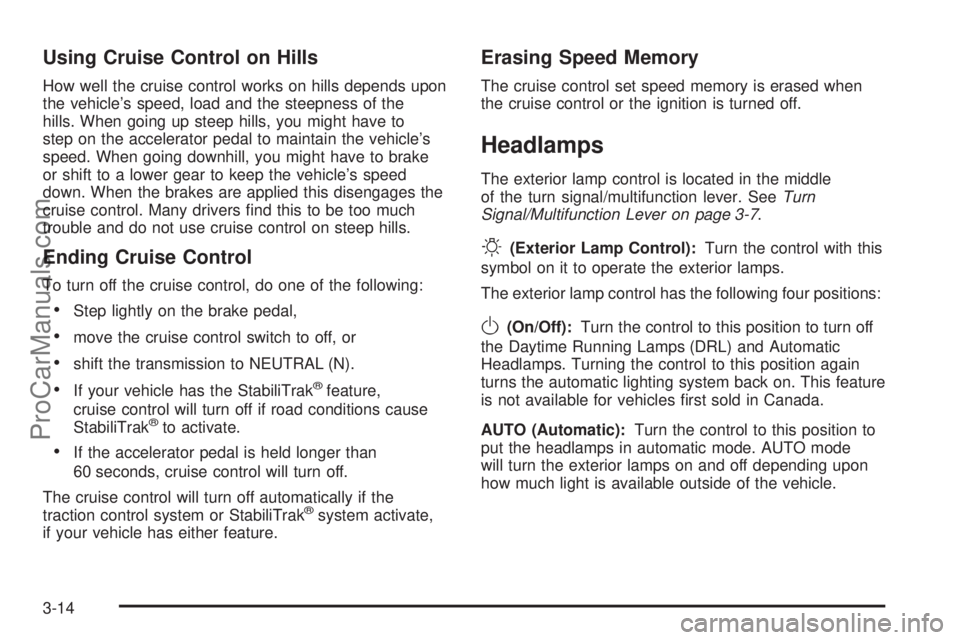
Using Cruise Control on Hills
How well the cruise control works on hills depends upon
the vehicle’s speed, load and the steepness of the
hills. When going up steep hills, you might have to
step on the accelerator pedal to maintain the vehicle’s
speed. When going downhill, you might have to brake
or shift to a lower gear to keep the vehicle’s speed
down. When the brakes are applied this disengages the
cruise control. Many drivers nd this to be too much
trouble and do not use cruise control on steep hills.
Ending Cruise Control
To turn off the cruise control, do one of the following:
Step lightly on the brake pedal,
move the cruise control switch to off, or
shift the transmission to NEUTRAL (N).
If your vehicle has the StabiliTrak®feature,
cruise control will turn off if road conditions cause
StabiliTrak
®to activate.
If the accelerator pedal is held longer than
60 seconds, cruise control will turn off.
The cruise control will turn off automatically if the
traction control system or StabiliTrak
®system activate,
if your vehicle has either feature.
Erasing Speed Memory
The cruise control set speed memory is erased when
the cruise control or the ignition is turned off.
Headlamps
The exterior lamp control is located in the middle
of the turn signal/multifunction lever. SeeTurn
Signal/Multifunction Lever on page 3-7.
O(Exterior Lamp Control):Turn the control with this
symbol on it to operate the exterior lamps.
The exterior lamp control has the following four positions:
O(On/Off):Turn the control to this position to turn off
the Daytime Running Lamps (DRL) and Automatic
Headlamps. Turning the control to this position again
turns the automatic lighting system back on. This feature
is not available for vehicles rst sold in Canada.
AUTO (Automatic):Turn the control to this position to
put the headlamps in automatic mode. AUTO mode
will turn the exterior lamps on and off depending upon
how much light is available outside of the vehicle.
3-14
ProCarManuals.com
Page 137 of 426
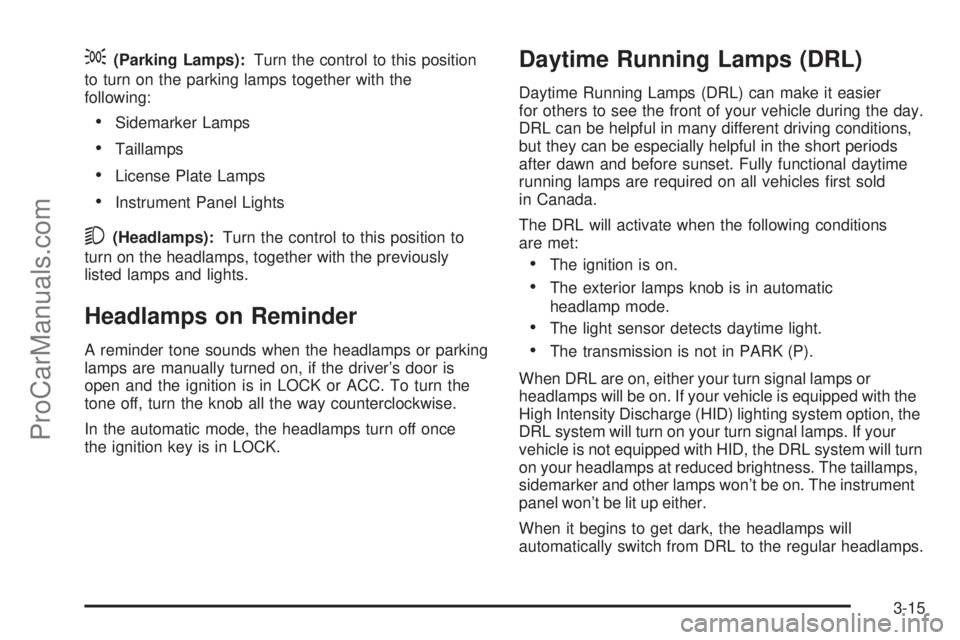
;(Parking Lamps):Turn the control to this position
to turn on the parking lamps together with the
following:
Sidemarker Lamps
Taillamps
License Plate Lamps
Instrument Panel Lights
5(Headlamps):Turn the control to this position to
turn on the headlamps, together with the previously
listed lamps and lights.
Headlamps on Reminder
A reminder tone sounds when the headlamps or parking
lamps are manually turned on, if the driver’s door is
open and the ignition is in LOCK or ACC. To turn the
tone off, turn the knob all the way counterclockwise.
In the automatic mode, the headlamps turn off once
the ignition key is in LOCK.
Daytime Running Lamps (DRL)
Daytime Running Lamps (DRL) can make it easier
for others to see the front of your vehicle during the day.
DRL can be helpful in many different driving conditions,
but they can be especially helpful in the short periods
after dawn and before sunset. Fully functional daytime
running lamps are required on all vehicles rst sold
in Canada.
The DRL will activate when the following conditions
are met:
The ignition is on.
The exterior lamps knob is in automatic
headlamp mode.
The light sensor detects daytime light.
The transmission is not in PARK (P).
When DRL are on, either your turn signal lamps or
headlamps will be on. If your vehicle is equipped with the
High Intensity Discharge (HID) lighting system option, the
DRL system will turn on your turn signal lamps. If your
vehicle is not equipped with HID, the DRL system will turn
on your headlamps at reduced brightness. The taillamps,
sidemarker and other lamps won’t be on. The instrument
panel won’t be lit up either.
When it begins to get dark, the headlamps will
automatically switch from DRL to the regular headlamps.
3-15
ProCarManuals.com
Page 139 of 426

Fog Lamps
The fog lamp control is located on the turn
signal/multifunction lever.
Use the fog lamps for better vision in foggy or misty
conditions.
-:The band with this symbol is used to turn the
fog lamps on and off.
When the fog lamps are turned on, the parking lamps
also turn on. A message will also display on the
DIC when the fog lamps are turned on or off. See
Driver Information Center (DIC) on page 3-45.
To turn the fog lamps on or off, turn the fog lamp
band on the lever up to the dot and release it.
The band will return to its original position.
If you turn on the high-beam headlamps, the fog
lamps will turn off. They will turn back on again
when you switch back to low-beam headlamps.
When the Fog Lamps are turned on or off, a message
will appear on the Driver Information Center. See
DIC Warnings and Messages on page 3-48.
Some localities have laws that require the headlamps
to be on along with the fog lamps.
Instrument Panel Brightness
Turn the knob clockwise
or counterclockwise to
brighten or dim the
interior lights.
To turn on the dome lamps, turn the knob completely
clockwise as far as it will go. The dome lamps stay
on until they are turned off.
Dome Lamps
The dome lamps automatically come on when a door
is opened, unless the dome lamp override button
is pressed in.
The lamps can also be turned on and off by turning
the instrument panel brightness control clockwise to
the farthest position.
3-17
ProCarManuals.com
Page 171 of 426

SeeDIC Operation and Displays on page 3-45.Ifthe
tire pressure is low, the low tire pressure warning
light comes on. SeeTire Pressure Light on page 3-37.
CHECK WASHER FLUID
This message displays if the washer uid level is low.
Adding washer uid to the windshield washer uid
reservoir clears this message. SeeWindshield Washer
Fluid on page 5-39. This message clears itself after
10 seconds, or you can manually clear it from the
DIC display.
CURB VIEW ACTIVATED
This message displays when the passenger outside
rearview mirror moves into the curb view position.
SeeOutside Curb View Assist Mirror on page 2-35
for more information.
DRIVER DOOR AJAR
This message displays and a chime sounds if the driver
door is not fully closed. Stop and turn off the vehicle,
check the door for obstructions, and close the door
again. Check to see if the message still appears
on the DIC.
ENGINE COOLANT HOT/ENGINE
OVERHEATED
Notice:If you drive your vehicle while the engine
is overheating, severe engine damage may occur.
If an overheat warning appears on the instrument
panel cluster and/or DIC, stop the vehicle as soon
as possible. Do not increase the engine speed
above normal idling speed. SeeEngine Overheating
on page 5-30for more information.
This message displays and a chime sounds if the
cooling system temperature gets hot. SeeEngine
Overheating on page 5-30for the proper course
of action. This message clears when the coolant
temperature drops to a safe operating temperature.
FRONT FOG LAMPS OFF
This message displays if the fog lamps are turned off.
The message clears after 10 seconds. If you turn on
the high-beam headlamps, the fog lamps also turn
off and this message appears on the DIC. The fog
lamps turn back on again when you switch back
to low-beam headlamps. SeeFog Lamps on page 3-17
andTurn Signal/Multifunction Lever on page 3-7for
more information.
3-49
ProCarManuals.com
Page 172 of 426
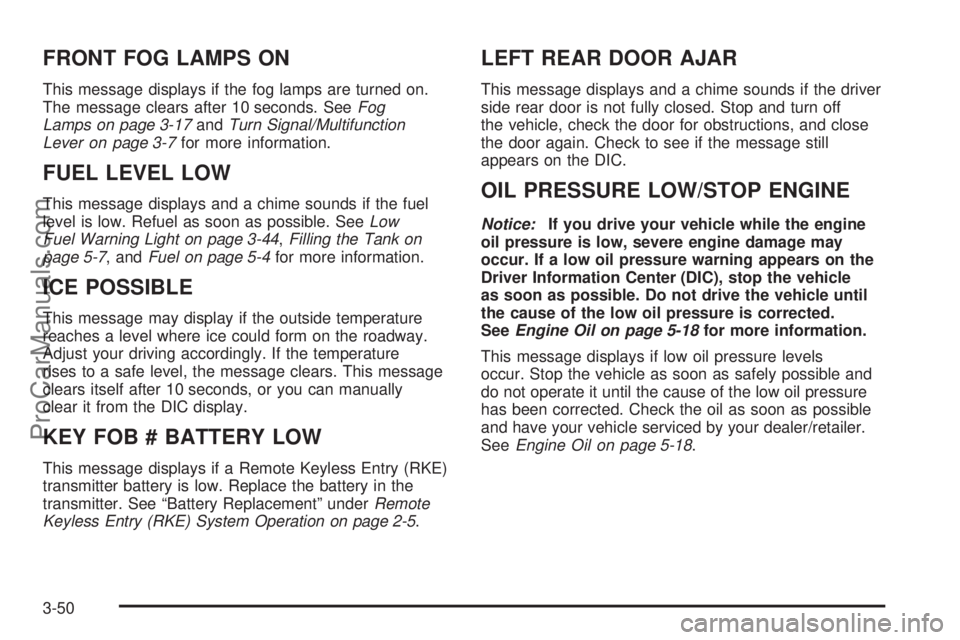
FRONT FOG LAMPS ON
This message displays if the fog lamps are turned on.
The message clears after 10 seconds. SeeFog
Lamps on page 3-17andTurn Signal/Multifunction
Lever on page 3-7for more information.
FUEL LEVEL LOW
This message displays and a chime sounds if the fuel
level is low. Refuel as soon as possible. SeeLow
Fuel Warning Light on page 3-44,Filling the Tank on
page 5-7, andFuel on page 5-4for more information.
ICE POSSIBLE
This message may display if the outside temperature
reaches a level where ice could form on the roadway.
Adjust your driving accordingly. If the temperature
rises to a safe level, the message clears. This message
clears itself after 10 seconds, or you can manually
clear it from the DIC display.
KEY FOB # BATTERY LOW
This message displays if a Remote Keyless Entry (RKE)
transmitter battery is low. Replace the battery in the
transmitter. See “Battery Replacement” underRemote
Keyless Entry (RKE) System Operation on page 2-5.
LEFT REAR DOOR AJAR
This message displays and a chime sounds if the driver
side rear door is not fully closed. Stop and turn off
the vehicle, check the door for obstructions, and close
the door again. Check to see if the message still
appears on the DIC.
OIL PRESSURE LOW/STOP ENGINE
Notice:If you drive your vehicle while the engine
oil pressure is low, severe engine damage may
occur. If a low oil pressure warning appears on the
Driver Information Center (DIC), stop the vehicle
as soon as possible. Do not drive the vehicle until
the cause of the low oil pressure is corrected.
SeeEngine Oil on page 5-18for more information.
This message displays if low oil pressure levels
occur. Stop the vehicle as soon as safely possible and
do not operate it until the cause of the low oil pressure
has been corrected. Check the oil as soon as possible
and have your vehicle serviced by your dealer/retailer.
SeeEngine Oil on page 5-18.
3-50
ProCarManuals.com
Page 175 of 426

TIGHTEN FUEL CAP
This message may display and a chime may sound if
the vehicle’s fuel cap is not tightened properly. Fully
reinstall the fuel cap. SeeFilling the Tank on page 5-7.
The diagnostic system can determine if the fuel cap
has been left off or improperly installed. A loose
or missing fuel cap allows fuel to evaporate into the
atmosphere. This message remains on until it is
manually cleared from the DIC display. The DIC
message is also cancelled if the ignition is turned off.
The DIC message and the Service Engine Soon light
may come on again during a second trip if the fuel cap
is still not tightened properly. SeeMalfunction Indicator
Lamp on page 3-38for more information.
TRACTION CONTROL OFF
This message displays when you momentarily press
the StabiliTrak®button located on the transmission
shift handle. In this mode, stability control and the
brake-traction control are functional. Engine speed
management will be modied and the driven wheels
can spin more freely. For more details on this mode,
seeStabiliTrak
®System on page 4-5.
TURN SIGNAL ON
This message displays and a chime sounds if a turn
signal is left on for 3/4 of a mile (1.2 km). Move the
turn signal/multifunction lever to the off position.
DIC Vehicle Customization
Your vehicle may have customization capabilities that
allow you to program some features to one setting
based on your preference. All of the customizable
options listed may not be available on your vehicle.
Only the options available display on the Driver
Information Center (DIC).
The default settings for the customization features were
set when your vehicle left the factory, but may have
been changed from their default state since then.
To change feature preferences, make sure the ignition
is on and the vehicle is in PARK (P). To avoid excessive
drain on the battery, it is recommended that the
headlamps are turned off.
Press the customization button to scroll through the
available customizable options.
After pressing the customization button, VEHICLE
SETTINGS momentarily displays before going to a
customization option.
3-53
ProCarManuals.com
Page 197 of 426
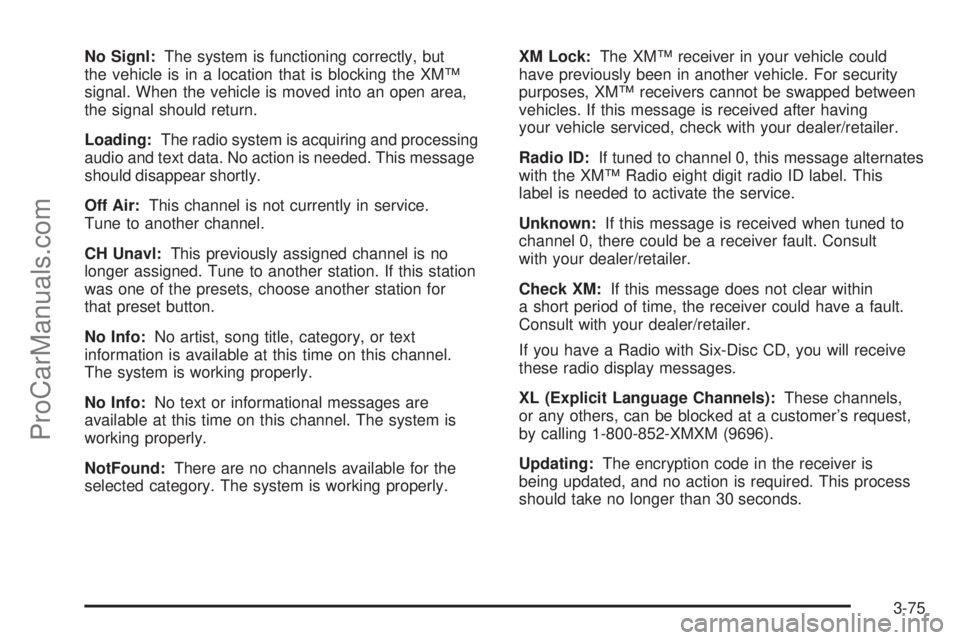
No Signl:The system is functioning correctly, but
the vehicle is in a location that is blocking the XM™
signal. When the vehicle is moved into an open area,
the signal should return.
Loading:The radio system is acquiring and processing
audio and text data. No action is needed. This message
should disappear shortly.
Off Air:This channel is not currently in service.
Tune to another channel.
CH Unavl:This previously assigned channel is no
longer assigned. Tune to another station. If this station
was one of the presets, choose another station for
that preset button.
No Info:No artist, song title, category, or text
information is available at this time on this channel.
The system is working properly.
No Info:No text or informational messages are
available at this time on this channel. The system is
working properly.
NotFound:There are no channels available for the
selected category. The system is working properly.XM Lock:The XM™ receiver in your vehicle could
have previously been in another vehicle. For security
purposes, XM™ receivers cannot be swapped between
vehicles. If this message is received after having
your vehicle serviced, check with your dealer/retailer.
Radio ID:If tuned to channel 0, this message alternates
with the XM™ Radio eight digit radio ID label. This
label is needed to activate the service.
Unknown:If this message is received when tuned to
channel 0, there could be a receiver fault. Consult
with your dealer/retailer.
Check XM:If this message does not clear within
a short period of time, the receiver could have a fault.
Consult with your dealer/retailer.
If you have a Radio with Six-Disc CD, you will receive
these radio display messages.
XL (Explicit Language Channels):These channels,
or any others, can be blocked at a customer’s request,
by calling 1-800-852-XMXM (9696).
Updating:The encryption code in the receiver is
being updated, and no action is required. This process
should take no longer than 30 seconds.
3-75
ProCarManuals.com
Page 198 of 426
No Signal:The system is functioning correctly, but
the vehicle is in a location that is blocking the XM™
signal. When you move into an open area, the signal
should return.
Loading XM:The audio system is acquiring and
processing audio and text data. No action is needed.
This message should disappear shortly.
CH Off Air:This channel is not currently in service.
Tune to another channel.
CH Unavail:This previously assigned channel is
no longer assigned. Tune to another station. If this
station was one of the presets, choose another
station for that preset button.
No Info:No artist, song title, category, or text
information is available at this time on this channel.
The system is working properly.
No Info:No text or informational messages are
available at this time on this channel. The system is
working properly.
Not Found:There are no channels available for the
selected category. The system is working properly.XM Locked:The XM™ receiver in the vehicle could
have previously been in another vehicle. For security
purposes, XM™ receivers cannot be swapped between
vehicles. If this message is received after having
your vehicle serviced, check with your dealer/retailer.
Radio ID:If tuned to channel 0, this message alternates
with the XM™ Radio eight digit radio ID label. This
label is needed to activate the service.
Unknown:If this message is received when tuned to
channel 0, there could be a receiver fault. Consult
with your dealer/retailer.
Chk XMRcvr:If this message does not clear within a
short period of time, the receiver could have a fault.
Consult with your dealer/retailer.
Navigation/Radio System
Your vehicle may have a navigation radio system.
The navigation system has built-in features intended
to minimize driver distraction. Technology alone,
no matter how advanced, can never replace your
own judgment. See the Navigation System manual for
some tips to help you reduce distractions while driving.
3-76
ProCarManuals.com
Page 199 of 426
Rear Seat Entertainment (RSE)
System
Your vehicle may have a DVD Rear Seat
Entertainment (RSE) system. The RSE system
includes a DVD player, a video display screen,
two sets of wireless headphones, and a remote
control.
Before You Drive
The RSE system is for rear seat passengers only,
not intended for the driver while driving.
Parental Control
This button is located behind the video screen. Press
this button while a DVD or CD is playing to freeze
the video and mute the audio. The video screen will
display Parental Control ON and the power indicator
light on the DVD player will ash. It will also disable all
other button operations from the remote control and
the DVD player, with the exception of the eject button.
Press this button again to restore operation of the
DVD player.
This button can also be used to turn the DVD player
power on and automatically resume play if the ignition
is in ON/RUN, ACC/ACCESSORY, or if Retained
Accessory Power (RAP) is active.
Headphones
The RSE system includes two sets of wireless
headphones.
Each set of headphones has an ON/OFF control.
An indicator light will illuminate on the headphones
when they are on. If the light does not illuminate,
the batteries may need to be replaced. See “Battery
Replacement” following for more information.
Each set of headphones has a volume knob.
To adjust the volume, adjust this knob.
The transmitters are located below the video display
screen. The headphones will shut off automatically
if they lose the signal from the system after about
four minutes to save battery power. The signal may
be lost if the system is turned off or if the headphones
are out of range of the transmitters.
When using the wired headphones, if the front seat
passengers play a CD in the Radio with Six-Disc CD
(if equipped) or use XM™ Satellite Radio Service
(if equipped), you will hear the audio for these sources,
instead of the DVD or CD that is currently playing
through the RSE.
Notice:Do not store the headphones in heat or
direct sunlight. This could damage the headphones
and repairs will not be covered by your warranty.
Storage in extreme cold can weaken the batteries.
Keep the headphones stored in a cool, dry place.
3-77
ProCarManuals.com
Page 200 of 426
Battery Replacement
To change the batteries on the headphones,
do the following:
1. Turn the screw to loosen the battery door
located on the left side of the headphones.
Slide the battery door open.
2. Replace the two batteries in the compartment.
Make sure that they are installed correctly,
using the diagram on the inside of the battery
compartment.
3. Replace the battery door and tighten the
door screw.
If the headphones are to be stored for a long period of
time, remove the batteries and keep them in a cool,
dry place.
Stereo RCA Jacks
The RCA jacks are located behind the video screen.
The RCA jacks allow audio and video signals to
be connected from an auxiliary device such as a
camcorder or a video game unit to the RSE system.
Standard RCA cables, not included, are needed
to connect the auxiliary device to the RCA jacks.
The yellow connector inputs video and the red and
white connectors input right and left audio. Refer to
the manufacturer’s instructions for proper connection
of the auxiliary device.To use the auxiliary inputs on the RSE system,
connect an external auxiliary device to the color-coded
RCA jacks and turn both the auxiliary device and
the RSE system power on. If the RSE system had
been previously in the DVD player mode, pressing the
SRCE button on the faceplate or the remote control
will switch the RSE system between the auxiliary device
and the DVD player.
How to Change the Video Format when
in the Auxiliary Mode
The auxiliary input video format is preset to NTSC.
In some countries, the video format may be in the
PAL system. To change the video format, perform
the following:
1. Press the display menu button.
2. Press the down arrow button to highlight the
Video Format option.
3. Press the enter button to select Video Format.
4. Press the right or left arrow button to select
the desired video format.
5. Press the enter button to accept the change.
3-78
ProCarManuals.com