ECO mode SAAB 9-7X 2009 User Guide
[x] Cancel search | Manufacturer: SAAB, Model Year: 2009, Model line: 9-7X, Model: SAAB 9-7X 2009Pages: 424, PDF Size: 2.75 MB
Page 163 of 424
The DIC has different modes which can be accessed by
pressing the four DIC buttons located on the center
of the instrument panel, above the radio. These buttons
are fuel information, trip information, customization,
and select. The button functions are detailed in the
following pages.
Fuel Information Button
r
(Fuel Information):Press this button to scroll
through the fuel range, fuel used, average fuel economy,
and the engine oil life system.
Fuel Range:Press the fuel information button until
RANGE appears on the display. This mode shows the
remaining distance you can drive without refueling. It is
based on fuel economy and the fuel remaining in the fuel
tank. The display will show LOW if the fuel level is low.
The fuel economy data used to determine fuel range
is an average of recent driving conditions. As your driving
conditions change, this data is gradually updated.
Fuel range cannot be reset.
Fuel Used:Press the fuel information button until
FUEL USED appears on the display. This mode shows
the number of gallons or liters of fuel used since the
last reset of this menu item. To reset the fuel used
information, press and hold the select button for
one second while FUEL USED is displayed.Average Fuel Economy:Press the fuel information
button until AVG. ECON appears on the display.
This mode shows how many miles per gallon (MPG),
kilometers per liter (km/L), or liters per 100 kilometers
(L/100 km) your vehicle is getting based on current and
past driving conditions.
Press and hold the select button for one second while
AVG. ECON is displayed to reset the average fuel
economy. Average fuel economy will then be calculated
starting from that point. If the average fuel economy is not
reset, it will be continually updated each time you drive.
Engine Oil Life System:Press the fuel information
button until ENGINE OIL LIFE appears on the display.
The engine oil life system shows an estimate of the oil’s
remaining useful life. It will show 100% when the
system is reset after an oil change. It will alert you to
change your oil on a schedule consistent with your
driving conditions.
Always reset the engine oil life system after an oil
change. To reset the engine oil life system, seeEngine
Oil Life System on page 5-22.
In addition to the engine oil life system monitoring the
oil life, additional maintenance is recommended in
the Maintenance Schedule in this manual. SeeEngine
Oil on page 5-18andScheduled Maintenance on
page 6-4.
3-43
ProCarManuals.com
Page 164 of 424
Trip Information Button
3
(Trip Information):Press this button to scroll
through the odometer, trip odometers, tire pressures,
and timer.
Odometer:Press the trip information button until
ODOMETER appears on the display. This mode shows
the total distance the vehicle has been driven in
either miles or kilometers. Pressing the trip stem located
on the instrument panel cluster with the vehicle off
will also display the odometer.
Trip A:Press the trip information button until TRIP A
appears on the display. This mode shows the current
distance traveled since the last reset for TRIP A in either
miles or kilometers.
Trip B:Press the trip information button until TRIP B
appears on the display. This mode shows the current
distance traveled since the last reset for TRIP B in either
miles or kilometers.
To reset TRIP A or TRIP B information, press and hold
the select button for one second while in one of the
trip modes. This will reset the information for TRIP A
or TRIP B.You can also reset the TRIP A or TRIP B while they are
displayed by pressing the trip stem. If you press and
hold the trip stem or the select button for more than
four seconds, the display will show the distance traveled
since the last ignition cycle for TRIP A or TRIP B.
Tire Pressures:On vehicles with the Tire Pressure
Monitor System (TPMS), press the trip information
button until TIRE PRESSURES appears on the display.
This mode shows the tire pressure in pounds per
square inch (psi) or kilopascals (kPa). Press the select
button to scroll through the following information:
LF TIRE shows the tire pressure for the front
driver’s side tire.
RF TIRE shows the tire pressure for the front
passenger’s side tire.
LR TIRE shows the tire pressure for the rear
driver’s side tire.
RR TIRE shows the tire pressure for the rear
passenger’s side tire.
Timer:The DIC can be used as a timer. Press the
select button while TIMER is displayed to start the timer.
The display will show the amount of time that has
passed since the timer was last reset, not including time
3-44
ProCarManuals.com
Page 169 of 424
If the message is still displayed, or appears again when
you begin driving, the brake system needs service.
See your dealer/retailer.
SERVICE CHARGING SYS (System)
This message displays if there is a problem with
the battery charging system. Under certain conditions,
the charging system light may also turn on in the
instrument panel cluster. SeeCharging System Light
on page 3-30. The battery will not be charging at
an optimal rate and the vehicle will lose the ability to
enter the fuel economy mode. The vehicle is safe
to drive, however you should have the electrical system
checked by your dealer/retailer.
SERVICE STABILITRAK
If this message displays, it means there may be a
problem with the StabiliTrak system. If this message
appears, try to reset the system by performing the
following: stop; turn off the engine; then start the engine
again. If this message still comes on, it means there
is a problem. You should see your dealer/retailer
for service. The vehicle is safe to drive, however, you
do not have the benet of StabiliTrak, so reduce
your speed and drive accordingly.
SERVICE TIRE MONITOR
On vehicles with the Tire Pressure Monitor System
(TPMS), this message displays if a part on the TPMS
is not working properly. The tire pressure light also
ashes and then remains on during the same ignition
cycle. SeeTire Pressure Light on page 3-34. Several
conditions may cause this message to appear. SeeTire
Pressure Monitor Operation on page 5-69for more
information. If the warning comes on and stays on,
there may be a problem with the TPMS. See your
dealer/retailer.
STABILITRAK ACTIVE
This message displays anytime the StabiliTrak system
activates to maintain vehicle stability. Any combination of
engine speed management, brake traction control,
and stability control displays this message.
STABILITRAK NOT READY
This message may display if driving conditions delay
StabiliTrak system initialization. This is normal. Once the
system initializes, this message will no longer be
displayed on the DIC.
3-49
ProCarManuals.com
Page 170 of 424
STABILITRAK OFF
This message displays when you press the StabiliTrak
button for more than ve seconds or when stability
control has been automatically disabled. The StabiliTrak
button is located on the transmission shift handle.
To limit wheel spin and realize the full benets of the
stability enhancement system, you should normally
leave StabiliTrak on. However, you should turn
StabiliTrak off if your vehicle gets stuck in sand, mud,
ice, or snow and you want to rock your vehicle to
attempt to free it, or if you are driving in extreme off-road
conditions and require more wheel spin. SeeIf Your
Vehicle is Stuck in Sand, Mud, Ice, or Snow on
page 4-20. To turn the StabiliTrak system back on,
press the StabiliTrak button again.
The message may display if the brake system warning light
is on. SeeBrake System Warning Light on page 3-31.
The message turns off as soon as the conditions that
caused the message to be displayed are no longer
present.
TIGHTEN FUEL CAP
This message may display and a chime may sound if
the vehicle’s fuel cap is not tightened properly. Fully
reinstall the fuel cap. SeeFilling the Tank on page 5-8.The diagnostic system can determine if the fuel cap has
been left off or improperly installed. A loose or missing
fuel cap allows fuel to evaporate into the atmosphere.
This message remains on until it is manually cleared
from the DIC display. The DIC message is also
cancelled if the ignition is turned off.
The DIC message and the Service Engine Soon light
may come on again during a second trip if the fuel cap is
still not tightened properly. SeeMalfunction Indicator
Lamp on page 3-34for more information.
TRACTION CONTROL OFF
This message displays when you momentarily press
the StabiliTrak button located on the transmission
shift handle. In this mode, stability control and the
brake-traction control are functional. Engine speed
management will be modied and the driven wheels can
spin more freely. For more details on this mode, see
StabiliTrak
®System on page 4-6.
TURN SIGNAL ON
This message displays and a chime sounds if a turn
signal is left on for 3/4 of a mile (1.2 km). Move the turn
signal/multifunction lever to the off position.
3-50
ProCarManuals.com
Page 176 of 424
Language
Pressquntil LANGUAGE: ENGLISH appears in the
display. To select your preference for display language,
press
rwhile LANGUAGE: ENGLISH is displayed on
the DIC. Pressing
rwill scroll through the following
settings:
ENGLISH (default):All messages will appear in
English.
FRANCAIS:All messages will appear in French.
ESPANOL:All messages will appear in Spanish.
To select a setting and move on to the next feature,
press
qwhile the desired setting is displayed on
the DIC.
If you accidentally choose a language that you do not
want or understand, press and hold
qand the trip
information button at the same time. The DIC will begin
scrolling through the languages in their particular
language. English will be in English, Francais will be in
French, and Espanol will be in Spanish. When you see
the language that you would like, release both buttons.
The DIC will then display the information in the language
you chose.
You can also scroll through the different languages by
pressing and holding the trip reset stem for four seconds,
as long as you are in the odometer mode.
Units
Pressquntil UNITS: U.S. (ENGLISH) appears in the
display. To select the units of measurement in which
the DIC will display vehicle information, press
rwhile
UNITS: U.S. (ENGLISH) is displayed on the DIC.
Pressing
rwill scroll through the following settings:
UNITS: U.S. (ENGLISH) (default):All information
will be displayed in English units.
UNITS: METRIC (km/L):All information will be
displayed in metric units.
UNITS: METRIC (L/100 km):All information will be
displayed in metric units.
To select a setting and exit out of the customizable
options, press
qwhile the desired setting is displayed
on the DIC.
3-56
ProCarManuals.com
Page 179 of 424
XM™ Satellite Radio Service
XM is a satellite radio service that is based in the
48 contiguous United States and 10 Canadian
provinces. XM Satellite Radio has a wide variety
of programming and commercial-free music,
coast-to-coast, and in digital-quality sound. During your
trial or when you subscribe, you will get unlimited
access to XM Radio Online for when you are not in
the vehicle. A service fee is required to receive the
XM service. For more information, contact XM at
xmradio.com or call 1-800-929-2100 in the U.S. and
xmradio.ca or call 1-877-438-9677 in Canada.
Playing the Radio
P
(Power/Volume):Press to turn the system on
and off.
Turn to increase or to decrease the volume.
DISP (Display):Press to display the time, while the
ignition is turned off.For XM, press the DISP button while in XM mode to
retrieve four different categories of information related
to the current song or channel: Artist, Song Title,
Category or PTY, Channel Number/Channel Name.
To change the default on the display, press the DISP
button until the desired option displays, then hold
this knob for two seconds. One beep sounds and the
selected display becomes the default.
AUTO VOL (Automatic Volume):With automatic
volume, the audio system adjusts automatically to make
up for road and wind noise while driving by increasing
the volume as vehicle speed increases.
Set the volume at the desired level. Press this button to
select LOW, MEDIUM, or HIGH. AVOL, or depending
on the radio, MIN, MED, or MAX. AUTO VOL. Each
higher setting provides more volume compensation at
faster vehicle speeds. The volume level should always
sound the same while driving. NONE displays if the
radio cannot determine the vehicle speed. To turn
automatic volume off, press this button until AVOL OFF
(automatic volume off) displays.
3-59
ProCarManuals.com
Page 189 of 424
Empty Directory or Folder
If a root directory or a folder exists somewhere in the
le structure that contains only folders/subfolders and no
compressed les directly beneath them, the player
advances to the next folder in the le structure that
contains compressed audio les. The empty folder is not
displayed.
No Folder
When the CD contains only compressed les, the les
are located under the root folder. The next and previous
folder functions do not function on a CD that was
recorded without folders or playlists. When displaying
the name of the folder the radio displays ROOT.
When the CD contains only playlists and compressed
audio les, but no folders, all les are located under the
root folder. The folder down and the folder up buttons
search playlists (Px) rst and then go to the root folder.
When the radio displays the name of the folder the
radio displays ROOT.
Order of Play
Tracks play in the following order:
Play begins from the rst track in the rst playlist
and continues sequentially through all tracks in
each playlist. When the last track of the last playlist
has played, play continues from the rst track of
the rst playlist.
If the CD does not contain any playlists, then play
begins from the rst track under the root directory.
When all tracks from the root directory have
played, play continues from les according to their
numerical listing. After playing the last track
from the last folder, play begins again at the rst
track of the rst folder or root directory.
When play enters a new folder, the display does not
automatically show the new folder name unless
the folder mode was chosen as the default display.
See DISP later in this section for more information.
The new track name displays.
3-69
ProCarManuals.com
Page 191 of 424
To play all the tracks on the CD in random order, press
and hold 4
yfor two seconds. A beep sounds and
CD RDM displays. This feature does not work with
playlists.
When in random, pressing and releasing either SEEK
arrow takes the CD to the next or previous randomized
track.
Press and release 4
yagain to turn off random play.
NO RDM displays.
5
!(Previous Folder):Press to go to the rst track
in the previous folder. Pressing 5
!while in folder
random mode takes the CD to the previous folder and
randomizes the tracks in that folder.
6
#(Next Folder):Press to go to the rst track in the
next folder. Pressing 6
#while in folder random
mode takes the CD to the next folder and randomizes
the tracks in that folder.
tSEEKu:Press the left arrow to go to the start of
the previous track. Press the right arrow to go to
the start of the next track. Press either arrow for
more than two seconds and SCAN displays.The radio scans the previous or next tracks at two tracks
per second. Release the arrow to stop scanning and
to play the track.
DISP (Display):Press to switch between track
mode, folder/playlist mode, and time of day mode.
The display shows only eight characters, but there can
be up to four pages of text. If there are more than
eight characters in the song, folder, or playlist name,
pressing DISP within two seconds takes the CD to the
next page of text. If there are no other pages to be
shown, pressing DISP within two seconds takes the CD
to the next display mode.
Track mode displays the current track number and
the ID3 tag song name.
Folder/playlist mode displays the current folder or
playlist number and the folder/playlist name.
Time of day mode displays the time of day and the
ID3 tag song name.
To change the default on the display, press the DISP
knob until the desired option displays, then hold
this knob for two seconds. One beep sounds and the
selected display becomes the default.
3-71
ProCarManuals.com
Page 212 of 424
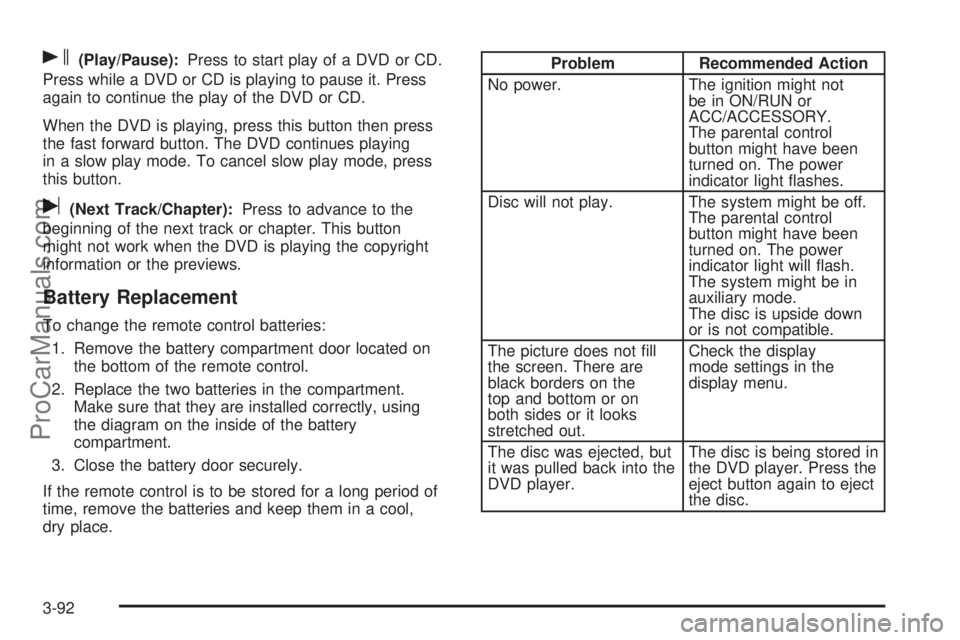
s(Play/Pause):Press to start play of a DVD or CD.
Press while a DVD or CD is playing to pause it. Press
again to continue the play of the DVD or CD.
When the DVD is playing, press this button then press
the fast forward button. The DVD continues playing
in a slow play mode. To cancel slow play mode, press
this button.
u(Next Track/Chapter):Press to advance to the
beginning of the next track or chapter. This button
might not work when the DVD is playing the copyright
information or the previews.
Battery Replacement
To change the remote control batteries:
1. Remove the battery compartment door located on
the bottom of the remote control.
2. Replace the two batteries in the compartment.
Make sure that they are installed correctly, using
the diagram on the inside of the battery
compartment.
3. Close the battery door securely.
If the remote control is to be stored for a long period of
time, remove the batteries and keep them in a cool,
dry place.
Problem Recommended Action
No power. The ignition might not
be in ON/RUN or
ACC/ACCESSORY.
The parental control
button might have been
turned on. The power
indicator light ashes.
Disc will not play. The system might be off.
The parental control
button might have been
turned on. The power
indicator light will ash.
The system might be in
auxiliary mode.
The disc is upside down
or is not compatible.
The picture does not ll
the screen. There are
black borders on the
top and bottom or on
both sides or it looks
stretched out.Check the display
mode settings in the
display menu.
The disc was ejected, but
it was pulled back into the
DVD player.The disc is being stored in
the DVD player. Press the
eject button again to eject
the disc.
3-92
ProCarManuals.com
Page 213 of 424
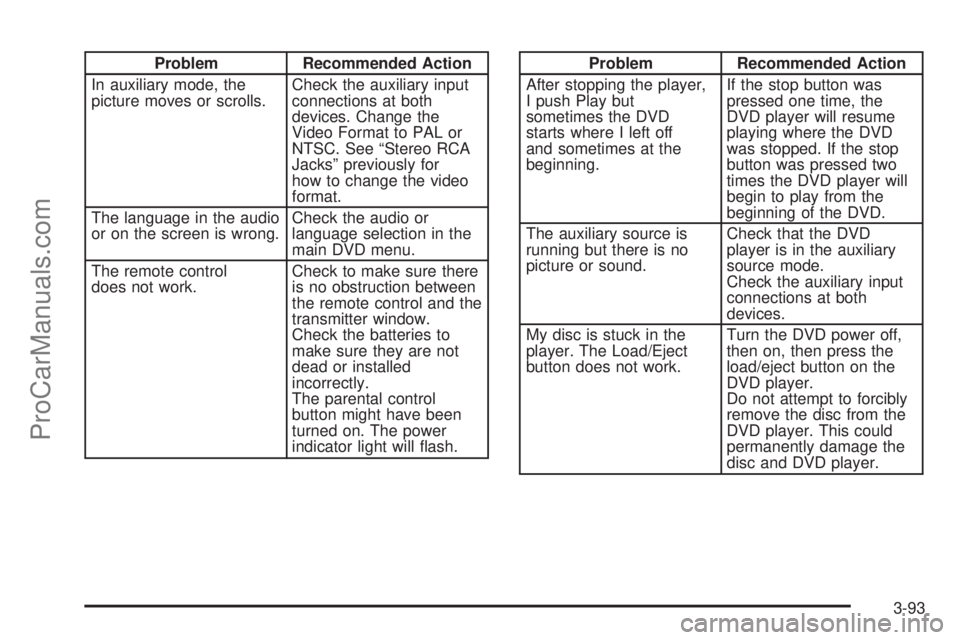
Problem Recommended Action
In auxiliary mode, the
picture moves or scrolls.Check the auxiliary input
connections at both
devices. Change the
Video Format to PAL or
NTSC. See “Stereo RCA
Jacks” previously for
how to change the video
format.
The language in the audio
or on the screen is wrong.Check the audio or
language selection in the
main DVD menu.
The remote control
does not work.Check to make sure there
is no obstruction between
the remote control and the
transmitter window.
Check the batteries to
make sure they are not
dead or installed
incorrectly.
The parental control
button might have been
turned on. The power
indicator light will ash.Problem Recommended Action
After stopping the player,
I push Play but
sometimes the DVD
starts where I left off
and sometimes at the
beginning.If the stop button was
pressed one time, the
DVD player will resume
playing where the DVD
was stopped. If the stop
button was pressed two
times the DVD player will
begin to play from the
beginning of the DVD.
The auxiliary source is
running but there is no
picture or sound.Check that the DVD
player is in the auxiliary
source mode.
Check the auxiliary input
connections at both
devices.
My disc is stuck in the
player. The Load/Eject
button does not work.Turn the DVD power off,
then on, then press the
load/eject button on the
DVD player.
Do not attempt to forcibly
remove the disc from the
DVD player. This could
permanently damage the
disc and DVD player.
3-93
ProCarManuals.com