ECO mode SAAB 9-7X 2009 Owner's Manual
[x] Cancel search | Manufacturer: SAAB, Model Year: 2009, Model line: 9-7X, Model: SAAB 9-7X 2009Pages: 424, PDF Size: 2.75 MB
Page 214 of 424
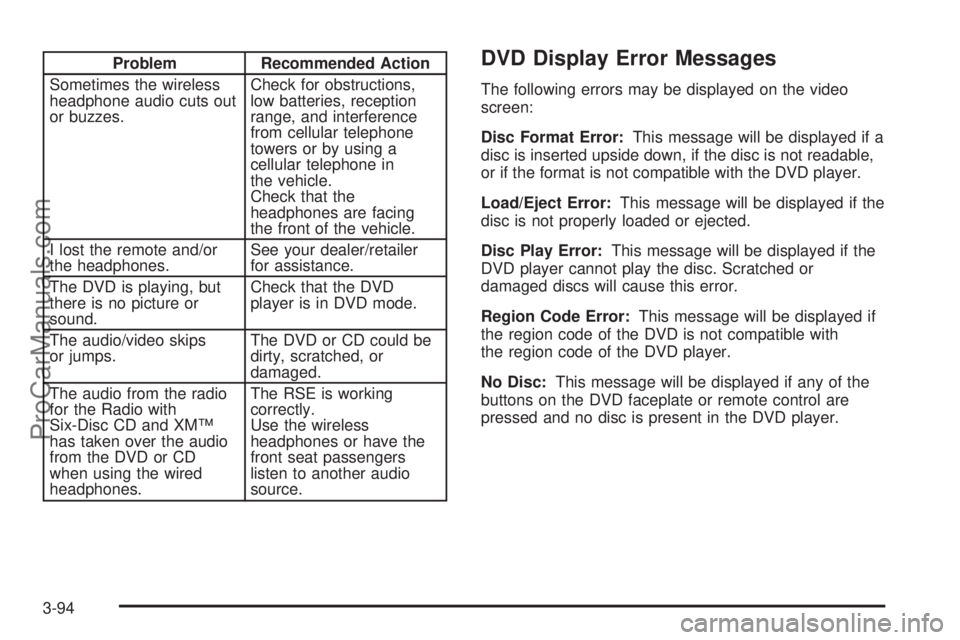
Problem Recommended Action
Sometimes the wireless
headphone audio cuts out
or buzzes.Check for obstructions,
low batteries, reception
range, and interference
from cellular telephone
towers or by using a
cellular telephone in
the vehicle.
Check that the
headphones are facing
the front of the vehicle.
I lost the remote and/or
the headphones.See your dealer/retailer
for assistance.
The DVD is playing, but
there is no picture or
sound.Check that the DVD
player is in DVD mode.
The audio/video skips
or jumps.The DVD or CD could be
dirty, scratched, or
damaged.
The audio from the radio
for the Radio with
Six-Disc CD and XM™
has taken over the audio
from the DVD or CD
when using the wired
headphones.The RSE is working
correctly.
Use the wireless
headphones or have the
front seat passengers
listen to another audio
source.DVD Display Error Messages
The following errors may be displayed on the video
screen:
Disc Format Error:This message will be displayed if a
disc is inserted upside down, if the disc is not readable,
or if the format is not compatible with the DVD player.
Load/Eject Error:This message will be displayed if the
disc is not properly loaded or ejected.
Disc Play Error:This message will be displayed if the
DVD player cannot play the disc. Scratched or
damaged discs will cause this error.
Region Code Error:This message will be displayed if
the region code of the DVD is not compatible with
the region code of the DVD player.
No Disc:This message will be displayed if any of the
buttons on the DVD faceplate or remote control are
pressed and no disc is present in the DVD player.
3-94
ProCarManuals.com
Page 227 of 424
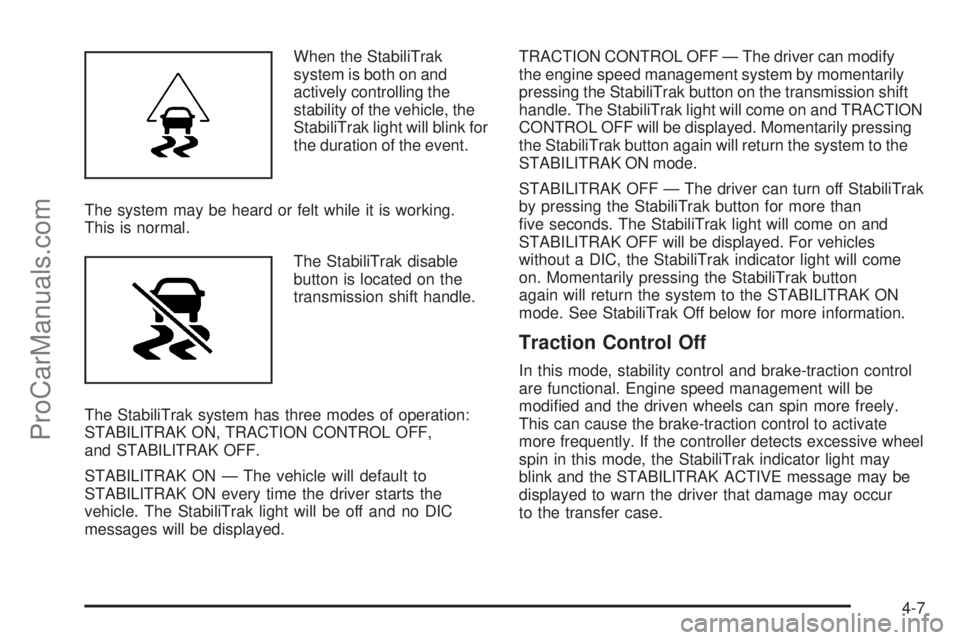
When the StabiliTrak
system is both on and
actively controlling the
stability of the vehicle, the
StabiliTrak light will blink for
the duration of the event.
The system may be heard or felt while it is working.
This is normal.
The StabiliTrak disable
button is located on the
transmission shift handle.
The StabiliTrak system has three modes of operation:
STABILITRAK ON, TRACTION CONTROL OFF,
and STABILITRAK OFF.
STABILITRAK ON — The vehicle will default to
STABILITRAK ON every time the driver starts the
vehicle. The StabiliTrak light will be off and no DIC
messages will be displayed.TRACTION CONTROL OFF — The driver can modify
the engine speed management system by momentarily
pressing the StabiliTrak button on the transmission shift
handle. The StabiliTrak light will come on and TRACTION
CONTROL OFF will be displayed. Momentarily pressing
the StabiliTrak button again will return the system to the
STABILITRAK ON mode.
STABILITRAK OFF — The driver can turn off StabiliTrak
by pressing the StabiliTrak button for more than
ve seconds. The StabiliTrak light will come on and
STABILITRAK OFF will be displayed. For vehicles
without a DIC, the StabiliTrak indicator light will come
on. Momentarily pressing the StabiliTrak button
again will return the system to the STABILITRAK ON
mode. See StabiliTrak Off below for more information.
Traction Control Off
In this mode, stability control and brake-traction control
are functional. Engine speed management will be
modied and the driven wheels can spin more freely.
This can cause the brake-traction control to activate
more frequently. If the controller detects excessive wheel
spin in this mode, the StabiliTrak indicator light may
blink and the STABILITRAK ACTIVE message may be
displayed to warn the driver that damage may occur
to the transfer case.
4-7
ProCarManuals.com
Page 228 of 424
StabiliTrak Off
In this mode, both stability control and part of the
traction control system are disabled. The vehicle will still
have brake-traction control, but will not be able to use
the engine speed management system. System
noises maybe heard as a result of the brake-traction
control coming on. If the controller detects excessive
wheel spin in this mode, the StabiliTrak indicator
light may blink and the STABILITRAK ACTIVE message
may be displayed to warn the driver that damage
may occur to the transfer case.It is recommended to leave the system on for normal
driving conditions, but it may be necessary to turn the
system off if the vehicle is stuck in sand, mud, ice or
snow, and you may want to “rock” the vehicle in an
attempt to free it. It may also be necessary to turn off the
system when driving in extreme off-road conditions where
high wheel spin is required. SeeIf Your Vehicle is Stuck
in Sand, Mud, Ice, or Snow on page 4-20for more
information.
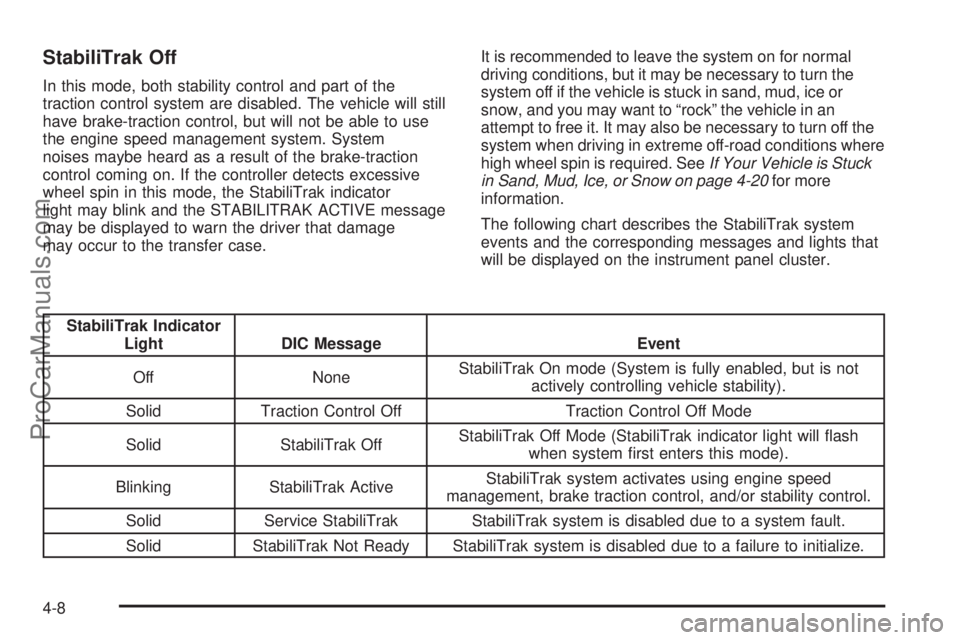
The following chart describes the StabiliTrak system
events and the corresponding messages and lights that
will be displayed on the instrument panel cluster.
StabiliTrak Indicator
Light DIC Message Event
Off NoneStabiliTrak On mode (System is fully enabled, but is not
actively controlling vehicle stability).
Solid Traction Control Off Traction Control Off Mode
Solid StabiliTrak OffStabiliTrak Off Mode (StabiliTrak indicator light will ash
when system rst enters this mode).
Blinking StabiliTrak ActiveStabiliTrak system activates using engine speed
management, brake traction control, and/or stability control.
Solid Service StabiliTrak StabiliTrak system is disabled due to a system fault.
Solid StabiliTrak Not Ready StabiliTrak system is disabled due to a failure to initialize.
4-8
ProCarManuals.com
Page 249 of 424
If the suspension remains at a low height, the rear
axle load has exceeded GAWR (Gross Axle Weight
Rating). When the overload protection mode is activated,
the compressor operates for about 30 seconds to
one minute without raising the vehicle depending on
the amount of overload. This will continue each time the
ignition is turned on until the rear axle load is reduced
below GAWR.
Towing a Trailer
{CAUTION:
The driver can lose control when pulling a trailer if
the correct equipment is not used or the vehicle is
not driven properly. For example, if the trailer is too
heavy, the brakes may not work well — or even at
all. The driver and passengers could be seriously
injured. The vehicle may also be damaged; the
resulting repairs would not be covered by the
vehicle warranty. Pull a trailer only if all the steps in
this section have been followed. Ask your dealer/
retailer for advice and information about towing a
trailer with the vehicle.Notice:Pulling a trailer improperly can damage the
vehicle and result in costly repairs not covered by the
vehicle warranty. To pull a trailer correctly, follow the
advice in this section and see your dealer/retailer for
important information about towing a trailer with the
vehicle.
To identify the trailering capacity of the vehicle, read the
information in “Weight of the Trailer” that appears
later in this section.
Trailering is different than just driving the vehicle
by itself. Trailering means changes in handling,
acceleration, braking, durability and fuel economy.
Successful, safe trailering takes correct equipment,
and it has to be used properly.
The following information has many time-tested,
important trailering tips and safety rules. Many of
these are important for your safety and that of your
passengers. So please read this section carefully
before pulling a trailer.
4-29
ProCarManuals.com
Page 407 of 424

Current and Past Model Order Forms
Technical Service Bulletins and Manuals are available
for current and past model Saab 9-7x vehicles. To
request an order form, please specify year and model
name of the vehicle.
ORDER TOLL FREE: 1-800-551-4123
Monday-Friday 8:00 AM - 6:00 PM
Eastern Time
For Credit Card Orders Only
(VISA-MasterCard-Discover), visit Helm, Inc.
on the World Wide Web at: helminc.com
Or you can write to:
Helm, Incorporated
P.O. Box 07130
Detroit, MI 48207
Prices are subject to change without notice and without
incurring obligation. Allow ample time for delivery.
Note to Canadian Customers: All listed prices are
quoted in U.S. funds. Canadian residents are to make
checks payable in U.S. funds.
Vehicle Data Recording and
Privacy
Your Saab vehicle has a number of sophisticated
computers that record information about the vehicle’s
performance and how it is driven. For example, your
vehicle uses computer modules to monitor and control
engine and transmission performance, to monitor the
conditions for airbag deployment and deploy airbags in a
crash and, if so equipped, to provide antilock braking to
help the driver control the vehicle. These modules may
store data to help your dealer technician service your
vehicle. Some modules may also store data about how
you operate the vehicle, such as rate of fuel consumption
or average speed. These modules may also retain the
owner’s personal preferences, such as radio pre-sets,
seat positions, and temperature settings.
7-15
ProCarManuals.com