headlamp SAAB 9-7X 2009 User Guide
[x] Cancel search | Manufacturer: SAAB, Model Year: 2009, Model line: 9-7X, Model: SAAB 9-7X 2009Pages: 424, PDF Size: 2.75 MB
Page 133 of 424
speed. When going downhill, you might have to brake
or shift to a lower gear to keep the vehicle’s speed
down. When the brakes are applied this disengages
the cruise control.
Ending Cruise Control
To turn off the cruise control, do one of the following:
Step lightly on the brake pedal,
move the cruise control switch to9,or
shift the transmission to N (Neutral).
If your vehicle has the StabiliTrak feature, cruise
control will turn off if road conditions cause
StabiliTrak to activate.
If the accelerator pedal is held longer than
60 seconds, cruise control will turn off.
The cruise control will turn off automatically if the
traction control system or StabiliTrak system activate,
if your vehicle has either feature.
Erasing Speed Memory
The cruise control set speed memory is erased when
the cruise control or the ignition is turned off.
Headlamps
The exterior lamp control is located in the middle
of the turn signal/multifunction lever. SeeTurn
Signal/Multifunction Lever on page 3-6.
O(Exterior Lamp Control):Turn the control with this
symbol on it to operate the exterior lamps.
The exterior lamp control has the following four positions:
O(On/Off):Turns off the Daytime Running
Lamps (DRL) and Automatic Headlamps. Turning the
control to this position again turns the automatic
lighting system back on. This feature is not available
for vehicles rst sold in Canada.
AUTO (Automatic):Automatically turns the exterior
lamps on and off depending upon how much light
is available outside of the vehicle.
;(Parking Lamps):Turns on the parking lamps
together with the following:
Sidemarker Lamps
Taillamps
License Plate Lamps
Instrument Panel Lights
5(Headlamps):Turn the control to this position to
turn on the headlamps, together with the previously
listed lamps and lights.
3-13
ProCarManuals.com
Page 134 of 424
Headlamps on Reminder
A reminder tone sounds when the headlamps or
parking lamps are manually turned on, if the driver’s
door is open and the ignition is in LOCK/OFF or
ACC/ACCESSORY. To turn the tone off, turn the knob
all the way counterclockwise.
In the automatic mode, the headlamps turn off once the
ignition key is in LOCK/OFF.
Daytime Running Lamps (DRL)
Daytime Running Lamps (DRL) can make it easier for
others to see the front of your vehicle during the
day. Fully functional daytime running lamps are required
on all vehicles rst sold in Canada.
The DRL will activate when the following conditions
are met:
The ignition is on.
The exterior lamps knob is in automatic
headlamp mode.
The light sensor detects daytime light.
The transmission is not in P (Park).When DRL are on, either the turn signal lamps or
headlamps will be on. If the vehicle has the High
Intensity Discharge (HID) lighting system option, the
DRL system will turn on the turn signal lamps. If the
vehicle does not have HID, the DRL system will turn on
the headlamps at reduced brightness. The taillamps,
sidemarker, and the instrument panel lights will not be on.
When it begins to get dark, the headlamps will
automatically switch from DRL to the regular headlamps.
Automatic Headlamp System
When it is dark enough outside, the Automatic
Headlamp System turns on the headlamps when the
vehicle is started and after the transmission has
been shifted out of the P (Park) position. The
headlamps, taillamps, sidemarker, and parking lamps
will come on. The instrument panel lights and radio lights
will also turn on at normal brightness. Once on, the
system remains on during these conditions even if the
vehicle is shifted back into P (Park).
The vehicle has a light sensor on the top of the
instrument panel. Do not cover the sensor or the system
may come on whenever the ignition is on and the
vehicle is shifted out of the P (Park) position.
3-14
ProCarManuals.com
Page 135 of 424
The system could also turn on the lamps when driving
through a parking garage, heavy overcast weather
or a tunnel. This is normal.
There is a delay in the transition between the daytime
and nighttime operation of the Daytime Running
Lamps (DRL) and the automatic headlamp systems,
so that driving under bridges or bright overhead street
lights does not affect the system. The DRL and
automatic headlamp system are only affected when the
light sensor sees a change in lighting lasting longer
than the delay.
If the vehicle is started in a dark garage, the automatic
headlamp system comes on after the transmission
is shifted out of P (Park). Once the vehicle leaves the
garage, it takes about one minute for the automatic
headlamp system to change to DRL if it is light outside.
During that delay, the instrument panel cluster might
not be as bright as usual. Make sure the instrument
panel brightness control is in the full bright position.
If the vehicle is running and the automatic headlamp
system is already on, it can be turned off by turning
and releasing the headlamp control at the off position.
The automatic headlamp system stays off until you
turn and release the headlamp control at the off position
again. SeeHeadlamps on page 3-13.Fog Lamps
The fog lamp control is located on the turn
signal/multifunction lever.
Use the fog lamps for better vision in foggy or misty
conditions.
#:The band with this symbol is used to turn the fog
lamps on and off.
When the fog lamps are turned on, the parking lamps
also turn on. A message will also display on the DIC
when the fog lamps are turned on or off. SeeDriver
Information Center (DIC) on page 3-42.
To turn the fog lamps on or off, turn the fog lamp
band on the lever up to the dot and release it.
The band will return to its original position.
If the high-beam headlamps are turned on, the fog
lamps will turn off. They will turn back on again
when you switch back to low-beam headlamps.
When the Fog Lamps are turned on or off, a message
will appear on the Driver Information Center. SeeDIC
Warnings and Messages on page 3-45.
Some localities have laws that require the headlamps to
be on along with the fog lamps.
3-15
ProCarManuals.com
Page 137 of 424
Exit Lighting
With exit lighting, the interior lamps will come on when
you remove the key from the ignition. If the dome
override is off, these lights will stay on for a short period
of time and then will go out.
Reading Lamps
Press the indented part of the lenses on the reading
lamps located in the overhead console to turn them
on or off.
Electric Power Management
The vehicle has Electric Power Management (EPM)
that estimates the battery’s temperature and state
of charge. It then adjusts the voltage for best
performance and extended life of the battery.
When the battery’s state of charge is low, the voltage is
raised slightly to quickly bring the charge back up.
When the state of charge is high, the voltage is lowered
slightly to prevent overcharging. If the vehicle has a
voltmeter gage or a voltage display on the Driver
Information Center (DIC), you may see the voltage move
up or down. This is normal. If there is a problem,
an alert will be displayed.The battery can be discharged at idle if the electrical
loads are very high. This is true for all vehicles.
This is because the generator (alternator) may not be
spinning fast enough at idle to produce all the power
that is needed for very high electrical loads.
A high electrical load occurs when several of the
following are on, such as: headlamps, high beams,
fog lamps, rear window defogger, climate control fan at
high speed, heated seats, engine cooling fans, trailer
loads, and loads plugged into accessory power outlets.
EPM works to prevent excessive discharge of the
battery. It does this by balancing the generator’s output
and the vehicle’s electrical needs. It can increase
engine idle speed to generate more power, whenever
needed. It can temporarily reduce the power demands of
some accessories.
Normally, these actions occur in steps or levels, without
being noticeable. In rare cases at the highest levels
of corrective action, this action may be noticeable to the
driver. If so, a Driver Information Center (DIC) message
might be displayed, such as BATTERY SAVER ACTIVE,
BATTERY VOLTAGE LOW, or LOW BATTERY.
If this message is displayed, it is recommended that the
driver reduce the electrical loads as much as possible.
SeeDIC Warnings and Messages on page 3-45.
3-17
ProCarManuals.com
Page 138 of 424
Battery Run-Down Protection
This feature shuts off the dome, courtesy, and vanity
lamps if they are left on for more than 20 minutes when
the ignition is off. This helps to keep the battery from
running down.
If the battery run-down protection shuts off the interior
lamps, it may be necessary to do one of the following to
return to normal operation:
Shut off all lamps and close all doors.
Turn the ignition key to ON/RUN.
This feature also turns off the parking lamps and
headlamps under most circumstances, if they are left
on. Turn the exterior lamps knob to turn them back on.
Accessory Power Outlet(s)
Accessory power outlets let you plug in auxiliary
electrical equipment, such as a cellular telephone.
The vehicle has three accessory power outlets. There
are two outlets located below the climate controls
and one outlet is on the rear of the center oor console.
Remove the cover from the outlet to use the outlet.
Be sure to put the cover back on when not using the
accessory power outlet.Certain electrical accessories may not be compatible
with the accessory power outlet and could result in
blown vehicle or adaptor fuses. If you experience
a problem, see your dealer/retailer for additional
information on the accessory power outlets.
Notice:Adding any electrical equipment to the
vehicle can damage it or keep other components
from working as they should. The repairs would not
be covered by the vehicle warranty. Do not use
equipment exceeding maximum amperage rating of
20 amperes. Check with your dealer/retailer before
adding electrical equipment.
When adding electrical equipment, be sure to follow
the proper installation instructions included with
the equipment.
Notice:Improper use of the power outlet can cause
damage not covered by the warranty. Do not hang
any type of accessory or accessory bracket from the
plug because the power outlets are designed for
accessory power plugs only.
3-18
ProCarManuals.com
Page 159 of 424
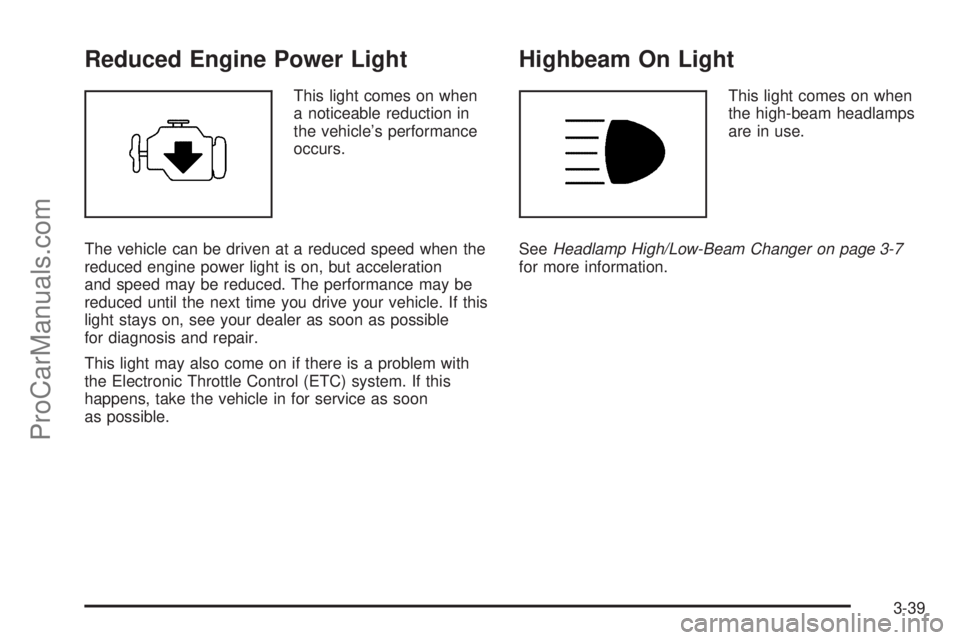
Reduced Engine Power Light
This light comes on when
a noticeable reduction in
the vehicle’s performance
occurs.
The vehicle can be driven at a reduced speed when the
reduced engine power light is on, but acceleration
and speed may be reduced. The performance may be
reduced until the next time you drive your vehicle. If this
light stays on, see your dealer as soon as possible
for diagnosis and repair.
This light may also come on if there is a problem with
the Electronic Throttle Control (ETC) system. If this
happens, take the vehicle in for service as soon
as possible.
Highbeam On Light
This light comes on when
the high-beam headlamps
are in use.
SeeHeadlamp High/Low-Beam Changer on page 3-7
for more information.
3-39
ProCarManuals.com
Page 167 of 424
This message displays and a chime sounds if the
cooling system temperature gets hot. SeeEngine
Overheating on page 5-34for the proper course of
action. This message clears when the coolant
temperature drops to a safe operating temperature.
FRONT FOG LAMPS OFF
This message displays if the fog lamps are turned off.
The message clears after 10 seconds. If you turn on the
high-beam headlamps, the fog lamps also turn off
and this message appears on the DIC. The fog lamps
turn back on again when you switch back to low-beam
headlamps. SeeFog Lamps on page 3-15andTurn
Signal/Multifunction Lever on page 3-6for more
information.
FRONT FOG LAMPS ON
This message displays if the fog lamps are turned on.
The message clears after 10 seconds. SeeFog Lamps
on page 3-15andTurn Signal/Multifunction Lever on
page 3-6for more information.
FUEL LEVEL LOW
This message displays and a chime sounds if the fuel
level is low. Refuel as soon as possible. SeeLow
Fuel Warning Light on page 3-41,Filling the Tank on
page 5-8, andFuel on page 5-5for more information.
ICE POSSIBLE
This message may display if the outside temperature
reaches a level where ice could form on the roadway.
Adjust your driving accordingly. If the temperature
rises to a safe level, the message clears. This message
clears itself after 10 seconds, or you can manually
clear it from the DIC display.
KEY FOB # BATTERY LOW
This message displays if a Remote Keyless Entry (RKE)
transmitter battery is low. Replace the battery in the
transmitter. See “Battery Replacement” underRemote
Keyless Entry (RKE) System Operation on page 2-5.
LEFT REAR DOOR AJAR
This message displays and a chime sounds if the driver
side rear door is not fully closed. Stop and turn off
the vehicle, check the door for obstructions, and close
the door again. Check to see if the message still
appears on the DIC.
3-47
ProCarManuals.com
Page 171 of 424
DIC Vehicle Customization
Your vehicle may have customization capabilities that
allow you to program some features to one setting
based on your preference. All of the customizable
options listed may not be available on your vehicle.
Only the options available display on the Driver
Information Center (DIC).
The default settings for the customization features were
set when your vehicle left the factory, but may have
been changed from their default state since then.
To change feature preferences, make sure the ignition
is on and the vehicle is in P (Park). To avoid excessive
drain on the battery, it is recommended that the
headlamps are turned off.
Press
qto scroll through the available customizable
options.
After pressing
q, VEHICLE SETTINGS momentarily
displays before going to a customization option.
Lock Doors
Pressquntil LOCK DOORS: IN GEAR appears in
the display. To select your preference for automatic
locking, press
rwhile LOCK DOORS: IN GEAR is
displayed on the DIC. Pressing
rwill scroll through
the following settings:
LOCK DOORS: IN GEAR (default):The doors will lock
when the vehicle is shifted out of P (Park).
LOCK DOORS: WITH SPEED:The doors will lock
when the vehicle speed is above 8 mph (13 km/h) for
three seconds.
To select a setting and move on to the next feature,
press
qwhile the desired setting is displayed on
the DIC.
SeeProgrammable Automatic Door Locks on page 2-9
for more information.
3-51
ProCarManuals.com
Page 173 of 424
Unlock Feedback
Pressquntil UNLOCK FEEDBACK: LAMPS appears
in the display. To select your preference for the
feedback you will receive when unlocking the vehicle
with the Remote Keyless Entry (RKE) transmitter, press
rwhile UNLOCK FEEDBACK: LAMPS is displayed
on the DIC. Pressing
rwill scroll through the
following settings:
UNLOCK FEEDBACK: LAMPS (default):The parking
lamps will ash each time you press the button with
the unlock symbol on the RKE transmitter.
UNLOCK FEEDBACK: HORN:The horn will chirp the
second time you press the button with the unlock
symbol on the RKE transmitter.
UNLOCK FEEDBACK: BOTH:The parking lamps will
ash each time you press the button with the unlock
symbol on the RKE transmitter and the horn will
chirp the second time you press the unlock button.
UNLOCK FEEDBACK: OFF:There will be no feedback
when unlocking the vehicle.
To select a setting and move on to the next feature,
press
qwhile the desired setting is displayed on
the DIC.
Headlamp Delay
Pressquntil HEADLAMP DELAY: 10 SEC appears in
the display. To select your preference for how long
the headlamps will stay on after you turn off the vehicle,
press
rwhile HEADLAMP DELAY: 10 SEC is
displayed on the DIC. Pressing
rwill scroll through
the following settings:
HEADLAMP DELAY: 10 SEC (Seconds) (default):
The headlamps will stay on for 10 seconds.
HEADLAMP DELAY: 20 SEC:The headlamps will stay
on for 20 seconds.
HEADLAMP DELAY: 40 SEC:The headlamps will stay
on for 40 seconds.
HEADLAMP DELAY: 1 MIN (Minute):The headlamps
will stay on for 1 minute.
HEADLAMP DELAY: 2 MIN:The headlamps will stay
on for 2 minutes.
HEADLAMP DELAY: 3 MIN:The headlamps will stay
on for 3 minutes.
HEADLAMP DELAY: OFF:The headlamps will not
turn on.
To select a setting and move on to the next feature,
press
qwhile the desired setting is displayed on
the DIC.
3-53
ProCarManuals.com
Page 174 of 424
Perimeter Lights
Pressquntil PERIMETER LIGHTS: ON appears in the
display. To select your preference for perimeter lighting,
press
rwhile PERIMETER LIGHTS: ON is displayed
on the DIC. Pressing
rwill scroll through the following
settings:
PERIMETER LIGHTS: ON (default):The headlamps
and back-up lamps will come on for 40 seconds,
if it is dark enough outside, when you unlock the vehicle
with the Remote Keyless Entry (RKE) transmitter.
PERIMETER LIGHTS: OFF:The perimeter lights will
not come on when you unlock the vehicle with the RKE
transmitter.
To select a setting and move on to the next feature,
press
qwhile the desired setting is displayed on
the DIC.
Easy Exit Seat
Pressquntil EASY EXIT SEAT: OFF appears in the
display. To select your preference for seat position
exit, press
rwhile EASY EXIT SEAT: OFF is
displayed on the DIC. Pressing
rwill scroll through
the following settings:
EASY EXIT SEAT: OFF (default):No seat exit recall
will occur.
EASY EXIT SEAT: ON:The driver’s seat will move to
the exit position when the key is removed from the
ignition.
To select a setting and move on to the next feature,
press
qwhile the desired setting is displayed on
the DIC.
See “Easy Exit Seat” underMemory Seat on page 1-3
for more information.
3-54
ProCarManuals.com