ECU SAAB 9-7X 2009 Service Manual
[x] Cancel search | Manufacturer: SAAB, Model Year: 2009, Model line: 9-7X, Model: SAAB 9-7X 2009Pages: 424, PDF Size: 2.75 MB
Page 161 of 424
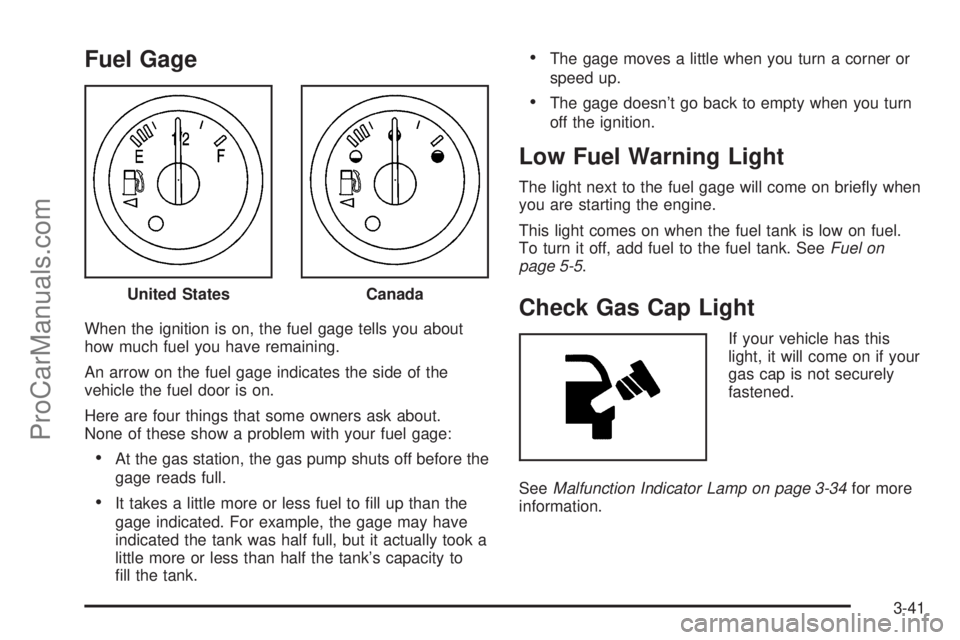
Fuel Gage
When the ignition is on, the fuel gage tells you about
how much fuel you have remaining.
An arrow on the fuel gage indicates the side of the
vehicle the fuel door is on.
Here are four things that some owners ask about.
None of these show a problem with your fuel gage:
At the gas station, the gas pump shuts off before the
gage reads full.
It takes a little more or less fuel to ll up than the
gage indicated. For example, the gage may have
indicated the tank was half full, but it actually took a
little more or less than half the tank’s capacity to
ll the tank.
The gage moves a little when you turn a corner or
speed up.
The gage doesn’t go back to empty when you turn
off the ignition.
Low Fuel Warning Light
The light next to the fuel gage will come on briey when
you are starting the engine.
This light comes on when the fuel tank is low on fuel.
To turn it off, add fuel to the fuel tank. SeeFuel on
page 5-5.
Check Gas Cap Light
If your vehicle has this
light, it will come on if your
gas cap is not securely
fastened.
SeeMalfunction Indicator Lamp on page 3-34for more
information. United States
Canada
3-41
ProCarManuals.com
Page 193 of 424
CH Off Air:This channel is not currently in service.
Tune in to another channel.
Off Air:This channel is not currently in service.
Tune to another channel.
CH Unauth:This channel is blocked or cannot be
received with your XM Subscription package.
Unauth:This channel is blocked or cannot be received
with your XM Subscription package.
CH Unavail:This previously assigned channel is no
longer assigned. Tune to another station. If this station
was one of the presets, choose another station for
that preset button.
CH Unavl:This previously assigned channel is no
longer assigned. Tune to another station. If this station
was one of the presets, choose another station for
that preset button.
No Info:No artist, song title, category, or text
information is available at this time on this channel.
The system is working properly.
Not Found:There are no channels available for the
selected category. The system is working properly.XM Locked:The XM receiver in the vehicle may have
previously been in another vehicle. For security
purposes, XM receivers cannot be swapped between
vehicles. If this message is received after having
the vehicle serviced, check with your dealer/retailer.
XM Lock:The XM receiver in your vehicle could have
previously been in another vehicle. For security
purposes, XM receivers cannot be swapped between
vehicles. If this message is received after having
your vehicle serviced, check with your dealer/retailer.
Radio ID:If tuned to channel 0, there could be a
receiver fault., this message will alternate with the
XM Radio 8 digit radio ID label. This label is needed to
activate the service. Consult with your dealer/retailer.
Unknown:If this message is received when tuned
to channel 0, there could be a receiver fault. Consult
with your dealer/retailer.
Chk XMRcvr:If this message does not clear within a
short period of time, the receiver may have a fault.
Consult with your dealer/retailer.
Check XM:If this message does not clear within
a short period of time, the receiver could have a fault.
Consult with your dealer/retailer.
3-73
ProCarManuals.com
Page 212 of 424
s(Play/Pause):Press to start play of a DVD or CD.
Press while a DVD or CD is playing to pause it. Press
again to continue the play of the DVD or CD.
When the DVD is playing, press this button then press
the fast forward button. The DVD continues playing
in a slow play mode. To cancel slow play mode, press
this button.
u(Next Track/Chapter):Press to advance to the
beginning of the next track or chapter. This button
might not work when the DVD is playing the copyright
information or the previews.
Battery Replacement
To change the remote control batteries:
1. Remove the battery compartment door located on
the bottom of the remote control.
2. Replace the two batteries in the compartment.
Make sure that they are installed correctly, using
the diagram on the inside of the battery
compartment.
3. Close the battery door securely.
If the remote control is to be stored for a long period of
time, remove the batteries and keep them in a cool,
dry place.
Problem Recommended Action
No power. The ignition might not
be in ON/RUN or
ACC/ACCESSORY.
The parental control
button might have been
turned on. The power
indicator light ashes.
Disc will not play. The system might be off.
The parental control
button might have been
turned on. The power
indicator light will ash.
The system might be in
auxiliary mode.
The disc is upside down
or is not compatible.
The picture does not ll
the screen. There are
black borders on the
top and bottom or on
both sides or it looks
stretched out.Check the display
mode settings in the
display menu.
The disc was ejected, but
it was pulled back into the
DVD player.The disc is being stored in
the DVD player. Press the
eject button again to eject
the disc.
3-92
ProCarManuals.com
Page 247 of 424
Using heavier suspension components to get
added durability might not change your vehicle’s
weight ratings. Ask your dealer to help you
load your vehicle the right way.
Notice
:Overloading your vehicle may cause
damage. Repairs would not be covered by your
warranty. Do not overload your vehicle.
If you put things inside your vehicle like suitcases,
tools, packages, or anything else they will go as fast
as the vehicle goes. If you have to stop or turn
quickly, or if there is a crash, they will keep going.
{CAUTION:
Things you put inside your vehicle can strike
and injure people in a sudden stop or turn, or
in a crash.
Put things in the cargo area of your
vehicle. Try to spread the weight evenly.
Never stack heavier things, like suitcases,
inside the vehicle so that some of them
are above the tops of the seats.
CAUTION: (Continued)
CAUTION: (Continued)
Do not leave an unsecured child restraint
in your vehicle.
When you carry something inside the
vehicle, secure it whenever you can.
Do not leave a seat folded down unless
you need to.
Towing
Towing Your Vehicle
To avoid damage, the disabled vehicle should be towed
with all four wheels off the ground. Consult your
dealer/retailer or a professional towing service if the
disabled vehicle must be towed. SeeRoadside
Assistance Program on page 7-6.
To tow the vehicle behind another vehicle for
recreational purposes (such as behind a motorhome),
see “Recreational Vehicle Towing” following.
4-27
ProCarManuals.com
Page 251 of 424
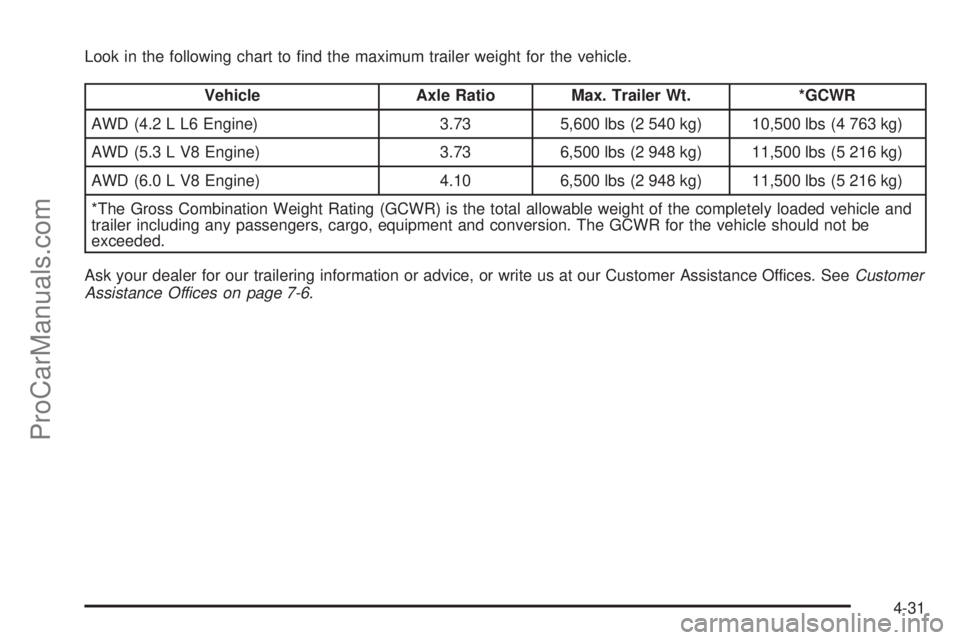
Look in the following chart to nd the maximum trailer weight for the vehicle.
Vehicle Axle Ratio Max. Trailer Wt. *GCWR
AWD (4.2 L L6 Engine) 3.73 5,600 lbs (2 540 kg) 10,500 lbs (4 763 kg)
AWD (5.3 L V8 Engine) 3.73 6,500 lbs (2 948 kg) 11,500 lbs (5 216 kg)
AWD (6.0 L V8 Engine) 4.10 6,500 lbs (2 948 kg) 11,500 lbs (5 216 kg)
*The Gross Combination Weight Rating (GCWR) is the total allowable weight of the completely loaded vehicle and
trailer including any passengers, cargo, equipment and conversion. The GCWR for the vehicle should not be
exceeded.
Ask your dealer for our trailering information or advice, or write us at our Customer Assistance Offices. SeeCustomer
Assistance Offices on page 7-6.
4-31
ProCarManuals.com
Page 256 of 424
Driving with a Trailer
{CAUTION:
When towing a trailer, exhaust gases may collect
at the rear of the vehicle and enter if the liftgate,
trunk/hatch, or rear-most window is open.
Engine exhaust contains carbon monoxide (CO)
which cannot be seen or smelled. It can cause
unconsciousness and even death.
To maximize safety when towing a trailer:
Have the exhaust system inspected for leaks
and make necessary repairs before starting
a trip.
Never drive with the liftgate, trunk/hatch, or
rear-most window open.
Fully open the air outlets on or under the
instrument panel.
Adjust the Climate Control system to a setting
that brings in only outside air and set the fan
speed to the highest setting. See Climate
Control System in the Index.
For more information about carbon monoxide, see
Engine Exhaust on page 2-30.Towing a trailer requires a certain amount of experience.
Get to know the rig before setting out for the open road.
Get acquainted with the feel of handling and braking with
the added weight of the trailer. And always keep in mind
that the vehicle you are driving is now longer and not as
responsive as the vehicle is by itself.
Before starting, check all trailer hitch parts and
attachments, safety chains, electrical connectors, lamps,
tires and mirror adjustments. If the trailer has electric
brakes, start the vehicle and trailer moving and then
apply the trailer brake controller by hand to be sure the
brakes are working. This checks the electrical connection
at the same time.
During the trip, check occasionally to be sure that the
load is secure, and that the lamps and any trailer brakes
are still working.
4-36
ProCarManuals.com
Page 294 of 424
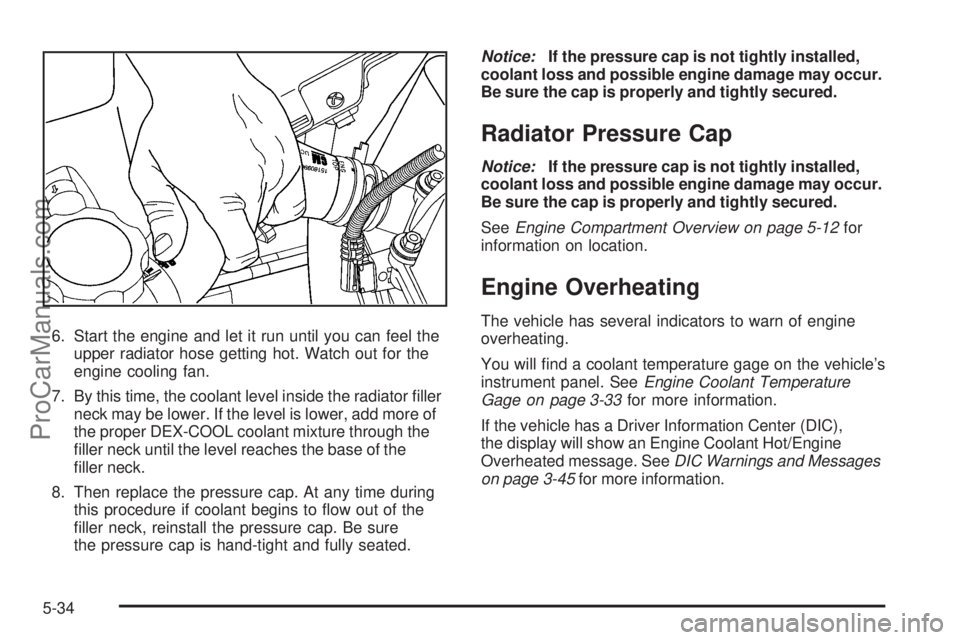
6. Start the engine and let it run until you can feel the
upper radiator hose getting hot. Watch out for the
engine cooling fan.
7. By this time, the coolant level inside the radiator ller
neck may be lower. If the level is lower, add more of
the proper DEX-COOL coolant mixture through the
ller neck until the level reaches the base of the
ller neck.
8. Then replace the pressure cap. At any time during
this procedure if coolant begins to ow out of the
ller neck, reinstall the pressure cap. Be sure
the pressure cap is hand-tight and fully seated.Notice:If the pressure cap is not tightly installed,
coolant loss and possible engine damage may occur.
Be sure the cap is properly and tightly secured.
Radiator Pressure Cap
Notice:If the pressure cap is not tightly installed,
coolant loss and possible engine damage may occur.
Be sure the cap is properly and tightly secured.
SeeEngine Compartment Overview on page 5-12for
information on location.
Engine Overheating
The vehicle has several indicators to warn of engine
overheating.
You will nd a coolant temperature gage on the vehicle’s
instrument panel. SeeEngine Coolant Temperature
Gage on page 3-33for more information.
If the vehicle has a Driver Information Center (DIC),
the display will show an Engine Coolant Hot/Engine
Overheated message. SeeDIC Warnings and Messages
on page 3-45for more information.
5-34
ProCarManuals.com
Page 312 of 424
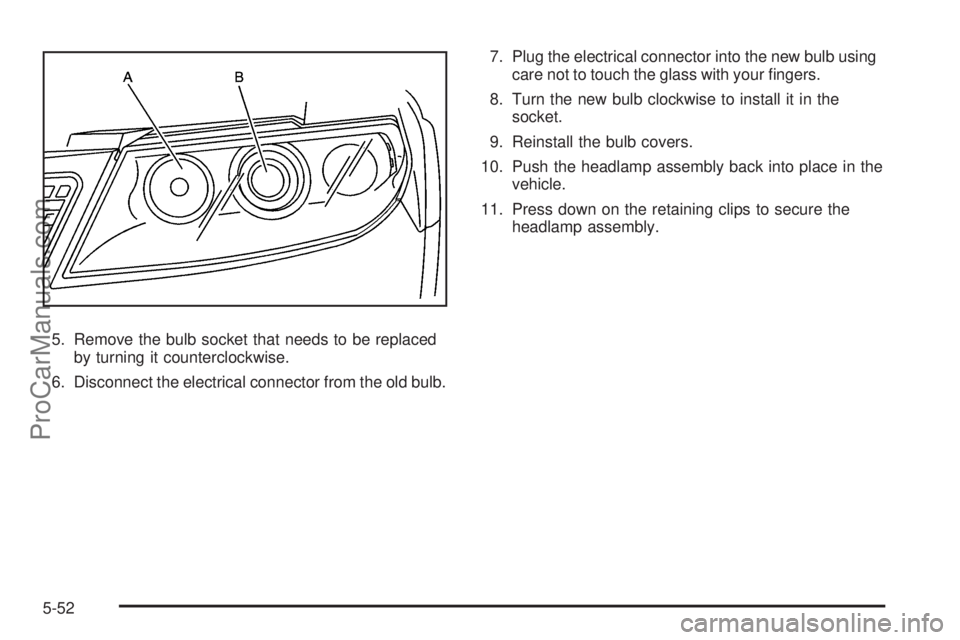
5. Remove the bulb socket that needs to be replaced
by turning it counterclockwise.
6. Disconnect the electrical connector from the old bulb.7. Plug the electrical connector into the new bulb using
care not to touch the glass with your ngers.
8. Turn the new bulb clockwise to install it in the
socket.
9. Reinstall the bulb covers.
10. Push the headlamp assembly back into place in the
vehicle.
11. Press down on the retaining clips to secure the
headlamp assembly.
5-52
ProCarManuals.com
Page 313 of 424
Front Turn Signal, Sidemarker and
Parking Lamps
To replace one of these bulbs:
1. Follow Steps 1 through 3 underHeadlamps on
page 5-51to access the front turn signal,
sidemarker or parking lamp.
2. Turn the bulb socket counterclockwise and remove
it from the lamp assembly.
3. Holding the socket, pull the old bulb to release it
from the socket.
4. Push the new bulb into the socket until it clicks.
5. Insert the bulb socket into the lamp assembly and
turn it clockwise to secure.
6. Reinstall the headlamp assembly by lining up the
headlamp assembly with the slots in the headlamp
retaining clips.
7. Press down on the headlamp retaining clips to
secure the headlamp assembly.
Taillamps, Turn Signal, Sidemarker,
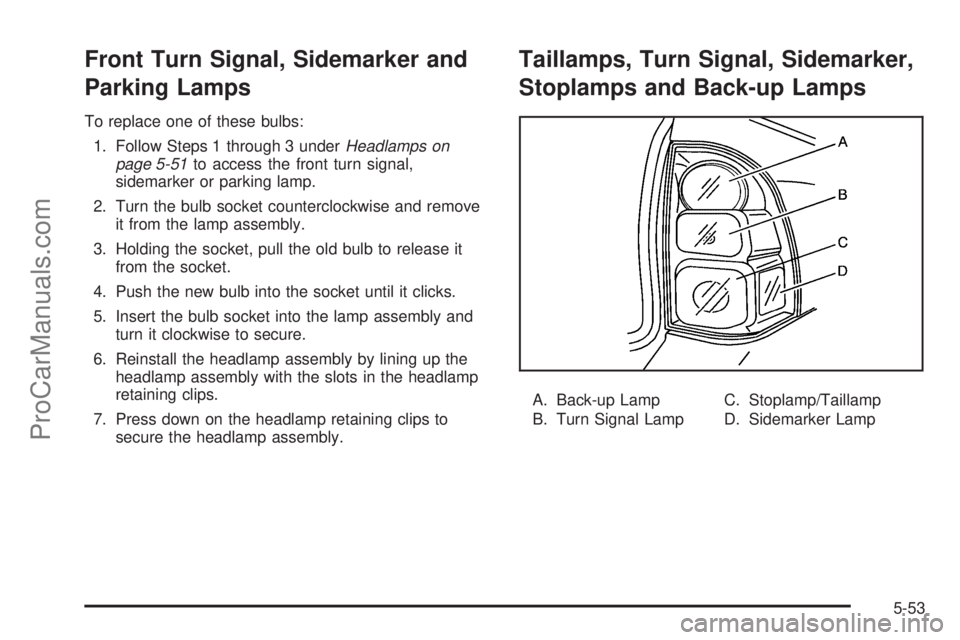
Stoplamps and Back-up Lamps
A. Back-up Lamp
B. Turn Signal LampC. Stoplamp/Taillamp
D. Sidemarker Lamp
5-53
ProCarManuals.com
Page 314 of 424
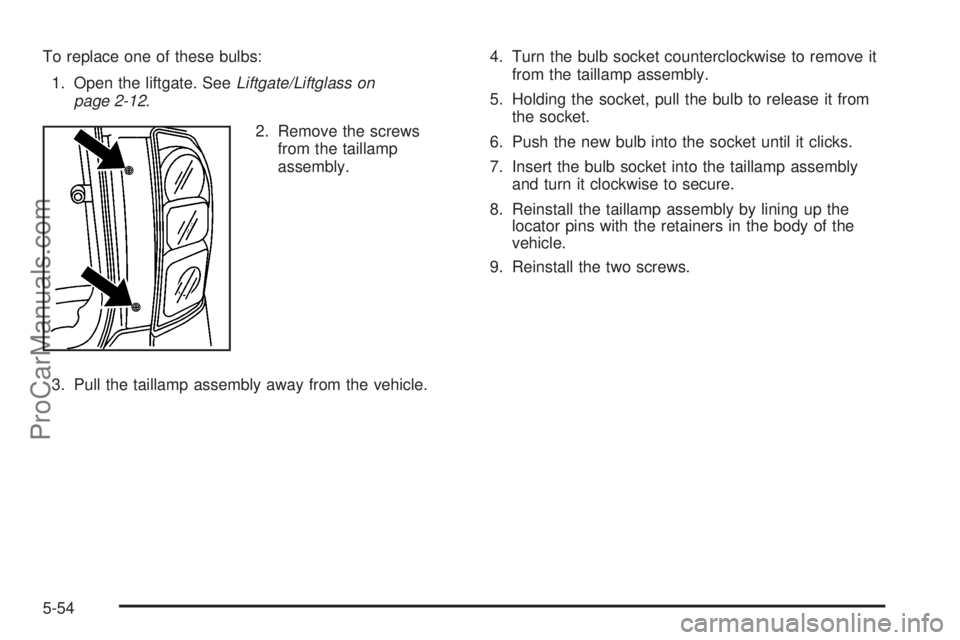
To replace one of these bulbs:
1. Open the liftgate. SeeLiftgate/Liftglass on
page 2-12.
2. Remove the screws
from the taillamp
assembly.
3. Pull the taillamp assembly away from the vehicle.4. Turn the bulb socket counterclockwise to remove it
from the taillamp assembly.
5. Holding the socket, pull the bulb to release it from
the socket.
6. Push the new bulb into the socket until it clicks.
7. Insert the bulb socket into the taillamp assembly
and turn it clockwise to secure.
8. Reinstall the taillamp assembly by lining up the
locator pins with the retainers in the body of the
vehicle.
9. Reinstall the two screws.
5-54
ProCarManuals.com