radio SATURN ASTRA 2008 Owners Manual
[x] Cancel search | Manufacturer: SATURN, Model Year: 2008, Model line: ASTRA, Model: SATURN ASTRA 2008Pages: 304, PDF Size: 1.92 MB
Page 63 of 304
Keep this number in a safe place.
If you lose your keys, you will
be able to have one made easily
using this number. If you need
a new key, go to your dealer/retailer
for the correct key code.
Notice:If you ever lock your
keys in the vehicle, you may have
to damage the vehicle to get in.
Be sure you have spare keys.
If you are locked out of your vehicle,
contact Roadside Assistance or
OnStar. SeeRoadside Assistance
Program on page 11-5orOnStar
®
System on page 4-38.
Remote Keyless Entry
(RKE) System
The Remote Keyless Entry (RKE)
system operates on a radio
frequency subject to Federal
Communications Commission (FCC)
Rules and with Industry Canada.This device complies with Part 15 of
the FCC Rules. Operation is subject
to the following two conditions:
1. This device may not cause
interference.
2. This device must accept any
interference received, including
interference that may cause
undesired operation of the device.
This device complies with RSS-210
of Industry Canada. Operation is
subject to the following two
conditions:
1. This device may not cause
interference.
2. This device must accept any
interference received, including
interference that may cause
undesired operation of the device.
Changes or modications to this
system by other than an authorized
service facility could void
authorization to use this equipment.If there is a decrease in the RKE
operating range, try this:
Check the distance. The
transmitter may be too far from
the vehicle. Stand closer
during rainy or snowy weather.
Check the location. Other
vehicles or objects may be
blocking the signal. Take a few
steps to the left or right, hold
the transmitter higher, and
try again.
Check the transmitter’s battery.
See “Battery Replacement”
later in this section.
If the transmitter is still not
working correctly, see your
dealer/retailer or a qualied
technician for service.
Keys, Doors and Windows 2-3
ProCarManuals.com
Page 93 of 304
If, after several seconds, both status
indicator lights remain on, or if there
are no lights at all, there may be
a problem with the lights or the
passenger sensing system.
See your dealer/retailer for service.
{CAUTION
If the airbag readiness light in
the instrument panel cluster
ever comes on and stays on, it
means that something may be
wrong with the airbag system.
If this ever happens, have the
vehicle serviced promptly,
because an adult-size person
sitting in the right front
passenger’s seat may not have
the protection of the airbag(s).
SeeAirbag Readiness Light
on page 4-14for more on this,
including important safety
information.
Charging System Light
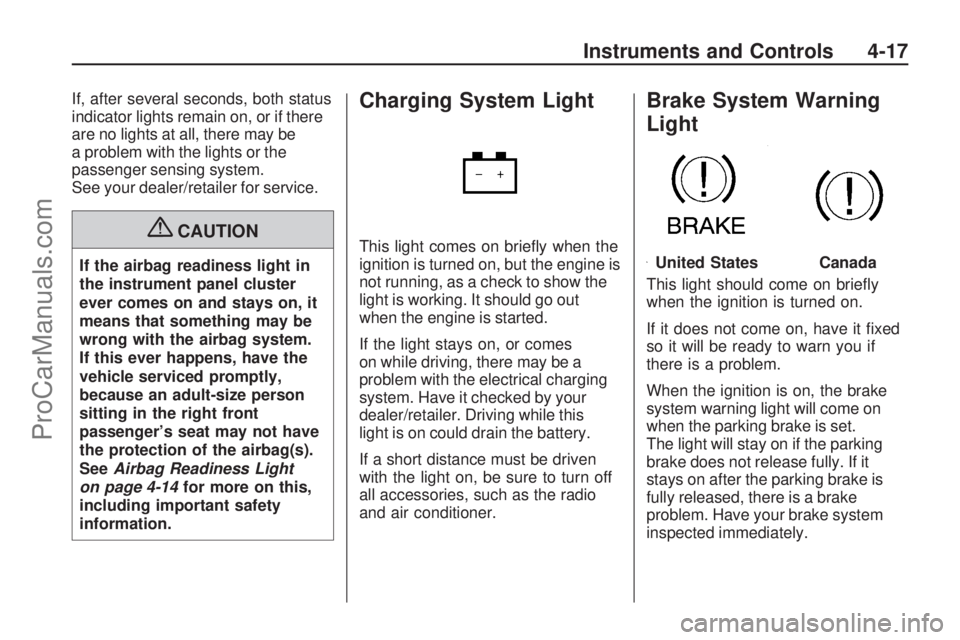
This light comes on briey when the
ignition is turned on, but the engine is
not running, as a check to show the
light is working. It should go out
when the engine is started.
If the light stays on, or comes
on while driving, there may be a
problem with the electrical charging
system. Have it checked by your
dealer/retailer. Driving while this
light is on could drain the battery.
If a short distance must be driven
with the light on, be sure to turn off
all accessories, such as the radio
and air conditioner.
Brake System Warning
Light
This light should come on briey
when the ignition is turned on.
If it does not come on, have it xed
so it will be ready to warn you if
there is a problem.
When the ignition is on, the brake
system warning light will come on
when the parking brake is set.
The light will stay on if the parking
brake does not release fully. If it
stays on after the parking brake is
fully released, there is a brake
problem. Have your brake system
inspected immediately.
United StatesCanada
Instruments and Controls 4-17
ProCarManuals.com
Page 117 of 304

OnStar service cannot work unless
your vehicle is in a place where
OnStar has an agreement with a
wireless service provider for service
in that area. OnStar service also
cannot work unless you are in a
place where the wireless service
provider OnStar has hired for that
area has coverage, network capacity
and reception when the service is
needed, and technology that is
compatible with the OnStar service.
Not all services are available
everywhere, particularly in remote
or enclosed areas, or at all times.OnStar service that involves location
information about your vehicle
cannot work unless GPS satellite
signals are unobstructed and
available in that place as well.
Your vehicle must have a working
electrical system (including adequate
battery power) for the OnStar
equipment to operate. There are
other problems OnStar cannot
control that may prevent OnStar
from providing service to you at
any particular time or place. Some
examples are damage to important
parts of your vehicle in an accident,
hills, tall buildings, tunnels, weather
or wireless phone network
congestion.Your Responsibility
You may need to increase the
volume of your radio to hear the
OnStar advisor. If the light next to the
OnStar buttons is red, this means
that your system is not functioning
properly and should be checked
by your dealer/retailer. If the light
appears clear (no light is appearing),
your OnStar subscription has
expired. You can always press the
OnStar button to conrm that your
OnStar equipment is active.
Instruments and Controls 4-41
ProCarManuals.com
Page 123 of 304

Infotainment
Audio System(s)
Audio System(s).................6-1
Radio(s).............................6-2
Theft-Deterrent Feature.....6-24
Audio Steering Wheel
Controls..........................6-24
Radio Reception...............6-25
Fixed Mast Antenna..........6-25
Audio System(s)
Determine which audio system the
vehicle has and then read the
following pages to become familiar
with its features.
{CAUTION
This system provides you with
far greater access to audio
stations and song listings.
Giving extended attention to
entertainment tasks while
driving can cause a crash and
you or others can be injured or
killed. Always keep your eyes on
the road and your mind on the
drive — avoid engaging in
extended searching while
driving.Keeping your mind on the drive is
important for safe driving. See
Defensive Driving on page 8-16.
Here are some ways in which you
can help avoid distraction while
driving.
While your vehicle is parked:
Familiarize yourself with all of its
controls.
Familiarize yourself with its
operation.
Set up your audio system by
presetting your favorite radio
stations, setting the tone, and
adjusting the speakers. Then,
when driving conditions permit,
you can tune to your favorite radio
stations using the presets and
remote control on the steering
wheel. SeeAudio Steering Wheel
Controls on page 6-24and the
audio system manual for more
information.
Infotainment 6-1
ProCarManuals.com
Page 124 of 304
Radio(s)
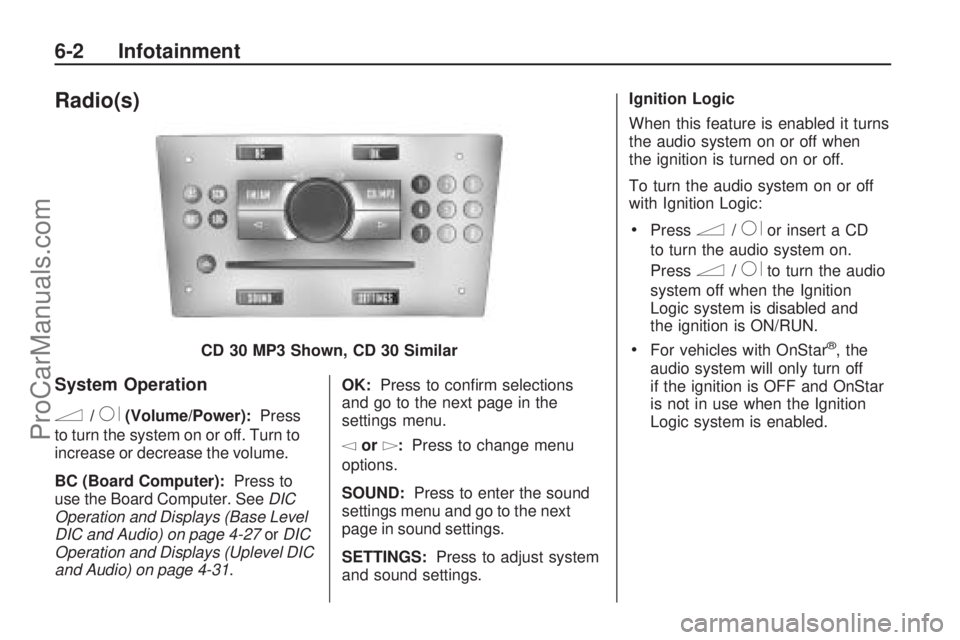
System Operation
n/R(Volume/Power):Press
to turn the system on or off. Turn to
increase or decrease the volume.
BC (Board Computer): Press to
use the Board Computer. See DIC
Operation and Displays (Base Level
DIC and Audio) on page 4-27 orDIC
Operation and Displays (Uplevel DIC
and Audio) on page 4-31 .OK:
Press to conrm selections
and go to the next page in the
settings menu.
\or]: Press to change menu
options.
SOUND: Press to enter the sound
settings menu and go to the next
page in sound settings.
SETTINGS: Press to adjust system
and sound settings. Ignition Logic
When this feature is enabled it turns
the audio system on or off when
the ignition is turned on or off.
To turn the audio system on or off
with Ignition Logic:
Pressn/Ror insert a CD
to turn the audio system on.
Press
n/Rto turn the audio
system off when the Ignition
Logic system is disabled and
the ignition is ON/RUN.
For vehicles with OnStar®, the
audio system will only turn off
if the ignition is OFF and OnStar
is not in use when the Ignition
Logic system is enabled.
CD 30 MP3 Shown, CD 30 Similar
6-2 Infotainment
ProCarManuals.com
Page 125 of 304

The Ignition Logic is preset to turn
off the audio system when the
ignition is turned off. To enable or
disable Ignition Logic:
1. Press SETTINGS until Audio
displays.
2. Press
\until System displays.
3. Press OK until Ign. Logic
ON or Ign. Logic OFF displays.
4. Press
\or]to select the
setting. The setting is saved
automatically.
Press SETTINGS again to
move back one level in
the menu.
Press FM/AM, CD/MP3, or
BC to turn on that feature.
Audio displays and the system
starts to play if SETTINGS, FM/AM,
CD/MP3, or BC is not pressed
within ve seconds after the setting
is saved.System Display
The following information shows on
the system display:
FM or AM, and the current
station frequency if the radio is
active.
The station name displays if RDS
is activated.
AS displays if the AS level is
activated.
CD displays, and the CD title
number or the CD title name
if the CD player is active.
MP3 displays if the CD is an
MP3 CD.
RDM displays if the CD is being
played in random mode.
The most recent selected audio
source plays when the audio system
is turned on and the display is lit.
The outside temperature, time,
and date display when the audio
system is turned off and the ignition
is ON/RUN, seeDriver Information
Center (DIC) on page 4-26.
Audio Settings
The audio settings can be set
for each audio source and are
stored separately for each radio
station and the CD player.
Adjusting the Tone (Bass/Treble)
To adjust the Bass:
1. Press SOUND until Bass
appears.
2. Press
\or]to adjust the level
from -12 through +12. The
setting is saved automatically.
Press SETTINGS again to go
back one level in the menu.
Press FM/AM, CD/MP3, or BC to
display that function.
Infotainment 6-3
ProCarManuals.com
Page 128 of 304
OnStar®Volume
For vehicles with OnStar, the OnStar
Volume is used to set the maximum
initial volume level for the OnStar
system when it is turned on.
To set OnStar Volume:
1. Press SETTINGS until Audio
appears.
2. Press OK until OnStar Vol.
appears.
3. Press
\or]to adjust the level
from -12 through 12. The setting
is saved automatically.
Press SETTINGS again to go
back one level in the menu.
Press FM/AM, CD/MP3, or BC to
display that function.On Volume
The On Volume is used to set the
maximum initial volume level for the
audio system when it is turned on.
The maximum initial volume level is
used only if the volume level before
turning the audio system off was
higher than the maximum initial
volume level set. This will work
when the audio system has been
off for at least ve minutes and the
ignition is OFF.
To set the On Volume level:
1. Press SETTINGS until Audio
appears.
2. Press OK until On Volume
appears.
3. Press
\or]to adjust the level
from -12 through 12. The setting
is saved automatically.
Press SETTINGS again to go
back one level in the menu.
Press FM/AM, CD/MP3, or BC to
display that function.
Using the Radio
FM/AM:Press to select between
FM, FM-AS, AM, and AM-AS,
or to listen to the radio while a CD
is playing.
RDS (Radio Data System):Press
to identify stations by name
instead of the radio frequency.
LOC (LOCAL/DX Function):Press
to change between LOC ON or LOC
OFF. When the LOC function is on,
it searches for the strongest radio
frequency. If none is found, it
automatically search for a weaker
radio frequency. If no frequency
is found after the second search,
the radio returns to the last active
frequency. If a new station search is
not started within one minute, the low
sensitivity (LOCAL) is set when the
next search is started. When LOC
OFF is set, a search is carried out
using the high sensitivity (DX).
6-6 Infotainment
ProCarManuals.com
Page 129 of 304

Finding an FM/AM Station
1 - 9 (Station Preset Buttons):
Press to play stations that are
programmed to the radio preset
pushbuttons.
SCN (Station Preset Scan):Press
to start station preset scan. The radio
goes to the rst preset station, plays
for a few seconds, then goes to the
next preset station. Press SCN again
to stop scanning preset stations.
\or]:Press to nd radio stations
using the automatic station search
or the manual station search.Automatic Station Search:Use
automatic station search when
the radio frequency is unknown.
Press
\or]for more then
one second to have the radio search
for the next station. Seek is shown
on the display and the radio is
muted until a station is found.
If the radio fails to locate a station,
the last active frequency is then
reset. When LOC is activated,
a search for the next strong station
is made. If it is not activated, it
searches the next receivable station.Manual Station Search:Use
manual station search when
the radio frequency is known.
To use manual station search:
Press and hold\or]until the
desired frequency is reached.
Tap\or]until the desired
frequency is reached.
Setting Preset Stations
The radio can store up to 36 stations
using the station preset buttons:
9FM
9 FM - AS (Autostore)
9AM
9 AM - AS (Autostore)
Infotainment 6-7
ProCarManuals.com
Page 130 of 304

Radio stations can be stored
manually, and by using Autostore.
To manually store preset stations:
1. Select FM or AM and tune to the
desired radio station.
2. Press and hold one of the nine
station preset buttons, the radio
briey mutes and displays the
previously stored station. The
new station has been stored
when the radio begins playing
again.
3. Repeat the steps for each radio
station to be stored.
AS (Autostore):Press to
automatically store the nine
strongest stations in the selected
radio band.
To use Autostore:
1. Select FM or AM.
2. Press and hold AS until a beep
is heard.
3. The radio begins storing the
stations in the nine preset
button locations.Using the CD Player
Display Options
The display can be changed
depending on what type of CD
is in the CD player. The display
options are:
Audio CD without CD text:
Track number and playing time.
Audio CD with CD text:
Track title
Artist name
Tack number and playing time
CD name
To change the display:
1. Press CD/MP3 twice, CD info
appears on the display.
2. Press
\or]to select the
display type.
3. After about ve seconds, the
selected display type is saved.Loading a CD
To load a CD, insert the CD label
side up in the CD player. The CD
player pulls the CD in automatically.
The display shows Read CD, the
CD symbol and the number of CD
tracks.
When the rst track starts to play,
the display shows track 1 and the
playing time.
Playing a CD
CD/MP3:Press to play a CD or
MP3 CD that is already loaded into
the CD player while the radio is
playing. See “Using an MP3” in the
owner manual index.
\or]:Press to go to the next or
previous track. Press and hold to
fast forward or fast rewind within
a track and the CD plays at a higher
speed and a reduced volume.
Z:Press to eject a CD, Eject CD
is displayed and the radio begins
playing.
6-8 Infotainment
ProCarManuals.com
Page 131 of 304
![SATURN ASTRA 2008 Owners Manual Random:Press CD/MP3 three
times to hear the tracks in random,
rather than sequential order. Press
\or]to select between Random
on and Random off. RDM shows on
the display when random is in use.
Using](/img/68/58566/w960_58566-130.png "SATURN ASTRA 2008 Owners Manual Random:Press CD/MP3 three
times to hear the tracks in random,
rather than sequential order. Press
\or]to select between Random
on and Random off. RDM shows on
the display when random is in use.
Using")
Random:Press CD/MP3 three
times to hear the tracks in random,
rather than sequential order. Press
\or]to select between Random
on and Random off. RDM shows on
the display when random is in use.
Using an MP3 CD
The CD 30 MP3 is capable of
playing MP3 CDs that have been
recorded to a CD-R.
Supported File Structure
The CD 30 MP3 supports up to:
99 albums.
367 tracks.
Bit rates up to 256 kbps.
File Naming
Files must be named .mp3 for the
CD to work. ID3 tags are supported.
The following information shows
on the display when the CD MP3 is
playing.MP3 CDs recorded without ID3 tags
display:
File name
Track number and playing time
Album name
MP3 CDs recorded with ID3 tags
display:
Track title
Artist name
Track number and playing time
Album name
To change the display:
1. Press CD/MP3 twice, CD info
appears on the display.
2. Press
\or]to select the
display type.
3. After about ve seconds, the
selected display type is saved.Playing an MP3
CD/MP3:Press to play an MP3 CD
that is already loaded into the CD
player while the radio is playing.
Selecting a Track
\or]:Press to go to the next or
previous track. Press and hold to
fast forward or fast rewind within a
track. During fast forward, the
CD plays at a higher speed and a
reduced volume.
Z:Press to eject a CD, Eject CD
appears on the display and the
radio begins playing.
Selecting an Album
To select a different album when
the MP3 CD contains several
albums:
1. Press CD/MP3.
2. Press
\or]until the desired
album displays.
Infotainment 6-9
ProCarManuals.com