seats SATURN ASTRA 2009 Workshop Manual
[x] Cancel search | Manufacturer: SATURN, Model Year: 2009, Model line: ASTRA, Model: SATURN ASTRA 2009Pages: 314, PDF Size: 1.94 MB
Page 54 of 314

2.3. Route, attach, and tighten
the top tether according to
your child restraint
instructions and the
following instructions:
If the position you are using
has an adjustable headrest
or head restraint and you are
using a dual tether, route the
tether around the headrest or
head restraint.If the position you are using
has an adjustable headrest
or head restraint and
you are using a single
tether, raise the headrest or
head restraint and route
the tether under the
headrest or head restraint
and in between the headrest
or head restraint posts.
3. Push and pull the child restraint
in different directions to be sure
it is secure.Replacing LATCH System
Parts After a Crash
{CAUTION
A crash can damage the LATCH
system in the vehicle. A damaged
LATCH system may not properly
secure the child restraint, resulting
in serious injury or even death in
a crash. To help make sure the
LATCH system is working
properly after a crash, see your
dealer/retailer to have the system
inspected and any necessary
replacements made as soon as
possible.
If the vehicle has the LATCH
system and it was being used
during a crash, new LATCH system
parts may be needed.
New parts and repairs may be
necessary even if the LATCH
system was not being used at the
time of the crash.
1-50 Seats and Restraints
ProCarManuals.com
Page 55 of 314
Securing Child Restraints
(Rear Seat)
When securing a child restraint in a
rear seating position, study the
instructions that came with your
child restraint to make sure it
is compatible with this vehicle.
If the child restraint has the LATCH
system, seeLower Anchors and
Tethers for Children (LATCH)
on page 1-46for how and where to
install your child restraint using
LATCH. If a child restraint is secured
in the vehicle using a safety belt
and it uses a top tether, seeLower
Anchors and Tethers for Children
(LATCH) on page 1-46for top tether
anchor locations.
Do not secure a child restraint in a
position without a top tether
anchor if a national or local law
requires that the top tether be
anchored, or if the instructions that
come with the child restraint say
that the top strap must be anchored.In Canada, the law requires that
forward-facing child restraints have
a top tether, and that the tether
be attached.
If the child restraint does not have
the LATCH system, you will be using
the safety belt to secure the child
restraint in this position. Be sure to
follow the instructions that came
with the child restraint. Secure the
child in the child restraint when
and as the instructions say.
If more than one child restraint
needs to be installed in the
rear seat, be sure to readWhere to
Put the Restraint on page 1-44.
1. Put the child restraint on the seat.
2. Pick up the latch plate, and
run the lap and shoulder portions
of the vehicle’s safety belt
through or around the restraint.
The child restraint instructions
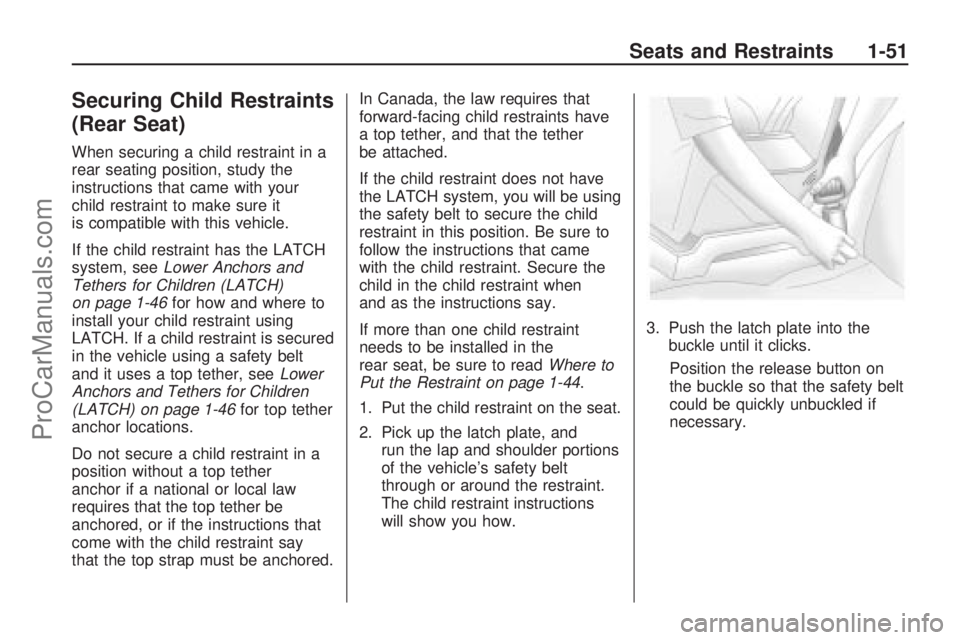
will show you how.3. Push the latch plate into the
buckle until it clicks.
Position the release button on
the buckle so that the safety belt
could be quickly unbuckled if
necessary.
Seats and Restraints 1-51
ProCarManuals.com
Page 56 of 314
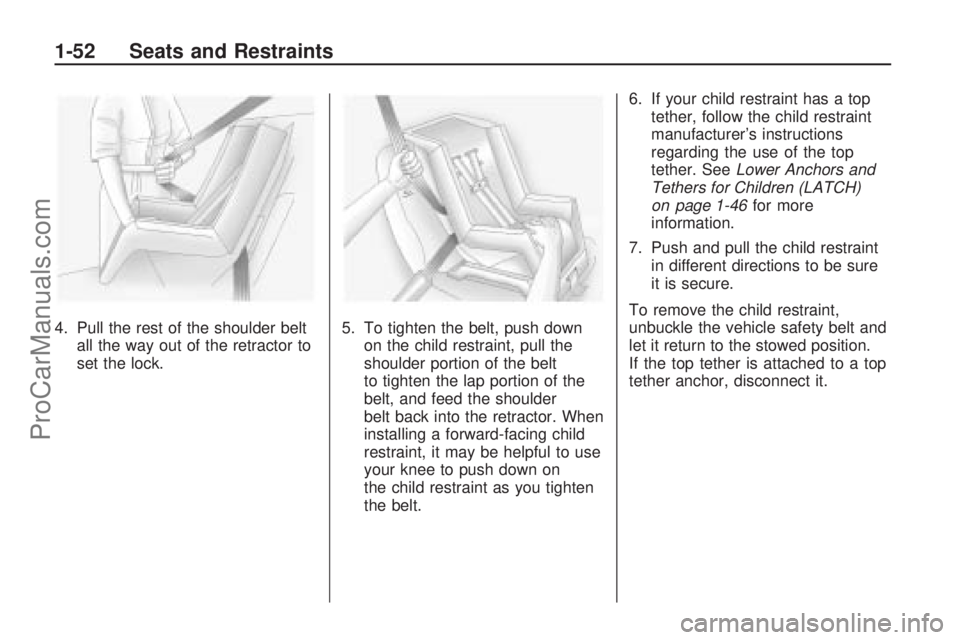
4. Pull the rest of the shoulder belt
all the way out of the retractor to
set the lock.5. To tighten the belt, push down
on the child restraint, pull the
shoulder portion of the belt
to tighten the lap portion of the
belt, and feed the shoulder
belt back into the retractor. When
installing a forward-facing child
restraint, it may be helpful to use
your knee to push down on
the child restraint as you tighten
the belt.6. If your child restraint has a top
tether, follow the child restraint
manufacturer’s instructions
regarding the use of the top
tether. SeeLower Anchors and
Tethers for Children (LATCH)
on page 1-46for more
information.
7. Push and pull the child restraint
in different directions to be sure
it is secure.
To remove the child restraint,
unbuckle the vehicle safety belt and
let it return to the stowed position.
If the top tether is attached to a top
tether anchor, disconnect it.
1-52 Seats and Restraints
ProCarManuals.com
Page 57 of 314
Securing Child Restraints
(Right Front Seat)
This vehicle has airbags. A rear
seat is a safer place to secure
a forward-facing child restraint.
SeeWhere to Put the Restraint on
page 1-44.
In addition, the vehicle has a
passenger sensing system which is
designed to turn off the right
front passenger frontal and
seat-mounted side impact airbag
under certain conditions. See
Passenger Sensing System on
page 1-30andPassenger Airbag
Status Indicator on page 4-15
for more information, including
important safety information.A label on the sun visor says,
“Never put a rear-facing child seat
in the front.” This is because the risk
to the rear-facing child is so great,
if the airbag deploys.
{CAUTION
A child in a rear-facing child
restraint can be seriously
injured or killed if the right front
passenger airbag inates.
This is because the back of the
rear-facing child restraint would
be very close to the inating
airbag. A child in a forward-facing
child restraint can be seriously
injured or killed if the right front
passenger airbag inates and the
passenger seat is in a forward
position.
(Continued)
CAUTION (Continued)
Even if the passenger sensing
system has turned off the right
front passenger frontal airbag, no
system is fail-safe. No one can
guarantee that an airbag will not
deploy under some unusual
circumstance, even though it is
turned off.
Secure rear-facing child
restraints in a rear seat, even if
the airbag is off. If you secure a
forward-facing child restraint in the
right front seat, always move the
front passenger seat as far back as
it will go. It is better to secure the
child restraint in a rear seat.
SeePassenger Sensing System
on page 1-30for additional
information.
Seats and Restraints 1-53
ProCarManuals.com
Page 58 of 314
If the child restraint has the LATCH
system, seeLower Anchors and
Tethers for Children (LATCH)
on page 1-46for how and where to
install the child restraint using
LATCH. If a child restraint is secured
in the seating position using a
safety belt and it uses a top tether,
seeLower Anchors and Tethers
for Children (LATCH) on page 1-46
for top tether anchor locations.
Do not secure a child seat in
a position without a top tether
anchor if a national or local
law requires that the top tether be
anchored, or if the instructions
that come with the child restraint
say that the top strap must be
anchored.
In Canada, the law requires that
forward-facing child restraints have
a top tether, and that the tether
be attached.You will be using the lap-shoulder
belt to secure the child restraint
in this position. Follow the
instructions that came with the
child restraint.
1. Move the seat as far back as it
will go before securing the
forward-facing child restraint.
When the passenger sensing
system has turned off the
right front passenger frontal and
seat-mounted side impact
airbag, the off indicator on the
passenger airbag status indicator
should light and stay lit when
you start the vehicle. See
Passenger Airbag Status
Indicator on page 4-15.
2. Put the child restraint on
the seat.
3. Pick up the latch plate, and run
the lap and shoulder portions of
the vehicle’s safety belt
through or around the restraint.
The child restraint instructions
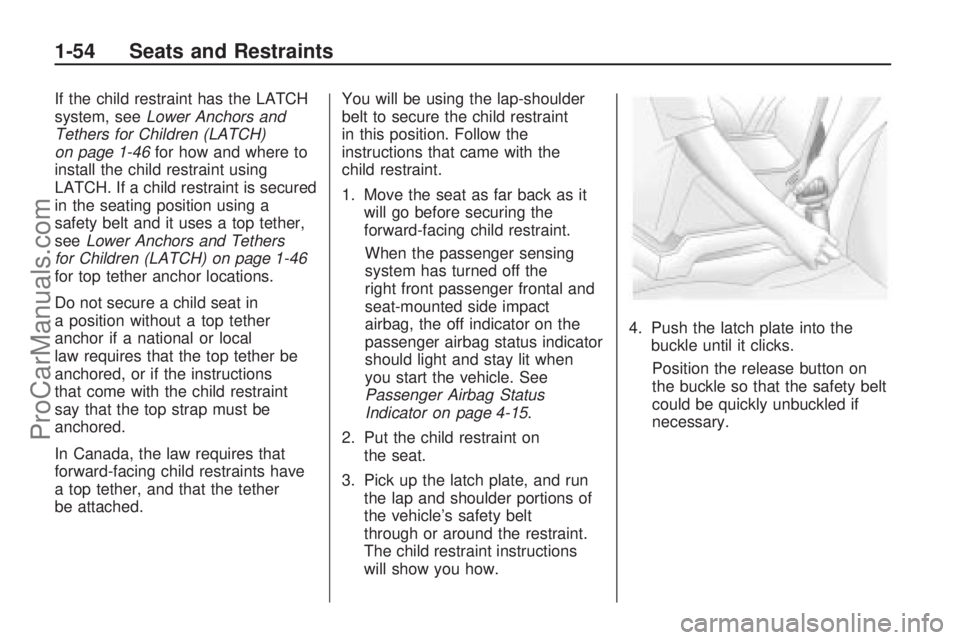
will show you how.4. Push the latch plate into the
buckle until it clicks.
Position the release button on
the buckle so that the safety belt
could be quickly unbuckled if
necessary.
1-54 Seats and Restraints
ProCarManuals.com
Page 59 of 314
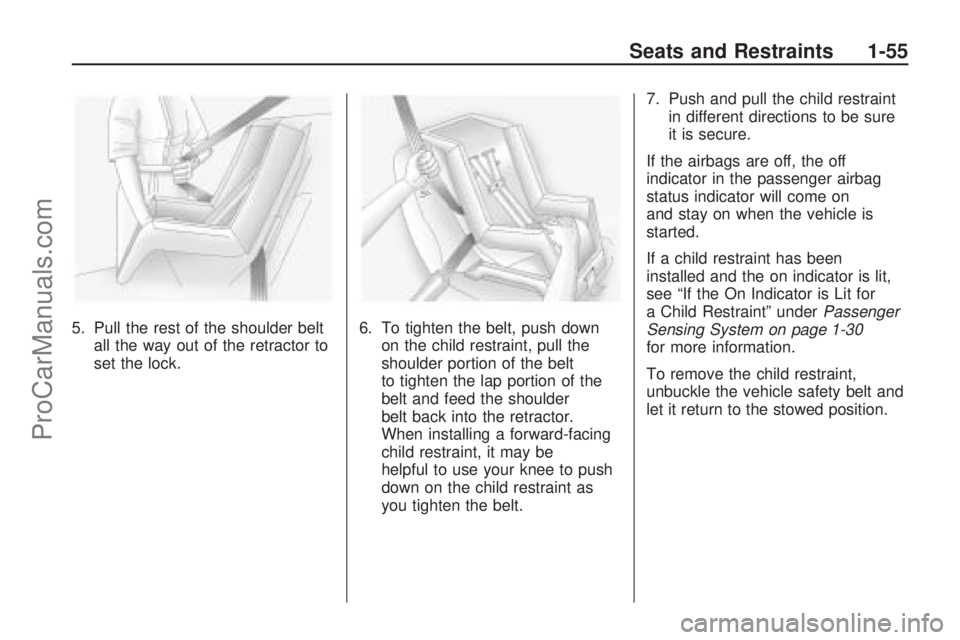
5. Pull the rest of the shoulder belt
all the way out of the retractor to
set the lock.6. To tighten the belt, push down
on the child restraint, pull the
shoulder portion of the belt
to tighten the lap portion of the
belt and feed the shoulder
belt back into the retractor.
When installing a forward-facing
child restraint, it may be
helpful to use your knee to push
down on the child restraint as
you tighten the belt.7. Push and pull the child restraint
in different directions to be sure
it is secure.
If the airbags are off, the off
indicator in the passenger airbag
status indicator will come on
and stay on when the vehicle is
started.
If a child restraint has been
installed and the on indicator is lit,
see “If the On Indicator is Lit for
a Child Restraint” underPassenger
Sensing System on page 1-30
for more information.
To remove the child restraint,
unbuckle the vehicle safety belt and
let it return to the stowed position.
Seats and Restraints 1-55
ProCarManuals.com
Page 60 of 314
✍NOTES
1-56 Seats and Restraints
ProCarManuals.com
Page 77 of 314
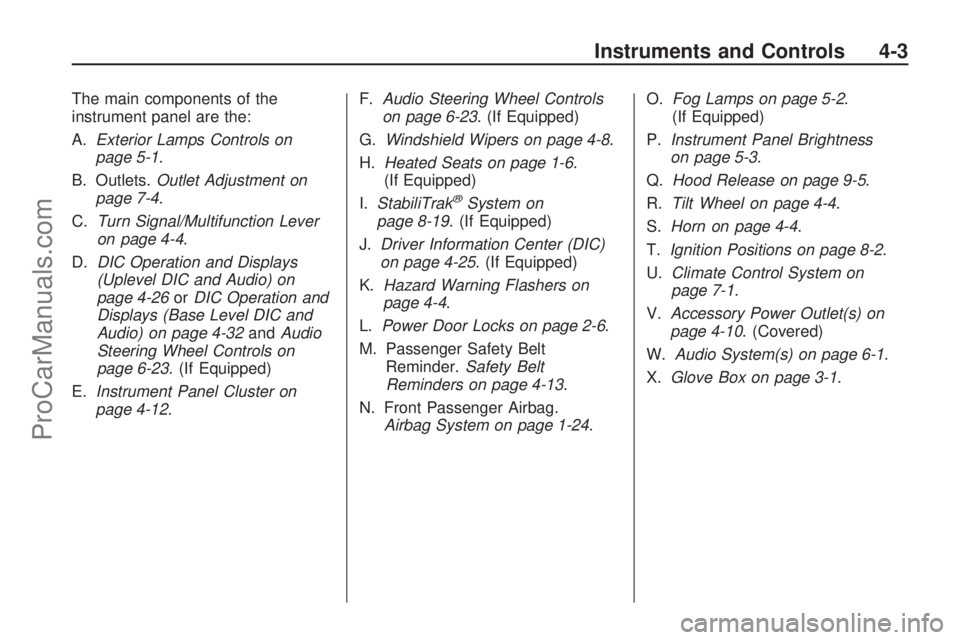
The main components of the
instrument panel are the:
A.Exterior Lamps Controls on
page 5-1.
B. Outlets.Outlet Adjustment on
page 7-4.
C.Turn Signal/Multifunction Lever
on page 4-4.
D.DIC Operation and Displays
(Uplevel DIC and Audio) on
page 4-26orDIC Operation and
Displays (Base Level DIC and
Audio) on page 4-32andAudio
Steering Wheel Controls on
page 6-23. (If Equipped)
E.Instrument Panel Cluster on
page 4-12.F.Audio Steering Wheel Controls
on page 6-23. (If Equipped)
G.Windshield Wipers on page 4-8.
H.Heated Seats on page 1-6.
(If Equipped)
I.StabiliTrak
®System on
page 8-19. (If Equipped)
J.Driver Information Center (DIC)
on page 4-25. (If Equipped)
K.Hazard Warning Flashers on
page 4-4.
L.Power Door Locks on page 2-6.
M. Passenger Safety Belt
Reminder.Safety Belt
Reminders on page 4-13.
N. Front Passenger Airbag.
Airbag System on page 1-24.O.Fog Lamps on page 5-2.
(If Equipped)
P.Instrument Panel Brightness
on page 5-3.
Q.Hood Release on page 9-5.
R.Tilt Wheel on page 4-4.
S.Horn on page 4-4.
T.Ignition Positions on page 8-2.
U.Climate Control System on
page 7-1.
V.Accessory Power Outlet(s) on
page 4-10. (Covered)
W.Audio System(s) on page 6-1.
X.Glove Box on page 3-1.
Instruments and Controls 4-3
ProCarManuals.com
Page 132 of 314

Adjusting the Equalizer
The equalizer allows changes to be
made to seven frequencies.
To adjust the equalizer:
1. Press SOUND and select the
Sound menu item.
2. Select Equalizer.
3. Select the desired frequency and
turn the multifunction knob to
adjust the level.
4. Press the multifunction knob to
save the setting.
5. Repeat these steps for each
frequency.
After making changes to the
equalizer, the user option in the
Sound menu is enabled.Adjusting the Sound Settings
There are preset sound settings
designed for different types of
music.
To adjust the sound settings:
1. Press SOUND and select the
Sound menu item.
2. Select Sound.
3. Select: User, Jazz, Speech, Pop,
Classical, and Rock.
4. Press the multifunction knob to
save the setting.
Adjusting the Speakers
(Balance/Fade)
To adjust the Balance:
1. Press SOUND and select the
Sound menu item.
2. Select Fader - Balance.
3. Select Balance from the menu
and turn the multifunction knob
to adjust the level.
4. Press the multifunction knob to
save the setting.To adjust the Fade:
1. Press SOUND and select the
Sound menu item.
2. Select Fader - Balance.
3. Select Fader from the menu and
turn the multifunction knob to
adjust the level.
4. Press the multifunction knob to
save the setting.
Adjusting the Sound Position
The sound position for the audio
system can be adjusted. The
settings are:
Driver:Adjusts the sound position
for the drivers seat.
Front:Adjusts the sound position
for the front seats.
6-14 Infotainment
ProCarManuals.com
Page 133 of 314
All Positions:The sound is
adjusted for all seats.
To adjust the sound position:
1. Press SOUND and select the
Sound menu item.
2. Select Position and then select
the desired sound position.
3. Press the multifunction knob to
save the setting.
Speed-Dependant Volume
Control (SDVC)
SDVC automatically adjusts the
volume for road and wind noise as
the vehicle increases or decreases
speed while driving.
To adjust SDVC:
1. Press SOUND, then SETTINGS
and select Volume from
the menu.
2. Select SDVC.
3. Turn the multifunction knob to
adjust the level.
4. Press the multifunction knob to
save the setting.OnStar®Volume
For vehicles with OnStar, the OnStar
Volume is used to set the maximum
initial volume level for the OnStar
system when it is turned on.
To set OnStar Volume:
1. Press SOUND, then SETTINGS
and select Volume from
the menu.
2. Select OnStar IN.
3. Turn the multifunction knob to
adjust the level.
4. Press the multifunction knob to
save the setting.
Start-up Volume
The Start-up Volume is used to set
the maximum initial volume level
for the audio system when it
is turned on.The maximum initial volume level is
used when the volume level before
turning the audio system off was
higher than the maximum initial
volume level set, or if the volume is
blow the maximum level.
To set the On Volume level:
1. Press SOUND, then SETTINGS
and select Volume from
the menu.
2. Select Start-up Volume.
3. Turn the multifunction knob to
adjust the level.
4. Press the multifunction knob to
save the setting.
Infotainment 6-15
ProCarManuals.com