keyless SATURN AURA 2010 User Guide
[x] Cancel search | Manufacturer: SATURN, Model Year: 2010, Model line: AURA, Model: SATURN AURA 2010Pages: 428, PDF Size: 2.78 MB
Page 124 of 428
Content Theft-Deterrent
Your vehicle may have a
content theft-deterrent
alarm system.
Arming the System
With the ignition off, press the Remote Keyless Entry
(RKE) transmitter lock button to arm the system.
The system will arm 30 seconds after all the doors are
closed, or 60 seconds with any door open.
If you press the lock button on the transmitter a second
time while all the doors are closed, the system will
arm immediately. The system will still arm in 60 seconds
if a door is open. When the open door is closed, the
system will arm.
The security light, located on the instrument panel
cluster, comes on to indicate that arming has been
initiated. Once the system is armed, the security light
flashes once every three seconds.
If the security light is flashing twice per second, this
means that a door is open.If the system is armed and the key is used to unlock the
vehicle, the alarm will be activated.
If you do not want to arm the content theft system, lock
the vehicle with the manual lock knob on the doors
or with the inside power door lock switches.
The alarm will sound and the exterior lights will flash if
any door is opened while armed.
Disarming the System
To disarm the system, do one of the following:
•Press the RKE transmitter unlock button.
•Turn the ignition to ON/RUN.
Once the system is disarmed, the security light will stop
flashing.
How the System Alarm is Activated
To activate the system if it is armed:
•Open the driver’s door or trunk. A ten second
pre-alarm chirp will sound followed by a thirty
second full alarm of horn and lights.
•Open any other door. A full alarm of horn and lights
will immediately sound for thirty seconds.
•Open the hood. If the vehicle has the remote start
feature, it will activate the full alarm.
When an alarm event has finished, the system will
re-arm itself automatically.
3-16
ProCarManuals.com
Page 165 of 428

Instrument Panel Brightness
The knob with this symbol
is located on the
instrument panel to the left
of the steering column.
Turn the knob clockwise or counterclockwise to brighten
or dim the lights.
Turn the knob completely clockwise to turn on the
interior lamps.
Dome Lamps
The dome lamps come on when any door is opened.
They turn off after all the doors are closed.
The dome lamps can also be turned on by turning the
instrument panel brightness knob, located on the
instrument panel to the left of the steering column,
clockwise to the farthest position. In this position, the
dome lamps remain on whether a door is opened
or closed.
Entry/Exit Lighting
The lamps inside the vehicle come on when any door is
opened. These lamps fade out about 20 seconds
after all of the doors have been closed or when the
ignition is turned to ON/RUN. They also come on when
the unlock symbol button or the horn symbol is
pressed on the Remote Keyless Entry (RKE) system
transmitter.
The lamps inside the vehicle stay on for about
20 seconds after the key is removed from the ignition to
provide light as you exit.
Parade Dimming
Parade dimming is a separate lighting mode that comes
on while the parking lamps are turned on during the
day. It prevents the display lights and indicator
lights from being dim, while the parking lamps are used
during the day.
Reading Lamps
For vehicles with front overhead console and rear
reading lamps, press the lens to turn the lamp on and
off, while the doors are closed. These lamps come
on automatically when any door is opened.
4-13
ProCarManuals.com
Page 166 of 428
Electric Power Management
The vehicle has Electric Power Management (EPM) that
estimates the battery’s temperature and state of
charge. It then adjusts the voltage for best performance
and extended life of the battery.
When the battery’s state of charge is low, the voltage is
raised slightly to quickly bring the charge back up.
When the state of charge is high, the voltage is lowered
slightly to prevent overcharging. If the vehicle has a
voltmeter gage or a voltage display on the Driver
Information Center (DIC), you may see the voltage move
up or down. This is normal. If there is a problem, an
alert will be displayed.
The battery can be discharged at idle if the electrical
loads are very high. This is true for all vehicles. This is
because the generator (alternator) may not be
spinning fast enough at idle to produce all the power
that is needed for very high electrical loads.
A high electrical load occurs when several of the
following are on, such as: headlamps, high beams, fog
lamps, rear window defogger, climate control fan at
high speed, heated seats, engine cooling fans, trailer
loads, and loads plugged into accessory power outlets.
EPM works to prevent excessive discharge of the
battery. It does this by balancing the generator’s output
and the vehicle’s electrical needs. It can increaseengine idle speed to generate more power, whenever
needed. It can temporarily reduce the power demands of
some accessories.
Normally, these actions occur in steps or levels, without
being noticeable. In rare cases at the highest levels
of corrective action, this action may be noticeable to the
driver. If so, a Driver Information Center (DIC)
message might be displayed, such as BATTERY
SAVER ACTIVE, BATTERY VOLTAGE LOW, or LOW
BATTERY. If this message is displayed, it is
recommended that the driver reduce the electrical loads
as much as possible. SeeDIC Warnings and Messages
on page 4-42.
Battery Run-Down Protection
The battery run-down feature is designed to protect the
vehicle’s battery.
When any interior lamp (trunk, reading lamps, or dome
lamp) is left on when the ignition is turned off, the
battery run-down protection system automatically shuts
the lamp off after 20 minutes. This prevents draining
of the battery.
To reactivate the interior lamps, do one of the following:
•Open any door.
•Press any Remote Keyless Entry (RKE) transmitter
button.
4-14
ProCarManuals.com
Page 171 of 428
Remote Start Climate Control Operation
For vehicles with the remote start feature, when it
is activated the climate control system heats or cools
the inside of the vehicle using the modes that were set
before the vehicle was turned off. The climate control
knobs will remain active during a remote start. However,
the climate control buttons will be inactive until the
ignition is turned on by the key. If the fan is off,
the climate control system will not operate during remote
start. SeeRemote Keyless Entry (RKE) System
Operation on page 3-3.
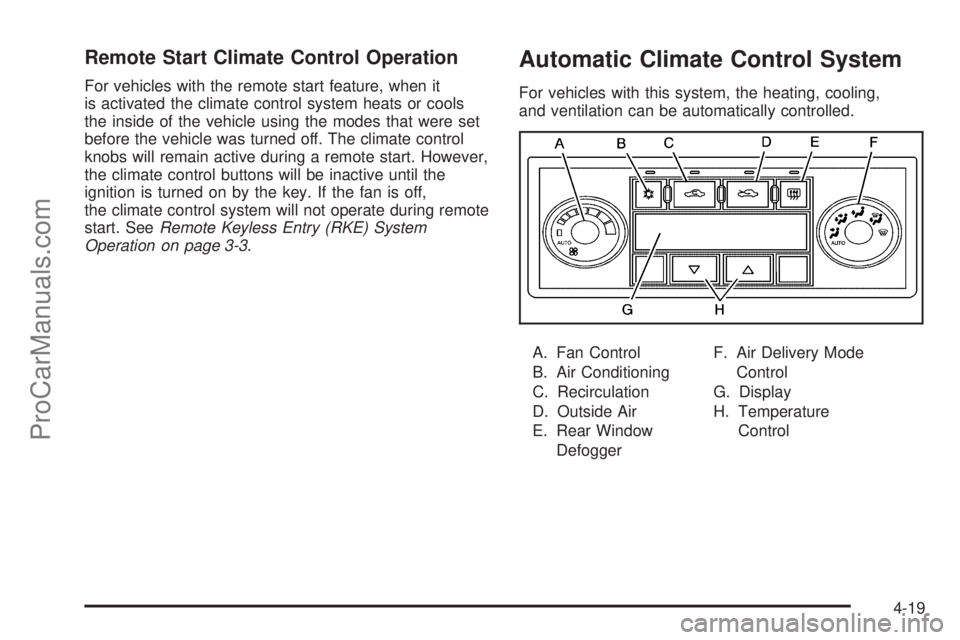
Automatic Climate Control System
For vehicles with this system, the heating, cooling,
and ventilation can be automatically controlled.
A. Fan Control
B. Air Conditioning
C. Recirculation
D. Outside Air
E. Rear Window
DefoggerF. Air Delivery Mode
Control
G. Display
H. Temperature
Control
4-19
ProCarManuals.com
Page 175 of 428
Remote Start Climate Control Operation
For vehicles with remote start, when it is activated the
climate control system heats and cools the inside of
the vehicle using the previous system settings before the
vehicle was turned off. The climate control knobs will
remain active during a remote start. However, the
climate control buttons will be inactive until the ignition
is turned on by the key. If the fan is off, the climate
control system will not operate during remote start.
With the automatic climate control system, the climate
control displays “RS” in place of the temperature to
indicate that remote start is activated. For best
performance, turn both the fan and mode knobs to
AUTO. If the temperature is cold enough and the mode
knob is set to AUTO, the system begins in defrost to
clear the windows. SeeRemote Keyless Entry
(RKE) System Operation on page 3-3.
Outlet Adjustment
There are four main air outlets on the instrument panel.
Move the lever located in the center of each outlet
side-to-side or up and down, to change the direction and
amount of airflow in the vehicle. The center thumbwheel
does not control the main outlets.
Rear Seat Air Outlet
For vehicles with this feature, the rear seat air outlet is
located in the center of the instrument panel above
the two main center outlets.
Use the thumbwheel in the center of the outlet to turn
the airflow on or off.
4-23
ProCarManuals.com
Page 195 of 428

ENGINE DISABLED
This message displays if the starting of the engine is
disabled. Have your vehicle serviced by your dealer/
retailer immediately.
ENG (Engine) PWR (Power) REDUCED
This message displays when the vehicle’s engine power
is reduced. Reduced engine power can affect the
vehicle’s ability to accelerate. If this message is on, but
there is no reduction in performance, proceed to
your destination. The performance may be reduced the
next time the vehicle is driven. The vehicle may be
driven at a reduced speed while this message is on, but
acceleration and speed may be reduced. Anytime this
message stays on, the vehicle should be taken to
your dealer/retailer for service as soon as possible.
ESC (Electronic Stability Control) ACTIVE
If your vehicle has Electronic Stability Control (ESC),
this message displays and the ESC/TCS light on
the instrument panel cluster flashes when ESC is
assisting you with directional control of the vehicle. You
may feel or hear the system working and see this
message displayed in the DIC. Slippery road conditions
may exist when this message is displayed, so adjust
your driving accordingly. This message may stay on for
a few seconds after ESC stops assisting you withdirectional control of the vehicle. This is normal when
the system is operating. SeeElectronic Stability Control
(ESC) on page 5-5andElectronic Stability Control
(ESC)/Traction Control System (TCS) Indicator/Warning
Light on page 4-32for more information.
ESC (Electronic Stability Control) OFF
If your vehicle has Electronic Stability Control (ESC),
this message displays and the ESC/TCS light on
the instrument panel cluster comes on solid when ESC
is turned off. Adjust your driving accordingly. See
Electronic Stability Control (ESC) on page 5-5and
Electronic Stability Control (ESC)/Traction Control
System (TCS) Indicator/Warning Light on page 4-32for
more information.
ICE POSSIBLE
This message displays when the outside air temperature
is cold enough to create icy road conditions. Adjust
your driving accordingly.
KEY FOB BATT (Battery) LOW
This message displays if the Remote Keyless Entry
(RKE) transmitter battery is low. Replace the battery in
the transmitter. See “Battery Replacement” under
Remote Keyless Entry (RKE) System Operation on
page 3-3.
4-43
ProCarManuals.com
Page 199 of 428

REMOTE START
If your vehicle has remote start, this feature allows
remote start to be turned off or on. Remote start allows
you to start the engine from outside of the vehicle
using your Remote Keyless Entry (RKE) transmitter.
When REMOTE START appears on the display, press
and hold the reset button for at least one second to
scroll through the available settings:
OFF:The remote start feature will be disabled.
ON (default):The remote start feature will be enabled.
SeeRemote Vehicle Start on page 3-5for more
information.
To select a setting and move on to the next feature,
press the information button while the desired setting is
displayed on the DIC.
LOCK HORN
This feature, which allows the vehicle’s horn to chirp
every time the lock button on the Remote Keyless Entry
(RKE) transmitter is pressed, can be enabled or
disabled. When LOCK HORN appears on the display,
press and hold the reset button for at least one second
to scroll through the available settings:
OFF (default):The horn will not chirp on the first press
of the lock button on the RKE transmitter. The horn
will still chirp on the second press.ON:The horn will chirp on the first press of the lock
button on the RKE transmitter.
SeeRemote Keyless Entry (RKE) System Operation on
page 3-3for more information.
To select a setting and move on to the next feature,
press the information button while the desired setting is
displayed on the DIC.
UNLOCK HORN
This feature, which allows the vehicle’s horn to chirp on
the first press of the unlock button on the Remote
Keyless Entry (RKE) transmitter, can be enabled or
disabled. When UNLOCK HORN appears on the display,
press and hold the reset button for at least one second
to scroll through the available settings:
OFF (default):The horn will not chirp when the unlock
button on the RKE transmitter is pressed.
ON:The horn will chirp on the first press of the unlock
button on the RKE transmitter.
SeeRemote Keyless Entry (RKE) System Operation on
page 3-3for more information.
To select a setting and move on to the next feature,
press the information button while the desired setting is
displayed on the DIC.
4-47
ProCarManuals.com
Page 200 of 428
LIGHT FLASH
This feature, which allows the vehicle’s exterior
hazard/turn signal lighting to flash every time the lock,
unlock, or trunk release buttons on the Remote Keyless
Entry (RKE) transmitter are pressed, can be enabled
or disabled. When LIGHT FLASH appears on the
display, press and hold the reset button for at least one
second to scroll through the available settings:
OFF:The exterior hazard/turn signal lighting will not
flash when the lock, unlock, or trunk release buttons on
the RKE transmitter are pressed.
ON (default):The exterior hazard/turn signal lighting
will flash when the lock, unlock, or trunk release buttons
on the RKE transmitter are pressed.
SeeRemote Keyless Entry (RKE) System Operation on
page 3-3for more information.
To select a setting and move on to the next feature,
press the information button while the desired setting is
displayed on the DIC.
DELAY LOCK
This feature, which delays the actual locking of the
vehicle, can be enabled or disabled. When DELAY
LOCK appears on the display, press and hold the reset
button for at least one second to scroll through the
available settings:
ON (default):The doors will not lock until five seconds
after the last door is closed. You can temporarily
override delayed locking by pressing the power lock
switch or the lock button on the Remote Keyless Entry
(RKE) transmitter a second time.
OFF:The doors will lock immediately when pressing
the power lock switch or the lock button on the
RKE transmitter.
SeePower Door Locks on page 3-8,Delayed Locking
on page 3-9, andRemote Keyless Entry (RKE)
System Operation on page 3-3for more information.
To select a setting and move on to the next feature,
press the information button while the desired setting is
displayed on the DIC.
4-48
ProCarManuals.com
Page 201 of 428

AUTO UNLK (Unlock)
This feature, which allows the vehicle to automatically
unlock certain doors, can be enabled or disabled. When
AUTO UNLK appears on the display, press and hold
the reset button for at least one second to scroll through
the available settings:
ALL (default):All of the doors will automatically unlock.
DRIVER:The driver’s door will automatically unlock.
NONE:None of the doors will automatically unlock. You
will need to manually unlock the doors.
SeeProgrammable Automatic Door Locks on page 3-9
for more information.
To select a setting and move on to the next feature,
press the information button while the desired setting is
displayed on the DIC.
UNLK (Unlock)
This screen displays only if DRIVER or ALL is selected
for the AUTO UNLK feature. This feature determines
when the automatic door unlocking will occur. When
UNLK appears on the display, press and hold the reset
button for at least one second to scroll through the
available settings:
KEY OFF:The door(s) will unlock when the key is
turned off.SHIFT TO P (Park) (default):The door(s) will unlock
when the vehicle is shifted into P (Park).
SeeProgrammable Automatic Door Locks on page 3-9
for more information.
To select a setting and move on to the next feature,
press the information button while the desired setting is
displayed on the DIC.
EXT (Exterior) LIGHTS
This feature, which allows the vehicle’s exterior
perimeter lighting to turn on each time the unlock button
on the Remote Keyless Entry (RKE) transmitter is
pressed, can be enabled or disabled. When EXT
LIGHTS appears on the display, press and hold the
reset button for at least one second to scroll through the
available settings:
OFF:The exterior perimeter lighting will not turn on
when the unlock button on the RKE transmitter is
pressed.
ON (default):The exterior perimeter lighting will turn on
when the unlock button on the RKE transmitter is
pressed.
SeeRemote Keyless Entry (RKE) System Operation on
page 3-3for more information.
4-49
ProCarManuals.com
Page 274 of 428

California Proposition 65 Warning
Most motor vehicles, including this one, contain and/or
emit chemicals known to the State of California to
cause cancer and birth defects or other reproductive
harm. Engine exhaust, many parts and systems, many
fluids, and some component wear by-products
contain and/or emit these chemicals.
California Perchlorate Materials
Requirements
Certain types of automotive applications, such as airbag
initiators, seat belt pretensioners, and lithium batteries
contained in remote keyless transmitters, may
contain perchlorate materials. Special handling may be
necessary. For additional information, see
www.dtsc.ca.gov/hazardouswaste/perchlorate.
Doing Your Own Service Work
{WARNING:
You can be injured and the vehicle could be
damaged if you try to do service work on a vehicle
without knowing enough about it.
•Be sure you have sufficient knowledge,
experience, the proper replacement parts,
and tools before attempting any vehicle
maintenance task.
•Be sure to use the proper nuts, bolts, and
other fasteners. English and metric fasteners
can be easily confused. If the wrong fasteners
are used, parts can later break or fall off. You
could be hurt.
If doing some of your own service work, use the proper
service manual. It tells you much more about how to
service the vehicle than this manual can. To order
the proper service manual, seeService Publications
Ordering Information on page 8-14.
This vehicle has an airbag system. Before attempting to
do your own service work, seeServicing Your
Airbag-Equipped Vehicle on page 2-73.
6-4
ProCarManuals.com