ABS SATURN AURA 2010 Owners Manual
[x] Cancel search | Manufacturer: SATURN, Model Year: 2010, Model line: AURA, Model: SATURN AURA 2010Pages: 428, PDF Size: 2.78 MB
Page 5 of 428
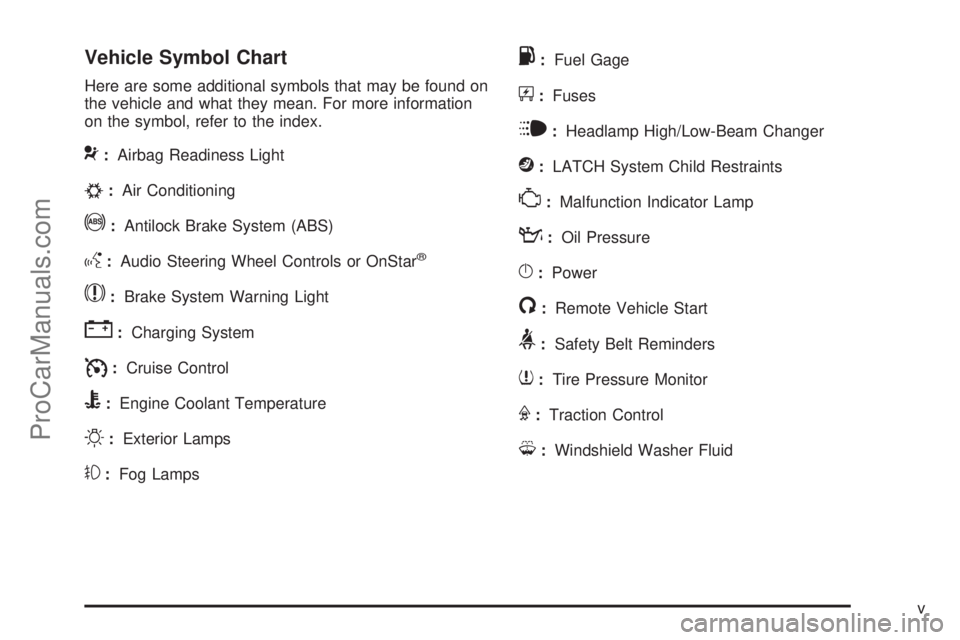
Vehicle Symbol Chart
Here are some additional symbols that may be found on
the vehicle and what they mean. For more information
on the symbol, refer to the index.
9:Airbag Readiness Light
#:Air Conditioning
!:Antilock Brake System (ABS)
g:Audio Steering Wheel Controls or OnStar®
$:Brake System Warning Light
":Charging System
I:Cruise Control
B:Engine Coolant Temperature
O:Exterior Lamps
#:Fog Lamps
.:Fuel Gage
+:Fuses
i:Headlamp High/Low-Beam Changer
j:LATCH System Child Restraints
*:Malfunction Indicator Lamp
::Oil Pressure
}:Power
/:Remote Vehicle Start
>:Safety Belt Reminders
7:Tire Pressure Monitor
F:Traction Control
M:Windshield Washer Fluid
v
ProCarManuals.com
Page 22 of 428

f:Select radio stations.
©¨:Seek or scan stations.
4:For vehicles with XM, MP3, WMA, or RDS features,
press to display additional text information related to
the current FM-RDS or XM station; or CD, MP3, WMA
song. Song title information will be displayed on the
top line of the display while the artist information will
be displayed on the bottom line, if the information
is available during XM, CD, MP3, or WMA playback.
When information is not available, “No Info” displays.
For more information about these and other radio
features, seeAudio System(s) on page 4-50and
Radio(s) on page 4-52.
Storing a Favorite Station
A maximum of 36 stations can be stored as favorites
using the six softkeys located below the radio station
frequency tabs and by using the radio FAV button. Press
FAV to go through up to six pages of favorites, each
having six favorite stations available per page. Each page
of favorites can contain any combination of AM, FM, or
XM stations.
SeeRadio(s) on page 4-52.
Setting the Clock
1. Turn the ignition key to ACC/ACCESSORY or
ON/RUN.
2. Press
Oto turn the radio on.
3. Press
Hand the HR, MIN, MM, DD, YYYY
(hour, minute, month, day, and year) displays.
4. Press the softkey located below any one of the tabs
that you want to change.
5. Increase or decrease the time or date by
turning
fclockwise or counterclockwise.
For detailed instructions on setting the clock for your
specific audio system, seeSetting the Clock on
page 4-51.
1-16
ProCarManuals.com
Page 153 of 428
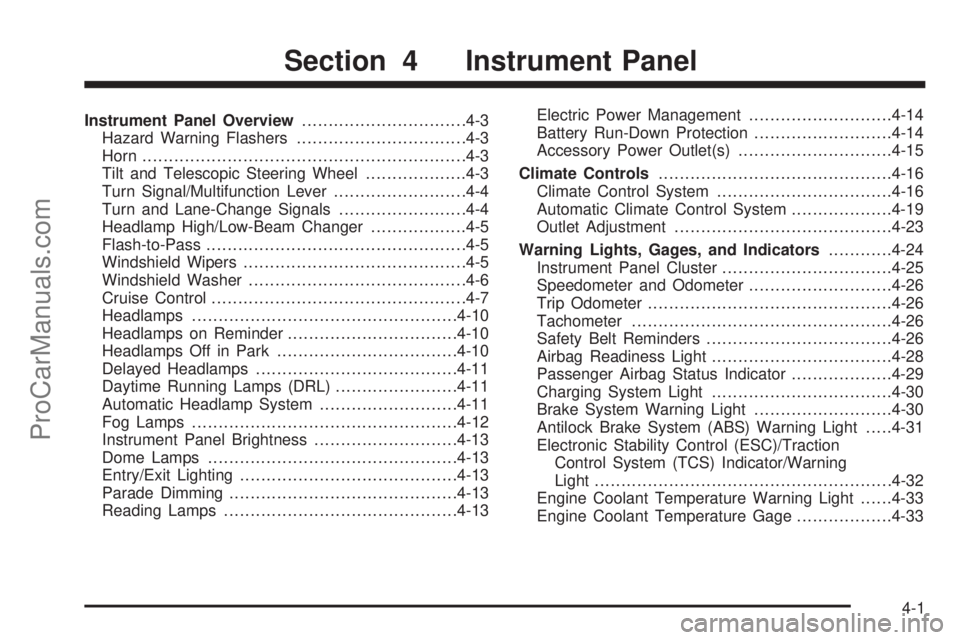
Instrument Panel Overview...............................4-3
Hazard Warning Flashers................................4-3
Horn .............................................................4-3
Tilt and Telescopic Steering Wheel...................4-3
Turn Signal/Multifunction Lever.........................4-4
Turn and Lane-Change Signals........................4-4
Headlamp High/Low-Beam Changer..................4-5
Flash-to-Pass.................................................4-5
Windshield Wipers..........................................4-5
Windshield Washer.........................................4-6
Cruise Control................................................4-7
Headlamps..................................................4-10
Headlamps on Reminder................................4-10
Headlamps Off in Park..................................4-10
Delayed Headlamps......................................4-11
Daytime Running Lamps (DRL).......................4-11
Automatic Headlamp System..........................4-11
Fog Lamps ..................................................4-12
Instrument Panel Brightness...........................4-13
Dome Lamps ...............................................4-13
Entry/Exit Lighting.........................................4-13
Parade Dimming...........................................4-13
Reading Lamps............................................4-13Electric Power Management...........................4-14
Battery Run-Down Protection..........................4-14
Accessory Power Outlet(s).............................4-15
Climate Controls............................................4-16
Climate Control System.................................4-16
Automatic Climate Control System...................4-19
Outlet Adjustment.........................................4-23
Warning Lights, Gages, and Indicators............4-24
Instrument Panel Cluster................................4-25
Speedometer and Odometer...........................4-26
Trip Odometer..............................................4-26
Tachometer................................................
.4-26
Safety Belt Reminders...................................4-26
Airbag Readiness Light..................................4-28
Passenger Airbag Status Indicator...................4-29
Charging System Light..................................4-30
Brake System Warning Light..........................4-30
Antilock Brake System (ABS) Warning Light.....4-31
Electronic Stability Control (ESC)/Traction
Control System (TCS) Indicator/Warning
Light........................................................4-32
Engine Coolant Temperature Warning Light......4-33
Engine Coolant Temperature Gage..................4-33
Section 4 Instrument Panel
4-1
ProCarManuals.com
Page 183 of 428
WARNING: (Continued)
crash. If the light is still on after the vehicle has
been pulled off the road and carefully stopped,
have the vehicle towed for service.
This light comes on briefly when the ignition key is
turned to ON/RUN. If it does not, have the vehicle
serviced by your dealer/retailer. If the system is working
normally the indicator light will then go off.
When the ignition is on, the brake system warning light
also comes on when the parking brake is set. The
light stays on if the parking brake does not fully release.
If it stays on after the parking brake is fully released,
it means there is a brake problem.
The Driver Information Center (DIC) may display a
BRAKE FLUID message. SeeDIC Warnings and
Messages on page 4-42for more information.
If the light comes on while driving, pull off the road and
stop carefully. The pedal may be harder to push or it
may go closer to the floor. It may take longer to stop. Try
turning off and restarting the vehicle one or two times,
if the light is still on, have the vehicle towed for service.
SeeTowing Your Vehicle on page 5-24.
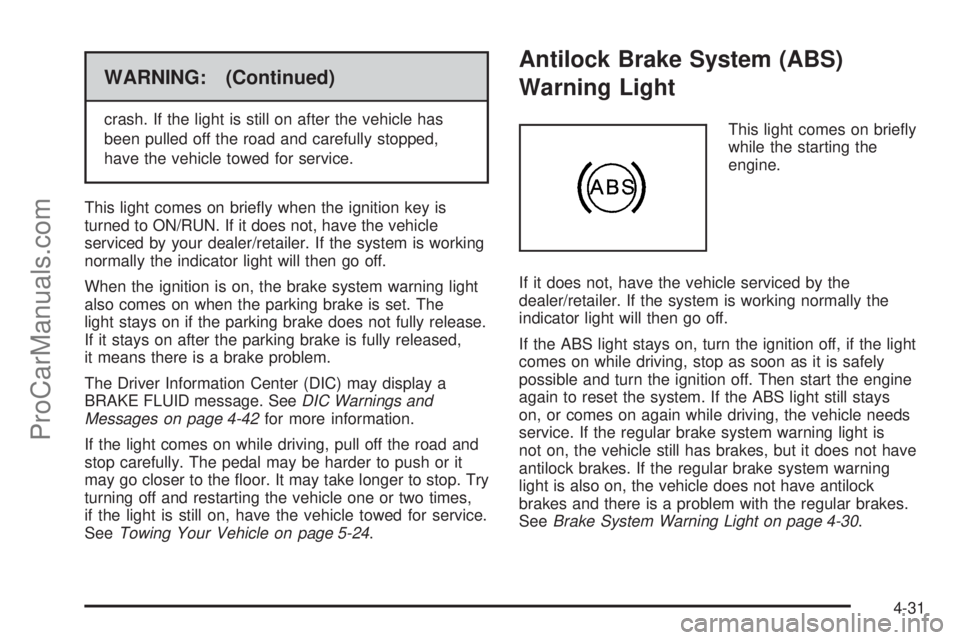
Antilock Brake System (ABS)
Warning Light
This light comes on briefly
while the starting the
engine.
If it does not, have the vehicle serviced by the
dealer/retailer. If the system is working normally the
indicator light will then go off.
If the ABS light stays on, turn the ignition off, if the light
comes on while driving, stop as soon as it is safely
possible and turn the ignition off. Then start the engine
again to reset the system. If the ABS light still stays
on, or comes on again while driving, the vehicle needs
service. If the regular brake system warning light is
not on, the vehicle still has brakes, but it does not have
antilock brakes. If the regular brake system warning
light is also on, the vehicle does not have antilock
brakes and there is a problem with the regular brakes.
SeeBrake System Warning Light on page 4-30.
4-31
ProCarManuals.com
Page 203 of 428

Notice:Contact your dealer/retailer before adding
any equipment.
Adding audio or communication equipment could
interfere with the operation of the vehicle’s engine,
radio, or other systems, and could damage them.
Follow federal rules covering mobile radio and
telephone equipment.
Notice:The chime signals related to safety belts,
parking brake, and other functions of your vehicle
operate through the radio/entertainment system.
If that equipment is replaced or additional equipment
is added to your vehicle, the chimes may not
work. Make sure that replacement or additional
equipment is compatible with your vehicle before
installing it. SeeAccessories and Modifications
on page 6-3.
The vehicle has Retained Accessory Power (RAP). With
RAP, the audio system can be played even after the
ignition is turned off. SeeRetained Accessory Power
(RAP) on page 3-20for more information.Setting the Clock
To set the time and date:
1. Turn the ignition key to ACC/ACCESSORY or
ON/RUN. Press
Oto turn the radio on.
2. Press
Hand the HR, MIN, MM, DD, YYYY (hour,
minute, month, day, and year) displays.
3. Press the softkey located below any one of the tabs
that you want to change.
4. To increase the time or date do one of the following:
•Press the softkey located below the selected tab.
•Press¨SEEK, or\FWD.
•Turnfclockwise.
5. To decrease the time or date do one of the
following:
•Press©SEEK orsREV.
•Turnfcounterclockwise.
The date does not automatically display. To see the
date press
Hwhile the radio is on. The date with display
times out after a few seconds and goes back to the
normal radio and time display.
4-51
ProCarManuals.com
Page 206 of 428
¨SEEK:Press to seek or scan stations with a strong
signal in the selected band.
•To seek stations, press and release¨SEEK to go
to the next station and stay there.
•To scan stations, press and hold¨SEEK for a
few seconds until the radio beeps once. The
radio goes to a station, plays for a few seconds,
then goes to the next station. Press
¨SEEK again
to stop scanning.
•To scan preset stations in the selected band, press
and hold
¨SEEK for four seconds until a double
beep sounds. The radio goes to a stored preset,
plays for a few seconds, then goes to the next
stored preset. Press
¨SEEK again to stop
scanning preset stations.
4(Information):For vehicles with XM, MP3, WMA, or
RDS features, press
4to display additional text
information related to the current FM-RDS or XM station;
or CD, MP3, WMA song. Song title information will be
displayed on the top line of the display while the
artist information will be displayed on the bottom line, if
the information is available during XM, CD, MP3, or
WMA playback. When information is not available, “No
Info” displays.
Storing a Radio Station
Drivers are encouraged to set up radio station favorites
while the vehicle is in P (Park). Tune to favorite
stations using the softkeys, favorites button, and steering
wheel controls. SeeDefensive Driving on page 5-2.
FAV (Favorites):A maximum of 36 stations can
be stored as favorites using the six softkeys located
below the radio station frequency tabs and by using the
radio favorites page button (FAV button). Press FAV
to go through up to six pages of favorites, each having
six favorite stations available per page. Each page
of favorites can contain any combination of AM, FM, or
XM stations. The current balance/fade and tone
settings are also stored with the favorite stations.
To store a station as a favorite:
1. Tune to the desired radio station and set the
balance/fade and tone settings to the desired levels.
2. Press FAV to display the page where to store the
station.
3. Press and hold one of the six softkeys until a beep
sounds.
4. Repeat the steps for each radio station to be stored
as a favorite.
4-54
ProCarManuals.com
Page 207 of 428
To setup the number of favorites pages:
1. Press MENU to display the radio setup menu.
2. Press the softkey located below the FAV 1-6 tab.
3. Select the desired number of favorites pages
by pressing the softkey located below the displayed
page numbers.
4. Press FAV, or let the menu time out, to return to
the original main radio screen showing the radio
station frequency tabs and to begin programming
favorites.
Auto Text (Satellite Radio Service, CD, MP3, and
WMA features):If additional information is available
for the current song being played, Auto Text will
automatically page/scroll the information every
three seconds above the FAV presets on the radio
display.
To activate Auto Text:
1. Press MENU to display the radio setup menu.
2. Press the softkey under AUTO TXT tab on the radio
display.
3. Press the softkey under the ON tab on the radio
display.
If
4is pressed and the song title or artist information
is longer than what can be displayed, the extra
information will page every three seconds when Auto
Text is activated.
Setting the Tone
(Bass/Midrange/Treble)
BASS/MID/TREB (Bass, Midrange, or Treble):The
radio may display some or all tones such as BASS, MID,
and TREB.
To adjust the tone settings:
1. Press
funtil the tone control tabs display.
2. Press the softkey below the desired tab, then turn
fto adjust the highlighted setting. The highlighted
setting can also be adjusted by pressing either
SEEK arrow, or by pressing
\FWD orsREV.
The radio may be capable of adjusting bass, midrange,
or treble to the middle position by pressing the
softkey below the BASS, MID, or TREB tab for more
than two seconds. The radio beeps once and the level
adjusts to the middle position.
The radio may also be capable of adjusting all tone and
speaker controls to the middle position by pressing
f
for more than two seconds until the radio beeps once.
If a station’s frequency is weak, or has static, decrease
the treble.
4-55
ProCarManuals.com
Page 237 of 428
Your Driving, the Road, and the Vehicle............5-2
Defensive Driving...........................................5-2
Drunk Driving.................................................5-2
Control of a Vehicle........................................5-3
Braking.........................................................5-3
Antilock Brake System (ABS)...........................5-4
Braking in Emergencies...................................5-5
Electronic Stability Control (ESC)......................5-5
Traction Control System (TCS).........................5-7
Steering........................................................5-9
Off-Road Recovery.......................................5-11
Passing.......................................................5-11
Loss of Control.............................................5-11
Driving at Night............................................5-12Driving in Rain and on Wet Roads..................5-13
Before Leaving on a Long Trip.......................5-14
Highway Hypnosis........................................5-14
Hill and Mountain Roads................................5-15
Winter Driving..............................................5-16
If Your Vehicle is Stuck in Sand, Mud, Ice,
or Snow...................................................5-18
Rocking Your Vehicle to Get It Out.................5-18
Loading the Vehicle......................................5-19
Towing..........................................................5-24
Towing Your Vehicle.....................................5-24
Recreational Vehicle Towing...........................5-24
Towing a Trailer...........................................5-27
Section 5 Driving Your Vehicle
5-1
ProCarManuals.com
Page 240 of 428
traffic and allowing realistic following distances
eliminates a lot of unnecessary braking. That means
better braking and longer brake life.
If the engine ever stops while the vehicle is being driven,
brake normally but do not pump the brakes. If the brakes
are pumped, the pedal could get harder to push down. If
the engine stops, there will still be some power brake
assist but it will be used when the brake is applied. Once
the power assist is used up, it can take longer to stop and
the brake pedal will be harder to push.
Adding non-dealer/non-retailer accessories can affect
vehicle performance. SeeAccessories and Modications
on page 6-3.
Antilock Brake System (ABS)
This vehicle has the Antilock Brake System (ABS), an
advanced electronic braking system that helps prevent a
braking skid.
When the engine is started and the vehicle begins to
drive away, ABS checks itself. A momentary motor
or clicking noise might be heard while this test is going
on, and it might even be noticed that the brake pedal
moves a little. This is normal.If there is a problem with
ABS, this warning light
stays on. SeeAntilock
Brake System (ABS)
Warning Light on
page 4-31.
Let us say the road is wet and you are driving safely.
Suddenly, an animal jumps out in front of you. You slam
on the brakes and continue braking. Here is what
happens with ABS:
A computer senses that the wheels are slowing down. If
one of the wheels is about to stop rolling, the computer
will separately work the brakes at each wheel.
ABS can change the brake pressure to each wheel, as
required, faster than any driver could. This can help
the driver steer around the obstacle while braking hard.
As the brakes are applied, the computer keeps
receiving updates on wheel speed and controls braking
pressure accordingly.
Remember: ABS does not change the time needed to get
a foot up to the brake pedal or always decrease stopping
distance. If you get too close to the vehicle in front of you,
there will not be enough time to apply the brakes if that
vehicle suddenly slows or stops. Always leave enough
room up ahead to stop, even with ABS.
5-4
ProCarManuals.com
Page 241 of 428
Using ABS
Do not pump the brakes. Just hold the brake pedal
down firmly and let antilock work. The antilock pump or
motor might be heard operating and the brake pedal
might be felt to pulsate, but this is normal.
Braking in Emergencies
ABS allows the driver to steer and brake at the same
time. In many emergencies, steering can help more than
even the very best braking.
Brake Assist
This vehicle has a Brake Assist feature designed to
assist the driver in stopping or decreasing vehicle speed
in emergency driving conditions. This feature uses the
stability system hydraulic brake control module to
supplement the power brake system under conditions
where the driver has quickly and forcefully applied
the brake pedal in an attempt to quickly stop or slow
down the vehicle. The stability system hydraulic
brake control module increases brake pressure at each
corner of the vehicle until the ABS activates. Minor
brake pedal pulsations or pedal movement during this
time is normal and the driver should continue to
apply the brake pedal as the driving situation dictates
The Brake Assist feature will automatically disengage
when the brake pedal is released or brake pedal
pressure is quickly decreased.
Electronic Stability Control (ESC)
The vehicle has an Electronic Stability Control (ESC)
system which combines antilock brake, traction
and stability control systems and helps the driver
maintain directional control of the vehicle in most driving
conditions.
When you first start the vehicle and begin to drive away,
the system performs several diagnostic checks to
ensure there are no problems. The system may be
heard or felt while it is working. This is normal and does
not mean there is a problem with the vehicle. The
system should initialize before the vehicle reaches
32 km/h (20 mph).
If the system fails to turn on or activate, the ESC/TCS
light will be on solid, and the ESC OFF or SERVICE
ESC message will be displayed.
For more information, seeDriver Information Center
(DIC) on page 4-39.
This light will flash on the
instrument panel cluster
when the ESC system
is both on and activated.
5-5
ProCarManuals.com