radio SATURN AURA 2010 Service Manual
[x] Cancel search | Manufacturer: SATURN, Model Year: 2010, Model line: AURA, Model: SATURN AURA 2010Pages: 428, PDF Size: 2.78 MB
Page 326 of 428
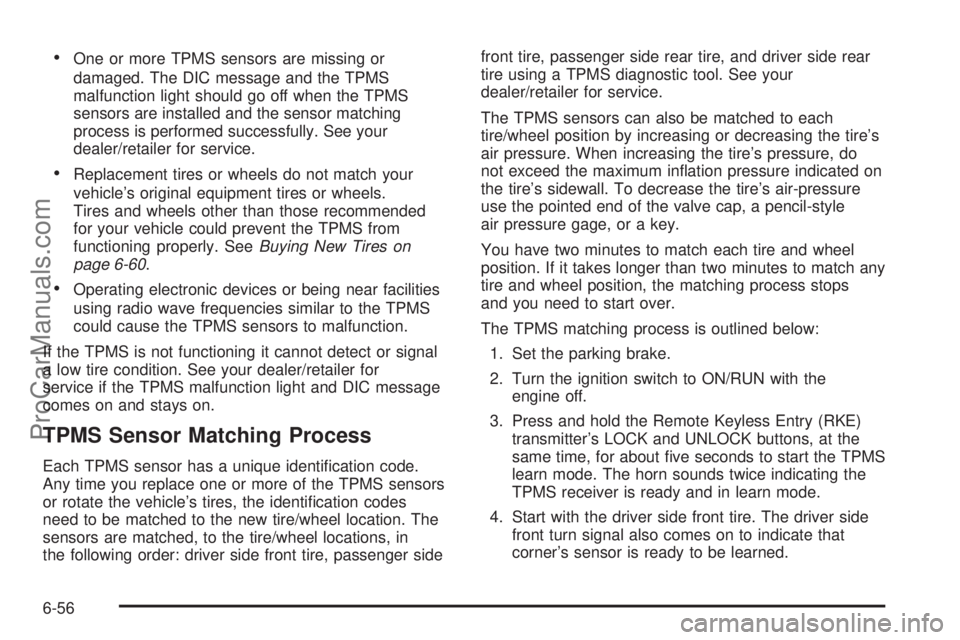
•One or more TPMS sensors are missing or
damaged. The DIC message and the TPMS
malfunction light should go off when the TPMS
sensors are installed and the sensor matching
process is performed successfully. See your
dealer/retailer for service.
•Replacement tires or wheels do not match your
vehicle’s original equipment tires or wheels.
Tires and wheels other than those recommended
for your vehicle could prevent the TPMS from
functioning properly. SeeBuying New Tires on
page 6-60.
•Operating electronic devices or being near facilities
using radio wave frequencies similar to the TPMS
could cause the TPMS sensors to malfunction.
If the TPMS is not functioning it cannot detect or signal
a low tire condition. See your dealer/retailer for
service if the TPMS malfunction light and DIC message
comes on and stays on.
TPMS Sensor Matching Process
Each TPMS sensor has a unique identification code.
Any time you replace one or more of the TPMS sensors
or rotate the vehicle’s tires, the identification codes
need to be matched to the new tire/wheel location. The
sensors are matched, to the tire/wheel locations, in
the following order: driver side front tire, passenger sidefront tire, passenger side rear tire, and driver side rear
tire using a TPMS diagnostic tool. See your
dealer/retailer for service.
The TPMS sensors can also be matched to each
tire/wheel position by increasing or decreasing the tire’s
air pressure. When increasing the tire’s pressure, do
not exceed the maximum inflation pressure indicated on
the tire’s sidewall. To decrease the tire’s air-pressure
use the pointed end of the valve cap, a pencil-style
air pressure gage, or a key.
You have two minutes to match each tire and wheel
position. If it takes longer than two minutes to match any
tire and wheel position, the matching process stops
and you need to start over.
The TPMS matching process is outlined below:
1. Set the parking brake.
2. Turn the ignition switch to ON/RUN with the
engine off.
3. Press and hold the Remote Keyless Entry (RKE)
transmitter’s LOCK and UNLOCK buttons, at the
same time, for about five seconds to start the TPMS
learn mode. The horn sounds twice indicating the
TPMS receiver is ready and in learn mode.
4. Start with the driver side front tire. The driver side
front turn signal also comes on to indicate that
corner’s sensor is ready to be learned.
6-56
ProCarManuals.com
Page 369 of 428

Fuses Usage
POWER
MIRRORSPower Mirrors
EPS Electronic Power Steering
RUN/CRANKCruise Control Switch, Passenger
Airbag Status Indicator
HVAC
BLOWER HIGHHeating Ventilation Air Conditioning
Blower - High Speed Relay
CLUSTER/
THEFTInstrument Panel Cluster, Theft
Deterrent System
ONSTAR OnStar
®
NOT
INSTALLEDNot Used
AIRBAG (IGN) Airbag (Ignition)
HVAC CTRL
(BATT)Heating Ventilation Air Conditioning
Control Diagnostic Link Connector
(Battery)
PEDAL Not Used
WIPER SW Windshield Wiper/Washer Switch
IGN SENSOR Ignition Switch
STRG WHL
ILLUMSteering Wheel Illumination
NOT
INSTALLEDNot Used
RADIO Audio System
INTERIOR
LIGHTSInterior Lamps
Fuses Usage
NOT
INSTALLEDNot Used
POWER
WINDOWSPower Windows
HVAC
CTRL (IGN)Heating Ventilation Air Conditioning
Control (Ignition)
HVAC
BLOWERHeating Ventilation Air Conditioning
Blower Switch
DOOR LOCK Door Locks
ROOF/HEAT
SEATSunroof, Heated Seat
NOT
INSTALLEDNot Used
NOT
INSTALLEDNot Used
AIRBAG
(BATT)Airbag (Battery)
SPARE FUSE
HOLDERSpare Fuse Holder
SPARE FUSE
HOLDERSpare Fuse Holder
SPARE FUSE
HOLDERSpare Fuse Holder
SPARE FUSE
HOLDERSpare Fuse Holder
FUSE PULLER Fuse Puller
6-99
ProCarManuals.com
Page 374 of 428

Fuses Usage
9 Not Used
10 Sunroof Controls
11 Not Used
12 Not Used
13 Audio Amplifier
14 Heated Seat Controls
15 Not Used
16Remote Keyless Entry (RKE)
System, XM™ Satellite
Radio, UGDO
17 Back-up Lamps
18 Not Used
19 Not Used
20 Auxiliary Power Outlets
21 Not Used
22 Trunk Release
23 Rear Defog
24 Heated Mirrors
25 Fuel PumpRelays Usage
26 Rear Window Defogger
27 Park Lamps
28 Not Used
29 Not Used
30 Not Used
31 Not Used
32 Not Used
33 Back-up Lamps
34 Not Used
35 Not Used
36 Trunk Release
37 Fuel Pump
38 (Diode) Cargo Lamp
6-104
ProCarManuals.com
Page 393 of 428

Customer Assistance and Information...............8-2
Customer Satisfaction Procedure......................8-2
Online Owner Center......................................8-4
Customer Assistance for Text Telephone
(TTY) Users...............................................8-5
Customer Assistance Offices............................8-5
GM Mobility Reimbursement Program................8-6
Roadside Assistance Program..........................8-6
Scheduling Service Appointments.....................8-8
Courtesy Transportation Program......................8-9
Collision Damage Repair................................8-10Reporting Safety Defects................................8-13
Reporting Safety Defects to the United
States Government....................................8-13
Reporting Safety Defects to the Canadian
Government..............................................8-14
Reporting Safety Defects to Saturn..................8-14
Service Publications Ordering Information.........8-14
Vehicle Data Recording and Privacy................8-15
Event Data Recorders...................................8-16
Navigation System........................................8-16
Radio Frequency Identification (RFID)..............8-17
Radio Frequency Statement...........................8-17
Section 8 Customer Assistance Information
8-1
ProCarManuals.com
Page 407 of 428

In Canada, information relating to product service
bulletins can be obtained by contacting your Saturn
retailer.
Service Bulletins
Saturn regularly sends its retailers useful service
bulletins about Saturn products. Saturn monitors product
performance in the field. We then prepare bulletins for
servicing our products better. You can get these
bulletins, too.
Bulletins cover various subjects. Some pertain to the
proper use and care of your vehicle. Some describe
costly repairs. Others describe inexpensive repairs
which, if done on time with the latest parts, may avoid
future costly repairs.
Some bulletins tell a technician how to repair a new or
unexpected condition. Others describe a quicker
way to fix your vehicle. They can help a technician
service your vehicle better.
Most bulletins apply to conditions affecting a small
number of vehicles. Your Saturn retailer or a qualified
technician may have to determine if a specific
bulletin applies to your vehicle. To order Saturn bulletins,
call Saturn Publications at 1-800-2-SATURN or visit
saturn-publications.com to order online.
Vehicle Data Recording and
Privacy
Your Saturn vehicle has a number of sophisticated
computers that record information about the vehicle’s
performance and how it is driven. For example,
your vehicle uses computer modules to monitor and
control engine and transmission performance, to monitor
the conditions for airbag deployment and deploy
airbags in a crash and, if so equipped, to provide
antilock braking to help the driver control the vehicle.
These modules may store data to help your
dealer/retailer technician service your vehicle. Some
modules may also store data about how you operate the
vehicle, such as rate of fuel consumption or average
speed. These modules may also retain the owner’s
personal preferences, such as radio pre-sets, seat
positions, and temperature settings.
8-15
ProCarManuals.com
Page 409 of 428

Radio Frequency
Identication (RFID)
RFID technology is used in some vehicles for functions
such as tire pressure monitoring and ignition system
security, as well as in connection with conveniences
such as key fobs for remote door locking/unlocking and
starting, and in-vehicle transmitters for garage door
openers. RFID technology in Saturn vehicles does not
use or record personal information or link with any other
Saturn system containing personal information.
Radio Frequency Statement
This vehicle has systems that operate on a radio
frequency that comply with Part 15 of the Federal
Communications Commission (FCC) Rules and with
RSS-210/211 of Industry and Science Canada.
Operation is subject to the following two conditions:
1. The device may not cause interference.
2. The device must accept any interference received,
including interference that may cause undesired
operation of the device.
Changes or modifications to any of these systems by
other than an authorized service facility could void
authorization to use this equipment.
8-17
ProCarManuals.com
Page 411 of 428

A
Accessories and Modifications............................ 6-3
Accessory Power............................................3-20
Accessory Power Outlets.................................4-15
Adding Washer Fluid.......................................6-32
Additional Factors Affecting System Operation.....2-73
Additional Program Information.........................8-10
Additional Required Services.............................. 7-4
Additives, Fuel................................................. 6-7
Add-On Electrical Equipment............................6-96
Adjusting the Speakers (Balance/Fade)..............4-56
Adjustment
Chime Level...............................................4-84
Air Cleaner/Filter, Engine.................................6-21
Air Conditioning..............................................4-16
Airbag
Adding Equipment to Your Airbag-Equipped
Vehicle...................................................2-74
Airbag System
How Does an Airbag Restrain?......................2-65
Passenger Sensing System...........................2-68
Servicing Your Airbag-Equipped Vehicle..........2-73
What Makes an Airbag Inflate?......................2-65
What Will You See After an Airbag Inflates?....2-66
When Should an Airbag Inflate?....................2-63
Where Are the Airbags?...............................2-61Airbags.........................................................2-75
Passenger Status Indicator...........................4-29
Readiness Light..........................................4-28
System Check.............................................2-58
AM ...............................................................4-83
Antenna
Backglass...................................................4-84
Antenna, XM™ Satellite Radio Antenna
System......................................................4-84
Antilock Brake System (ABS)............................. 5-4
Warning Light.............................................4-31
Appearance Care
Aluminum Wheels........................................6-94
Care of Safety Belts....................................6-91
Chemical Paint Spotting...............................6-95
Cleaning Exterior Lamps/Lenses....................6-92
Fabric/Carpet..............................................6-90
Finish Care.................................................6-92
Finish Damage............................................6-95
Instrument Panel, Vinyl, and Other Plastic
Surfaces.................................................6-91
Interior Cleaning..........................................6-89
Leather......................................................6-91
Sheet Metal Damage...................................6-94
Tires..........................................................6-94
Underbody Maintenance...............................6-95
Washing Your Vehicle...................................6-92
Weatherstrips..............................................6-92
Windshield and Wiper Blades........................6-93
1
ProCarManuals.com
Page 412 of 428

Arming the System.........................................3-16
Assistance Program, Roadside........................... 8-6
Audio System.........................................4-50, 4-69
Audio Steering Wheel Controls......................4-82
Radio Reception..........................................4-83
Rear Seat (RSA).........................................4-79
Setting the Clock.........................................4-51
Theft-Deterrent Feature................................4-81
XM™ Satellite Radio Antenna System............4-84
Audio System(s).............................................4-52
Automatic Climate Control System.....................4-19
Automatic Dimming Mirror Operation..................3-32
Automatic Headlamp System............................4-11
Automatic Transmission
Fluid..........................................................6-23
Operation...................................................3-23
Automatic Transmission Shift Lock Control
System Check.............................................. 7-8
B
Backglass Antenna..........................................4-84
Backing Up....................................................5-31
Battery..........................................................6-35
Electric Power Management..........................4-14
Run-Down Protection...................................4-14
Battery Replacement......................................... 3-5Belt Routing, Engine.......................................7-12
Blizzard Conditions..........................................5-16
Bluetooth Controls...........................................4-69
Bluetooth
®.....................................................4-68
Brake
Emergencies................................................ 5-5
Brake Adjustment............................................6-35
Brake Fluid....................................................6-33
Brake Pedal Travel.........................................6-35
Brake Wear...................................................6-34
Brakes..........................................................6-33
Antilock....................................................... 5-4
Parking......................................................3-26
System Warning Light..................................4-30
Braking........................................................... 5-3
Braking in Emergencies..................................... 5-5
Break-In, New Vehicle.....................................3-19
Bulb Replacement...........................................6-43
Fog Lamps .................................................4-12
Halogen Bulbs............................................6-41
Headlamp Aiming........................................6-40
Headlamps.................................................6-41
License Plate Lamps....................................6-43
Taillamps, Turn Signal, Sidemarker, Stoplamps,
and Back-Up Lamps.................................6-41
Buying New Tires...........................................6-60
2
ProCarManuals.com
Page 416 of 428

Electronic Immobilizer Operation
PASS-Key®III+...........................................3-17
Electronic Stability Control................................. 5-5
Electronic Stability Control Indicator Light...........4-32
Emergency Trunk Release Handle.....................3-12
Emissions Inspection and Maintenance
Programs...................................................4-36
Ending a Call.................................................4-76
Engine
Air Cleaner/Filter.........................................6-21
Check and Service Engine Soon Lamp...........4-34
Compartment Overview................................6-14
Coolant......................................................6-25
Coolant Heater............................................3-22
Coolant Temperature Gage...........................4-33
Coolant Temperature Warning Light................4-33
Cooling System...........................................6-24
Drive Belt Routing.......................................7-12
Exhaust.....................................................3-30
Oil .............................................................6-17
Overheated Protection Operating Mode...........6-30
Overheating................................................6-28
Starting......................................................3-20
Engine Cooling When Trailer Towing..................5-33
Engine Identification........................................6-96
Engine Oil
Life System................................................6-20
Engine Oil Additives / Engine Oil Flushes...........6-20Entering Personalization Menu..........................4-46
Entry/Exit Lighting...........................................4-13
Erasing Universal Home Remote Buttons...........3-40
Event Data Recorders.....................................8-16
Exiting Personalization Menu............................4-50
Express Window Anti-Pinch Feature...................3-15
Express Window Anti-Pinch Override.................3-15
Express-Down Window....................................3-14
Express-Up Window........................................3-14
Extender, Safety Belt
.......................................2-31
Exterior Mirrors...............................................1-10
F
Federal Communications Commission (FCC) and
Industry and Science Canada........................6-54
Filter
Engine Air Cleaner......................................6-21
Finding a Category (CAT) Station (XM Satellite
Radio Service Only).....................................4-56
Finding a Station............................................4-53
Finish Damage...............................................6-95
Flashers, Hazard Warning.................................. 4-3
Flash-to-Pass................................................... 4-5
Flat Tire........................................................6-66
Flat Tire, Changing.........................................6-74
Flat Tire, Storing.............................................6-84
6
ProCarManuals.com
Page 421 of 428
Other Information............................................4-78
Other Rainy Weather Tips................................5-14
Outlet Adjustment............................................4-23
Outlets
Accessory Power.........................................4-15
Outside
Automatic Dimming Mirror.............................3-34
Heated Mirrors............................................3-34
Power Mirrors.............................................3-34
Overheated Engine Protection
Operating Mode..........................................6-30
Owner Checks and Services.............................. 7-8
Owner Publications.........................................8-14
Owners, Canadian.............................................. iii
P
Paint, Damage...............................................6-95
Pairing..........................................................4-69
Parade Dimming.............................................4-13
Park
Headlamps Off in Park.................................4-10
Shifting Into................................................3-27
Shifting Out of............................................3-28
Parking
Brake........................................................3-26
Over Things That Burn.................................3-29Parking Brake and Automatic Transmission
P (Park) Mechanism Check............................. 7-9
Parking on Hills..............................................5-32
Passenger Airbag Status Indicator.....................4-29
Passenger Safety Belt Reminder Light...............4-27
Passenger Sensing System..............................2-68
Passing.................................................5-11, 5-31
PASS-Key
®III+ Electronic Immobilizer...............3-17
PASS-Key®III+ Electronic Immobilizer
Operation...................................................3-17
Perchlorate Materials Requirements, California...... 6-4
Personalization Menu Modes............................4-46
Phone
Bluetooth
®..................................................4-68
Playing a CD.................................................4-58
Playing a CD-R or CD-RW MP3.......................4-63
Playing an MP3 CD-R or CD-RW Disc...............4-58
Playing the Radio...........................................4-53
Power
Door Locks.................................................. 3-8
Electrical System.........................................6-97
Lift Seat....................................................... 2-9
Lumbar Controls........................................... 2-5
Retained Accessory (RAP)............................3-20
Seat............................................................ 2-5
Steering Fluid.............................................6-30
Windows....................................................3-14
11
ProCarManuals.com