door lock SATURN AURA 2010 Owners Manual
[x] Cancel search | Manufacturer: SATURN, Model Year: 2010, Model line: AURA, Model: SATURN AURA 2010Pages: 428, PDF Size: 2.78 MB
Page 1 of 428

In Brief........................................................... 1-1
Instrument Panel
........................................ 1-2
Initial Drive Information
............................... 1-3
Vehicle Features
......................................1-15
Performance and Maintenance
...................1-20
Seats and Restraint System............................. 2-1
Head Restraints
......................................... 2-2
Front Seats
............................................... 2-4
Rear Seats
..............................................2-10
Safety Belts
.............................................2-12
Child Restraints
.......................................2-32
Airbag System
.........................................2-58
Restraint System Check
............................2-75
Features and Controls..................................... 3-1
Keys
........................................................ 3-2
Doors and Locks
....................................... 3-8
Windows
.................................................3-13
Theft-Deterrent Systems
............................3-15
Starting and Operating Your Vehicle
...........3-19
Mirrors
....................................................3-32Universal Home Remote System
................3-34
Storage Areas
.........................................3-41
Sunroof
..................................................3-42
Instrument Panel............................................. 4-1
Instrument Panel Overview
.......................... 4-3
Climate Controls
......................................4-16
Warning Lights, Gages, and Indicators
........4-24
Driver Information Center (DIC)
..................4-39
Audio System(s)
.......................................4-50
Driving Your Vehicle....................................... 5-1
Your Driving, the Road, and the Vehicle
....... 5-2
Towing
...................................................5-24
Service and Appearance Care.......................... 6-1
Service
..................................................... 6-3
Fuel
......................................................... 6-5
Checking Things Under the Hood
...............6-12
Headlamp Aiming
.....................................6-40
Bulb Replacement
....................................6-41
Windshield Wiper Blade Replacement
.........6-44
Tires
......................................................6-44
2010 Saturn AURA Owner ManualM
ProCarManuals.com
Page 7 of 428
Instrument Panel..............................................1-2
Initial Drive Information....................................1-3
Remote Keyless Entry (RKE) System................1-4
Remote Vehicle Start......................................1-4
Door Locks....................................................1-5
Trunk Release...............................................1-5
Windows.......................................................1-5
Seat Adjustment.............................................1-6
Second Row Seats.........................................1-8
Safety Belt....................................................1-9
Sensing System for Passenger Airbag...............1-9
Mirror Adjustment.........................................1-10
Steering Wheel Adjustment............................1-11
Interior Lighting............................................1-11
Exterior Lighting...........................................1-12
Windshield Wiper/Washer...............................1-12
Climate Controls...........................................1-13
Transmission................................................1-14Vehicle Features.............................................1-15
Radio(s)......................................................1-15
Satellite Radio..............................................1-17
Portable Audio Devices (Auxiliary Input or
USB Port)................................................1-17
Steering Wheel Controls................................1-17
Bluetooth
®...................................................1-18
Driver Information Center (DIC).......................1-18
Cruise Control..............................................1-19
Power Outlets..............................................1-20
Performance and Maintenance.........................1-20
Traction Control System (TCS).......................1-20
Electronic Stability Control (ESC)....................1-21
Tire Pressure Monitor....................................1-21
Tire Sealant and Compressor Kit....................1-22
Engine Oil Life System..................................1-22
Fuel E85 (85% Ethanol)................................1-22
Driving for Better Fuel Economy.....................1-23
Roadside Assistance Program........................1-23
OnStar
®......................................................1-24
Section 1 In Brief
1-1
ProCarManuals.com
Page 10 of 428

Remote Keyless Entry (RKE)
System
The RKE transmitter is used to remotely lock and
unlock the doors from up to 60 m (195 feet) away
from the vehicle.
Press
Kto unlock the
driver door. Press again
within five seconds to
unlock all remaining doors.
Press
Qto lock all doors.
Lock and unlock feedback can be personalized.
Press and hold
Vfor approximately one second to
open the trunk.
Press
Land release to locate the vehicle.Press
Land hold for three seconds to sound the panic
alarm.
Press
Lagain to cancel the panic alarm.
SeeKeys on page 3-2andRemote Keyless
Entry (RKE) System Operation on page 3-3.
Remote Vehicle Start
With this feature the engine can be started from outside
of the vehicle.
Starting the Vehicle
1. Aim the RKE transmitter at the vehicle.
2. Press
Q.
3. Immediately after completing Step 2, press and
hold
/until the turn signal lamps flash.
When the vehicle starts, the parking lamps will turn
on and remain on as long as the engine is running.
The doors will be locked and the climate control system
may come on.
The engine will continue to run for 10 minutes. Repeat
the steps for a 10-minute time extension. Remote
start can be extended only once.
1-4
ProCarManuals.com
Page 11 of 428

Canceling a Remote Start
To cancel a remote start:
•Aim the RKE transmitter at the vehicle and press
and hold
/until the parking lamps turn off.
•Turn on the hazard warning flashers.
•Turn the ignition switch out of LOCK/OFF position
and then back to LOCK/OFF.
SeeRemote Vehicle Start on page 3-5.
Door Locks
Manual Locks
To operate the locks, use the key or the Remote
Keyless Entry (RKE) transmitter from outside the
vehicle, and the manual lock knob from the inside.
SeeDoor Locks on page 3-8.
Power Door Locks
Power door lock switches are located on the
front doors.
Lock or unlock the doors by pressing the inboard or
outboard sides of the switch.
For more information, see:
•Power Door Locks on page 3-8.
Trunk Release
In addition to the trunk release button on the RKE
transmitter, there is a remote release
Vbutton located
on the driver door near the map pocket.
For more information seeTrunk on page 3-11.
Windows
On vehicles with power
windows, the switches
are on the driver door
armrest.
Each passenger door has a switch that controls only
that window.
Press the front of the switch to open the window.
Pull the switch up to close it.
For more information, seePower Windows on
page 3-14.
1-5
ProCarManuals.com
Page 17 of 428
Steering Wheel Adjustment
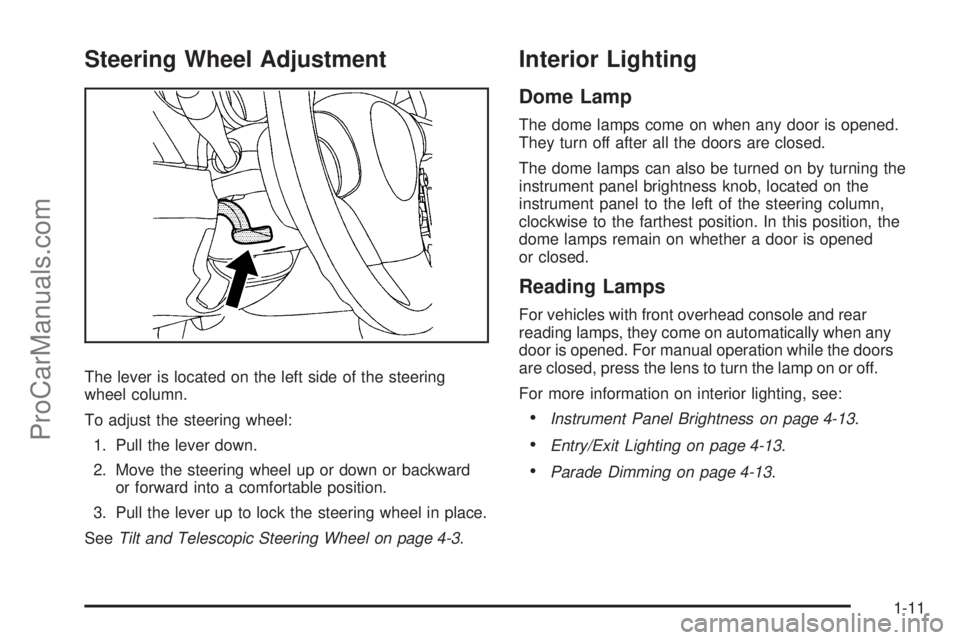
The lever is located on the left side of the steering
wheel column.
To adjust the steering wheel:
1. Pull the lever down.
2. Move the steering wheel up or down or backward
or forward into a comfortable position.
3. Pull the lever up to lock the steering wheel in place.
SeeTilt and Telescopic Steering Wheel on page 4-3.
Interior Lighting
Dome Lamp
The dome lamps come on when any door is opened.
They turn off after all the doors are closed.
The dome lamps can also be turned on by turning the
instrument panel brightness knob, located on the
instrument panel to the left of the steering column,
clockwise to the farthest position. In this position, the
dome lamps remain on whether a door is opened
or closed.
Reading Lamps
For vehicles with front overhead console and rear
reading lamps, they come on automatically when any
door is opened. For manual operation while the doors
are closed, press the lens to turn the lamp on or off.
For more information on interior lighting, see:
•Instrument Panel Brightness on page 4-13.
•Entry/Exit Lighting on page 4-13.
•Parade Dimming on page 4-13.
1-11
ProCarManuals.com
Page 25 of 428

Vehicle Personalization
Some vehicle features can be programmed by using the
DIC buttons on the left side of the steering wheel.
These features include:
•Oil Life Reset
•Units
•RKE Lock and Unlock Feedback
•Door Lock and Unlock Settings
•Language
SeeDIC Vehicle Personalization on page 4-46.
Cruise Control
The cruise control buttons
are located on the left side
of the steering wheel.
J:On/Off.
RES+:Press to resume or accelerate speed.
SET−:Press to set or decrease speed.
For more information, seeCruise Control on page 4-7.
1-19
ProCarManuals.com
Page 30 of 428

OnStar®
OnStar®uses several innovative technologies and live
advisors to provide a wide range of safety, security,
navigation, diagnostics, and calling services.
Automatic Crash Response
In a crash, built in sensors can automatically alert an
OnStar advisor who is immediately connected to
the vehicle to see if you need help.
How OnStar Service Works
Q
:This blue button connects you to a specially
trained OnStar advisor to verify your account information
and to answer questions.
]:Push this red emergency button to get priority help
from specially trained OnStar emergency advisors.
X:Push this button for hands-free, voice-activated
calling and to give voice commands for turn-by-turn
navigation.Crisis Assist, Stolen Vehicle Assistance, Vehicle
Diagnostics, Remote Door Unlock, Roadside Assistance,
Turn-by-Turn Navigation and Hands-Free Calling are
available on most vehicles. Not all OnStar services are
available on all vehicles. For more information see
the OnStar Owner’s Guide or visit www.onstar.com
(U.S.) or www.onstar.ca (Canada), contact OnStar
at 1-888-4-ONSTAR (1-888-466-7827) or TTY
1-877-248-2080, or press
Qto speak with an
OnStar advisor 24 hours a day, 7 days a week.
For a full description of OnStar services and system
limitations, see the OnStar Owner’s Guide in the
glove box.
OnStar service is subject to the OnStar terms and
conditions included in the OnStar Subscriber
Information.
OnStar service cannot work unless the vehicle is in a
place where OnStar has an agreement with a wireless
service provider for service in that area. OnStar service
also cannot work unless the vehicle is in a place where
the wireless service provider OnStar has hired for that
area has coverage, network capacity and reception when
the service is needed, and technology that is compatible
with the OnStar service. Not all services are available
everywhere, particularly in remote or enclosed areas,
or at all times.
1-24
ProCarManuals.com
Page 95 of 428

{WARNING:
If something is between an occupant and an
airbag, the airbag might not inflate properly or it
might force the object into that person causing
severe injury or even death. The path of an
inflating airbag must be kept clear. Do not put
anything between an occupant and an airbag, and
do not attach or put anything on the steering
wheel hub or on or near any other airbag
covering.
Do not use seat accessories that block the
inflation path of a seat-mounted side impact
airbag.
Never secure anything to the roof of a vehicle with
roof-rail airbags by routing a rope or tie down
through any door or window opening. If you do,
the path of an inflating roof-rail airbag will be
blocked.
When Should an Airbag Inate?
Frontal airbags are designed to inflate in moderate to
severe frontal or near-frontal crashes to help reduce the
potential for severe injuries mainly to the driver’s or
right front passenger’s head and chest. However, they
are only designed to inflate if the impact exceeds a
predetermined deployment threshold. Deployment
thresholds are used to predict how severe a crash is
likely to be in time for the airbags to inflate and
help restrain the occupants.
Whether the frontal airbags will or should deploy is not
based on how fast your vehicle is traveling. It depends
largely on what you hit, the direction of the impact,
and how quickly your vehicle slows down.
2-63
ProCarManuals.com
Page 98 of 428
What Will You See After an Airbag
Inates?
After the frontal airbags and seat-mounted side impact
airbags inflate, they quickly deflate, so quickly that
some people may not even realize an airbag inflated.
Roof-rail airbags may still be at least partially inflated for
some time after they deploy. Some components of
the airbag module may be hot for several minutes. For
location of the airbag modules, seeWhat Makes an
Airbag Inate? on page 2-65.
The parts of the airbag that come into contact with you
may be warm, but not too hot to touch. There may
be some smoke and dust coming from the vents in the
deflated airbags. Airbag inflation does not prevent
the driver from seeing out of the windshield or being
able to steer the vehicle, nor does it prevent people from
leaving the vehicle.
{WARNING:
When an airbag inflates, there may be dust in the
air. This dust could cause breathing problems for
people with a history of asthma or other breathing
trouble. To avoid this, everyone in the vehicle
should get out as soon as it is safe to do so. If
you have breathing problems but cannot get out of
the vehicle after an airbag inflates, then get fresh
air by opening a window or a door. If you
experience breathing problems following an airbag
deployment, you should seek medical attention.
The vehicle has a feature that may automatically unlock
the doors, turn on the interior lamps and hazard
warning flashers, and shut off the fuel system after the
airbags inflate. You can lock the doors, turn off the
interior lamps and hazard warning flashers by using the
controls for those features.
2-66
ProCarManuals.com
Page 109 of 428
Keys...............................................................3-2
Remote Keyless Entry (RKE) System................3-3
Remote Keyless Entry (RKE) System
Operation...................................................3-3
Remote Vehicle Start......................................3-5
Doors and Locks.............................................3-8
Door Locks....................................................3-8
Power Door Locks..........................................3-8
Door Ajar Reminder........................................3-8
Delayed Locking.............................................3-9
Programmable Automatic Door Locks................3-9
Rear Door Security Locks..............................3-10
Lockout Protection........................................3-10
Trunk..........................................................3-11
Windows........................................................3-13
Power Windows............................................3-14
Sun Visors...................................................3-15
Theft-Deterrent Systems..................................3-15
Content Theft-Deterrent.................................3-16
PASS-Key
®III+ Electronic Immobilizer.............3-17
PASS-Key®III+ Electronic Immobilizer
Operation.................................................3-17
Starting and Operating Your Vehicle................3-19
New Vehicle Break-In....................................3-19
Ignition Positions..........................................3-19
Retained Accessory Power (RAP)...................3-20Starting the Engine.......................................3-20
Engine Coolant Heater..................................3-22
Automatic Transmission Operation
(Six Speed Transmission)...........................3-23
Parking Brake..............................................3-26
Shifting Into Park..........................................3-27
Shifting Out of Park......................................3-28
Parking Over Things That Burn.......................3-29
Engine Exhaust............................................3-30
Running the Vehicle While Parked..................3-31
Mirrors...........................................................3-32
Manual Rearview Mirror.................................3-32
Automatic Dimming Rearview Mirror................3-32
Compass.....................................................3-33
Outside Power Mirrors...................................3-34
Outside Automatic Dimming Mirror..................3-34
Outside Heated Mirrors..................................3-34
Universal Home Remote System......................3-34
Universal Home Remote System Operation
(With Three Round LED)............................3-35
Storage Areas................................................3-41
Glove Box...................................................3-41
Cupholders..................................................3-41
Center Console Storage.................................3-41
Convenience Net..........................................3-42
Sunroof.........................................................3-42
Section 3 Features and Controls
3-1
ProCarManuals.com