air condition SATURN OUTLOOK 2007 Owner's Manual
[x] Cancel search | Manufacturer: SATURN, Model Year: 2007, Model line: OUTLOOK, Model: SATURN OUTLOOK 2007Pages: 538, PDF Size: 3.2 MB
Page 303 of 538
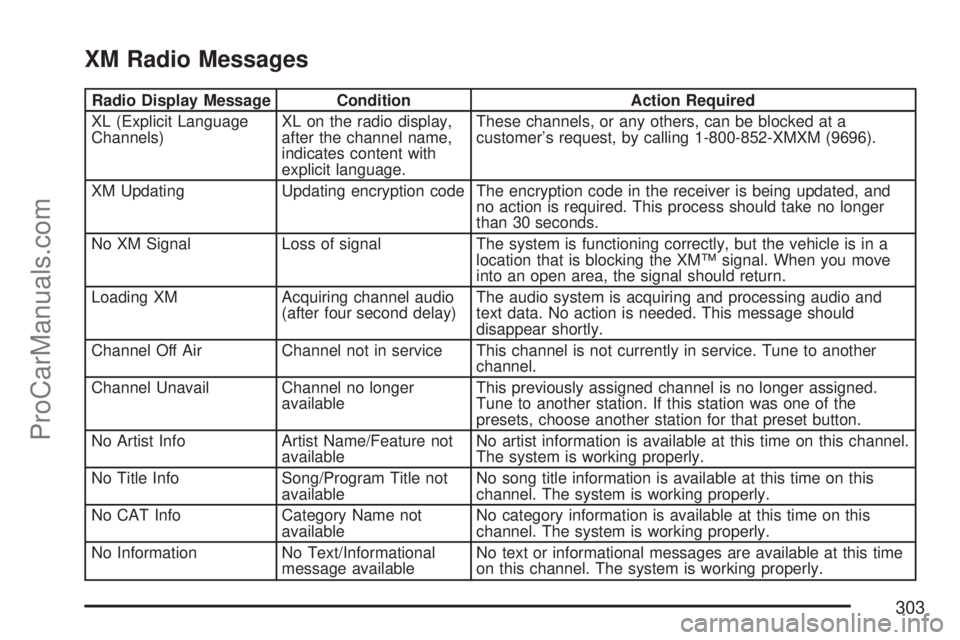
XM Radio Messages
Radio Display Message Condition Action Required
XL (Explicit Language
Channels)XL on the radio display,
after the channel name,
indicates content with
explicit language.These channels, or any others, can be blocked at a
customer’s request, by calling 1-800-852-XMXM (9696).
XM Updating Updating encryption code The encryption code in the receiver is being updated, and
no action is required. This process should take no longer
than 30 seconds.
No XM Signal Loss of signal The system is functioning correctly, but the vehicle is in a
location that is blocking the XM™ signal. When you move
into an open area, the signal should return.
Loading XM Acquiring channel audio
(after four second delay)The audio system is acquiring and processing audio and
text data. No action is needed. This message should
disappear shortly.
Channel Off Air Channel not in service This channel is not currently in service. Tune to another
channel.
Channel Unavail Channel no longer
availableThis previously assigned channel is no longer assigned.
Tune to another station. If this station was one of the
presets, choose another station for that preset button.
No Artist Info Artist Name/Feature not
availableNo artist information is available at this time on this channel.
The system is working properly.
No Title Info Song/Program Title not
availableNo song title information is available at this time on this
channel. The system is working properly.
No CAT Info Category Name not
availableNo category information is available at this time on this
channel. The system is working properly.
No Information No Text/Informational
message availableNo text or informational messages are available at this time
on this channel. The system is working properly.
303
ProCarManuals.com
Page 331 of 538

Traction Control Operation
The traction control system is part of the
StabiliTrak®system. Traction control limits wheel
spin by reducing engine power to the wheels
(engine speed management) and by applying
brakes to each individual wheel (brake-traction
control) as necessary.
The traction control system is enabled
automatically when you start your vehicle. It will
activate and the StabiliTrak
®light will ash if
it senses that any of the wheels are spinning or
beginning to lose traction while driving. If you turn
off traction control, only the brake-traction
control portion of traction control will work. The
engine speed management will be disabled. In this
mode, engine power is not reduced automatically
and the driven wheels can spin more freely.
This can cause the brake-traction control to
activate constantly.
Notice:If you allow the wheel(s) of one axle
to spin excessively while the StabiliTrak
®, ABS
and brake warning lights and the SERVICE
STABILITRAK message are displayed,
you could damage the transfer case. The
repairs would not be covered by your warranty.Reduce engine power and do not spin the
wheel(s) excessively while these lights and this
message are displayed.
The traction control system may activate on
dry or rough roads or under conditions such as
heavy acceleration while turning or abrupt
upshifts/downshifts of the transmission. When
this happens, you may notice a reduction in
acceleration, or may hear a noise or vibration.
This is normal.
If your vehicle is in cruise control when the system
activates, the StabiliTrak
®light will ash and the
cruise control will automatically disengage.
When road conditions allow you to use cruise
again, you may re-engage the cruise control. See
Cruise Control on page 179.
StabiliTrak
®may also turn off automatically if it
determines that a problem exists with the system.
If the problem does not clear itself after restarting
the vehicle, you should see your dealer/retailer
for service.
331
ProCarManuals.com
Page 337 of 538
A cornering skid is best handled by easing your
foot off the accelerator pedal.
If your vehicle starts to slide, ease your foot off the
accelerator pedal and quickly steer the way you
want the vehicle to go. If you start steering quickly
enough, your vehicle may straighten out. Always be
ready for a second skid if it occurs.
Of course, traction is reduced when water, snow,
ice, gravel, or other material is on the road. For
safety, you want to slow down and adjust your
driving to these conditions. It is important to slow
down on slippery surfaces because stopping
distance is longer and vehicle control more limited.
While driving on a surface with reduced traction,
try your best to avoid sudden steering,
acceleration, or braking, including reducing vehicle
speed by shifting to a lower gear. Any sudden
changes could cause the tires to slide. You might
not realize the surface is slippery until your
vehicle is skidding. Learn to recognize
warning clues — such as enough water, ice, or
packed snow on the road to make a mirrored
surface — and slow down when you have
any doubt.
Remember: Any Antilock Brake System (ABS)
helps avoid only the braking skid.Driving at Night
Night driving is more dangerous than day driving.
One reason is that some drivers are likely to
be impaired — by alcohol or drugs, with night
vision problems, or by fatigue.
Here are some tips on night driving.
Drive defensively.
Do not drink and drive.
Adjust the inside rearview mirror to reduce the
glare from headlamps behind you.
Since you cannot see as well, slow down and
keep more space between you and other
vehicles.
Slow down, especially on higher speed roads.
Your vehicle’s headlamps can light up only so
much road ahead.
In remote areas, watch for animals.
If you are tired, pull off the road in a safe
place and rest.
337
ProCarManuals.com
Page 371 of 538

Making Turns
Notice:Making very sharp turns while
trailering could cause the trailer to come in
contact with the vehicle. Your vehicle could be
damaged. Avoid making very sharp turns
while trailering.
When you’re turning with a trailer, make wider
turns than normal. Do this so your trailer
won’t strike soft shoulders, curbs, road signs,
trees or other objects. Avoid jerky or sudden
maneuvers. Signal well in advance.
Turn Signals When Towing a Trailer
When you tow a trailer, your vehicle may need a
different turn signal asher and/or extra wiring.
Check with your dealer/retailer. The arrows on your
instrument panel will ash whenever you signal a
turn or lane change. Properly hooked up, the trailer
lamps will also ash, telling other drivers you’re
about to turn, change lanes or stop.
When towing a trailer, the arrows on your
instrument panel will ash for turns even if the
bulbs on the trailer are burned out. Thus, you may
think drivers behind you are seeing your signalwhen they are not. It’s important to check
occasionally to be sure the trailer bulbs are still
working.
Driving on Grades
Your vehicle is designed primarily as a passenger
and load carrying vehicle. If you tow a trailer,
your vehicle will require more frequent
maintenance due to the additional load. Because
of the added load of the trailer, your vehicle’s
engine may overheat on hot days, when going up
a long or steep grade with a trailer. If the engine
coolant temperature gage indicates overheating,
turn off the air conditioning to reduce engine load,
pull off the road and stop in a safe spot.
Reduce speed and shift to a lower gear before
you start down a long or steep downgrade. If you
don’t shift down, you might have to use your
brakes so much that they would get hot and no
longer work well.
On a long uphill grade, shift down and reduce
your speed to around 55 mph (88 km/h) to reduce
the possibility of the engine and the transmission
overheating.
371
ProCarManuals.com
Page 380 of 538

California Fuel
If your vehicle is certied to meet California
Emissions Standards, it is designed to operate on
fuels that meet California specications. See
the underhood emission control label. If this fuel is
not available in states adopting California
emissions standards, your vehicle will operate
satisfactorily on fuels meeting federal
specications, but emission control system
performance might be affected. The malfunction
indicator lamp could turn on and your vehicle might
fail a smog-check test. SeeMalfunction Indicator
Lamp on page 222. If this occurs, return to
your authorized dealer/retailer for diagnosis. If it is
determined that the condition is caused by the
type of fuel used, repairs might not be covered by
your warranty.
Additives
To provide cleaner air, all gasolines in the United
States are now required to contain additives
that help prevent engine and fuel system deposits
from forming, allowing the emission control
system to work properly. In most cases, you
should not have to add anything to the fuel.However, some gasolines contain only the
minimum amount of additive required to meet U.S.
Environmental Protection Agency regulations.
To help keep fuel injectors and intake valves clean,
or if your vehicle experiences problems due to
dirty injectors or valves, look for gasoline that is
advertised as TOP TIER Detergent Gasoline. Also,
your dealer/retailer has additives that will help
correct and prevent most deposit-related problems.
Gasolines containing oxygenates, such as
ethers and ethanol, and reformulated gasolines
might be available in your area. We recommend
that you use these gasolines, if they comply
with the specications described earlier. However,
E85 (85% ethanol) and other fuels containing
more than 10% ethanol must not be used
in vehicles that were not designed for those fuels.
Notice:Your vehicle was not designed for
fuel that contains methanol. Do not use
fuel containing methanol. It can corrode metal
parts in the fuel system and also damage
plastic and rubber parts. That damage would
not be covered under your warranty.
380
ProCarManuals.com
Page 392 of 538

What to Do with Used Oil
Used engine oil contains certain elements that can
be unhealthy for your skin and could even
cause cancer. Do not let used oil stay on your
skin for very long. Clean your skin and nails with
soap and water, or a good hand cleaner. Wash
or properly dispose of clothing or rags containing
used engine oil. See the manufacturer’s
warnings about the use and disposal of oil
products.
Used oil can be a threat to the environment. If you
change your own oil, be sure to drain all the oil
from the lter before disposal. Never dispose of oil
by putting it in the trash, pouring it on the
ground, into sewers, or into streams or bodies of
water. Instead, recycle it by taking it to a place
that collects used oil. If you have a problem
properly disposing of used oil, ask your
dealer/retailer, a service station, or a local
recycling center for help.
Engine Air Cleaner/Filter
When to Inspect the Engine Air
Cleaner/Filter
Inspect the air cleaner/lter at the MaintenanceII
intervals and replace it at the rst oil change after
each 50,000 mile (83 000 km) interval. See
Scheduled Maintenance on page 488for more
information. If you are driving in dusty/dirty
conditions, inspect the lter at each engine oil
change.
SeeEngine Compartment Overview on page 386
for the location of the engine air cleaner/lter.
392
ProCarManuals.com
Page 401 of 538

If No Steam Is Coming From Your
Engine
If you get an engine overheat warning but see or
hear no steam, the problem may not be too
serious. Sometimes the engine can get a little too
hot when you:
Climb a long hill on a hot day.
Stop after high-speed driving.
Idle for long periods in traffic.
Tow a trailer.
If you get the overheat warning with no sign of
steam, try this for a minute or so:
1. If your air conditioner is on, turn it off.
2. Turn on your heater to full hot at the highest
fan speed and open the windows as
necessary.
3. If you are in a traffic jam, shift to NEUTRAL (N);
otherwise, shift to the highest gear while
driving — DRIVE (D) or LOW (L).If you no longer have the overheat warning, you
can drive. Just to be safe, drive slower for
about 10 minutes. If the warning does not come
back on, you can drive normally.
If the warning continues, pull over, stop, and park
your vehicle right away.
If there is still no sign of steam, idle the engine for
three minutes while you are parked. If you still
have the warning, turn off the engine and
get everyone out of the vehicle until it cools down.
Also, see “Overheated Engine Protection
Operating Mode” later in this section.
You may decide not to lift the hood but to get
service help right away.
401
ProCarManuals.com
Page 402 of 538

Overheated Engine Protection
Operating Mode
This emergency operating mode lets your vehicle
be driven to a safe place in an emergency
situation. If an overheated engine condition exists,
an overheat protection mode which alternates
ring groups of cylinders helps prevent engine
damage. In this mode, there is a signicant loss in
power and engine performance. The temperature
gage indicates an overheat condition exists.
Driving extended distances and/or towing a trailer
in the overheat protection mode should be
avoided.
Notice:After driving in the overheated engine
protection operating mode, to avoid engine
damage, allow the engine to cool before
attempting any repair. The engine oil will be
severely degraded. Repair the cause of coolant
loss, change the oil and reset the oil life
system. SeeEngine Oil on page 387.
Cooling System
When you decide it is safe to lift the hood, here is
what you will see:
A. Engine Coolant Reservoir
B. Radiator Pressure Cap (covered)
C. Engine Cooling Fans
402
ProCarManuals.com
Page 412 of 538

Brake Wear
Your vehicle has four-wheel disc brakes.
Disc brake pads have built-in wear indicators that
make a high-pitched warning sound when the
brake pads are worn and new pads are needed.
The sound can come and go or be heard all
the time your vehicle is moving, except when you
are pushing on the brake pedal rmly.
{CAUTION:
The brake wear warning sound means that
soon the brakes will not work well. That
could lead to an accident. When you hear
the brake wear warning sound, have your
vehicle serviced.
Notice:Continuing to drive with worn-out
brake pads could result in costly brake repair.Some driving conditions or climates can cause a
brake squeal when the brakes are rst applied
or lightly applied. This does not mean something
is wrong with the brakes.
Properly torqued wheel nuts are necessary to help
prevent brake pulsation. When tires are rotated,
inspect brake pads for wear and evenly tighten
wheel nuts in the proper sequence to torque
specications inCapacities and Specifications on
page 483.
Brake linings should always be replaced as
complete axle sets.Brake Pedal Travel
See your dealer/retailer if the brake pedal does
not return to normal height, or if there is a
rapid increase in pedal travel. This could be a sign
that brake service might be required.
Brake Adjustment
Every time you apply the brakes, with or without
the vehicle moving, the brakes adjust for wear.
412
ProCarManuals.com
Page 429 of 538

(D) Construction Code:A letter code is used to
indicate the type of ply construction in the tire.
The letter R means radial ply construction;
the letter D means diagonal or bias ply
construction; and the letter B means belted-bias
ply construction.
(E) Rim Diameter:Diameter of the wheel in
inches.
(F) Service Description:These characters
represent the load range and speed rating of the
tire. The load index represents the load carry
capacity a tire is certied to carry. The load index
can range from 1 to 279. The speed rating is
the maximum speed a tire is certied to carry a
load. Speed ratings range from A to Z.
Tire Terminology and Denitions
Air Pressure:The amount of air inside the tire
pressing outward on each square inch of the
tire. Air pressure is expressed in pounds
per square inch (psi) or kilopascal (kPa).Accessory Weight:This means the combined
weight of optional accessories. Some examples of
optional accessories are, automatic transmission,
power steering, power brakes, power windows,
power seats, and air conditioning.
Aspect Ratio:The relationship of a tire’s height
to its width.
Belt:A rubber coated layer of cords that is
located between the plies and the tread. Cords
may be made from steel or other reinforcing
materials.
Bead:The tire bead contains steel wires wrapped
by steel cords that hold the tire onto the rim.
Bias Ply Tire:A pneumatic tire in which the plies
are laid at alternate angles less than 90 degrees
to the centerline of the tread.
Cold Tire Pressure:The amount of air pressure
in a tire, measured in pounds per square inch (psi)
or kilopascals (kPa) before a tire has built up heat
from driving. SeeInflation - Tire Pressure on
page 432.
429
ProCarManuals.com