key battery SATURN OUTLOOK 2009 User Guide
[x] Cancel search | Manufacturer: SATURN, Model Year: 2009, Model line: OUTLOOK, Model: SATURN OUTLOOK 2009Pages: 432, PDF Size: 2.48 MB
Page 184 of 432

SERVICE BATTERY
CHARGING SYSTEM
On some vehicles, this message
displays if there is a problem
with the battery charging system.
Under certain conditions, the
charging system light may also turn
on in the instrument panel cluster.
SeeCharging System Light on
page 3-35. Driving with this problem
could drain the battery. Turn off all
unnecessary accessories. Have the
electrical system checked as soon
as possible. See your dealer/retailer.
SERVICE BRAKE SYSTEM
This message displays along with
the brake system warning light if
there is a problem with the brake
system. SeeBrake System Warning
Light on page 3-36. If this message
appears, stop as soon as possible
and turn off the vehicle. Restart the
vehicle and check for the message
on the DIC display. If the message isstill displayed or appears again when
you begin driving, the brake system
needs service as soon as possible.
See your dealer/retailer.
SERVICE PARK ASSIST
If your vehicle has the Ultrasonic
Rear Parking Assist (URPA) system,
this message displays if there is a
problem with the URPA system.
Do not use this system to help you
park. SeeUltrasonic Rear Parking
Assist (URPA) on page 2-34for more
information. See your dealer/retailer
for service.
SERVICE POWER STEERING
This message displays when a
problem is detected with the power
steering system. When this message
is displayed, you may notice that the
effort required to steer the vehicle
increases or feels heavier, but you
will still be able to steer the vehicle.
Have your vehicle serviced by your
dealer/retailer immediately.
SERVICE STABILITRAK
This message displays if there
is a problem with the StabiliTrak®
system. If this message appears,
try to reset the system. Stop; turn off
the engine for at least 15 seconds;
then start the engine again. If this
message still comes on, it means
there is a problem. See your dealer/
retailer for service. The vehicle is
safe to drive, however, you do not
have the benet of StabiliTrak,
so reduce your speed and drive
accordingly.
SERVICE THEFT DETERRENT
SYSTEM
This message displays when there
is a problem with the theft-deterrent
system. The vehicle may or may
not restart so you may want to take
the vehicle to your dealer/retailer
before turning off the engine.
SeePASS-Key
®III+ Electronic
Immobilizer Operation on page 2-18
for more information.
3-62 Instrument Panel
ProCarManuals.com
Page 242 of 432
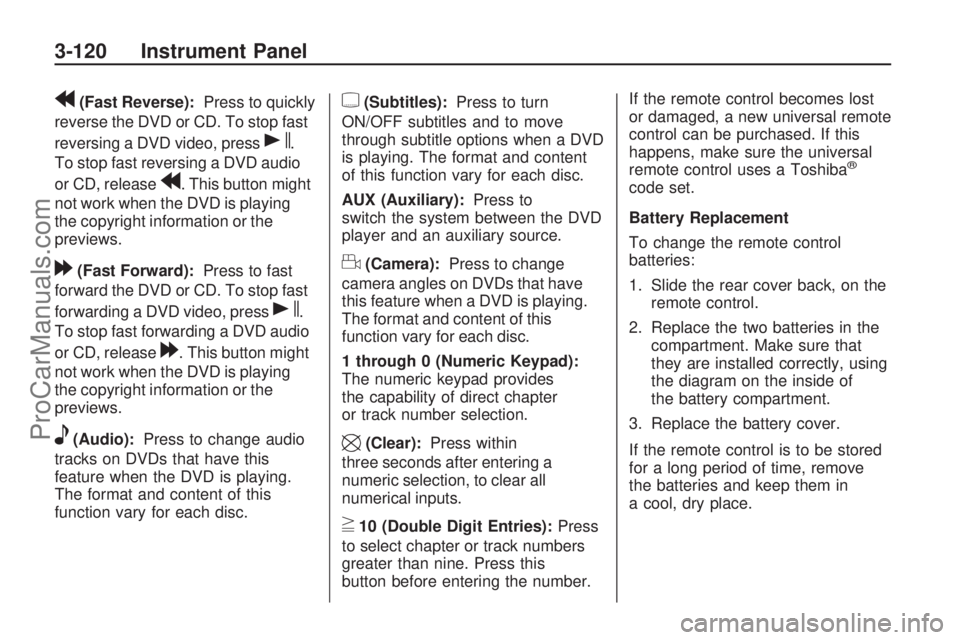
r(Fast Reverse):Press to quickly
reverse the DVD or CD. To stop fast
reversing a DVD video, press
s.
To stop fast reversing a DVD audio
or CD, release
r. This button might
not work when the DVD is playing
the copyright information or the
previews.
[(Fast Forward):Press to fast
forward the DVD or CD. To stop fast
forwarding a DVD video, press
s.
To stop fast forwarding a DVD audio
or CD, release
[. This button might
not work when the DVD is playing
the copyright information or the
previews.
e(Audio):Press to change audio
tracks on DVDs that have this
feature when the DVD is playing.
The format and content of this
function vary for each disc.
{(Subtitles):Press to turn
ON/OFF subtitles and to move
through subtitle options when a DVD
is playing. The format and content
of this function vary for each disc.
AUX (Auxiliary):Press to
switch the system between the DVD
player and an auxiliary source.
d(Camera):Press to change
camera angles on DVDs that have
this feature when a DVD is playing.
The format and content of this
function vary for each disc.
1 through 0 (Numeric Keypad):
The numeric keypad provides
the capability of direct chapter
or track number selection.
\(Clear):Press within
three seconds after entering a
numeric selection, to clear all
numerical inputs.
}10 (Double Digit Entries):Press
to select chapter or track numbers
greater than nine. Press this
button before entering the number.If the remote control becomes lost
or damaged, a new universal remote
control can be purchased. If this
happens, make sure the universal
remote control uses a Toshiba
®
code set.
Battery Replacement
To change the remote control
batteries:
1. Slide the rear cover back, on the
remote control.
2. Replace the two batteries in the
compartment. Make sure that
they are installed correctly, using
the diagram on the inside of
the battery compartment.
3. Replace the battery cover.
If the remote control is to be stored
for a long period of time, remove
the batteries and keep them in
a cool, dry place.
3-120 Instrument Panel
ProCarManuals.com
Page 274 of 432

6. To prevent the battery from
draining while the vehicle is being
towed, remove the 50 amp
BATT1 fuse from the underhood
fuse block and store in a safe
location. SeeUnderhood
Fuse Block on page 5-94.
7. Release the parking brake.
Notice:If the vehicle is towed
without performing each of
the steps listed under “Dinghy
Towing,” the automatic
transmission could be damaged.
Be sure to follow all steps of
the dinghy towing procedure prior
to and after towing the vehicle.
Notice:If 65 mph (105 km/h)
is exceeded while towing
the vehicle, it could be damaged.
Never exceed 65 mph (105 km/h)
while towing the vehicle.Once the destination is reached:
1. Set the parking brake.
2. Reinstall the 50 amp BATT1 fuse
to the underhood fuse block.
3. Shift the transmission to
P (Park), turn the ignition
to LOCK/OFF and remove the
key from the ignition.
4. Disconnect the vehicle from the
towing vehicle.
Notice:Do not tow a vehicle
with the front drive wheels on the
ground if one of the front tires
is a compact spare tire. Towing
with two different tire sizes on the
front of the vehicle can cause
severe damage to the
transmission.Dolly Towing (All-Wheel-Drive
Vehicles)
All-wheel-drive vehicles must not be
towed with two wheels on the
ground. To properly tow these
vehicles, they should be placed on
a platform trailer with all four
wheels off of the ground or dinghy
towed from the front.
4-24 Driving Your Vehicle
ProCarManuals.com