oil SATURN OUTLOOK 2009 User Guide
[x] Cancel search | Manufacturer: SATURN, Model Year: 2009, Model line: OUTLOOK, Model: SATURN OUTLOOK 2009Pages: 432, PDF Size: 2.48 MB
Page 182 of 432

LEFT REAR DOOR OPEN
This message displays and a chime
sounds if the driver side rear door is
not fully closed and the vehicle is
shifted out of P (Park). Stop and turn
off the vehicle, check the door for
obstructions, and close the door
again. Check to see if the message
still appears on the DIC.
LIFTGATE OPEN
This message displays and a chime
sounds if the liftgate is open while
the ignition is in ON/RUN. Turn off
the vehicle and check the liftgate.
Restart the vehicle and check for
the message on the DIC display.
OIL PRESSURE LOW STOP
ENGINE
Notice:If you drive your vehicle
while the engine oil pressure
is low, severe engine damage
may occur. If a low oil pressure
warning appears on the Driver
Information Center (DIC), stop
the vehicle as soon as possible.
Do not drive the vehicle until
the cause of the low oil pressure
is corrected. SeeEngine Oil
on page 5-13for more
information.
This message displays if low oil
pressure levels occur. Stop the
vehicle as soon as safely possible
and do not operate it until the cause
of the low oil pressure has been
corrected. Check the oil as soon
as possible and have your vehicle
serviced by your dealer/retailer.
SeeEngine Oil on page 5-13.
PARK ASSIST OFF
If your vehicle has the Ultrasonic
Rear Parking Assist (URPA) system,
after the vehicle has been started
and shifted out of P (Park), this
message displays to remind the
driver that the URPA system has
been turned off. Press the set/reset
button or the trip odometer reset
stem to acknowledge this message
and clear it from the DIC display.
To turn the URPA system back on,
seeUltrasonic Rear Parking Assist
(URPA) on page 2-34.
PASSENGER DOOR OPEN
This message displays and a
chime sounds if the passenger door
is not fully closed and the vehicle is
shifted out of P (Park). Stop and turn
off the vehicle, check the door for
obstructions, and close the door
again. Check to see if the message
still appears on the DIC.
3-60 Instrument Panel
ProCarManuals.com
Page 205 of 432

If the ignition or radio is turned off,
while a CD is in the player, it stays in
the player. When the ignition or radio
is turned on, the CD starts playing
where it stopped, if it was the last
selected audio source. The CD is
controlled by the buttons on the
radio faceplate or by the RSA unit.
SeeRear Seat Audio (RSA) on
page 3-123for more information.
The DVD/CD decks, (upper slot is
the DVD deck and the lower slot
is the CD deck) of the radio are
compatible with most audio CDs,
CD-R, CD-RW, and MP3/WMAs.
When a CD is inserted, the text
label DVD or CD symbol displays
on the left side of the radio display.
As each new track starts to play,
the track number displays.Care of CDs and DVDs
If playing a CD-R, the sound quality
can be reduced due to CD-R or
CD-RW quality, the method of
recording, the quality of the music
that has been recorded, and the
way the CD-R or CD-RW has been
handled. Handle them carefully.
Store CD-R(s) or CD-RW(s) in their
original cases or other protective
cases and away from direct sunlight
and dust. The CD or DVD player
scans the bottom surface of the disc.
If the surface of a CD is damaged,
such as cracked, broken, or
scratched, the CD does not play
properly or not at all. Do not touch
the bottom side of a CD while
handling it; this could damage the
surface. Pick up CDs by grasping
the outer edges or the edge of the
hole and the outer edge.If the surface of a CD is soiled, take
a soft, lint free cloth or dampen a
clean, soft cloth in a mild, neutral
detergent solution mixed with water,
and clean it. Make sure the wiping
process starts from the center to
the edge.
Care of the CD and DVD Player
Do not add any label to a CD, it
could get caught in the CD or DVD
player. If a CD is recorded on a
personal computer and a description
label is needed, try labeling the top of
the recorded CD with a marking pen.
Instrument Panel 3-83
ProCarManuals.com
Page 263 of 432

Other Rainy Weather Tips
Besides slowing down, other wet
weather driving tips include:
Allow extra following distance.
Pass with caution.
Keep windshield wiping
equipment in good shape.
Keep the windshield washer uid
reservoir lled.
Have good tires with proper tread
depth. SeeTires on page 5-39.
Turn off cruise control.
Before Leaving on a
Long Trip
To prepare your vehicle for a long
trip, consider having it serviced
by your dealer/retailer before
departing.
Things to check on your own
include:
Windshield Washer Fluid:
Reservoir full? Windows
clean — inside and outside?
Wiper Blades:In good shape?
Fuel, Engine Oil, Other Fluids:
All levels checked?
Lamps:Do they all work and are
lenses clean?
Tires:Are treads good? Are tires
inated to recommended
pressure?
Weather and Maps:Safe to
travel? Have up-to-date maps?
Highway Hypnosis
Always be alert and pay attention to
your surroundings while driving.
If you become tired or sleepy, nd a
safe place to park your vehicle
and rest.
Other driving tips include:
Keep the vehicle well ventilated.
Keep interior temperature cool.
Keep your eyes moving — scan
the road ahead and to the sides.
Check the rearview mirror and
vehicle instruments often.
Driving Your Vehicle 4-13
ProCarManuals.com
Page 284 of 432

Parking on Hills
{CAUTION
Parking the vehicle on a hill with
the trailer attached can be
dangerous. If something goes
wrong, the rig could start to move.
People can be injured, and both
the vehicle and the trailer can be
damaged. When possible, always
park the rig on a at surface.
If parking the rig on a hill:
1. Press the brake pedal, but do
not shift into P (Park) yet.
Turn the wheels into the curb if
facing downhill or into traffic
if facing uphill.
2. Have someone place chocks
under the trailer wheels.
3. When the wheel chocks are in
place, release the brake pedal
until the chocks absorb the load.4. Reapply the brake pedal. Then
apply the parking brake and shift
the transmission into P (Park).
5. Release the brake pedal.Leaving After Parking on
a Hill
1. Apply and hold the brake pedal
while you:
start the engine,
shift into a gear, and
release the parking brake.
2. Let up on the brake pedal.
3. Drive slowly until the trailer is
clear of the chocks.
4. Stop and have someone pick up
and store the chocks.
Maintenance When Trailer
Towing
The vehicle needs service more
often when pulling a trailer.
SeeScheduled Maintenance on
page 6-3for more information.Things that are especially important
in trailer operation are automatic
transmission uid, engine oil,
axle lubricant, belts, cooling system
and brake system. It is a good
idea to inspect these before and
during the trip.
Check periodically to see that all
hitch nuts and bolts are tight.
Trailer Wiring Harness
The vehicle is equipped with the
following wiring harness for towing
a trailer.
Basic Trailer Wiring
The trailer wiring harness, with a
seven-pin connector, is located
at the rear of the vehicle and is
tied to the vehicle’s frame.
The harness connector can be
plugged into a seven-pin
universal heavy-duty trailer
connector available through your
dealer/retailer.
4-34 Driving Your Vehicle
ProCarManuals.com
Page 287 of 432
Service and
Appearance Care
ServiceService................................5-3
Accessories and
Modications.......................5-3
California Proposition 65
Warning.............................5-3
California Perchlorate
Materials Requirements........5-4
Doing Your Own
Service Work......................5-4
Adding Equipment to the
Outside of the Vehicle..........5-5
FuelFuel....................................5-5
Gasoline Octane...................5-5
Gasoline Specications..........5-5
California Fuel......................5-6
Additives..............................5-6Fuels in Foreign Countries......5-7
Filling the Tank.....................5-8
Filling a Portable Fuel
Container..........................5-10
Checking Things Under
the Hood
Checking Things Under
the Hood..........................5-10
Hood Release.....................5-11
Engine Compartment
Overview..........................5-12
Engine Oil..........................5-13
Engine Oil Life System.........5-15
Engine Air Cleaner/Filter.......5-17
Automatic Transmission
Fluid................................5-18
Cooling System...................5-19
Engine Coolant...................5-19
Engine Overheating.............5-23
Overheated Engine
Protection Operating Mode. . .5-25
Power Steering Fluid............5-25
Windshield Washer Fluid......5-26
Brakes...............................5-27
Battery...............................5-29
Jump Starting.....................5-30
All-Wheel DriveAll-Wheel Drive...................5-35
Headlamp AimingHeadlamp Aiming................5-35
Bulb ReplacementBulb Replacement...............5-35
High Intensity Discharge
(HID) Lighting....................5-36
Halogen Bulbs....................5-36
Taillamps, Turn Signal,
Stoplamps and
Sidemarker Lamps.............5-36
License Plate Lamp.............5-37
Replacement Bulbs..............5-37
Windshield Wiper Blade
Replacement
Windshield Wiper Blade
Replacement.....................5-38
TiresTires..................................5-39
Tire Sidewall Labeling..........5-40
Tire Terminology and
Denitions.........................5-42
Ination - Tire Pressure........5-45
Service and Appearance Care 5-1
ProCarManuals.com
Page 292 of 432

California Fuel
If the vehicle is certied to meet
California Emissions Standards, it is
designed to operate on fuels that
meet California specications. See
the underhood emission control
label. If this fuel is not available in
states adopting California emissions
standards, the vehicle will operate
satisfactorily on fuels meeting federal
specications, but emission control
system performance might be
affected. The malfunction indicator
lamp could turn on and the vehicle
might fail a smog-check test. See
Malfunction Indicator Lamp on
page 3-39. If this occurs, return to
your authorized dealer/retailer for
diagnosis. If it is determined that the
condition is caused by the type of
fuel used, repairs might not be
covered by the vehicle warranty.
Additives
To provide cleaner air, all gasolines
in the United States are now required
to contain additives that help prevent
engine and fuel system deposits
from forming, allowing the emission
control system to work properly. In
most cases, you should not have to
add anything to the fuel. However,
some gasolines contain only the
minimum amount of additive
required to meet U.S. Environmental
Protection Agency regulations.
To help keep fuel injectors and
intake valves clean, or if the vehicle
experiences problems due to dirty
injectors or valves, look for gasoline
that is advertised as TOP TIER
Detergent Gasoline.For customers who do not use TOP
TIER Detergent Gasoline regularly,
one bottle of GM Fuel System
Treatment PLUS, added to the fuel
tank at every engine oil change, can
help clean deposits from fuel
injectors and intake valves. GM Fuel
System Treatment PLUS is the only
gasoline additive recommended by
General Motors.
Also, your dealer/retailer has
additives that will help correct and
prevent most deposit-related
problems.
5-6 Service and Appearance Care
ProCarManuals.com
Page 293 of 432

Gasolines containing oxygenates,
such as ethers and ethanol, and
reformulated gasolines might
be available in your area. We
recommend that you use these
gasolines, if they comply with the
specications described earlier.
However, E85 (85% ethanol) and
other fuels containing more than
10% ethanol must not be used in
vehicles that were not designed for
those fuels.
Notice:This vehicle was not
designed for fuel that contains
methanol. Do not use fuel
containing methanol. It can
corrode metal parts in the fuel
system and also damage plastic
and rubber parts. That damage
would not be covered under
the vehicle warranty.Some gasolines that are
not reformulated for low
emissions can contain an
octane-enhancing additive called
methylcyclopentadienyl manganese
tricarbonyl (MMT); ask the attendant
where you buy gasoline whether the
fuel contains MMT. We recommend
against the use of such gasolines.
Fuels containing MMT can reduce
the life of spark plugs and the
performance of the emission control
system could be affected. The
malfunction indicator lamp might turn
on. If this occurs, return to your
dealer/retailer for service.Fuels in Foreign
Countries
If you plan on driving in another
country outside the United States
or Canada, the proper fuel might
be hard to nd. Never use leaded
gasoline or any other fuel not
recommended in the previous text
on fuel. Costly repairs caused
by use of improper fuel would not
be covered by the vehicle warranty.
To check the fuel availability, ask
an auto club, or contact a major oil
company that does business in the
country where you will be driving.
Service and Appearance Care 5-7
ProCarManuals.com
Page 296 of 432

Filling a Portable Fuel
Container
{CAUTION
Never ll a portable fuel container
while it is in the vehicle. Static
electricity discharge from the
container can ignite the fuel vapor.
You can be badly burned and the
vehicle damaged if this occurs. To
help avoid injury to you and others:
Dispense fuel only into
approved containers.
Do not ll a container while it
is inside a vehicle, in a
vehicle’s trunk, pickup bed, or
on any surface other than the
ground.
(Continued)
CAUTION (Continued)
Bring the ll nozzle in contact
with the inside of the ll
opening before operating the
nozzle. Contact should be
maintained until the lling is
complete.
Do not smoke while
pumping fuel.
Do not use a cellular phone
while pumping fuel.
Checking Things
Under the Hood
{CAUTION
An electric fan under the hood can
start up and injure you even when
the engine is not running. Keep
hands, clothing, and tools away
from any underhood electric fan.
{CAUTION
Things that burn can get on hot
engine parts and start a re.
These include liquids like fuel, oil,
coolant, brake uid, windshield
washer and other uids, and
plastic or rubber. You or others
could be burned. Be careful not to
drop or spill things that will burn
onto a hot engine.
5-10 Service and Appearance Care
ProCarManuals.com
Page 299 of 432

A. Radiator Pressure Cap. See
Cooling System on page 5-19.
B. Engine Coolant Recovery Cap.
SeeCooling System on
page 5-19.
C. Remote Negative (−) Terminal.
SeeJump Starting on page 5-30.
D.Underhood Fuse Block on
page 5-94.
E. Remote Positive (+) Terminal.
SeeJump Starting on page 5-30.
F.Power Steering Fluid on
page 5-25.
G. Engine Oil Fill Cap. See “When
to Add Engine Oil” underEngine
Oil on page 5-13.H. Engine Oil Dipstick. See
“Checking Engine Oil” under
Engine Oil on page 5-13.
I. Automatic Transmission Fluid
Dipstick. See “Checking the
Fluid Level” underAutomatic
Transmission Fluid on page 5-18.
J. Brake Master Cylinder Reservoir.
See “Brake Fluid” underBrakes
on page 5-27.
K.Engine Air Cleaner/Filter on
page 5-17.
L. Windshield Washer Fluid
Reservoir. See “Adding Washer
Fluid” underWindshield
Washer Fluid on page 5-26.Engine Oil
Checking Engine Oil
It is a good idea to check the engine
oil level at each fuel ll. In order to
get an accurate reading, the oil must
be warm and the vehicle must be on
level ground.
The engine oil dipstick handle
is a yellow loop. SeeEngine
Compartment Overview on
page 5-12for the location of the
engine oil dipstick.
1. Turn off the engine and give the
oil several minutes to drain back
into the oil pan. If this is not done,
the oil dipstick might not show the
actual level.
2. Pull out the dipstick and clean
it with a paper towel or cloth,
then push it back in all the way.
Remove it again, keeping the
tip down, and check the level.
Service and Appearance Care 5-13
ProCarManuals.com
Page 300 of 432
When to Add Engine Oil
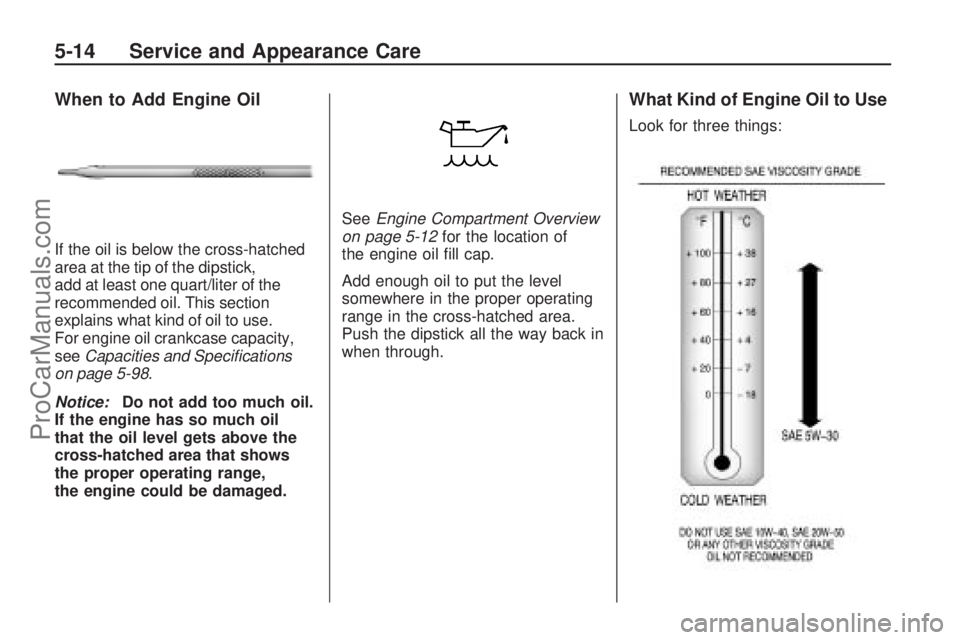
If the oil is below the cross-hatched
area at the tip of the dipstick,
add at least one quart/liter of the
recommended oil. This section
explains what kind of oil to use.
For engine oil crankcase capacity,
seeCapacities and Specifications
on page 5-98.
Notice:Do not add too much oil.
If the engine has so much oil
that the oil level gets above the
cross-hatched area that shows
the proper operating range,
the engine could be damaged.SeeEngine Compartment Overview
on page 5-12for the location of
the engine oil ll cap.
Add enough oil to put the level
somewhere in the proper operating
range in the cross-hatched area.
Push the dipstick all the way back in
when through.
What Kind of Engine Oil to Use
Look for three things:
5-14 Service and Appearance Care
ProCarManuals.com