airbag SATURN OUTLOOK 2009 Owner's Guide
[x] Cancel search | Manufacturer: SATURN, Model Year: 2009, Model line: OUTLOOK, Model: SATURN OUTLOOK 2009Pages: 432, PDF Size: 2.48 MB
Page 155 of 432

To turn off the warning light and or
chime, remove the object from the
seat or buckle the safety belt
Airbag Readiness Light
This light shows if there is an
electrical problem. The system
check includes the airbag sensor,
the pretensioners, the airbag
modules, the wiring and the crash
sensing and diagnostic module.
For more information on the airbag
system, seeAirbag System on
page 1-47.This light will come on and stay
on for several seconds when the
vehicle is started. Then the light
should go out.
If the airbag readiness light stays
on after the vehicle has been started
or comes on when while driving,
the airbag system may not work
properly. Have the vehicle serviced
right away.
{CAUTION
If the airbag readiness light stays
on after the vehicle is started or
comes on while driving, it means
the airbag system might not be
working properly. The airbags in
the vehicle might not inate in a
crash, or they could even inate
without a crash. To help avoid
injury, have the vehicle serviced
right away.
Instrument Panel 3-33
ProCarManuals.com
Page 156 of 432

Passenger Airbag Status
Indicator
The vehicle has a passenger
sensing system. SeePassenger
Sensing System on page 1-55
for important safety information.
The instrument panel has a
passenger airbag status indicator.When the vehicle is started, the
passenger airbag status indicator
will light ON and OFF, or the symbol
for on and off, for several seconds
as a system check. If you are using
remote start to start the vehicle from
a distance, if equipped, you may not
see the system check. Then, after
several more seconds, the status
indicator will light either ON or OFF,
or either the on or off symbol to let
you know the status of the right front
passenger frontal airbag.
If the word ON or the on symbol is
lit on the passenger airbag status
indicator, it means that the right front
passenger frontal airbag is enabled
(may inate).
If the word OFF or the off symbol
is lit on the passenger airbag
status indicator, it means that the
passenger sensing system has
turned off the right front passenger
frontal airbag.If, after several seconds, both
status indicator lights remain on,
or if there are no lights at all, there
may be a problem with the lights
or the passenger sensing system.
See your dealer/retailer for service.
{CAUTION
If the airbag readiness light ever
comes on and stays on, it means
that something may be wrong with
the airbag system. To help avoid
injury to yourself or others, have
the vehicle serviced right away.
SeeAirbag Readiness Light on
page 3-33for more information,
including important safety
information. United States
Canada
3-34 Instrument Panel
ProCarManuals.com
Page 183 of 432

REMOTE KEY LEARNING
ACTIVE
This message displays while you are
matching a Remote Keyless Entry
(RKE) transmitter to your vehicle.
See “Matching Transmitter(s) to
Your Vehicle” underRemote Keyless
Entry (RKE) System Operation on
page 2-4andDIC Operation and
Displays (With DIC Buttons) on
page 3-45orDIC Operation and
Displays (Without DIC Buttons) on
page 3-50for more information.
REPLACE BATTERY IN
REMOTE KEY
This message displays if a Remote
Keyless Entry (RKE) transmitter
battery is low. The battery needs
to be replaced in the transmitter.
See “Battery Replacement” under
Remote Keyless Entry (RKE)
System Operation on page 2-4.
RIGHT REAR DOOR OPEN
This message displays and a chime
sounds if the passenger side rear
door is not fully closed and the
vehicle is shifted out of P (Park).
Stop and turn off the vehicle, check
the door for obstructions, and close
the door again. Check to see if the
message still appears on the DIC.
SERVICE A/C
(Air Conditioning) SYSTEM
This message displays when
the electronic sensors that control
the air conditioning and heating
systems are no longer working.
Have the climate control system
serviced by your dealer/retailer
if you notice a drop in heating
and air conditioning efficiency.
SERVICE AIR BAG
This message displays if there is
a problem with the airbag system.
Have your dealer/retailer inspect the
system for problems. SeeAirbag
Readiness Light on page 3-33and
Airbag System on page 1-47for
more information.
SERVICE ALL WHEEL DRIVE
If your vehicle has the All-Wheel
Drive (AWD) system, this message
displays if there is a problem with
this system. If this message appears,
stop as soon as possible and turn
off the vehicle. Restart the vehicle
after 30 seconds and check for the
message on the DIC display. If the
message is still displayed or appears
again when you begin driving,
the AWD system needs service.
See your dealer/retailer.
Instrument Panel 3-61
ProCarManuals.com
Page 289 of 432

Service
For service and parts needs,
visit your dealer/retailer. You will
receive genuine Saturn parts
and Saturn-trained and supported
service people.
Genuine Saturn parts have one of
these marks.
Accessories and
Modications
When non-dealer/non-retailer
accessories are added to the vehicle,
they can affect vehicle performance
and safety, including such things
as airbags, braking, stability, ride
and handling, emissions systems,
aerodynamics, durability, and
electronic systems like antilock
brakes, traction control, and stability
control. Some of these accessories
could even cause malfunction or
damage not covered by the vehicle
warranty.
Damage to vehicle components
resulting from the installation or use
of non-GM certied parts, including
control module modications, are not
covered under the terms of the
vehicle warranty and may affect
remaining warranty coverage for
affected parts.
GM Accessories are designed to
complement and function with
other systems on the vehicle.Your GM dealer/retailer can
accessorize the vehicle using
genuine GM Accessories. When you
go to your GM dealer/retailer and ask
for GM Accessories, you will know
that GM-trained and supported
service technicians will perform the
work using genuine GM Accessories.
Also, seeAdding Equipment to
Your Airbag-Equipped Vehicle on
page 1-60.
California Proposition 65
Warning
Most motor vehicles, including this
one, contain and/or emit chemicals
known to the State of California
to cause cancer and birth defects or
other reproductive harm. Engine
exhaust, many parts and systems
(including some inside the vehicle),
many uids, and some component
wear by-products contain and/or
emit these chemicals.
Service and Appearance Care 5-3
ProCarManuals.com
Page 290 of 432

California Perchlorate
Materials Requirements
Certain types of automotive
applications, such as airbag
initiators, seat belt pretensioners,
and lithium batteries contained
in remote keyless transmitters, may
contain perchlorate materials.
Special handling may be necessary.
For additional information, see
www.dtsc.ca.gov/hazardouswaste/
perchlorate.
Doing Your Own
Service Work
{CAUTION
You can be injured and the
vehicle could be damaged if you
try to do service work on a vehicle
without knowing enough about it.
Be sure you have sufficient
knowledge, experience, the
proper replacement parts, and
tools before attempting any
vehicle maintenance task.
Be sure to use the proper
nuts, bolts, and other
fasteners. English and metric
fasteners can be easily
confused. If the wrong
fasteners are used, parts
can later break or fall off.
You could be hurt.If doing some of your own service
work, use the proper service manual.
It tells you much more about how to
service the vehicle than this manual
can. To order the proper service
manual, seeService Publications
Ordering Information on page 7-15.
This vehicle has an airbag system.
Before attempting to do your own
service work, seeServicing Your
Airbag-Equipped Vehicle on
page 1-60.
Keep a record with all parts receipts
and list the mileage and the date
of any service work performed. See
Maintenance Record on page 6-16.
5-4 Service and Appearance Care
ProCarManuals.com
Page 342 of 432

Non-TPC Spec rated tires may
give a low-pressure warning that
is higher or lower than the proper
warning level you would get with
TPC Spec rated tires. SeeTire
Pressure Monitor System on
page 5-46.
Your vehicle’s original equipment
tires are listed on the Tire and
Loading Information Label.
SeeLoading the Vehicle on
page 4-18, for more information
about the Tire and Loading
Information Label and its location
on your vehicle.Different Size Tires and
Wheels
If you add wheels or tires that
are a different size than your original
equipment wheels and tires, this may
affect the way your vehicle performs,
including its braking, ride and
handling characteristics, stability,
and resistance to rollover.
Additionally, if your vehicle has
electronic systems such as, anti-lock
brakes, rollover airbags, traction
control, and stability control, the
performance of these systems can
be affected.
{CAUTION
If you add different sized
wheels, your vehicle may not
provide an acceptable level of
performance and safety if tires not
recommended for those wheels
are selected. You may increase
the chance that you will crash and
suffer serious injury. Only use
Saturn specic wheel and tire
systems developed for your
vehicle, and have them properly
installed by a Saturn certied
technician.
SeeBuying New Tires on page 5-54
andAccessories and Modifications
on page 5-3for additional
information.
5-56 Service and Appearance Care
ProCarManuals.com
Page 378 of 432

Add-On Electrical
Equipment
Notice:Do not add anything
electrical to the vehicle unless you
check with your dealer/retailer
rst. Some electrical equipment
can damage the vehicle and the
damage would not be covered by
the vehicle’s warranty. Some
add-on electrical equipment can
keep other components from
working as they should.
Add-on equipment can drain the
vehicle’s battery, even if the vehicle
is not operating.
The vehicle has an airbag system.
Before attempting to add anything
electrical to the vehicle, see
Servicing Your Airbag-Equipped
Vehicle on page 1-60.
Windshield Wiper Fuses
The windshield wiper motor is
protected by a circuit breaker and a
fuse. If the motor overheats due to
heavy snow or ice, the wiper will stop
until the motor cools. If the overload
is caused by some electrical
problem, have it xed.
Power Windows and
Other Power Options
Circuit breakers in the fuse block
protect the power windows and
other power accessories. When the
current load is too heavy, the
circuit breaker opens and closes,
protecting the circuit until the
problem is xed or goes away.
Fuses and Circuit
Breakers
The wiring circuits in your vehicle are
protected from short circuits by a
combination of fuses, circuit breakers
and fusible thermal links. This greatly
reduces the chance of res caused
by electrical problems.Look at the silver-colored band
inside the fuse. If the band is broken
or melted, replace the fuse. Be sure
you replace a bad fuse with a new
one of the identical size and rating.
Fuses of the same amperage can be
temporarily borrowed from another
fuse location, if a fuse goes out.
Replace the fuse as soon as
you can.
Instrument Panel Fuse
Block
The instrument panel fuse block is
located under the instrument panel
on the passenger side of the vehicle.
Pull down on the cover to access the
fuse block.
5-92 Service and Appearance Care
ProCarManuals.com
Page 379 of 432
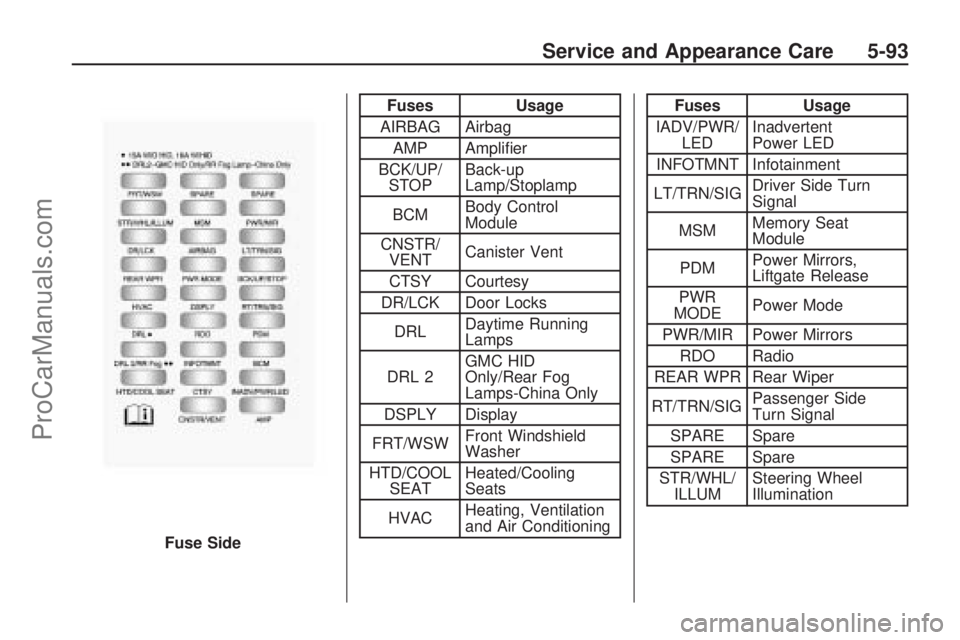
Fuses Usage
AIRBAG Airbag
AMP Amplier
BCK/UP/
STOPBack-up
Lamp/Stoplamp
BCMBody Control
Module
CNSTR/
VENTCanister Vent
CTSY Courtesy
DR/LCK Door Locks
DRLDaytime Running
Lamps
DRL 2GMC HID
Only/Rear Fog
Lamps-China Only
DSPLY Display
FRT/WSWFront Windshield
Washer
HTD/COOL
SEATHeated/Cooling
Seats
HVACHeating, Ventilation
and Air ConditioningFuses Usage
IADV/PWR/
LEDInadvertent
Power LED
INFOTMNT Infotainment
LT/TRN/SIGDriver Side Turn
Signal
MSMMemory Seat
Module
PDMPower Mirrors,
Liftgate Release
PWR
MODEPower Mode
PWR/MIR Power Mirrors
RDO Radio
REAR WPR Rear Wiper
RT/TRN/SIGPassenger Side
Turn Signal
SPARE Spare
SPARE Spare
STR/WHL/
ILLUMSteering Wheel
Illumination
Fuse Side
Service and Appearance Care 5-93
ProCarManuals.com
Page 381 of 432

FusesUsage
A/C
CLUTCH Air Conditioning
Clutch
ABS MTR Antilock Braking
System (ABS) Motor
AFS Adaptive Forward
Lighting SystemFuses
Usage
AIRBAG Airbag System AUX
POWER Auxiliary Power
AUX VAC PUMP Auxiliary Vacuum
Pump
Fuses
Usage
AWD All-Wheel-Drive
System
BATT 1 Battery 1
BATT 2 Battery 2
BATT 3 Battery 3
ECM Engine Control
Module
ECM 1 Engine Control
Module 1
EMISSION 1 Emission 1
EMISSION 2 Emission 2 EVEN
COILS Even Injector Coils
FAN 1 Cooling Fan 1
FAN 2 Cooling Fan 2
FOG LAMP Fog Lamps
FSCM Fuel System Control
Module
HORN Horn
HTD WASH Heated Windshield
Washer Fluid
Service and Appearance Care 5-95
ProCarManuals.com
Page 418 of 432

Owner Publications
Information on how to obtain product
bulletins and as described below is
applicable only in the fty U.S. states
and the District of Columbia, and
only for cars and light trucks with
a Gross Vehicle Weight Rating
(GVWR) less than 10,000 pounds
(4 536 kg). Copies of individual
bulletins are also at your participating
Saturn retailer. You can ask to
see them.
In Canada, information relating to
product service bulletins can
be obtained by contacting your
Saturn retailer.
Service Bulletins
Saturn regularly sends its retailers
useful service bulletins about Saturn
products. Saturn monitors product
performance in the eld. We then
prepare bulletins for servicing
our products better. You can get
these bulletins, too.Bulletins cover various subjects.
Some pertain to the proper use and
care of your vehicle. Some describe
costly repairs. Others describe
inexpensive repairs which, if done on
time with the latest parts, may avoid
future costly repairs.
Some bulletins tell a technician how
to repair a new or unexpected
condition. Others describe a quicker
way to x your vehicle. They can
help a technician service your
vehicle better.
Most bulletins apply to conditions
affecting a small number of vehicles.
Your Saturn retailer or a qualied
technician may have to determine
if a specic bulletin applies to your
vehicle. To order Saturn bulletins,
call Saturn Publications at
1-800-2-SATURN or visit
saturn-publications.com to order
online.
Vehicle Data
Recording and
Privacy
Your Saturn vehicle has a number of
sophisticated computers that record
information about the vehicle’s
performance and how it is driven.
For example, your vehicle uses
computer modules to monitor and
control engine and transmission
performance, to monitor the
conditions for airbag deployment and
deploy airbags in a crash and, if so
equipped, to provide antilock braking
to help the driver control the vehicle.
These modules may store data to
help your dealer/retailer technician
service your vehicle. Some modules
may also store data about how you
operate the vehicle, such as rate of
fuel consumption or average speed.
These modules may also retain the
owner’s personal preferences, such
as radio pre-sets, seat positions, and
temperature settings.
7-16 Customer Assistance Information
ProCarManuals.com