ABS SATURN RELAY 2005 User Guide
[x] Cancel search | Manufacturer: SATURN, Model Year: 2005, Model line: RELAY, Model: SATURN RELAY 2005Pages: 446, PDF Size: 3.03 MB
Page 318 of 446

Engine Air Cleaner/Filter
SeeEngine Compartment Overview on page 5-12for
the location of the engine air cleaner/lter.
When to Inspect the Engine Air
Cleaner/Filter
Inspect the air cleaner/lter at the MaintenanceII
intervals and replace it at the rst oil change after each
50,000 mile (83 000 km) interval. SeeScheduled
Maintenance on page 6-4for more information. If you
are driving in dusty/dirty conditions, inspect the lter
at each engine oil change.
How to Inspect the Engine Air
Cleaner/Filter
To inspect the air cleaner/lter, remove the lter from
the vehicle and lightly shake the lter to release
loose dust and dirt. If the lter remains caked with dirt, a
new lter is required.
To inspect or replace the air cleaner/lter, do the
following:
1. Remove the two clamps on the duct.
2. Remove the duct.
3. Unlatch the two hooks on top of the engine air
cleaner/lter housing.
4. Inspect or replace the engine air cleaner/lter.
5. Align the tabs located on the bottom of the panel
with the slots at the bottom of the housing.
6. Latch the hooks to secure the panel in place. If the
panel moves easily, check that the tabs are seated
correctly in the slots.
7. Put the duct back on and reinstall the clamps.
5-18
ProCarManuals.com
Page 341 of 446

Notice:If you leave your radio or other accessories
on during the jump starting procedure, they could
be damaged. The repairs would not be covered
by your warranty. Always turn off your radio and
other accessories when jump starting your vehicle.
3. Turn off the ignition on both vehicles. Unplug
unnecessary accessories plugged into the cigarette
lighter or the accessory power outlet. Turn off
the radio and all lamps that are not needed. This
will avoid sparks and help save both batteries. And
it could save the radio!
4. Open the hoods and locate the batteries. Find the
positive (+) and negative (−) terminal locations on
each vehicle.
You will not need to access your battery for jump
starting. Your vehicle has a remote positive (+) jump
starting terminal for that purpose.The terminal is located
under a tethered cap at
the front of the underhood
fuse block. SeeEngine
Compartment Overview on
page 5-12for more
information on location.
Squeeze the tabs and swing the cap out of the way
to access the remote positive (+) terminal. You
should always use the remote positive (+) terminal
instead of the positive (+) terminal on your
battery.
{CAUTION:
An electric fan can start up even when the
engine is not running and can injure you. Keep
hands, clothing and tools away from any
underhood electric fan.
5-41
ProCarManuals.com
Page 351 of 446
Windshield Wiper Blade
Replacement
Windshield wiper blades should be inspected for wear
and cracking. SeeScheduled Maintenance on page 6-4
for more information.
Replacement blades come in different types and are
removed in different ways. For proper type and length,
seeNormal Maintenance Replacement Parts on
page 6-14.
To replace the windshield wiper blade assembly do the
following:
1. Lift the wiper arm and turn the blade until it is
facing away from the windshield.
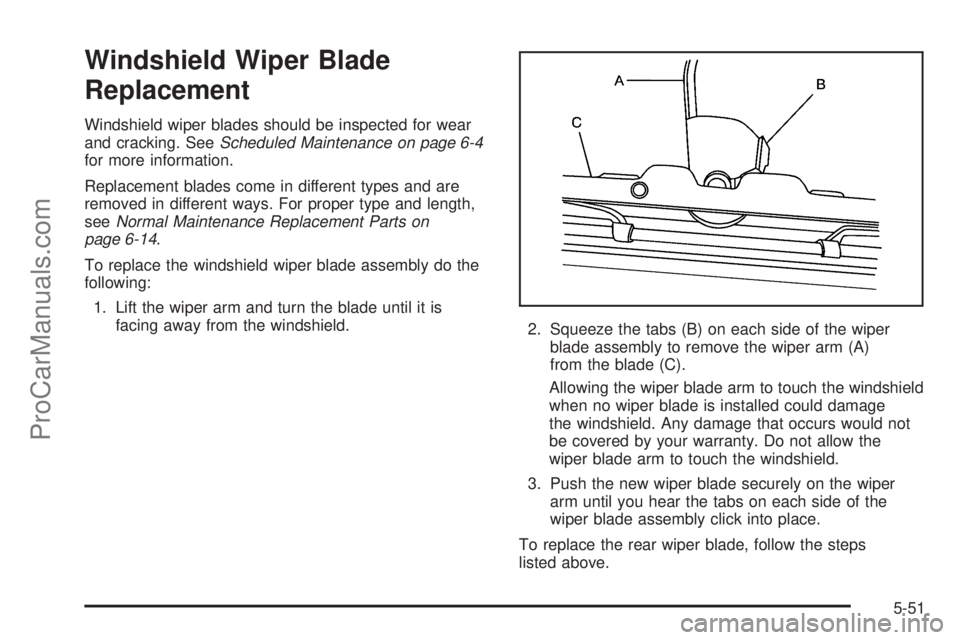
2. Squeeze the tabs (B) on each side of the wiper
blade assembly to remove the wiper arm (A)
from the blade (C).
Allowing the wiper blade arm to touch the windshield
when no wiper blade is installed could damage
the windshield. Any damage that occurs would not
be covered by your warranty. Do not allow the
wiper blade arm to touch the windshield.
3. Push the new wiper blade securely on the wiper
arm until you hear the tabs on each side of the
wiper blade assembly click into place.
To replace the rear wiper blade, follow the steps
listed above.
5-51
ProCarManuals.com
Page 367 of 446

To use your accessory inator system, do the following:
1. Turn the ignition to ACCESSORY or RUN.
2. Attach the appropriate nozzle adapter, if required,
to the end of the hose that has the pressure gage.
3. Attach that end of the hose to the object you wish
to inate.
4. Remove the protective cap covering the outlet.
5. Attach the other end of the hose to the outlet.
6. Press the accessory inator switch. The light in the
switch will come on to show the system is working.
If the accessory inator system does not turn on or the
light does not come on, the fuse may be blown or
installed incorrectly. SeeFuses and Circuit Breakers on
page 5-98or see your retailer for service.
Your accessory inator will automatically shut off after
about 10 minutes. The light in the switch will blink. After
about one minute you can use the system again.
Press the switch and the indicator light will come on.Notice:If you run the accessory inator longer
than 30 minutes at a time, you could damage
the inator. The repairs would not be covered by
your warranty. Run the inator for short periods of
time only.
After running the accessory inator for 30 minutes, wait
at least 10 minutes before restarting the accessory
inator.
To turn off the inator, do the following:
1. Press the switch and detach the hose, rst from the
inated object, then from the outlet.
2. Put the protective cap back on.
3. Place the inator kit tools in the pouch, and store in
the rear compartment on the passenger’s side.
To put the cover back on, line up the tabs at the bottom
of the cover and put it in place. Push down the tab to
secure the cover.
5-67
ProCarManuals.com
Page 386 of 446
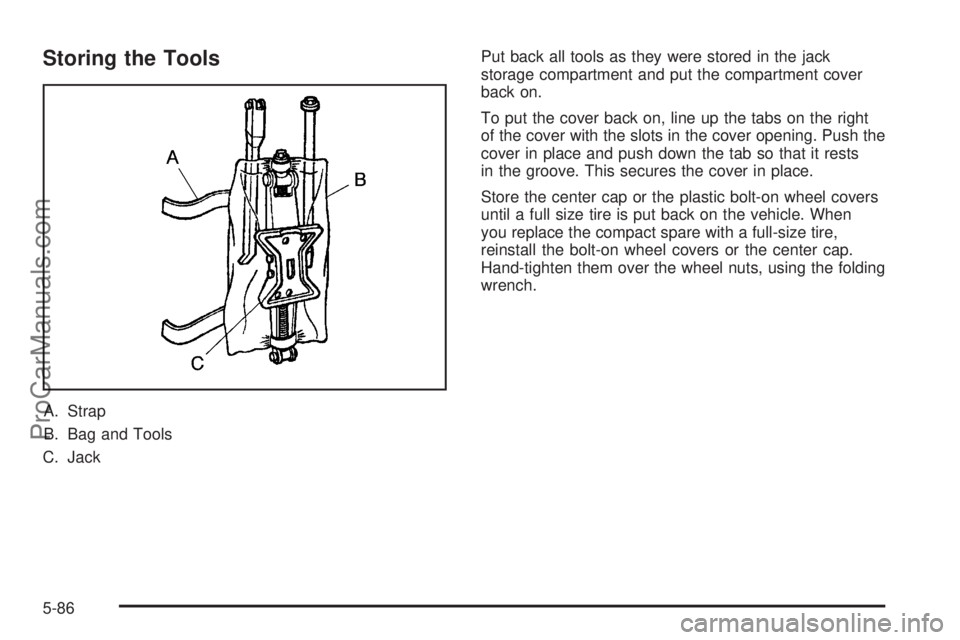
Storing the Tools
A. Strap
B. Bag and Tools
C. JackPut back all tools as they were stored in the jack
storage compartment and put the compartment cover
back on.
To put the cover back on, line up the tabs on the right
of the cover with the slots in the cover opening. Push the
cover in place and push down the tab so that it rests
in the groove. This secures the cover in place.
Store the center cap or the plastic bolt-on wheel covers
until a full size tire is put back on the vehicle. When
you replace the compact spare with a full-size tire,
reinstall the bolt-on wheel covers or the center cap.
Hand-tighten them over the wheel nuts, using the folding
wrench.
5-86
ProCarManuals.com
Page 389 of 446

Do not clean your vehicle using the following cleaners
or techniques:
Never use a knife or any other sharp object to
remove a soil from any interior surface.
Never use a stiff brush. It can cause damage to
your vehicle’s interior surfaces.
Never apply heavy pressure or rub aggressively
with a cleaning cloth. Use of heavy pressure
can damage your interior and does not improve the
effectiveness of soil removal.
Use only mild, neutral-pH soaps. Avoid laundry
detergents or dishwashing soaps with degreasers.
Using too much soap will leave a residue that
leaves streaks and attracts dirt. For liquid cleaners,
about 20 drops per gallon (3.78 L) of water is a
good guide.
Do not heavily saturate your upholstery while
cleaning.
Damage to your vehicle’s interior may result from
the use of many organic solvents such as naptha,
alcohol, etc.
Fabric/Carpet
Use a vacuum cleaner with a soft brush attachment
frequently to remove dust and loose dirt. A canister
vacuum with a beater bar in the nozzle may only be used
on oor carpet and carpeted oor mats. For soils, always
try to remove them rst with plain water or club soda.
Before cleaning, gently remove as much of the soil as
possible using one of the following techniques:
For liquids: gently blot the remaining soil with a paper
towel. Allow the soil to absorb into the paper towel
until no more can be removed.
For solid dry soils: remove as much as possible and
then vacuum.
To clean, use the following instructions:
1. Saturate a lint-free, clean white cloth with water or
club soda.
2. Wring the cloth to remove excess moisture.
3. Start on the outside edge of the soil and gently rub
toward the center. Continue cleaning, using a clean
area of the cloth each time it becomes soiled.
4. Continue to gently rub the soiled area until the
cleaning cloth remains clean.
5. If the soil is not completely removed, use a mild
soap solution and repeat the cleaning process
that was used with plain water.
5-89
ProCarManuals.com
Page 433 of 446
A
Accessory Inator...........................................5-66
Accessory Power Outlets.................................3-22
Adding Equipment to Your Airbag-Equipped
Vehicle.......................................................1-78
Additives, Fuel................................................. 5-6
Add-On Electrical Equipment............................5-97
Air Cleaner/Filter, Engine.................................5-18
Air Conditioning..............................................3-24
Airbag
Passenger Status Indicator...........................3-33
Readiness Light..........................................3-32
Airbag Sensing and Diagnostic Module (SDM)...... 7-6
Airbag System................................................1-64
Adding Equipment to Your Airbag-Equipped
Vehicle...................................................1-78
How Does an Airbag Restrain?......................1-71
Passenger Sensing System...........................1-74
Servicing Your Airbag-Equipped Vehicle..........1-78
What Makes an Airbag Inate?......................1-71
What Will You See After an Airbag Inates?....1-72
When Should an Airbag Inate?....................1-69
Where Are the Airbags?...............................1-67
All-Wheel Drive...............................................5-45
All-Wheel Drive (AWD) System.........................2-36All-Wheel-Drive (AWD) System.........................4-11
Antenna, Fixed Mast......................................3-111
Antenna, XM™ Satellite Radio
Antenna System........................................3-111
Anti-Lock Brake System (ABS)........................... 4-6
Anti-Lock Brake, System Warning Light..............3-36
Appearance Care............................................5-87
Aluminum Wheels........................................5-93
Care of Safety Belts....................................5-91
Chemical Paint Spotting...............................5-94
Cleaning Exterior Lamps/Lenses....................5-91
Cleaning the Inside of Your Vehicle................5-88
Fabric/Carpet..............................................5-89
Finish Care.................................................5-92
Finish Damage............................................5-94
Instrument Panel, Vinyl, and Other Plastic
Surfaces.................................................5-90
Leather......................................................5-90
Sheet Metal Damage...................................5-94
Tires..........................................................5-93
Underbody Maintenance...............................5-94
Vehicle Care/Appearance Materials................5-95
Washing Your Vehicle...................................5-91
Weatherstrips..............................................5-91
Windshield, Backglass, and Wiper Blades.......5-92
1
ProCarManuals.com
Page 434 of 446

Audio System(s).............................................3-72
Audio Steering Wheel Controls....................3-109
Care of Your CD and DVD Player................3-111
Care of Your CDs and DVDs.......................3-111
Fixed Mast Antenna...................................3-111
Radio with CD............................................3-73
Rear Seat Audio (RSA)...............................3-106
Setting the Time..........................................3-72
Theft-Deterrent Feature...............................3-109
Understanding Radio Reception...................3-110
XM™ Satellite Radio Antenna System...........3-111
Automatic Door Locks.....................................2-13
Automatic Transaxle
Fluid..........................................................5-19
Operation...................................................2-33
B
Battery..........................................................5-39
Run-Down Protection...................................3-19
Before Leaving on a Long Trip.........................4-23
Brake
Anti-Lock Brake System (ABS)........................ 4-6
Emergencies................................................ 4-8
Parking......................................................2-37
System Warning Light..................................3-35
Brakes..........................................................5-36
Braking........................................................... 4-5
Braking in Emergencies..................................... 4-8Break-In, New Vehicle.....................................2-30
Bucket Seats, Rear........................................... 1-8
Bulb Replacement...........................................5-47
Front Turn Signal, Parking and Daytime
Running Lamps........................................5-49
Halogen Bulbs............................................5-47
Replacement Bulbs......................................5-50
Taillamps, Turn Signal, Stoplamps and
Back-up Lamps........................................5-49
Buying New Tires...........................................5-61
C
California Fuel.................................................. 5-6
Canadian Owners................................................ ii
Capacities and Specications..........................5-103
Captain Chairs, Rear.......................................1-14
Carbon Monoxide...................2-21, 2-40, 4-26, 4-38
Care of
Safety Belts................................................5-91
Your CD and DVD Player...........................3-111
Your CDs and DVDs..................................3-111
Cargo Lamp...................................................3-19
Chains, Tire...................................................5-65
Charging System Light....................................3-35
Check
Engine Light...............................................3-38
Checking Things Under the Hood......................5-10
Chemical Paint Spotting...................................5-94
2
ProCarManuals.com