warning Seat Alhambra 2006 Owner's Manual
[x] Cancel search | Manufacturer: SEAT, Model Year: 2006, Model line: Alhambra, Model: Seat Alhambra 2006Pages: 299, PDF Size: 6.33 MB
Page 173 of 299
Driving171
Safety FirstOperating instructionsTips and MaintenanceTe c h n i c a l D a t a
Changing gear with “Tiptronic”
The “Tiptronic” system allows the driver to change gears
manually.Changing gear with “Tiptronic” (selector lever)
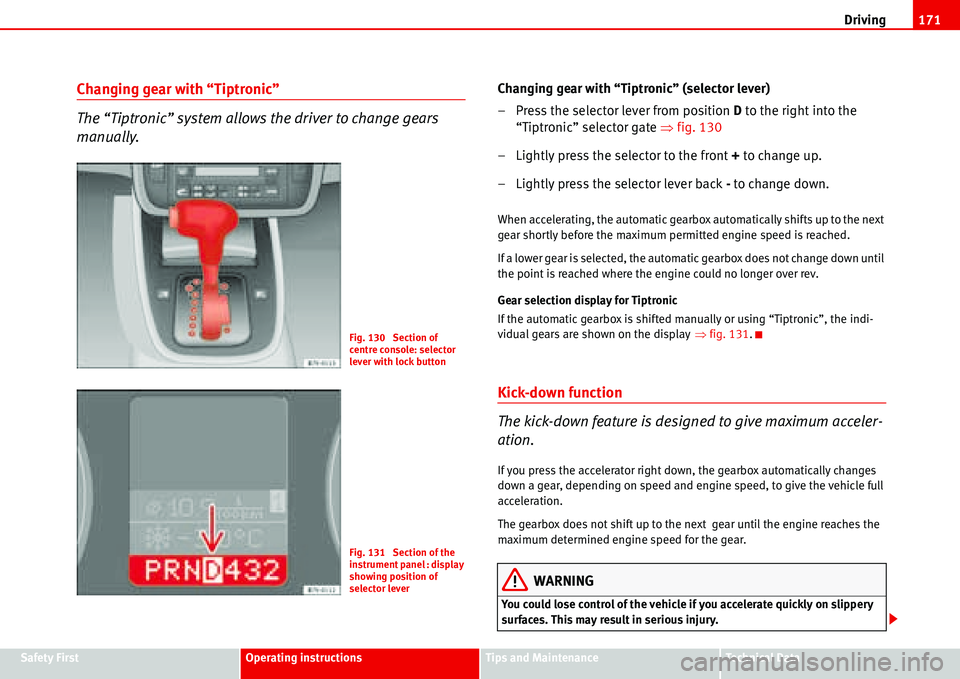
– Press the selector lever from position D to the right into the
“Tiptronic” selector gate Ÿfig. 130
– Lightly press the selector to the front + to change up.
– Lightly press the selector lever back - to change down.
When accelerating, the automatic gearbox automatically shifts up to the next
gear shortly before the maximum permitted engine speed is reached.
If a lower gear is selected, the automatic gearbox does not change down until
the point is reached where the engine could no longer over rev.
Gear selection display for Tiptronic
If the automatic gearbox is shifted manually or using “Tiptronic”, the indi-
vidual gears are shown on the displayŸfig. 131.
Kick-down function
The kick-down feature is designed to give maximum acceler-
ation.
If you press the accelerator right down, the gearbox automatically changes
down a gear, depending on speed and engine speed, to give the vehicle full
acceleration.
The gearbox does not shift up to the next gear until the engine reaches the
maximum determined engine speed for the gear.
WARNING
You could lose control of the vehicle if you accelerate quickly on slippery
surfaces. This may result in serious injury.
Fig. 130 Section of
centre console: selector
lever with lock button
Fig. 131 Section of the
instrument panel : display
showing position of
selector lever
Page 174 of 299
Driving 172
•Be particularly careful, therefore, when using the kick-down function on
slippery road surfaces.
•You should use the kick-down function only when traffic and weather
conditions allow it to be used safely.
Handbrake
Using the handbrake
The handbrake should be applied firmly to prevent the
vehicle from accidentally rolling away.
Always apply the handbrake when you leave your vehicle and when
you park.
Using the handbrake
– Firmly pull the handbrake lever up all the way.
Releasing the handbrake
– Firmly pull the handbrake lever up all the way.
– Push in the lock button on the handbrake lever.
– Keep the locking knob pressed and push the lever all the way
down Ÿ.
The handbrake is located at the side of the driver seat. Always apply the
handbrake firmly. This prevents you driving with the handbrake applied
Ÿ.The handbrake warning lamp
H lights up when the handbrake is applied
and the ignition switched on. The warning lamp goes out when the hand-
brake is released.
WARNING
•Never use the handbrake to slow down the vehicle when it is in motion.
The braking distance is considerably longer, as braking is only applied to
the rear wheels. Risk of accident!
•Never drive with the handbrake slightly applied. This could cause the
rear brakes to overheat and lose their braking efficiency. Risk of accident.
This also causes premature wear on the rear brake pads/linings.
Caution
Always apply the handbrake before you leave the vehicle. On cars with a
manual gearbox engage 1st gear, or for an automatic gearbox move the
selector lever to P.
Parking
The handbrake should always be firmly applied when the
vehicle is parked.
Always note the following points when parking the vehicle:
– Use the foot brake to stop the vehicle.
– Apply the handbrake firmly.
– On a manual gearbox engage 1st gear. On an automatic move
the selector lever to P .
WARNING (continued)
Page 175 of 299
Driving173
Safety FirstOperating instructionsTips and MaintenanceTe c h n i c a l D a t a
– Switch off the engine and remove the key from the ignition lock.
Turn the steering wheel slightly to engage the steering lock.
– Always take you car keys with you when you leave the vehicle
Ÿ.
Additional notes on parking the vehicle on gradients:
Turn the steering wheel so that the vehicle would roll against the kerb if it did
start to roll.
•If the vehicle is facing downhill, turn the front wheels so that they point
towards the kerb.
•If the vehicle is facing uphill, turn the front wheels so that they point away
from the kerb.
WARNING
Take measures to reduce the risk of injury when you leave your vehicle
unattended.
•Never park where the hot exhaust system could ignite inflammable
materials, such as dry grass, low bushes, spilt fuel etc.
•Never allow vehicle occupants to remain in the vehicle when it is
locked. They would be unable to open the vehicle from the inside, and
could become trapped in the vehicle in an emergency. In the event of an
emergency, locked doors will delay assistance to occupants.
•Never leave children unsupervised in the vehicle. They could set the
vehicle in motion, for example, by releasing the handbrake or the gear
lever / selector lever.
•Depending on weather conditions, it may become extremely hot or cold
inside the vehicle. This can be fatal.
Parking distance warning system
Description
The parking distance warning system is a parking aid which
draws your attention to obstacles in front or behind the
vehicle.
The parking distance warning system assists the driver when parking. If the
rear of the vehicle is approaching an obstacle, an intermittent sound signal is
emitted. The shorter the distance, the shorter the intervals between tones. If
the vehicle is too close to the obstacle, the sound signal becomes constant.
The distance to an obstacle at the front is indicated via a high tone and via a
low tone at the rear. The shorter the distance, the shorter the intervals
between tones. If the vehicle is too close to the obstacle, the sound signal
becomes constant.
The obstacle may no longer be detected if the vehicle gets even closer to it!
The warning signal will stop when
•the vehicle moves away from the obstacle
•the outer sensors measure a constant distance for approximately 3
seconds.
The signal will not be switched off once the vehicle has reached the perma-
nent tone area.
Registering the obstacle
•Outer sensors front and rear: as of approx. 80 cm
•Centre sensors at the front: as of approx. 120 cm
•Centre sensors at the rear: as of approx. 160 cm
Page 176 of 299
Driving 174
Switching the parking distance warning system on and off
Switching on the parking distance warning system
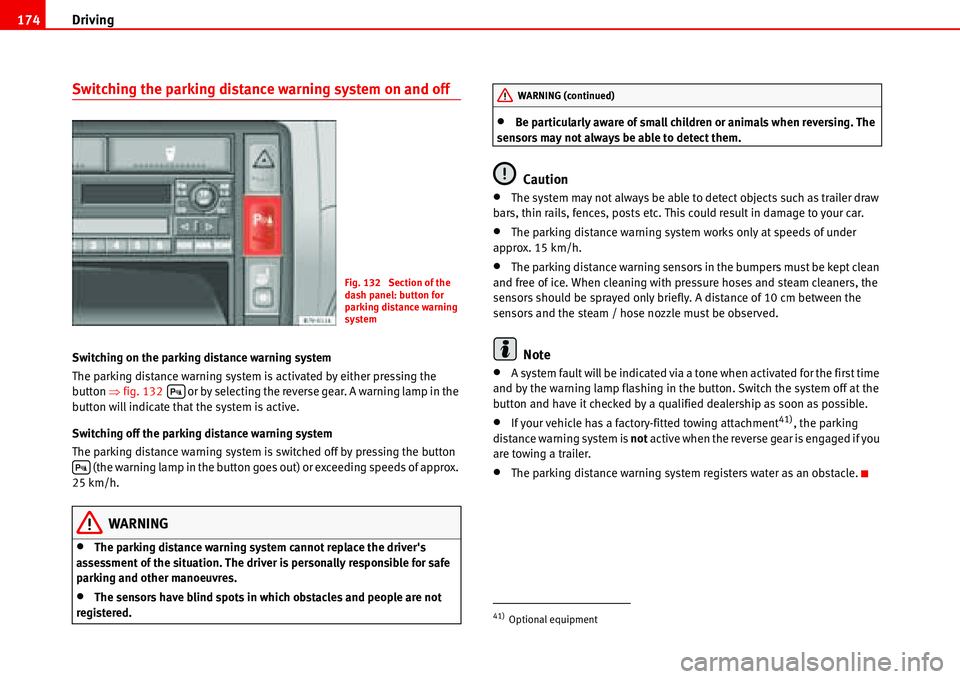
The parking distance warning system is activated by either pressing the
button Ÿfig. 132 or by selecting the reverse gear. A warning lamp in the
button will indicate that the system is active.
Switching off the parking distance warning system
The parking distance warning system is switched off by pressing the button
(the warning lamp in the button goes out) or exceeding speeds of approx.
25 km/h.
WARNING
•The parking distance warning system cannot replace the driver's
assessment of the situation. The driver is personally responsible for safe
parking and other manoeuvres.
•The sensors have blind spots in which obstacles and people are not
registered.
•Be particularly aware of small children or animals when reversing. The
sensors may not always be able to detect them.
Caution
•The system may not always be able to detect objects such as trailer draw
bars, thin rails, fences, posts etc. This could result in damage to your car.
•The parking distance warning system works only at speeds of under
approx. 15 km/h.
•The parking distance warning sensors in the bumpers must be kept clean
and free of ice. When cleaning with pressure hoses and steam cleaners, the
sensors should be sprayed only briefly. A distance of 10 cm between the
sensors and the steam / hose nozzle must be observed.
Note
•A system fault will be indicated via a tone when activated for the first time
and by the warning lamp flashing in the button. Switch the system off at the
button and have it checked by a qualified dealership as soon as possible.
•If your vehicle has a factory-fitted towing attachment41), the parking
distance warning system is not active when the reverse gear is engaged if you
are towing a trailer.
•The parking distance warning system registers water as an obstacle.
Fig. 132 Section of the
dash panel: button for
parking distance warning
system
'
'
41)Optional equipment
WARNING (continued)
Page 177 of 299
Driving175
Safety FirstOperating instructionsTips and MaintenanceTe c h n i c a l D a t a
Cruise control system (CCS)
Cruise control operation
The cruise control system(CCS) is able to maintain the set
speed in the range from approx. 30 km/h to 180 km/h.
Once the desired speed has been reached and the setting stored, you may
take your foot off the accelerator.
In vehicles fitted with a manual gearbox and in vehicles with an automatic
gearbox with the lever in positions P, N or R the cruise control does not
operate in first gear.
WARNING
It could be dangerous to use the cruise control system (CCS) if it is not
possible to drive at constant speed.
•Do not use the cruise control in heavy traffic or on steep roads, with
several bends or in slippery circumstances (snow, ice, rain or loose gravel),
as there is a risk of accident.
•Always adapt your speed and the distance to the vehicles ahead to take
the traffic situation into consideration. This is the duty of the driver. The
cruise control system is merely an aid to the driver.
•Never use the cruise control system when driving off-road or on
unpaved roads . This feature is designed for use on paved roads only. Risk
of accident.
•Always switch off the CCS when you have finished using it. This will
prevent you using it by mistake.
•It is dangerous to use a set speed which is too high for the prevailing
road, traffic or weather conditions. This may cause an accident.
Caution
if the cruise control is activated the gearbox should not be set in neutral
without first releasing the clutch, as the engine speed will increase and this
may cause damage.
Note
When travelling down hills, the CCS cannot maintain a constant speed. The
vehicle will accelerate under its own weight. Reduce gears (with an automatic
gearbox, reduce gears using the “Tiptronic”) or brake using the footbrake.
Page 179 of 299
Driving177
Safety FirstOperating instructionsTips and MaintenanceTe c h n i c a l D a t a Control of the set speed is switched off if you reduce speed by depressing the
brake pedal. You can reactivate the control by pressing once on the upper part
of the rocker switch or button .
WARNING
It is dangerous to use a set speed which is too high for the prevailing road,
traffic or weather conditions. This may cause an accident.
Switching off system temporarily
Switching off the control temporarily in vehicles with a manual
gearbox
– Depress the brake or clutch pedal or
–Push the switch Ÿpage 176, fig. 133 to “OFF”, or
– Press the lower part of the button .
Switching off the control temporarily in vehicles with an automatic
gearbox
– Press the brake pedal or
– Select positions N or 1 or
–Push the switch Ÿpage 176, fig. 133 to “OFF”, or
– Press the lower part of the rocker button .
The speed stored will remain in the cruise control memory if the control is
switched off temporarily, unless you select positions N or 1. In this case, the
speed stored in the memory will be deleted.To resume the control function, release the brake or clutch pedal, move the
switch to ON or press the button Ÿpage 176, fig. 133 or button
Ÿpage 176, fig. 134 once.
WARNING
It is dangerous to use a set speed which is too high for the current road,
traffic or weather conditions. Risk of accident.
2%3 +
AA
CANCEL
AA
CANCEL
AA2%3 +
Page 181 of 299
Intelligent technology179
Safety FirstOperating instructionsTips and MaintenanceTe c h n i c a l D a t a
Tips and Maintenance
Intelligent technology
Brakes
Brake servo
The brake servo supplements the pressure you exert on the brake pedal. It
works only when the engine is running.
If the brake servo does not operate, for example, when the vehicle is being
towed or due to a fault in the system, the brake pedal must be depressed
harder.
WARNING
The braking distance can also be affected by external factors.
•Never let the vehicle coast with the engine switched off. Failure to do so
could result in an accident. The braking distance is increased considerably
as the brake servo does not function.
•If the brake servo is out of action, for example if the car is being towed,
you will have to press the brake pedal considerably harder than normal.
Brake pads wear display I
If this light comes on, check the brake pads immediately.
At the same time, a text message or the necessary operations may appear on
the instrument panel .
WARNING
If the warning lamp lights up I or the corresponding message appears on
the instrument panel, immediately have the brake pads checked and
replaced, if necessary, at a specialised workshop.
Brake warning lamp H
If the warning lamp comes on, this may be caused by the
following reasons:
•With the handbrake on the warning light comes on H on the instrument
panel. If you are travelling at over 6 km/h with the hand brake on, a text
message or the required operations may appear on the instrument panel. In
addition a warning signal is heard.
•In the event of insufficient brake fluid the warning lamp lights up H on
the instrument panel. At the same time, a text message or the necessary oper-
ations may appear on the instrument panel . Stop the vehicle immediately
and check the level of the brake fluid Ÿpage 221
•In the event of a fault in the brake system the warning lamp lights up H
on the instrument panel and three buzzes are emitted. At the same time, a
text message or the necessary operations may appear on the instrument
panel . Stop the vehicle and do not drive on. You should obtain professional
assistance. This warning lamp
H can light up together with the anti-locking
brake system warning lamp JŸ.
Page 182 of 299
Intelligent technology 180
WARNING
Special care must be taken when working on the engine or on components
in the engine compartment.
•It is important that you read and observe the corresponding warnings
before working in the engine compartment Ÿpage 209.
•If the brake warning symbol does not go out, or if it lights up when
driving, the brake fluid level in the reservoir is too low or there is a fault in
the brake system. Risk of accident. Stop the vehicle and do not drive on.
You should obtain professional assistance.
•If the brake warning lamp H lights up together with the ABS warning
lamp J, the control function of the ABS could be out of action. This could
cause the rear wheels to lock quickly when you brake. This could cause the
rear to break away. Risk of skidding. Drive carefully to the nearest qualified
workshop and have the fault corrected.
Brake assist system (BAS)
The brake servo (BAS) works only when the engine is running.
In an emergency, most drivers brake in time, but not with maximum force.
This results in unnecessarily long braking distances.
The brake assist system intervenes here: if you press the brake pedal very
quickly, the brake assist system registers an emergency situation. It then very
quickly builds up the full brake pressure so that the ABS can be activated
more quickly and efficiently, thus reducing the braking distance.
Do not reduce the pressure on the brake pedal. The brake assist system
switches off automatically as soon as you release the brake.
WARNING
Try to always adapt the speed of the vehicle to weather, road and traffic
conditions. Do not let the extra safety afforded by the system tempt you
into taking any risks when driving. Risk of accident.
•The risk of accident is higher if you drive too fast, if you do not keep
your distance from the car in front, and when the road surface is slippery or
wet. The increased accident risk cannot be reduced by the brake assist
system.
•The brake assist system cannot defy the laws of motion. Slippery and
wet roads are dangerous even with the brake assist system!
•Modifications to the vehicle or work carried out incorrectly (e. g. to the
engine, the brake system, running gear or any components affecting the
wheels and tyres) could affect the efficiency of the ABS, EDL, ESP and TCS
and lessen their efficiency.
Anti-locking brake system (ABS)
The anti-lock brake system prevents the wheels locking
during braking.
The anti-lock brake system (ABS) is an important part of the car's active safety
system.
How the ABS works
If one of the wheels is turning too slowly in relation to the road speed, and is
close to locking, the system will reduce the pressure for this wheel. The driver
is made aware of this control process by a pulsating of the brake pedal and
audible noise. This is a deliberate warning to the driver that one or more of
the wheels is tending to lock and the ABS control function has intervened. In
this situation it is important to keep the brake pedal fully depressed so the
ABS can regulate the brake application. Do not “pump” the brake pedal.
Page 183 of 299
Intelligent technology181
Safety FirstOperating instructionsTips and MaintenanceTe c h n i c a l D a t a On braking sharply on slippery ground, this system helps to keep the vehicle
under control, as the wheels do not lock.
However, ABS will not necessarily guarantee shorter braking distances in all
conditions. The braking distance could even be longer if you brake on gravel
or on fresh snow covering a slippery surface.
WARNING
Try to always adapt the speed of the vehicle to weather, road and traffic
conditions. Do not let the extra safety afforded by the system tempt you
into taking any risks when driving. Risk of accident.
•The anti-lock brake system cannot defy the laws of motion. Slippery
and wet roads are dangerous even with ABS! If you notice that the ABS has
been activated, you should reduce speed immediately to suit the road and
traffic conditions.
•The ABS cannot reduce the risk of accident if, for example, you are
driving with an unsuitable load or too close to the preceding vehicle.
WARNING
•Modifications to the vehicle or work carried out incorrectly (e. g. to the
engine, the brake system, running gear or any components affecting the
wheels and tyres) could affect the efficiency of the ABS, EDL, ESP and TCS
and lessen their efficiency.
•The effectiveness of ABS is also determined by the tyres fitted
Ÿpage 225.
ABS warning lamp J
The warning lamp monitors the ABS.
The warning lamp Jshould light up for a few seconds when the ignition is
switched on. It goes out again after the system has run through an automatic
test sequence.
There is a fault in the ABS if:
•The ABS warning lamp J does not light up when the ignition is switched
on.
•The warning lamp does not go out again after a few seconds.
•The warning lamp lights up when the vehicle is moving.
The vehicle can still be braked in the normal way (except that the ABS control
function is out of action). Please take the vehicle to a qualified workshop as
soon as possible.
If a fault occurs in the ABS, the ESP warning lamp will also light up
42).
Brake system fault
If the ABS warning lamp
J lights up together with the brake warning lamp H, this indicates not only a fault in the ABS function, but also a possible fault
in the brake system Ÿ.
At the same time, a text message or the necessary operations may appear on
the instrument panel .
WARNING
Special care must be taken when working on the engine or on components
in the engine compartment.
•It is important that you read and observe the corresponding warnings
before working in the engine compartment Ÿpage 209.
42)Optional equipment
Page 184 of 299
Intelligent technology 182
•If the brake warning lamp H should light up together with the ABS
warning lamp J, stop the vehicle immediately and check the brake fluid
level in the reservoir Ÿpage 221. If the fluid level has dropped below the
“MIN” mark you must not drive on. Risk of accident. You should obtain
professional assistance.
•If the brake fluid level is correct, the fault in the brake system may have
been caused by a failure of the ABS control function. This could cause the
rear wheels to lock quickly when you brake. This could cause the tail of the
vehicle to skid sideways. Drive carefully to the nearest qualified workshop
and have the fault corrected.
Electronic differential lock (EDL)
The electronic differential lock helps prevent the loss of trac-
tion caused if one of the driven wheels starts spinning.
The electronic differential lock (EDL) only works when the engine is running.
EDL helps the vehicle to start moving, accelerate and climb a gradient in slip-
pery conditions where this may otherwise be difficult or even impossible.
It uses the ABS sensors to monitor the speed of the driven wheels.
At speeds of up to approximately 80 km/h, it is able to balance out differ-
ences in the speed of the driven wheels of approximately 100 rpm caused by
a slippery road surface on one side of the vehicle. It does this by braking the
wheel which has lost traction and distributing more driving force to the other
driven wheel via the differential.
To prevent the disc brake of the braked wheel from overheating, the EDL cuts
out automatically if subjected to excessive loads. The car remains operational
and will behave in the same way as a car without EDL. For this reason, the
driver is not informed that the EDL has been switched off.The EDL will switch on again automatically when the brake has cooled down.
WARNING
Try to always adapt the speed of the vehicle to weather, road and traffic
conditions. Do not let the extra safety afforded by the system tempt you
into taking any risks when driving. Risk of accident.
•When accelerating on a slippery surface, for example on ice and snow,
press the accelerator carefully. Despite EDL, the driven wheels may other-
wise start to spin. This could impair the car's stability.
•Always adapt your driving style to suit road conditions and the traffic
situation.
WARNING
Modifications to the vehicle or work carried out incorrectly (e. g. to the
engine, the brake system, running gear or any components affecting the
wheels and tyres) could affect the efficiency of the ABS, EDL, ESP and TCS
and lessen their efficiency.
Electronic stabilisation programme (ESP)
The electronic stabilisation programme helps to reduce the
danger of skidding.
The electronic stabilisation programme (ESP) consists of ABS, EDL and TCS
and only works when the engine is running.
The ESP should generally be left switched on at all times. Only when the
necessary drive can not be obtained should the ESP be disconnected.
For example:
•when driving with snow chains,
WARNING (continued)