maintenance Seat Alhambra 2007 Workshop Manual
[x] Cancel search | Manufacturer: SEAT, Model Year: 2007, Model line: Alhambra, Model: Seat Alhambra 2007Pages: 291, PDF Size: 9.13 MB
Page 103 of 291
Unlocking and locking101
Safety First
Operating instructions
Tips and Maintenance
Te c h n i c a l D a t a
−
If the ignition is switched on, the electric equipment could be acti-
vated with risk of injury, for example, in the electric windows.
− The doors can be locked using the remote control key. This could
result in people being trapped in the vehicle in an emergency.
− Always take the key with you when you leave the vehicle.
•
The electric windows will work unti l the ignition has been switched off
and one of the front doors has been opened.
•
If necessary, use the safety switch to disable the rear electric windows.
Make sure that they have been disabled.Note
If the window is not able to close because it is stiff or because of an obstruc-
tion, the window will automatically open again ⇒page 102. If this happens,
check why the window could not be clos ed before attempting to close it
again.One-touch closing and opening
One-touch opening and closing means you do not have to
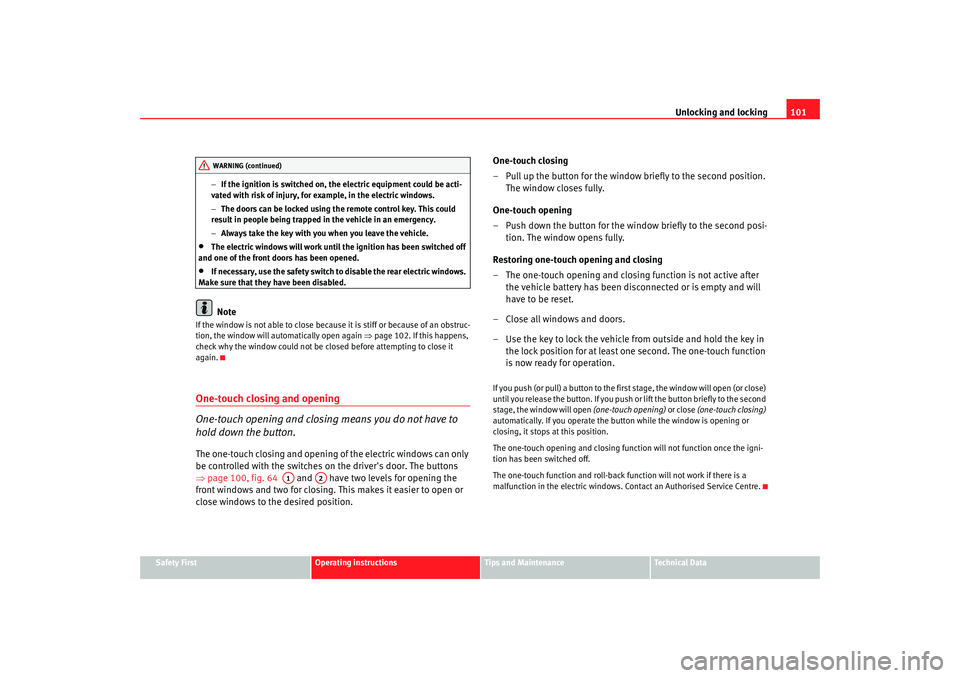
hold down the button.The one-touch closing and opening of the electric windows can only
be controlled with the switches on the driver's door. The buttons
⇒ page 100, fig. 64 and have two levels for opening the
front windows and two for closing. This makes it easier to open or
close windows to the desired position. One-touch closing
– Pull up the button for the window briefly to the second position.
The window closes fully.
One-touch opening
– Push down the button for the window briefly to the second posi- tion. The window opens fully.
Restoring one-touch opening and closing
– The one-touch opening and closing function is not active after the vehicle battery has been disconnected or is empty and will
have to be reset.
– Close all windows and doors.
– Use the key to lock the vehicle from outside and hold the key in the lock position for at least one second. The one-touch function
is now ready for operation.
If you push (or pull) a button to the first stage, the window will open (or close)
until you release the button. If you push or lift the button briefly to the second
stage, the window will open (one-touch opening) or close (one-touch closing)
automatically. If you operate the button while the window is opening or
closing, it stops at this position.
The one-touch opening and closing function will not function once the igni-
tion has been switched off.
The one-touch function and roll-back function will not work if there is a
malfunction in the electric windows. Contact an Authorised Service Centre.
WARNING (continued)
A1
A2
alhambra ingles.book Seite 101 Donnerstag, 19. April 2007 4:04 16
Page 105 of 291
Unlocking and locking103
Safety First
Operating instructions
Tips and Maintenance
Te c h n i c a l D a t a
Mechanical vent wings
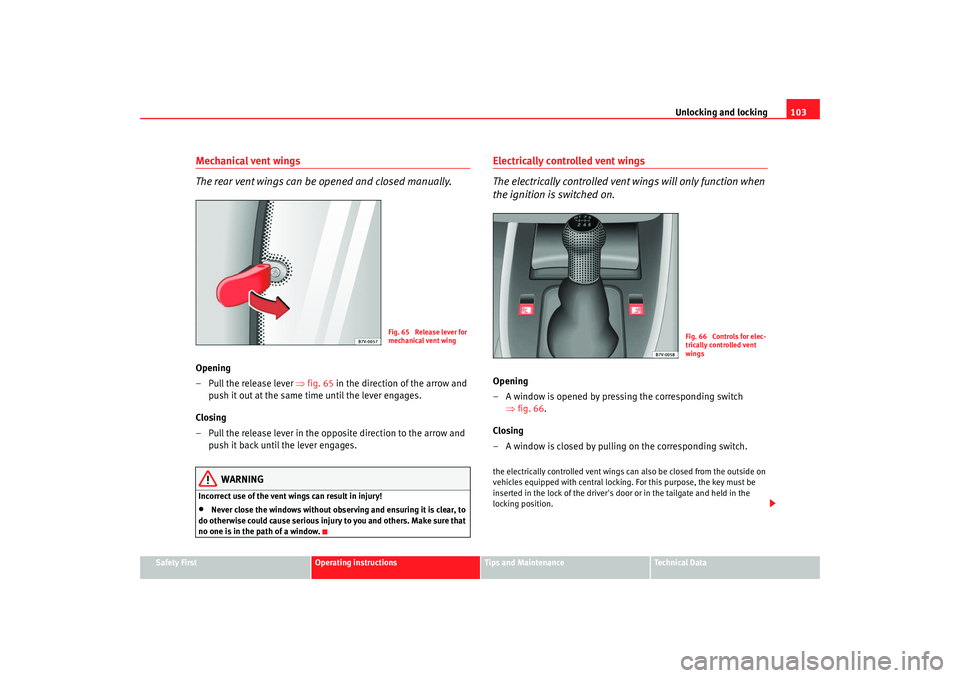
The rear vent wings can be opened and closed manually.Opening
– Pull the release lever ⇒fig. 65 in the direction of the arrow and
push it out at the same time until the lever engages.
Closing
– Pull the release lever in the opposite direction to the arrow and push it back until the lever engages.
WARNING
Incorrect use of the vent wings can result in injury!•
Never close the windows without observ ing and ensuring it is clear, to
do otherwise could cause serious injury to you and others. Make sure that
no one is in the path of a window.
Electrically controlled vent wings
The electrically controlled vent wings will only function when
the ignition is switched on.Opening
– A window is opened by pressing the corresponding switch ⇒fig. 66 .
Closing
– A window is closed by pulling on the corresponding switch.the electrically controlled vent wings ca n also be closed from the outside on
vehicles equipped with central locki ng. For this purpose, the key must be
inserted in the lock of the driver's door or in the tailgate and held in the
locking position.
Fig. 65 Release lever for
mechanical vent wing
Fig. 66 Controls for elec-
trically controlled vent
wings
alhambra ingles.book Seite 103 Donnerstag, 19. April 2007 4:04 16
Page 107 of 291
Unlocking and locking105
Safety First
Operating instructions
Tips and Maintenance
Te c h n i c a l D a t a
•
The sliding/tilting sunroof operates as long as the ignition is switched
on.Note
The roof can be closed by hand if the system is defective.Convenience closing*– Via door lock: Hold the key in the door lo ck of the driver's door in
the locking position until the sliding/tilting roof is closed.
– Release the key to interrupt this function.During convenience closing, first the windows and then the sliding roof will
be closed.
WARNING
Never close the sliding/tilting sunroof without observing and ensuring it is
clear, to do otherwise could cause serious injury to you and others. The
sliding/tilting sunroof closes with the roll-back function activated.
However, always make sure that no one is in the path of the sliding/tilting
sunroof.
Note
The sliding/tilting sunroof rotary button remains in the last position selected
if the roof is closed using convenience closing from outside the vehicle and
will have to be re-positio ned the next time you drive.
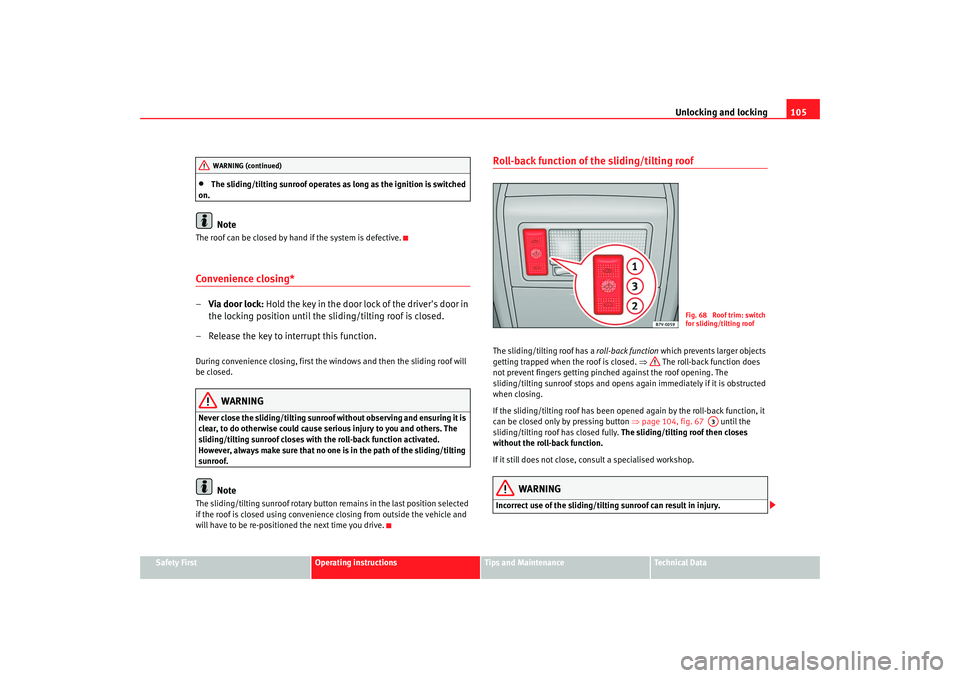
Roll-back function of the sliding/tilting roofThe sliding/tilting roof has a roll-back function which prevents larger objects
getting trapped when the roof is closed. ⇒ The roll-back function does
not prevent fingers getting pinched against the roof opening. The
sliding/tilting sunroof stops and opens again immediately if it is obstructed
when closing.
If the sliding/tilting roof has been opened again by the roll-back function, it
can be closed only by pressing button ⇒page 104, fig. 67 until the
sliding/tilting roof has closed fully. The sliding/tilting roof then closes
without the roll-back function.
If it still does not close, consult a specialised workshop.
WARNING
Incorrect use of the sliding/tilting sunroof can result in injury.
WARNING (continued)
Fig. 68 Roof trim: switch
for sliding/tilting roof
A3
alhambra ingles.book Seite 105 Donnerstag, 19. April 2007 4:04 16
Page 109 of 291
Unlocking and locking107
Safety First
Operating instructions
Tips and Maintenance
Te c h n i c a l D a t a
–Replace the cover and interior light.
alhambra ingles.book Seite 107 Donnerstag, 19. April 2007 4:04 16
– Remove the lever from its casing, insert it in the opening and
close the roof
– Replace the lever in its casing and turn the cover ⇒fig. 70
over the lever opening.
AA
Page 111 of 291
Lights and visibility109
Safety First
Operating instructions
Tips and Maintenance
Te c h n i c a l D a t a
If you are towing a trailer equipped with a rear fog light on a vehicle with a
factory-fitted
towing bracket
17), the rear fog light on the car will automatically
be switched off.
WARNING
•
Never drive with just the side lights on. Risk of accident. The side lights
are not bright enough to illuminate the road ahead and to ensure that other
road users are able to see you. Always use your dipped headlights if it is
dark or if visibility is poor.Note
•
If the lights are left on after the key has been taken out of the ignition lock,
a buzzer sounds when the driver door is opened. This is a reminder to switch
off the lights.
•
The rear fog light is so bright that it can dazzle drivers behind you. You
should use the rear fog light only when visibility is very poor.
•
If you are towing a trailer equipped with a rear fog light on a vehicle with
a factory-fitted towing bracket, the rear fog light on the car will automatically
be switched off.
•
The use of the lighting described here is subject to the relevant statutory
requirements.
Coming Home function (guide lights)*
The Coming Home function (guide lights) allows the vehicle
lights to stay on for approximately 3 minutes after the ignition
is switched off.To activate the Coming Home function the vehicle lights should have
already been switched on. – Switch off vehicle lights.
– Switch off ignition.
– Keep all doors closed.
– Briefly pull the turn signal lever towards the steering wheel
within a maximum of 2 minutes after switching off the lights.
– Open the driver door.
When the driver's door is opened, the ve hicle lights automatically light up for
approx. 3 minutes If the door is closed within 3 minutes, the guide lights will
stay on for approximately. 30 seconds. If the door is closed after 3 minutes,
the vehicle lights switch off and the guide lights are not activated.Illumination of instruments and switches
and headlight
range control
Fig. 72 Instrument panel:
headlight range control and illumination of
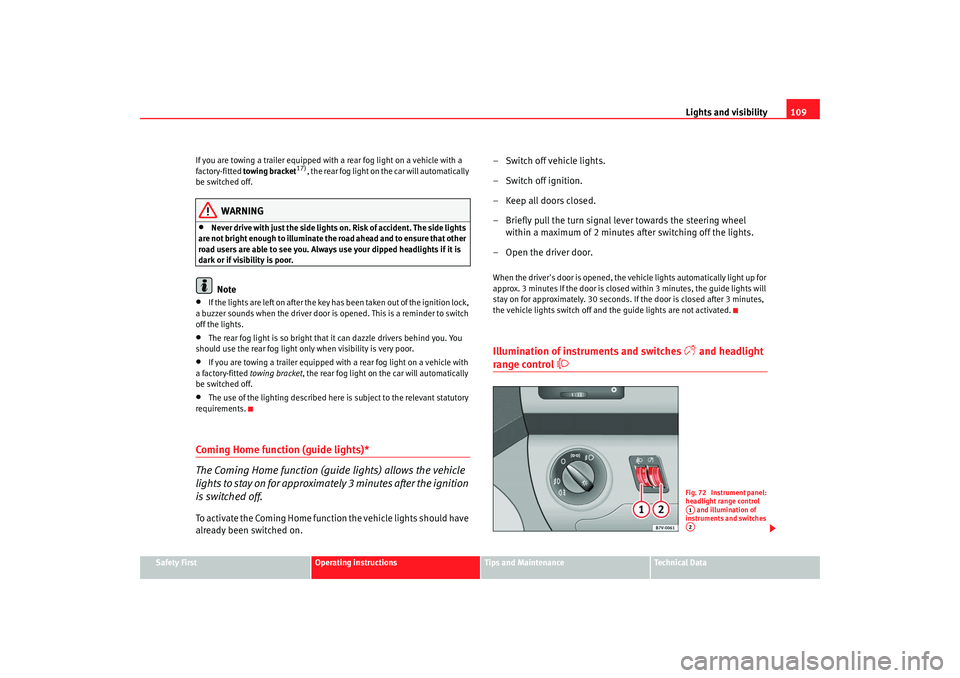
instruments and switches A1A2
alhambra ingles.book Seite 109 Donnerstag, 19. April 2007 4:04 16
Page 113 of 291
Lights and visibility111
Safety First
Operating instructions
Tips and Maintenance
Te c h n i c a l D a t a
3. Switch the engine off.
4. Apply the handbrake firmly.
5. On a manual gearbox engage 1st gear. On an automatic move
the selector lever to P .
6. Use the warning triangle to draw the attention of other road users
to your vehicle.
7. Always take the key with you when you leave the vehicle.You should switch on the hazard warning lights to warn other road users, for
instance when:•
reaching the tail end of a traffic jam
•
there is an emergency
•
your vehicle breaks down due to a technical defect
•
you are towing another vehicle or your vehicle is being towed.
All turn signals flash simultaneously when the hazard warning lights are
switched on. The turn signal lights
and the button warning light
will
also flash. The hazard warning lights also work when the ignition is switched
off.
WARNING
•
The risk of an accident increases if your vehicle breaks down. Always
use the hazard warning lights and a warning triangle to draw the attention
of other road users to your stationary vehicle.
•
Never park where the catalytic converter could come into contact with
inflammable materials under the vehicle, for example dry grass or spilt
petrol. This could start a fire!
Note
•
The battery will run down if the hazard warning lights are left on for a long
time - even if the ignition is switched off.
•
If the hazard warning lights are not working, you must use an alternative
method of drawing attention to your ve hicle. This method must comply with
traffic legislation.
•
The use of the hazard warning lights de scribed here is subject to the rele-
vant statutory requirements.
Turn signal and main beam headlight lever
The turn signal and main beam lever also operates the
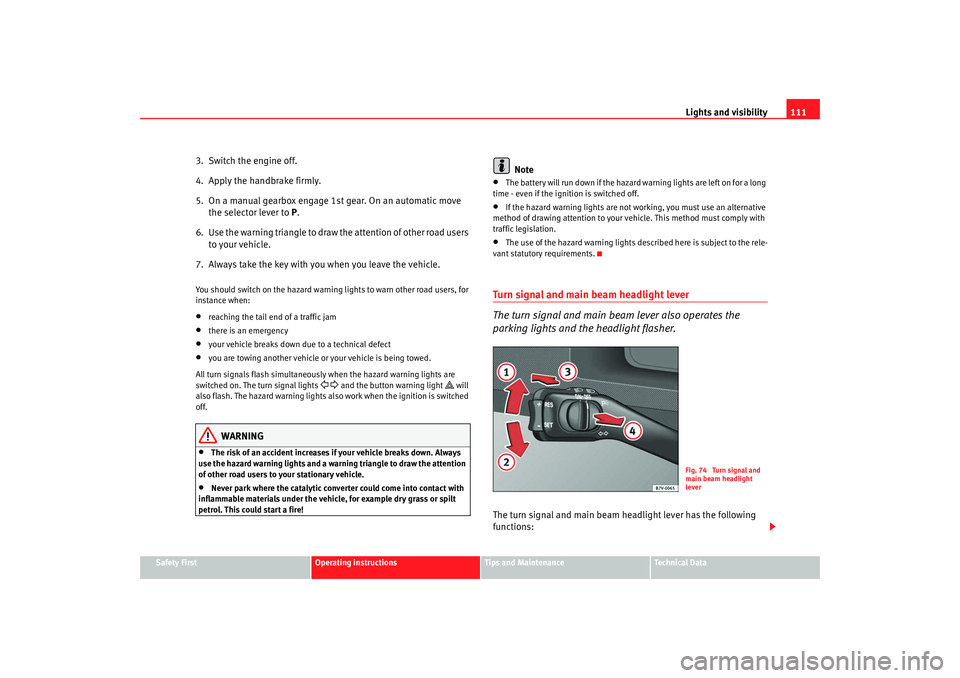
parking lights and the headlight flasher.The turn signal and main beam headlight lever has the following
functions:
Fig. 74 Turn signal and
main beam headlight
lever
alhambra ingles.book Seite 111 Donnerstag, 19. April 2007 4:04 16
Page 115 of 291
Lights and visibility113
Safety First
Operating instructions
Tips and Maintenance
Te c h n i c a l D a t a
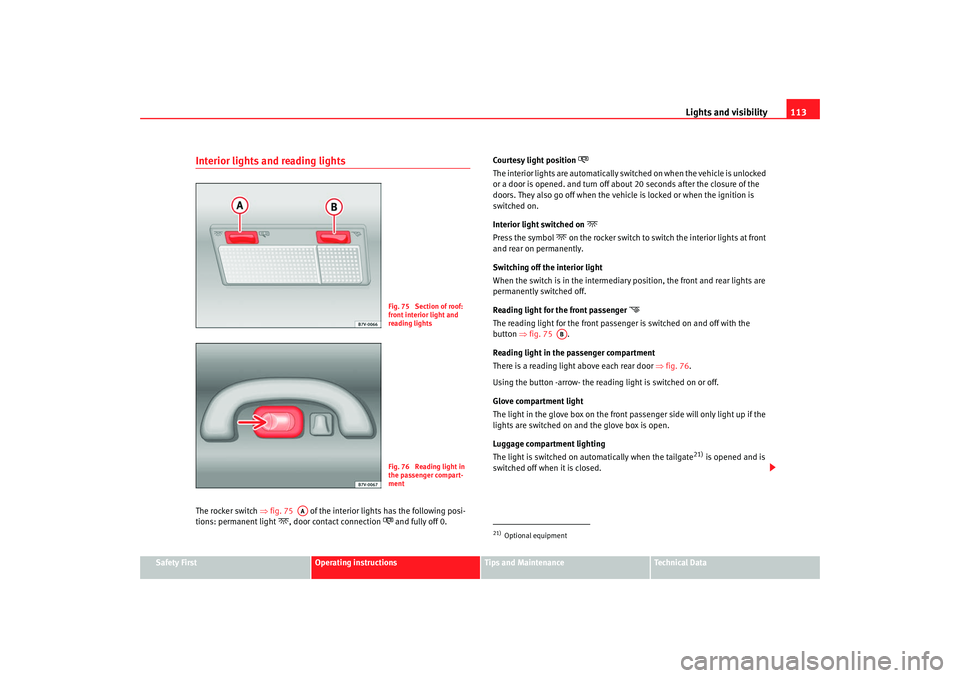
Interior lights and reading lightsThe rocker switch ⇒fig. 75 of the interior lights has the following posi-
tions: permanent light
, door contact connection
and fully off 0. Courtesy light position
The interior lights are automatically switched on when the vehicle is unlocked
or a door is opened. and turn off about 20 seconds after the closure of the
doors. They also go off when the vehicle is locked or when the ignition is
switched on.
Interior light switched on
Press the symbol
on the rocker switch to switch the interior lights at front
and rear on permanently.
Switching off the interior light
When the switch is in the intermediary position, the front and rear lights are
permanently switched off.
Reading light for the front passenger
The reading light for the front passenger is switched on and off with the
button ⇒fig. 75 .
Reading light in the passenger compartment
There is a reading light above each rear door ⇒fig. 76 .
Using the button -arrow- the reading light is switched on or off.
Glove compartment light
The light in the glove box on the front passenger side will only light up if the
lights are switched on and the glove box is open.
Luggage compartment lighting
The light is switched on automatically when the tailgate
21) is opened and is
switched off when it is closed.
Fig. 75 Section of roof:
front interior light and
reading lightsFig. 76 Reading light in
the passenger compart-
ment
AA
21)Optional equipment
AB
alhambra ingles.book Seite 113 Donnerstag, 19. April 2007 4:04 16
Page 117 of 291
Lights and visibility115
Safety First
Operating instructions
Tips and Maintenance
Te c h n i c a l D a t a
Rear window heating
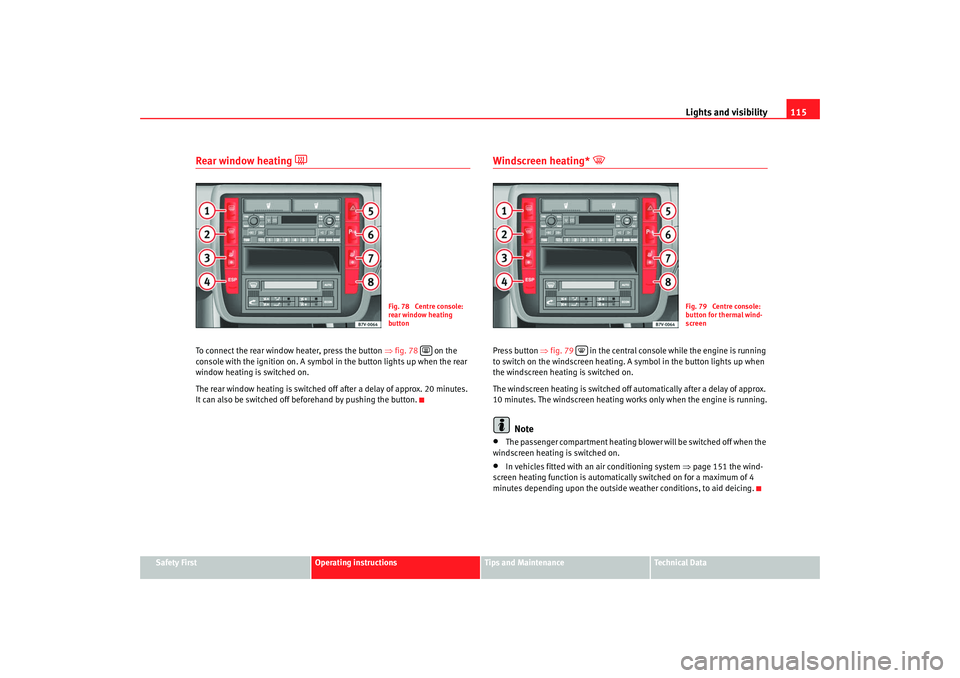
To connect the rear window heater, press the button ⇒fig. 78 on the
console with the ignition on. A symbol in the button lights up when the rear
window heating is switched on.
The rear window heating is switched off after a delay of approx. 20 minutes.
It can also be switched off be forehand by pushing the button.
Windscreen heating*
Press button ⇒fig. 79 in the central console while the engine is running
to switch on the windscreen heating. A symbol in the button lights up when
the windscreen heating is switched on.
The windscreen heating is switched off automatically after a delay of approx.
10 minutes. The windscreen heating wo rks only when the engine is running.
Note
•
The passenger compartment heating blower will be switched off when the
windscreen heating is switched on.
•
In vehicles fitted with an air conditioning system ⇒page 151 the wind-
screen heating function is automatically switched on for a maximum of 4
minutes depending upon the outside weather conditions, to aid deicing.
Fig. 78 Centre console:
rear window heating
button
Fig. 79 Centre console:
button for thermal wind-
screen
alhambra ingles.book Seite 115 Donnerstag, 19. April 2007 4:04 16
Page 119 of 291
Lights and visibility117
Safety First
Operating instructions
Tips and Maintenance
Te c h n i c a l D a t a
Caution
In icy conditions, always check that th e wiper blades are not frozen to the
glass before using the wipers for the fi rst time. If you switch on the wipers
when the wiper blades are frozen to the windscreen, you could damage both
the wiper blades and the wiper motor.Rear window wiper
The windscreen wiper lever controls the rear window wipers
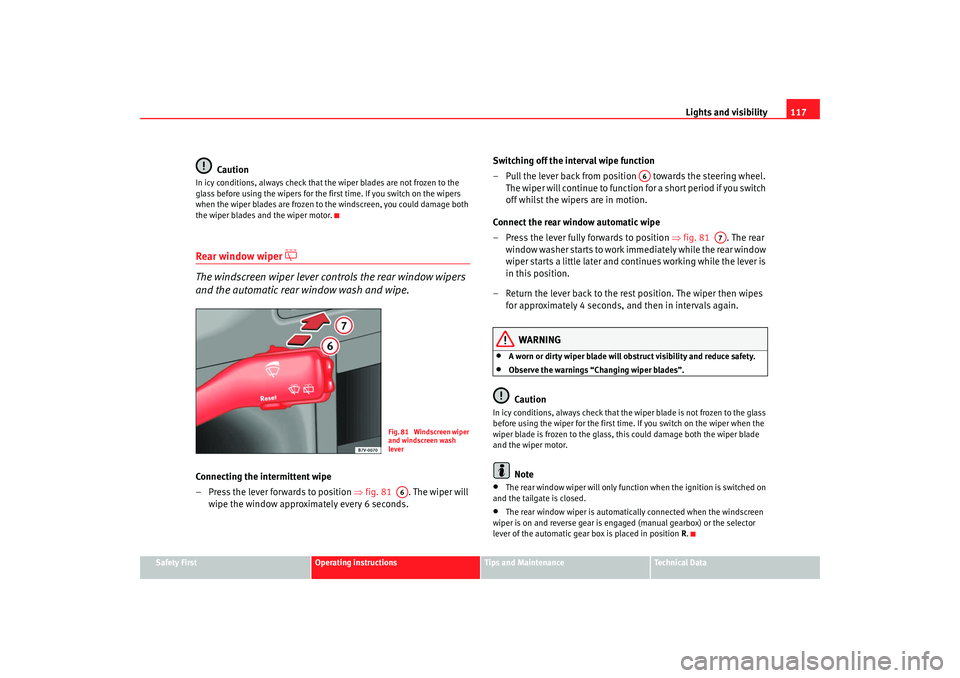
and the automatic rear window wash and wipe.Connecting the intermittent wipe
– Press the lever forwards to position ⇒fig. 81 . The wiper will
wipe the window approximately every 6 seconds. Switching off the interval wipe function
– Pull the lever back from position towards the steering wheel.
T h e wi p e r will co n t i n u e to fun c t i o n fo r a s h o r t p e r i o d i f yo u s wi tch
off whilst the wipers are in motion.
Connect the rear window automatic wipe
– Press the lever fully forwards to position ⇒fig. 81 . The rear
wi n d o w w a s h e r s ta r t s t o w o r k i m mediately while the rear window
wiper starts a little later and continues working while the lever is
in this position.
– Return the lever back to the rest position. The wiper then wipes for approximately 4 seconds, and then in intervals again.
WARNING
•
A worn or dirty wiper blade will obstruct visibility and reduce safety.
•
Observe the warnings “Changing wiper blades”.Caution
In icy conditions, always check that the wiper blade is not frozen to the glass
before using the wiper for the first time. If you switch on the wiper when the
wiper blade is frozen to the glass, this could damage both the wiper blade
and the wiper motor.
Note
•
The rear window wiper will only function when the ignition is switched on
and the tailgate is closed.
•
The rear window wiper is automatically connected when the windscreen
wiper is on and reverse gear is engaged (manual gearbox) or the selector
lever of the automatic gear box is placed in position R.
Fig. 81 Windscreen wiper
and windscreen wash
leverA6
A6
A7
alhambra ingles.book Seite 117 Donnerstag, 19. April 2007 4:04 16
Page 121 of 291
Lights and visibility119
Safety First
Operating instructions
Tips and Maintenance
Te c h n i c a l D a t a
This function can be activated and deactivated by pressing the rearview
mirror switch
⇒page 118, fig. 82 . When it is activated, the warning lamp
lights up .
Exterior mirrors
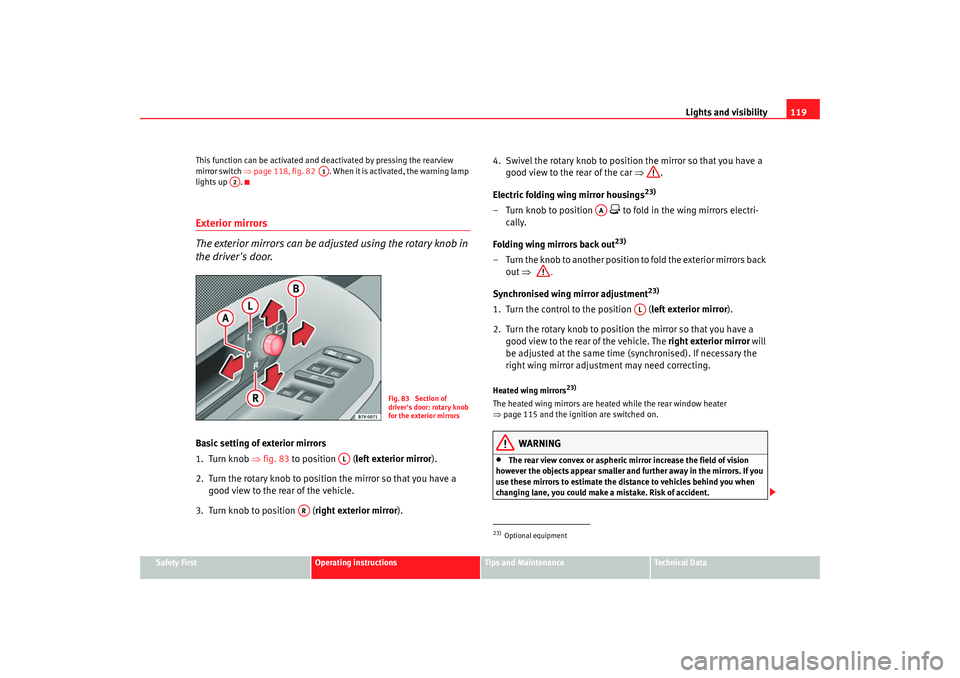
The exterior mirrors can be adjusted using the rotary knob in
the driver's door.Basic setting of exterior mirrors
1. Turn knob ⇒fig. 83 to position ( left exterior mirror ).
2. Turn the rotary knob to position the mirror so that you have a good view to the rear of the vehicle.
3. Turn knob to position ( right exterior mirror). 4. Swivel the rotary knob to position the mirror so that you have a
good view to the rear of the car ⇒ .
Electric folding wing mirror housings
23)
– Turn knob to position
to fold in the wing mirrors electri-
cally.
Folding wing mirrors back out23)
– Turn the knob to another position to fold the exterior mirrors back out ⇒ .
S y
nchroni sed wing mirror ad
justm
ent
23)
1. Turn the control to the position ( left exterior mirror).
2. Turn the rotary knob to position the mirror so that you have a good view to the rear of the vehicle. The right exterior mirror will
be adjusted at the same time (synchronised). If necessary the
right wing mirror adjustment may need correcting.Heated wing mirrors
23)
The heated wing mirrors are heated while the rear window heater
⇒ page 115 and the ignition are switched on.
WARNING
•
The rear view convex or aspheric mirror increase the field of vision
however the objects appear smaller and further away in the mirrors. If you
use these mirrors to estimate the distance to vehicles behind you when
changing lane, you could make a mistake. Risk of accident.
A1
A2
Fig. 83 Section of
driver's door: rotary knob
for the exterior mirrors
AL
AR
23)Optional equipment
AA
AL
alhambra ingles.book Seite 119 Donnerstag, 19. April 2007 4:04 16