maintenance Seat Alhambra 2007 Manual Online
[x] Cancel search | Manufacturer: SEAT, Model Year: 2007, Model line: Alhambra, Model: Seat Alhambra 2007Pages: 291, PDF Size: 9.13 MB
Page 163 of 291
Driving161
Safety First
Operating instructions
Tips and Maintenance
Te c h n i c a l D a t a
•
when rocking the vehicle backwards and forwards to free it from mud, for
example.
You should press the button to switch the ESP back on when you no longer
need wheel spin.
The TCS and EDL are also switched off if the ESP is switched off. This means
that this technology is not available for as long as the ESP remains switched
off.
When does the inscriptio nOFF light up on the button?
•
It will light up continuously if there is a malfunction in the ESP.
•
It will light up continuously if the ESP is switched off.
WARNING
•
The electronic stabilisation program (ESP) cannot defy the laws of
physics. This should be kept in mind, particularly on slippery and wet
roads and when towing a trailer.
•
Always adapt your driving style to suit the condition of the roads and
the traffic situation. Do not let the extra safety afforded by ESP tempt you
into taking any risks when driving, this can cause accidents.
•
Please refer to the corresponding warning notes on ESP.
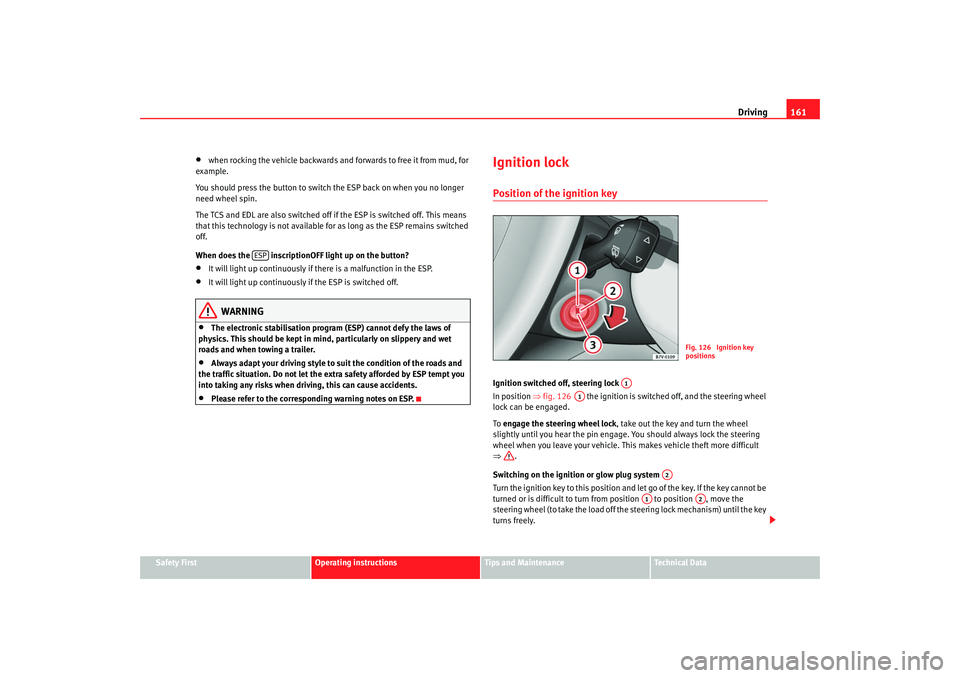
Ignition lockPosition of the ignition keyIgnition switched off, steering lock
In position ⇒fig. 126 the ignition is switched off, and the steering wheel
lock can be engaged.
To engage the steering wheel lock, take out the key and turn the wheel
slightly until you hear the pin engage. You should always lock the steering
wheel when you leave your vehicle. This makes vehicle theft more difficult
⇒ .
Switching on the ignition or glow plug system
Tu rn the ignition key to this position and let go of the key. If the key canno t b e
turned or is difficult to turn from position to position , move the
steering wheel (to take the load off the steering lock mechanism) until the key
turns freely.
ESP
Fig. 126 Ignition key
positions
A1
A1
A2
A1
A2
alhambra ingles.book Seite 161 Donnerstag, 19. April 2007 4:04 16
Page 165 of 291
Driving163
Safety First
Operating instructions
Tips and Maintenance
Te c h n i c a l D a t a
Starting and stopping the engineStarting a petrol engine
The engine can only be started using a genuine SEAT key with
the correct code.– Place the gear in neutral (if it is an automatic gearbox, place the
gear lever in P or in N ).
– In vehicles with a manual gearbox, depress the clutch pedal fully and hold it in this position, the starter will then only have to turn
the engine.
– Turn the ignition key to position ⇒page 161, fig. 126 to start
the engine.
– Let go of the ignition key as soon as the engine starts; the starter motor must not be allowed to run on with the engine.You may need to press the accelerator briefly after starting a very hot engine.
When starting from cold, the engine ma y be a little noisy for the first few
seconds until oil pressure has built up in the hydraulic valve lifters. This is
quite normal, and no cause for concern.
If the engine does not start immediatel y, switch off the starter after about
10 seconds and try again after about half a minute. If the engine still does not
start, the fuel pump fuse should be checked.
WARNING
•
Never start or run the engine in unventilated or closed rooms. The
exhaust fumes contain carbon monoxide, an odourless and colourless poisonous gas. Risk of fatal accidents. Carbon monoxide can cause people
to lose consciousness. It can also cause death.
•
Never leave the vehicle unattended if the engine is running.
•
Never use “cold start sprays”, they could explode or cause the engine
to run at high revs. Risk of injury.Caution
•
When the engine is cold, you should avoid high engine speeds, driving at
full throttle and over-loading the engine. Risk of engine damage.
•
The vehicle should not be pushed or towed for more than approximately
50 metres to start the engine. Fuel could enter the catalytic converter and
damage it.
•
Before attempting to push-start or tow a vehicle to start it, you should first
try to start it using the battery of another vehicle. Observe the warnings in the
chapter Help with Ignition.For the sake of the environment
Do not warm up the engine by running it with the car stationary. You should
drive off as soon as you start the engine. This helps the engine reach oper-
ating temperature faster and reduces emissions.Starting a diesel engine
The engine can only be started using a genuine SEAT key with
the correct code.– Place the gear in neutral (if it is an automatic gearbox, place the gear lever in P or in N).
A3
WARNING (continued)
alhambra ingles.book Seite 163 Donnerstag, 19. April 2007 4:04 16
Page 167 of 291
Driving165
Safety First
Operating instructions
Tips and Maintenance
Te c h n i c a l D a t a
After the engine is switched off the radiator fan may run on for up to 10
minutes, even if the ignition is switched off. The radiator fan can start auto-
matically if the hot engine causes the coolant temperature to rise, or if the sun
heats the engine compartment.
WARNING
•
Never switch off the engine until the vehicle is stationary.
•
The brake servo and the power assisted steering work only when the
engine is running. You need more strength to steer and brake the vehicle
when the engine is switched off. As you cannot steer and brake in the
normal manner, there is a greater risk of accidents and serious injury.
•
The steering lock can engage immediately when the key is removed
from the ignition lock. The vehicle cannot be steered. Risk of accident.Caution
If the engine has been driven hard for a long period, the engine could over-
heat when it is switched off. Risk of engine damage. For this reason, you
should idle the engine for approx. 2 minutes before you switch it off.
Manual gearboxManual gearboxSelecting the reverse gear
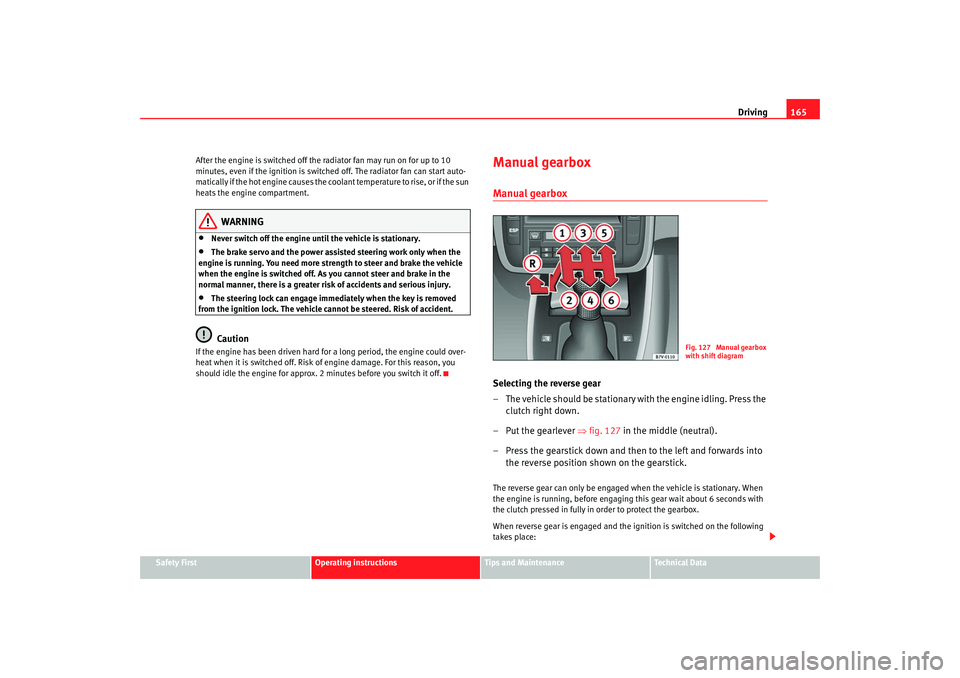
– T h e v e h i c l e s h o u l d b e s t a t i o n a r y with the engine idling. Press the
clutch right down.
–Put the gearlever ⇒fig. 127 in the middle (neutral).
– Press the gearstick down and then to the left and forwards into the reverse position shown on the gearstick.The reverse gear can only be engaged when the vehicle is stationary. When
the engine is running, before engaging this gear wait about 6 seconds with
the clutch pressed in fully in order to protect the gearbox.
When reverse gear is engaged and the ignition is switched on the following
takes place:
Fig. 127 Manual gearbox
with shift diagram
alhambra ingles.book Seite 165 Donnerstag, 19. April 2007 4:04 16
Page 169 of 291
Driving167
Safety First
Operating instructions
Tips and Maintenance
Te c h n i c a l D a t a
Note
A programme will, depending on the driving resistance, be selected automat-
ically that guarantees more pulling power, thus avoiding having to shift gear
constantly.Selector lever lock
The selector lever lock in positi on P or N prevents gears from
being engaged inadvertently, which would cause the vehicle
to move.The selector lever lock is released as follows:
– Switch on the ignition.
– Press and hold the brake pedal and press the selector lever lock
on the left of the selector lever at the same time ⇒page 166,
fig. 128.The selector lever lock only works if the vehicle is stationary or driving at
speeds up to 5 km/h (approx. 3 km/h). At higher speeds the selector lever
lock is disengaged automatically in the N position.
The selector lever lock is not engaged if the selector lever is moved quickly
through position N (e.g. when shifting from R to D). This makes it possible, for
instance, to “rock” the vehicle backwards and forwards if it is stuck in snow
or mud. The selector lever lock engages automatically if the brake pedal is not
depressed and the lever is in position N for more than about 1 second.
Driving a car with an automatic gearbox
The gearbox changes the forwar d gears up and down auto-
matically.Switching on
– Start the engine with the selector lever in position P or N. Further
information ⇒page 163.
Driving
– Press and hold the brake pedal.
– Press and hold the lock button (button on the knob of the selector lever) ⇒page 166, fig. 128 , s e l e c t g e a r p o s i t i o n ( R, D or
S ).
– Release the lock button and wait for the gearbox to engage the
gear (a slight movement can be felt).
– Release the brake and press the accelerator ⇒.
Stopping briefly
– Use the foot brake to prevent the car “creeping” forwards, e.g. at traffic lights. The selector lever does not need to be put into the
positions P or N for this.
– Do not press the accelerator.
Parking the vehicle
– Press and hold the brake pedal until the vehicle comes to a standstill ⇒.
– Apply the handbrake firmly.
alhambra ingles.book Seite 167 Donnerstag, 19. April 2007 4:04 16
Page 171 of 291
Driving169
Safety First
Operating instructions
Tips and Maintenance
Te c h n i c a l D a t a
Note
The two clutch system of the direct shift gearbox* has a system to protect
against excess strain, which may occur, for example, when the vehicle is held
on a hill with the clutch and the gearbox oil overheats. When the clutch is
overloaded, the vehicle begins to jerk and the position indicator of the
selector lever begins to flash. To avoid breakdowns, the clutch breaks the
power transmission between the engine and the gearbox, as a result of which
the vehicle loses impetus. If the clutch opens automatically due to over-
loading, depress the brake pedal and wait a few seconds before
continuing.Selector lever positions
The selector lever positions and gears are shown on the
display in the combi-instrument.
Selector lever positions
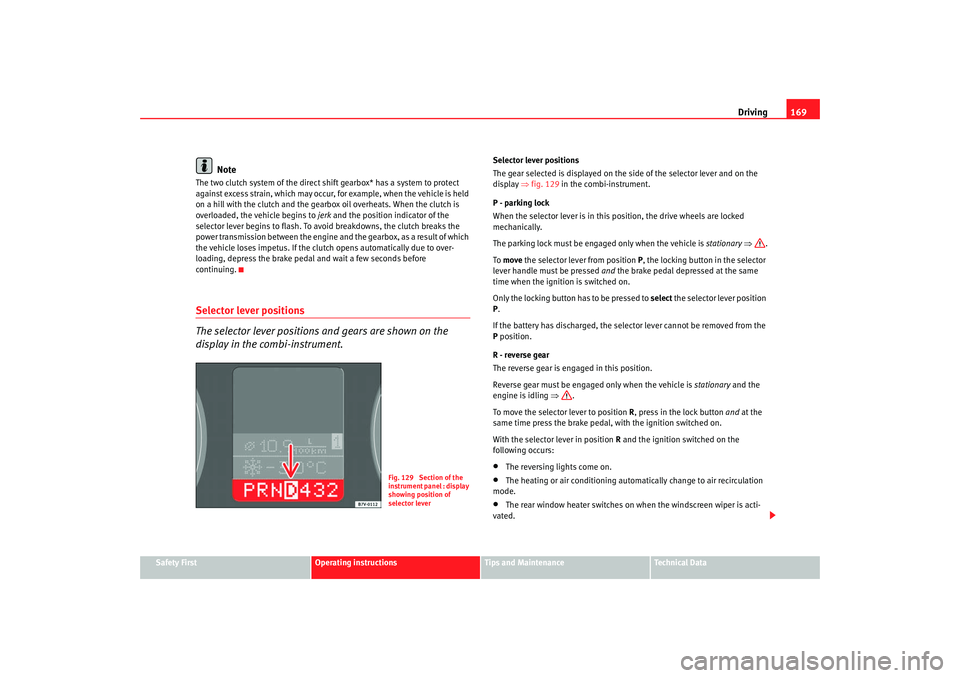
The gear selected is displayed on the side of the selector lever and on the
display ⇒fig. 129 in the combi-instrument.
P - parking lock
When the selector lever is in this position, the drive wheels are locked
mechanically.
The parking lock must be engaged only when the vehicle is stationary ⇒ .
To move the selector lever from position P, the locking button in the selector
lever handle must be pressed and the brake pedal depressed at the same
time when the ignition is switched on.
Only the locking button has to be pressed to select the selector lever position
P .
If the battery has discharged, the selector lever cannot be removed from the
P position.
R - reverse gear
The reverse gear is engaged in this position.
Reverse gear must be engaged only when the vehicle is stationary and the
engine is idling ⇒.
To move the selector lever to position R, press in the lock button and at the
same time press the brake pedal, with the ignition switched on.
With the selector lever in position R and the ignition switched on the
following occurs:•
The reversing li ghts come on.
•
The heating or air conditioning automatically change to air recirculation
mode.
•
The rear window heater switches on when the windscreen wiper is acti-
vated.
Fig. 129 Section of the
instrument panel : display
showing position of
selector lever
alhambra ingles.book Seite 169 Donnerstag, 19. April 2007 4:04 16
Page 173 of 291
Driving171
Safety First
Operating instructions
Tips and Maintenance
Te c h n i c a l D a t a
Changing gear with “Tiptronic”
The “Tiptronic” system allows the driver to change gears
manually.
Changing gear with “Tiptronic” (selector lever)
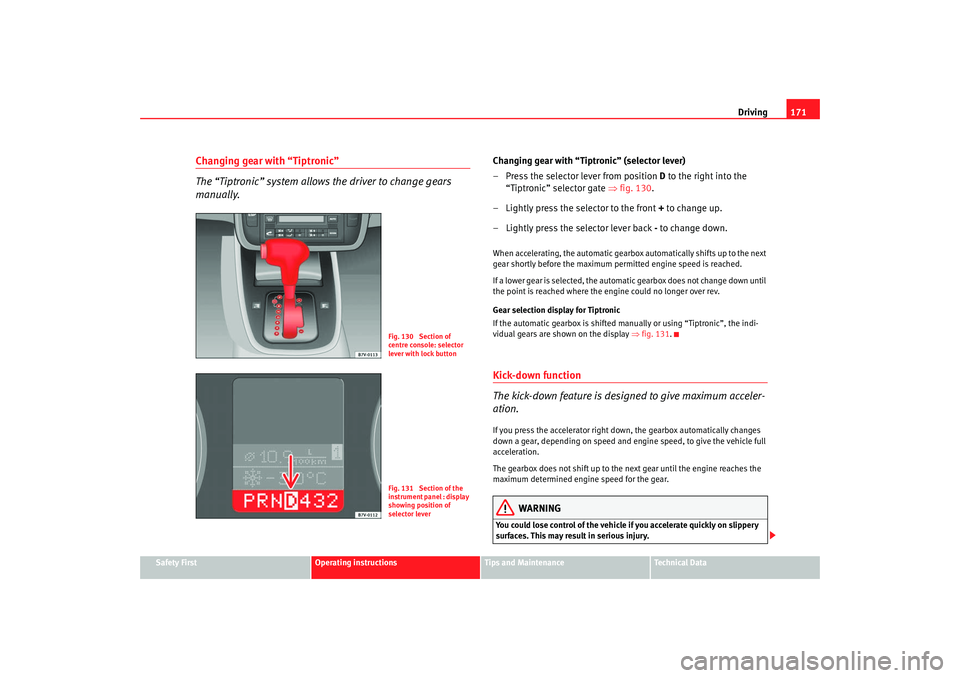
– Press the selector lever from position D to the right into the
“Tiptronic” selector gate ⇒fig. 130 .
– Lightly press the selector to the front + to change up.
– Lightly press the selector lever back - to change down.When accelerating, the automatic gearbox automatically shifts up to the next
gear shortly before the maximum permitted engine speed is reached.
If a lower gear is selected, the automatic gearbox does not change down until
the point is reached where the engine could no longer over rev.
Gear selection display for Tiptronic
If the automatic gearbox is shifted manually or using “Tiptronic”, the indi-
vidual gears are shown on the display ⇒fig. 131 .Kick-down function
The kick-down feature is designed to give maximum acceler-
ation.If you press the accelerator right down, the gearbox automatically changes
down a gear, depending on speed and engine speed, to give the vehicle full
acceleration.
The gearbox does not shift up to the next gear until the engine reaches the
maximum determined engine speed for the gear.
WARNING
You could lose control of the vehicle if you accelerate quickly on slippery
surfaces. This may result in serious injury.
Fig. 130 Section of
centre console: selector
lever with lock buttonFig. 131 Section of the
instrument panel : display
showing position of
selector lever
alhambra ingles.book Seite 171 Donnerstag, 19. April 2007 4:04 16
Page 175 of 291
Driving173
Safety First
Operating instructions
Tips and Maintenance
Te c h n i c a l D a t a
– Switch off the engine and remove the key from the ignition lock.
Turn the steering wheel slightly to engage the steering lock.
– Always take you car keys with you when you leave the vehicle ⇒ .Additional notes on parking the vehicle on gradients:
Turn the steering wheel so that the vehicle would roll against the kerb if it did
start to roll.•
If the vehicle is facing downhill, turn the front wheels so that they point
towards the kerb.
•
If the vehicle is facing uphill , turn the front wheels so that they point away
from the kerb .
WARNING
Take measures to reduce the risk of injury when you leave your vehicle
unattended.•
Never park where the hot exhaust system could ignite inflammable
materials, such as dry grass, low bushes, spilt fuel etc.
•
Never allow vehicle occupants to re main in the vehicle when it is
locked. They would be unable to open the vehicle from the inside, and
could become trapped in the vehicle in an emergency. In the event of an
emergency, locked doors will delay assistance to occupants.
•
Never leave children unsupervised in the vehicle. They could set the
vehicle in motion, for example, by releasing the handbrake or the gear
lever / selector lever.
•
Depending on weather conditions, it may become extremely hot or cold
inside the vehicle. This can be fatal.
Parking distance warning systemDescription
The parking distance warning system is a parking aid which
draws your attention to obstacles in front or behind the
vehicle.The parking distance warning system as sists the driver when parking. If the
rear of the vehicle is approaching an obstacle, an intermittent sound signal is
emitted. The shorter the distance, the shorter the intervals between tones. If
the vehicle is too close to the obstacle, the sound signal becomes constant.
The distance to an obstacle at the front is indicated via a high tone and via a
low tone at the rear. The shorter the distance, the shorter the intervals
between tones. If the vehicle is too close to the obstacle, the sound signal
becomes constant.
The obstacle may no longer be detected if the vehicle gets even closer to it!
The warning signal will stop when•
the vehicle moves away from the obstacle
•
the outer sensors measure a constant distance for approximately 3
seconds.
The signal will not be switched off once the vehicle has reached the perma-
nent tone area.
Registering the obstacle
•
Outer sensors front and rear: as of approx. 80 cm
•
Centre sensors at the front: as of approx. 120 cm
•
Centre sensors at the rear: as of approx. 160 cm
alhambra ingles.book Seite 173 Donnerstag, 19. April 2007 4:04 16
Page 177 of 291
Driving175
Safety First
Operating instructions
Tips and Maintenance
Te c h n i c a l D a t a
Cruise control system (CCS)Cruise control operation
The cruise control system(CCS) is able to maintain the set
speed in the range from approx. 30 km/h to 180 km/h.Once the desired speed has been reached and the setting stored, you may
take your foot off the accelerator.
In vehicles fitted with a manual gearbox and in vehicles with an automatic
gearbox with the lever in positions P, N or R the cruise control does not
operate in first gear.
WARNING
It could be dangerous to use the cruise control system (CCS) if it is not
possible to drive at constant speed.•
Do not use the cruise control in heavy traffic or on steep roads, with
several bends or in slippery circumstances (snow, ice, rain or loose gravel),
as there is a risk of accident.
•
Always adapt your speed and the dist ance to the vehicles ahead to take
the traffic situation into consideration. This is the duty of the driver. The
cruise control system is merely an aid to the driver.
•
Never use the cruise control system when driving off-road or on
unpaved roads. This feature is designed for use on paved roads only. Risk
of accident.
•
Always switch off the CCS when you have finished using it. This will
prevent you using it by mistake.
•
It is dangerous to use a set speed wh ich is too high for the prevailing
road, traffic or weather conditions. This may cause an accident.
Caution
if the cruise control is activated the gearbox should not be set in neutral
without first releasing the clutch, as the the engine speed will increase and
this may cause damage.
Note
When travelling down hills, the CCS cannot maintain a constant speed. The
vehicle will accelerate under its own weight. Reduce gears (with an automatic
gearbox, reduce gears using the “Tiptronic”) or brake using the footbrake.
alhambra ingles.book Seite 175 Donnerstag, 19. April 2007 4:04 16
Page 179 of 291
Driving177
Safety First
Operating instructions
Tips and Maintenance
Te c h n i c a l D a t a
Control of the set speed is switched off if you reduce speed by depressing the
brake pedal. You can reactivate the control by pressing once on the upper part
of the rocker switch or button .
WARNING
It is dangerous to use a set speed whic
h is too high for the prevailing road,
traffic or weather conditions. This may cause an accident.Switching off system temporarilySwitching off the control temporarily in vehicles with a manual
gearbox
– Depress the brake or clutch pedal or
–Push the switch ⇒page 176, fig. 133 to “OFF”, or
– Press the lower part of the button .
Switching off the control temporaril y in vehicles with an automatic
gearbox
– Press the brake pedal or
– Select positions N or 1 or
–Push the switch ⇒page 176, fig. 133 to “OFF”, or
– Press the lower part of the rocker button .The speed stored will remain in the memory if the control is switched off
temporarily, unless you select positions N or 1. In this case, the speed stored
in the memory will be deleted. To resume the control function, release the brake or clutch pedal, move the
switch to ON or press the button
⇒page 176, fig. 133 or button
⇒ page 176, fig. 134 once.
WARNING
It is dangerous to use a set speed whic h is too high for the current road,
traffic or weather conditions. Risk of accident.
+
AA
CANCEL
AACANCEL
AA
+
alhambra ingles.book Seite 177 Donnerstag, 19. April 2007 4:04 16
Page 181 of 291
Intelligent technology179
Safety First
Operating instructions
Tips and Maintenance
Te c h n i c a l D a t a
Tips and MaintenanceIntelligent technologyBrakesBrake servoThe brake servo supplements the pressure you exert on the brake pedal. It
works only when the engine is running .
If the brake servo does not operate, for example, when the vehicle is being
towed or due to a fault in the system, the brake pedal must be depressed
harder.
WARNING
The braking distance can also be affected by external factors.•
Never let the vehicle coast with the engine switched off. Failure to do so
could result in an accident. The braking distance is increased considerably
as the brake servo does not function.
•
If the brake servo is out of action, for example if the car is being towed,
you will have to press the brake pedal considerably harder than normal.
Brake pads wear display
If this light comes on, check the brake pads immediately.
At the same time, a text message or the necessary operations may appear on
the instrument panel.
WARNING
If the warning lamp lights up
or the corresponding message appears on
the instrument panel, immediately have the brake pads checked and
replaced, if necessary, at a specialised workshop.
Brake warning lamp
If the warning lamp comes on, this may be caused by the
following reasons:•
With the handbrake on the warning light comes on
on the instrument
panel. If you are travelling at over 6 km/h with the hand brake on, a text
message or the required operations ma y appear on the instrument panel. In
addition a warning signal is heard.
•
In the event of insufficient brake fluid the warning lamp lights up
on
the instrument panel. At the same time, a text message or the necessary oper-
ations may appear on the instrument panel. Stop the vehicle immediately
and check the level of the brake fluid ⇒page 221.
•
In the event of a fault in the brake system the warning lamp lights up
on the instrument panel and three buzz es are emitted. At the same time, a
text message or the necessary operations may appear on the instrument
panel. Stop the vehicle and do not dr ive on. You should obtain professional
assistance. This warning lamp
can light up together with the anti-locking
brake system warning lamp
⇒ .
alhambra ingles.book Seite 179 Donnerstag, 19. April 2007 4:04 16