buttons Seat Alhambra 2010 User Guide
[x] Cancel search | Manufacturer: SEAT, Model Year: 2010, Model line: Alhambra, Model: Seat Alhambra 2010Pages: 413, PDF Size: 3.86 MB
Page 104 of 413
Unlocking and locking103
Safety FirstOperating instructionsPractical tipsTe c h n i c a l D a t a
Opening and closing the electric windows
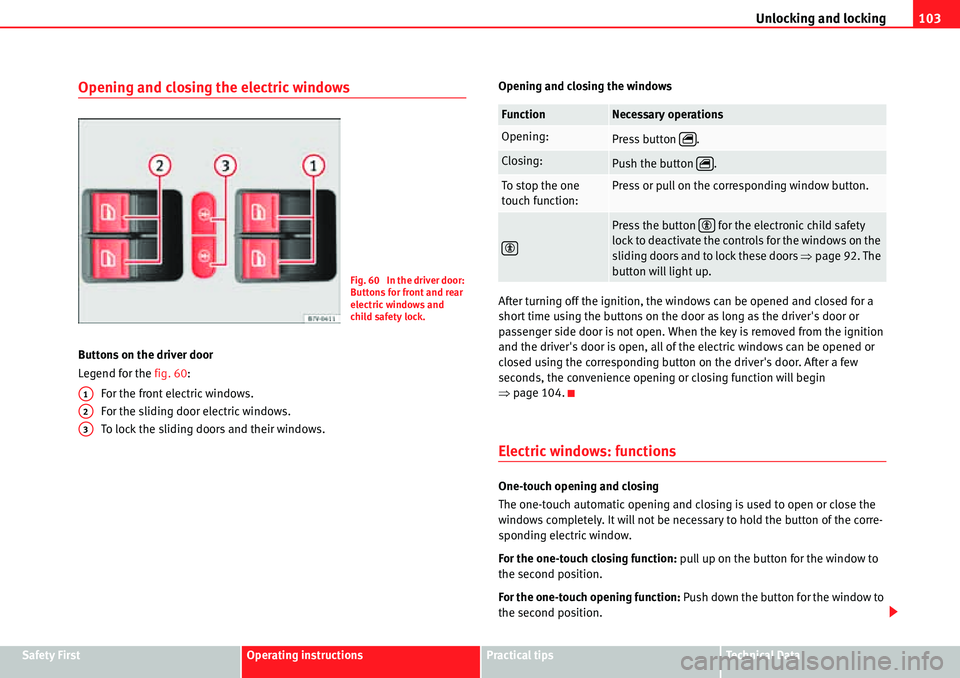
Buttons on the driver door
Legend for the fig. 60:
For the front electric windows.
For the sliding door electric windows.
To lock the sliding doors and their windows.Opening and closing the windows
After turning off the ignition, the windows can be opened and closed for a
short time using the buttons on the door as long as the driver's door or
passenger side door is not open. When the key is removed from the ignition
and the driver's door is open, all of the electric windows can be opened or
closed using the corresponding button on the driver's door. After a few
seconds, the convenience opening or closing function will begin
Ÿpage 104.
Electric windows: functions
One-touch opening and closing
The one-touch automatic opening and closing is used to open or close the
windows completely. It will not be necessary to hold the button of the corre-
sponding electric window.
For the one-touch closing function: pull up on the button for the window to
the second position.
For the one-touch opening function: Push down the button for the window to
the second position.
Fig. 60 In the driver door:
Buttons for front and rear
electric windows and
child safety lock.
A1
A2
A3
FunctionNecessary operations
Opening:Press button .
Closing:Push the button .
To stop the one
touch function:Press or pull on the corresponding window button.
Press the button for the electronic child safety
lock to deactivate the controls for the windows on the
sliding doors and to lock these doors Ÿpage 92. The
button will light up.
r
r
Page 105 of 413
Unlocking and locking 104
To stop the one touch function: Push or pull on the button of the corre-
sponding window.
Restoring one-touch opening and closing
The one-touch opening and closing function is not active after the vehicle
battery has been disconnected or is flat and will have to be reset.
xClose all windows and doors.
xPull the button of the corresponding window and hold it for one second in
this position.
xRelease the button and pull upwards and hold again. The one-touch func-
tion is now ready for operation.
The automatic one-touch electric windows can be reinitialised individually or
several at a time.
Convenience opening and closing function
The electric windows can be opened or closed from outside using the vehicle
key:
xHold in the unlocking for locking button for the vehicle. All windows which
function electrically will be either opened or closed.
xTo interrupt the function, release the locking or unlocking button.
During convenience closing, first the windows and then the sliding sunroof
will be closed.
In the Configuration - convenience menu, there are different settings for oper-
ating the windows Ÿpage 70.
WARNING
Careless use of the electric windows can cause serious injury.
xOnly operate the electric windows when nobody is in the way.
xNever leave children or disabled people alone in the vehicle if the doors
are to be locked. The windows cannot be opened in case of an emergency.
xAlways take all the keys with you whenever you leave the vehicle. After
turning off the ignition, the windows can be opened and closed for a short
time using the buttons on the door as long as the driver's door or
passenger side door is not open.
xWhen transporting children in the rear seats, always deactivate the rear
electric windows with the child safety lock so that they cannot be opened
and closed.
Note
The one-touch function and roll-back function will not work if there is a
malfunction in the electric windows. Visit a specialist workshop.
Electric Windows anti-trap function
The anti-trap function of the electric windows can reduce the risk of injury
when opening and closing the electric windows Ÿ. If a window is not able
to close because it is stiff or because of an obstruction, it will automatically
open again.
xCheck why the window does not close.
xAttempt to close the window again.
xIf you try within the following 10 seconds and the window closes with
difficulty or there is an obstruction once again, the one-touch closing will stop
working for 10 seconds.
xIf the window is still obstructed, it will stop at the corresponding position.
When the button is operated within 10 seconds, the window will close
without the anti-trap function Ÿ.
WARNING (continued)
Page 111 of 413
Unlocking and locking 110
Programming the garage door remote control
Functions from up to 3 different remote controls for different products can be
transferred to the buttons on the sunshade ( for example, the electric system
for a gateway or a garage door, a house alarm or a lighting system).Before programming
xBefore programming the garage remote control, always read the instruc-
tion manual from the product manufacturer.
xAlways stop your vehicle safe distance from the system.
xWhen programming, turn on the ignition but do not start the engine.
Before programming the unit for the first time:
xPress the buttons and until the indicator above the button begins
to blink.
xRelease both buttons. This erases the factory settings. There is no need to
do this again to program the remaining buttons.
xHowever, if you hold in the buttons for more time, the factory settings will
be re-established.
Programming
xBefore programming, carry out the initial steps Ÿpage 110.
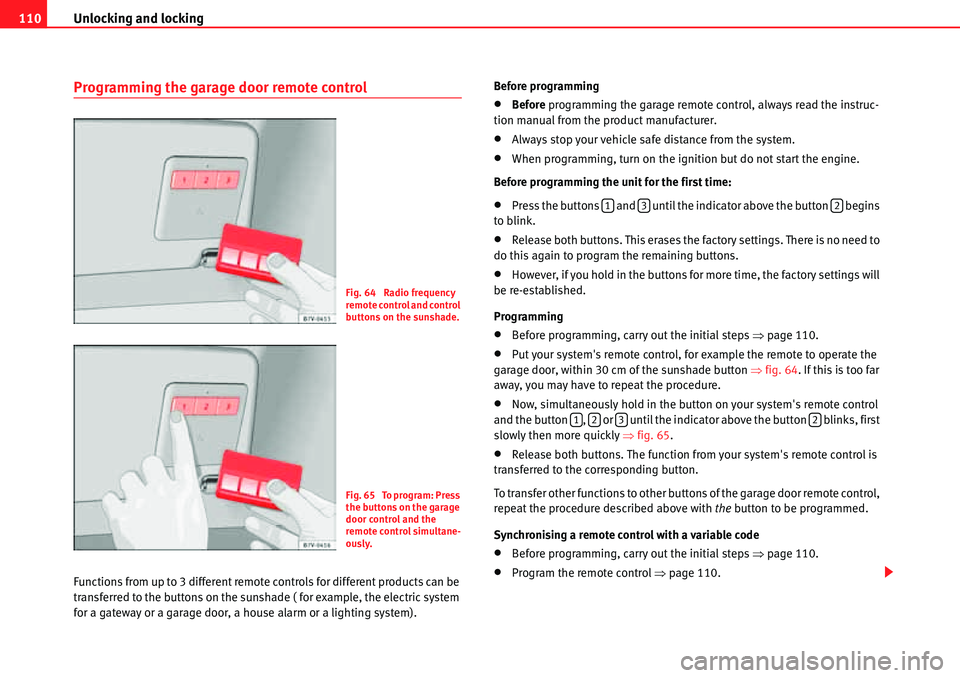
xPut your system's remote control, for example the remote to operate the
garage door, within 30 cm of the sunshade button Ÿfig. 64. If this is too far
away, you may have to repeat the procedure.
xNow, simultaneously hold in the button on your system's remote control
and the button , or until the indicator above the button blinks, first
slowly then more quickly Ÿfig. 65.
xRelease both buttons. The function from your system's remote control is
transferred to the corresponding button.
To transfer other functions to other buttons of the garage door remote control,
repeat the procedure described above with the button to be programmed.
Synchronising a remote control with a variable code
xBefore programming, carry out the initial steps Ÿpage 110.
xProgram the remote control Ÿpage 110.
Fig. 64 Radio frequency
remote control and control
buttons on the sunshade.
Fig. 65 To program: Press
the buttons on the garage
door control and the
remote control simultane-
ously.
132
1232
Page 112 of 413
Unlocking and locking111
Safety FirstOperating instructionsPractical tipsTe c h n i c a l D a t a
xSearch the manufacturer's instructions manual for the garage door or
gate to find the “setting button” for the power motor to synchronise a new
remote control.
xAfter pressing the “settings button” on the power motor, you have a
maximum of 30 seconds to press the button , or . Press the same
button once more to complete the process. For some systems, the button
must be pressed the third time.
Erasing the programming for all buttons
SEAT recommends erasing the programming for all buttons when selling or
loaning your vehicle.
xBefore programming, carry out the initial steps Ÿpage 110.
xPress the buttons and until the indicator above the button begins
to blink.
xRelease both buttons. All of the programmed functions are erased.
After programming
Check the garage door remote control Ÿpage 111, “Using the garage door
remote control”.
Using the garage door remote control
The vehicle must be within range of the garage door or gate power motor.
xWith the engine running or the ignition on, push the corresponding
button on the sunshade Ÿ.
WARNING
Careless use of the garage remote control can cause serious injury.
xOnly use the remote control when you can see the garage door and that
there is nobody in its way.
Caution
Use of inappropriate batteries may damage the remote control. For this
reason, always replace the dead battery with another of the same voltage,
size and specifications.
For the sake of the environment
Please dispose of your used batteries correctly and with the utmost respect
for the environment.
123
132
FaultPossible causePossible solution
Garage door or
electric system is
not working.
The batteries of
remote control are
flat.Change the batteries.
The remote control is
too far away or the
transmission angle
was to large.Vary the distance and the angle
to the receiver.
The garage door or
electric system are
not compatible.The system does not corre-
spond to legal requirements
and must be replaced.
Programming was
not completed cor-
rectly.Program the remote control
once more.
Page 139 of 413
Seats and storage compartments 138
burns to the back, buttocks and legs from use of the seat heating that may
lead to a long healing process or that may never completely heal. Seek
medical advice if you have doubts regarding your health.
xPeople with a limit pain and temperature threshold must never use seat
heating.
Caution
xTo avoid damaging the heating elements of the seat heating, please do
not kneel on the seat or apply sharp pressure at a single point to the seat
cushion and backrest.
xLiquids, sharp objects and insulating materials on the seat could damage
the seat heating.
xIn the event of smells, switch off the seat heating immediately and have
the unit inspected by a qualified workshop.
For the sake of the environment
The seat heating should remain on only when needed. Otherwise, it is an
unnecessary fuel waste.
Seat with position memory
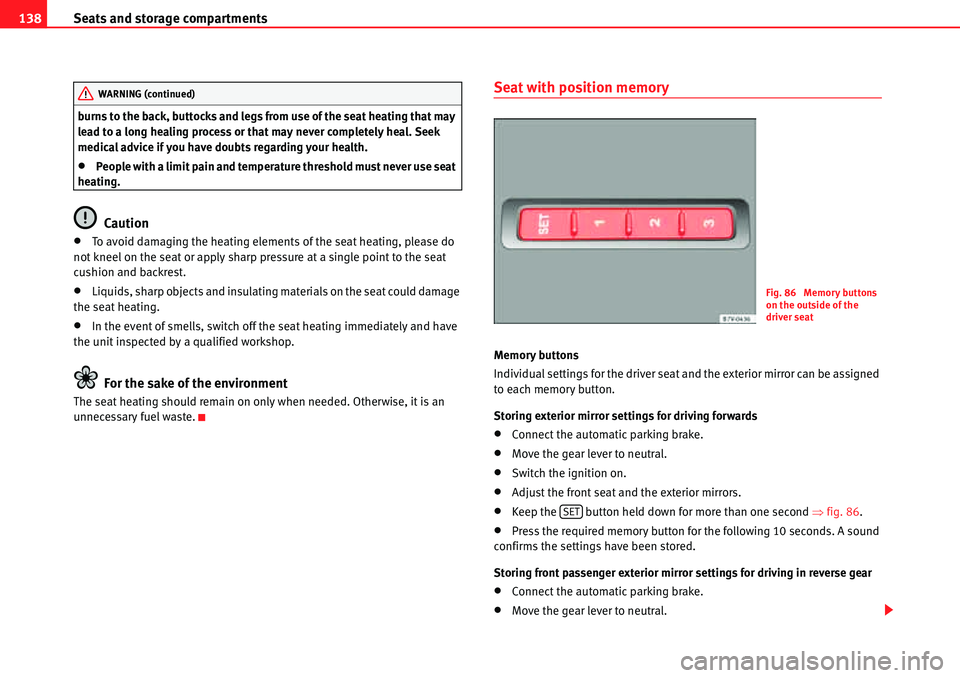
Memory buttons
Individual settings for the driver seat and the exterior mirror can be assigned
to each memory button.
Storing exterior mirror settings for driving forwards
xConnect the automatic parking brake.
xMove the gear lever to neutral.
xSwitch the ignition on.
xAdjust the front seat and the exterior mirrors.
xKeep the button held down for more than one second Ÿfig. 86.
xPress the required memory button for the following 10 seconds. A sound
confirms the settings have been stored.
Storing front passenger exterior mirror settings for driving in reverse gear
xConnect the automatic parking brake.
xMove the gear lever to neutral.
WARNING (continued)
Fig. 86 Memory buttons
on the outside of the
driver seat
SET
Page 140 of 413
Seats and storage compartments139
Safety FirstOperating instructionsPractical tipsTe c h n i c a l D a t a
xSwitch the ignition on.
xPress the required memory button.
xSelect reverse gear.
xAdjust the front passenger exterior mirror so that you can see, for
example, the kerb area.
xThe new position of the mirror will be stored automatically and allocated
to the vehicle key that was used to unlock the vehicle.
Activating exterior mirror settings
xWith the driver's door open and the ignition turned off, push the memory
button of the corresponding door briefly.
xALTERNATIVELY: With the ignition switched on, hold in the corresponding
memory button until the memorised position is reached.
To activate the memory function of the vehicle key
Important: a position must be memorised in the memory.
xOpen the driver-side door.
xPress and hold any memory button.
xWithin the following three seconds, push the button to open the
vehicle on the vehicle key. A sound confirms the settings have been acti-
vated.
Adjusting the wing mirrors for driving and assigning driver seat settings to a
vehicle key
xActivate the memory function of the vehicle key
xAdjust the front seat and the exterior mirrors.
xLock the vehicle. The settings are assigned to the vehicle key.
To deactivate the memory function of the vehicle key
Important: a position must be memorised in the memory.
xPress and hold the button.
xWithin the following ten seconds, push the button to open the vehicle
on the vehicle key. A sound confirms the settings have been deactivated.
Initialising the seat position memory
The position memory system must be initialised if, for example, the driver's
seat has been changed.
Initialisation deletes all memories and assignments for the seat with position
memory. The memory buttons can then be reprogrammed and the vehicle
keys re-assigned.
xOpen the driver's door and do not get into the vehicle.
xOperating the seat settings from outside the vehicle.
xMove the angle of the backrest completely forwards.
xRelease the control to set the angle and then press again until a sound is
heard.
Note
The front passenger side wing mirror automatically changes from the position
stored for reversing as soon as the vehicle moves forward at a speed of at
least 15 km/h or when the gear selection lever is changed to a position other
than R.
0
SET
0
Page 184 of 413
Heating, Ventilation and Air conditioning183
Safety FirstOperating instructionsPractical tipsTe c h n i c a l D a t a
WARNING
Never turn off the air fan for a long time or the air in the passenger compart-
ment will not be refreshed.
xStuffy or used air will increase fatigue and reduce driver and passenger
concentration possibly resulting in a serious accident.
Note
Not all Climatronic buttons are operational in REAR mode.
Note
The button is locked in defrost mode.
Climate control user instructions
The cooling system only works when the engine is running and fan is
switched on.
The climate control system operates most effectively with the windows and
the sliding panoramic roof closed. However, if the vehicle has heated up after
standing in the sun for some time, the air inside can be cooled more quickly
by opening the windows briefly.
Keep the air vents in front of the windscreen free of snow, ice and leaves to
ensure heating and cooling are not impaired and to prevent the windows
from misting over.
Adjustment for safer driving
When the air conditioning is switched on, the temperature and the air
humidity in the vehicle interior drop. Hence, when the outside air humidity is
high, the windows do not mist over and comfort for the vehicle occupants is
improved:
With Climatic
xDisable air recirculation mode Ÿpage 185.
xSet the fan to setting 1 or 2.
xTurn the temperature control to the centre position.
xOpen the air outlets in the dash panel Ÿpage 185.
xTurn the air distribution control to the required position.
xPress the button to turn on cooling. The button will light up.
With Climatronic
xPress the button.
xSet the temperature to +22 °C (+72 °F).
xOpen the air outlets in the dash panel Ÿpage 185.
REST
Climatronic: press the button to use residual heat. When
the engine is still warm but the ignition switched off, the heat
given off by the engine can be used to keep the passenger
compartment warm. The button will light up when the
function is switched on. The function will switch off after
around 30 minutes and if the battery level is low.
p
Climatronic: transferring the driver's seat temperature settings
to the other seats. If the button is not lit up, the set tem-
perature in the driver's seat will also apply to the other seats.
Press the button or the temperature control for the front pas-
senger's seat or the rear seats to set them to a different tem-
perature. The button lights with an indicator.
Vehicles with auxiliary heating: observe the description of the
button.
AUTOAutomatic temperature, fan, and air distribution control.
Control
button Additional information. Climatic Ÿpage 181, fig. 129; Cli-
matronic Ÿpage 181, fig. 130.
REST
REST
p
AUTO
REAR
AC
AUTO
Page 185 of 413
Heating, Ventilation and Air conditioning 184
Switching the Climatronic temperature measuring unit
Press and hold the and buttons to switch the temperature display
between Celsius and Fahrenheit.
Heat
The maximum heat output required to defrost windows quickly is only avail-
able when the engine has reached its normal running temperature.
The air conditioning system does not switch on
If the air conditioning system cannot be switched on, this may be caused by
the following:
xThe engine is not running.
xThe fan is switched off.
xThe climate control fuse has blown.
xThe outside temperature is lower than approximately +3 °C (+38 °F).
xThe climate control system compressor has been temporarily switched off
because the engine coolant temperature is too high.
xAnother fault in the vehicle. Have the climate control system checked by
a qualified workshop.
Things to note
If the humidity and temperature outside the vehicle are high, condensation
can drip off the evaporator in the cooling system and form a pool underneath
the vehicle. This is normal and does not indicate a leak!
Dust and pollen filter
The dust and pollen filter with its activated charcoal cartridge serves as a
barrier against impurities in the ambient air.
For the climate control system to work with maximum efficiency, the dust and
pollen filter must be replaced at the intervals specified in the Maintenance
Programme.If the filter loses efficiency prematurely due to use in areas with very high
levels of air pollution, the filter must be changed more frequently than stated
in the Service Schedule.
Note
The climate control system must left running for a few minutes to reach the
set temperature in the vehicle interior.
Note
After starting it, any residual humidity in the climate control system could
mist over the windscreen.
Note
The air from the vents flows through the passenger compartment and out
through the outlets below the rear window. Do not cover these outlets with
items of clothing or other objects.
ACAUTO
Page 190 of 413
Heating, Ventilation and Air conditioning189
Safety FirstOperating instructionsPractical tipsTe c h n i c a l D a t a Replacing the remote control battery
When the light Ÿpage 188, fig. 132 on the remote control does not
come on when the button is pressed, the remote control battery should soon
be replaced.
The battery is located beneath a cover on the back of the remote control. Turn
the slot to the left using a flat, blunt object (e.g. a coin). When changing the
battery, use another battery of the same model and observe the polarity when
fitting it Ÿ.
Range
The receiver is in the interior of the vehicle. The remote control, when fitted
with new batteries, has a range of several hundred metres. Obstacles
between the remote control and the vehicle, bad weather conditions and
discharged batteries can considerably reduce the range of the remote control.
An optimum range is obtained by keeping the remote control vertical, with
the aerial Ÿpage 188, fig. 132 pointing upwards. When doing so, do not
cover the aerial with your fingers or with the palm of your hand.
There must be a minimum distance of two metres between the remote control
and the vehicle.
Caution
xThe radiofrequency remote control contains electronic components.
Therefore, avoid getting the remote control wet and from being knocked and
protect it from direct sunlight.
xUse of inappropriate batteries may damage the remote control. For this
reason, always replace the dead battery with another of the same voltage,
size and specifications.
For the sake of the environment
Please dispose of old batteries so that they do not harm the environment.
For the sake of the environment
The remote control battery may contain perchlorate. Observe the legal
requirements for their disposal.
Programming the auxiliary heater
The heater or ventilation inside the vehicle can be programmed for a certain
period.
Before programming, check that the day is correctly set in the Auxiliary
heater - day of the week menu Ÿ.
Enabling the Auxiliary heater menu on the instrument panel
xFrom the main menu, select the Auxiliary heater submenu and press the
button on the windscreen wiper lever.
xALTERNATIVELY: press the or arrow buttons on the multi-function
steering wheel until the Auxiliary heater menu is displayed.
a)Within its range, the remote control might not receive the signal sent by the vehicle
receiver. In this case, the remote control will send an error message despite the aux-
iliary heater being on or off. Come closer to the vehicle and press the corresponding
button on the remote control once again.
AB
AAOK
ƒ„
Page 236 of 413
Driving235
Safety FirstOperating instructionsPractical tipsTe c h n i c a l D a t a
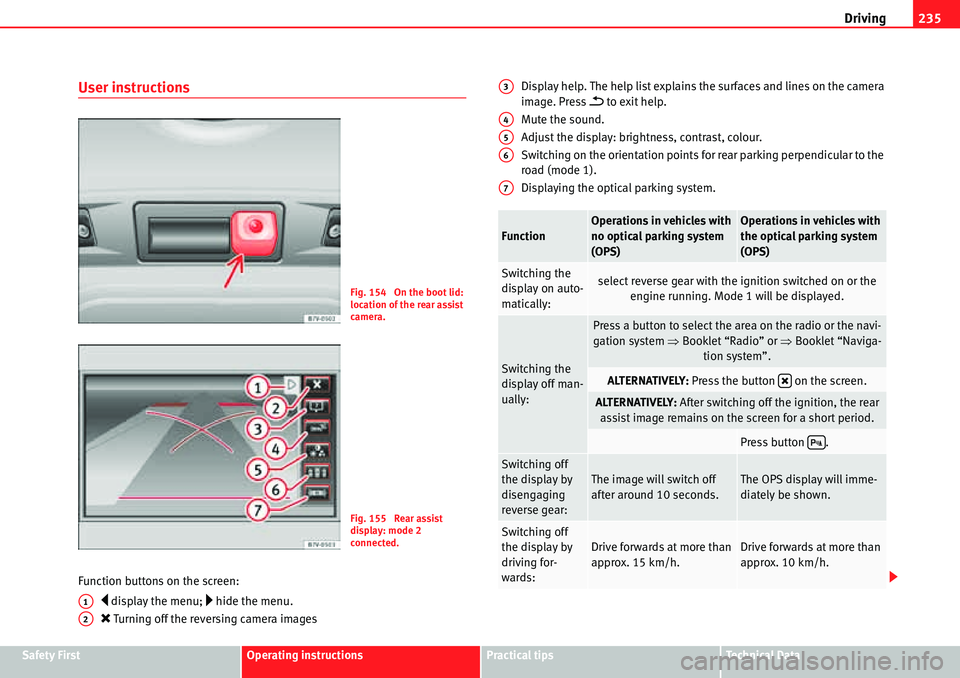
User instructions
Function buttons on the screen:
y display the menu; … hide the menu.
O Turning off the reversing camera imagesDisplay help. The help list explains the surfaces and lines on the camera
image. Press
E to exit help.
Mute the sound.
Adjust the display: brightness, contrast, colour.
Switching on the orientation points for rear parking perpendicular to the
road (mode 1).
Displaying the optical parking system.
Fig. 154 On the boot lid:
location of the rear assist
camera.
Fig. 155 Rear assist
display: mode 2
connected.
A1
A2
FunctionOperations in vehicles with
no optical parking system
(OPS)Operations in vehicles with
the optical parking system
(OPS)
Switching the
display on auto-
matically:select reverse gear with the ignition switched on or the
engine running. Mode 1 will be displayed.
Switching the
display off man-
ually:
Press a button to select the area on the radio or the navi-
gation system ŸBooklet “Radio” or ŸBooklet “Naviga-
tion system”.
ALTERNATIVELY: Press the button on the screen.
ALTERNATIVELY: After switching off the ignition, the rear
assist image remains on the screen for a short period.
Press button .
Switching off
the display by
disengaging
reverse gear:The image will switch off
after around 10 seconds.The OPS display will imme-
diately be shown.
Switching off
the display by
driving for-
wards:Drive forwards at more than
approx. 15 km/h.Drive forwards at more than
approx. 10 km/h.
A3
A4
A5
A6
A7
O
'