change time Seat Alhambra 2010 User Guide
[x] Cancel search | Manufacturer: SEAT, Model Year: 2010, Model line: Alhambra, Model: Seat Alhambra 2010Pages: 413, PDF Size: 3.86 MB
Page 121 of 413
Lights and visibility 120
function is switched on. If the equipment includes the light sensor, the
lighting around the exterior mirrors only comes when it is dark.
Note
The time taken for the headlights to go off can be changed in the menu Lights
& Visibility and the function can be switched on or off Ÿpage 70.
Note
When the “Coming home” function is on, if the vehicle door is opened there
is no audible warning signal to advise that the light is still on.
Headlight range control, instrument and switch lighting
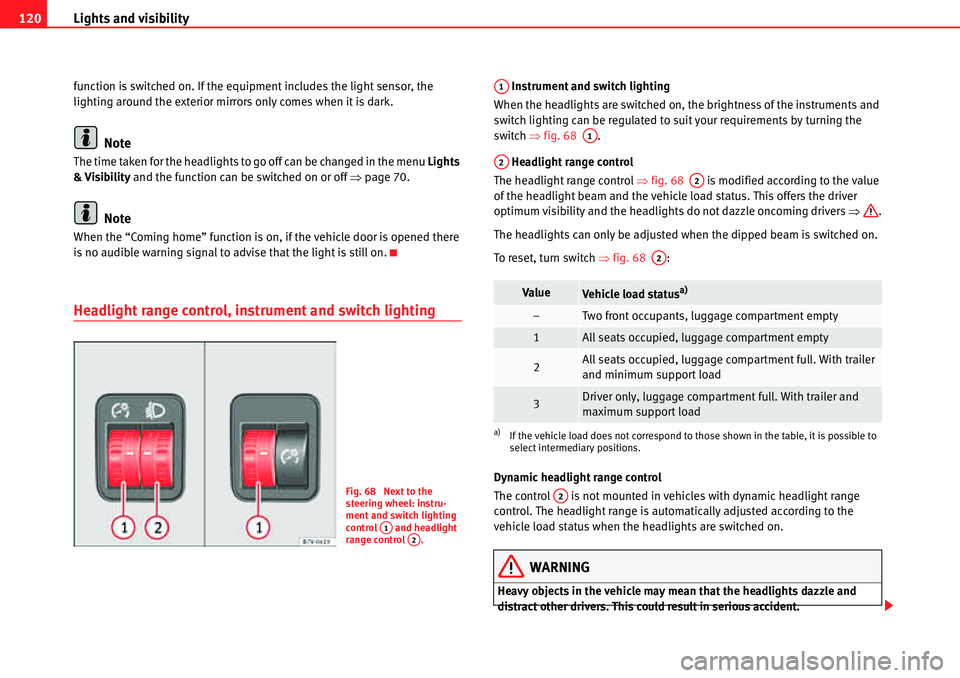
Instrument and switch lighting
When the headlights are switched on, the brightness of the instruments and
switch lighting can be regulated to suit your requirements by turning the
switch Ÿfig. 68 .
Headlight range control
The headlight range control Ÿfig. 68 is modified according to the value
of the headlight beam and the vehicle load status. This offers the driver
optimum visibility and the headlights do not dazzle oncoming drivers Ÿ.
The headlights can only be adjusted when the dipped beam is switched on.
To reset, turn switch Ÿfig. 68 :
Dynamic headlight range control
The control is not mounted in vehicles with dynamic headlight range
control. The headlight range is automatically adjusted according to the
vehicle load status when the headlights are switched on.
WARNING
Heavy objects in the vehicle may mean that the headlights dazzle and
distract other drivers. This could result in serious accident.
Fig. 68 Next to the
steering wheel: instru-
ment and switch lighting
control and headlight
range control .
A1A2
ValueVehicle load statusa)
a)If the vehicle load does not correspond to those shown in the table, it is possible to
select intermediary positions.
–Two front occupants, luggage compartment empty
1All seats occupied, luggage compartment empty
2All seats occupied, luggage compartment full. With trailer
and minimum support load
3Driver only, luggage compartment full. With trailer and
maximum support load
A1
A1
A2
A2
A2
A2
Page 127 of 413
Lights and visibility 126
Note
The intermittent wiper speed varies according to the vehicle speed. The faster
the vehicle is moving, the more often the windscreen is cleaned.
Note
The rear wiper is automatically switched on when the windscreen wiper is
connected and the car is in reverse gear.
Windscreen wiper functions
Heated windscreen washer jets
The heating only thaws the frozen jets, it does not thaw the water in the
washer hoses. The heated windscreen washer jets automatically adjust the
heat depending on the ambient temperature, when the ignition is switched
on.Headlight wash /wipe system
The headlight washers/wipers clean the headlight lenses.
After the ignition is switched on, the first and every fifth time the windscreen
washer is switched on, the headlights are also washed. Therefore, the wind-
screen wiper lever should be pulled towards the steering wheel when the
dipped beam or main beam are on. Any incrusted dirt (such as insects)
should be cleaned regularly (e.g. when refuelling).
To ensure the headlight washers work correctly in winter, any snow which has
got into the bumper jet supports should be cleaned away. If necessary,
remove snow with an anti-icing spray.
Note
The wiper will try to wipe away any obstacles that are on the windscreen. The
wiper will stop moving if the obstacle blocks its path. Remove the obstacle
and switch the wiper back on again.Windscreen wiper performance in different situations:
If the vehicle is at a stand-
still:The activated position provisionally changes
to the previous position.
During the automatic wipe:
The air conditioning comes on for approxi-
mately 30 seconds in air recirculation mode
to prevent the smell of the windscreen
washer fluid entering the inside of the vehi-
cle.
For the intermittent wipe:The intervals between wipes vary according
to the speed of the vehicle. The higher the
vehicle speed the shorter the intervals.
Page 163 of 413
Seats and storage compartments 162
Storage compartments
Introduction
Storage compartments must only be used to store light or small objects.
The front central armrest compartment houses the factory-fitted AUX-IN or
multimedia (MEDIA-IN) connection sockets.
The factory-fitted CD changer is located in the left-hand storage compartment
of the luggage compartment.
Additional information and warnings:
xChild seats (accessories) Ÿpage 42
xLuggage compartment Ÿpage 146
xCare and cleaning of the vehicle interior Ÿpage 278
xŸBooklet “Radio” or ŸBooklet “navigation system”
WARNING
In the event of sudden braking movements or turns, loose objects may be
thrown around the vehicle interior. This could cause serious injuries to
passengers and cause the driver to lose control of the vehicle.
xDo not transport animals or place hard, heavy or sharp objects inside
the vehicle in: open storage compartments, instrument panel, storage tray,
items of clothing or bags.
xWhile driving, always keep object compartments closed.
WARNING
Objects falling into the driver's footwell could prevent use of the pedals.
This could lead the driver to lose control of the vehicle, increasing the risk
of a serious accident.
xMake sure the pedals can be used at all times, with no objects rolling
underneath them.
xThe floor mat should always be secured to the floor.
xNever place other mats or rugs on top of the original mat supplied by
the factory.
xMake sure that no objects can fall into the driver's footwell while the
vehicle is in motion.
Caution
xObjects on the shelf could chafe against the wires of the heating element
in the rear window and cause damage.
xDo not keep heat-sensitive objects, food or medicines inside the vehicle.
Heat and cold could damage them or render them useless.
xLight-transparent objects placed inside the vehicle, such as lenses,
magnifying glasses or transparent suction caps on the windows, could
concentrate the sun's rays and cause damage to the vehicle.
Note
The ventilating slits between the heated rear window and the shelf must not
be covered so that used air can escape from the vehicle.
WARNING (continued)
Page 195 of 413
Driving 194
WARNING
The counter steering assistance system combined with ESP helps the
driver to steer the vehicle in critical driving conditions. At all times, it is the
driver who steers the vehicle. The counter steering system does not steer
the vehicle.
Adjusting the steering wheel position
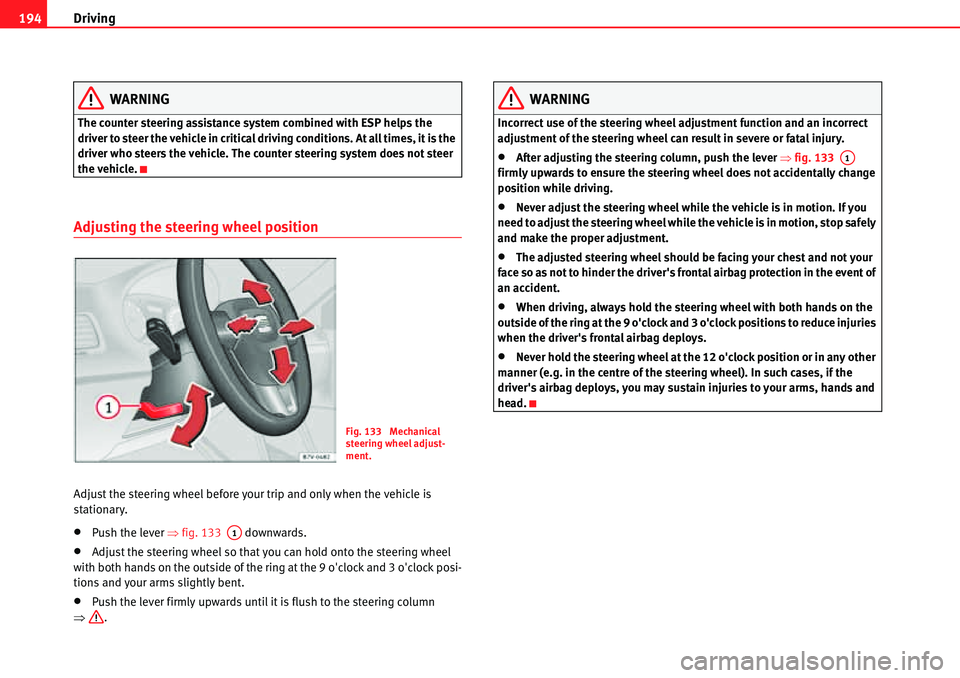
Adjust the steering wheel before your trip and only when the vehicle is
stationary.
xPush the lever Ÿfig. 133 downwards.
xAdjust the steering wheel so that you can hold onto the steering wheel
with both hands on the outside of the ring at the 9 o'clock and 3 o'clock posi-
tions and your arms slightly bent.
xPush the lever firmly upwards until it is flush to the steering column
Ÿ.
WARNING
Incorrect use of the steering wheel adjustment function and an incorrect
adjustment of the steering wheel can result in severe or fatal injury.
xAfter adjusting the steering column, push the lever Ÿfig. 133
firmly upwards to ensure the steering wheel does not accidentally change
position while driving.
xNever adjust the steering wheel while the vehicle is in motion. If you
need to adjust the steering wheel while the vehicle is in motion, stop safely
and make the proper adjustment.
xThe adjusted steering wheel should be facing your chest and not your
face so as not to hinder the driver's frontal airbag protection in the event of
an accident.
xWhen driving, always hold the steering wheel with both hands on the
outside of the ring at the 9 o'clock and 3 o'clock positions to reduce injuries
when the driver's frontal airbag deploys.
xNever hold the steering wheel at the 12 o'clock position or in any other
manner (e.g. in the centre of the steering wheel). In such cases, if the
driver's airbag deploys, you may sustain injuries to your arms, hands and
head.
Fig. 133 Mechanical
steering wheel adjust-
ment.
A1
A1
Page 202 of 413
Driving201
Safety FirstOperating instructionsPractical tipsTe c h n i c a l D a t a
Changing gear
Introduction
When reverse gear is engaged and the ignition is switched on the following
takes place:
xReverse lights light up.
xWhen reversing, the air conditioner automatically changes to air recircu-
lation mode.
xThe rear window heater switches on when the windscreen wiper is acti-
vated.
xAlso, the parking sensor system, the optical parking sensor and the
camera for the reverse assist system are connected.
Additional information and warnings:
xInstruments Ÿpage 64
xBraking, stopping and parking Ÿpage 210
xParking sensor system Ÿpage 225
xPark Assist system Ÿpage 229
xReverse assist system (Rear Assist) Ÿpage 234
xAir conditioning Ÿpage 179
xElectronic power control and exhaust gases purification system
Ÿpage 255
xEmergency locking and unlocking Ÿpage 348
WARNING
Rapid acceleration can cause loss of traction and skidding, especially on
slippery ground. This could cause loss of control of the vehicle resulting in
an accident and considerable damage.
xOnly use the kickdown or rapid acceleration if visibility, weather, road
and traffic conditions so permit.
WARNING
Do not allow the brakes to “rub” for a prolonged period of time, or brake
frequently or for long periods of time. Continuous braking heats up the
brakes. This could significantly reduce braking power, increase braking
distance or even result in the total failure of the brake system.
Caution
xNever make the brakes slip by pressing the pedal gently, if it is not really
necessary to brake. This will increase wear.
xReduce speed, move down a gear or select a shorter range of gears before
long steep slopes. This allows you to use the engine braking effect and to
reduce the strain on the brake system. Otherwise, the brakes may overheat
and fail. Only use the brakes to reduce speed or to stop.
WARNING (continued)
Page 208 of 413
Driving207
Safety FirstOperating instructionsPractical tipsTe c h n i c a l D a t a
Changing gears with Tiptronic*
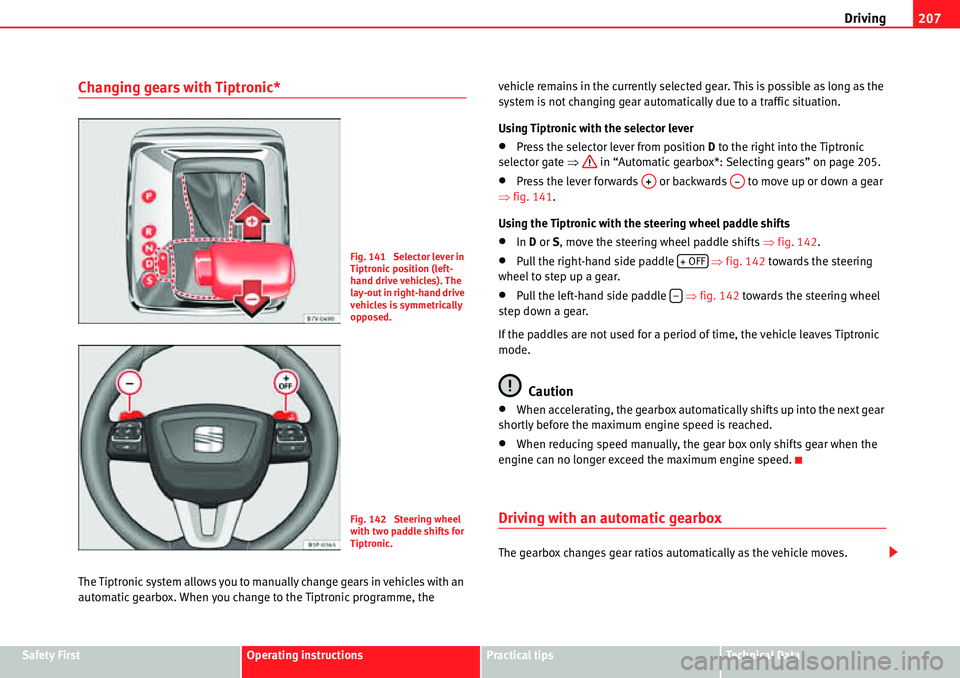
The Tiptronic system allows you to manually change gears in vehicles with an
automatic gearbox. When you change to the Tiptronic programme, the vehicle remains in the currently selected gear. This is possible as long as the
system is not changing gear automatically due to a traffic situation.
Using Tiptronic with the selector lever
xPress the selector lever from position D to the right into the Tiptronic
selector gate Ÿ in “Automatic gearbox*: Selecting gears” on page 205.
xPress the lever forwards or backwards to move up or down a gear
Ÿfig. 141.
Using the Tiptronic with the steering wheel paddle shifts
xIn D or S, move the steering wheel paddle shifts Ÿfig. 142.
xPull the right-hand side paddle Ÿfig. 142 towards the steering
wheel to step up a gear.
xPull the left-hand side paddle Ÿfig. 142 towards the steering wheel
step down a gear.
If the paddles are not used for a period of time, the vehicle leaves Tiptronic
mode.
Caution
xWhen accelerating, the gearbox automatically shifts up into the next gear
shortly before the maximum engine speed is reached.
xWhen reducing speed manually, the gear box only shifts gear when the
engine can no longer exceed the maximum engine speed.
Driving with an automatic gearbox
The gearbox changes gear ratios automatically as the vehicle moves.
Fig. 141 Selector lever in
Tiptronic position (left-
hand drive vehicles). The
lay-out in right-hand drive
vehicles is symmetrically
opposed.
Fig. 142 Steering wheel
with two paddle shifts for
Tiptronic.
A+A
Page 217 of 413
Driving 216
Caution
xNever make the brakes slip by pressing the pedal gently, if it is not really
necessary to brake. Continuously pressing on the brake pedal will heat the
brakes. This could significantly reduce braking power, increase braking
distance or even result in the total failure of the brake system.
xReduce speed, move down a gear or select a shorter range of gears before
long steep slopes. This allows you to use the engine braking effect and to
reduce the strain on the brake system. Otherwise, the brakes may overheat
and fail. Only use the brakes to reduce speed or to stop.
Note
When checking the front brake pads, take the time to also check the rear
brake pads. The thickness of the brake pads should be checked visually and
regularly, by looking through the openings in the wheel rims or from under-
neath the vehicle. If necessary, remove the wheels to check them thoroughly.
SEAT recommends visiting a qualified workshop.
Assisted braking systems
The assisted braking systems ESP, ABS, BAS, TCS and EDS only operate when
the ignition is switched on. They contribute significantly to increasing active
safety.
Electronic stability programme (ESP)
ESP reduces the risk of skidding and increases the vehicle stability by braking
individual wheels under specific driving conditions. ESP detects critical
handling situations, such as understeer, oversteer and wheelspin on the
driven wheels. The system stabilises the vehicle by braking individual wheels
or by reducing the engine torque.
The ESP has limits. It is important to realise that the ESP is also subject to the
laws of physics. ESP will not be able to deal with all situations with which drivers may be faced. For example, if the road surface changes suddenly then
ESP will not be useful in all cases. If the vehicle suddenly enters a section
covered by water, mud or snow then ESP will not provide assistance in the
same way as on dry ground. If the vehicle loses its grip on the ground and
moves on a film of water (aquaplaning), the ESP will not be able to assist the
driver to control the vehicle due to the loss of adherence with the road surface
preventing braking and steering. If the vehicle is driven through series of
bends at high speed, the ESP will not always be as effective: the vehicle reac-
tion to aggressive driving is not the same as at reduced speeds. When driving
with a trailer, ESP does not provide the same amount of vehicle control as
without a trailer.
Adjust your speed and driving style to road, traffic and weather conditions.
ESP cannot push the limits of the laws of physics; improve the transmission
available or maintain the vehicle on the road if a lack of driver attention
creates an inevitable situation. Otherwise, ESP assists in maintaining vehicle
control in extreme situations and uses the movements of the steering made
by the driver to maintain the vehicle moving in the desired direction. If the
vehicle is driven at such a speed that it will leave the road before ESP can
intervene then the system cannot provide assistance.
The ABS, BAS, TCS and EDS systems are incorporated into the ESP. The ESP is
always on. The ESP should only be turned off using the TCS button
Ÿpage 218, fig. 144 when traction is insufficient. Always remember to turn
on the TCS once more when the vehicle has traction once again.
Anti-lock brake system (ABS)
ABS can prevent the wheels from locking during braking until just before the
vehicle stops thus helping the driver to steer the vehicle and maintain
control. This means that, even during full braking, the risk of skidding is
reduced:
xPress and hold the brake pedal fully. Do not remove your foot from the
brake pedal or reduce braking force!
xDo not “pump” the brake pedal, or reduce braking force!
xMaintain vehicle direction when braking fully.
Page 220 of 413
Driving219
Safety FirstOperating instructionsPractical tipsTe c h n i c a l D a t a
Brake fluid
In the course of time, the brake fluid absorbs water from the ambient air. If
there is too much water contained in the brake fluid, the brake system could
be damaged. In addition, the boiling point of the brake fluid is significantly
lowered. When the brake fluid contains too much water and the brakes are
subject to considerable forces, bubbles of water vapour can form in the
system. These bubbles of water vapour can significantly reduce braking
power, notably increasing braking distance, and could even result in the total
failure of the brake system. Ensuring that the brake system is always func-
tioning correctly is essential for your own safety and the safety of other road
users Ÿ.
Brake fluid specifications
SEAT have developed a special brake fluid optimised for the brake systems of
their vehicles. To ensure the optimum working of the brake system, SEAT
recommends the use of brake fluid in accordance with the VW 501 14
standard. If this brake fluid is not available or another brake fluid is used for
different reasons, use a brake fluid that complies with the United States standard FMVSS 116 DOT 4 or the German standard DIN ISO 4925 CLASS 4
Ÿ.
Brake fluids conforming to the standard VW 501 14, fulfil the American
requirements of the FMVSS 116 DOT 4 standard and the German DIN ISO
4925 CLASS 4 standard. However, fluids that comply with the American
FMVSS 116 DOT 4 standard or the German DIN ISO 4925 CLASS 4 standard do
not necessarily comply with the VW 501 14 standard. Always check the infor-
mation on the brake fluid container and ensure that you are using suitable
brake fluid.
A suitable brake fluid can be obtained from Authorised Service Centres.
Brake fluid level
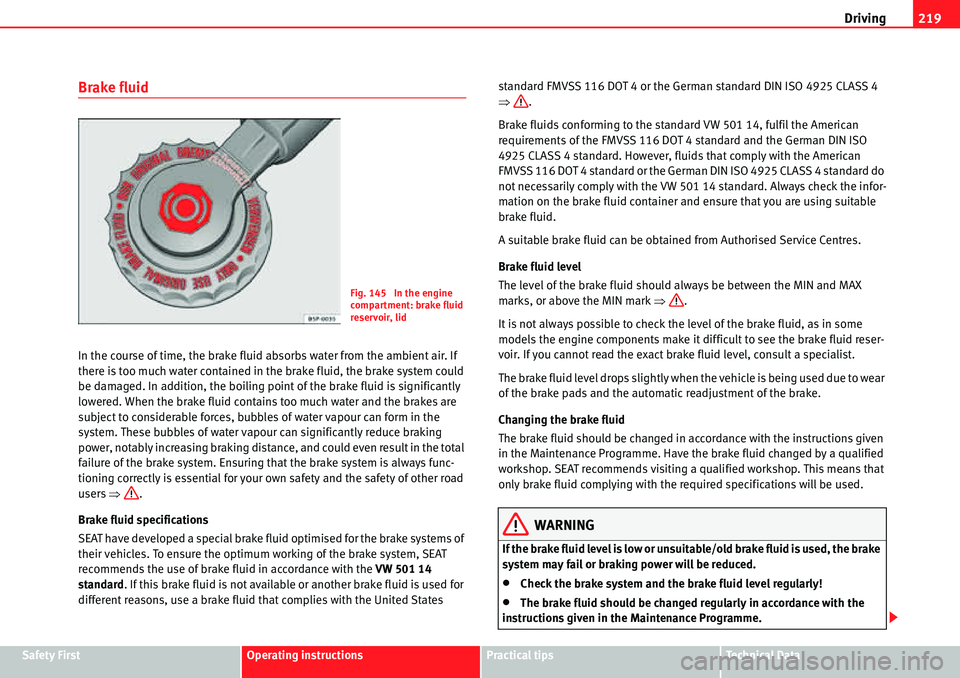
The level of the brake fluid should always be between the MIN and MAX
marks, or above the MIN mark Ÿ.
It is not always possible to check the level of the brake fluid, as in some
models the engine components make it difficult to see the brake fluid reser-
voir. If you cannot read the exact brake fluid level, consult a specialist.
The brake fluid level drops slightly when the vehicle is being used due to wear
of the brake pads and the automatic readjustment of the brake.
Changing the brake fluid
The brake fluid should be changed in accordance with the instructions given
in the Maintenance Programme. Have the brake fluid changed by a qualified
workshop. SEAT recommends visiting a qualified workshop. This means that
only brake fluid complying with the required specifications will be used.
WARNING
If the brake fluid level is low or unsuitable/old brake fluid is used, the brake
system may fail or braking power will be reduced.
xCheck the brake system and the brake fluid level regularly!
xThe brake fluid should be changed regularly in accordance with the
instructions given in the Maintenance Programme.
Fig. 145 In the engine
compartment: brake fluid
reservoir, lid
Page 223 of 413
Driving 222
Auto Hold function*
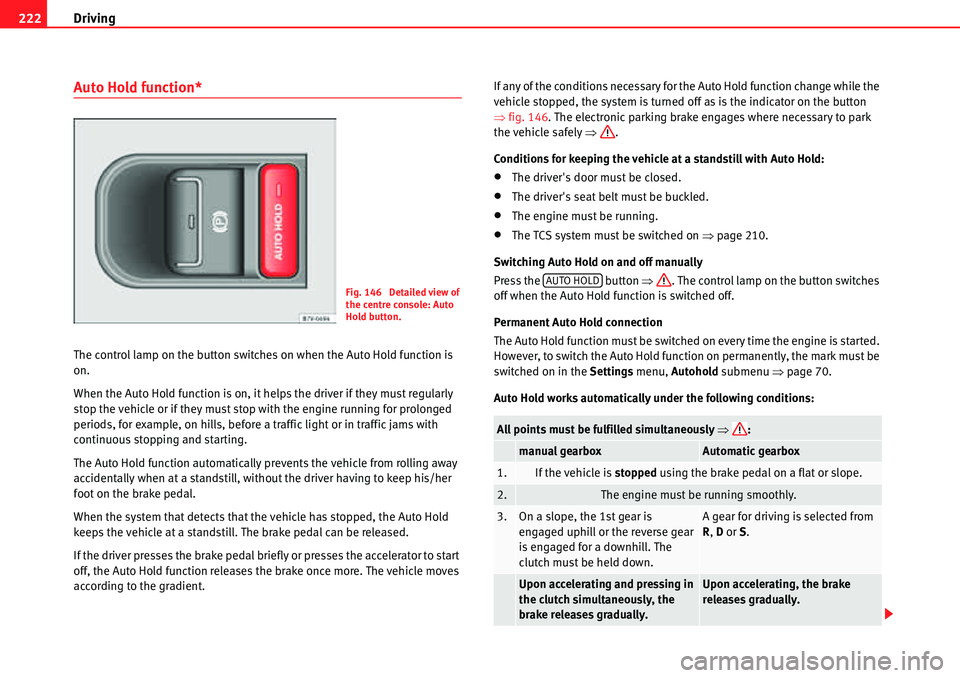
The control lamp on the button switches on when the Auto Hold function is
on.
When the Auto Hold function is on, it helps the driver if they must regularly
stop the vehicle or if they must stop with the engine running for prolonged
periods, for example, on hills, before a traffic light or in traffic jams with
continuous stopping and starting.
The Auto Hold function automatically prevents the vehicle from rolling away
accidentally when at a standstill, without the driver having to keep his/her
foot on the brake pedal.
When the system that detects that the vehicle has stopped, the Auto Hold
keeps the vehicle at a standstill. The brake pedal can be released.
If the driver presses the brake pedal briefly or presses the accelerator to start
off, the Auto Hold function releases the brake once more. The vehicle moves
according to the gradient.If any of the conditions necessary for the Auto Hold function change while the
vehicle stopped, the system is turned off as is the indicator on the button
Ÿfig. 146. The electronic parking brake engages where necessary to park
the vehicle safely Ÿ.
Conditions for keeping the vehicle at a standstill with Auto Hold:
xThe driver's door must be closed.
xThe driver's seat belt must be buckled.
xThe engine must be running.
xThe TCS system must be switched on Ÿpage 210.
Switching Auto Hold on and off manually
Press the button Ÿ. The control lamp on the button switches
off when the Auto Hold function is switched off.
Permanent Auto Hold connection
The Auto Hold function must be switched on every time the engine is started.
However, to switch the Auto Hold function on permanently, the mark must be
switched on in the Settings menu, Autohold submenu Ÿpage 70.
Auto Hold works automatically under the following conditions:
Fig. 146 Detailed view of
the centre console: Auto
Hold button.
All points must be fulfilled simultaneously Ÿ:
manual gearboxAutomatic gearbox
1.If the vehicle is stopped using the brake pedal on a flat or slope.
2.The engine must be running smoothly.
3.On a slope, the 1st gear is
engaged uphill or the reverse gear
is engaged for a downhill. The
clutch must be held down.A gear for driving is selected from
R, D or S.
Upon accelerating and pressing in
the clutch simultaneously, the
brake releases gradually.Upon accelerating, the brake
releases gradually.
AUTO HOLD
Page 227 of 413
Driving 226
Parking sensor system*
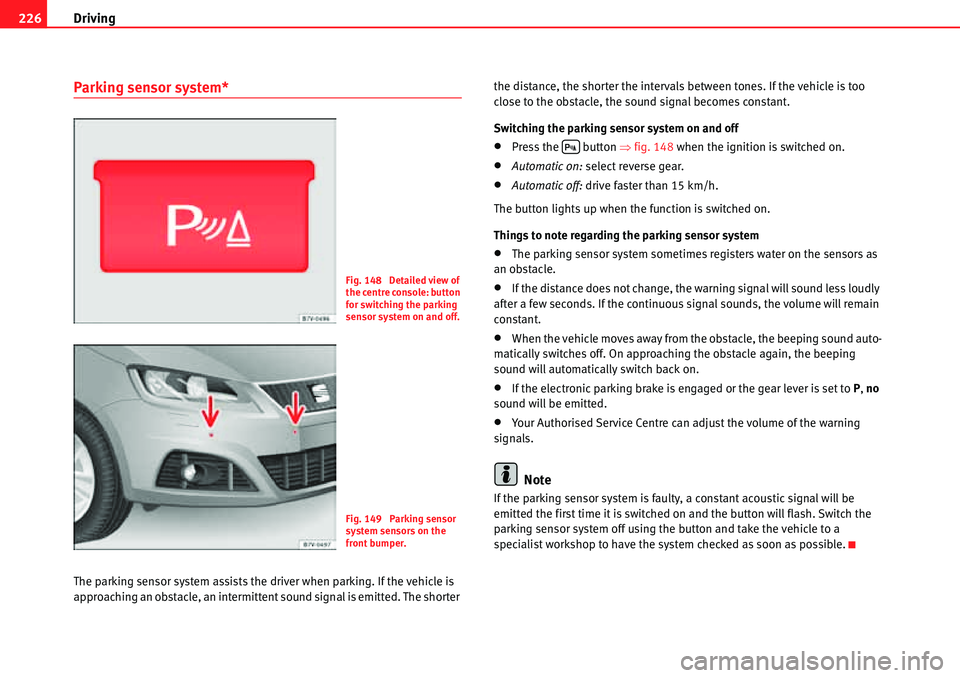
The parking sensor system assists the driver when parking. If the vehicle is
approaching an obstacle, an intermittent sound signal is emitted. The shorter the distance, the shorter the intervals between tones. If the vehicle is too
close to the obstacle, the sound signal becomes constant.
Switching the parking sensor system on and off
xPress the button Ÿfig. 148 when the ignition is switched on.
xAutomatic on: select reverse gear.
xAutomatic off: drive faster than 15 km/h.
The button lights up when the function is switched on.
Things to note regarding the parking sensor system
xThe parking sensor system sometimes registers water on the sensors as
an obstacle.
xIf the distance does not change, the warning signal will sound less loudly
after a few seconds. If the continuous signal sounds, the volume will remain
constant.
xWhen the vehicle moves away from the obstacle, the beeping sound auto-
matically switches off. On approaching the obstacle again, the beeping
sound will automatically switch back on.
xIf the electronic parking brake is engaged or the gear lever is set to P, no
sound will be emitted.
xYour Authorised Service Centre can adjust the volume of the warning
signals.
Note
If the parking sensor system is faulty, a constant acoustic signal will be
emitted the first time it is switched on and the button will flash. Switch the
parking sensor system off using the button and take the vehicle to a
specialist workshop to have the system checked as soon as possible.
Fig. 148 Detailed view of
the centre console: button
for switching the parking
sensor system on and off.
Fig. 149 Parking sensor
system sensors on the
front bumper.
'