brake Seat Alhambra 2010 Service Manual
[x] Cancel search | Manufacturer: SEAT, Model Year: 2010, Model line: Alhambra, Model: Seat Alhambra 2010Pages: 413, PDF Size: 3.86 MB
Page 233 of 413
Driving 232
Note
The park assist can also be activated afterwards, if you pass close to a parallel
parking space at a maximum of 40 km an hour or close to be perpendicular
parking space at about 20 km an hour then press the button .
Note
The progress bar on the screen of the instrument panel shows a display of the
relative distance to be covered.
Note
When the Park Assist system is turning the steering wheel of the stopped
vehicle the symbol K is also displayed. Press on the brake pedal so that the
steering can turn with the vehicle at a standstill and thus reduce the number
of manoeuvres.
Note
A suitable parking space length is at least 1.1 m greater than the length of the
vehicle.
Note
If the results of the park assist system are not as good after changing the
wheels, the system must memorise the perimeter of the new wheels. This
process is performed automatically while the vehicle is in motion. To help this
process, turn slowly (at less than 20 km/h), e.g. in an empty car park.
Leaving a parking space using the Park Assist system
Driving off
xSwitch on the engine.
xPress button . When the function is enabled, the button Ÿpage 230,
fig. 152 will light up.
xApply the turn signal indicator for the side on which you want to leave the
parking space.
xSelect reverse gear.
xFollow the instructions given by the park assist system.
xWhen the next indication appears, release the steering wheel Ÿ in
“Parking using the park assist system” on page 230: The system will move
the steering wheel! Observe the surrounding area.
xObserve the surrounding area and accelerate carefully at a maximum of
up to 7 km/h.
xThe park assist system is only responsible for moving the steering wheel
during the manoeuvre. The driver applies the accelerator, the clutch, the
gears and the brake.
xWhen it is possible to leave the parking space, the Park Assist system will
stop. Take control of the steering and when traffic conditions permit, leave
the parking space.
Automatic stoppage of the manoeuvre
The park assist system stops the manoeuvre in the event of one of the
following:
xDriving faster than 7 km/h.
xThe driver moves the steering wheel.
xA sliding door is opened. To restart the manoeuvre, close the sliding door
and press the button again.
xThere is a system malfunction (system temporarily unavailable).
xThe TCS system is switched off or the TCS or ESP is working.
ii
i
Page 234 of 413
Driving233
Safety FirstOperating instructionsPractical tipsTe c h n i c a l D a t a
WARNING
The steering wheel turns quickly automatically when leaving a parking
space using the park assist system. Placing your hand between the
steering wheel spokes could lead to injuries.
Park Assist brake operation
The Park Assist system helps the driver by braking automatically. Automatic
braking does not relieve the driver of responsibility for controlling the accel-
erator, brake and clutch Ÿ.
Braking to avoid damage at excess speed
It is possible that the system operates the brakes to reduce excess speed. The
parking manoeuvre can then continue. The brakes will intervene during each
parking process.
Braking to minimise damage
When approaching an obstacle, the vehicle may brake automatically. In
certain circumstances (for example, storm, detection of ultrasounds, vehicle
status, load, inclination), the Park Assist system may stop the vehicle
completely before an object.
xPress the foot brake Ÿ!
Following the intervention of the brakes, the Park Assist will stop.
WARNING
Despite the assistance provided by the park assist system, do not run any
risks when parking. The system is not a replacement for driver awareness.
xAlways be ready to brake.
xAutomatic brake intervention will end after 1.5 seconds approximately.
Following automatic intervention of the brakes, stop the vehicle yourself.
WARNING (continued)
Page 240 of 413
Driving239
Safety FirstOperating instructionsPractical tipsTe c h n i c a l D a t a
Cruise control system* (CCS)
Introduction
The cruise control system (CCS) is able to maintain the set speed when
driving forwards from approx. 20 km/h (12 mph).
The CCS only slows down by reducing the accelerator but not by braking.
Ÿ.
Additional information and warnings:
xChanging gear Ÿpage 201
xAccessories, parts replacement, repairs and modifications Ÿpage 285
WARNING
Use of the cruise control could cause accidents and severe injuries if it is
not possible to drive at a constant speed maintaining the safety distance.
xDo not use the CCS in heavy traffic, if the distance from the vehicle in
front is insufficient, on steep roads, with several bends or in slippery
circumstances (snow, ice, rain or loose gravel), or on flooded roads.
xNever use the CCS when driving off-road or on unpaved roads.
xAlways adapt your speed and the distance to the vehicles ahead in line
with visibility, weather conditions, the condition of the road and the traffic
situation.
xTo avoid unexpected operation of the cruise control system, turn it off
every time you finish using it.
xIt is dangerous to use a set speed which is too high for the prevailing
road, traffic or weather conditions.
xWhen travelling down hills, the CCS cannot maintain a constant speed.
The vehicle tends to accelerate under its own weight. Select a lower gear or
use the foot brake to slow the vehicle.
Page 242 of 413
Driving241
Safety FirstOperating instructionsPractical tipsTe c h n i c a l D a t a
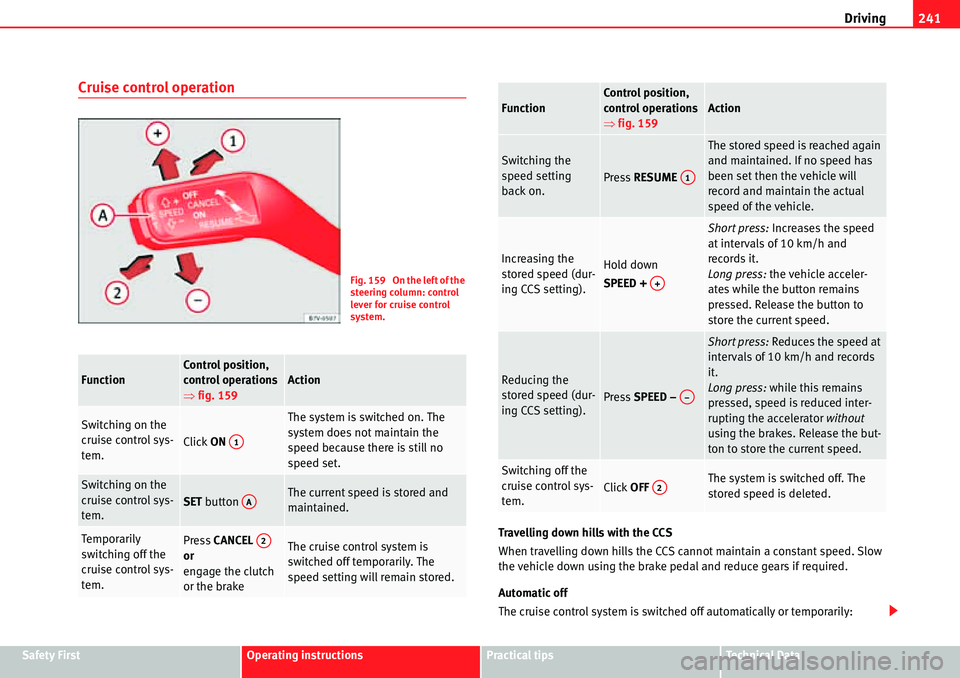
Cruise control operation
Travelling down hills with the CCS
When travelling down hills the CCS cannot maintain a constant speed. Slow
the vehicle down using the brake pedal and reduce gears if required.
Automatic off
The cruise control system is switched off automatically or temporarily:
FunctionControl position,
control operations
Ÿfig. 159Action
Switching on the
cruise control sys-
tem.
Click ON
The system is switched on. The
system does not maintain the
speed because there is still no
speed set.
Switching on the
cruise control sys-
tem.
SET button The current speed is stored and
maintained.
Tempo rarily
switching off the
cruise control sys-
tem.Press CANCEL
or
engage the clutch
or the brakeThe cruise control system is
switched off temporarily. The
speed setting will remain stored.
Fig. 159 On the left of the
steering column: control
lever for cruise control
system.
A1
AA
A2
Switching the
speed setting
back on.
Press RESUME
The stored speed is reached again
and maintained. If no speed has
been set then the vehicle will
record and maintain the actual
speed of the vehicle.
Increasing the
stored speed (dur-
ing CCS setting).Hold down
SPEED +
Short press: Increases the speed
at intervals of 10 km/h and
records it.
Long press: the vehicle acceler-
ates while the button remains
pressed. Release the button to
store the current speed.
Reducing the
stored speed (dur-
ing CCS setting).
Press SPEED –
Short press: Reduces the speed at
intervals of 10 km/h and records
it.
Long press: while this remains
pressed, speed is reduced inter-
rupting the accelerator without
using the brakes. Release the but-
ton to store the current speed.
Switching off the
cruise control sys-
tem.
Click OFF The system is switched off. The
stored speed is deleted.
FunctionControl position,
control operations
Ÿfig. 159Action
A1
A+
A
Page 243 of 413
Driving 242
xIf the system detects a fault that could affect the working order of the CCS.
xIf you increase the stored speed by using the accelerator for a certain
time.
xif the brake or clutch pedal is depressed.
xIf you change gears.
xIf the airbag is triggered.
Page 252 of 413
Driving and the environment251
Safety FirstOperating instructionsPractical tipsTe c h n i c a l D a t a
Practical tips
Driving and the environment
Running-in
Please observe the instructions for running-in new components.
Running-in the engine
The engine needs to be run-in over the first 1500 km (1000 miles). During its
first few hours of running, the internal friction in the engine is greater than
later on when all the moving parts have bedded down.
How the vehicle is driven for the first 1,500 km (1000 miles) influences the
future engine performance. Throughout the life of the vehicle, it should be
driven at a moderate speed – especially when the engine is cold – this will
reduce engine wear and increase its useful life. Never drive at extremely low
engine speeds. Always engage a lower gear when the engine works “irregu-
larly”. For the first 1000 km or 600 miles, please note:
xDo not use full throttle.
xDo not force the engine above two thirds of its maximum speed.
xDo not tow a trailer.
Between 1000 and 1500 kilometres (600 to 1000 miles), gradually increase
power until reaching the maximum speed and high engine speeds.
Running in new tyres and brake pads
xReplacement of new tyres and wheel rims Ÿpage 323
xNotes on the brakes Ÿpage 214
For the sake of the environment
If the engine is run in gently, the life of the engine will be increased and the
engine oil consumption reduced.
Page 253 of 413
Driving and the environment 252
Ecological driving
Introduction
Fuel consumption, environmental impact and engine, brake and tyre wear
depend largely on three factors:
xPersonal driving style.
xConditions of use (weather, road surface).
xTechnical requirements.
Savings of up to 25% in fuel consumption are possible with an appropriate
driving style and the adoption of certain simple tips.
WARNING
Always adapt your speed and the distance to the vehicles ahead in line
with visibility, weather conditions, the condition of the road and the traffic
situation.
Economic driving style
Changing gear early
General instructions: The highest gear is always the most economical gear.
As a guideline, for the majority of vehicles: At a speed of 30 km/h, drive in
third gear, at 40 km/h in fourth gear and at 50 km/h in fifth gear.
In addition, skipping gears when shifting up helps to save fuel, weather and
traffic conditions permitting.
Do not wait until the last moment before changing gear. Only use first gear
when you move off and change to second gear quickly. Avoid the kick-down
function in vehicles with automatic gearbox.Vehicles with a gear display help to achieve an economical driving style as
the display indicates the best moment to change gear.
Let the vehicle roll
If you take your foot off the accelerator, the fuel supply is stopped and
consumption is reduced.
Allow the vehicle to roll without accelerating, for example when approaching
a red traffic light. However, if the vehicle is rolling too slowly or the distance
is too long, the clutch pedal should be pressed to declutch. The engine will
then operate at idle speed.
If the vehicle is going to be at a standstill for a period of time, switch off the
engine; for example, while waiting at a level crossing. In vehicles which have
the Start-Stop function on, the engine switches off automatically when the
vehicle is not moving.
Think ahead and “flow” with the traffic
Frequent acceleration and braking considerably increase fuel consumption. If
you think ahead as you drive and keep a safe distance from the vehicle in
front, it is possible to slow down by simply lifting your foot off the accelerator.
This eliminates the need for constant braking and acceleration.
Calm and steady driving
Constancy is more important than speed: The more you drive at a constant
speed, the lower the fuel consumption.
When driving on the motorway, it is more efficient to drive at a constant and
more moderate speed than to be continuously accelerating and braking. As a
general rule, you will reach your destination just as quickly when you drive at
a constant speed.
The cruise control function helps you to achieve a constant style of driving.
Moderate use of additional electrical appliances
It is important to travel in comfort, but convenience systems should be used
in an ecological manner.
Page 254 of 413
Driving and the environment253
Safety FirstOperating instructionsPractical tipsTe c h n i c a l D a t a Some equipment, when connected, increase fuel consumption considerably,
for example:
xAir conditioning cooling system: If the air conditioning system is required
to cool to significantly lower temperatures than the true outside temperature,
it will require a large quantity of energy from the engine. Therefore, we recom-
mend that the selected temperature for the vehicle is not too different to the
outside temperature. It is a good idea to open all the windows of the car
before starting your journey, and to drive a short distance with all the
windows open to allow the vehicle to cool down slightly. Only then should
you close all the windows and switch on the air conditioning. Keep windows
closed when travelling at high speeds. Driving with the windows open
increases fuel consumption.
xSwitch off the seat heating when the seats have warmed up.
xSwitch off the heated rear window and the windscreen heating when the
windows have demisted and are free of ice.
xDo not leave the independent heating switched on when the vehicle is
moving Ÿpage 187.
Other factors which increase fuel consumption (examples):
xFault in engine management.
xDriving on hills.
xTrailer towing.
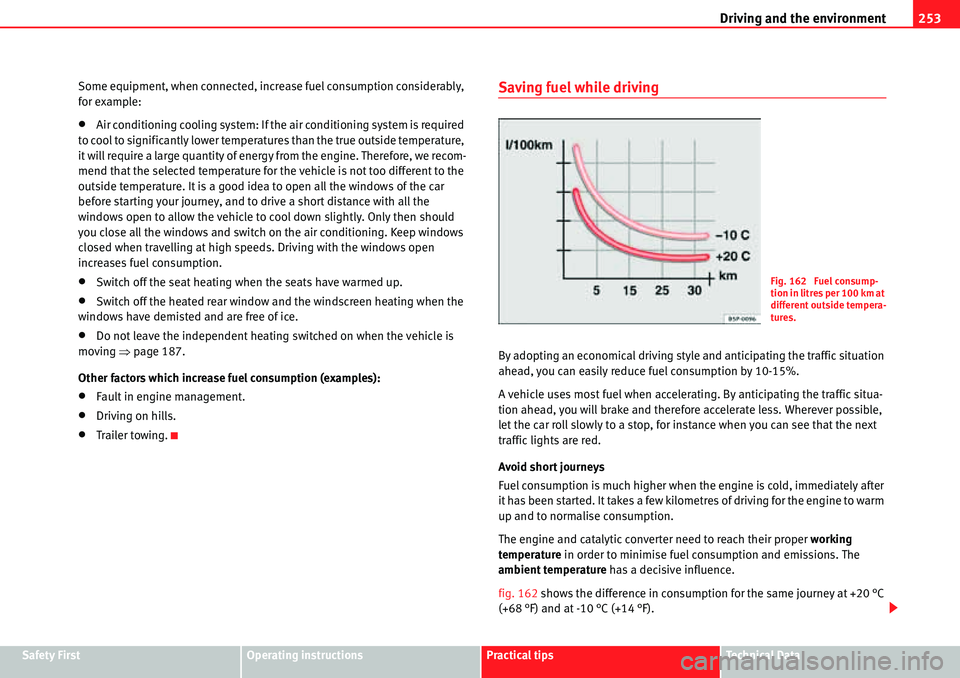
Saving fuel while driving
By adopting an economical driving style and anticipating the traffic situation
ahead, you can easily reduce fuel consumption by 10-15%.
A vehicle uses most fuel when accelerating. By anticipating the traffic situa-
tion ahead, you will brake and therefore accelerate less. Wherever possible,
let the car roll slowly to a stop, for instance when you can see that the next
traffic lights are red.
Avoid short journeys
Fuel consumption is much higher when the engine is cold, immediately after
it has been started. It takes a few kilometres of driving for the engine to warm
up and to normalise consumption.
The engine and catalytic converter need to reach their proper working
temperature in order to minimise fuel consumption and emissions. The
ambient temperature has a decisive influence.
fig. 162 shows the difference in consumption for the same journey at +20 °C
(+68 °F) and at -10 °C (+14 °F).
Fig. 162 Fuel consump-
tion in litres per 100 km at
different outside tempera-
tures.
Page 261 of 413
Trailer towing 260
Driving with a trailer
Technical requirements
If the car is supplied with a factory-fitted tow hitch it will already have the
necessary technical modifications and meet the statutory requirements for
towing a trailer.
Only use an approved trailer hitch for the gross trailer weight rating. The tow
hitch must be suitable for both the vehicle and trailer and must be securely
fitted to the vehicle chassis. Only use a tow hitch with a removable ball joint.
Always check and take into account the tow hitch manufacturer's instruc-
tions. Never fit a trailer tow hitch “that distributes the load” or “balances the
load”.
Bumper mounted tow hitch
Never fit a tow hitch or its attachments to the bumper. A tow hitch should
never interfere with the bumper performance. Do not modify the exhaust
system and brake system. Regularly check the tow hitch to ensure it is firmly
fitted.
Engine cooling system
Driving with a trailer increases the load on the engine and cooling system.
The cooling system should always have sufficient coolant and to be able to
cope with the vehicle and trailer.
Electric trailer brake
If the trailer has its own braking system, please note the relevant legal
requirements. The trailer braking system should never be connected to the
vehicle braking system.
Trailer cable
Always use a cable between the vehicle and the trailer Ÿpage 262.Trailer rear lights
The rear lights of a trailer must fulfil the corresponding standards
Ÿpage 262.
Never connect the trailer's rear lights directly to the vehicle electric system. In
case of any doubt about the electrical connection of the trailer, ask a
specialist workshop. SEAT recommends visiting a qualified workshop.
Wing mirrors
When the field of vision behind the trailer cannot be seen using the standard
wing mirrors of the towing vehicle, additional wing mirrors are required
according to the legal requirements of each country. The wing mirrors must
be fitted before driving and must provide a sufficient field of vision behind.
Trailer electricity consumption
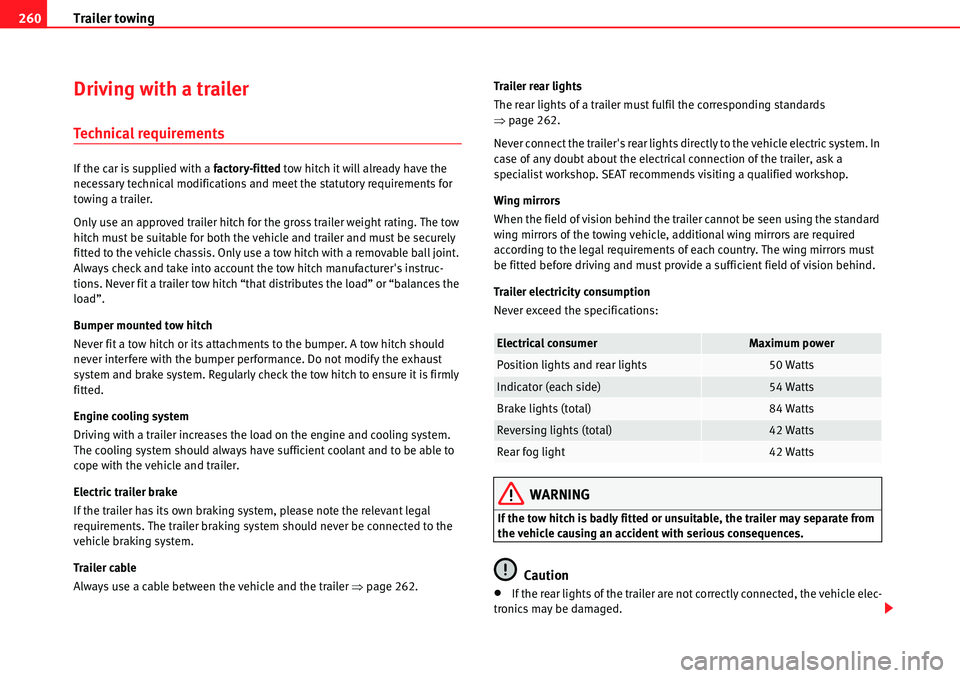
Never exceed the specifications:
WARNING
If the tow hitch is badly fitted or unsuitable, the trailer may separate from
the vehicle causing an accident with serious consequences.
Caution
xIf the rear lights of the trailer are not correctly connected, the vehicle elec-
tronics may be damaged.
Electrical consumerMaximum power
Position lights and rear lights50 Watts
Indicator (each side)54 Watts
Brake lights (total)84 Watts
Reversing lights (total)42 Watts
Rear fog light42 Watts
Page 262 of 413
Trailer towing261
Safety FirstOperating instructionsPractical tipsTe c h n i c a l D a t a
xIf the trailer absorbs excessive electric current, the vehicle electronics
may be damaged.
xNever connect the trailer's electric system to the electrical connections of
the rear lights or any other power sources. Only use suitable connections for
providing electric current to the trailer.
Note
Towing a trailer places additional demands on the vehicle. At SEAT, we recom-
mend additional services between the normal inspection intervals if the
vehicle is used frequently for towing a trailer.
Note
In some countries, an additional fire extinguisher is required if the trailer
weight is more than 2500 kg
Electric tow hitch ball
The rotation radius of the tow hitch ball should be free of people, animals and
objects Ÿ.
The tow hitch is located in the bumper. The electric tow ball is fixed and
cannot be removed.
Releasing and unfolding the tow ball
xStop the vehicle and apply the electric parking brake.
xSwitch the engine off.
xOpen the tailgate.
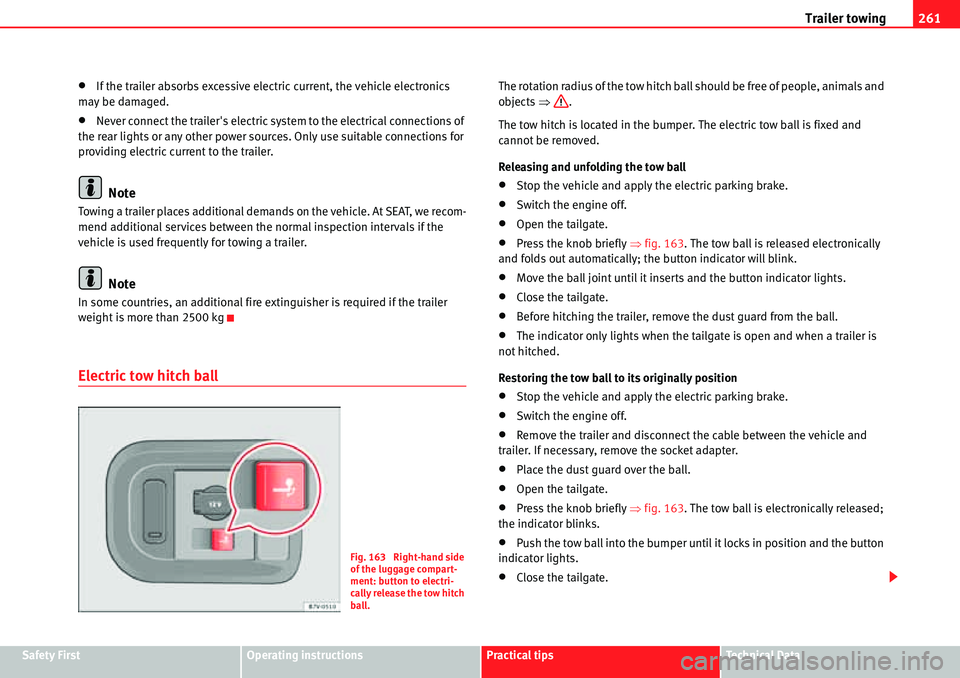
xPress the knob briefly Ÿfig. 163. The tow ball is released electronically
and folds out automatically; the button indicator will blink.
xMove the ball joint until it inserts and the button indicator lights.
xClose the tailgate.
xBefore hitching the trailer, remove the dust guard from the ball.
xThe indicator only lights when the tailgate is open and when a trailer is
not hitched.
Restoring the tow ball to its originally position
xStop the vehicle and apply the electric parking brake.
xSwitch the engine off.
xRemove the trailer and disconnect the cable between the vehicle and
trailer. If necessary, remove the socket adapter.
xPlace the dust guard over the ball.
xOpen the tailgate.
xPress the knob briefly Ÿfig. 163. The tow ball is electronically released;
the indicator blinks.
xPush the tow ball into the bumper until it locks in position and the button
indicator lights.
xClose the tailgate.
Fig. 163 Right-hand side
of the luggage compart-
ment: button to electri-
cally release the tow hitch
ball.