air conditioning Seat Alhambra 2011 User Guide
[x] Cancel search | Manufacturer: SEAT, Model Year: 2011, Model line: Alhambra, Model: Seat Alhambra 2011Pages: 385, PDF Size: 7.92 MB
Page 162 of 385
160
Heating, Ventilation and Air conditioning
Keep the air vents in front of the windscreen free of snow, ice and leaves to
ens ur
e heating and cooling are not impaired and to prevent the windows
from misting over.
Adjustment for safer driving
When the air conditioning is switched on, the temperature and the air hu-
midity in the vehicle interior drop. Hence, when the outside air humidity is
high, the windows do not mist over and comfort for the vehicle occupants is
improved:
With Climatic
● Disable air recirculation mode ⇒ pag
e 161.
● Set the fan to setting 1 or 2.
● Turn the temperature control to the centre position.
● Open the air outlets in the dash panel ⇒ pag
e 161.
● Turn the air distribution control to the required position.
● Press the AC button to turn on cooling. The button will light up.
With C lim
atronic
● Press the AUTO button.
● Set the temperature to +22°C (+72°F).
● Open the air outlets in the dash panel ⇒ pag
e 161.
Switching the Climatronic temperature measuring unit
Press and hold the AC and
AUT
O buttons to switch the temperature display
between C el
sius and Fahrenheit.
Heat
The maximum heat output required to defrost windows quickly is only avail-
able when the engine has reached its normal running temperature.
The air conditioning system does not switch on
If the air conditioning system cannot be switched on, this may be caused by
the following: ●
The engine is not running.
● The fan i
s switched off.
● The climate control fuse has blown.
● The outside temperature is lower than approximately +3°C (+38°F).
● The climate control system compressor has been temporarily switched
off becau
se the engine coolant temperature is too high.
● Another fault in the vehicle. Have the climate control system checked by
a Tec
hnical Service.
Things to note
If the humidity and temperature outside the vehicle are high, condensation
can drip off the evaporator in the cooling system and form a pool under-
neath the vehicle. This is normal and does not indicate a leak!
Dust and pollen filter
The dust and pollen filter with its activated charcoal cartridge serves as a
barrier against impurities in the ambient air.
For the climate control system to work with maximum efficiency, the dust
and pollen filter must be replaced at the intervals specified in the Mainte-
nance Programme.
If the filter loses efficiency prematurely due to use in areas with very high
levels of air pollution, the filter must be changed more frequently than sta-
ted in the Service Schedule. Note
● The climate control system must left running for a few minutes to reach
the set t
emperature in the vehicle interior.
● After starting it, any residual humidity in the climate control system
coul
d mist over the windscreen.
● The air from the vents flows through the passenger compartment and
out through the outl
ets below the rear window. Do not cover these outlets
with items of clothing or other objects.
Page 163 of 385
161
Heating, Ventilation and Air conditioning
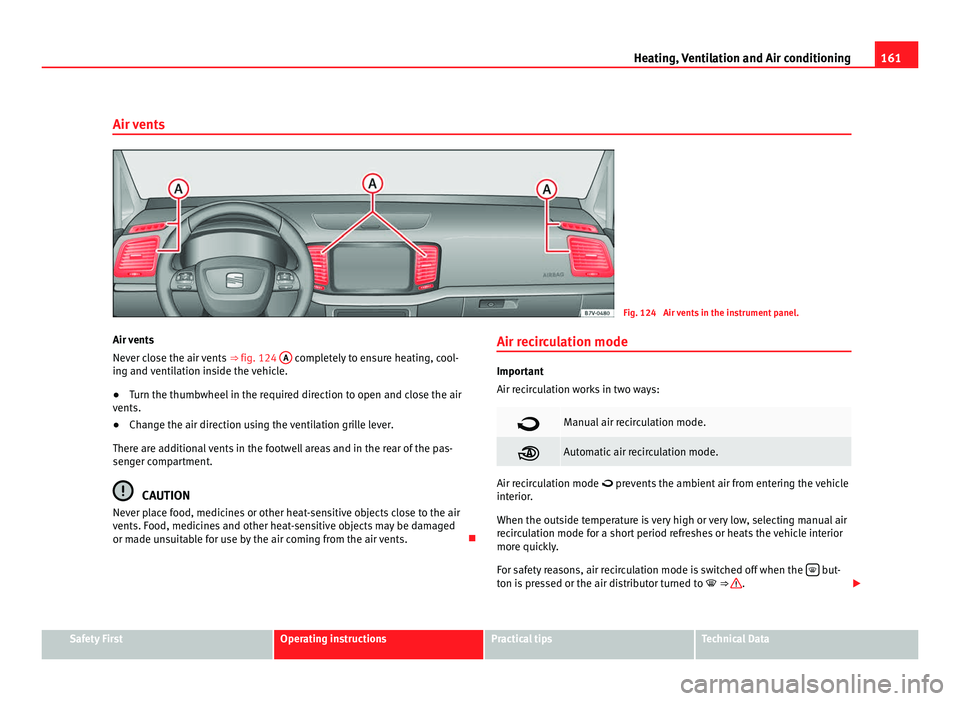
Air vents Fig. 124 Air vents in the instrument panel.
Air vents
Never c lo
se the air vents ⇒ fig. 124 A completely to ensure heating, cool-
ing and v
entilation inside the vehicle.
● Turn the thumbwheel in the required direction to open and close the air
vents.
● Chan
ge the air direction using the ventilation grille lever.
There are a
dditional vents in the footwell areas and in the rear of the pas-
senger compartment. CAUTION
Never place food, medicines or other heat-sensitive objects close to the air
vents. F ood, medic
ines and other heat-sensitive objects may be damaged
or made unsuitable for use by the air coming from the air vents. Air recirculation mode Important
Air rec
ir
culation works in two ways: Manual air recirculation mode.
Automatic air recirculation mode.
Air recirculation mode prev
ents
the ambient air from entering the vehicle
interior.
When the outside temperature is very high or very low, selecting manual air
recirculation mode for a short period refreshes or heats the vehicle interior
more quickly.
For safety reasons, air recirculation mode is switched off when the but-
ton i s
pressed or the air distributor turned to ⇒ .
Safety First Operating instructions Practical tips Technical Data
Page 164 of 385
162
Heating, Ventilation and Air conditioning
Switching air recirculation mode on and off manually
Swit c
hing on: press the corresponding button until the light under the sym-
bol comes on.
Switching off: press the button until no indicator remains lit.
Automatic air recirculation mode
Fresh air enters the vehicle interior in position . If the system detects a
high concentration of hazardous substances in the ambient air, air recircu-
lation mode is switched on automatically. When the level of impurities
drops to within a normal range, recirculation mode is switched off.
The system is unable to detect unpleasant smells.
Air recirculation mode is not automatically switched on in the following ca-
ses of outside temperatures and conditions:
● The cooling system is switched on (the AC button is lit up) and the out-
side t emper
ature is below +3°C (+38°F).
● The cooling system and the windscreen wipers are switched off and the
outside temper
ature is below +10°C (+50°F).
● The cooling system is switched on, the outside temperature is below
+15°C (+59°F) and the wind
screen wipers are switched on.
Switching the automatic air recirculation mode on and off
Switching on: press the button until the light under the symbol
come s
on.
Switching off: press the button until no button remains lit.
Swit c
hing the automatic air recirculation mode off temporarily
● Press the button once to temporarily switch to manual air recircula-
tion mode in the event of
unpleasant smells from outside. The control light
under the symbol comes on.
● After more than two seconds, press the
button again to restart au-
tom atic
air recirculation. The control light under the symbol comes on. WARNING
Stuffy or used air will increase fatigue and reduce driver concentration
pos s
ibly resulting in a serious accident.
● Never use recirculation mode for long periods as it does not refresh
the air inside the
vehicle.
● If the cooling mode is switched off and air recirculation mode switch-
ed on, the window
s can mist over very quickly, considerably limiting visi-
bility.
● Switch air recirculation mode off when it is not required. CAUTION
Do not smoke when air recirculation is switched on in vehicles with a cli-
mat e c
ontrol system. The smoke taken in could lie on the cooling system va-
poriser and on the activated charcoal cartridge of the dust and pollen filter,
leading to a permanently unpleasant smell. Note
Air recirculation mode switches on to prevent exhaust gas from entering the
vehic l
e interior when it is in reverse and while the automatic windscreen
wash and wipe is working.
Page 165 of 385
163
Heating, Ventilation and Air conditioning
Auxiliary heater* (additional heater) Introduction The auxiliary heater is powered by fuel from the vehicle's fuel tank and can
be used whi
l
e the vehicle is in motion and at a standstill. Select the mode
required (heat or fan) ⇒ page 165 on the instrument panel.
In winter, the auxiliary heater can be used in heat mode before switching on
the ignition to remove any ice, mist or snow from the windscreen (thin lay-
ers only).
Additional information and warnings:
● SEAT information system ⇒ pag
e 62
● Refuelling ⇒ pag
e 264 WARNING
The auxiliary heater fumes contain carbon dioxide, an odourless and col-
ourle s
s toxic gas. Carbon monoxide can cause people to lose conscious-
ness. It can also cause death.
● Never switch on the auxiliary heater or leave it running in places that
are enclo
sed or unventilated.
● Never program the independent heating system to be activated and
operated in c
losed, unventilated areas. WARNING
The components of the auxiliary heater exhaust system heat up a great
dea l
. This could cause a fire.
● Always park your vehicle so that no part of the exhaust system can
come in cont
act with flammable materials (such as dried grass). CAUTION
Never place food, medicines or other heat-sensitive objects close to the air
vents. F ood, medic
ines and other heat-sensitive objects may be damaged
or made unsuitable for use by the air coming from the air vents.
Switching the auxiliary heater on and off Switching the auxiliary heater on:
Manually using the instant on/off button. ⇒ page 157
ON
Manually using the remote control. ⇒ page 164
Automatically at the programmed and enabled on
time. ⇒ page 165
Switching the auxiliary heater off:
Manually using the instant on/off button for the
clim
at
e control system. ⇒ page 157
OFF
Manually using the remote control. ⇒ page 164
Automatically after the programmed time. ⇒ page 165
Automatically when the light comes on
(fuel r
e-
serve). ⇒ page 264
Automatically when the battery power drops to a
ver
y
low level. ⇒ page 288
Things to note
Aft
er sw
itching the auxiliary heater off, it continues to run for a short period
to completely burn any fuel remaining in the auxiliary heater. The exhaust
fumes are also extracted from the system. Safety First Operating instructions Practical tips Technical Data
Page 166 of 385
164
Heating, Ventilation and Air conditioning
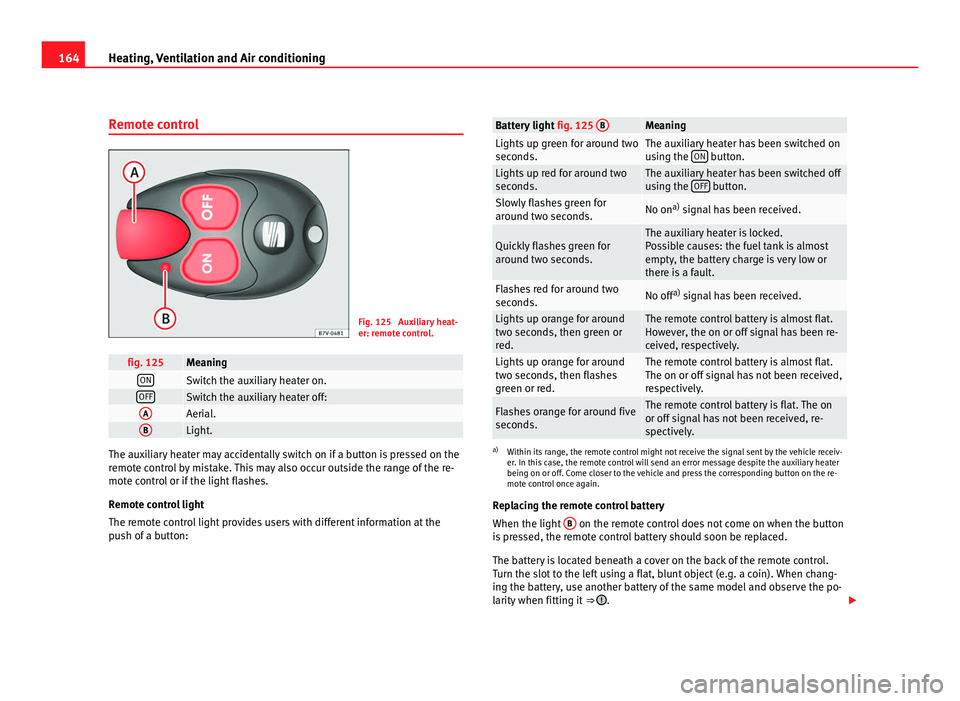
Remote control Fig. 125 Auxiliary heat-
er: remot
e c
ontrol. fig. 125 Meaning
ON
Switch the auxiliary heater on.
OFF
Switch the auxiliary heater off:
A
Aerial.
B
Light.
The auxiliary heater may accidentally switch on if a button is pressed on the
remot
e c
ontrol by mistake. This may also occur outside the range of the re-
mote control or if the light flashes.
Remote control light
The remote control light provides users with different information at the
push of a button: Battery light
fig. 125 B Meaning
Lights up green for around two
second
s. The auxiliary heater has been switched on
us
in
g the ON button.
Lights up red for around two
second
s. The auxiliary heater has been switched off
us
in
g the OFF button.
Slowly flashes green for
arou
nd tw
o seconds. No on
a)
signal has been received. Quickly flashes green for
arou
nd tw
o seconds. The auxiliary heater is locked.
Po
s
sible causes: the fuel tank is almost
empty, the battery charge is very low or
there is a fault. Flashes red for around two
second
s. No off
a)
signal has been received. Lights up orange for around
two sec
ond
s, then green or
red. The remote control battery is almost flat.
How
ev
er, the on or off signal has been re-
ceived, respectively. Lights up orange for around
two sec
ond
s, then flashes
green or red. The remote control battery is almost flat.
The on or off s
ign
al has not been received,
respectively. Flashes orange for around five
second
s. The remote control battery is flat. The on
or off s
ign
al has not been received, re-
spectively. a)
Within its range, the remote control might not receive the signal sent by the vehicle receiv-
er. In thi s
case, the remote control will send an error message despite the auxiliary heater
being on or off. Come closer to the vehicle and press the corresponding button on the re-
mote control once again.
Replacing the remote control battery
When the light B on the remote control does not come on when the button
is pr
essed, the remote control battery should soon be replaced.
The battery is located beneath a cover on the back of the remote control.
Turn the slot to the left using a flat, blunt object (e.g. a coin). When chang-
ing the battery, use another battery of the same model and observe the po-
larity when fitting it ⇒ .
Page 167 of 385
165
Heating, Ventilation and Air conditioning
Range
The rec eiv
er is in the interior of the vehicle. The remote control, when fitted
with new batteries, has a range of several hundred metres. Obstacles be-
tween the remote control and the vehicle, bad weather conditions and dis-
charged batteries can considerably reduce the range of the remote control.
An optimum range is obtained by keeping the remote control vertical, with
the aerial A pointing upwards. When doing so, do not cover the aerial with
your fin g
ers or with the palm of your hand.
There must be a minimum distance of two metres between the remote con-
trol and the vehicle. CAUTION
● The radiofrequency remote control contains electronic components.
Ther ef
ore, avoid getting the remote control wet and from being knocked
and protect it from direct sunlight.
● Use of inappropriate batteries may damage the remote control. For this
rea
son, always replace the dead battery with another of the same voltage,
size and specifications. For the sake of the environment
● Please dispose of old batteries so that they do not harm the environ-
ment .
● The r
emote control battery may contain perchlorate. Observe the legal
requirements
for their disposal.
Programming the auxiliary heater The heater or ventilation inside the vehicle can be programmed for a certain
period. Before programming, check that the day is correctly set in the
Auxi
liary heat-
er - day of the week menu ⇒ .
Enab lin
g the Auxiliary heater menu on the instrument panel
● From the main menu, select the Auxili
ary heater submenu and press the
OK button on the windscreen wiper lever.
● ALTERNATIVELY: pre s
s the or
arrow buttons on the multi-function
st eerin
g wheel until the Auxiliary heater menu is displayed. Menu options Description
Switching on
Swit
c
hing off The auxiliary heater can be set to come on automati-
cal
ly
if required. To do so, select a timer:
– The timer is displayed marked with a .
– Only one timer can be selected. If a timer has been
selected, Prog. ON will be displayed on the screen. If
no timer has been selected, the instrument panel
screen will display Prog. OFF.
– To modify the programmed timer, select another tim-
er or select the Off option. Timer 1
Timer 2
Timer 3 Three different timers (hh.mm) can later be selected
us
in
g the On option. If the auxiliary heater is to be
switched on for just a certain day of the week, select
the day of the week and the time for the auxiliary heat-
er to come on. Duration The operating time may vary between 10 and 60 mi-
nute
s
and can be set to 5-minute intervals. Operating mode Set to heat or ventilate the vehicle interior when the
auxi
li
ary heater is switched on. Day Set the current day of the week.
Manufacturer's
setting
s The predefined factory values for the functions of this
menu are r
e
stored. Back This returns to the main menu
Safety First Operating instructions Practical tips Technical Data
Page 168 of 385
166
Heating, Ventilation and Air conditioning
Checking programming
If the timer h
as been switched on after switching the ignition off, the instant
on button will remain lit for around ten seconds.
WARNING
Never program the independent heating system to be activated and oper-
ated in c lo
sed, unventilated areas. The auxiliary heater fumes contain
carbon dioxide, an odourless and colourless toxic gas. Carbon monoxide
can cause people to lose consciousness. It can also cause death.
Operating instructions The auxiliary heater exhaust system located below the vehicle must be kept
cl
e
ar of snow, mud and other objects. The exhaust fumes must not be ob-
structed in any way. The exhaust fumes generated by the auxiliary heater
are removed via an exhaust pipe fitted underneath the vehicle.
On heating the vehicle interior, depending on the outside temperature the
warm air is first directed at the windscreen and then to the rest of the pas-
senger compartment through the air vents. If the air vents are turned to-
wards the windows, for example, the form of air distribution may be affec-
ted.
Depending on the outside temperature, the temperature at which the auxili-
ary heater warms the vehicle interior may be somewhat higher if the heating
or climate control temperature control is set to maximum before switching
the heating on.
Depending on the engine, vehicles with auxiliary heater may be fitted with a
second battery in the luggage compartment that is responsible for powering
the auxiliary heater. Cases in which the auxiliary heater will not switch on
●
The auxiliary heater requires about as much power as the dipped head-
lights. If the batt
ery charge is low, the auxiliary heater will switch off auto-
matically or will not even switch on. This avoids problems when starting the
engine.
● The heater will switch just once each time. The timer will also have to be
switc
hed back on every time it is required. Note
● Noise will be heard while the auxiliary heater is running.
● When the air humidity i
s high and the outside temperature low, the
heating sy
stem may evaporate condensation from the auxiliary heater. In
this case, steam may be released from underneath the vehicle. This is com-
pletely normal and there is no need to suspect a fault!
● If the auxiliary heater runs several times over a prolonged period, the ve-
hicle b
attery may run flat. To re-charge the battery, drive the vehicle for a
long distance. In general: drive for as much time as the auxiliary heating
was working.
Page 198 of 385
196
Driving
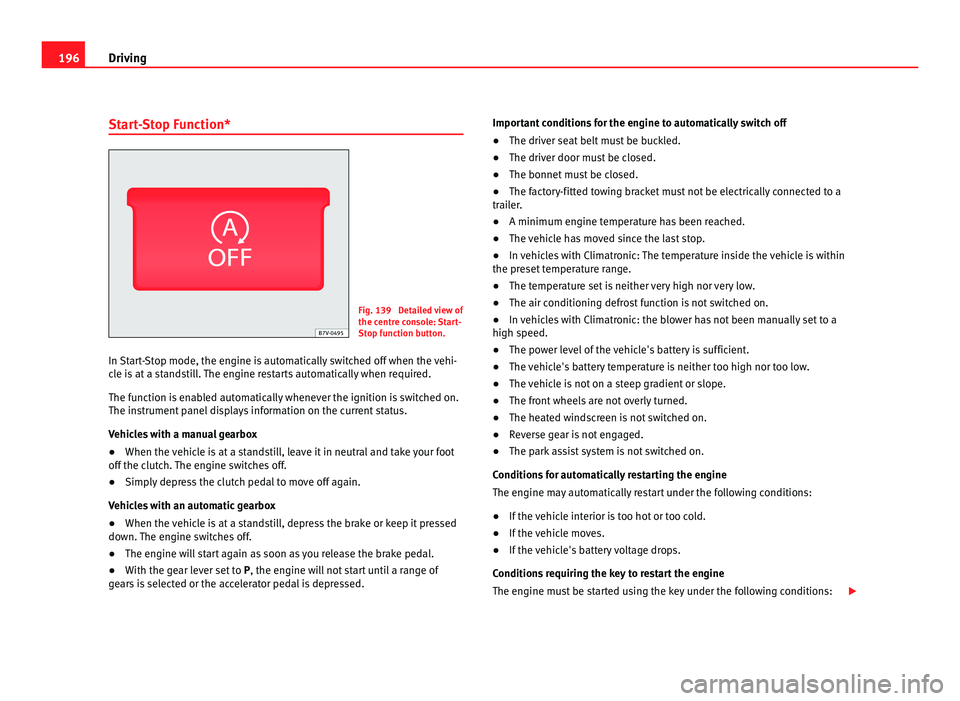
Start-Stop Function* Fig. 139 Detailed view of
the centr
e c
onsole: Start-
Stop function button.
In Start-Stop mode, the engine is automatically switched off when the vehi-
cle i
s at a standstill. The engine restarts automatically when required.
The function is enabled automatically whenever the ignition is switched on.
The instrument panel displays information on the current status.
Vehicles with a manual gearbox
● When the vehicle is at a standstill, leave it in neutral and take your foot
off the clut
ch. The engine switches off.
● Simply depress the clutch pedal to move off again.
Vehicl
es with an automatic gearbox
● When the vehicle is at a standstill, depress the brake or keep it pressed
down. The en
gine switches off.
● The engine will start again as soon as you release the brake pedal.
● With the gear lever set to P, the engine wi
ll not start until a range of
gears is selected or the accelerator pedal is depressed. Important conditions for the engine to automatically switch off
●
The driver seat belt must be buckled.
● The driver door must be closed.
● The bonnet must be closed.
● The factory-fitted towing bracket must not be electrically connected to a
trail
er.
● A minimum engine temperature has been reached.
● The vehicle has moved since the last stop.
● In vehicles with Climatronic: The temperature inside the vehicle is within
the preset
temperature range.
● The temperature set is neither very high nor very low.
● The air conditioning defrost function is not switched on.
● In vehicles with Climatronic: the blower has not been manually set to a
high speed.
● The pow
er level of the vehicle's battery is sufficient.
● The vehicle's battery temperature is neither too high nor too low.
● The vehicle is not on a steep gradient or slope.
● The front wheels are not overly turned.
● The heated windscreen is not switched on.
● Reverse gear is not engaged.
● The park assist system is not switched on.
Conditions
for automatically restarting the engine
The engine may automatically restart under the following conditions:
● If the vehicle interior is too hot or too cold.
● If the vehicle moves.
● If the vehicle's battery voltage drops.
Conditions
requiring the key to restart the engine
The engine must be started using the key under the following conditions:
Page 228 of 385
226
Driving and the environment
Economic driving style Changing gear early
General
in
structions: The highest gear is always the most economical gear.
As a guideline, for the majority of vehicles: At a speed of 30 km/h, drive in
third gear, at 40 km/h in fourth gear and at 50 km/h in fifth gear.
In addition, skipping gears when shifting up helps to save fuel, weather and
traffic conditions permitting.
Do not wait until the last moment before changing gear. Only use first gear
when you move off and change to second gear quickly. Avoid the kick-down
function in vehicles with automatic gearbox.
Vehicles with a gear display help to achieve an economical driving style as
the display indicates the best moment to change gear.
Let the vehicle roll
If you take your foot off the accelerator, the fuel supply is stopped and con-
sumption is reduced.
Allow the vehicle to roll without accelerating, for example when approach-
ing a red traffic light. However, if the vehicle is rolling too slowly or the dis-
tance is too long, the clutch pedal should be pressed to declutch. The en-
gine will then operate at idle speed.
If the vehicle is going to be at a standstill for a period of time, switch off the
engine; for example, while waiting at a level crossing. In vehicles which
have the Start-Stop function on, the engine switches off automatically when
the vehicle is not moving.
Think ahead and “flow” with the traffic
Frequent acceleration and braking considerably increase fuel consumption.
If you think ahead as you drive and keep a safe distance from the vehicle in
front, it is possible to slow down by simply lifting your foot off the accelera-
tor. This eliminates the need for constant braking and acceleration. Calm and steady driving
Cons
tancy is more important than speed: The more you drive at a constant
speed, the lower the fuel consumption.
When driving on the motorway, it is more efficient to drive at a constant and
more moderate speed than to be continuously accelerating and braking. As
a general rule, you will reach your destination just as quickly when you drive
at a constant speed.
The cruise control function helps you to achieve a constant style of driving.
Moderate use of additional electrical appliances
It is important to travel in comfort, but convenience systems should be used
in an ecological manner.
Some equipment, when connected, increase fuel consumption considera-
bly, for example:
● Air conditioning cooling system: If the air conditioning system is re-
quired to c
ool to significantly lower temperatures than the true outside tem-
perature, it will require a large quantity of energy from the engine. There-
fore, we recommend that the selected temperature for the vehicle is not too
different to the outside temperature. It is a good idea to open all the win-
dows of the car before starting your journey, and to drive a short distance
with all the windows open to allow the vehicle to cool down slightly. Only
then should you close all the windows and switch on the air conditioning.
Keep windows closed when travelling at high speeds. Driving with the win-
dows open increases fuel consumption.
● Switch off the seat heating when the seats have warmed up.
● Switch off the heated rear window and the windscreen heating when the
window
s have demisted and are free of ice.
● Do not leave the auxiliary heater switched on when the vehicle is mov-
ing ⇒ p
age 163.
Page 367 of 385
Index
A
Abro
a
d
Extended stay abroad with your vehicle . . 255
Sale of vehicle . . . . . . . . . . . . . . . . . . . . . . 255
ABS See "Braking assist systems" . . . . . . . . . . 189
Accessories . . . . . . . . . . . . . . . . . . . . . . . . . . . . 257
Acoustic warnings Headlights . . . . . . . . . . . . . . . . . . . . . . . . . . 97
Adaptive headlights Dynamic . . . . . . . . . . . . . . . . . . . . . . . . . . . . 99
AdBlue Control lamp . . . . . . . . . . . . . . . . . . . . . . . . 271
Information . . . . . . . . . . . . . . . . . . . . . . . . . 272
Minimum quantity for a refill . . . . . . . . . . . 272
Refilling . . . . . . . . . . . . . . . . . . . . . . . . . . . . 273
Specifications . . . . . . . . . . . . . . . . . . . . . . . 274
Tank filling capacity . . . . . . . . . . . . . . . . . . 272
Warning lamp . . . . . . . . . . . . . . . . . . . . . . . 271
Additional equipment . . . . . . . . . . . . . . . . . . . 258
Additional heater See "Auxiliary heater" . . . . . . . . . . . . . . . . 163
Adjusting passenger exterior mirror . . . . . . . . 112
Adjustment Correct sitting position . . . . . . . . . . . . . . . . 12
Electric front seat . . . . . . . . . . . . . . . . . . . . 115
Head restraints . . . . . . . . . . . . . . . . . . . . . . 123
Mechanical front seat . . . . . . . . . . . . . . . . 114
Rear seats . . . . . . . . . . . . . . . . . . . . . . . . . . 116 Seat with position memory . . . . . . . . . . . . 118
Steering wheel
. . . . . . . . . . . . . . . . . . . . . . 169
Adjustments Folding the backrest of the front passeng-er's seat . . . . . . . . . . . . . . . . . . . . . . . . . . 121
Headlight range . . . . . . . . . . . . . . . . . . . . . 102
Aerial . . . . . . . . . . . . . . . . . . . . . . . . . . . . . . . . . 255
Aerial built into the window . . . . . . . . . . . . . . . 255
AFS . . . . . . . . . . . . . . . . . . . . . . . . . . . . . . . . . . . 99
Airbag system . . . . . . . . . . . . . . . . . . . . . . . . 28, 31 Cleaning instrument panel . . . . . . . . . . . . 253
Curtain airbags . . . . . . . . . . . . . . . . . . . . . . . 37
Deactivating the front passenger airbag . . 35
Deactivating using the key switch . . . . . . . . 35
Description . . . . . . . . . . . . . . . . . . . . . . . . . . 31
Differences between front passenger airbagsystems . . . . . . . . . . . . . . . . . . . . . . . . . . . 34
Faults . . . . . . . . . . . . . . . . . . . . . . . . . . . . . 259
Front airbags . . . . . . . . . . . . . . . . . . . . . . . . 33
Function . . . . . . . . . . . . . . . . . . . . . . . . . . . . 31
Knee airbag . . . . . . . . . . . . . . . . . . . . . . . . . 38
Locking the vehicle after airbag deploy- ment . . . . . . . . . . . . . . . . . . . . . . . . . . . . . . 75
Repairs . . . . . . . . . . . . . . . . . . . . . . . . . . . . 259
Side airbags . . . . . . . . . . . . . . . . . . . . . . . . . 36
Use of child seats . . . . . . . . . . . . . . . . . . . . . 35
Vehicle care . . . . . . . . . . . . . . . . . . . . . . . . 253
Warning lamp . . . . . . . . . . . . . . . . . . . . . . . . 30
Air conditioning see "Climate control" . . . . . . . . . . . . . . . . . 155 Air recirculation mode . . . . . . . . . . . . . . . . . . . 161
Air vents
. . . . . . . . . . . . . . . . . . . . . . . . . . . . . . 161
Alarm system . . . . . . . . . . . . . . . . . . . . . . . . . . . 78
Alcantara . . . . . . . . . . . . . . . . . . . . . . . . . . . . . . 251
All-wheel drive Snow chains . . . . . . . . . . . . . . . . . . . . . . . . 301
Winter tyres . . . . . . . . . . . . . . . . . . . . . . . . . 300
Alternator . . . . . . . . . . . . . . . . . . . . . . . . . . . . . 289
Ambient lighting . . . . . . . . . . . . . . . . . . . . . . . 102
Anodized surfaces . . . . . . . . . . . . . . . . . . . . . . 247
Anti-lock brake system (ABS) . . . . . . . . . . . . . 189
Anti-theft locking bolts . . . . . . . . . . . . . . . . . . 305
Anti-theft wheel locking bolts . . . . . . . . . . . . . 307
Anti-tow system . . . . . . . . . . . . . . . . . . . . . . . . . 79
Anti-trap function Electric windows . . . . . . . . . . . . . . . . . . . . . . 91
Panorama sliding sunroof . . . . . . . . . . . . . . 94
Sunshade . . . . . . . . . . . . . . . . . . . . . . . . . . . 94
Antifreeze . . . . . . . . . . . . . . . . . . . . . . . . . . . . . 285
Antitheft alarm . . . . . . . . . . . . . . . . . . . . . . . . . . 78 Trailer . . . . . . . . . . . . . . . . . . . . . . . . . . . . . 236
Antitheft alarm system Anti-tow system . . . . . . . . . . . . . . . . . . . . . . 79
False alarms . . . . . . . . . . . . . . . . . . . . . . . . . 80
Interior monitoring . . . . . . . . . . . . . . . . . . . . 79
Antitheft bolts . . . . . . . . . . . . . . . . . . . . . . . . . . 321
Armrests . . . . . . . . . . . . . . . . . . . . . . . . . . . . . . 125
Ashtray . . . . . . . . . . . . . . . . . . . . . . . . . . . . . . . 150 365
Index