steering Seat Alhambra 2011 User Guide
[x] Cancel search | Manufacturer: SEAT, Model Year: 2011, Model line: Alhambra, Model: Seat Alhambra 2011Pages: 385, PDF Size: 7.92 MB
Page 64 of 385
62
Cockpit
The service interval display is reset
If the ser v
ice was not carried out by a Technical Service, the display can be
reset as follows: In vehicles with text messages:
Select the
Settings
menu.In the submenu Serv
ic
e, select the option Reset.Confirm with
OK when requested to do so by the system.
In vehicles without text messages:
Switch the ignition off.
Press and hold the
0.0 / S
ET button.
Switch the ignition back on.
Release the
0.0 / S
ET button and, press
for the next 20 seconds.
Do not reset the indicator to zero between two intervals, otherwise the dis-
p l
ay will be incorrect.
If, while the LongLife service is valid, the service interval display is reset to
zero, the “service will be activated by time or mileage”. The service interval
is no longer calculated individually ⇒ Booklet Maintenance Programme.Note
● The service message disappears after a few seconds, when the engine is
s t
arted or when OK is pressed.
● In vehicles with the LongLife system in which the battery has been dis-
connect ed f
or a long period of time, it is not possible to calculate the date
of the next service. Therefore the service interval display may not be correct.
In this case, please check the maximum permitted service intervals ⇒ Book-
let Maintenance Programme. SEAT information system
Introduction With the ignition switched on, it is possible to read the different functions of
the dis
p
lay by scrolling through the menus.
In vehicles with a multifunction steering wheel, there are no buttons on the
windscreen wiper lever. The multifunction display can only be controlled
from the buttons on the multifunction steering wheel.
The number of menus displayed on the instrument panel will vary according
to the vehicle electronics and equipment.
A specialised dealer will be able to programme or modify additional func-
tions, according to the vehicle equipment. SEAT recommends visiting a
Technical Service.
Some menu options can only be read when the vehicle is at a standstill.
As long as a priority 1 warning is displayed, it will not be possible to read
the menus. To display the menus, confirm the warning by pressing OK .
Addition a
l information and warnings:
● Exterior mirrors ⇒ pag
e 110
● Auxiliary heating ⇒ pag
e 163 WARNING
Any distraction may lead to an accident, with the risk of injury.
● Do not read the instrument panel menus when driving.
Page 67 of 385
65
Cockpit
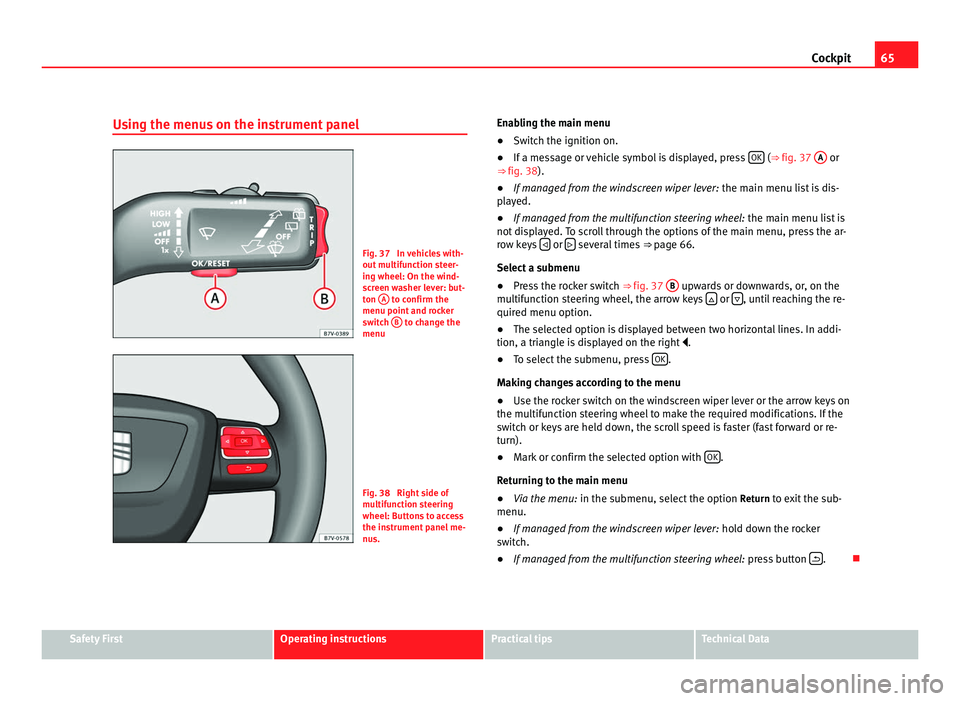
Using the menus on the instrument panel Fig. 37 In vehicles with-
out mu
ltif
unction steer-
ing wheel: On the wind-
screen washer lever: but-
ton A to confirm the
menu point and r oc
ker
switch B to change the
menu Fig. 38 Right side of
multif
u
nction steering
wheel: Buttons to access
the instrument panel me-
nus. Enabling the main menu
●
Switch the ignition on.
● If a message or vehicle symbol is displayed, press OK (⇒
fig. 37 A or
⇒ fig. 38).
● If managed from the windscreen wiper lever: the main menu lis
t is dis-
played.
● If managed from the multifunction steering wheel: the main menu lis
t is
not displayed. To scroll through the options of the main menu, press the ar-
row keys or
several times
⇒ pag
e 66.
Select a submenu
● Press the rocker switch ⇒ fig. 37 B upwards or downwards, or, on the
multif u
nction steering wheel, the arrow keys or
, until reaching the re-
quired menu option.
● The sel ect
ed option is displayed between two horizontal lines. In addi-
tion, a triangl
e is displayed on the right .
● To select the submenu, press OK .
Mak in
g changes according to the menu
● Use the rocker switch on the windscreen wiper lever or the arrow keys on
the multifu
nction steering wheel to make the required modifications. If the
switch or keys are held down, the scroll speed is faster (fast forward or re-
turn).
● Mark or confirm the selected option with OK .
Ret urnin
g to the main menu
● Via the menu: in the submenu, select
the option Return to exit the sub-
menu.
● If managed from the windscreen wiper lever: hold do
wn the rocker
switch.
● If managed from the multifunction steering wheel: pres
s button .
Safety First Operating instructions Practical tips Technical Data
Page 69 of 385
67
Cockpit Menu Function
Average fuel con-
sumption When the ignition is switched on, the average con-
sumption (in l/100 km or in mp
g) i
s displayed after
the vehicle has moved approximately 100 metres
(328 feet). Otherwise horizontal lines are displayed.
The value shown is updated approximately every 5
seconds. Distance to empty
(the dis
t
ance you
can travel with the
remaining fuel) Approximate distance in km (or miles) that can still
be trav
el
led with the fuel remaining in the tank, as-
suming the same style of driving is maintained. This
is calculated using the current fuel consumption. Distance covered Distance travelled, after ignition is switched on, in
km (or mil
e
s). Average speed After the ignition is switched on, the average speed
wi
l
l be shown after a distance of approximately 100
metres (328 feet) has been travelled. Otherwise hori-
zontal lines are displayed. The value shown is upda-
ted approximately every 5 seconds. Digital display of
speed Current speed displayed digitally.
Oil temperature digi-
ta
l
display Updated engine oil temperature digital display
Speed warning to ---
km/h If the stored speed is exceeded (between
30 - 250 km/h, or 18 - 155 mph), an audibl
e w
arning
is given together with a visual warning. Changing between display modes
●
In vehicles without multifunction steering wheel: pres
s the lever.
● Vehicles with a multifunction steering wheel: pres
s or
.
Storin g a s
peed for the speed warning
● Select the display Speed warnin
g at --- km/h.
● Press OK to store the current speed and switch off the warning. ●
In addition, set the required speed by pressing the rocker switch on the
w ind
screen wiper lever or buttons or
on the multifunction steering
wheel f or 5 sec
onds. Next, press OK again or wait a few seconds. The
speed i s
stored and the warning activated.
● To switch off , pres
s OK . The stored speed is deleted.
Manua l
ly erasing memory 1 or 2
● Select the memory to be erased.
● Press and hold OK for approximately two seconds.
Per son
alising the displays
It is possible to select which of the displays in the multifunction display you
wish to see on the instrument panel in the settings menu. The units of
measurement can also be modified ⇒ page 67.
Configuration Menu Configuration
Menu Function
Multifunction
dis
p
lay data Configuration of the multifunction display data which you
wi
sh t
o see on the instrument panel display ⇒ page 66. Compass Changing the magnetic region and calibration of the com-
pa
s
s. To calibrate the compass, please follow the instruc-
tions given on the instrument panel display. Convenience Changing vehicle convenience functions
⇒ page 68. Lights & visi-
bi
lity Configuration of vehicle lighting
⇒ page 69. Time Changing the hours and minutes of the clock and the navi-
gation sy
s
tem. The time can be set here and the choice
can be made between the 24 hour and 12 hour display.
The S in the upper part of the display indicates that the
clock is set to summer time. Safety First Operating instructions Practical tips Technical Data
Page 73 of 385
71
Unlocking and locking
Unlocking and locking
Vehicle key set
Introduction Additional information and warnings:
●
Adjustments to the SEAT information system ⇒ page 62
● C
entral locking and locking system ⇒ page 74
● St
art and stop the engine ⇒ page 170
● Not
es for the user ⇒ page 255
● Emer
gency locking and unlocking ⇒ page 314WARNING
Careless or incorrect use of vehicle keys may result in severe injury and
acc ident
.
● Always take all the keys with you whenever you leave the vehicle.
Childr
en and unauthorised individuals could lock the doors or the tail-
gate, start the engine or turn the ignition on activating electrical sys-
tems, for example: the electric windows.
● Never leave children or disabled people alone in the car. They could
be trapped in the c
ar in an emergency and will not be able to get them-
selves to safety. For example, depending on the time of the year, temper-
atures inside a locked and closed vehicle can be extremely high or ex-
tremely low resulting in serious injuries and illness or even death, partic-
ularly for young children.
● Never remove the key from the ignition if the vehicle is in motion. The
steerin
g may lock and it will not be possible to turn the steering wheel. Vehicle key
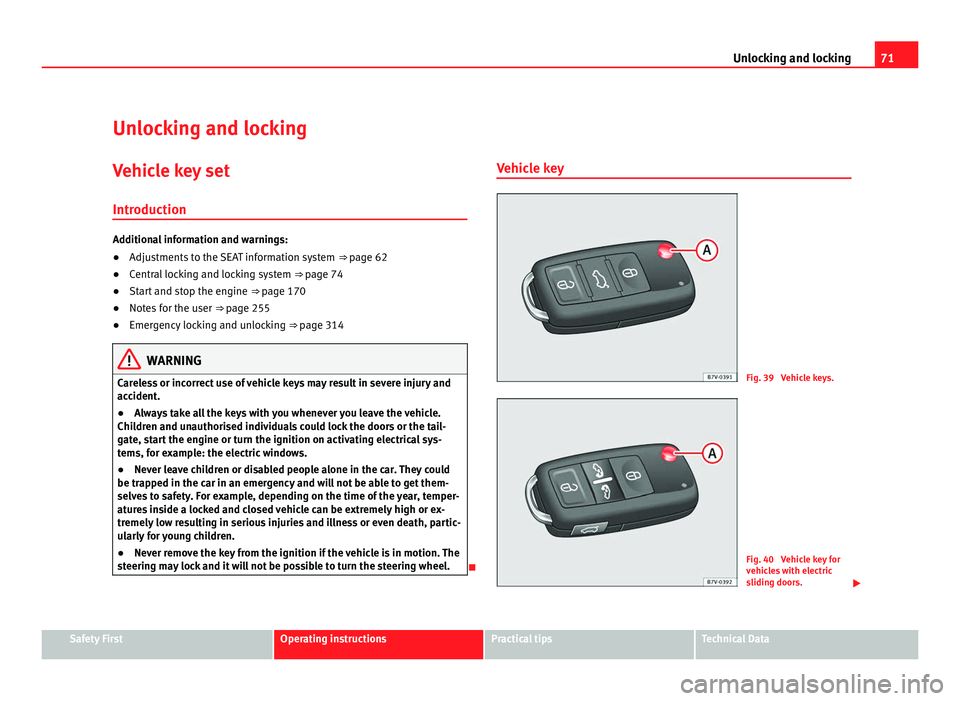
Fig. 39 Vehicle keys.
Fig. 40 Vehicle key for
vehic
l
es with electric
sliding doors. Safety First Operating instructions Practical tips Technical Data
Page 99 of 385
97
Lights and visibility
The control turn signals are switched on and off from the menu Lights & Visi-
bility on the instrument panel display ⇒ page 62. This function can be dis-
connected at a specialised workshop for those vehicles which do not have
the menu Lights & Visibility .WARNING
Incorrect use of the headlamps may cause accidents and serious injury,
as the m
ain beam may distract or dazzle other drivers. Note
● The turn signal only works when the ignition is switched on. The hazard
w arnin
g lights also work when the ignition is switched off ⇒ page 312.
● If a turn signal on the vehicle or trailer is faulty, the warning lamp flash-
es tw
ice as fast as usual.
● The main beam headligh
ts can only be switched on if the dipped beam
headlights are already on.
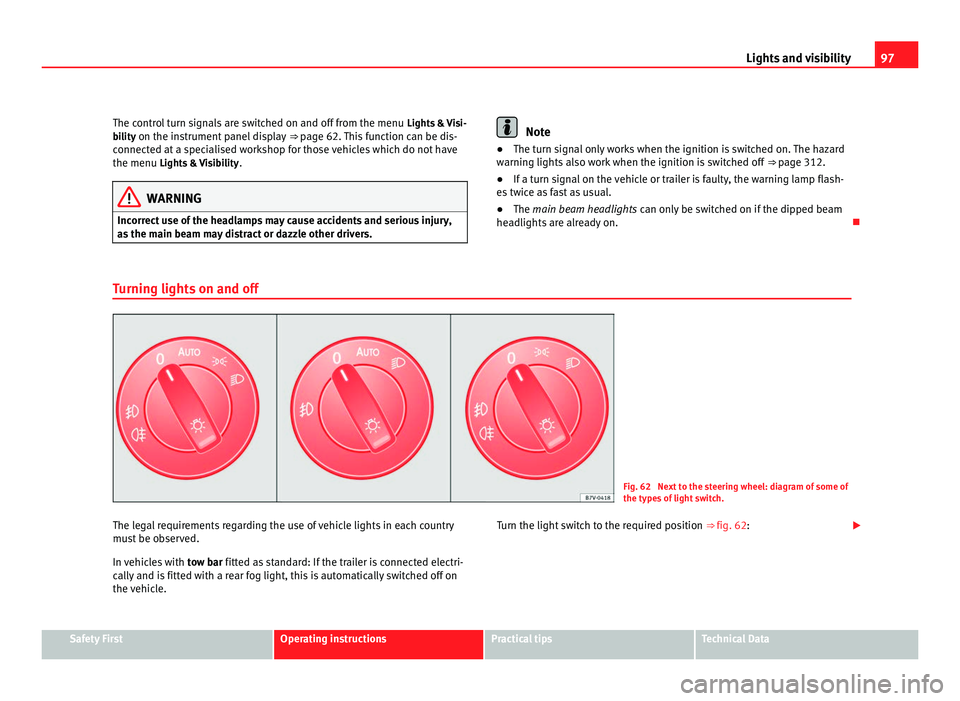
Turning lights on and off Fig. 62 Next to the steering wheel: diagram of some of
the type
s
of light switch.
The legal requirements regarding the use of vehicle lights in each country
mus t
be observed.
In vehicles with tow bar fitted as standard: If the trailer is connected electri-
cally and is fitted with a rear fog light, this is automatically switched off on
the vehicle. Turn the light switch to the required position
⇒ fig. 62:Safety First Operating instructions Practical tips Technical Data
Page 109 of 385
107
Lights and visibility
Windscreen wiper functions Windscreen wiper performance in different situations:
If the vehicle is at a stand-
sti
l
l: The activated position provisionally changes
to the pr
ev
ious position. During the automatic wipe: The air conditioning comes on for approxi-
mat
ely
30 seconds in air recirculation mode
to prevent the smell of the windscreen wash-
er fluid entering the inside of the vehicle. For the intermittent wipe: The intervals between wipes vary according
to the s
peed of
the vehicle. The higher the
vehicle speed the shorter the intervals. Heated windscreen washer jets
The heatin
g on
ly thaws the frozen jets, it does not thaw the water in the
washer hoses. The heated windscreen washer jets automatically adjust the
heat depending on the ambient temperature, when the ignition is switched
on.
Headlight wash /wipe system
The headlight washers/wipers clean the headlight lenses.
After the ignition is switched on, the first and every fifth time the wind-
screen washer is switched on, the headlights are also washed. Therefore,
the windscreen wiper lever should be pulled towards the steering wheel
when the dipped beam or main beam are on. Any incrusted dirt (such as in-
sects) should be cleaned regularly (e.g. when refuelling).
To ensure the headlight washers work correctly in winter, any snow which
has got into the bumper jet supports should be cleaned away. If necessary,
remove snow with an anti-icing spray. Note
The wiper will try to wipe away any obstacles that are on the windscreen.
The wiper w i
ll stop moving if the obstacle blocks its path. Remove the ob-
stacle and switch the wiper back on again.
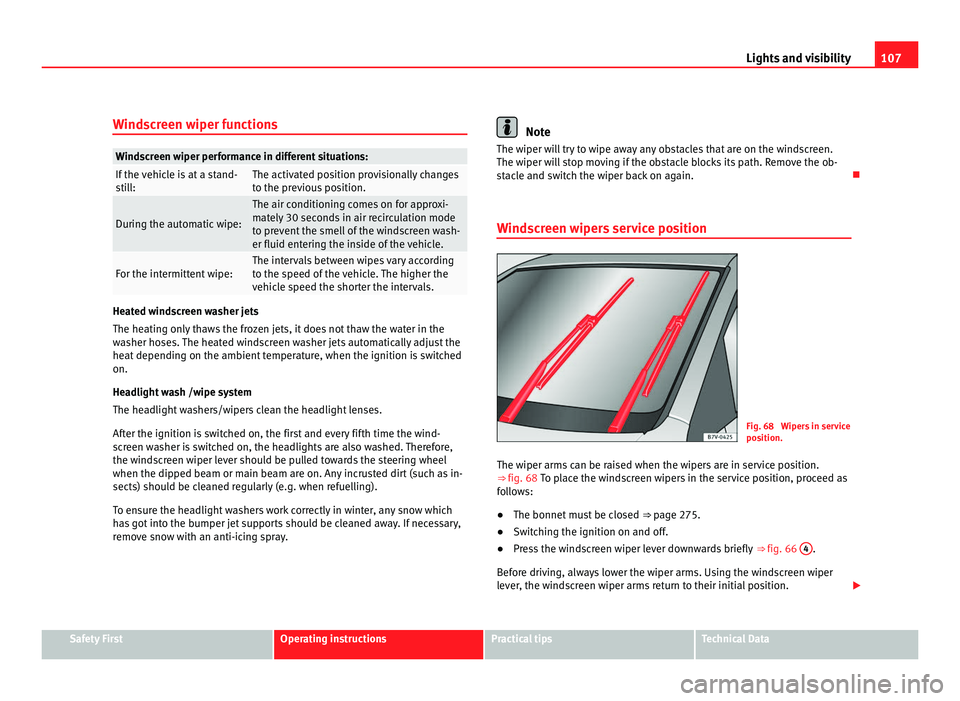
Windscreen wipers service position Fig. 68 Wipers in service
pos
ition.
The w
iper arms can be raised when the wipers are in service position.
⇒ fig. 68 To p l
ace the windscreen wipers in the service position, proceed as
follows:
● The bonnet must be closed ⇒ page 275.
● Sw
itching the ignition on and off.
● Press the windscreen wiper lever downwards briefly ⇒ fig. 66 4 .
Bef or
e driving, always lower the wiper arms. Using the windscreen wiper
lever, the windscreen wiper arms return to their initial position. Safety First Operating instructions Practical tips Technical Data
Page 169 of 385
167
Driving
Driving SteeringIntroduction The power steering is not hydraulic but electromechanical. The advantage
of thi
s
steering system is that it disposes of hydraulic tubes, hydraulic oil,
the pump, filter and other components. The electromechanical system
saves fuel. While a hydraulic system requires oil pressure to be maintained,
electromechanical steering only requires energy when the steering wheel is
turned.
With the power steering system, the assisted steering function automatical-
ly adjusts according to the vehicle speed, the steering torque and the wheel
turning angle. The power steering only works when the engine is running.
Additional information and warnings:
● Start and stop the engine ⇒ page 170
● V
ehicle battery ⇒ page 288
● T
ow-starting and towing away ⇒ page 340WARNING
If the power steering is not working then the steering wheel is much
more diffic u
lt to turn and the vehicle more difficult to control.
● The power steering only works when the engine is running.
● Never allow the vehicle to move when the engine is switched off.
● Never remove the key from the ignition if the vehicle is in motion. The
steerin
g may lock and it will not be possible to turn the steering wheel. Control and warning lamps lights up Possible cause Solution
(red) Power steering faulty. The steering system should be
chec
k
ed by a Technical Service
as soon as possible.
(yel-
lo w) Power steering operation re-
duced. The steering system should be
chec
k
ed by a Technical Service
as soon as possible.
If, after restarting the engine
and driving for a short distance,
the yellow warning light no lon-
ger comes on, it will not be nec-
essary to take the vehicle to a
specialised workshop. The vehicle battery was dis-
connect
ed and h
as been re-
connected. Drive for a short distance at 15 –
20 km/h.
Safety First Operating instructions Practical tips Technical Data
Page 170 of 385
168
Driving flashes Possible cause Solution
(red) Fault in the steering column
electr
onic
lock.
Do not drive on!
Seek pr
ofessional advice.
(yel-
lo w) Steering column deviation. Gently turn the steering wheel to
and fro
. Steering wheel not unlocked
or lock
ed. Remove the key from the igni-
tion and then swit
c
h the ignition
back on. Check the messages
displayed on the instrument
panel at the same time.
Do not drive on, if the steering
column remains locked after the
ignition has been switched on.
You should obtain professional
assistance. Several warning and control lamps should light up for a few seconds when
the ignition is
sw
itched. This signals that the lamp is working properly. They
will switch off after a few seconds. WARNING
If the warning lamps and messages are ignored, the vehicle may stall in
traffic, or m a
y cause accidents and severe injuries.
● Never ignore the warning lamps or text messages.
● Stop the vehicle safely as soon as possible. CAUTION
Failure to heed the warning lamps and text messages when they appear
ma y
result in faults in the vehicle. Information on the steering Steering column electronic lock
If the driv
er's
door is opened before the ignition is switched off, the steering
column electronic lock is activated via the ignition key or the sensor built
into the door handle.
Mechanical steering lock
To prevent theft, we recommend you lock the steering before leaving the ve-
hicle. Please engage steering lock Unlocking the steering
Parking the vehicle
⇒ page 183. Turn the steering wheel slightly to
rel
e
ase the steering lock. Remove the key from the ignition. Insert the key in the ignition lock.
Turn the steering wheel slightly until
you he
ar the s
teering lock. Hold the steering wheel in this posi-
tion and swit
c
h on the ignition. Electromechanical power steering
With the po
w
er steering system, the assisted steering function automatical-
ly adjusts according to the vehicle speed, the steering torque and the wheel
turning angle. The power steering only works when the engine is running.
You should remember that you will need considerably more power than nor-
mal to steer the vehicle if the power steering is not working correctly or not
at all.
Counter steering assistance system
The counter steering assistance system helps the driver in critical situa-
tions. Additional steering power helps the driver when counter steering.
Page 171 of 385
169
Driving WARNING
The counter steering assistance system combined with ESC (ESP) helps
the driver t o s
teer the vehicle in critical driving conditions. At all times, it
is the driver who steers the vehicle. The counter steering system does
not steer the vehicle.
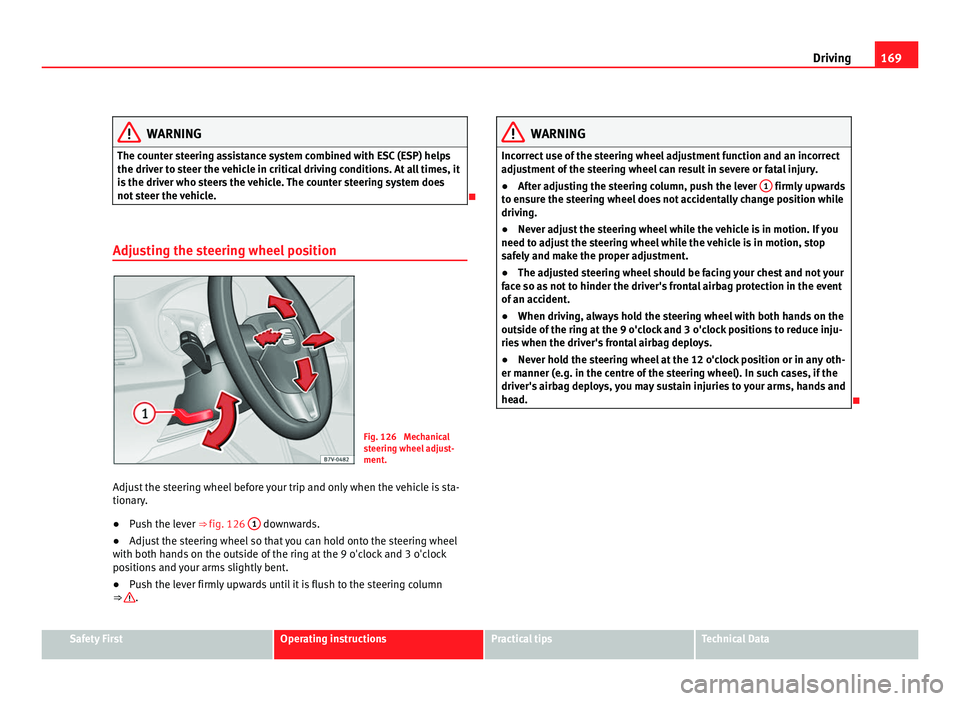
Adjusting the steering wheel position Fig. 126 Mechanical
st
eerin
g wheel adjust-
ment.
Adjust the steering wheel before your trip and only when the vehicle is sta-
tionary
.
● Push the lever ⇒ fig. 126 1 downwards.
● Adjust the steering wheel so that you can hold onto the steering wheel
with both h and
s on the outside of the ring at the 9 o'clock and 3 o'clock
positions and your arms slightly bent.
● Push the lever firmly upwards until it is flush to the steering column
⇒ . WARNING
Incorrect use of the steering wheel adjustment function and an incorrect
adju s
tment of the steering wheel can result in severe or fatal injury.
● After adjusting the steering column, push the lever 1 firmly upwards
to en s
ure the steering wheel does not accidentally change position while
driving.
● Never adjust the steering wheel while the vehicle is in motion. If you
need to adju
st the steering wheel while the vehicle is in motion, stop
safely and make the proper adjustment.
● The adjusted steering wheel should be facing your chest and not your
face so a
s not to hinder the driver's frontal airbag protection in the event
of an accident.
● When driving, always hold the steering wheel with both hands on the
outside of
the ring at the 9 o'clock and 3 o'clock positions to reduce inju-
ries when the driver's frontal airbag deploys.
● Never hold the steering wheel at the 12 o'clock position or in any oth-
er manner (e.g. in the c
entre of the steering wheel). In such cases, if the
driver's airbag deploys, you may sustain injuries to your arms, hands and
head.
Safety First Operating instructions Practical tips Technical Data
Page 172 of 385
170
Driving
Stopping and starting the engine
Introduction Immobiliser display
When an inv
alid k
ey is used or in the event of a system fault, or Immo-
biliser on is displayed on the instrument panel. The engine cannot be star- ted.
Pushing or towing
For technical reasons, the vehicle must not be push- or tow-started. Jump
starting is preferable.
Additional information and warnings:
● Vehicle key set ⇒ pag
e 71
● Changing gear ⇒ pag
e 174
● Braking, stopping and parking ⇒ page 183
● St
eering ⇒ pag
e 167
● Start assist systems ⇒ pag
e 194
● Refuelling ⇒ pag
e 264
● Fuel ⇒ page 267
● Emer
gency locking and unlocking ⇒ page 314
● Jump s
tarting ⇒ pag
e 337
● Tow-starting and towing away ⇒ pag
e 340 WARNING
Turning off the engine while driving will make stopping the vehicle diffi-
cu lt; thi
s could even result in the loss of control causing an accident with
serious consequences.
● The assisted braking and steering systems, the airbag system, safety
belts and c
ertain safety equipment are only active while the engine is
running.
● The engine should only be switched off when the vehicle is at a
stand
still. WARNING
While the engine is running or starting it could help reduce the risk of se-
rious injur
y.
● Never start or leave the engine running in poorly ventilated or closed
spac
es. Exhaust gas contains carbon monoxide, a toxic, colourless and
odourless gas. Carbon monoxide can cause people to lose conscious-
ness. It can also cause death.
● Never leave the vehicle unattended if the engine is running. The vehi-
cle c
ould move off suddenly or something unexpected could happen re-
sulting in damage and serious injury.
● Never use start boosters. Cold start sprays could explode or increase
the engine speed u
nexpectedly.