ECO mode Seat Alhambra 2012 User Guide
[x] Cancel search | Manufacturer: SEAT, Model Year: 2012, Model line: Alhambra, Model: Seat Alhambra 2012Pages: 388, PDF Size: 6.72 MB
Page 136 of 388
134Seats and storage compartments
Installing the net partition behind the front seats
●Hook in the net partition on the left-hand side roof support C
. To do
this, guide the rod from up to down.
● Hook in the net partition on the rear right-hand side roof support by
pressing on the rod.
● Secure the hooks of the net partition to the attachment rings in the left
and right hand side foot rests on the second row of seats then tighten the
straps.
Removing the net partition
● Loosen the net partition straps.
● Release the net partition hooks from the rings B
.
● Release the net partition from the right and left roof supports A or Cby pressing on the rod.
●
Unhook the net partition from the left-hand side roof support.
Folding in the net partition
● Press on the release button ⇒ fig. 93 2
and bend the rod A in the di-
rection of the arrow with the release o button pressed.
● Press on the release button 3
and bend the rod B in the direction of
the arrow with the release button pressed.
● Store the net partition securely in the vehicle.
WARNING
Loose objects in the passenger compartment can be violently thrown in
case of a sudden manoeuvre or braking and especially in accidents caus-
ing serious injury.
● Ensure that the rods are correctly locked in place.
● Even when net partition is correctly fitted, objects must be secured.
● When driving with the net partition, no passengers should be behind
it.
Fastening rings*
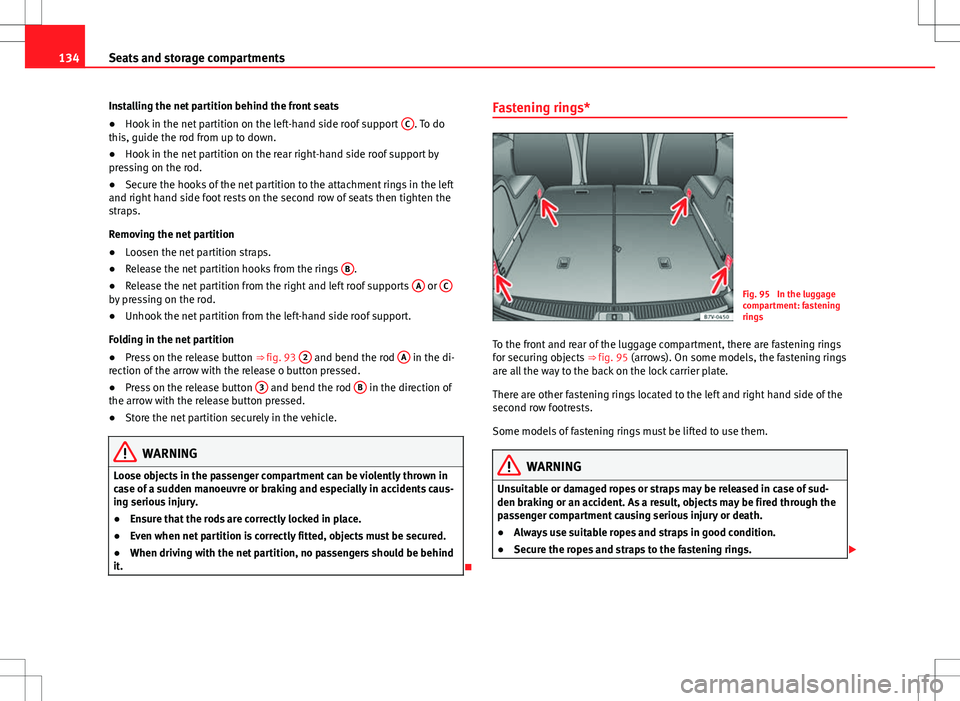
Fig. 95 In the luggage
compartment: fastening
rings
To the front and rear of the luggage compartment, there are fastening rings
for securing objects ⇒ fig. 95 (arrows). On some models, the fastening rings
are all the way to the back on the lock carrier plate.
There are other fastening rings located to the left and right hand side of the
second row footrests.
Some models of fastening rings must be lifted to use them.
WARNING
Unsuitable or damaged ropes or straps may be released in case of sud-
den braking or an accident. As a result, objects may be fired through the
passenger compartment causing serious injury or death.
● Always use suitable ropes and straps in good condition.
● Secure the ropes and straps to the fastening rings.
Page 159 of 388
157
Air conditioning
Air conditioning Climate Control
Introduction
Viewing Climatronic information
The factory-fitted radio or navigation system screen briefly displays informa-
tion relating to Climatronic.
The units of temperature measurement is displayed on the factory-installed
radio or navigation system and, depending on the vehicle equipment, can
be set using the Configuration menu on the instrument panel.
Additional information and warnings:
● SEAT information system ⇒ page 62
● Windscreen wash system ⇒ page 105
● Auxiliary heating ⇒ page 165
● Caring for and cleaning the vehicle exterior ⇒ page 246
WARNING
Reduced visibility through the windows increases the risk of serious acci-
dents.
● Ensure that all windows are free of ice and snow and that they are not
fogged up preventing a clear view of everything outside.
● The maximum heat output required to defrost windows quickly is only
available when the engine has reached its normal running temperature.
Only drive when you have good visibility.
WARNING (Continued)
● Always ensure that you use the climate control and heated rear win-
dow to maintain good visibility.
● Never leave the air recirculation on for a long period of time. If the
cooling mode is switched off and air recirculation mode switched on, the
windows can mist over very quickly, considerably limiting visibility.
● Switch air recirculation mode off when it is not required.
WARNING
Stuffy or used air will increase fatigue and reduce driver concentration
possibly resulting in a serious accident.
● Never leave the fresh air fan turned off or use the air recirculation for
long periods of time; the air inside the passenger compartment will not
be refreshed.
CAUTION
● Switch the climate control system off if you think it may be broken. This
will avoid additional damage. Have the air conditioner checked by a special-
ised workshop.
● Repairs to the air conditioner require specialist knowledge and special
tools. SEAT recommends visiting a Technical Service.
● Do not smoke when air recirculation is switched on in vehicles with a cli-
mate control system. The smoke taken in could lie on the cooling system va-
poriser and on the activated charcoal cartridge of the dust and pollen filter,
leading to a permanently unpleasant smell.
Safety FirstOperating instructionsPractical tipsTechnical Specifications
Page 163 of 388
161
Air conditioning
Control but-
tonAdditional information. Climatic ⇒ fig. 122; Climatronic
⇒ fig. 123.
Climatronic: Automatic temperature, fan, and air distribution
control. Press the button to switch on the function. The con-
trol lamp lights up on the AUTO
button.
Climatronic: Press the button REAR to adjust the air condi-
tioner for the rear seats from the front seats. A lamp is lit in
the REAR
button if the function is activated. The settings for
the rear seats will be displayed. Press the button again to
switch the function off or do not touch any other button for
around 10 seconds.
Climatronic: Press the button REST to use the heat that the
engine radiates. When the engine is still warm but the igni-
tion switched off, the heat given off by the engine can be
used to keep the passenger compartment warm. The REST
button will light up when the function is switched on. The
function will switch off after around 30 minutes and if the
battery level is low.
a)
Turn off.
Climatic: Turn the fan switch to setting 0.
Climatronic: Press the button OFF
or manually set the fan to
0. When the device is switched off the OFF button will light
up.
a) Depending on the version of the model.
WARNING
Never turn off the air fan for a long time or the air in the passenger com-
partment will not be refreshed.
● Stuffy or used air will increase fatigue and reduce driver and passen-
ger concentration possibly resulting in a serious accident.
Note
● Not all Climatronic buttons are operational in REAR mode.
● The REAR
button is locked in defrost mode.
Rear operation
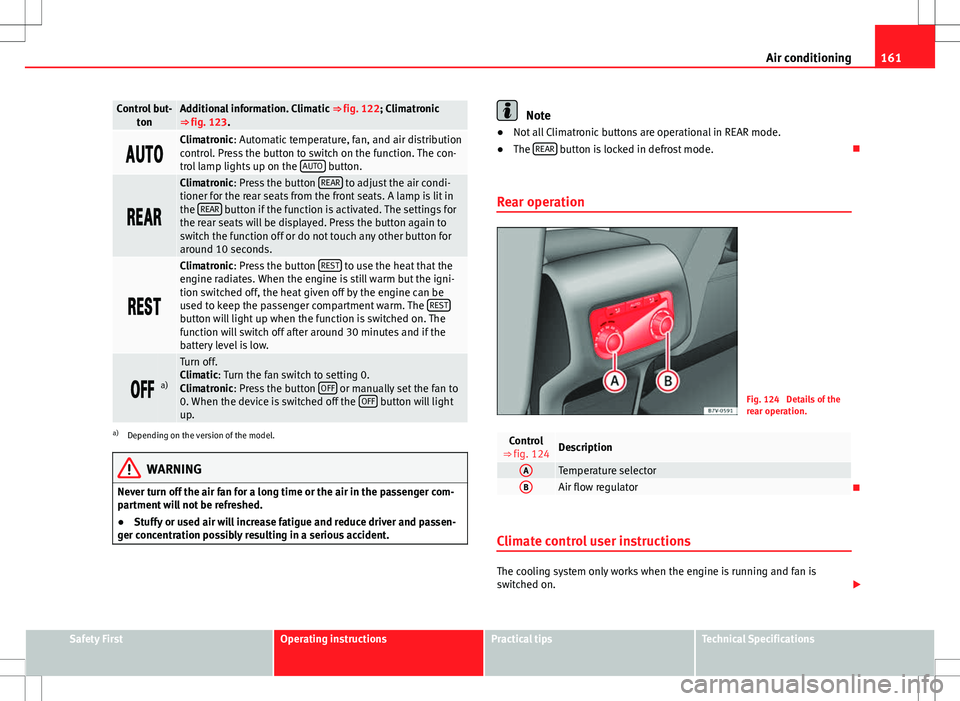
Fig. 124 Details of the
rear operation.
Control
⇒ fig. 124Description
ATemperature selectorBAir flow regulator
Climate control user instructions
The cooling system only works when the engine is running and fan is
switched on.
Safety FirstOperating instructionsPractical tipsTechnical Specifications
Page 166 of 388
164Air conditioning
Switching off: Press the button until the lamp on the button switches off.
Switching the recirculation mode on and off manually on the
Climatronic
Switching on: Press the button until the lamp on the button lights up.
Switching off: Press the button until the lamp on the button switches
off.
Automatic air recirculation mode
Fresh air enters the vehicle interior in position . If the system detects a
high concentration of hazardous substances in the ambient air, air recircu-
lation mode is switched on automatically. When the level of impurities
drops to within a normal range, recirculation mode is switched off.
The system is unable to detect unpleasant smells.
With the following outside temperatures and conditions the air recirculation
does not switch on automatically:
● The cooling system is switched on (the AC
button is lit up) and the out-
side temperature is below +3 °C (+38 °F).
● The cooling system and the windscreen wipers are switched off and the
outside temperature is below +10 °C (+50 °F).
● The cooling system is switched off and the outside temperature is below
+15 °C (+59 °F). The windscreen wiper is switched on.
Switching the automatic air recirculation mode on and off
Switching on: Press the button until the right lamp on the button lights
up.
Switching off: Press the button until all the lamps on the button are
switched off. Switching the automatic air recirculation mode off temporarily
●
Press the button once to temporarily switch to manual air recircula-
tion mode in the event of unpleasant smells from outside. The left indicator
lamp turns on.
● After more than two seconds, press the button again to restart auto-
matic air recirculation. The right indicator lamp turns on.
WARNING
Stuffy or used air will increase fatigue and reduce driver concentration
possibly resulting in a serious accident.
● Never use recirculation mode for long periods as it does not refresh
the air inside the vehicle.
● If the cooling mode is switched off and air recirculation mode switch-
ed on, the windows can mist over very quickly, considerably limiting visi-
bility.
● Switch air recirculation mode off when it is not required.
CAUTION
Do not smoke when air recirculation is switched on in vehicles with a cli-
mate control system. The smoke taken in could lie on the cooling system va-
poriser and on the activated charcoal cartridge of the dust and pollen filter,
leading to a permanently unpleasant smell.
Note
Climatronic: Air recirculation mode switches on to prevent exhaust gas from
entering the vehicle interior when it is in reverse and while the automatic
windscreen wash and wipe is working.
Page 168 of 388
166Air conditioning
Remote control
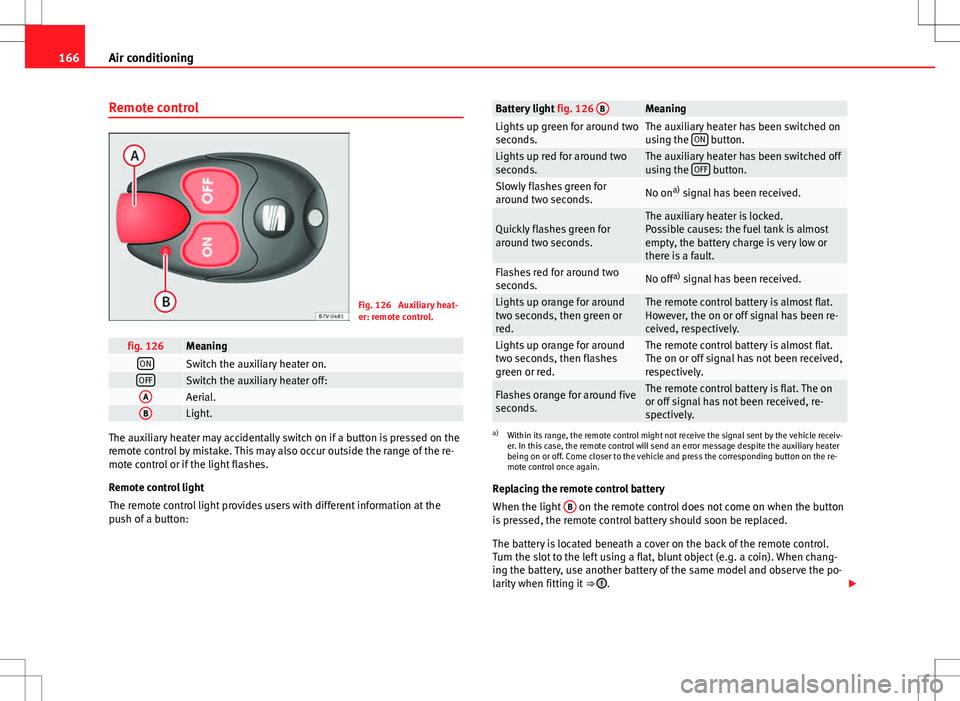
Fig. 126 Auxiliary heat-
er: remote control.
fig. 126MeaningONSwitch the auxiliary heater on.OFFSwitch the auxiliary heater off:AAerial.BLight.
The auxiliary heater may accidentally switch on if a button is pressed on the
remote control by mistake. This may also occur outside the range of the re-
mote control or if the light flashes.
Remote control light
The remote control light provides users with different information at the
push of a button:
Battery light fig. 126 BMeaningLights up green for around two
seconds.The auxiliary heater has been switched on
using the ON button.Lights up red for around two
seconds.The auxiliary heater has been switched off
using the OFF button.Slowly flashes green for
around two seconds.No ona)
signal has been received.
Quickly flashes green for
around two seconds.The auxiliary heater is locked.
Possible causes: the fuel tank is almost
empty, the battery charge is very low or
there is a fault.
Flashes red for around two
seconds.No off a)
signal has been received.
Lights up orange for around
two seconds, then green or
red.The remote control battery is almost flat.
However, the on or off signal has been re-
ceived, respectively.
Lights up orange for around
two seconds, then flashes
green or red.The remote control battery is almost flat.
The on or off signal has not been received,
respectively.
Flashes orange for around five
seconds.The remote control battery is flat. The on
or off signal has not been received, re-
spectively.
a) Within its range, the remote control might not receive the signal sent by the vehicle receiv-
er. In this case, the remote control will send an error message despite the auxiliary heater
being on or off. Come closer to the vehicle and press the corresponding button on the re-
mote control once again.
Replacing the remote control battery
When the light B
on the remote control does not come on when the button
is pressed, the remote control battery should soon be replaced.
The battery is located beneath a cover on the back of the remote control.
Turn the slot to the left using a flat, blunt object (e.g. a coin). When chang-
ing the battery, use another battery of the same model and observe the po-
larity when fitting it ⇒
.
Page 185 of 388
183
Driving
● You should reduce speed accordingly.
● Press the selector lever from position D to the right into the Tiptronic se-
lector gate ⇒ page 182.
● Gently pull the selector lever back to change down a gear.
● ALTERNATIVELY: Reduce using the steering wheel paddles ⇒ page 182.
Emergency program
If all the selector lever positions on the instrument panel display are shown
with a light-coloured background, this means there is a fault in the system.
The automatic gearbox will operate in emergency programme mode. When
the emergency program is activated, it is possible to drive the vehicle how-
ever, at low speeds and within a selected range of gears.
For the DSG ®
dual clutch gearbox, in some cases, this may mean that the
reverse gear does not engage . The gearbox should be checked by a Techni-
cal Service as soon as possible.
Overload protection for the 6-speed DSG gearbox ®
When the clutch is overloaded, the vehicle begins to jerk and the selector
lever position indicator begins to flash. To prevent damage to the clutch,
this interrupts the power transmission between the engine and the gearbox.
There is no more traction and it is not possible to accelerate. If the clutch is
opened automatically due to overloading, press the brake pedal. Wait a few
seconds before starting to move again.
Kick-down
The kick-down system provides maximum acceleration when the gear selec-
tor lever is in the positions D, S or in the Tiptronic position.
When the accelerator pedal is pressed right down, the automatic gearbox
will shift down to a lower gear, depending on road speed and engine speed.
This takes advantage of the maximum acceleration of the vehicle ⇒
.
When the accelerator is pressed to the floor, the automatic gearbox shifts to
the next gear only after the engine reaches the specified maximum engine
speed. Launch-Control Programme
The Launch-Control programme enables maximum acceleration while at a
standstill.
●
Switch off the ASR ⇒ page 185.
● Press and hold the brake pedal with your left foot.
● Place the selector lever in position S or Tiptronic.
● Press the accelerator with the right foot until the vehicle reaches an en-
gine speed of approximately 3200 rpm.
● Lift the left foot off the brake ⇒
. The vehicle starts with maximum ac-
celeration.
● Turn on the ASR after accelerating!
WARNING
Rapid acceleration can cause loss of traction and skidding, especially on
slippery ground. This could cause loss of control of the vehicle resulting
in an accident and considerable damage.
● Only use kick-down and rapid acceleration when weather conditions,
surface conditions and traffic conditions permit; accelerate and drive in a
manner that does not endanger other road users.
● Please remember that the driven wheels can slip and the vehicle can
skid if the ASR is turned off, especially on slippery ground.
● Turn on the ASR after accelerating!
CAUTION
● If you stop on a hill with a gear ratio engaged, do not try to prevent the
vehicle from rolling back by pressing on the accelerator. This could cause
overheating and damage the automatic gearbox.
● Never allow the vehicle to move with the gear selector lever in N, espe-
cially with the engine turned off. The automatic gearbox will not be lubrica-
ted and could be damaged.
Safety FirstOperating instructionsPractical tipsTechnical Specifications
Page 191 of 388
189
Driving
● On slopes, turn the front wheels so that they are against the edge of the
kerb.
● Uphill, turn the wheels towards the centre of the road.
WARNING
The components of the exhaust system reach very high temperatures.
This could cause a fire and considerable damage.
● Always park your vehicle so that no part of the exhaust system can
come in contact with flammable materials (such as wood, leaves, spilled
fuel, dried grass, etc).
CAUTION
● Special care should be taken when parking in areas with high kerbs or
fixed barriers. Objects protruding from the ground may damage the bumper
or other parts of the vehicle during manoeuvres. To avoid damage, stop be-
fore the wheels touched the barrier or kerb.
● Special attention is required when driving through entrances, over
ramps, kerbs or other objects. The vehicle underbody, bumpers, mudguards
and running gear, and the engine and exhaust system could be damaged as
you drive over these objects.
Information about the brakes
For the first 200 to 300 km (100 to 200 miles), new brake pads have not yet
reached their maximum braking capacity, and need to be “run in” first ⇒ .
The slightly reduced braking effect can be compensated for by increasing
pressure on the brake pedal. While running in, the full braking distance or
emergency braking distance is larger then when the brake pads have been
run in. While running in, avoid full power braking or situations requiring
braking performance. For example, in heavy traffic. The rate of wear of the brake pads
depends to a great extent on the condi-
tions in which the vehicle is used and the way the vehicle is driven. If the
vehicle is used frequently in city traffic or for short trips or driven sport style,
visit a specialised workshop regularly more frequently than advised in the
Maintenance Programme to have the bake pads checked.
If you drive with wet brakes, for example, after crossing areas of water, in
heavy rainfall or even after washing the car, the effect of the brakes is less-
ened as the brake discs are wet or even frozen (in winter). At higher speed,
dry the brakes as quickly as possible by braking gently several times. Only
do this without endangering vehicles behind you or any other road users
⇒
.
A layer of salt on the discs and brake pads will reduce brake efficiency and
increase braking distance. If you drive for a prolonged period on salted
roads without braking then brake carefully several times to eliminate the
layer of salt on the brakes ⇒
.
If the vehicle remains parked for considerable lengths of time, is used little,
or if the brakes are not used, there may be corrosion on the brake discs and
a build-up of dirt on the brake pads. If the brakes are not used frequently, or
if rust has formed on the discs, SEAT recommends cleaning the pads and
discs by braking firmly a few times at a moderately high speed. Only do this
without endangering vehicles behind you or any other road users ⇒
.
Faults in the brake system
During braking, if you notice that the vehicle does not react as usual (that
the braking distance has increased suddenly) it may be possible that there
is a fault in the braking system. The warning lamp lights up and a text
message displayed. Take the vehicle to a Technical Service immediately and
have the fault repaired. Drive at a moderate speed and be prepared to use
more pressure on the brake pedal, and allow for longer stopping distances.
Brake servo
The brake servo only operates when the engine is running and the pressure
applied by the driver on the brake pedal increases.
Safety FirstOperating instructionsPractical tipsTechnical Specifications
Page 196 of 388
194Driving
notably increasing braking distance, and could even result in the total fail-
ure of the brake system. Ensuring that the brake system is always function-
ing correctly is essential for your own safety and the safety of other road
users ⇒
.
Brake fluid specifications
SEAT have developed a special brake fluid optimised for the brake systems
of their vehicles. To ensure the optimum working of the brake system, SEAT
recommends the use of brake fluid in accordance with the VW 501 14
standard. If this brake fluid is not available or another brake fluid is used for
different reasons, use a brake fluid that complies with the United States
standard FMVSS 116 DOT 4 or the German standard DIN ISO 4925 CLASS 4
⇒
.
Brake fluids conforming to the standard VW 501 14, fulfil the American re-
quirements of the FMVSS 116 DOT 4 standard and the German
DIN ISO 4925 CLASS 4 standard. However, fluids that comply with the Amer-
ican FMVSS 116 DOT 4 standard or the German DIN ISO 4925 CLASS 4
standard do not necessarily comply with the VW 501 14 standard. Always
check the information on the brake fluid container and ensure that you are
using suitable brake fluid.
A suitable brake fluid can be obtained from Technical Services.
Brake fluid level
The level of the brake fluid should always be between the MIN and MAX
marks, or above the MIN mark ⇒
.
It is not always possible to check the level of the brake fluid, as in some
models the engine components make it difficult to see the brake fluid reser-
voir. If you cannot read the exact brake fluid level, consult a specialist.
The brake fluid level drops slightly when the vehicle is being used due to
wear of the brake pads and the automatic readjustment of the brake.
Changing the brake fluid
The brake fluid should be changed in accordance with the instructions giv-
en in the Maintenance Programme. Have the brake fluid changed by a Tech- nical Service. SEAT recommends visiting a Technical Service. This means
that only brake fluid complying with the required specifications will be
used.
WARNING
If the brake fluid level is low or unsuitable/old brake fluid is used, the
brake system may fail or braking power will be reduced.
● Check the brake system and the brake fluid level regularly!
● The brake fluid should be changed regularly in accordance with the
instructions given in the Maintenance Programme.
● When the brake fluid is used and brakes are subjected to extreme
braking forces, bubbles of vapour form in the brake system. These bub-
bles of water vapour can significantly reduce braking power, notably in-
creasing braking distance, and could even result in the total failure of the
brake system.
● Only used brake fluid that conforms to the VW 501 14 standard,
FMVSS 116 DOT 4 standard or even the DIN ISO 4925 CLASS 4 standard.
Other types of brake fluid could affect brake operation and reduce brak-
ing power. Do not use a brake fluid if the container does not specify com-
pliance with the VW 501 14, FMVSS 116 DOT 4 or DIN ISO 4925 CLASS 4
standards.
● The replacement brake fluid must be new.
● Always ensure that you use suitable brake fluid. Do not use a brake
fluid if the container does not specify compliance with the VW 501 14,
FMVSS 116 DOT 4 or DIN ISO 4925 CLASS 4 standards.
Page 207 of 388
205
Driving
● To ensure that the system works properly, the bumper sensors must be
kept clean, free of ice and snow and uncovered.
● The bumper sensors may become damaged or misaligned, for example,
when parking.
● When cleaning the sensors with high-pressure or steam cleaning equip-
ment, spray the sensors briefly at a distance of no less than 10 cm.
Note
Contact a specialised workshop with any system faults. SEAT recommends
visiting a Technical Service.
Parking using the park assist system
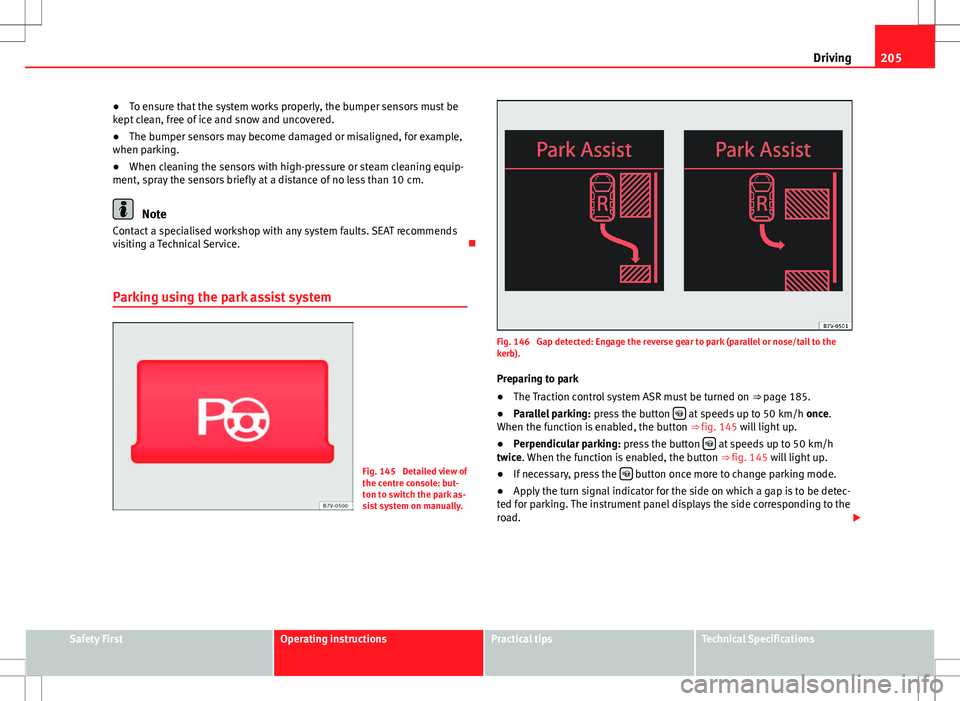
Fig. 145 Detailed view of
the centre console: but-
ton to switch the park as-
sist system on manually.
Fig. 146 Gap detected: Engage the reverse gear to park (parallel or nose/tail to the
kerb). Preparing to park
● The Traction control system ASR must be turned on ⇒ page 185.
● Parallel parking: press the button
at speeds up to 50 km/h once.
When the function is enabled, the button ⇒ fig. 145 will light up.
● Perpendicular parking: press the button
at speeds up to 50 km/h
twice. When the function is enabled, the button ⇒ fig. 145 will light up.
● If necessary, press the
button once more to change parking mode.
● Apply the turn signal indicator for the side on which a gap is to be detec-
ted for parking. The instrument panel displays the side corresponding to the
road.
Safety FirstOperating instructionsPractical tipsTechnical Specifications
Page 211 of 388
209
Driving
Rear Assist system*
Introduction
The camera fitted to the tailgate helps drivers during parking or reversing
manoeuvres. The camera image and certain orientation points generated by
the system are indicated on the factory-fitted radio or navigation system
screen.
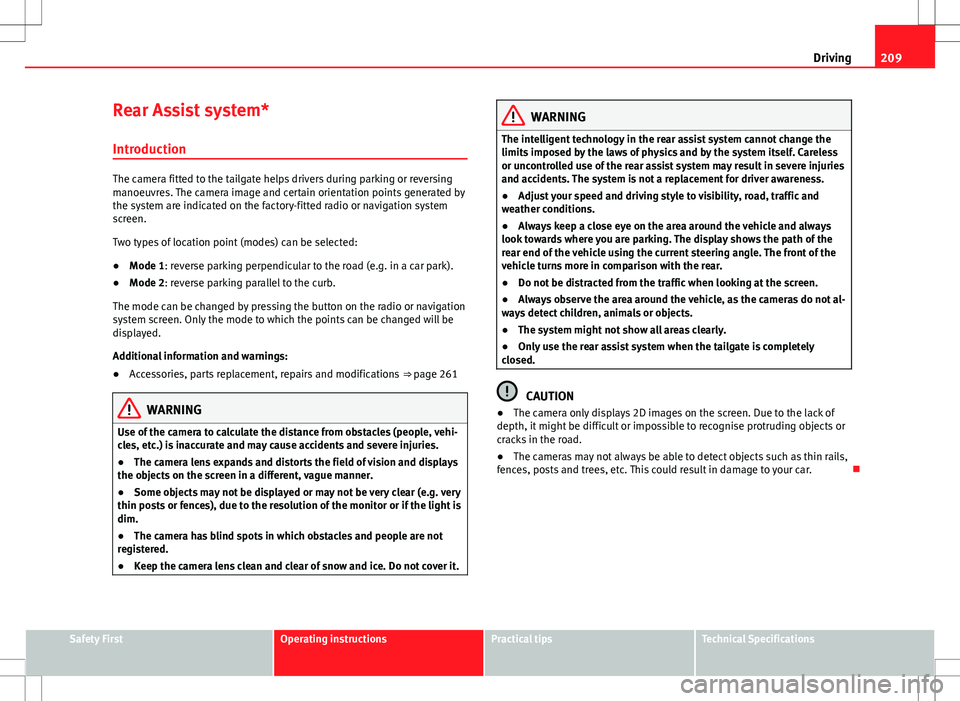
Two types of location point (modes) can be selected:
● Mode 1: reverse parking perpendicular to the road (e.g. in a car park).
● Mode 2: reverse parking parallel to the curb.
The mode can be changed by pressing the button on the radio or navigation
system screen. Only the mode to which the points can be changed will be
displayed.
Additional information and warnings:
● Accessories, parts replacement, repairs and modifications ⇒ page 261
WARNING
Use of the camera to calculate the distance from obstacles (people, vehi-
cles, etc.) is inaccurate and may cause accidents and severe injuries.
● The camera lens expands and distorts the field of vision and displays
the objects on the screen in a different, vague manner.
● Some objects may not be displayed or may not be very clear (e.g. very
thin posts or fences), due to the resolution of the monitor or if the light is
dim.
● The camera has blind spots in which obstacles and people are not
registered.
● Keep the camera lens clean and clear of snow and ice. Do not cover it.
WARNING
The intelligent technology in the rear assist system cannot change the
limits imposed by the laws of physics and by the system itself. Careless
or uncontrolled use of the rear assist system may result in severe injuries
and accidents. The system is not a replacement for driver awareness.
● Adjust your speed and driving style to visibility, road, traffic and
weather conditions.
● Always keep a close eye on the area around the vehicle and always
look towards where you are parking. The display shows the path of the
rear end of the vehicle using the current steering angle. The front of the
vehicle turns more in comparison with the rear.
● Do not be distracted from the traffic when looking at the screen.
● Always observe the area around the vehicle, as the cameras do not al-
ways detect children, animals or objects.
● The system might not show all areas clearly.
● Only use the rear assist system when the tailgate is completely
closed.
CAUTION
● The camera only displays 2D images on the screen. Due to the lack of
depth, it might be difficult or impossible to recognise protruding objects or
cracks in the road.
● The cameras may not always be able to detect objects such as thin rails,
fences, posts and trees, etc. This could result in damage to your car.
Safety FirstOperating instructionsPractical tipsTechnical Specifications