lights Seat Alhambra 2012 User Guide
[x] Cancel search | Manufacturer: SEAT, Model Year: 2012, Model line: Alhambra, Model: Seat Alhambra 2012Pages: 388, PDF Size: 6.72 MB
Page 71 of 388

69
Cockpit
Convenience menuFunctionRear-view mirror adjustmentTilts passenger mirror downwards when reverse gear is engaged. This enables the driver to see the edge of the pavement,
for example ⇒ page 110.
Exterior mirror adjust.If synchronised adjustment is selected, when the driver side exterior mirror is adjusted, the passenger exterior mirror is also
moved.
Factory settingsSome functions of the Convenience submenu will be reset to the factory value.BackThe Configuration menu is displayed again.
Lights & visibility submenu
Lights & visi-
bility menuFunction
Coming HomeThis permits the adjustment of the time the headlamps
stay on after locking or unlocking the vehicle, the function
can also be connected or disconnected here ⇒ page 101.Leaving Home
Footwell lightThis permits the adjustment of the brightness of the foot-
well lighting when the doors are open, the function can al-
so be connected or disconnected here
Convenience
indicatorsSwitching convenience indicators on and off When the
convenience indicators are connected, when the indicator
is switched on, these flash at least three times
⇒ page 95.
Factory set-
tingsAll the configurations in the submenu Lights & visibility are
reset to the predefined factory values.
Tourist lightHeadlamp adjustment for countries in which vehicles are
driven on the other side of the road. When the mark is acti-
vated, the headlamps of a left-hand drive vehicle are ad-
justed for driving on the left. This function must only be
used for a short period.
BackThe Configuration menu is displayed again. Personal convenience settings
When two people use a vehicle, SEAT recommends that each person always
uses “their” own remote control key. When the ignition is switched off, or
the vehicle is locked, the personal convenience settings are stored and au-
tomatically allocated to the vehicle key
⇒ page 62.
The values of the personalised convenience settings of the following menu
options are allocated to the vehicle key: ■ Parking heating menu
■ Configuration Menu
■ Time
■ Settings: Language
■ Units
■ Convenience settings menu
■Door unlock (individual opening, Auto Lock)
■ Convenience handling of windows
■ Rear-view mirror adjustment
■ Lights & visibility settings menu
■ Coming home and leaving home
■ Footwell light
■ Convenience indicators
Safety FirstOperating instructionsPractical tipsTechnical Specifications
Page 79 of 388

77
Unlocking and locking
Locking and unlocking the vehicle from the inside
Fig. 47 In the driver
door: central locking but-
ton.
Push the button ⇒ fig. 47:Unlocking the vehicle.Lock the vehicle.
The central locking button is still operative when the ignition is switched off.
The central locking button is only deactivated if the "Safe" security system
is activated ⇒ page 77.
Please note the following when you use the central locking button to lock
your vehicle:
● Do not turn on the "Safe" security system ⇒ page 77.
● Do not turn on the anti-theft alarm.
● It will not be possible to open the doors or the tailgate from the outside
this may offer extra safety, when stopped at traffic lights for example. ●
The doors can be opened and unlocked individually from the inside by
pulling the inside door handle. If necessary, pull the door release lever
twice.
● The driver's door cannot be locked when it is still open. This avoids lock-
ing the vehicle key inside the vehicle when there is nobody inside.
"Safe" security system
FunctionNecessary operationsLocks the vehicle with the
"Safe" security system.Press the button once on the vehicle
key.
Locks the vehicle without the
"Safe" security system.Press the button twice on the vehicle
key.
Press the central locking button on
the driver's door once.
When the vehicle is locked, the "Safe" security system deactivates the door
handles and the central locking button making the vehicle difficult to open.
The doors cannot be opened from inside ⇒
.
When the "Safe" security system is turned off:
● The vehicle can be opened and unlocked from the inside using an inside
door handle.
● The vehicle may be unlocked from the inside by pushing the central
locking button.
● The anti-theft alarm will be activated.
● The vehicle interior monitoring system and the anti-tow system are de-
activated.
Safety FirstOperating instructionsPractical tipsTechnical Specifications
Page 82 of 388
80Unlocking and locking
Note
Upon activating the alarm, if any door or the tailgate is open, only the alarm
will be activated. The interior monitoring and anti-tow systems will only be
activated when the doors and tailgate are fully closed.
Doors Introduction
Additional information and warnings:
● Vehicle key set ⇒ page 71
● Central locking and locking system ⇒ page 74
● Emergency locking and unlocking ⇒ page 318
WARNING
If a door is not correctly closed, it could open unexpectedly when driving
and cause serious injuries.
● Always stop immediately and close the door.
● When closing, ensure that the door has closed correctly. A closed
door should be flush with the corresponding parts of the bodywork.
● Open and close doors only when nobody is in the way of the door.
WARNING
A door held open by its retainer could be blown closed by the wind or
close if the vehicle is on a hill causing injury.
● When opening and closing doors, always use the door handle.
Warning indicator
lights upPossible causeSolution
At least one vehicle door is
open or not correctly shut.
Stop driving immediately!
Open the corresponding door
and close it immediately.
Several warning and control lamps should light up for a few seconds when
the ignition is switched. This signals that the lamp is working properly. They
will switch off after a few seconds.
If a door is open or incorrectly closed, the indicator or on the instru-
ment panel will light.
Depending on the vehicle equipment, a symbol may be displayed on the in-
strument panel screen instead of the warning lamp. The indication is also
visible when the ignition is switched off. The indication disappears around
15 seconds after the vehicle has been locked.
Sliding doors Introduction
Additional information:
● Vehicle key set ⇒ page 71
● Central locking and locking system ⇒ page 74
● Emergency locking and unlocking ⇒ page 318
Page 86 of 388
84Unlocking and locking
Tailgate
Introduction
Additional information and warnings:
● Central locking ⇒ page 74
● Transporting ⇒ page 13
● Emergency locking and unlocking ⇒ page 318
WARNING
Careless and unsuitable locking, opening and closing of the tailgate can
cause accidents and serious injury.
● Open and close the tailgate only when nobody is in the way.
● Do not close the tailgate by pushing it down with your hand on the
rear window. The rear window could break and cause injury.
● Ensure the tailgate is locked after closing, otherwise, it may open un-
expectedly while driving. A closed tailgate should be flush with the cor-
responding parts of the bodywork.
● Always keep the tailgate closed while driving to avoid toxic gases en-
tering the passenger compartment.
● Do not open the tailgate when there is a load carrier installed. Like-
wise, the tailgate cannot be opened when a load is attached to it, for ex-
ample bicycles. An open tailgate could close itself if there is an addition-
al weight on it. If necessary, press down on the tailgate and remove the
load.
● Close and lock both the tailgate and all the other doors when you are
not using the vehicle. Ensure that nobody remains inside the vehicle.
● Never allow children to play inside or around the vehicle without su-
pervision, especially if the tailgate is open. Children could enter the lug-
gage compartment, close the tailgate and become trapped. Depending
WARNING (Continued)
on the time of the year, temperatures inside a locked and closed vehicle
can be extremely high or extremely low resulting in serious injuries and
illness or even death, particularly for young children.
● Never leave children or disabled people alone in the vehicle. If the ve-
hicle key or the central locking button is used, they may be locked in the
vehicle.
CAUTION
Before opening the tailgate, ensure that there is sufficient free space to
open and close it, for example if you are towing a trailer or in a garage.
Warning indicator
lights upPossible causeSolution
The tailgate is open or not
correctly shut. Stop driving immediately!
Open the tailgate and close it
again.
Several warning and control lamps should light up for a few seconds when
the ignition is switched. This signals that the lamp is working properly. They
will switch off after a few seconds.
A warning appears on the instrument panel if the tailgate is open or not
properly closed.
Depending on the vehicle equipment, a symbol may be displayed on the in-
strument panel screen instead of the warning lamp. The indication is also
visible when the ignition is switched off. The indication disappears around
15 seconds after the vehicle has been locked.
Page 89 of 388

87
Unlocking and locking
Opening the tailgate electronically
Fig. 55 Button with tail-
gate open.
Opening the tailgate
● Press and hold the
button on the vehicle key until the tailgate opens
automatically.
● ALTERNATIVELY: Press and hold the
button on the centre console for
approximately 1 second ⇒ fig. 52.
● ALTERNATIVELY: Press the ⇒ fig. 53 tailgate button (arrow).
In case of difficulty or obstruction, automatic opening of the tailgate is inter-
rupted.
Electronically opening the tailgate does not work when a trailer is electrical-
ly connected and hitched to a factory fitted trailer hitch ⇒ page 237.
The tailgate can be opened manually by applying more force. Closing the tailgate
●
Press and hold the
button on the vehicle key for approximately 1
second.
● ALTERNATIVELY: Press and hold the
button on the centre console for
approximately 1 second ⇒ fig. 52.
● ALTERNATIVELY: Press the ⇒ fig. 53 tailgate button (arrow).
● Press the button
on the open tailgate ⇒
fig. 55 ⇒ .
● Manually push the tailgate down to close it.
The tailgate will move down to the closed position to close and lock itself
automatically using the power-close feature ⇒
.
In case of difficulty or obstruction, automatic closing of the tailgate is inter-
rupted and it will open slightly.
Check why the tailgate could not close.
Attempt to close it once more.
Interrupting the opening and closing process
Tailgate opening and closing can be stopped by pressing one of the
but-
tons. Each time one of the buttons is pressed, the tailgate moves to its
initial position.
Then, it can be opened or closed by hand. To do this, apply a little more
force.
Memorising the opening angle
The tailgate must be at least half open to memorise an opening angle.
● Stop automatic opening in the opening position required ⇒ page 87.
● Hold down the button ⇒ fig. 55 with the tailgate open for at least three
seconds. The opening angle is memorised.
Memorisation is confirmed by blinking of the hazard warning lights and a
sound signal.
Safety FirstOperating instructionsPractical tipsTechnical Specifications
Page 97 of 388

95
Lights and visibility
Lights and visibility
Lights Introduction
The legal requirements regarding the use of vehicle lights in each country
must be observed.
The driver is personally responsible for the correct use and adjustment of
the lights in all situations.
Additional information and warnings:
● SEAT information system ⇒ page 62
● Changing bulbs ⇒ page 330
WARNING
If the headlights are set too high and the main beam is not used correct-
ly, there is a risk of dazzling or distracting other road users. This could
result in serious accident.
● Always make sure that the headlamps are correctly adjusted.
● Never use the main beam or flashed headlamps as this could dazzle
other drivers.
Warning lamps
lights upPossible causeSolution
Driving light totally or partially
faulty.
Replace the corresponding
bulb ⇒ page 330.
If all the bulbs are OK, the vehi-
cle should be taken to a speci-
alised workshop if necessary.
Fault in adaptive light.⇒ page 99.
Rear fog light switched on.⇒ page 98.
Fog lights switched on
Left or right turn signal.
The warning lamp flashes
twice as fast when a vehicle or
trailer turn signal is faulty.If necessary, check the vehicle
and trailer lighting.
Headlight on or flasher on.⇒ page 96.
Headlight adjustment (Light
Assist) on.⇒ page 98.
flashesPossible causeSolution
Fault in the adaptive light sys-
tem.Contact a specialised work-
shop ⇒ page 98.
Several warning and control lamps should light up for a few seconds when
the ignition is switched. This signals that the lamp is working properly. They
will switch off after a few seconds.
Safety FirstOperating instructionsPractical tipsTechnical Specifications
Page 98 of 388
96Lights and visibility
WARNING
If the warning lamps and messages are ignored, the vehicle may stall in
traffic, or may cause accidents and severe injuries.
● Never ignore the warning lamps or text messages.
● Stop the vehicle safely as soon as possible.
● Park the vehicle at a suitable distance away from the traffic ensuring
that the exhaust system is not in contact with inflammable material, for
example, dry grass, fuel, oil, etc.
● A faulty vehicle represents a risk of accident for the driver and for oth-
er road users. If necessary, switch on the hazard warning lamps and put
out the warning triangle to advise other drivers.
CAUTION
Failure to heed the warning lamps and text messages when they appear
may result in faults in the vehicle. Turn signal and main beam leverFig. 60 Turn signal and
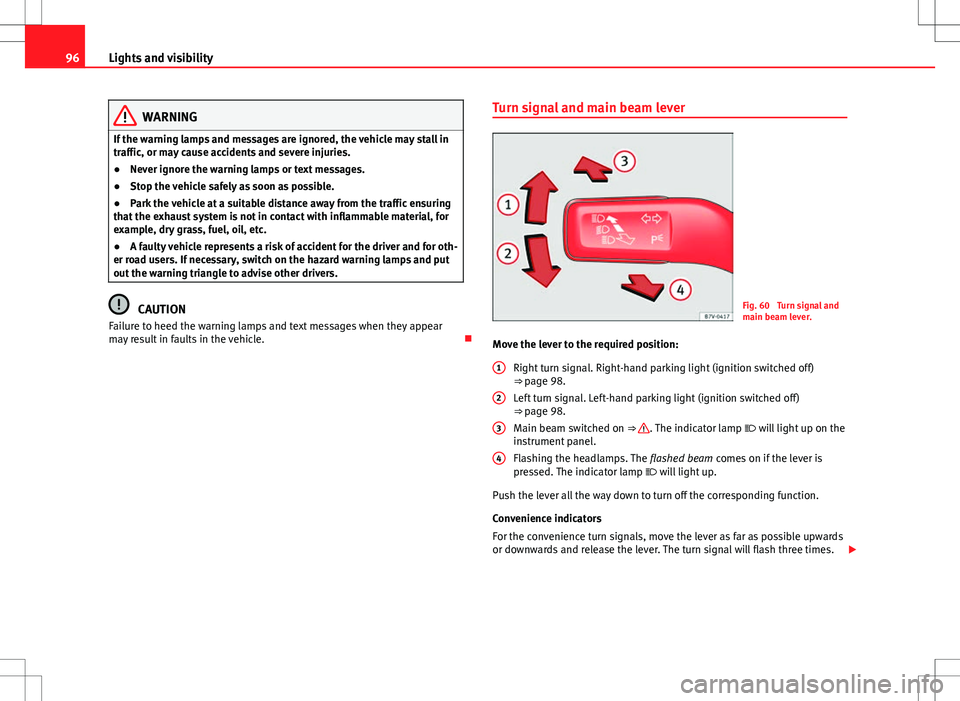
main beam lever.
Move the lever to the required position: Right turn signal. Right-hand parking light (ignition switched off)
⇒ page 98.
Left turn signal. Left-hand parking light (ignition switched off)
⇒ page 98.
Main beam switched on ⇒
. The indicator lamp will light up on the
instrument panel.
Flashing the headlamps. The flashed beam comes on if the lever is
pressed. The indicator lamp will light up.
Push the lever all the way down to turn off the corresponding function.
Convenience indicators
For the convenience turn signals, move the lever as far as possible upwards
or downwards and release the lever. The turn signal will flash three times.
1
2
3
4
Page 99 of 388
97
Lights and visibility
The control turn signals are switched on and off from the menu Lights & Visi-
bility on the instrument panel display ⇒ page 62. This function can be dis-
connected at a specialised workshop for those vehicles which do not have
the menu Lights & Visibility .
WARNING
Incorrect use of the headlamps may cause accidents and serious injury,
as the main beam may distract or dazzle other drivers.
Note
● The turn signal only works when the ignition is switched on. The hazard
warning lights also work when the ignition is switched off ⇒ page 316.
● If a turn signal on the vehicle or trailer is faulty, the warning lamp flash-
es twice as fast as usual.
● The main beam headlights can only be switched on if the dipped beam
headlights are already on.
Turning lights on and off
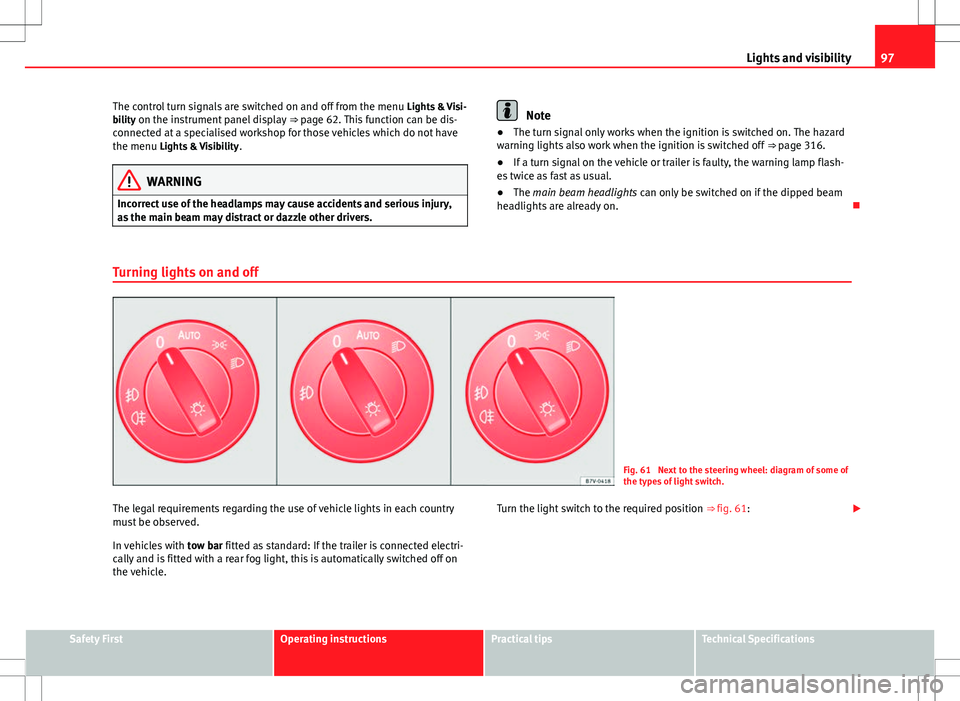
Fig. 61 Next to the steering wheel: diagram of some of
the types of light switch.
The legal requirements regarding the use of vehicle lights in each country
must be observed.
In vehicles with tow bar fitted as standard: If the trailer is connected electri-
cally and is fitted with a rear fog light, this is automatically switched off on
the vehicle. Turn the light switch to the required position
⇒ fig. 61:
Safety FirstOperating instructionsPractical tipsTechnical Specifications
Page 100 of 388
98Lights and visibility
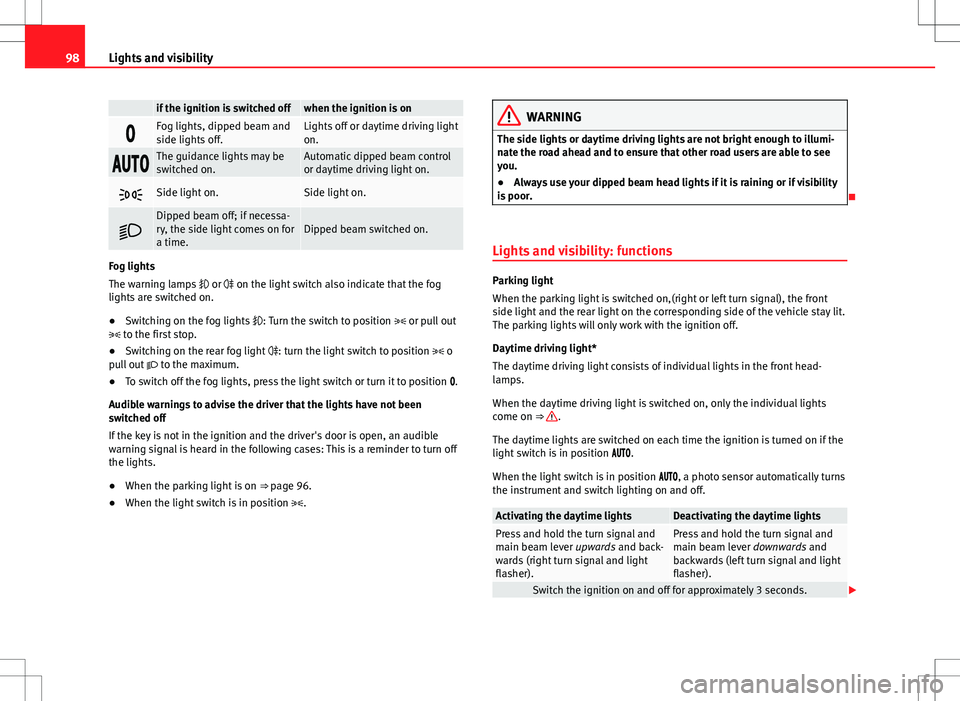
if the ignition is switched offwhen the ignition is on
Fog lights, dipped beam and
side lights off.Lights off or daytime driving light
on.
The guidance lights may be
switched on.Automatic dipped beam control
or daytime driving light on.
Side light on.Side light on.
Dipped beam off; if necessa-
ry, the side light comes on for
a time.Dipped beam switched on.
Fog lights
The warning lamps or on the light switch also indicate that the fog
lights are switched on.
● Switching on the fog lights : Turn the switch to position or pull out
to the first stop.
● Switching on the rear fog light : turn the light switch to position o
pull out to the maximum.
● To switch off the fog lights, press the light switch or turn it to position .
Audible warnings to advise the driver that the lights have not been
switched off
If the key is not in the ignition and the driver's door is open, an audible
warning signal is heard in the following cases: This is a reminder to turn off
the lights.
● When the parking light is on ⇒ page 96.
● When the light switch is in position .
WARNING
The side lights or daytime driving lights are not bright enough to illumi-
nate the road ahead and to ensure that other road users are able to see
you.
● Always use your dipped beam head lights if it is raining or if visibility
is poor.
Lights and visibility: functions
Parking light
When the parking light is switched on,(right or left turn signal), the front
side light and the rear light on the corresponding side of the vehicle stay lit.
The parking lights will only work with the ignition off.
Daytime driving light*
The daytime driving light consists of individual lights in the front head-
lamps.
When the daytime driving light is switched on, only the individual lights
come on ⇒
.
The daytime lights are switched on each time the ignition is turned on if the
light switch is in position .
When the light switch is in position , a photo sensor automatically turns
the instrument and switch lighting on and off.
Activating the daytime lightsDeactivating the daytime lightsPress and hold the turn signal and
main beam lever upwards and back-
wards (right turn signal and light
flasher).Press and hold the turn signal and
main beam lever downwards and
backwards (left turn signal and light
flasher).
Switch the ignition on and off for approximately 3 seconds.
Page 101 of 388

99
Lights and visibility
Automatic dipped beam control
The automatic dipped beam control is merely intended as an aid and is not
able to recognise all driving situations.
When the light switch is in position , the vehicle lights and the instru-
ment panel and switch lighting switch on and off automatically in the fol-
lowing situations ⇒
:
Automatic switching on:Automatic switching off or switch to
daytime driving lighting:
The photo sensor detects darkness,
for example, when driving through a
tunnel.When adequate lighting is detected.
The rain sensor detects rain and ac-
tivates the windscreen wipers.When the windscreen wiper has
been inactive for a few minutes.
Adaptive headlights (AFS)
The adaptive headlights only operate when the dipped beam is on and at
speeds of over 10 km/h. When taking a bend, the adaptive headlights auto-
matically light up the road better.
The adaptive headlights can be switched on and off from the infotainment
system.
Static turning lights
When turning slowly to change direction or going round a tight bend, the
static cornering lights automatically come on. The static cornering lights on-
ly work at speeds of less than 40 km/h.
The static cornering lights may be incorporated into the fog lights or the
front headlights, depending upon the equipment.
WARNING
If the road is not well lit and other road users cannot see the vehicle well
enough or at all, accidents may occur.
● The automatic dipped beam control ( ) only switches on the dip-
ped beam when there are no changes in brightness, and not, for example
when it is foggy.
● Never drive with daytime lights if the road is not well lit due to weath-
er or lighting conditions. Daytime lights do not provide enough light to
illuminate the road properly or be seen by other road users.
Headlight adjustment
Headlight adjustment (Light Assist)
The headlight adjustment automatically connects and disconnects the main
beam headlights depending on the environmental and traffic conditions
and on the speed, within the limitations of the system ⇒
. This is moni-
tored by a sensor located on the inside of the windscreen, above the interior
rear vision mirror.
The automatic headlight adjustment automatically switches on the main
beam depending on the vehicles travelling in front and in the opposite di-
rection, and of other environmental and traffic conditions from an approxi-
mate speed of 60 km/h (37 mph) and turns them off again at speeds below
approximately 30 km/h (18 mph).
Safety FirstOperating instructionsPractical tipsTechnical Specifications