key Seat Alhambra 2012 Owner's Guide
[x] Cancel search | Manufacturer: SEAT, Model Year: 2012, Model line: Alhambra, Model: Seat Alhambra 2012Pages: 388, PDF Size: 6.72 MB
Page 104 of 388
102Lights and visibility
1
Instrument and switch lighting
When the headlights are switched on, the brightness of the instruments
and switch lighting can be regulated to suit your requirements by turning
the switch ⇒ fig. 62 1
.
2
Headlight range control
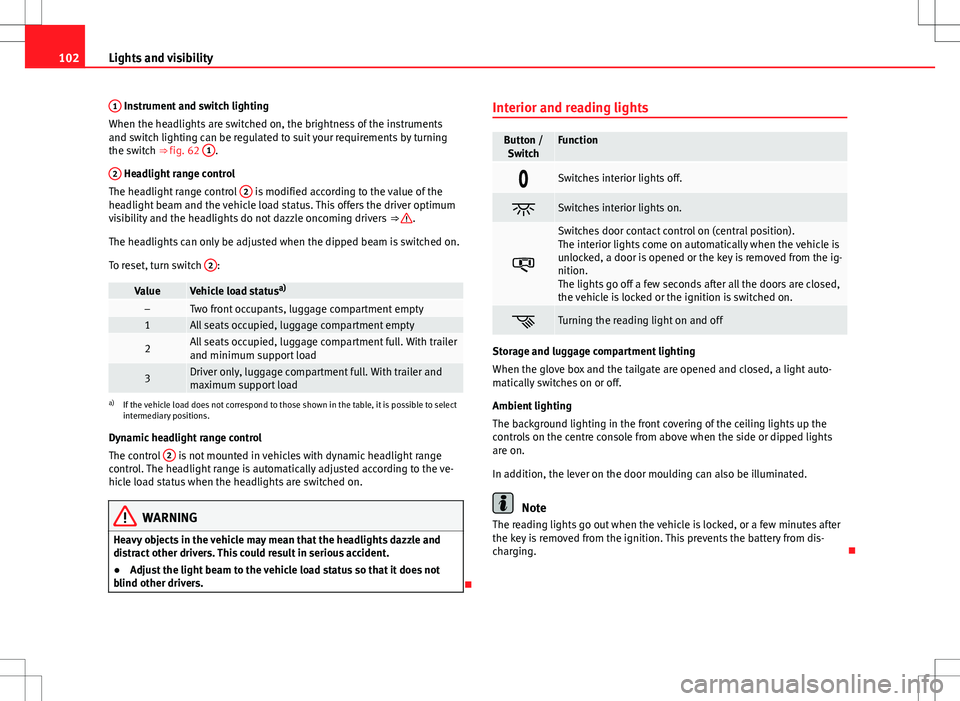
The headlight range control 2 is modified according to the value of the
headlight beam and the vehicle load status. This offers the driver optimum
visibility and the headlights do not dazzle oncoming drivers ⇒
.
The headlights can only be adjusted when the dipped beam is switched on.
To reset, turn switch 2
:
ValueVehicle load statusa)–Two front occupants, luggage compartment empty1All seats occupied, luggage compartment empty
2All seats occupied, luggage compartment full. With trailer
and minimum support load
3Driver only, luggage compartment full. With trailer and
maximum support load
a)
If the vehicle load does not correspond to those shown in the table, it is possible to select
intermediary positions.
Dynamic headlight range control
The control 2
is not mounted in vehicles with dynamic headlight range
control. The headlight range is automatically adjusted according to the ve-
hicle load status when the headlights are switched on.
WARNING
Heavy objects in the vehicle may mean that the headlights dazzle and
distract other drivers. This could result in serious accident.
● Adjust the light beam to the vehicle load status so that it does not
blind other drivers.
Interior and reading lights
Button /
SwitchFunction
Switches interior lights off.
Switches interior lights on.
Switches door contact control on (central position).
The interior lights come on automatically when the vehicle is
unlocked, a door is opened or the key is removed from the ig-
nition.
The lights go off a few seconds after all the doors are closed,
the vehicle is locked or the ignition is switched on.
Turning the reading light on and off
Storage and luggage compartment lighting
When the glove box and the tailgate are opened and closed, a light auto-
matically switches on or off.
Ambient lighting
The background lighting in the front covering of the ceiling lights up the
controls on the centre console from above when the side or dipped lights
are on.
In addition, the lever on the door moulding can also be illuminated.
Note
The reading lights go out when the vehicle is locked, or a few minutes after
the key is removed from the ignition. This prevents the battery from dis-
charging.
Page 114 of 388
112Lights and visibility
Exterior mirrors
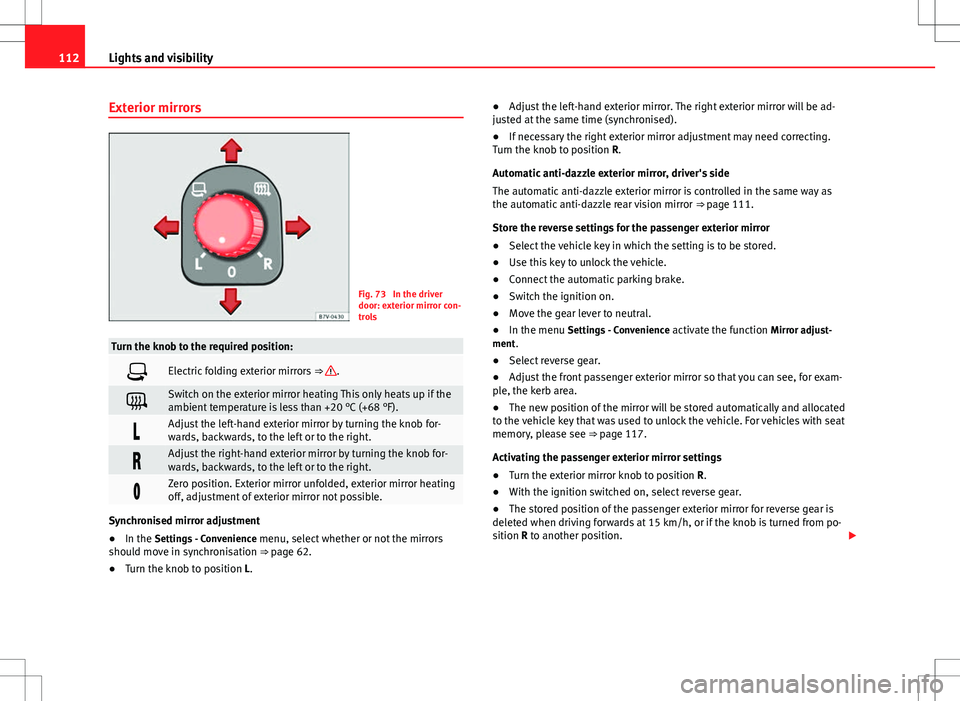
Fig. 73 In the driver
door: exterior mirror con-
trols
Turn the knob to the required position:
Electric folding exterior mirrors ⇒ .
Switch on the exterior mirror heating This only heats up if the
ambient temperature is less than +20 °C (+68 °F).
Adjust the left-hand exterior mirror by turning the knob for-
wards, backwards, to the left or to the right.
Adjust the right-hand exterior mirror by turning the knob for-
wards, backwards, to the left or to the right.
Zero position. Exterior mirror unfolded, exterior mirror heating
off, adjustment of exterior mirror not possible.
Synchronised mirror adjustment
●In the Settings - Convenience menu, select whether or not the mirrors
should move in synchronisation ⇒ page 62.
● Turn the knob to position L. ●
Adjust the left-hand exterior mirror. The right exterior mirror will be ad-
justed at the same time (synchronised).
● If necessary the right exterior mirror adjustment may need correcting.
Turn the knob to position R.
Automatic anti-dazzle exterior mirror, driver's side
The automatic anti-dazzle exterior mirror is controlled in the same way as
the automatic anti-dazzle rear vision mirror ⇒ page 111.
Store the reverse settings for the passenger exterior mirror
● Select the vehicle key in which the setting is to be stored.
● Use this key to unlock the vehicle.
● Connect the automatic parking brake.
● Switch the ignition on.
● Move the gear lever to neutral.
● In the menu Settings - Convenience activate the function Mirror adjust-
ment.
● Select reverse gear.
● Adjust the front passenger exterior mirror so that you can see, for exam-
ple, the kerb area.
● The new position of the mirror will be stored automatically and allocated
to the vehicle key that was used to unlock the vehicle. For vehicles with seat
memory, please see ⇒ page 117.
Activating the passenger exterior mirror settings
● Turn the exterior mirror knob to position R.
● With the ignition switched on, select reverse gear.
● The stored position of the passenger exterior mirror for reverse gear is
deleted when driving forwards at 15 km/h, or if the knob is turned from po-
sition R to another position.
Page 121 of 388

119
Seats and storage compartments
● Press the required memory button.
● Select reverse gear.
● Adjust the front passenger exterior mirror so that you can see, for exam-
ple, the kerb area.
● The new position of the mirror will be stored automatically and allocated
to the vehicle key that was used to unlock the vehicle.
Activating exterior mirror settings
● With the driver's door open and the ignition turned off, push the memo-
ry button of the corresponding door briefly.
● ALTERNATIVELY: With the ignition switched on, hold in the correspond-
ing memory button until the memorised position is reached.
To activate the memory function of the vehicle key
Important: a position must be memorised in the memory.
● Open the driver-side door.
● Press and hold any memory button.
● Within the following three seconds, push the button
to open the vehi-
cle on the vehicle key. A sound confirms the settings have been activated.
Adjusting the wing mirrors for driving and assigning driver seat settings to
a vehicle key
● Activate the memory function of the vehicle key
● Adjust the front seat and the exterior mirrors.
● Lock the vehicle. The settings are assigned to the vehicle key.
To deactivate the memory function of the vehicle key
Important: a position must be memorised in the memory.
● Press and hold the SET
button.
● Within the following ten seconds, push the button to open the vehi-
cle on the vehicle key. A sound confirms the settings have been deactiva-
ted. Initialising the seat position memory
The position memory system must be initialised if, for example, the driver's
seat has been changed.
Initialisation deletes all memories and assignments for the seat with posi-
tion memory. The memory buttons can then be reprogrammed and the vehi-
cle keys re-assigned.
●
Open the driver's door and do not get into the vehicle.
● Operating the seat settings from outside the vehicle.
● Move the angle of the backrest completely forwards.
● Release the control to set the angle and then press again until a sound
is heard.
Note
The front passenger side wing mirror automatically changes from the posi-
tion stored for reversing as soon as the vehicle moves forward at a speed of
at least 15 km/h or when the gear selection lever is changed to a position
other than R.
Safety FirstOperating instructionsPractical tipsTechnical Specifications
Page 148 of 388
146Seats and storage compartments
Glove compartment
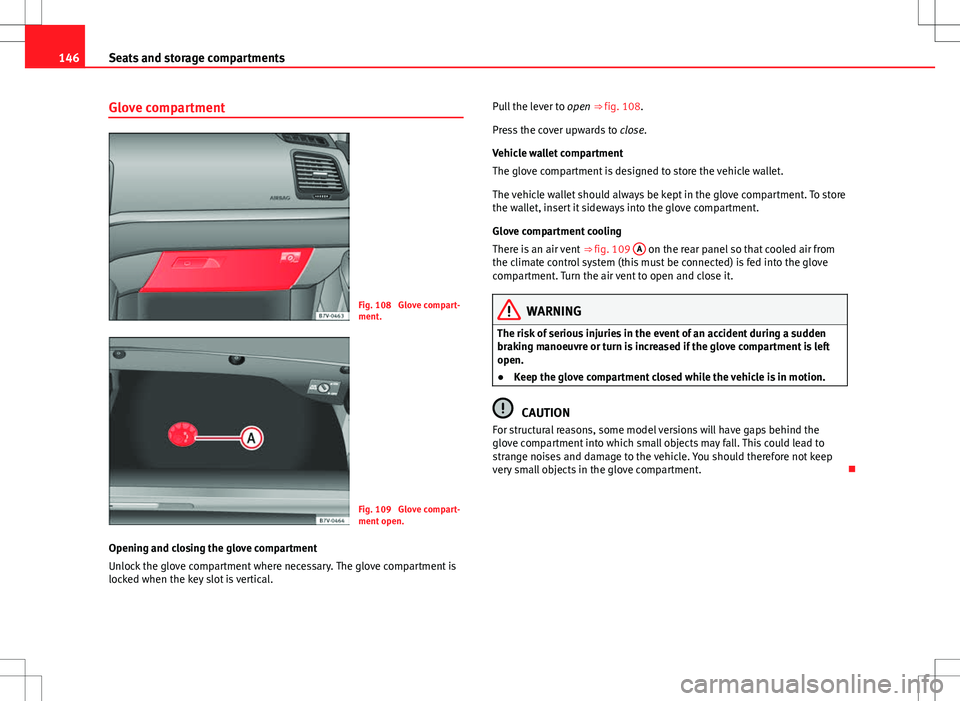
Fig. 108 Glove compart-
ment.
Fig. 109 Glove compart-
ment open.
Opening and closing the glove compartment
Unlock the glove compartment where necessary. The glove compartment is
locked when the key slot is vertical. Pull the lever to
open ⇒ fig. 108.
Press the cover upwards to close.
Vehicle wallet compartment
The glove compartment is designed to store the vehicle wallet.
The vehicle wallet should always be kept in the glove compartment. To store
the wallet, insert it sideways into the glove compartment.
Glove compartment cooling
There is an air vent ⇒ fig. 109 A
on the rear panel so that cooled air from
the climate control system (this must be connected) is fed into the glove
compartment. Turn the air vent to open and close it.
WARNING
The risk of serious injuries in the event of an accident during a sudden
braking manoeuvre or turn is increased if the glove compartment is left
open.
● Keep the glove compartment closed while the vehicle is in motion.
CAUTION
For structural reasons, some model versions will have gaps behind the
glove compartment into which small objects may fall. This could lead to
strange noises and damage to the vehicle. You should therefore not keep
very small objects in the glove compartment.
Page 171 of 388
169
Driving
Driving SteeringIntroduction
The power steering is not hydraulic but electromechanical. The advantage
of this steering system is that it disposes of hydraulic tubes, hydraulic oil,
the pump, filter and other components. The electromechanical system
saves fuel. While a hydraulic system requires oil pressure to be maintained,
electromechanical steering only requires energy when the steering wheel is
turned.
With the power steering system, the assisted steering function automatical-
ly adjusts according to the vehicle speed, the steering torque and the wheel
turning angle. The power steering only works when the engine is running.
Additional information and warnings:
● Start and stop the engine ⇒ page 172
● Vehicle battery ⇒ page 292
● Tow-starting and towing away ⇒ page 344
WARNING
If the power steering is not working then the steering wheel is much
more difficult to turn and the vehicle more difficult to control.
● The power steering only works when the engine is running.
● Never allow the vehicle to move when the engine is switched off.
● Never remove the key from the ignition if the vehicle is in motion. The
steering may lock and it will not be possible to turn the steering wheel.
Control and warning lamps
lights upPossible causeSolution
(red)Power steering faulty.The steering system should be
checked by a Technical Service
as soon as possible.
(yel-
low)
Power steering operation re-
duced.
The steering system should be
checked by a qualified work-
shop as soon as possible.
If, after restarting the engine
and driving for a short distance,
the yellow warning light no lon-
ger comes on, it will not be nec-
essary to take the vehicle to a
specialised workshop.
The vehicle battery was dis-
connected and has been re-
connected.Drive for a short distance at 15 –
20 km/h.
Safety FirstOperating instructionsPractical tipsTechnical Specifications
Page 172 of 388
170Driving
flashesPossible causeSolution
(red)Fault in the steering column
electronic lock. Do not drive on!
Seek professional advice.
(yel-
low)
Steering column deviation.Gently turn the steering wheel to
and fro.
Steering wheel not unlocked
or locked.
Remove the key from the igni-
tion and then switch the ignition
back on. Check the messages
displayed on the instrument
panel at the same time.
Do not drive on, if the steering
column remains locked after the
ignition has been switched on.
You should obtain professional
assistance.
Several warning and control lamps should light up for a few seconds when
the ignition is switched. This signals that the lamp is working properly. They
will switch off after a few seconds.
WARNING
If the warning lamps and messages are ignored, the vehicle may stall in
traffic, or may cause accidents and severe injuries.
● Never ignore the warning lamps or text messages.
● Stop the vehicle safely as soon as possible.
CAUTION
Failure to heed the warning lamps and text messages when they appear
may result in faults in the vehicle. Information on the steering
Steering column electronic lock
If the driver's door is opened before the ignition is switched off, the steering
column electronic lock is activated via the ignition key or the sensor built
into the door handle.
Mechanical steering lock
To prevent theft, we recommend you lock the steering before leaving the ve-
hicle.
Please engage steering lockUnlocking the steeringParking the vehicle
⇒ page 185.Turn the steering wheel slightly to
release the steering lock.
Remove the key from the ignition.Insert the key in the ignition lock.Turn the steering wheel slightly until
you hear the steering lock.Hold the steering wheel in this posi-
tion and switch on the ignition.
Electromechanical power steering
With the power steering system, the assisted steering function automatical-
ly adjusts according to the vehicle speed, the steering torque and the wheel
turning angle. The power steering only works when the engine is running.
You should remember that you will need considerably more power than nor-
mal to steer the vehicle if the power steering is not working correctly or not
at all.
Counter steering assistance system
The counter steering assistance system helps the driver in critical situa-
tions. Additional steering power helps the driver when counter steering.
Page 174 of 388
172Driving
Stopping and starting the engine
Introduction
Immobiliser display
When an invalid key is used or in the event of a system fault, or Immo-
biliser on is displayed on the instrument panel. The engine cannot be star- ted.
Pushing or towing
For technical reasons, the vehicle must not be push- or tow-started. Jump
starting is preferable.
Additional information and warnings:
● Vehicle key set ⇒ page 71
● Changing gear ⇒ page 176
● Braking, stopping and parking ⇒ page 185
● Steering ⇒ page 169
● Start assist systems ⇒ page 196
● Refuelling ⇒ page 268
● Fuel ⇒ page 271
● Emergency locking and unlocking ⇒ page 318
● Jump starting ⇒ page 341
● Tow-starting and towing away ⇒ page 344
WARNING
Turning off the engine while driving will make stopping the vehicle diffi-
cult; this could even result in the loss of control causing an accident with
serious consequences.
● The assisted braking and steering systems, the airbag system, safety
belts and certain safety equipment are only active while the engine is
running.
● The engine should only be switched off when the vehicle is at a
standstill.
WARNING
While the engine is running or starting it could help reduce the risk of se-
rious injury.
● Never start or leave the engine running in poorly ventilated or closed
spaces. Exhaust gas contains carbon monoxide, a toxic, colourless and
odourless gas. Carbon monoxide can cause people to lose conscious-
ness. It can also cause death.
● Never leave the vehicle unattended if the engine is running. The vehi-
cle could move off suddenly or something unexpected could happen re-
sulting in damage and serious injury.
● Never use start boosters. Cold start sprays could explode or increase
the engine speed unexpectedly.
Page 175 of 388
173
Driving
WARNING
The components of the exhaust system reach very high temperatures.
This could cause a fire and considerable damage.
● Always park your vehicle so that no part of the exhaust system can
come in contact with flammable materials (such as wood, leaves, spilled
fuel, dried grass, etc).
● Do not apply additional underseal or anti-corrosion coatings to the
exhaust pipes, catalytic converter, heat shields or the diesel particulate
filter.
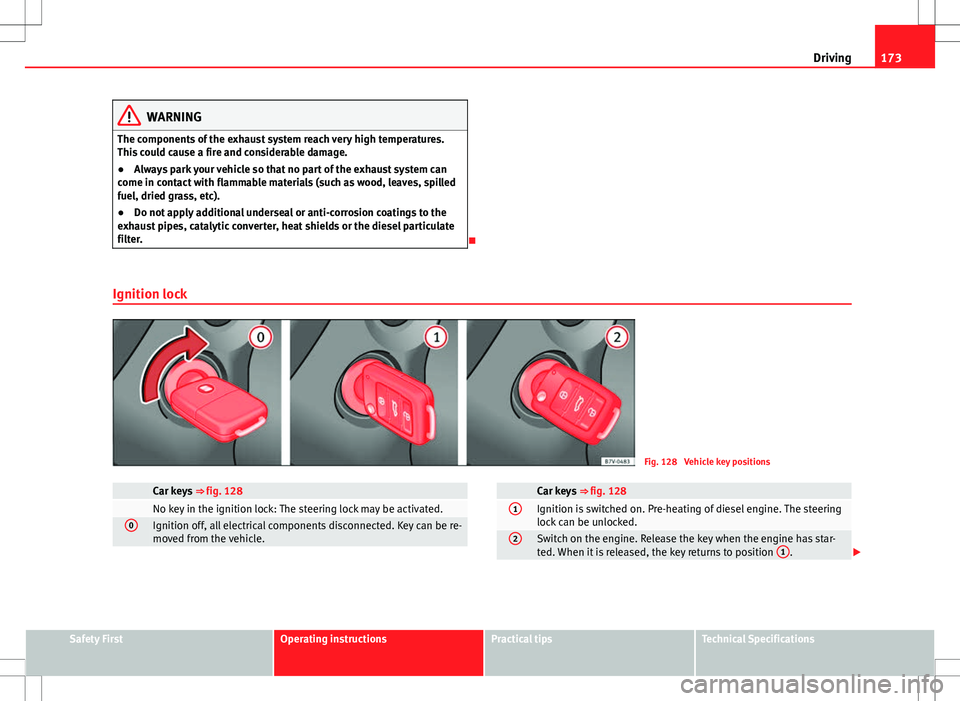
Ignition lock
Fig. 128 Vehicle key positions
Car keys ⇒ fig. 128 No key in the ignition lock: The steering lock may be activated.0Ignition off, all electrical components disconnected. Key can be re-
moved from the vehicle.
Car keys ⇒ fig. 1281Ignition is switched on. Pre-heating of diesel engine. The steering
lock can be unlocked.
2Switch on the engine. Release the key when the engine has star-
ted. When it is released, the key returns to position 1.
Safety FirstOperating instructionsPractical tipsTechnical Specifications
Page 176 of 388
174Driving
Key not authorised for the vehicle
If a key which is not authorised for this vehicle is inserted in the ignition
lock, it can be removed as follows:
● Automatic gearbox: the key cannot be removed from the ignition lock.
Press and release the selector lever locking button. Key can be removed
from the vehicle.
● Manual gearbox: Remove the key from the ignition.
WARNING
Unsuitable or careless use of the vehicle key could result in serious in-
jury.
● Always take all the keys with you whenever you leave the vehicle. The
engine could accidentally be started and electrical equipment such as
the windows could accidentally be operated resulting in serious injury.
● Never leave children or disabled people alone in the car. They could
be trapped in the car in an emergency and will not be able to get them-
selves to safety. For example, depending on the time of the year, temper-
atures inside a locked and closed vehicle can be extremely high or ex-
tremely low resulting in serious injuries and illness or even death, partic-
ularly for young children.
● Never remove the key from the ignition if the vehicle is in motion. The
steering may lock and it will not be possible to turn the steering wheel.
Note
● If the key is left in the ignition lock with the engine off for long periods,
the vehicle battery will run flat.
● For automatic gearbox vehicles the key can only be removed from the ig-
nition lock if the gear selector lever is in position P. In this case, press and
release the selector lever locking button. Starting the engine
Complete operations only in the sequence given:
Step
1.Press the brake pedal and keep pressed until step 5 has been
completed.
1 a.In vehicles with a manual gearbox:
Press the clutch pedal all
the way and keep pressed until the engine starts.
2.Put the gearstick in neutral or the selector lever in position P
or N.
3.Only in vehicles with diesel engine: To preheat, turn the key
in the ignition lock to position ⇒ fig. 128 1. A warning lamp
lights up in the control panel .
4.Turn the key in the ignition lock to position ⇒ fig. 128 2; do
not press the accelerator.
5.When the engine has started, release the key in the ignition
lock.
6.If the engine does not start, stop the process and try again af-
ter one minute.
7.Disconnect the electronic parking brake when you wish to
start driving ⇒ page 185.
WARNING
Never leave the vehicle unattended if the engine is running. The vehicle
could move off suddenly, especially if it is in gear, resulting in an acci-
dent and serious injury.
Page 177 of 388
175
Driving
WARNING
Cold start sprays could explode or cause a sudden increase in the engine
speed.
● Never use start boosters.
CAUTION
● An attempt to start the engine while driving or starting the engine imme-
diately after turning it off can cause damage to the engine or starter motor.
● When the engine is cold, avoid high revs and heavy acceleration and do
not make the engine work hard.
● Do not push or tow start the engine. Sunburnt fuel could damage the
catalytic converter.
For the sake of the environment
Do not warm the engine at idle speed; start driving immediately if the visi-
bility is OK. This helps the engine reach operating temperature faster and
reduces emissions.
Note
● For example, if the key battery is very worn or flat, the engine cannot be
started with the starter button. In this case, remove the ignition button from
the lock and insert the key.
● Electrical components with a high power consumption are switched off
temporarily when the engine starts.
● When the engine is started cold, there may be strong vibrations for a few
moments for technical reasons. This is quite normal, and no cause for con-
cern.
● At temperatures below +5 °C (+41 °F), smoke may be given off below the
vehicle when the additional heater is connected. Stopping the engine
Complete operations only in the sequence given:
Step 1.Stopping the vehicle completely
⇒ .
2.Press the brake pedal and keep pressed until step 4 has been
completed.
3.In automatic gearboxes, put the selector lever in position P.4.Connect the electronic parking brake ⇒ page 185.5.Turn the key in the ignition lock to position ⇒ fig. 128 0.6.With a manual gearbox, put the vehicle in first or reverse gear.
WARNING
Never switch off the engine while the vehicle is moving. You may lose
control of the vehicle and there is a risk of serious accident.
● The airbags and belt tensioners do not work when the ignition is
switched off.
● The brake servo does not work with the engine off. To stop, the brake
pedal must be pressed with more force.
● As the power steering does not work if the engine is not running, you
will need more strength to steer than normally.
● If the key is removed from the ignition, the steering may lock and it
will not be possible to steer the vehicle.
CAUTION
If the engine has been driven at high speed for a prolonged period of time,
it may overheat when turned off. To avoid engine damage, allow the engine
to run for approximately two minutes in neutral before switching it off.
Safety FirstOperating instructionsPractical tipsTechnical Specifications