engine Seat Alhambra 2012 Workshop Manual
[x] Cancel search | Manufacturer: SEAT, Model Year: 2012, Model line: Alhambra, Model: Seat Alhambra 2012Pages: 388, PDF Size: 6.72 MB
Page 195 of 388
193
Driving
WARNING (Continued)
● Changes to the vehicle suspension or using unapproved wheel/tyre
combinations can affect operation of the ABS, BAS, ASL EDL and ESC and
their effectiveness.
● Likewise, the effectiveness of ESC depends on the use of suitable
tyres ⇒ page 297.
Note
● To ensure that the ESC and ASR work properly, all four wheels must be
fitted with identical tyres. Any differences in the rolling radius of the tyres
can cause the system to reduce engine power when this is not desired.
● If a malfunction should occur in the ABS, the ESC, EDL and ASR will also
be out of action.
● Noises may be heard while any of the above systems are operating.
Turning on and off the ASR
Fig. 137 Detailed view of
the centre console: but-
ton used to switch ASR
on and off (vehicles with
ESC). The electronic stability control ESC consists of ABS, EDL and ASR and only
works when the engine is running.
The ASR can be switched off while the engine is running by pressing the
OFF
⇒ fig. 137 button. The ASR (and similar) is only switched off when the
required traction is not obtained:
● When driving through deep snow or on loose ground (gravel...).
● When freeing a trapped vehicle.
Turn the ASR back on by pressing the button OFF
⇒ fig. 137.
Brake fluid
Fig. 138 In the engine
compartment: brake fluid
reservoir, lid
In the course of time, the brake fluid absorbs water from the ambient air. If
there is too much water contained in the brake fluid, the brake system could
be damaged. In addition, the boiling point of the brake fluid is significantly
lowered. When the brake fluid contains too much water and the brakes are
subject to considerable forces, bubbles of water vapour can form in the sys-
tem. These bubbles of water vapour can significantly reduce braking power,
Safety FirstOperating instructionsPractical tipsTechnical Specifications
Page 196 of 388
194Driving
notably increasing braking distance, and could even result in the total fail-
ure of the brake system. Ensuring that the brake system is always function-
ing correctly is essential for your own safety and the safety of other road
users ⇒
.
Brake fluid specifications
SEAT have developed a special brake fluid optimised for the brake systems
of their vehicles. To ensure the optimum working of the brake system, SEAT
recommends the use of brake fluid in accordance with the VW 501 14
standard. If this brake fluid is not available or another brake fluid is used for
different reasons, use a brake fluid that complies with the United States
standard FMVSS 116 DOT 4 or the German standard DIN ISO 4925 CLASS 4
⇒
.
Brake fluids conforming to the standard VW 501 14, fulfil the American re-
quirements of the FMVSS 116 DOT 4 standard and the German
DIN ISO 4925 CLASS 4 standard. However, fluids that comply with the Amer-
ican FMVSS 116 DOT 4 standard or the German DIN ISO 4925 CLASS 4
standard do not necessarily comply with the VW 501 14 standard. Always
check the information on the brake fluid container and ensure that you are
using suitable brake fluid.
A suitable brake fluid can be obtained from Technical Services.
Brake fluid level
The level of the brake fluid should always be between the MIN and MAX
marks, or above the MIN mark ⇒
.
It is not always possible to check the level of the brake fluid, as in some
models the engine components make it difficult to see the brake fluid reser-
voir. If you cannot read the exact brake fluid level, consult a specialist.
The brake fluid level drops slightly when the vehicle is being used due to
wear of the brake pads and the automatic readjustment of the brake.
Changing the brake fluid
The brake fluid should be changed in accordance with the instructions giv-
en in the Maintenance Programme. Have the brake fluid changed by a Tech- nical Service. SEAT recommends visiting a Technical Service. This means
that only brake fluid complying with the required specifications will be
used.
WARNING
If the brake fluid level is low or unsuitable/old brake fluid is used, the
brake system may fail or braking power will be reduced.
● Check the brake system and the brake fluid level regularly!
● The brake fluid should be changed regularly in accordance with the
instructions given in the Maintenance Programme.
● When the brake fluid is used and brakes are subjected to extreme
braking forces, bubbles of vapour form in the brake system. These bub-
bles of water vapour can significantly reduce braking power, notably in-
creasing braking distance, and could even result in the total failure of the
brake system.
● Only used brake fluid that conforms to the VW 501 14 standard,
FMVSS 116 DOT 4 standard or even the DIN ISO 4925 CLASS 4 standard.
Other types of brake fluid could affect brake operation and reduce brak-
ing power. Do not use a brake fluid if the container does not specify com-
pliance with the VW 501 14, FMVSS 116 DOT 4 or DIN ISO 4925 CLASS 4
standards.
● The replacement brake fluid must be new.
● Always ensure that you use suitable brake fluid. Do not use a brake
fluid if the container does not specify compliance with the VW 501 14,
FMVSS 116 DOT 4 or DIN ISO 4925 CLASS 4 standards.
Page 198 of 388
196Driving
Start assist systems
Introduction
Additional information and warnings:
● SEAT information system ⇒ page 62
● Braking, stopping and parking ⇒ page 185
● Vehicle battery ⇒ page 292
● Wheels and tyres ⇒ page 297
● Accessories, parts replacement, repairs and modifications ⇒ page 261
● Jump starting ⇒ page 341
WARNING
The intelligent technology in the start assist systems cannot change the
laws of physics. The improved comfort provided by start assist systems
should not prompt you to take risks.
● Unintentional movements of the vehicle could cause serious injury.
● The start assist systems are not a replacement for driver awareness.
● Always try to adapt the speed of the vehicle and your style of driving
to the condition of the ground or the road and to weather and traffic con-
ditions.
● The start assist system cannot keep the vehicle stationary in all con-
ditions on a gradient or cause it to brake on steep downhill gradients,
e.g. if the road is slippery or icy.
Auto Hold function*
Fig. 139 Detailed view of
the centre console: Au-
to Hold button.
The control lamp on the button switches on when the Auto Hold function is
on.
When the Auto Hold function is on, it helps the driver if they must regularly
stop the vehicle or if they must stop with the engine running for prolonged
periods, for example, on hills, before a traffic light or in traffic jams with
continuous stopping and starting.
The Auto Hold function automatically prevents the vehicle from rolling away
accidentally when at a standstill, without the driver having to keep his/her
foot on the brake pedal.
When the system that detects that the vehicle has stopped, the Auto Hold
keeps the vehicle at a standstill. The brake pedal can be released.
If the driver presses the brake pedal briefly or presses the accelerator to
start off, the Auto Hold function releases the brake once more. The vehicle
moves according to the gradient.
Page 199 of 388
197
Driving
If any of the conditions necessary for the Auto Hold function change while
the vehicle stopped, the system is turned off as is the indicator on the but-
ton ⇒ fig. 139. The electronic parking brake engages where necessary to
park the vehicle safely ⇒
.
Conditions for keeping the vehicle at a standstill with Auto Hold:
● The driver's door must be closed.
● The driver's seat belt must be buckled.
● The engine must be running.
● The ASR system is switched on ⇒ page 185.
Switching Auto Hold on and off manually
Press the AUTO HOLD
button ⇒ . The control lamp on the button switches
off when the Auto Hold function is switched off.
Permanent Auto Hold connection
The Auto Hold function must be switched on every time the engine is star-
ted. However, to switch the Auto Hold function on permanently, the mark
must be switched on in the Settings menu, “Autohold” submenu
⇒ page 62.
Auto Hold works automatically under the following conditions:
All points must be fulfilled simultaneously ⇒ : manual gearboxAutomatic gearbox1.If the vehicle is stopped using the brake pedal on a flat or slope.2.The engine must be running smoothly.3.On a slope, the 1st gear is engag-
ed uphill or the reverse gear is en-
gaged for a downhill. The clutch
must be held down.A gear for driving is selected from
R, D or S.
Upon accelerating and pressing in
the clutch simultaneously, the
brake releases gradually.Upon accelerating, the brake re-
leases gradually.
Auto Hold turns off automatically under the following conditions:
manual gearboxAutomatic gearbox1.If one of the conditions mentioned in table on page 197 changes.2.If the engine is not running regularly or if there is a malfunction.3.When changing to idle speed.If the selector lever is placed in
neutral (N).
4.If the engine is turned off or stalls.If the engine is switched off.5.If the driver accelerates while
pressing the clutch in.If the vehicle is accelerated.
6. When one of the wheels has mini-
mal contact with the ground (for
example, on uneven ground).
WARNING
The Auto Hold technology is limited by the laws of physics. The improved
comfort provided by Auto Hold should never prompt you to take risks.
● Never leave the vehicle running and with the Auto Hold function
switched on.
● Auto Hold cannot always stop the vehicle uphill and downhill (for ex-
ample, if the ground is slippery or frozen).
CAUTION
Before entering an automatic car wash, always switch the Auto Hold func-
tion off, as it could be damaged when the electronic parking brake automat-
ically engages.
Safety FirstOperating instructionsPractical tipsTechnical Specifications
Page 200 of 388
198Driving
Start-Stop Function*
Fig. 140 Detailed view of
the centre console: Start-
Stop function button.
In Start-Stop mode, the engine is automatically switched off when the vehi-
cle is at a standstill. The engine restarts automatically when required.
The function is enabled automatically whenever the ignition is switched on.
The instrument panel displays information on the current status.
Vehicles with a manual gearbox
● When the vehicle is at a standstill, leave it in neutral and take your foot
off the clutch. The engine switches off.
● Simply depress the clutch pedal to move off again.
Vehicles with an automatic gearbox
● When the vehicle is at a standstill, depress the brake or keep it pressed
down. The engine switches off.
● The engine will start again as soon as you release the brake pedal.
● With the gear lever set to P, the engine will not start until a range of
gears is selected or the accelerator pedal is depressed. Important conditions for the engine to automatically switch off
●
The driver seat belt must be buckled.
● The driver door must be closed.
● The bonnet must be closed.
● The factory-fitted towing bracket must not be electrically connected to a
trailer.
● A minimum engine temperature has been reached.
● The steering wheel must not be turned more than 270 degrees.
● The vehicle has moved since the last stop.
● In vehicles with Climatronic: The temperature inside the vehicle is within
the preset temperature range.
● The temperature set is neither very high nor very low.
● The air conditioning defrost function is not switched on.
● In vehicles with Climatronic: the blower has not been manually set to a
high speed.
● The power level of the vehicle's battery is sufficient.
● The vehicle's battery temperature is neither too high nor too low.
● The vehicle is not on a steep gradient or slope.
● The front wheels are not overly turned.
● The heated windscreen is not switched on.
● Reverse gear is not engaged.
● The park assist system is not switched on.
Conditions for automatically restarting the engine
The engine may automatically restart under the following conditions:
● If the vehicle interior is too hot or too cold.
● If the vehicle moves.
● If the vehicle's battery voltage drops.
Conditions requiring the key to restart the engine
The engine must be started using the key under the following conditions:
Page 201 of 388
199
Driving
● If the driver unbuckles his/her seat belt.
● If the driver's door is opened.
● If the bonnet is opened.
● In vehicles with a manual gearbox: If a gear has been selected.
Switching Start-Stop mode on and off manually
● Press the
button on the centre console ⇒
fig. 140.
● The button will light up when the Start-Stop function is switched off.
The engine will start immediately if the vehicle is in Stop mode when it is
switched off manually.
WARNING
The brake servo and the power steering do not work when the engine is
switched off.
● Never allow the vehicle to move when the engine is switched off.
CAUTION
Using the Start-Stop function for a long period at very high outdoor temper-
atures could damage the vehicle's battery.
Note
● In some cases, you may have to restart the vehicle using the key. Ob-
serve the corresponding message on the instrument panel display.
● If the steering wheel is turned more than 270°, Stop will not function;
however, the angle of steering wheel turn does not affect starting the vehi-
cle.
Safety FirstOperating instructionsPractical tipsTechnical Specifications
Page 209 of 388
207
Driving
● A suitable parking space length is at least 1.1 m greater than the length
of the vehicle.
● If the results of the park assist system are not as good after changing
the wheels, the system must memorise the perimeter of the new wheels.
This process is performed automatically while the vehicle is in motion. To
help this process, turn slowly (at less than 20 km/h), e.g. in an empty car
park.
Leaving a parking space using the Park Assist system
Driving off
● Switch on the engine.
● Press button
. When the function is enabled, the button
⇒ fig. 145
will light up.
● Apply the turn signal indicator for the side on which you want to leave
the parking space.
● Select reverse gear.
● Follow the instructions given by the park assist system.
● When the next indication appears, release the steering wheel ⇒
in
Parking using the park assist system on page 206: The system will move the
steering wheel! Observe the surrounding area.
● Observe the surrounding area and accelerate carefully at a maximum of
up to 7 km/h.
● The park assist system is only responsible for moving the steering wheel
during the manoeuvre. The driver applies the accelerator, the clutch, the
gears and the brake.
● When it is possible to leave the parking space, the Park Assist system
will stop. Take control of the steering and when traffic conditions permit,
leave the parking space. Automatic stoppage of the manoeuvre
The park assist system stops the manoeuvre in the event of one of the fol-
lowing:
●
Driving faster than 7 km/h.
● The driver moves the steering wheel.
● A sliding door is opened. To restart the manoeuvre, close the sliding
door and press the button
again.
● There is a system malfunction (system temporarily unavailable).
● The ASR system is switched off or the ASR or ESC is working.
WARNING
The steering wheel turns quickly automatically when leaving a parking
space using the park assist system. Placing your hand between the steer-
ing wheel spokes could lead to injuries.
Park Assist brake operation
The Park Assist system helps the driver by braking automatically. Automatic
braking does not relieve the driver of responsibility for controlling the accel-
erator, brake and clutch ⇒
.
Braking to avoid damage at excess speed
It is possible that the system operates the brakes to reduce excess speed.
The parking manoeuvre can then continue. The brakes will intervene during
each parking process.
Braking to minimise damage
When approaching an obstacle, the vehicle may brake automatically. In cer-
tain circumstances (for example, storm, detection of ultrasounds, vehicle
status, load, inclination), the Park Assist system may stop the vehicle com-
pletely before an object.
Safety FirstOperating instructionsPractical tipsTechnical Specifications
Page 212 of 388
210Driving
User instructions
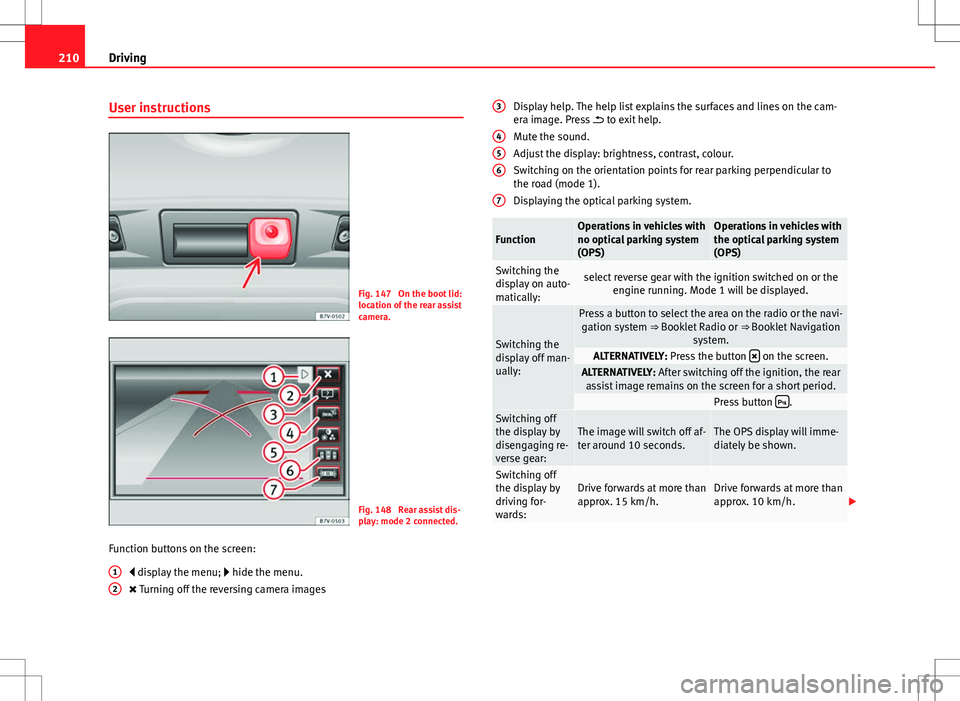
Fig. 147 On the boot lid:
location of the rear assist
camera.
Fig. 148 Rear assist dis-
play: mode 2 connected.
Function buttons on the screen: display the menu; hide the menu.
Turning off the reversing camera images
1
2
Display help. The help list explains the surfaces and lines on the cam-
era image. Press
to exit help.
Mute the sound.
Adjust the display: brightness, contrast, colour.
Switching on the orientation points for rear parking perpendicular to
the road (mode 1).
Displaying the optical parking system.
FunctionOperations in vehicles with
no optical parking system
(OPS)Operations in vehicles with
the optical parking system
(OPS)
Switching the
display on auto-
matically:select reverse gear with the ignition switched on or the engine running. Mode 1 will be displayed.
Switching the
display off man-
ually:
Press a button to select the area on the radio or the navi-gation system ⇒ Booklet Radio or ⇒ Booklet Navigation
system.
ALTERNATIVELY: Press the button on the screen.ALTERNATIVELY: After switching off the ignition, the rear
assist image remains on the screen for a short period.
Press button .Switching off
the display by
disengaging re-
verse gear:The image will switch off af-
ter around 10 seconds.The OPS display will imme-
diately be shown.
Switching off
the display by
driving for-
wards:Drive forwards at more than
approx. 15 km/h.Drive forwards at more than
approx. 10 km/h.
3
456
7
Page 231 of 388
229
Driving and the environment
Practical tips Driving and the environment
Running-in
Please observe the instructions for running-in new components.
Running-in the engine
The engine needs to be run-in over the first 1500 km (1000 miles). During
its first few hours of running, the internal friction in the engine is greater
than later on when all the moving parts have bedded down.
How the vehicle is driven for the first 1500 km (1000 miles) influences the
future engine performance. Throughout the life of the vehicle, it should be
driven at a moderate speed – especially when the engine is cold – this will
reduce engine wear and increase its useful life. Never drive at extremely low
engine speeds. Always engage a lower gear when the engine works “irregu-
larly”. For the first 1000 km or 600 miles, please note:
● Do not use full throttle.
● Do not force the engine above two thirds of its maximum speed.
● Do not tow a trailer.
Between 1000 and 1500 kilometres (600 to 1000 miles), gradually in-
crease power until reaching the maximum speed and high engine speeds.
Running in new tyres and brake pads
● Replacement of new tyres and wheel rims ⇒ page 297
● Notes on the brakes ⇒ page 189
For the sake of the environment
If the engine is run in gently, the life of the engine will be increased and the
engine oil consumption reduced.
Ecological driving Introduction
Fuel consumption, environmental impact and engine, brake and tyre wear
depend largely on three factors:
● Personal driving style.
● Conditions of use (weather, road surface).
● Technical requirements.
Savings of up to 25% in fuel consumption are possible with an appropriate
driving style and the adoption of certain simple tips.
WARNING
Always adapt your speed and the distance to the vehicles ahead in line
with visibility, weather conditions, the condition of the road and the traf-
fic situation.
Safety FirstOperating instructionsPractical tipsTechnical Specifications
Page 232 of 388
230Driving and the environment
Economic driving style
Changing gear early
General instructions: The highest gear is always the most economical gear.
As a guideline, for the majority of vehicles: At a speed of 30 km/h, drive in
third gear, at 40 km/h in fourth gear and at 50 km/h in fifth gear.
In addition, skipping gears when shifting up helps to save fuel, weather and
traffic conditions permitting.
Do not wait until the last moment before changing gear. Only use first gear
when you move off and change to second gear quickly. Avoid the kick-down
function in vehicles with automatic gearbox.
Vehicles with a gear display help to achieve an economical driving style as
the display indicates the best moment to change gear.
Let the vehicle roll
If you take your foot off the accelerator, the fuel supply is stopped and con-
sumption is reduced.
Allow the vehicle to roll without accelerating, for example when approach-
ing a red traffic light. However, if the vehicle is rolling too slowly or the dis-
tance is too long, the clutch pedal should be pressed to declutch. The en-
gine will then operate at idle speed.
If the vehicle is going to be at a standstill for a period of time, switch off the
engine; for example, while waiting at a level crossing. In vehicles which
have the Start-Stop function on, the engine switches off automatically when
the vehicle is not moving.
Think ahead and “flow” with the traffic
Frequent acceleration and braking considerably increase fuel consumption.
If you think ahead as you drive and keep a safe distance from the vehicle in
front, it is possible to slow down by simply lifting your foot off the accelera-
tor. This eliminates the need for constant braking and acceleration. Calm and steady driving
Constancy is more important than speed: The more you drive at a constant
speed, the lower the fuel consumption.
When driving on the motorway, it is more efficient to drive at a constant and
more moderate speed than to be continuously accelerating and braking. As
a general rule, you will reach your destination just as quickly when you drive
at a constant speed.
The cruise control function helps you to achieve a constant style of driving.
Moderate use of additional electrical appliances
It is important to travel in comfort, but convenience systems should be used
in an ecological manner.
Some equipment, when connected, increase fuel consumption considera-
bly, for example:
●
Air conditioning cooling system: If the air conditioning system is re-
quired to cool to significantly lower temperatures than the true outside tem-
perature, it will require a large quantity of energy from the engine. There-
fore, we recommend that the selected temperature for the vehicle is not too
different to the outside temperature. It is a good idea to open all the win-
dows of the car before starting your journey, and to drive a short distance
with all the windows open to allow the vehicle to cool down slightly. Only
then should you close all the windows and switch on the air conditioning.
Keep windows closed when travelling at high speeds. Driving with the win-
dows open increases fuel consumption.
● Switch off the seat heating when the seats have warmed up.
● Switch off the heated rear window and the windscreen heating when the
windows have demisted and are free of ice.
● Do not leave the auxiliary heater switched on when the vehicle is mov-
ing ⇒ page 165.