air conditioning Seat Alhambra 2012 Owner's Manual
[x] Cancel search | Manufacturer: SEAT, Model Year: 2012, Model line: Alhambra, Model: Seat Alhambra 2012Pages: 388, PDF Size: 6.72 MB
Page 5 of 388
Table of Contents
Manual structure . . . . . . . . . . . . . . . . . . . . 5
Content . . . . . . . . . . . . . . . . . . . . . . . . . . . . . . . . 6
Safety First . . . . . . . . . . . . . . . . . . . . . . . . . . . . 7
Safe driving . . . . . . . . . . . . . . . . . . . . . . . . . . . . . . . 7
Dear SEAT Driver . . . . . . . . . . . . . . . . . . . . . . . . . . 7
Tips for driving . . . . . . . . . . . . . . . . . . . . . . . . . . . 7
Adjusting the seat position . . . . . . . . . . . . . . . . . 10
Transporting objects . . . . . . . . . . . . . . . . . . . . . . . 13
Seat belts . . . . . . . . . . . . . . . . . . . . . . . . . . . . . . . . . 16
Brief introduction . . . . . . . . . . . . . . . . . . . . . . . . . 16
Why wear seat belts? . . . . . . . . . . . . . . . . . . . . . . 19
Seat belts . . . . . . . . . . . . . . . . . . . . . . . . . . . . . . . 21
Seat belt tensioners . . . . . . . . . . . . . . . . . . . . . . . 26
Airbag system . . . . . . . . . . . . . . . . . . . . . . . . . . . . . 28
Brief introduction . . . . . . . . . . . . . . . . . . . . . . . . . 28
Airbag system . . . . . . . . . . . . . . . . . . . . . . . . . . . . 31
Child safety . . . . . . . . . . . . . . . . . . . . . . . . . . . . . . . 39
Child seats (accessories) . . . . . . . . . . . . . . . . . . . 39
Integrated child seat . . . . . . . . . . . . . . . . . . . . . . . 45
Operating instructions . . . . . . . . . . . . . 53
Cockpit . . . . . . . . . . . . . . . . . . . . . . . . . . . . . . . . . . . 53
Overview . . . . . . . . . . . . . . . . . . . . . . . . . . . . . . . . 53
Instrument panel . . . . . . . . . . . . . . . . . . . . . . . . . . 54
Instruments . . . . . . . . . . . . . . . . . . . . . . . . . . . . . . 57
SEAT information system . . . . . . . . . . . . . . . . . . . 62 Unlocking and locking
. . . . . . . . . . . . . . . . . . . . . 71
Vehicle key set . . . . . . . . . . . . . . . . . . . . . . . . . . . 71
Central locking and locking system . . . . . . . . . . . 74
Doors . . . . . . . . . . . . . . . . . . . . . . . . . . . . . . . . . . . 80
Sliding doors . . . . . . . . . . . . . . . . . . . . . . . . . . . . . 80
Tailgate . . . . . . . . . . . . . . . . . . . . . . . . . . . . . . . . . 84
Electric windows . . . . . . . . . . . . . . . . . . . . . . . . . . 88
Panorama sliding sunroof* . . . . . . . . . . . . . . . . . 92
Lights and visibility . . . . . . . . . . . . . . . . . . . . . . . . 95
Lights . . . . . . . . . . . . . . . . . . . . . . . . . . . . . . . . . . . 95
Sun blind . . . . . . . . . . . . . . . . . . . . . . . . . . . . . . . . 103
Windscreen wiper and washer . . . . . . . . . . . . . . . 105
Rear vision mirror . . . . . . . . . . . . . . . . . . . . . . . . . 110
Seats and storage compartments . . . . . . . . . . 114
Seat adjustment . . . . . . . . . . . . . . . . . . . . . . . . . . 114
Seat functions . . . . . . . . . . . . . . . . . . . . . . . . . . . . 117
Head restraints . . . . . . . . . . . . . . . . . . . . . . . . . . . 123
Centre armrest . . . . . . . . . . . . . . . . . . . . . . . . . . . . 126
Loading luggage compartment . . . . . . . . . . . . . . 126
Roof carrier system* . . . . . . . . . . . . . . . . . . . . . . . 139
Storage compartments . . . . . . . . . . . . . . . . . . . . . 142
Cup holders . . . . . . . . . . . . . . . . . . . . . . . . . . . . . . 150
Ashtray and cigarette lighter* . . . . . . . . . . . . . . . 151
Electrical sockets . . . . . . . . . . . . . . . . . . . . . . . . . 153
Air conditioning . . . . . . . . . . . . . . . . . . . . . . . . . . . 157
Climate Control . . . . . . . . . . . . . . . . . . . . . . . . . . . 157
Auxiliary heater* (additional heater) . . . . . . . . . . 165
Driving . . . . . . . . . . . . . . . . . . . . . . . . . . . . . . . . . . . . 169
Steering . . . . . . . . . . . . . . . . . . . . . . . . . . . . . . . . . 169
Stopping and starting the engine . . . . . . . . . . . . 172
Changing gear . . . . . . . . . . . . . . . . . . . . . . . . . . . . 176
Braking, stopping and parking . . . . . . . . . . . . . . 185
Start assist systems . . . . . . . . . . . . . . . . . . . . . . . 196
Parking sensor system* . . . . . . . . . . . . . . . . . . . . 200 Park Assist system* . . . . . . . . . . . . . . . . . . . . . . . 204
Rear Assist system* . . . . . . . . . . . . . . . . . . . . . . . 209
Cruise control system* . . . . . . . . . . . . . . . . . . . . . 214
Lane Assist system* . . . . . . . . . . . . . . . . . . . . . . . 217
Sign Assist* . . . . . . . . . . . . . . . . . . . . . . . . . . . . . . 220
Tiredness detection (recommendation to take a
break) . . . . . . . . . . . . . . . . . . . . . . . . . . . . . . . . . . . 223
Tyre monitoring systems . . . . . . . . . . . . . . . . . . . . 225
Practical tips . . . . . . . . . . . . . . . . . . . . . . . . . . 229
Driving and the environment . . . . . . . . . . . . . . . 229
Running-in . . . . . . . . . . . . . . . . . . . . . . . . . . . . . . . 229
Ecological driving . . . . . . . . . . . . . . . . . . . . . . . . . 229
Engine management and exhaust gas
purification system . . . . . . . . . . . . . . . . . . . . . . . . 232
Trailer towing . . . . . . . . . . . . . . . . . . . . . . . . . . . . . . 235
Introduction . . . . . . . . . . . . . . . . . . . . . . . . . . . . . . 235
Driving with a trailer . . . . . . . . . . . . . . . . . . . . . . . 237
Vehicle maintenance and cleaning . . . . . . . . . 246
Care and cleaning the vehicle exterior . . . . . . . . 246
Caring for and cleaning the vehicle interior . . . . 253
Notes for the user . . . . . . . . . . . . . . . . . . . . . . . . . 259
Accessories, parts replacement and
modifications . . . . . . . . . . . . . . . . . . . . . . . . . . . . . 261
Accessories, replacement of parts and
modifications . . . . . . . . . . . . . . . . . . . . . . . . . . . . 261
Checking and refilling levels . . . . . . . . . . . . . . . 268
Filling the tank . . . . . . . . . . . . . . . . . . . . . . . . . . . . 268
Fuel . . . . . . . . . . . . . . . . . . . . . . . . . . . . . . . . . . . . 271
Selective Catalytic Reduction* (AdBlue) . . . . . . . 275
Working in the engine compartment . . . . . . . . . . 279
Engine oil . . . . . . . . . . . . . . . . . . . . . . . . . . . . . . . . 283
3
Table of Contents
Page 8 of 388
6Content
Content
This manual is structured to provide the information you need in an organ-
ised way. The content of this Manual is divided into sections which belong
to chapters (e.g.“Air conditioning”). The entire manual is divided into five
large parts which are:
1. Safety First Information on the vehicle equipment relating to passive safety such as
seat belts, airbags, seats, etc.
2. Operating instructions
Information about the distribution of controls in the driver position of your
vehicle, about the seat adjustment possibilities, about how to create a suit-
able climate in the passenger compartment, etc.
3. Practical tips
Advice relating to the driving, caring and maintenance of your vehicle and
certain problems you can solve yourself.
4. Technical specifications Figures, data, dimensions and measurements (for example fuel consump-
tion) of your vehicle.
5. Alphabetic index At the end of this manual there is a detailed alphabetical index, this will
help you to rapidly find the information you require.
Page 17 of 388
15
Safe driving
WARNING
Toxic gases may enter the vehicle interior when the tailgate is open. This
could cause loss of consciousness, carbon monoxide poisoning, serious
injury and accidents.
● To avoid toxic gases entering the vehicle always drive with the tail-
gate closed.
● In exceptional circumstances, if you must drive with the tailgate
open, observe the following to reduce the entry of toxic gases inside the
vehicle:
–Close all windows and the sliding roof.
– Turn off the air recirculation for the heating and air conditioning.
– Open all of the air outlets in the dashboard.
– Turn the heating fan and heater to the highest level.
CAUTION
An open tailgate changes the length and height of the vehicle.
Driving a loaded vehicle
For the best handling when driving a loaded vehicle, note the following:
● Secure all objects
⇒ page 14.
● Accelerate gently and carefully.
● Avoid sudden braking and manoeuvres.
● Brake early.
● If necessary, read the instructions for driving with a trailer
⇒ page 237.
● If necessary, read the instructions for driving with a roof carrier system
⇒ page 139.
WARNING
A sliding load could considerably affect the stability and safety of the ve-
hicle resulting in an accident with serious consequences.
● Secure loads correctly so they do not move.
● When transporting heavy objects, use suitable ropes or straps.
● Lock the seat backs in vertical position.
Specific vehicle weight information
The instructions in the official vehicle documents take precedence. All the
technical data provided in this documentation is applicable to the basic
model. The vehicle data label in the Maintenance Programme or the vehicle
documents show which engine is installed in your vehicle.
The figures may be different depending on if additional equipment is fitted,
for different models and for special vehicles.
WARNING
Exceeding the maximum authorised weight and the load on the axles
could cause damage to the vehicle, accidents and serious injuries.
● The real load on the axles should never exceed the maximum permit-
ted.
● The load and its distribution in the vehicle have effects on the vehicle
handling and the braking ability. Always drive at a suitable speed.
CAUTION
Distribute the load as uniformly and as low down on the vehicle as possible.
When transporting heavy objects in the trunk/boot, these should be placed
as far forward as possible or over the rear axle to have as little influence on
handling as possible.
Safety FirstOperating instructionsPractical tipsTechnical Specifications
Page 107 of 388

105
Lights and visibility
Windscreen wiper and washer
Introduction
Additional information and warnings:
● Recirculation of air conditioning air ⇒ page 157
● Working in the engine compartment ⇒ page 279
● Caring for and cleaning the vehicle exterior ⇒ page 246
WARNING
Water from the windscreen washer water bottle may freeze on the wind-
screen if it does not contain enough anti-freeze, reducing forward visibili-
ty.
● In winter, ensure the windscreen washer contains enough anti-freeze.
● In cold conditions, you should not use the wash / wipe system unless
you have warmed the windscreen with the ventilation system. The anti-
freeze could freeze on the windscreen and reduce visibility.
WARNING
Worn or dirty wiper blades reduce visibility and increase the risk of acci-
dent and serious injury.
● Always replace damaged or worn blades or blades which do not clean
the windscreen correctly.
CAUTION
In icy conditions, always check that the wiper blades are not frozen to the
glass before using the wipers for the first time. In cold weather, it may help
to leave the vehicle parked with the wipers in service position ⇒ page 107. Control lamp
lights upPossible causeSolution
Windscreen wiper fluid level
too lowTop up the windscreen wiper
bottle as soon as possible
⇒ page 109.
Several warning and control lamps should light up for a few seconds when
the ignition is switched. This signals that the lamp is working properly. They
will switch off after a few seconds.
CAUTION
Failure to heed the warning lamps and text messages when they appear
may result in faults in the vehicle.
Safety FirstOperating instructionsPractical tipsTechnical Specifications
Page 109 of 388

107
Lights and visibility
Windscreen wiper functions
Windscreen wiper performance in different situations:If the vehicle is at a stand-
still:The activated position provisionally changes
to the previous position.
During the automatic wipe:
The air conditioning comes on for approxi-
mately 30 seconds in air recirculation mode
to prevent the smell of the windscreen wash-
er fluid entering the inside of the vehicle.
For the intermittent wipe:The intervals between wipes vary according
to the speed of the vehicle. The higher the
vehicle speed the shorter the intervals.
Heated windscreen washer jets
The heating only thaws the frozen jets, it does not thaw the water in the
washer hoses. The heated windscreen washer jets automatically adjust the
heat depending on the ambient temperature, when the ignition is switched
on.
Headlight wash /wipe system
The headlight washers/wipers clean the headlight lenses.
After the ignition is switched on, the first and every fifth time the wind-
screen washer is switched on, the headlights are also washed. Therefore,
the windscreen wiper lever should be pulled towards the steering wheel
when the dipped beam or main beam are on. Any incrusted dirt (such as in-
sects) should be cleaned regularly (e.g. when refuelling).
To ensure the headlight washers work correctly in winter, any snow which
has got into the bumper jet supports should be cleaned away. If necessary,
remove snow with an anti-icing spray.
Note
The wiper will try to wipe away any obstacles that are on the windscreen.
The wiper will stop moving if the obstacle blocks its path. Remove the ob-
stacle and switch the wiper back on again.
Windscreen wipers service position
Fig. 67 Wipers in service
position.
The wiper arms can be raised when the wipers are in service position
⇒ fig. 67. To place the windscreen wipers in the service position, proceed as follows:
● The bonnet must be closed ⇒ page 279.
● Switching the ignition on and off.
● Press the windscreen wiper lever downwards briefly ⇒ fig. 65 4
.
Before driving, always lower the wiper arms. Using the windscreen wiper
lever, the windscreen wiper arms return to their initial position.
Safety FirstOperating instructionsPractical tipsTechnical Specifications
Page 159 of 388
157
Air conditioning
Air conditioning Climate Control
Introduction
Viewing Climatronic information
The factory-fitted radio or navigation system screen briefly displays informa-
tion relating to Climatronic.
The units of temperature measurement is displayed on the factory-installed
radio or navigation system and, depending on the vehicle equipment, can
be set using the Configuration menu on the instrument panel.
Additional information and warnings:
● SEAT information system ⇒ page 62
● Windscreen wash system ⇒ page 105
● Auxiliary heating ⇒ page 165
● Caring for and cleaning the vehicle exterior ⇒ page 246
WARNING
Reduced visibility through the windows increases the risk of serious acci-
dents.
● Ensure that all windows are free of ice and snow and that they are not
fogged up preventing a clear view of everything outside.
● The maximum heat output required to defrost windows quickly is only
available when the engine has reached its normal running temperature.
Only drive when you have good visibility.
WARNING (Continued)
● Always ensure that you use the climate control and heated rear win-
dow to maintain good visibility.
● Never leave the air recirculation on for a long period of time. If the
cooling mode is switched off and air recirculation mode switched on, the
windows can mist over very quickly, considerably limiting visibility.
● Switch air recirculation mode off when it is not required.
WARNING
Stuffy or used air will increase fatigue and reduce driver concentration
possibly resulting in a serious accident.
● Never leave the fresh air fan turned off or use the air recirculation for
long periods of time; the air inside the passenger compartment will not
be refreshed.
CAUTION
● Switch the climate control system off if you think it may be broken. This
will avoid additional damage. Have the air conditioner checked by a special-
ised workshop.
● Repairs to the air conditioner require specialist knowledge and special
tools. SEAT recommends visiting a Technical Service.
● Do not smoke when air recirculation is switched on in vehicles with a cli-
mate control system. The smoke taken in could lie on the cooling system va-
poriser and on the activated charcoal cartridge of the dust and pollen filter,
leading to a permanently unpleasant smell.
Safety FirstOperating instructionsPractical tipsTechnical Specifications
Page 160 of 388
158Air conditioning
Note
● When the cooling system is turned off, air coming from the outside will
not be dried. To avoid fogging up the windows, SEAT recommends leaving
the cooler (compressor) on. To do this, press the AC
button. The button in-
dicator should light up.
● If the humidity and temperature outside the vehicle are high, condensa-
tion can drip off the evaporator in the cooling system and form a pool un-
derneath the vehicle, this is completely normal and there is no need to sus-
pect a leak.
● Keep the air intake slots in front of the windscreen free of snow, ice and
leaves to ensure heating and cooling are not impaired, and to prevent the
windows from misting over.
Page 161 of 388

159
Air conditioning
Controls
Fig. 122 Detailed view of the centre console: Climatic
controls
Fig. 123 Detailed view of the centre console: Clima-
tronic controls.
To switch a function on or off, press the appropriate button. Press the but-
ton again to switch off the function. The LED on each control lights up to indicate that the respective function of
a control has been switched on.
Safety FirstOperating instructionsPractical tipsTechnical Specifications
Page 162 of 388
160Air conditioning
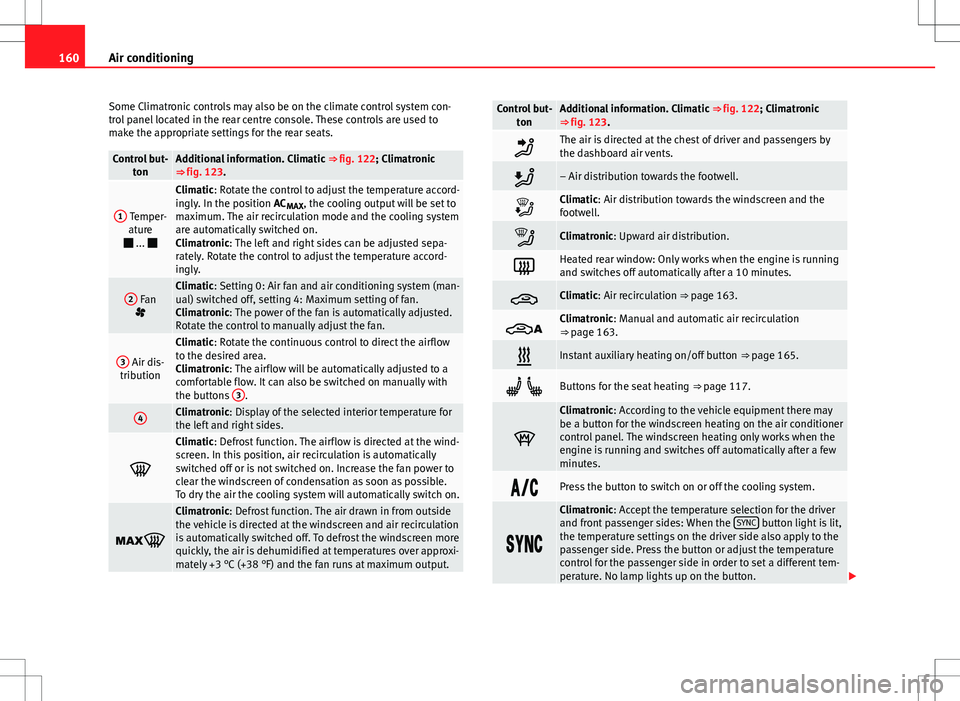
Some Climatronic controls may also be on the climate control system con-
trol panel located in the rear centre console. These controls are used to
make the appropriate settings for the rear seats.
Control but- tonAdditional information. Climatic ⇒ fig. 122; Climatronic
⇒ fig. 123.
1 Temper- ature
...
Climatic: Rotate the control to adjust the temperature accord-
ingly. In the position AC MAX, the cooling output will be set to
maximum. The air recirculation mode and the cooling system
are automatically switched on.
Climatronic: The left and right sides can be adjusted sepa-
rately. Rotate the control to adjust the temperature accord-
ingly.
2 Fan
Climatic: Setting 0: Air fan and air conditioning system (man-
ual) switched off, setting 4: Maximum setting of fan.
Climatronic: The power of the fan is automatically adjusted.
Rotate the control to manually adjust the fan.
3 Air dis-
tribution
Climatic: Rotate the continuous control to direct the airflow
to the desired area.
Climatronic: The airflow will be automatically adjusted to a
comfortable flow. It can also be switched on manually with
the buttons 3
.
4Climatronic: Display of the selected interior temperature for
the left and right sides.
Climatic: Defrost function. The airflow is directed at the wind-
screen. In this position, air recirculation is automatically
switched off or is not switched on. Increase the fan power to
clear the windscreen of condensation as soon as possible.
To dry the air the cooling system will automatically switch on.
Climatronic: Defrost function. The air drawn in from outside
the vehicle is directed at the windscreen and air recirculation
is automatically switched off. To defrost the windscreen more
quickly, the air is dehumidified at temperatures over approxi-
mately +3 °C (+38 °F) and the fan runs at maximum output.
Control but-
tonAdditional information. Climatic ⇒ fig. 122; Climatronic
⇒ fig. 123.
The air is directed at the chest of driver and passengers by
the dashboard air vents.
– Air distribution towards the footwell.
Climatic: Air distribution towards the windscreen and the
footwell.
Climatronic: Upward air distribution.
Heated rear window: Only works when the engine is running
and switches off automatically after a 10 minutes.
Climatic: Air recirculation ⇒ page 163.
Climatronic: Manual and automatic air recirculation
⇒ page 163.
Instant auxiliary heating on/off button ⇒ page 165.
Buttons for the seat heating ⇒ page 117.
Climatronic: According to the vehicle equipment there may
be a button for the windscreen heating on the air conditioner
control panel. The windscreen heating only works when the
engine is running and switches off automatically after a few
minutes.
Press the button to switch on or off the cooling system.
Climatronic: Accept the temperature selection for the driver
and front passenger sides: When the SYNC button light is lit,
the temperature settings on the driver side also apply to the
passenger side. Press the button or adjust the temperature
control for the passenger side in order to set a different tem-
perature. No lamp lights up on the button.
Page 163 of 388
161
Air conditioning
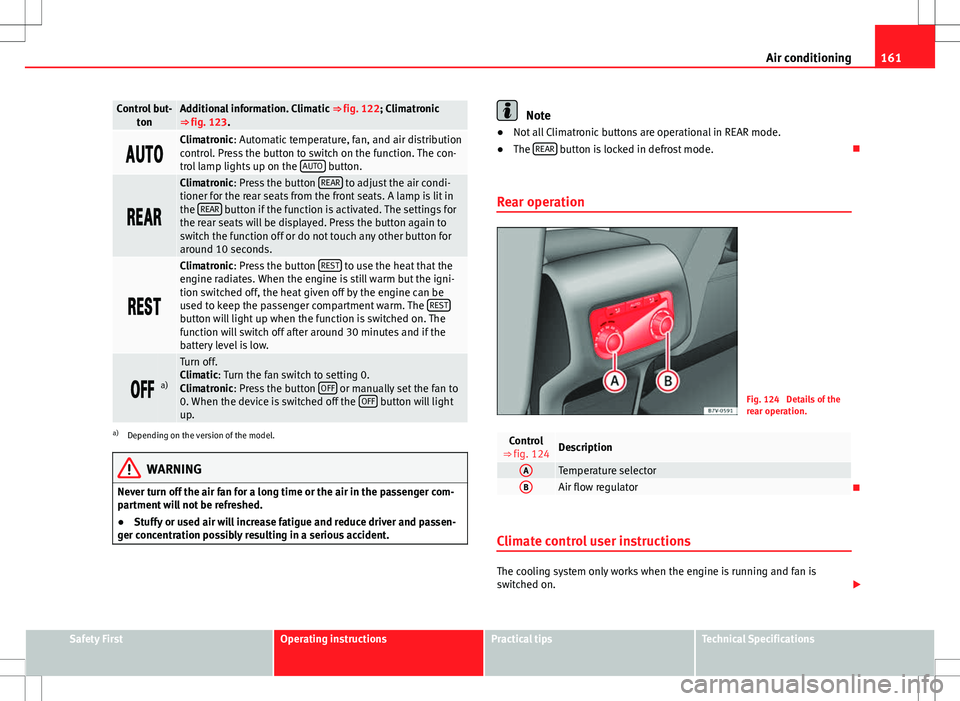
Control but-
tonAdditional information. Climatic ⇒ fig. 122; Climatronic
⇒ fig. 123.
Climatronic: Automatic temperature, fan, and air distribution
control. Press the button to switch on the function. The con-
trol lamp lights up on the AUTO
button.
Climatronic: Press the button REAR to adjust the air condi-
tioner for the rear seats from the front seats. A lamp is lit in
the REAR
button if the function is activated. The settings for
the rear seats will be displayed. Press the button again to
switch the function off or do not touch any other button for
around 10 seconds.
Climatronic: Press the button REST to use the heat that the
engine radiates. When the engine is still warm but the igni-
tion switched off, the heat given off by the engine can be
used to keep the passenger compartment warm. The REST
button will light up when the function is switched on. The
function will switch off after around 30 minutes and if the
battery level is low.
a)
Turn off.
Climatic: Turn the fan switch to setting 0.
Climatronic: Press the button OFF
or manually set the fan to
0. When the device is switched off the OFF button will light
up.
a) Depending on the version of the model.
WARNING
Never turn off the air fan for a long time or the air in the passenger com-
partment will not be refreshed.
● Stuffy or used air will increase fatigue and reduce driver and passen-
ger concentration possibly resulting in a serious accident.
Note
● Not all Climatronic buttons are operational in REAR mode.
● The REAR
button is locked in defrost mode.
Rear operation
Fig. 124 Details of the
rear operation.
Control
⇒ fig. 124Description
ATemperature selectorBAir flow regulator
Climate control user instructions
The cooling system only works when the engine is running and fan is
switched on.
Safety FirstOperating instructionsPractical tipsTechnical Specifications